Blog

  • WriterAgent Week 8-9: Adding NumPy to LibreOffice

    In the last update, I wrote about the process of adding an async grammar checker and TeX import into LibreOffice. It was very exciting to see my blog post get picked up by Slashdot but right at the time it was published, I was finishing a feature LibreOffice should have probably added years ago: real scientific Python.

    LibreOffice has lagged behind Excel in data science workflows. With my recent work in WriterAgent, you can now leverage the full Python ecosystem: Run NumPy in Calc, generate pandas DataFrames from Writer, or let AI agents create scripts.

    My focus in NumPy at first was exposing it to the LLMs so they could write scripts and put the results in your document, but I eventually realized Python should be enabled for the meatbags too. The implementation is simple, robust, and fast enough, but getting here required rejecting previous approaches.

    The ABI Problem

    The reason why Numpy is not supported in Libreoffice today is that NumPy is not pure Python. It ships compiled C and C++ extensions containing a wide variety of high-performance math implementations that must match the exact Python ABI they were built against: minor version, architecture, compiler, and build flags. LibreOffice (for many operating systems) embeds its own Python interpreter.

    If you simply append a user’s packages to LibreOffice’s sys.path and import NumPy, you will quickly crash because the binary interface between the extension and NumPy’s files is incompatible.

    Two common “solutions” look attractive on paper but create long-term headaches.

    1. Vendor the NumPy stack into the .oxt file. At first, it sounds reasonable: “users just install the extension and it works.” The challenge is that the full scientific stack is large—easily 50–100 MB uncompressed, and that is before you multiply by the number of platforms and Python versions.

    Security and bug fix updates become the extension’s responsibility. Users who want MKL-accelerated NumPy have to use a specific pinned version of Python that matches the LibreOffice version. The download size balloons from 7 MB to a gigabyte, even for those who will never run a single line of Python.

    2. Vendoring pip and auto-installing packages into LibreOffice’s embedded Python at startup is the approach taken by LibrePythonista. It is clever, but adds a different layer of fragility. If the Python code hangs or crashes, it takes down LibreOffice. You are now tightly coupled to whatever Python version LibreOffice ships with. When LibreOffice upgrades, installed packages break.

    Both approaches also make the extension more complex. LibrePythonista ended up writing a lot of path manipulation and other code that has to work on every platform that LibreOffice supports. That code is easy to get subtly wrong and hard to test comprehensively.

    The Design I Chose: User Venv + Subprocess Bridge
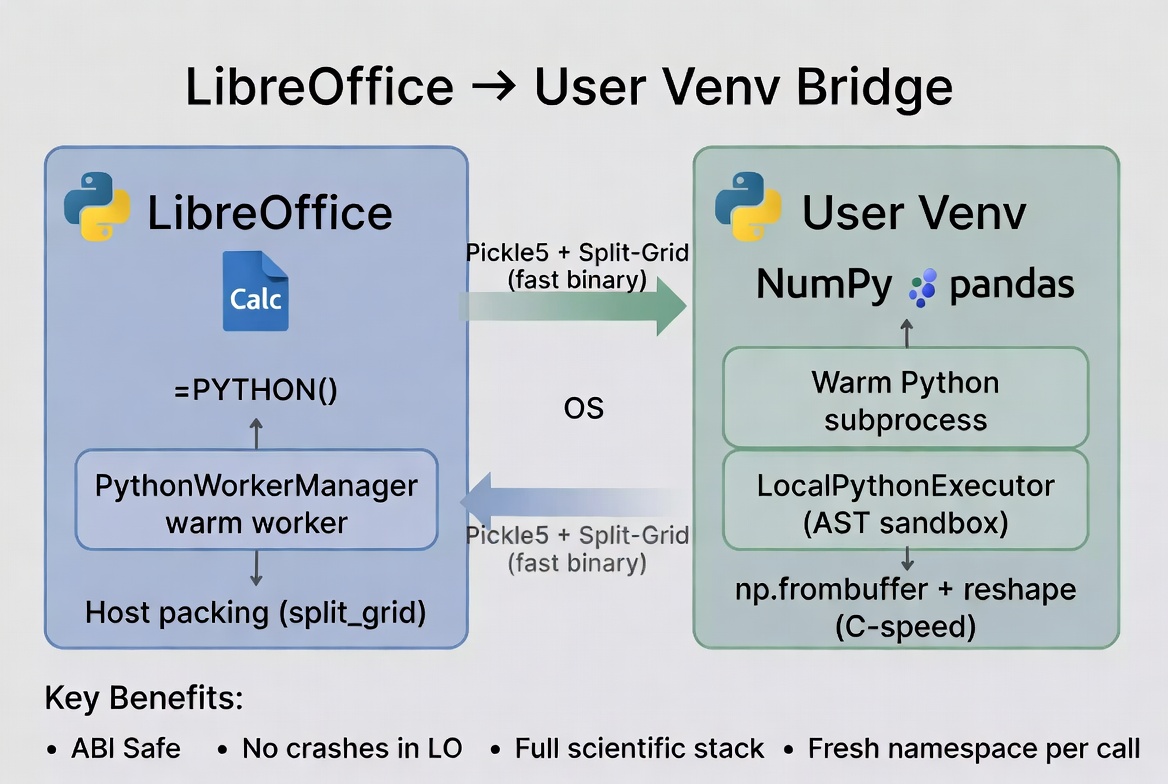
    WriterAgent takes a different path. You just point LibreOffice to a Python virtual environment (venv) directory with whatever version of Python and packages you want. WriterAgent never imports NumPy (or any third-party package) in LibreOffice’s embedded Python.

    Instead, it spawns (and keeps running) an external Python worker process. When you send data cross-process, both sides don’t need to be running the same version or even architecture, they just need to be able to parse JSON or whatever data format is used. The implementation is so simple I had it working an hour.

    There are many benefits of this design. If you have already created a custom high-performance MKL or OpenBLAS build, you can just use it. A crash inside a user script will not take down LibreOffice.

    =PYTHON() in Calc

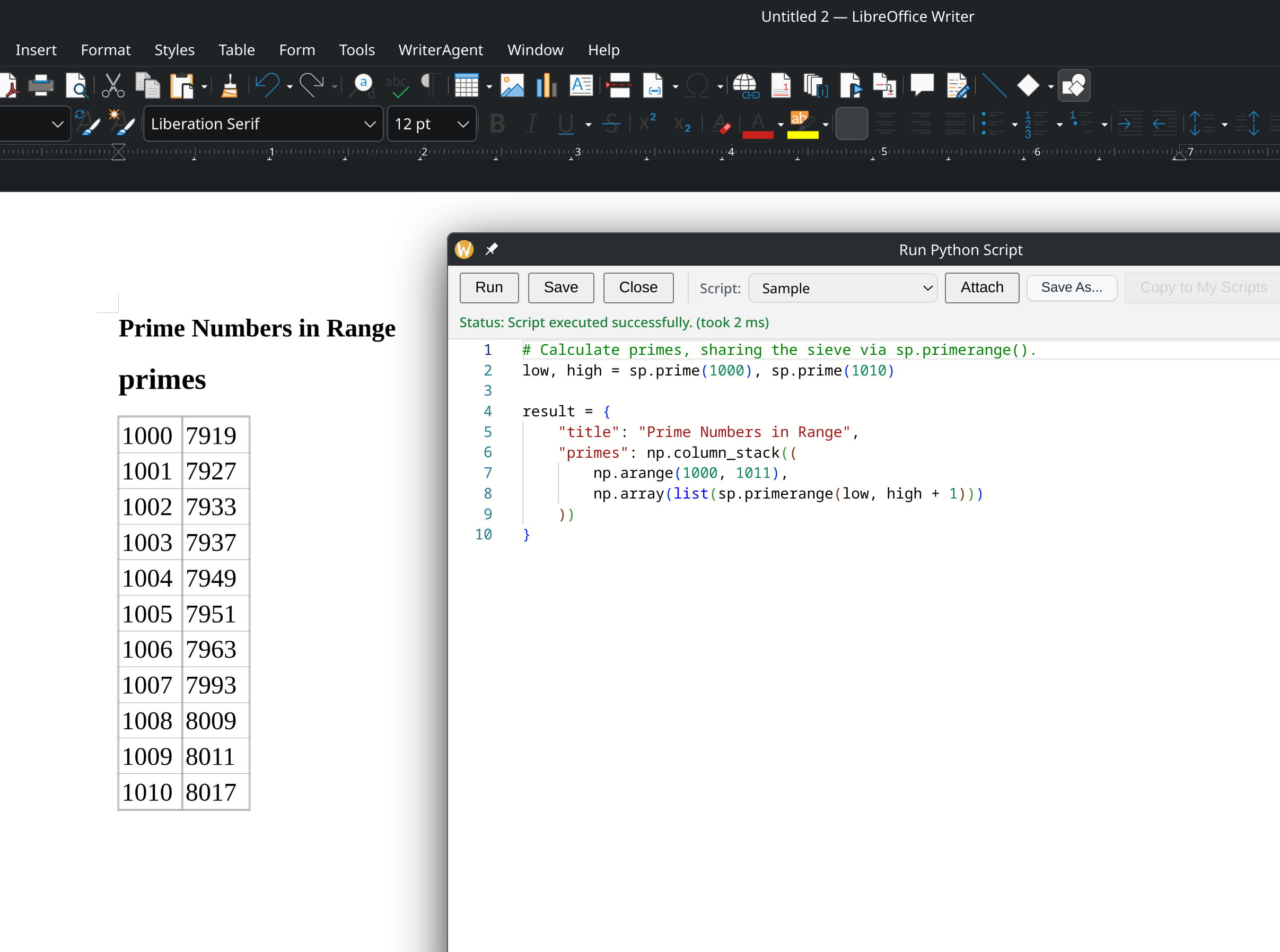
    Next, I added a formula to Calc to let you write code like this: =PYTHON("np.mean(data)", B1:B1000)

    The data variable is a special value containing the passed-in ranges, injected into the Python’s namespace at runtime. You can return a result variable, or it will treat the last line of code as the final result.

    The only downside of =PYTHON() so far is that most of LibreOffice expects Calc functions to return a single data point. If you want to return an array, you need to select the proper number of rows in advance and use a matrix key (Ctrl+Shift+Enter) so one worker invocation can fill an entire range without N separate round-trips.

    Having to select the proper number of rows in advance and remember to press Ctrl+Shift+Enter is a drag, so I’ve created ways to have scripts with the ability to overwrite multiple cells.

    When the default is to return just a single value, sharing code between cells becomes very important. Fortunately, LibreOffice automatically supports the feature if you write something like this: =PYTHON($A$1,B1:B1000).

    We’ve moved beyond OOP – Object Oriented Programming to COP – Cell Oriented Programming!

    The xl() Hack

    Microsoft’s Python in Excel forces you to write xl(“A1:B100”) inside the Python code. That string is opaque to Calc’s formula engine, so the dependency graph breaks. When you edit any cell, Excel has to re-run every Python cell in row-major order just to be safe. Move a cell, insert a row, or rename a sheet and your pipelines silently stop working or produce stale results.

    WriterAgent’s =PYTHON() keeps the dependency declaration where Calc expects it: in the arguments. You get true incremental recalc and explicit ordering without fragile sheet layout. The Python code itself stays clean and readable because it just receives data: no string parsing or magic xl() calls required.

    When you have a bunch of random “global variables” or tweakable parameters that you want your Python code to respect: simulation counts, thresholds, etc., the cleanest pattern is to gather a reference to them together in a single range (for example, A5 – A30), and pass that in. This keeps the formula short, makes the parameters clear, and doesn’t break the recalculation engine.

    Shared kernel and initialization scripts

    Right now the default behavior is isolated (each =PYTHON() cell gets its own fresh namespace), but you can turn on a shared kernel. In shared mode, every cell in the same spreadsheet shares one persistent Python namespace.

    Variables, DataFrames and helper functions that you define in one cell are instantly available in the next. The big thing you have to keep in mind is that your code runs in dependency order, not left to right. However if you declare all of your dependencies as part of the ranges that are passed in, it will all just work out. There’s also a new menu item to Reset Python Session and start fresh.

    To make multi-cell workflows more powerful, there are also initialization scripts. In Calc, you can create a special “Init” and attach it to your spreadsheet. It runs before the first Python function is called. You can put any expensive one-time setup code in there, and every subsequent =PYTHON() cell starts with those variables and functions ready.

    The Monaco editor for rich-text Python editing

    Once I had Python external communication working, adding a full-featured code editor with color syntax highlighting was mostly a matter of exposing the same pipe to a new child: pywebview + the official Monaco bundle. The JS resources are packaged with the extension but it runs in a child subprocess.

    Once I had Init scripts, it was easy to generalize to add other scripts you could attach to a document, or keep in a personal scratchpad that lives in the JSON config file.

    Cross-Process Serialization

    There’s overhead to send data to/from another process, so it became a little game to try to see how far you could optimize it. I started with basic JSON: “((1.51321),(1514213.3),(5.14159))” which the receiving side has to chew through cell-by-cell, parsing the parenthesis, traversing the points, etc. I soon realized that it’s much more efficient to have host pack the entire range into a single float64 array. On the child side, where NumPy lives, np.frombuffer, plus a reshape to whatever Calc actually delivered, turns the float64 buffer into a proper ndarray in microseconds.

    Empty cells and strings become NaN, while the string values ride along in a dictionary keyed by their position. The whole thing gets wrapped in pickle protocol 5 and sent across the pipe.

    After profiling and optimizing the Python packing, the next optimization was to implement the few speed-critical pack routines in Cython. Cython is a variant of Python which can be compiled into native code. For most of WriterAgent (and every) Python codebase, the performance benefit from compiling the entire source tree to native x64 or whatever wouldn’t even be noticeable. A well-designed Python program should already be spending most of the CPU time running native code already. If your Python code is slow, it will be slow in C++ or Rust.

    Serializing and deserializing 100,000 numbers takes about 50 ms with standard JSON, 12 ms with pickle (Python’s native binary serializer), and with the split-grid Cython version, it takes 1.3 ms. Microsoft sends all of your Python calculations to their servers in the cloud, so you’ll never get results in milliseconds, and if you don’t have Internet access, they’ll never arrive.

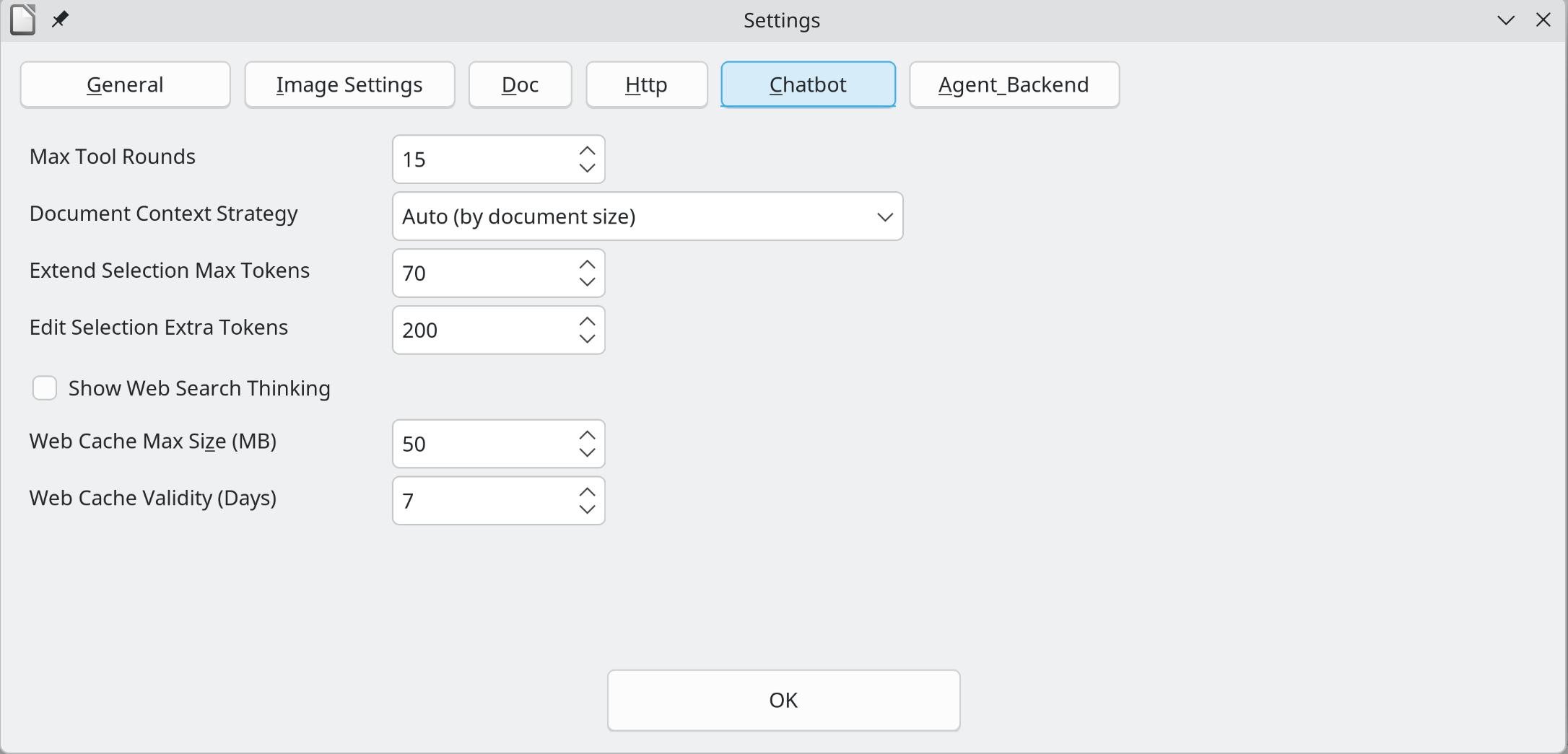
    Since I didn’t want to make binaries for Windows, Mac, x64, ARM, etc, GitHub Actions using cibuildwheel lets you build the binaries for the different processors and Python versions. It’s nice not to bother with those headaches when GitHub will do it for free! At runtime the extension does a graceful fallback to pure-Python if the native module is missing. The Settings -> Python -> Test button shows you whether Cython is active.

    The 150 lines of Cython take 200KB per platform and Python version, but that is the first-time Cython tax. Any new functions will take a tiny amount of additional space. I’m not sure if I’ll find another reason to write this native code, but it’s nice to have the infrastructure. For now I ship x64 Linux binaries, giving the cool kids the perf benefits, while keeping the extension portable for the rest.

    Thanks for reading! Try it out, and tell me what breaks, this is still early: https://github.com/KeithCu/writeragent

    If you enjoyed this article, here are the rest in the series:

    Week 1: Initial fork, sidebar chat, multi-turn tools, and async streaming

    Week 2 & 3: MCP, research sub-agent, voice support, and evaluation dashboard

    Week 4-6: State machines, formal verification, and specialized toolsets

    Week 6 & 7: Async grammar checking and TeX import support
  • WriterAgent (LibreOffice Plugin) Week 6-7: Async Grammar Checking and Math

    This is the 4th in a series of articles discussing my work on a LibreOffice extension, now known as WriterAgent. Here’s a link to the first article for background: https://keithcu.com/wordpress/?p=5060

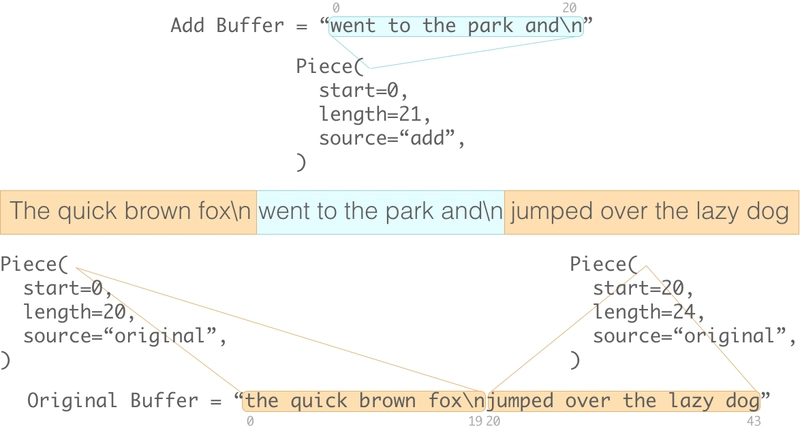
    At Microsoft, I spent five years working on the text components RichEdit and Quill, and came to understand the “physics” of word processing: the file formats, data structures, and algorithms that provided fast access to text and properties, independent of the length of the file. Selecting one million characters to make them bold took about the same time as changing one character, because of the clever data structures (piece tables) and algorithms in these engines.

    To be clear, changing more characters requires more repainting, but the code that actually applied the change to the document so it could be persisted to disk, and fetched while redrawing, ran in near-constant time. It did this for changes anywhere, in documents of any size, because of the piece table.

    Text editing is an interesting problem space: Latin line layout alone is a hard problem, even before you consider the rules for non-Western languages: tabs, justification, hyphenation, kerning, ligatures, numbering, etc. There are many interesting little features you might never have noticed, like merging connected underlines:

    On top of line layout, you add tables, embedded objects, columns, footnotes, indexes like a table of contents, and many other features required for real-world documents, and it becomes very complicated.

    Word is a codebase where “byzantine” is an understatement, but RichEdit and Quill were in those perfect Goldilocks zones where you could over time learn most of the details of the code, since they weren’t buried under a mountain of legacy features and cruft.

    When I decided to add a real-time AI grammar checker to WriterAgent, I knew what I was getting into, but I underestimated the trickery of LibreOffice’s UNO.

    The Silent Killer Bug

    LibreOffice has a linguistic subsystem that provides spelling and grammar checkers with a consistent UI. You register a proofreader component, and it calls you back, asking you to review text. You can return “no errors”, or a list of problems, explanations, and fixes.

    LibreOffice will draw blue underlines in the correct place, and create the pop-up menu when the user right-clicks on the squiggles. The menu shows the explanation of the mistake, and let the user choose the replacement, and LibreOffice will apply it to the document.

    That all sounds great, but it has a huge downside: it is entirely synchronous. However, I couldn’t even solve that problem because LibreOffice kept crashing!

    When UNO is unhappy, it doesn’t throw a message box with an error; it shuts down the entire program. This usually only happens when there is a developer error, but when the program disappears it’s hard to figure out what happened. My code tries to catch all exceptions and log errors, so that I can figure out what happened later, but when the program disappeared, there was no chance to do so.

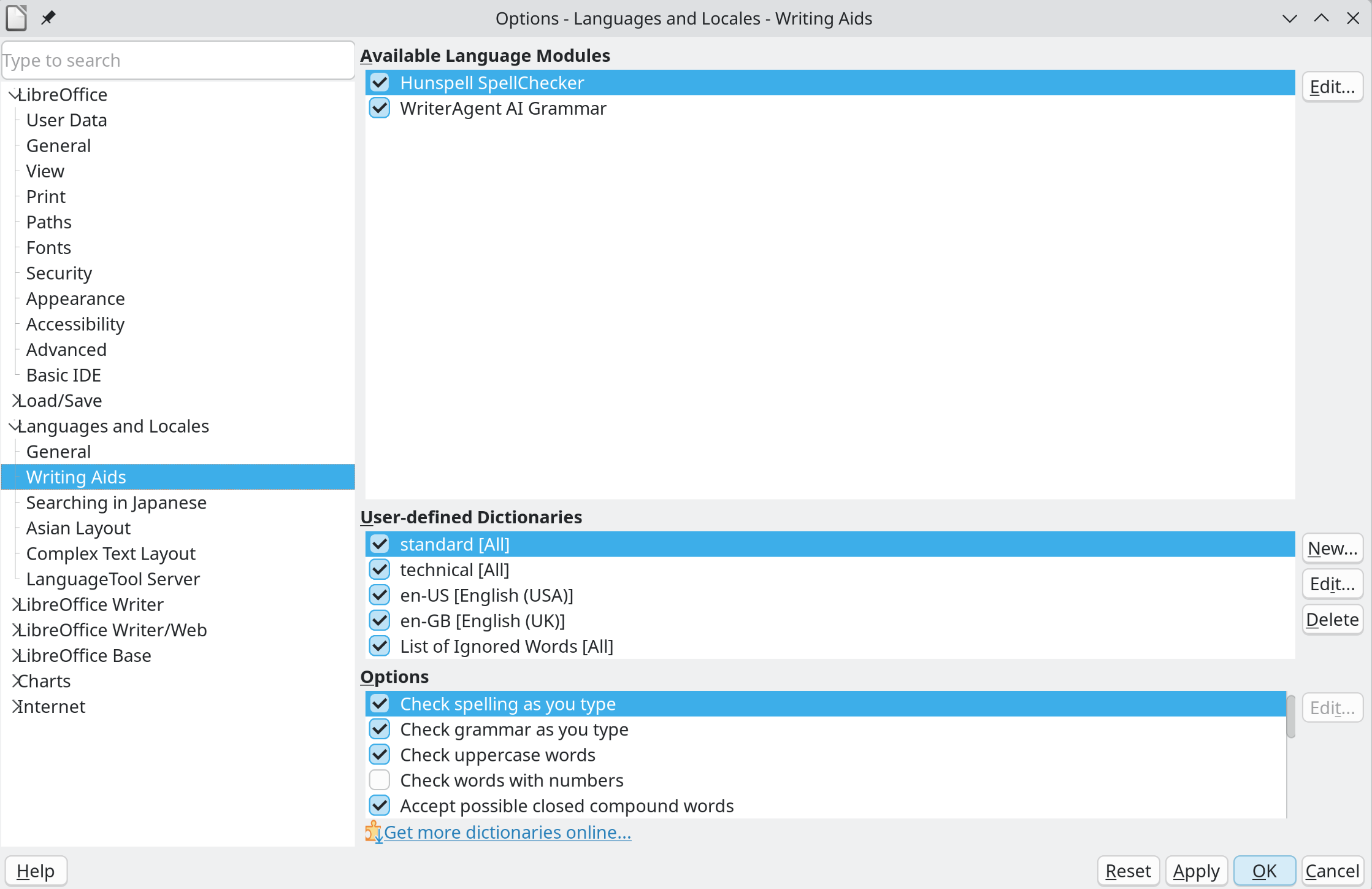
    I spent several hours banging my head against the wall trying to figure out why the Tools – Options – Writing Aids dialog, where I had registered my grammar checker, would take down the whole LibreOffice process. Here’s a feature that almost works; I hope you’ve saved your changes!

    Somewhere my Python XProofreader class was causing LibreOffice to detonate even though my grammar checker was not being called yet.After failing with even a simple one-page grammar checker that immediately agrees everything is correct, I decided to fire up ye olde GNU debugger.

    It shows you the stack trace when the unhandled exception happens, which allows you to figure out the line of code that caused the problem. If you can narrow it down to one line, that usually clarifies things enough.

    It turns out, LibreOffice instantiates these services using a C++ function called createInstanceWithArgumentsAndContext. Even if you aren’t passing use arguments, the office suite throws a bunch of initialization variables at your constructor. If your Python __init__ method doesn’t handle them, the code fails to map the call, the stack misaligns, and the program dies.

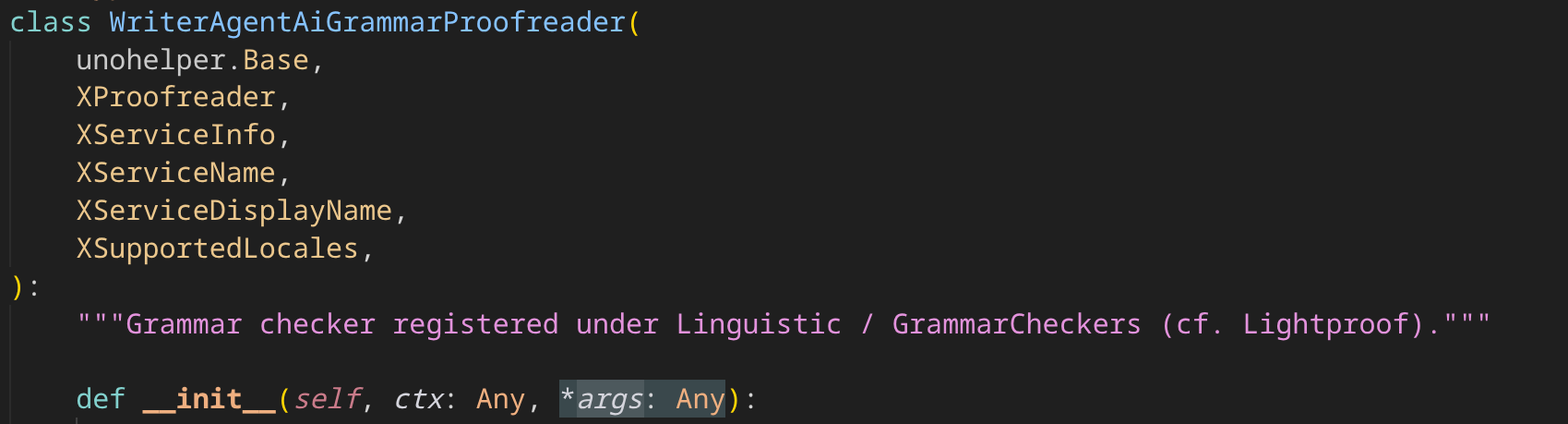
    The fix? I changed the class’s __init__ method to accept *args (Python’s syntax for a variable length number of extra parameters), allowing LibreOffice to pass its hidden arguments, giving them a place to go besides corrupting the stack.

    It was just 4 characters (plus the addition of Any which tells the type checkers what type to expect, in this case any type: string, integer, etc.) to act as a bucket for LibreOffice’s variables and suddenly, the crashes stopped. Once that UNO weirdness was out of the way, I could actually start on the grammar checker.

    Async Queues and a Sentence Cache

    The reason I avoided working on a grammar checker was the whole sync / async problem. I had built a multi-threaded extension, but the LibreOffice proofreading API is synchronous. That means the entire LibreOffice app waits—the code that handles keyboard events and everything else—while you decide whether there is a problem. You can spin up another thread to make the request in the background, but that doesn’t stop LibreOffice from waiting for an answer. Since I use OpenRouter and Together.ai for my LLMs, the “hold tight while I do a quick network request” was not going to work.

    I like Mercury-2 which returns 250-500 tokens per second, so I can often get any answer in half a second. But when typing, even a half-second delay before anything shows up is annoying, and that’s the best-case scenario.

    Also, I was happy with the add_comment tool as a way for the LLM to suggest corrections. You can ask WriterAgent to “review”, give “feedback” or “suggestions” on your document, and it will go through it in one pass like a professional copyeditor, and add comments. Then, you can go through those notes at your own pace, and delete each when you are satisfied.

    I ’m not sure how many know of the comments feature in LibreOffice, it’s very cool but surely underutilized. The messages show up on the right-hand margin, in colored rectangles, almost like sticky notes that a professional might have written.

    Because the LLM has full context rather than just a single sentence, it can provide more useful feedback. I told the AI to use add_comment for both positive and negative feedback, so the users enjoy reading the notes rather than always dreading bad news. The add_comment tool call is in the main document context to make it easy for the LLM to review at any time. The user just has to trigger it with the right keywords.

    However, the LLMs occasionally grouped multiple similar issues in one comment, rather than creating separate comments at each location, which made it harder to find and fix the problems. I realized it’s nice to have a basic checker constantly running, verifying proper grammar, reminding you where a comma is needed or other sorts of nontrivial but essential details that should actually be fixed before you show it to your copyeditor. That way no one will wonder whether you graduated from middle school.

    Eventually, I decided to tackle the problem. I used the venerable LightProof Python grammar checker which was a great starting point for efficiently handling the ProofReading API, but its rules were regular expressions which take microseconds to check, so I used its foundation but had to change the guts.

    I tried two different designs to handle the sync-async issue: a fully async one where I would look up the results, cache them, and then give the answers later, and another design that returned error results right away, without completely halting the program, and which almost worked.

    While it is true that in the proofreading callback, the entire LibreOffice process is waiting, you can call any function in LibreOffice, including processEventsToIdle(). That function tells LibreOffice to process keyboard and other events that might have happened, including repainting the screen.

    It meant that from within my grammar checker callback, I could actually tell LibreOffice: “Do what you gotta do while I’m waiting on this network request.” You could type at full speed without seeing any delay as the screen repainted, even though the main thread and grammar checker were actually still waiting for an answer. It’s the power of recursion, being able to call LibreOffice back!

    While it mostly worked, a few things broke, like being able to right-click on errors. None of the menus would appear while the LibreOffice proofing subsystem was still waiting. You could type, but the app was still mostly on hold. I had to move to async, which I knew would create more challenges.

    So I changed the system to return “no errors” immediately, start the request in a background thread, save the results whenever they arrive, and if LibreOffice asks again with the exact same string, we’ll have a useful answer.

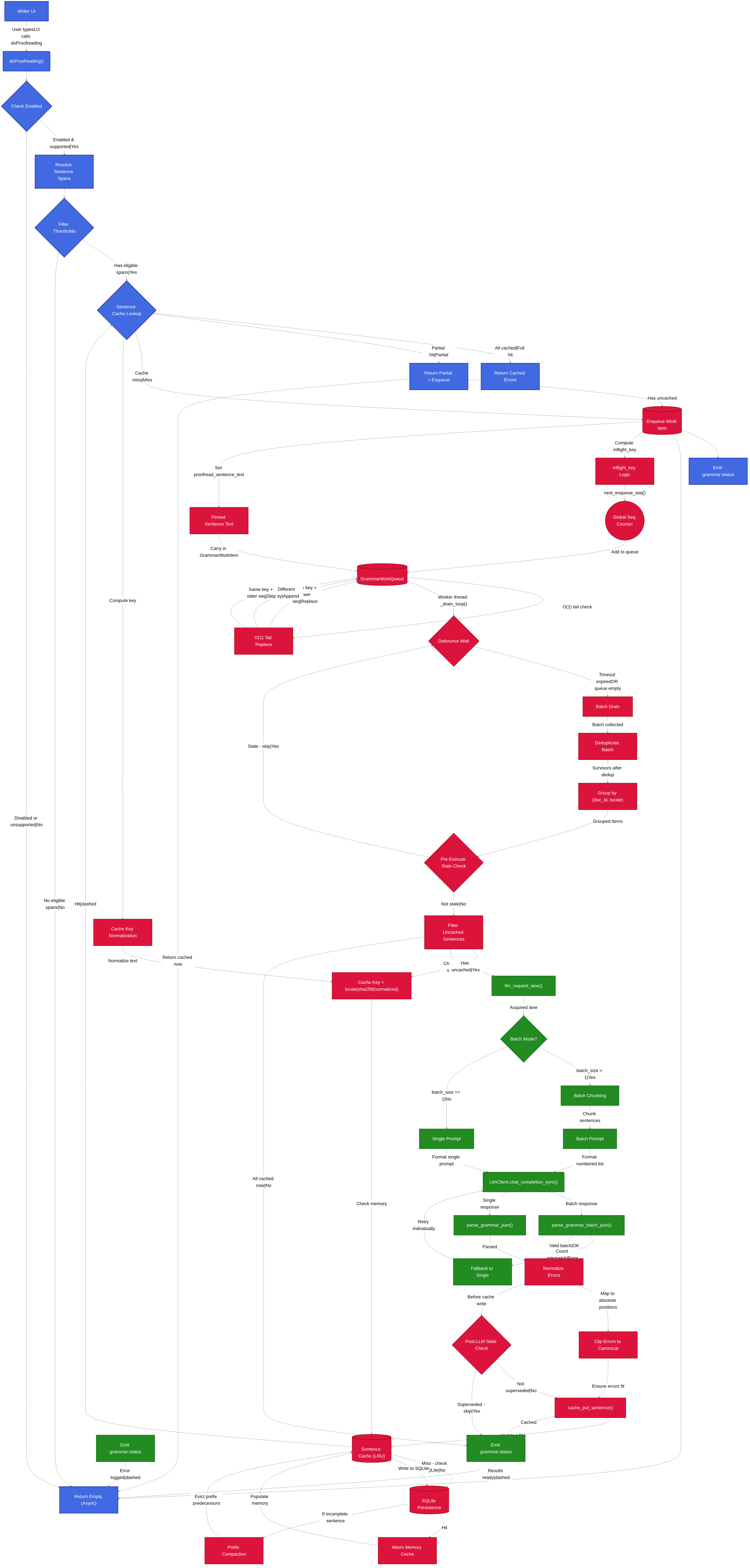
    The first problem I had to solve was that while I was looking up one answer, multiple new requests would come in as the user typed each character. So in the background worker, `_GrammarWorkQueue`, I keep only the newest request for each paragraph, and it only fires after a 1-second pause of no new requests. There is no point in trying to check anything until the user has calmed down.

    The next feature I needed was sentence caching, which is a minor topic in itself.

    The challenge is that not only does each language have different punctuation marks, but also some languages like Thai don’t use standard punctuation. They don’t have spaces between words, only between sentences, so the rules for deciding what is a sentence cannot be the same for all languages.

    I had done the easy part of auto-translating the user-visible strings into 34 languages, but now I needed some special rules in a few places to handle the quirks of those languages, like sentence determination. Fortunately, you can fetch the full list of Unicode punctuation marks, and store them in a little table.

    I needed to break chunks up into sentences because I saw cases where an LLM was given multiple sentences with many errors and it would get confused, and sometimes show zero problems. Perhaps it was thinking: “No issues,who knows? Maybe that is some intentional new poetic lingo I’m not familiar with. I’m not paid enough to try to explain all the issues in that mess.” Feeding it just one sentence at a time makes it more focused, although you can adjust the value in settings, and try it out on larger batches, and see how it behaves on your model.

    The async model works well enough because LO asks you to proof the paragraph every time. When a single sentence changes, only that new sentence is sent to be checked; the results for the rest are served from cache and reported as errors.

    Because LibreOffice updates the UI on a pull model, there is a chance that it never asks about an error that was found. I will eventually add a way to keep track of errors LibreOffice hasn’t asked us about yet, a way to poke the system. For example, toggling the language of the affected sentence to a new one, and back. For now, it seems to report useful problems in practice. (The build on GitHub has the ability to persist errors, so saving and re-opening will show them all the next time.)

    Then there was the issue of the over-helpful AI. You type something simple like “This is a error.” The model knows it is wrong, it would flag the “a” as problematic, and suggest “is an error.” as the replacement. My initial, naive version of the code looked like a glitch in the matrix because you’d end up with: “This is is an error. error.” The system fixed one mistake, and created two new ones, like the Sorcerer’s Apprentice.

    To fix this, I wrote code to strip out any duplicate words before or after the suggestion that match any words at the beginning or end of the replacement. The resulting architecture: debouncing, deduplication, prefix/postfix matching, and caching, keeps the UI snappy and usually useful, no matter the speed of the LLM, while preserving the original synchronous API.

    Protecting Math from JSON

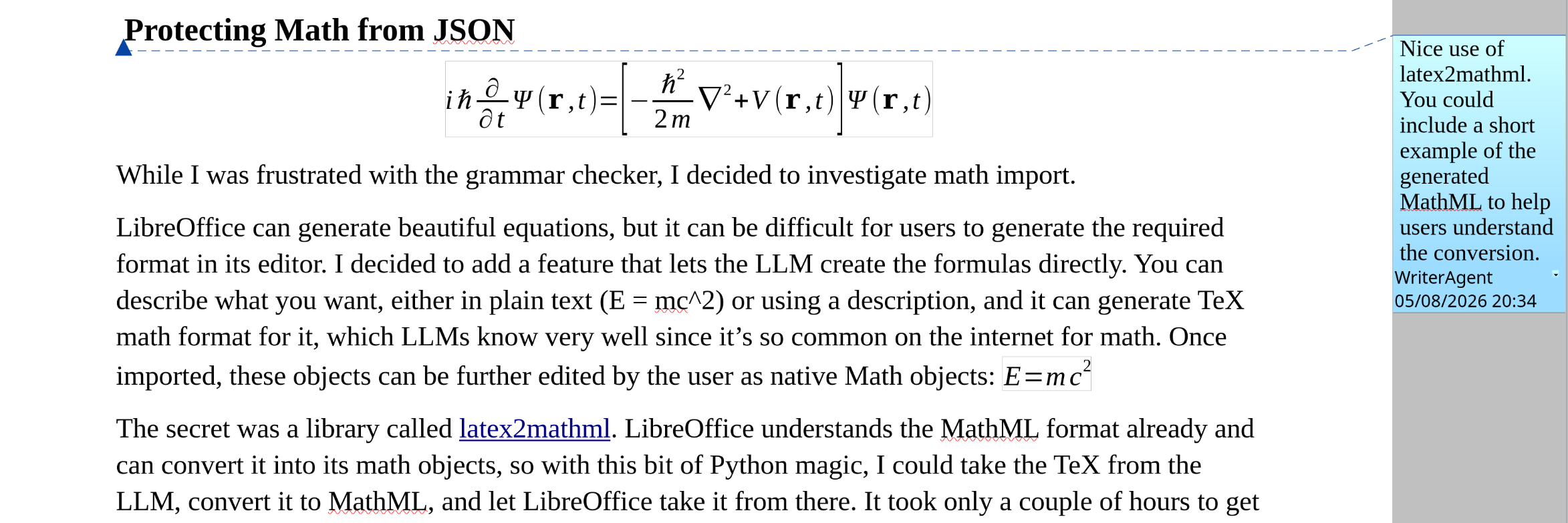
    While I was frustrated with the grammar checker, I decided to investigate math import.

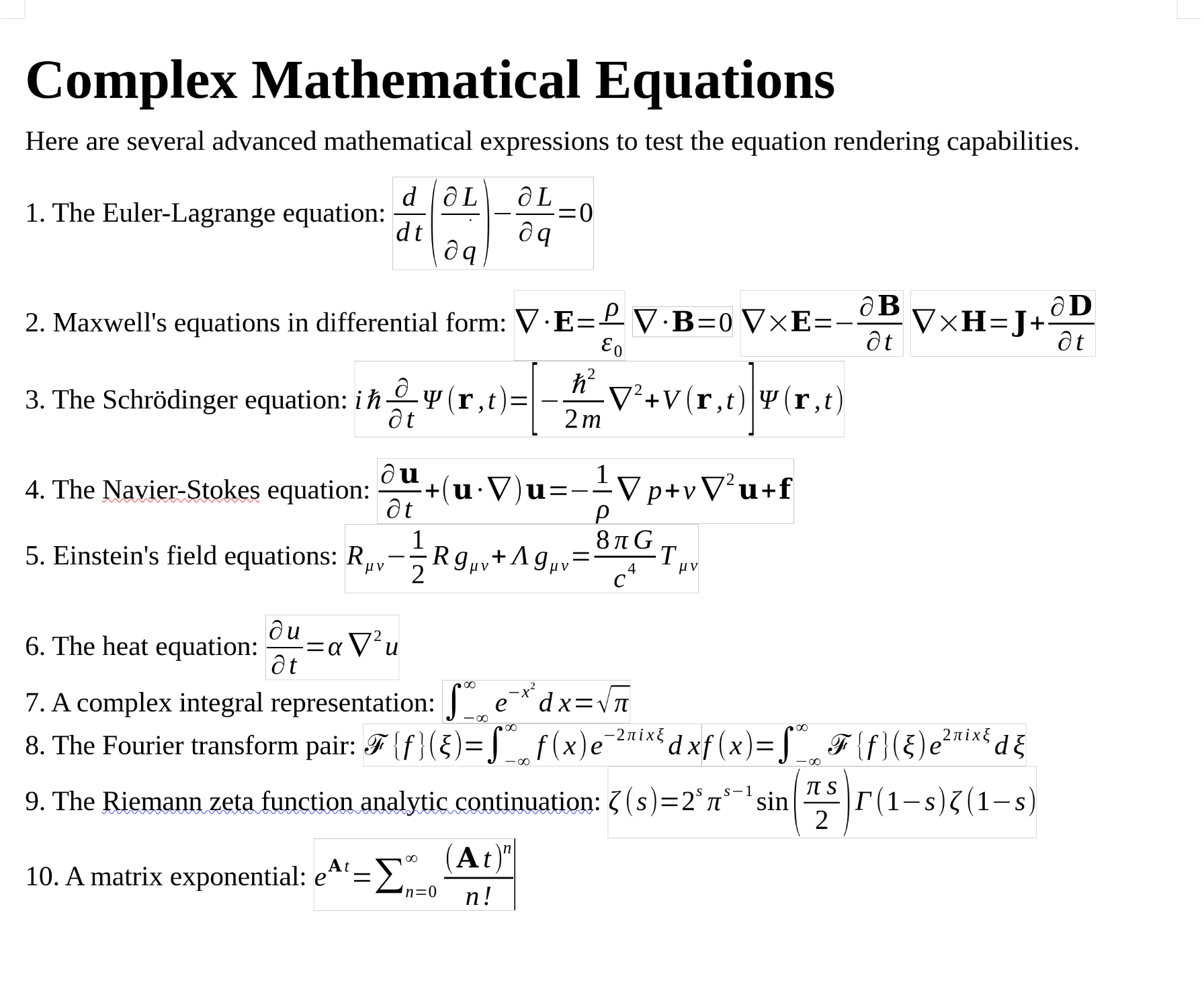
    LibreOffice can generate beautiful equations, but it can be difficult for users to generate the required format in its editor. I decided to add a feature that lets the LLM create the formulas directly. You can describe what you want, either in plain text (E = mc^2) or using a description, and it can generate TeX math format, which LLMs know very well since it is so common on the internet for math. Once imported, these objects can be further edited by the user as beautifully formatted native Math objects.

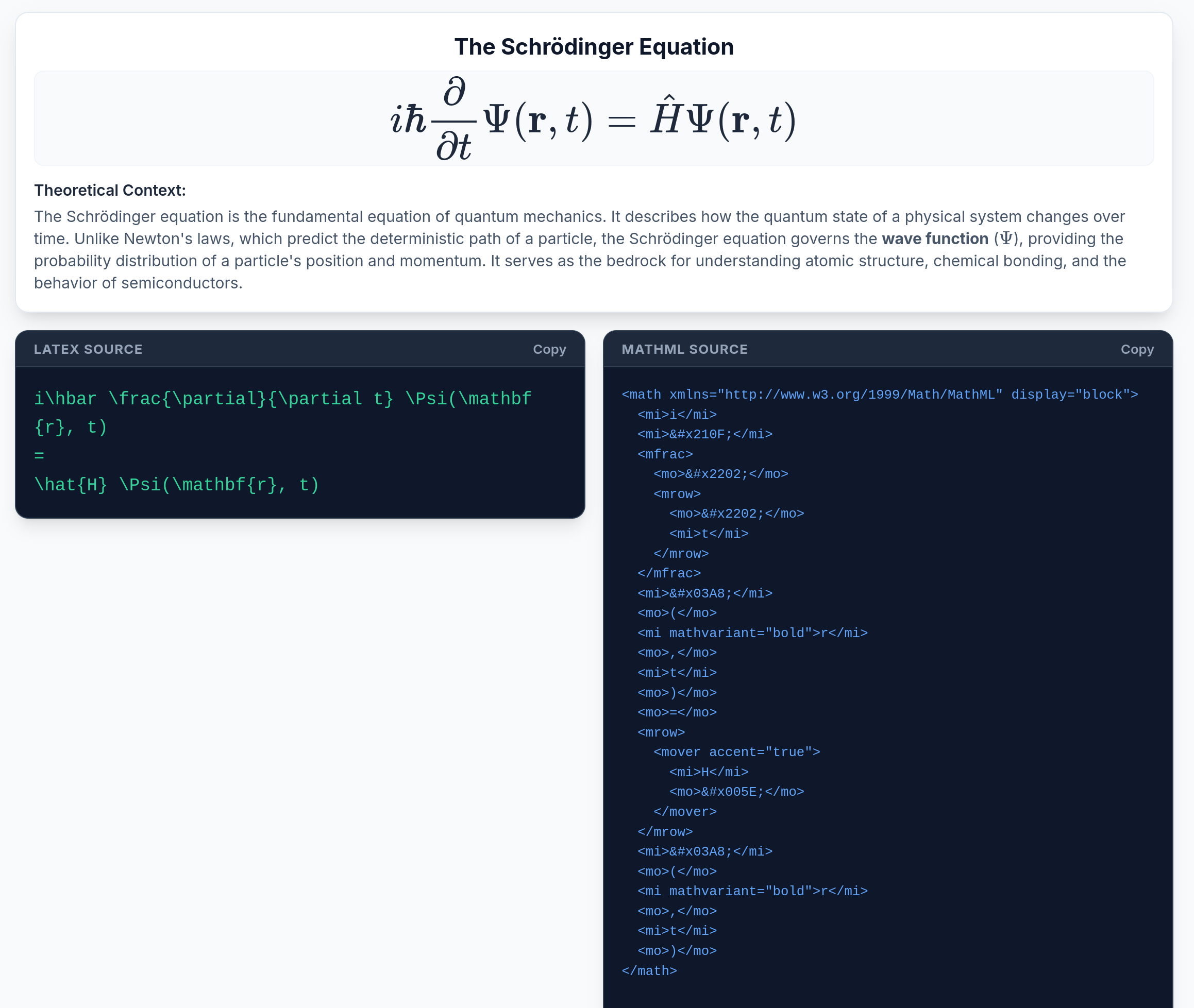
    The secret was a library called latex2mathml. LibreOffice understands the MathML format already and can convert it into its math objects, so with this bit of Python magic, I could take the TeX from the LLM, convert it to MathML, and let LibreOffice take it from there. It took only a couple of hours to get it working since the Python library and LibreOffice were doing most of the work.

    I ran into a couple of issues; at first it would display “imes” instead of the multiplication operator. The issue was that streaming APIs return chunks of JSON. If the AI generates a LaTeX command like \times or \nabla, standard JSON parsers see the backslash, assume it’s a control character (like a tab \t or a new line \n), and mangle the math before it ever reaches the parsing code. I had to build a workaround for math blocks.

    I don’t have edit working yet, converting back to TeX from MathML is a completely separate problem, but at least the LLM can insert formulas, and the user can change it, or delete it and tell the AI how to make a better one.

    34 Languages and Auto-Translation

    Having translated it to 8 languages, it was almost no work to add more. I had already built a batching, multi-threaded auto-translation system that reads the .pot template files and translates any missing strings, up to 10 strings at a time using 8 concurrent threads.

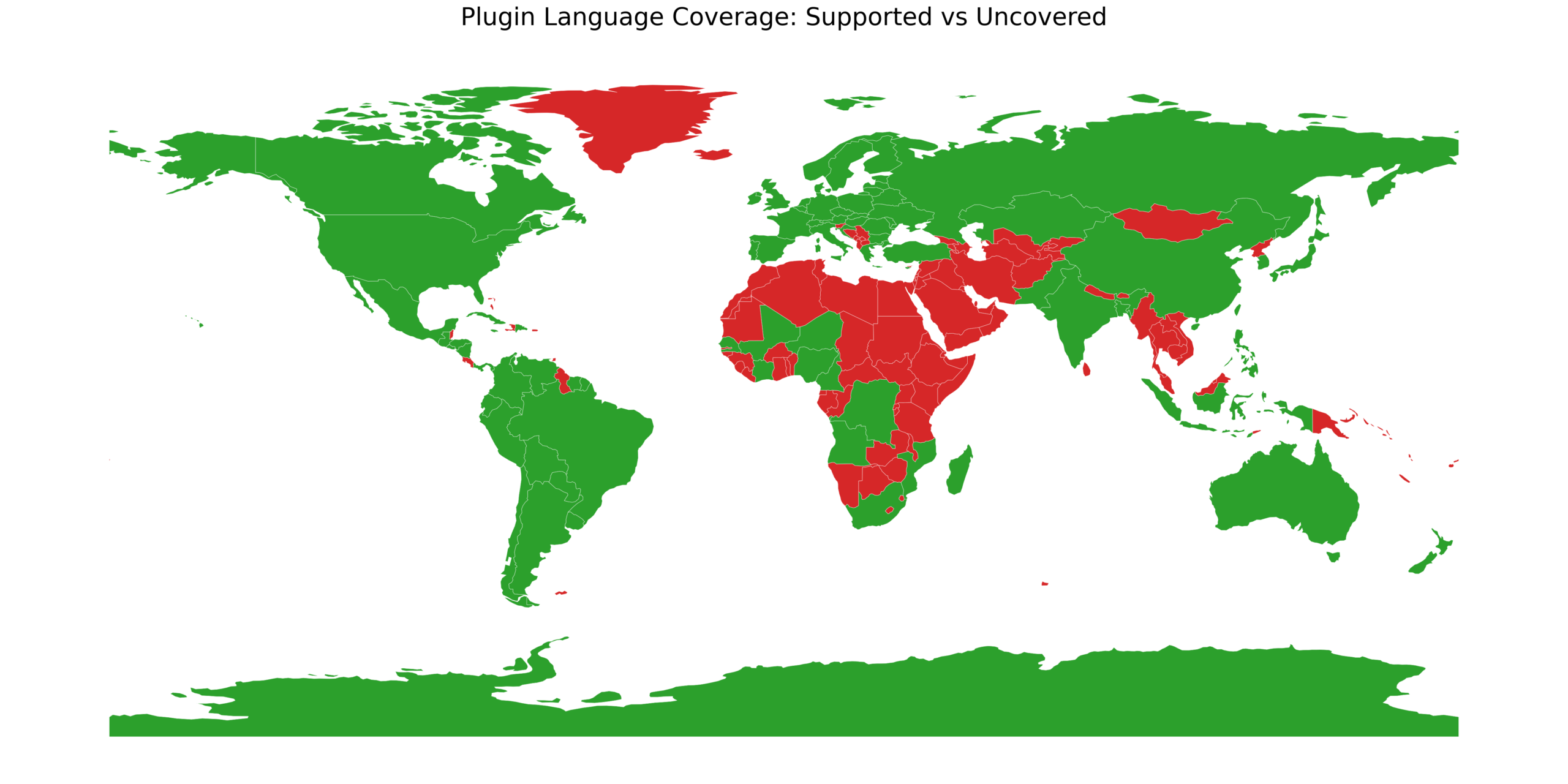
    Because the infrastructure is automated, adding new locales is essentially painless. I decided to flip the switch and WriterAgent now supports 34 languages, including most European languages, plus Japanese, Korean, Chinese, Hindi, and other major Asian languages. For the translation, I use x-ai/grok-4.1-fast. It’s fast, intelligent, and inexpensive. Translating the extension into a new language costs a couple of pennies. Most of the strings are UI elements like “Send” or “Image Model,” so I don’t need a frontier model.

    In fact, because it’s so cheap to run these API calls, I set up a review system that has another model (such as Qwen for Chinese) review every translation and report errors, with an English description of the issue and suggestions. The review script generates a JSON file of improvements, which you can further modify and then apply to the translation file. I’ve made many changes that will go into version 0.7.7.1.

    Future Work

    There’s plenty of future work. Each time I add a feature, I find two new ones I could work on. If you want to try it out, the repo is here: https://github.com/KeithCu/writeragent. Let’s make LibreOffice and the free desktop AI-native!

  • Cursor for LibreOffice, Week 4-6

    Refactoring into Pure State Machines, Nested Tool-Calling, and Translation into 8 Languages

    After the previous week I was feeling good about the ACP integration, the research sub-agent, talk to your document, and surviving Quarzadous’s refactor. In common scenarios, the whole thing usually just…worked.

    However, one day after I pushed the latest build to GitHub and the LibreOffice extension site, my most active (and very helpful) user posted that he couldn’t uninstall or reinstall the extension. That’s sure to make happy customers!!

    It turned out to be a user error (of trying to install the source ZIP instead of the OXT) but I realized I wanted to set up a system to let me sleep at night knowing the extension wouldn’t break in some basic scenario. The code was organized and clean, but over time the complexity of the plugin had increased, to support the larger feature set.

    Some functions were long, and they were doing complicated state changes, so even testing every possible combination (stop clicked mid-stream, max rounds exhausted, speech to text transcription fallback mode, document mutation after a tool, etc.) was almost impossible without spinning up a LibreOffice instance and creating intricate tests. Each unit test was only sampling the state space so I realized that if I didn’t break things up into smaller functions, the test code would be larger and more complicated than the extension itself.

    I didn’t have any boss demanding new features, so I spent some time researching modern tools for formal verification in Python:

    Extension nameWhat it does
    Type checking tools (Pyright, Mypy, Pyre, Pytype)Analyze your code to find code calling functions which don’t exist on that object, catching other syntax bugs early.
    DealA lightweight library that lets you write simple rules (contracts) like “this function must receive a positive number”. It checks these rules while the program runs, helping catch errors in plain language.
    CrossHairUses a mathematical engine (Z3) to explore many possible ways your code could run, automatically generating test cases and proving that your contracts hold, or pointing out where they could fail.
    PyExZ3Provides a bridge to the Z3 solver so you can write custom checks that reason about your code’s logic, letting you verify complex conditions beyond simple type checks.

    I decided the first step was to break up the complicated loops into pure state machines. Here is the tool-loop FSM:

    The state machine loops have no threads, no mutable instance variables, no internal side effects. Just data in → new state + list of effects out. The code still does all the same UNO calls as it did before, but by breaking it up into pure state machines and smaller functions, it’s much easier to reason about and test. It’s good I made each the loops simple and reliable, because if you combine all of them, it becomes complicated:

    The unit tests in test_tool_loop_state.py are now simple, deterministic, and run outside LibreOffice, and this refactor is the foundation for formal verification. The sidebar behaves the same, but under the hood the scariest parts of WriterAgent are now cleaner and more predictable.

    I also now have quite a bit of test coverage, 700 tests, so I can generally make changes and ship updates without as much worrying that some simple bug doesn’t bite someone, somewhere. I didn’t set out with a goal of having so many tests, but at one point I added a rule that told the AIs to create tests for every feature and bug fix, and it kept accumulating.

    Type Checking

    def unpack(t: Union[FsmTransition[StateT], Tuple[StateT, List[Any]]],) → FsmTransition[StateT]:
        """Normalize legacy ``(state, effects)`` tuples to :class:`FsmTransition`."""
        if isinstance(t, FsmTransition):
            return t
        state, effects = t
        return FsmTransition(state=state, effects=list(effects))

    I’m generally not a big fan of type checking in Python. It can sometimes require a lot more effort on the keyboard, and make function declarations as ugly as C++.

    However, it’s basically necessary for formal verification since if a system doesn’t know that a function requires integers, it will waste a lot of time trying strings and the other types to verify it works reliably, for cases that will never happen.

    I also ran into a bug where code in an unusual case was calling a method that didn’t even exist on the object. This is exactly the kind of problem that type checking was made for. Python lets you write code, and only at runtime will it flag these errors.

    In many cases for small projects, which are most of them, type checking isn’t necessary. These bugs can be caught when you actually use the code. Calling the wrong method name is usually an easy fix. However, when a codebase gets above 10,000 lines of code, it starts to have more special cases, so type checking becomes worthwhile.

    I researched the most popular type checkers, and it seems like the cool kids are using Ty. It’s new, modern, and written in Rust so very fast. I think Rust is a byzantine language that makes C++ look easy to read so I wouldn’t touch it in my code, but I’d be happy to read the error messages it dumps to the screen.

    Ty initially found 1000 errors, but when I figured out how to trim out the contributed code (presumed to be stable) and the test code, it was just 400. That was still a lot of problems, but I just started plugging away at it.

    The biggest issue was that my dev environment didn’t have type definitions for UNO. So I figured out how to load them into my local environment. It also needed protocol classes are an interesting feature because in Python, they let me say: “this function doesn’t care what type you give it, as long as it supports these methods.” You specify in the Protocol what methods you require and the type checker will verify that only those ones are called.

    I was happy to get it working with Ty, but then I thought, why not just try it out with mypy, which is considered the trusted OG of type checkers? It found a few more areas. For example, it is more strict about calling methods on potentially None variables:

    # Before (ty accepts, mypy rejects)def get_page_count(self):    page = self.get_active_page()    return page.getCount()  # mypy: Item "None" has no attribute "getCount"
    # After (both accept)def get_page_count(self):    page = self.get_active_page()    if page is None:        return 0
        return page.getCount()

    After fixing those few new problem areas, installed Pyright, It found a few more issues, and I fixed those too. So now, the make build runs the fast Ty checker, and make test / make release runs all 3.

    Specialized Tools

    Writer has a ton of features and UNO surface area: tables, styles, text-boxes, shapes, charts, indexes, fields, embedded objects, track changes, etc. Dumping every tool into the main chat prompt would bloat context, and even frontier models like Claude Opus would fail to make good decisions.

    It’s easy to build a plugin that supports a small subset of the LibreOffice API, but having a plugin which can understand the full fidelity of LibreOffice is more difficult, but that was what I wanted to build. In fact, I had stopped adding richer Writer support to the codebase because the current API was already too large for smaller tools, and so I didn’t want to keep making the problem worse.

    One way to solve the tool proliferation problem is through Fat API design instead of fine-grained (skinny) APIs which are specific tools for each operation: create_footnote, edit_footnote, delete_footnote, etc.

    That code provides simpler parameter schemas per tool, is easier to map directly to underlying UNO, and simpler validation logic.However, this would cause the tool count to explode.

    So one possibility is to create APIs that combine related operations into broader, multi-purpose “fat” tools. Examples: manage_footnotes(action = ‘create’, ‘edit, ‘delete, …)

    • Pros: Drastically reduces the total number of tools, limiting context size. A polymorphic schema allows more capabilities to remain in the main chat prompt, potentially eliminating the need for the sub-agent delegation pattern.
    • Cons: The parameter schemas become extremely large and complex (e.g., union types or nested generic objects). LibreOffice operations are highly disparate, making a unified underlying Python handler harder to write, and smaller LLMs often struggle to reliably handle the union parameters correctly.

    Ultra-Fat API (Single manage_shapes Tool):

    {
      "name": "manage_shapes",
      "parameters": {
        "action": {"type": "string", "enum": ["create", "edit", "delete"]},
        "shape_index": {"type": "integer", "description": "Target shape (for edit/delete)"},
        "shape_type": {"type": "string", "enum": ["rectangle", "ellipse", "text", "line"], "description": "Required for create"},
        "geometry": {
          "type": "object", 
          "properties": {"x": {"type": "integer"}, "y": {"type": "integer"}, "width": {"type": "integer"}, "height": {"type": "integer"}}
        },
        ...
      }
    }

    I decided to stick with the simple APIs for now, and create a two-level toolset, leveraging what I did for the web research subagent, which defines its own set of specialized tools (web_search, visit_webpage).

    The LLM now sees a basic set of tools. For Writer they are:

    FunctionPurposeKey Parameters

    apply_document_contentInsert or overwrite content in the document.content (list of HTML strings), target (beginning, end, selection, full_document, search), old_content (text to find when target=’search’), all_matches (bool).
    get_document_contentRetrieve the current document (or a selection/range).scope (full, selection, range), max_chars, start, end.
    get_document_statsGet high‑level statistics (characters, words, paragraphs, pages, headings).No parameters
    get_document_treeReturn the heading outline (or full tree) of the document.content_strategy (heading_only, first_lines, ai_summary_first, full), depth.
    search_in_documentSearch for a string or regex inside the document.pattern, regex, case_sensitive, max_results, context_paragraphs, return_offsets.
    add_commentWhen the user asks to “review” or “give feedback” on a documentanchor text, string
    styles_applyApply a paragraph style to a target location.style_name, target (beginning, end, selection, full_document, search), old_content.
    delegate_to_specialized_writer_toolsetHand off a complex Writer task to a sub‑agent that has a focused toolset (tables, charts, shapes, images, web research, etc.).domain (styles, page, embedded, shapes, charts, indexes, fields, bookmarks, tracking, images), task (free‑form description).

    The main chat sees a compact core plus one gateway tool. When the model calls the gateway with a domain and task, it switches into a focused agent mode that only exposes specialized tools. When the agent is done, it calls a specialized_workflow_finished tool-call to return control to the main agent with the general toolset.

    I was happy to discover this solution, because it allows over time full fidelity with LibreOffice that should work well with smaller, dumber local models.

    Localization Support

    My first active user was a friendly and helpful German named Samuel. He could speak English, but I could tell his native language was much better, and so I thought, why not translate this little plugin into German and some of the other popular languages? I already had code to talk to LLM endpoints, many of them speak dozens of languages. I just needed to hand them strings and ask.

    The code itself didn’t have any localization support yet so I had to work on that first. The most time-consuming part was going through every string in the codebase, and deciding if it was user visible, and if so, swap the translated string instead, based on the user’s language.


    In Python, the convention is create a little function called “_”:

    def _(message: str) -> str:
        """Translate English msgid *message* via gettext. Must be :class:`str`."""
        if not isinstance(message, str):
            raise TypeError("gettext msgid must be str")
    
        global _translation
        if _translation is None:
            init_i18n()
    
        assert _translation is not None
        return _translation.gettext(message)

    Everywhere in the code where you might display a string such as “Transcribing audio…”, you simply insert an underscore and parentheses, like this: _(“Transcribing audio...”) to auto-translate the string.

    Python has a tool, xgettext, to take all the strings that are called to be translated and puts them into a central text (POT) file. Once I had it mostly working, I setup an automate process that spins up multiple threads to process strings in batches. It currently supports Spanish, French, Portuguese, Russian, German, Japanese, Italian and Polish, which covers about 3 billion people, and it’s simple to add more.

    Where We Stand Now

    The codebase is more reliable, the state machines are verifiable, localization is automatic, and the main chat agent stays fast and focused while delegating to specialized agents. Over time it allows to expose the full LibreOffice power.

    None of this would have been possible without the incredible FOSS ecosystem: deal, CrossHair, smolagents, polib, Hermes-Agent, and other FOSS codebases, and of course the LibreOffice UNO bridge that I treat as sacred and bug-free for purposes of plugin verification. The repo is here: https://github.com/KeithCu/writeragent. Please try it out and give patches or stars ⭐.

  • Detailed Proposal: Compact, High-Speed Tethered FPV Drone Simulator (C-HS TFPVDS)

    Executive Summary:

    With new bullets, standard 5.56″ rifles can take out drones from 50 to 100 meters. This is a game-changer in a world where 80-90% of casualties are caused by drones.

    Current military training lacks realistic, cost-effective methods for engaging dynamic FPV drone threats. Most training and certification involves stationary or slow-moving targets. Existing solutions involving real drones are expensive, consumable, and lack repeatable flight paths for structured mass certification.

    My proposed solution is the Compact, High-Speed Tethered FPV Drone Simulator (C-HS TFPVDS), a robust indoor training system designed to replicate the flight characteristics of an FPV drone without the associated costs and complexities of live drone operations. The system utilizes a lightweight, non-ballistic target tethered to a high-speed robotic arm, protected behind an angled shielding wall, making it a practical and resilient solution for widespread deployment in military training facilities.

    Technical Approach:

    The C-HS TFPVDS is composed of four primary subsystems:

    1. Robotic Positioning System: A high-speed 3-axis Delta robot, chosen for its exceptional acceleration and speed capabilities, is mounted on an elevated platform. This robot is positioned behind an angled, sacrificial shielding wall (composed of self-healing polymer or angled AR500 steel) that protects the expensive mechanism from incoming 5.56 anti-drone rounds.
    2. Tether and Target Assembly: A 15-foot high-strength, low-stretch Dyneema tether connects the robotic end effector to the target. The target is a lightweight (2-3 oz), metallic-coated foam or hollow plastic sphere (4.5 inches in diameter), simulating the size and radar/visual signature of a typical FPV drone chassis while minimizing mechanical load on the robot. A piezoelectric sensor is embedded within the target to detect kinetic impact and provide real-time scoring feedback.
    3. Control and Simulation Software: The system is driven by custom software written in Python, utilizing the pyodrive library for precise motor control. This software generates randomized “jink-and-dive” flight patterns, simulating realistic FPV evasive maneuvers at speeds up to 120 mph. The software implements feed-forward control to compensate for tether lag and aerodynamic drag, ensuring precise and responsive target movement.
    4. Power and Safety Systems: The system is powered by high-torque brushless DC motors, managed by industrial motor drives. Safety features include integrated emergency stop (E-Stop) circuitry compliant with NEC Article 670 and automatic shutdown upon tether breakage or system fault. All electrical components within the damp indoor range environment are protected by GFCI (NEC 210.8(B)(6)) and Surge Protective Devices (SPD) per NEC Article 242.

    Benefits:

    • Realistic Training: Replicates the difficult non-linear flight paths and high speeds of FPV drones.
    • Cost-Effective: Eliminates the ongoing cost of consumable live drones and the logistical burden of FAA compliance.
    • Robust and Resilient: Protective shielding and sacrificial components ensure long-term system survivability.
    • Objective Certification: Integrated scoring system provides clear, measurable data for soldier qualification.
    • Indoor Operation: Allows for year-round, weather-independent training in standard shooting ranges.

    Feasibility:

    The C-HS TFPVDS utilizes mature, commercially available industrial automation components and high-strength materials. The software control principles are well-established in the field of robotics. The system is designed to integrate seamlessly into existing military range infrastructure. The combination of protective shielding and lightweight, inexpensive targets addresses the primary survivability and cost concerns of previous drone target systems.

    Hopefully Army TRADOC researches this idea one day soon!

  • Cursor for LibreOffice Week 2 & 3: How I Added MCP, ACP, a Research Sub-agent, Talk to Your Document, an Eval Dashboard, and Survived Quarzadous’s Total Refactor


    I’ve been calling this project Cursor for LibreOffice to myself, but I knew I couldn’t use the name forever, so I researched and chose WriterAgent. It supports Calc, and Draw as well, but I didn’t like the name OfficeAgent, which sounds like some Soviet-era KGB job title. Last week’s post was how I took John Balis’s clean little Localwriter and bolted on threading, tool-calling, chat, and enough other stuff that it started to feel like a powerful chatbox inside LibreOffice.

    It became useful enough, and the progress was so fast with all the Python code out there to re-use, that I was motivated to keep going. Meanwhile a chap named Quarzadous dropped a complete refactor and I wanted to integrate it without breaking anything, including the new features I had added.

    MCP

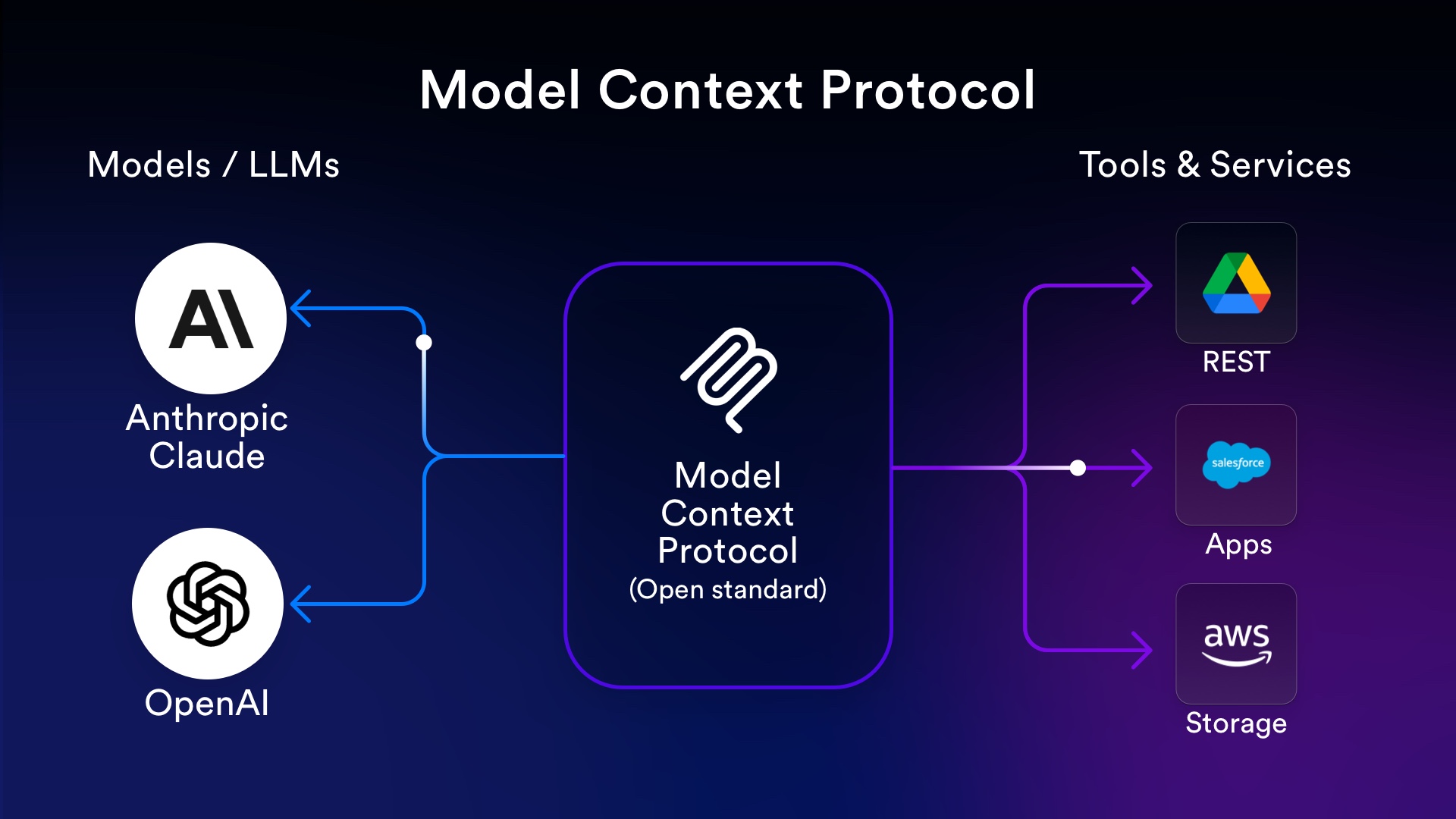
    After creating the initial chat with document, I realized that many people might want to talk via their local agents: the infamous OpenClaw, Hermes, Claude, etc. and allow those agents to edit your documents. These systems have many features: memory of previous conversations, file-system access, and skills they can learn after install, so implementing the Model Context Protocol to let them make the same tool calls would also be useful.

    I wondered whether supporting both external agents and an internal one in the same codebase is a good idea since the users and some use-cases are different. However, both use the same API backend and other pieces that much of the code is shared. The UI is just a new checkbox “Enable MCP”, and a few new files to spin up an HTTP server, process the JSON-RPC, and one day possibly support tunneling. So I decided it was worth supporting both, rather than either-or.

    Actually, the hardest part of building software for non-technical people is that you need to make something Apple-like, very easy to use, which is hard because developers have a much higher tolerance for confusing products.

    The libreoffice-mcp-extension, written by Quarzadous, had the missing pieces, and I integrated it with the existing code, and over time refactored it to remove any duplicate logic. I also added sidebar logging, so that when an MCP tool-call happens, you can see information in the chat, just like for the internal agent.

    Huggingface Smolagents

    The next feature I wanted was a web search tool for the AIs to make. LLMs are generally useful, but their training cutoff is often a year or 2 ago, so I wanted a way to let it look up information from the web to plug into a document.

    However, once I thought through the various steps:

    • Make a web search tool-call
    • Read through the results, decide the first page to visit
    • Read the web page and decide if it needs to read another page or whether it has an answer

    I realized that it would be much better to have an isolated, specialized sub-agent do all this work, and just return a distilled answer, and not distract the main LLM with this specialized task and bloat the context.

    After a few minutes of searching, I discovered Huggingface’s smolagents library already includes this functionality. Huggingface is the man! The code needed to be changed slightly to remove dependencies (Jinja, etc.) but it was easy to vendor the core of their ToolCallingAgent + ReAct (Reason – Action) loop. Here’s some of the prompt and you can see how it encourages a loop until confident in the answer:

    You are an expert assistant who can solve any task using tool calls. You will be given a task to solve as best you can.
    To do so, you have been given access to some tools.
    
    The tool call you write is an action: after the tool is executed, you will get the result of the tool call as an "observation".
    This Action/Observation can repeat N times, you should take several steps when needed. You can use the result of the previous action as input for the next action.
    
    To provide the final answer to the task, use an action blob with "name": "final_answer" tool. It is the only way to complete the task, else you will be stuck on a loop. So your final output should look like this:
    Action:
    {
      "name": "final_answer",
      "arguments": {"answer": "insert your final answer here"}
    }
    
    Tools list:
    - web_search:
      Performs a duckduckgo web search based on your query (think a Google search) then returns the top search results.
      Inputs:
        - query (string): The search query to perform.
      Output type:
        - string
    
    - visit_webpage:
      Visits a webpage at the given url and reads its content as a markdown string. Use this to browse webpages.
      Inputs:
        - url (string): The url of the webpage to visit.
      Output type:
        - string
    
    - final_answer:
      Provides a final answer to the given problem.
      Inputs:
        - answer (any): The final answer to the problem.
      Output type:
        - any
    
    Now Begin!

    I rewrote their web tools to use just the standard APIs in the Python library, and wrapped the existing LlmClient so the research sub-agent uses the same model and endpoint as chat with document. That way, if a local model gets confused by a complex topic and starts chewing on the furniture, you can easily select a smarter, pricier one and pay a couple of pennies to have the adults handle it.

    In a couple of hours, it was working and I could type this text in a document:

    The price of a Sol-Ark 15K limitless inverter is: $YYY.

    In the sidebar, I wrote: What is the real price of the inverter?

    Without web research, if you ask a random LLM for the price and specs of a Sol-Ark 15KW inverter, it will hallucinate a price tag of $400, tell you it runs on AA batteries, and confidently suggest wiring it with speaker wire. With the sub-agent, it can learn any details you request, and the AI changed the sentence to:

    The price of a Sol-Ark 15 KW Limitless inverter in the US is: $6,979.99 – $6,999.00.

    It even fixed the capitalization for Limitless, which is a proper name. I’ve tweaked the prompts to explain to the AI that your primary job is to edit the document, not just answer questions, and they mostly get it now.

    This feature was so exciting to me, I added a checkbox for Web research that lets you talk directly to the sub-agent to have it answer questions, or summarize web pages, and it place the answers in the chat window.

    This little feature is better than ye olde Google search box since it understands natural language. You can ask it specific questions:

    “What is the current version of Python and when was it released?”

    And it gives you a natural language answer:

    “The current stable version of Python is 3.14.3, which was released on February 3, 2026.

    The LLMs are told about the tool call for Web research if asked about a topic it is unfamiliar with, but you can also encourage it: “Do web research and write a colorful, detailed summary of the space elevator, suitable for physicists.

    Or you could say “suitable for English teachers”, and get a completely different report!

    Reports generated by Nemotron 3 Super

    With a typical model on OpenRouter, it takes 30-60 seconds to generate a report on any topic, which isn’t that long in the scheme of things, but I discovered a diffusion model called Mercury-2 which is fairly smart (Claude Haiku level) but much cheaper ($0.25 / M input tokens, $0.75 / M output) and outputs 250-500 tokens per second. With that model, I can get researched documents on any topic faster than I can take a sip of coffee, and each report costs a fraction penny. Going back to a standard model feels like watching a dot-matrix printer.

    I hardly use search engines directly anymore. For the last couple of years, I would ask an LLM any questions and let it read the pages and synthesize. But now, I have WriterAgent running at all times and let it do the research since it is very fast and puts the information into a chat window or into a document I can further edit.

    Talk to your document

    The next feature I wanted to do was talk with the document. I had pushed it off (for almost 2 weeks) because there are no cross-platform APIs for using the microphone built in to the standard Python runtime. So I had the Google Jules coding agent do research and we had a long conversation about the various ways to implement this feature in the constrained LibreOffice environment, including using a local web browser to handle the cross-platform audio headaches.

    However, I realized that there was a reasonable vendoring strategy, bundling a few MB of binaries for sounddevice, cffi, and pycparser directly into the extension. Sounddevice for Windows and macOS included the compiled binaries inside the package, so it was truly plug-and-play, without needing to fire up a bunch of cross-compilers.

    Jules was either extremely thorough in the implementation phase, or lacking a bit in common sense when it grabbed binaries for every device known to man, including the IBM S-390x mainframe. I love supporting all the latest packages as much as anyone, but decided that the number of banking executives wanting to dictate memos in LibreOffice using the most expensive computer in their data center is probably zero. They can always make a custom build! By narrowing it down to x86 and ARM, on Linux, Mac, and Windows, the binary increased from 500 KB to 4 MB, which I felt was not too bad for a no-hassle install.

    Few LLMs support native audio input, so I implemented an automatic fall-back. It first tries to send audio, and if it gets an error, it routes your voice to a fallback speech to text (STT) model to transcribe it, which is then sent to the chat model. This happens automatically, the user just clicks record and talks.

    The Great Refactor (thanks Quarzadous)

    While I was heads-down trying to make the system smarter, Quarzadous opened a ‘framework’ branch that completely rewrote my architecture from a cozy monolith into a maze that even an Enterprise Java developer, who is used to navigating registry classes to find factory classes to instantiate singletons — aka global variables — would think was slightly overdone.

    He made so many good changes but the only tricky part was that it was all done at the same time, and suddenly the 15-kLOC codebase had more sub-directories than the Linux kernel and every file was in a different location.

    I decided to take his changes a piece at a time. First, I (mostly) took the new directory layout and build system, and then step by step migrated the other features over. Once consolidated it into something I felt was appropriate for a codebase of its size, and I knew where the files were, I was happy. He added so many useful features:

    • Each module is its own folder with a module.yaml that auto-generates the settings UI, so no more manual XDL work for every new service.
    • A main-thread executor with backpressure (no more crashes on huge documents)
    • Fresh UNO context on every call
    • Refactored tools and services into common classes

    Having a schema generate the config UI is such a nice feature that I would never have added to this codebase without someone else thinking of it and doing it.

    ACP

    While it was great to talk to the agents, it kinda sucked to interact with them on the command line. I spent several hours trying to implement TTY re-direct, and other tricks, but it was a pain and would hang. I noticed on March 14th, Hermes Agent added the Agent Communication Protocol, which provided an easy way to talk to it without dealing with the mess of a console. So I threw away the unreliable hacks, and changed it to a simple ACP implementation and in 10 minutes I had it talking.

    You could ask Hermes to create a report of weekend events in Akihabara, and in less than a minute get pages that look like this:

    Evaluation Dashboard

    OpenRouter gives you 500 models, but which ones actually are best at editing documents and are good value? To answer that, I created some tests I could run against various models and compare how they did. For some tests, it was easy to tell whether the answer was correct or not (“remove all the excess spacing between the words.”) but I realized that for many of them (“make a table from this mess of text”) it would be best to call into a Teacher model to grade the score.

    So I used Sonnet 4.6 to create the gold answers, and gave the teacher (Grok 4.1 fast) the gold answer as well as the model’s answer and instructions on how to grade from 0 to 1, considering formatting, naturalness, etc.

    Originally I calculated Value = Correctness / Cost, but eventually decided to use a quadratic intelligence per dollar scoring (Value = Correctness² / Cost) because accuracy is more important than cheap but wrong.

    RankModelValue (C²/$)Avg CorrectnessTokens/RunCost ($)
    1openai/gpt-oss-120b263.80.92050,1980.0032
    2google/gemini-3-flash-preview141.00.94050,1790.0063
    3openai/gpt-4o-mini70.50.79047,5400.0089
    4nvidia/nemotron-3-nano-30b-a3b60.60.56050,2430.0052
    5x-ai/grok-4.1-fast46.50.98066,9290.0207
    6nex-agi/deepseek-v3.1-nex-n139.40.91564,2220.0213
    7minimax/minimax-m2.139.20.98362,3940.0246
    8mistralai/devstral-251227.90.91057,1500.0297
    9z-ai/glm-4.726.90.95363,0350.0337
    10qwen/qwen3.5-27b26.50.99352,2100.0371
    11openai/gpt-5-nano26.40.82599,5760.0258
    12allenai/olmo-3.1-32b-instruct20.80.57068,3170.0156

    DSPy

    One of the reasons I love Python is the amazing set of libraries. Another that I wanted to check out is DSPy (Declarative Self-improving Language Programs). Developed by Stanford, DSPy is a framework that does programmatic optimization of your prompt, trying variants, to see if it can get greater intelligence and value from the models automatically.

    Before DSPy, “prompt engineering” mostly consisted of typing in ALL CAPS, offering a $500 tip, or threats of jail to get it to follow instructions. DSPy automates the voodoo, creating variants of your prompt, and auto-optimizes to find the one which gives the best results with the fewest tokens used. This way you don’t have to talk like a hostage negotiator just to get a clean table. Using this tool, I’ve taken some of the suggestions, rolled it into my prompts, and tested it against a bunch of models to verify it is generally helpful.

    WriterAgent now feels like a real product instead of a weekend hack. If you want to try it out, the repo is here: https://github.com/KeithCu/writeragent. Let’s make LibreOffice an AI-native office suite!

    If you enjoyed this article, check out Part one for background on how I got here.

    Part 3, posted April 22, 2026: https://keithcu.com/wordpress/?p=5245

    Epilogue

    LLM Slop

    A lot of people talk about AIs generating slop, but few talk about how you can prompt AIs to remove slop when you see it. People used to talk about “refactoring code” all the time, yet somehow don’t realize this same process is still needed in the world of AI-assisted code. You can use AIs to remove technical debt, increase test-coverage, and do other code cleanliness activities if you bother to ask them.

    Slop code used to appear in the world of human programmers too. Humans, sometimes when in the flow getting a new feature working, would copy and paste logic that should be put into a shared function, but they didn’t want to deal with that distraction at the time. Cleanup can happen after things are generally working and the test cases pass.

    People should look at an AI as a smart person who just joined the team yesterday, and therefore doesn’t know everything. AI makes programming more efficient, but you need to oversee them. Someone who complains about slop is not prompting the AI properly.

    Testing

    Another critical piece to being able to rapidly evolve codebases using AI is to have thorough test coverage. The standard make test doesn’t need to test all the edge-cases, although codebases depended on by millions should have that, but it should try to exercise every major function in the product. When I get burned tracking down a regression, I add test coverage for that and other nearby parts of the product to prevent it from happening in the future.

    You don’t have to write the tests at the same time as when you do the feature work, working on test suites isn’t nearly as fun as seeing a new feature working, but at some point later, they should be added. Note: when submitting new features to other codebases, having a test suite with the new code would be greatly appreciated, since the tests “prove” correctness of the feature and decrease the ongoing maintenance burden.

    I was working on some testing code recently and decided to re-enable an assert that had been commented out. Of course I didn’t really bother to check whether an assert info.structVersion == 1 would be a problem, it looked so innocent, but enabling it broke talk to your document support! It took me almost 30 minutes to track it down to that line because the error handling in that part of the code wasn’t very good yet. So I improved the error handling, and then realized that assert should stay commented out!

    The AIs by default wanted to write Mock implementations of LibreOffice functionality since you can’t depend on it when running tests outside. However, the whole point of the test code is because the LibreOffice API is very sophisticated and you want to actually verify end-to-end that it all works.

    Quarzadous had created a pytest test harness for code that didn’t depend on LibreOffice which allows you to test the half of the plugin codebase. On top of that I created a custom pytest runner for inside LibreOffice and return the results in a JSON. The best way to handle the onslaught of AI-assisted code is with comprehensive test coverage and a clean codebase.