Skip to content

Sunday, 1 November 2026

I've started work on a new KDE application. It's called Kwi (pronounced kwee).

Kwi is designed to provide users of KDE Plasma and other free desktops with a modern and fast terminal, built on a robust tech stack and following the latest KDE HIG and UI conventions.

Here's a screenshot:

A basic screenshot of Kwi

In some sense, the product vision for Kwi is to be kind of unexciting: Just what you want and expect out of a KDE Plasma terminal. Of course, given the powerful nature users generally expect from KDE software, this does not make the project lacking in ambition. :-)

To achieve things, Kwi builds on libghostty-vt from the excellent Ghostty project and familiar, mature KDE Frameworks such as KPty. It has a very speedy GPU-accelerated (Vulkan or OpenGL) renderer powered by the Qt Scene Graph. Its user interface is built with the latest and greatest by Kirigami, making it blend in very well among more recent KDE applications and the Plasma desktop.

In keeping with the theme, Kwi's icon/logo is a cute little terminal ghost. This is also how it came to bear its name: kwisin, or more typically gwisin, is a romanized form of 귀신 - Korean for ghost. It's pronounced a little bit like kwee-shin.

The Kwi logo and application icon

Things Kwi has to offer

Compared to the venerable and mature Konsole, Kwi is young and new. At the moment it offers a more streamlined feature set than Konsole, carefully realized using KDE's latest HIG patterns. The way forward will be to build on this slowly and carefully, using everything we've learned as a community about running mature design processes over the last decade or so (hello, VDG!). It's a chance to canvass the scene, take stock of how other terminals implement more recent innovations in this space, and compete with a KDE spin on things.

Konsole is very intertwined with the older of the two user interface tech stacks in Qt, QWidget. QWidget typically renders using the CPU, and so does Konsole. Newer KDE software (including Plasma itself) typically uses Qt Quick and benefits from GPU acceleration via Vulkan or OpenGL instead. This is what Kwi does as well. For certain terminal applications the performance gain (3x-35x faster than Konsole depending on what's being benchmarked) can make an actual big difference in the user experience, but generally it should also help reduce battery usage.

Kwi is built on libghostty-vt, a project that describes itself as an ecosystem play - provide a headless lib that takes care of all the gnarly terminal parsing and state, enable downstream projects and become sort of a rising tide that lifts all boats. It's starting to really deliver on this promise lately, outpacing other terminal implementations on support for modern TUI features and not hoarding all this good only for itself. While the library will only make an ABI/API stable v1.0 promise at some point in the next 4-6 months, it's already slowly being adopted by big and popular projects, including Neovim, Ghostel and many more. Here's a list.

Kwi marries the library to the KDE/Qt tech stack, which allows the project to focus mostly on desktop integration and rendering performance, two areas where KDE's software stack is generally second to none. The combination of the two offers some improvements over Konsole already, for example:

  • General
    • UI lift-up to the latest KDE HIG
    • 3x–35x faster overall performance, depending on the benchmark
      • E.g. 870 fps in DOOM-fire-zig on a test system, vs. 23 fps in Konsole
  • Rendering
    • GPU-accelerated rendering via Vulkan or OpenGL
    • Better support for using the KDE Plasma system color scheme, including live changes
    • Improved support for correct handling of Wayland fractional scaling
    • Improved terminal text rendering
      • Improved rendering of text decorations (e.g. z-sorting for complex underline styles)
      • Improved support for ligatures, especially when they interact with coloration and selection
      • Support for mode-2027 grapheme widths, Nerd Font icon scaling, etc.
      • Improved support for Powerline and geometry symbols
      • Support for Unicode placeholder images
  • TUI app features, desktop integrations for terminal features, etc.
    • Improved accessibility in the terminal
      • Much improved text extraction for screen readers
      • Better mouse/hitscan/query support for screen readers
      • Better support for accessing actions from accessibility tools
    • Support for CSI 996/mode 2031 color scheme queries and updates
    • Improved, more complete support for modern TUI protocols
      • More complete, significantly faster support for the Kitty image protocol
        • Support for parent-relative image placement
      • Support for the Kitty animation protocol
      • Support for the Kitty mouse cursor shape protocol
      • Support for the Kitty/OSC 5522 and OSC 1337 clipboard protocols
      • More complete support for the OSC 9;4 progress protocol, including error and indeterminate states, etc.
      • Improved support for the Kitty keyboard protocol
  • Architecture
    • Support for embedding into Qt Quick/Kirigami apps
    • More fine-grained threading architecture, also improving performance
    • Additional optimizations for running efficiently when containerized (e.g. as a Flatpak)

And many more, deeper down in the weeds.

Why make this, continued - a little bit about architecture

Why make this? First of all, to deliver the marked advantages detailed above! But there are also a few deeper motivations at play.

There's a gap we currently have in our developer offerings: Konsole, being strongly tied into the older QWidget tech stack, offers an embeddable component used in various QWidget-based KDE apps, for example Dolphin, Kate and Yakuake (the Kwi project offers a drop-in replacement solution for these apps). It doesn't offer anything similar to KDE apps written in Qt Quick/Kirigami, however, nor can it easily. This is a (minor) factor increasing the friction to move these KDE apps to the new tech stack. It also leaves new Qt Quick/Kirigami apps without a well-realized KDE terminal component to use.

Kwi installs a public Qt Quick/QML module that can be imported and used by other KDE apps, closing this gap.

An aside to this is an architectural improvement over Konsole: Anyone who's ever made an app using the Konsole KPart component (I made and maintained the KDE 4 version of Yakuake for many years) knows that the Konsole main application famously isn't a consumer of its own KPart. This leads to behavioral differences and some odd limitations between Konsole and alternative UIs like Yakuake. It's also a big reason why Konsole has very complex and sometimes confusing settings UI, with options placed seemingly at random in either a primary Settings dialog or within an Edit Current Profile dialog - it's because only the latter can be opened from within apps hosting the KPart. This is addressed in Kwi as well: The Kwi application is built around the same public QML module it offers for use by others. The settings accessible from the KPart are the same as from the application.

The improvements list in the earlier section also documents a pattern: In principle, Konsole is well-maintained and has also kept pace with modern terminal features. Often, however, the implementations of newer features are neither complete nor thorough, due to the high amount of effort involved in making changes to the old codebase and the highly terminal-specific expertise required. For example, Konsole does have support for Kitty images, but in practice it's just not fast or complete enough to be very useful, usually resulting in odd placement or low-res image display. The Kwi/libghostty split could be just the right one to pool and access the right resources where they are available, and increase velocity for the terminal ecosystem overall.

Future Outlook

There are a few more ideas further away that involve Kwi as a technology in some fashion.

Linux distributions are currently moving away from the in-kernel virtual terminal to better userspace solutions, generally Kmscon. This is overall a good thing, but from a KDE perspective, still leaves some potential for further seamless product integration on the table.

Kwi will allow us to experiment with building a Kmscon alternative built on the KDE tech stack, offering for the first time a VT with full accessibility and IME support and behavioral parity for the complete Linux user interface. Only time will tell if this works out, though, as it has been in no way attempted just yet!

Another challenge the project will have to work on is a more seamless transition path for Konsole users. Kwi already supports Konsole color scheme files. An open problem, though, is that QWidget-based apps embedding the Konsole KPart need a one-line code change to request the Kwi KPart instead. There an elegant solution needs to be found to express a user preference, ideally somewhere central.

Current Status & How To Try Kwi

Kwi is well underway and has seen limited testing by a small circle of friends, but it's also so very hot off the presses there's not even a tagged v0.1.0 yet. As such, please greatly temper your expectations and expect obvious and immediate bugs :-). It is in no way a match for the 29 years of continuous development work on Konsole, used by millions every day.

Please also don't mistake Kwi as some kind of announcement of the future KDE direction. For now, Kwi is an experiment and a proposal, only promising to develop an application you may choose to, and will hopefully like to, use. It's an option. The rest is a conversation to be had, and only time will tell.

That said, I greatly appreciate your help and feedback. If you find a bug, you can file it on KDE's Bugzilla, against the kwi application.

If you would like to take Kwi for a spin today, check out its code repository on KDE Invent.

Building Kwi can be difficult today, as it has very fresh dependencies that are likely still on their way into your distro/OS of choice at the moment. Thankfully, the KDE Invent CI/CD is also producing Flatpak builds and keeps a Flatpak repo of nightly builds you can install. Both are linked from the repo README. (Be aware, however, that also the Flatpak runtime can provide too-old versions of things for a while still, in particular affecting Union theming at the moment. Update: Nate has already ninja-fixed this, many thanks!)

On to lots of work ahead!

Saturday, 31 October 2026

This is a long one, because 1) there was a lot that we discussed at Akademy, and 2) since many people are not aware of Activities, I wanted to provide some more context, so people can understand better.

Overwhelming interest

That I think Activities are cool should come as no surprise.

What was surprising though was just how much interest in Activities turns out there is the community:

  • at the Activity BoF, we were about 30 people and it was a very constructive meeting
  • the video recording (PeerTube, YouTube) of my Activities BoF lightning talk has already had more than 1.200 views – which I find just utterly wild
  • completely independent from each other, apart from mine there were two other talks at Akademy that touched upon Activities and how they can be a foundation for cool advanced stuff – in the BoF we have taken some inspiration from them

This is all to say: it is the right time for Activities to finally shine!

Call for help

As I mentioned at the Tuesday BoF Wrap-Up, we unearthed a lot of (previously hidden) interest in Activities, but – as is often the case – much fewer people have the skills and time to help develop them.

So if anything written below tickles your interest, you are very welcome to join in!

The first point of entry is the #kactivities:kde.org Matrix channel.

What are Activities (my desks analogy)

In the lightning talk I used a desk analogy to explain how I understand Activities. I will summarize that here, but will not go into technical details of how Activities work.1

Essentially, I consider virtual desktops and Activites as complementary or even orthogonal to each other.2

I treat virtual desktops as real estate – analogous to extending the size of my physical desk. So I can fit more tools on it to get something done. So when I am moving a window from one virtual desktop to another, it is merely (re-)positioning my tools and resources around on the desk.3

To continue with this analogy, I understand Activities as separate, specialized desks.4 Like you would not chop onions at your office desk and would not do woodwork on your kitchen counter, it makes sense to separate the tools and activity on your computer by context too. When you go get your study book, notepad and writing utensils, you also do not go browse for them through your kitchen cupboards and fridge, game collection or garden toolshed, but instead go straight to your study room where what you need is on the desk or in its drawers. This context separation and switching is what Activities enable on the computer desktop.

Context is king

One of the first things did was to gather some information what people use Activities for and how.

Very quickly a common theme emerged: almost everyone saw Activities as providing context to the task at hand.

In some cases those contexts were for longer-standing activities (e.g. communication, organisation, work, study, presentations, gaming); in other cases those contexts were used for more project-based activities (e.g. writing a long document/book, work for client X, work for client Y, programming project A, programming project B, vacation planning, …).

To help those, who have not had much experience with Activites yet, better understand, these are all things that are unique to an Activity and are useful to provide context:

  • the Activity name, icon, wallpaper and layout of icons/plasmoids can jog your visual memory
  • having a toolkit specific for that task by setting custom plasmoids and by associating/pinning individual programs, files and folders to that Activity makes it easy to reach the right resources
  • Plasma stores file and program use history per Activity5 and that serves two purposes here – 1) by looking at the history and most used sections in KickOff you can more easily remember what you were working on; and at the same time 2) having the history only be restricted to this Activity, you can stay focused better because when searching for something in e.g. your programming Activity, you will not be shown your gaming or comic book history

Presentation of Activities to new users

A good start is that we already mention and quickly explain Activities in the Welcome dialogue. (I apologize that in my lighting talk I forgot that fact.)

Screenshot of Plasma Welcome dialog’s description of Activities

But it would be even better if we could show that power and flexibility by shipping Plasma with a handful of preset Activities – for example, to get the discussion going:

  • Main/default – as it is now
  • Presentation – an activity that is intended just for making and presenting slides and demos, with the “automatic suspend computer” and “automatically turn off screen” options off6
  • Gaming – with gaming-related plasmoids and some games associated with that Activity, so they show up first on KickOff

The Presentation Activity is particularly one that several BoF participants thought was a great idea to avoid oversharing when presenting talks/slides or demos. Having a clean place, where the desktop, browser and their history is showing only presentation-relevant information would have saved many from awkward situations.

With the Gaming Activity we could demonstrate how you can be playful with plasmoids in one Activity, without affecting the other, more serious Activities, like Presentation.

Main/default Activity – avoid or embrace?

That brings us also to a problem many of us admitted to be guilty of – there always ends up this one Activity that you default to, when you are not working on any specific project.

It looks like many of us felt this as a failure (of either us or the system) as this main/default/chaos/dump Activity would typically be the gateway to procrastinating, as starting a new Activity would be just a little too much work. Also, if everything was associated with the main Activity, it lost its quality as context.

But perhaps a coming back to the default Activity should not be seen as a failure, but instead as a (ever new) starting point. To borrow the rooms analogy, instead of treating it as a hoarder’s out-of-hand den, perhaps we should treat it as a hallway, where you choose where you go next.

This needs some serious thought and discussion on how to tackle that. But it seems clear there is room for improvement and that it is possible to fix it.

We are exploring this very idea right now – see the Workflow idea below. This could be a game changer!

Low-hanging fruit

Some things seem like they might be relatively easy to implement. Activities are already hiding a lot of untapped power, remember?

These things below might be an interesting single-person contribution, if anyone is looking for a small thing to dive into.7

Mentioning Activities in “find window” in KRunner/KickOff

Currently when you are searching for a window with KRunner, it will very helpfully tell you which virtual desktop the window is on.

Unfortunately, it will equally very unhelpfully omit to tell you on which Activity it is. Which is extra confusing if you have several windows of the same app in different Activities – like Kate sessions or browser profiles.

It would help a lot if instead of just saying “Activate window on Desktop 4” it would say “Activate window on Desktop 4 in Writing activity”.

Recently and commonly used files and apps (per Activity)

As mentioned, Plasma already stores the history of which apps and files were opened separated by Activity.

You can already access this information through Dolphin, if you type/select recentlyused:/ in the location bar8. As you can see below, in the “Activities” Activity, that I recently made for this project, it is very useful already for quick access.

Screenshot of Dolphin showing file history in my “Activities” Activity.

Even if we look at my very old “FLA” Activity, the history there remains very useful and jogged my memory about where I can find more information about not just the latest draft, but presentations and other documents I accessed while analyzing different options.

Screenshot of Dolphin showing file history in my “FLA” Activity.

KickOff (and other launchers) show even more historic information. Confusingly though, the historic information lies under the “Places” tab in KickOff.

In addition to files and folders, here we can also see application history.

Not only does it show recently used files and apps, but often often used ones too! For some this has the potential to replace (or enhance) the favourite/pinned apps in the menu.

Screenshot of the Kickoff launch menu showing recently used files in this Activity

Kai Uwe Broulik was so cool that he already implemented an option for the users to at least set the “Places” tab as the default tab in KickOff while he was sitting in the BoF! (I do not have the link to said merge request at hand, if I get it I will post it here.)

Still, it would be great if we made this information easier to access by the user and make it more useful. If you have any ideas, there is a lot of potential here, it seems.

Plasmoid to show history

But, surely, we can do more than that!

For inspiration, we can look at the timeline demo by Scott Jenson.

Per-Activity information we can already gather:

  • file/folder history – as seen in the above screenshots
  • application launch history – I do not know the details, but assume Plasma records timestamps for it too
  • browser history – not out of the box, but you can use the Activity-aware Firefox wrapper together with the Plasma Browser Integration (and you enable access to browser history in its option)

In addition to that, it could be very useful to also add see a ChangeLog/journal of what you did in that Activity. (See the Workflow idea below.)

Perhaps as a start, as a testing ground to see if this is useful to users, someone can make a simple plasmoid to show a timeline and put all of the above info in it … and then we start using it and gather feedback whether what could be improved (or if it is a terrible idea).

As Scott Jenson said, it is up to the FOSS desktops to innovate and it seems it is the right time to do just that and play around a bit (to paraphrase Nuno Pinheiro).

Context-aware clipboard / scrapbook (i.e. per Activity)

Another thing from Scott Jenson’s talk that seems like a very powerful idea, and relatively easy to develop in Plasma is the clipboard/scrapbook demo – but with the slight change of doing it per-Activity instead of per-Document.

There are two reasons for this modification: 1) as we already have Activities it should be much easier to set it up that way instead of writing a new way to associate clipboard entries to files/windows/applications, and 2) it makes a lot more sense to store all the project’s information per Activity – history, plasmoids, favourite/pinned files and applications and now the clipboard/scrapbook.

The obvious solution would be to modify Klipper to support Activities in some way.

And the obvious caveat would be what happens when you want to copy something in one Activity to bring it to another? So a 100% separation between Activities may not be the best option.

Maybe we should introduce an additional separate part of Klipper that is a per-Activity scrapbook and does not automatically get cleared. Then, the user could have the scrapbook-view of the Klipper plasmoid on the desktop (or in a panel9) for easy access.

This is just brainstorming, to get ideas going and test things out.

Again, Kai Uwe Broulik was already super-fast in creating a merge request in Qrca that goes a bit in this direction.

Time tracking

“Funnily” enough, at the BoF someone suggested that it would be very useful for them to track the time spent in an Activity. Their use case was that they have a separate Activity for each paid project they do for a client, and knowing how much time they spent on a project this way would make things much easier. I say “funnily”, because that functionality got removed not too long ago under the assumption that no-body uses it 😅

At least we know it is not hard to do, as it was done before. And Ivan Čukić said it was trivial to implement – sounds like a great small first project 😉

Here are some use cases for where this could be useful:

  • count time spent in the Activity – e.g. to track work, paid projects (and offer different time statistics – per day/week/month/total)
  • limit maximum time – e.g. to limit time for playing games, work10, doing responsive tasks like processing e-mail and work chat
  • enforce minimum use – e.g. too force you to stay in the studying or writing mode, before being able to switch to a different Activity (and ideally prevent you from accessing stuff that’s just a distraction)

Do not disturb mode

It would be great if we could trigger the “Do Not Disturb” mode when starting a specific Activity.

This would be particularly useful for the Presentation Activity and any others where the user wants to concentrate on.

In the Activity settings, next to where the “do not suspend” and “do not turn off screen” options already lie, there is a great place to put it.
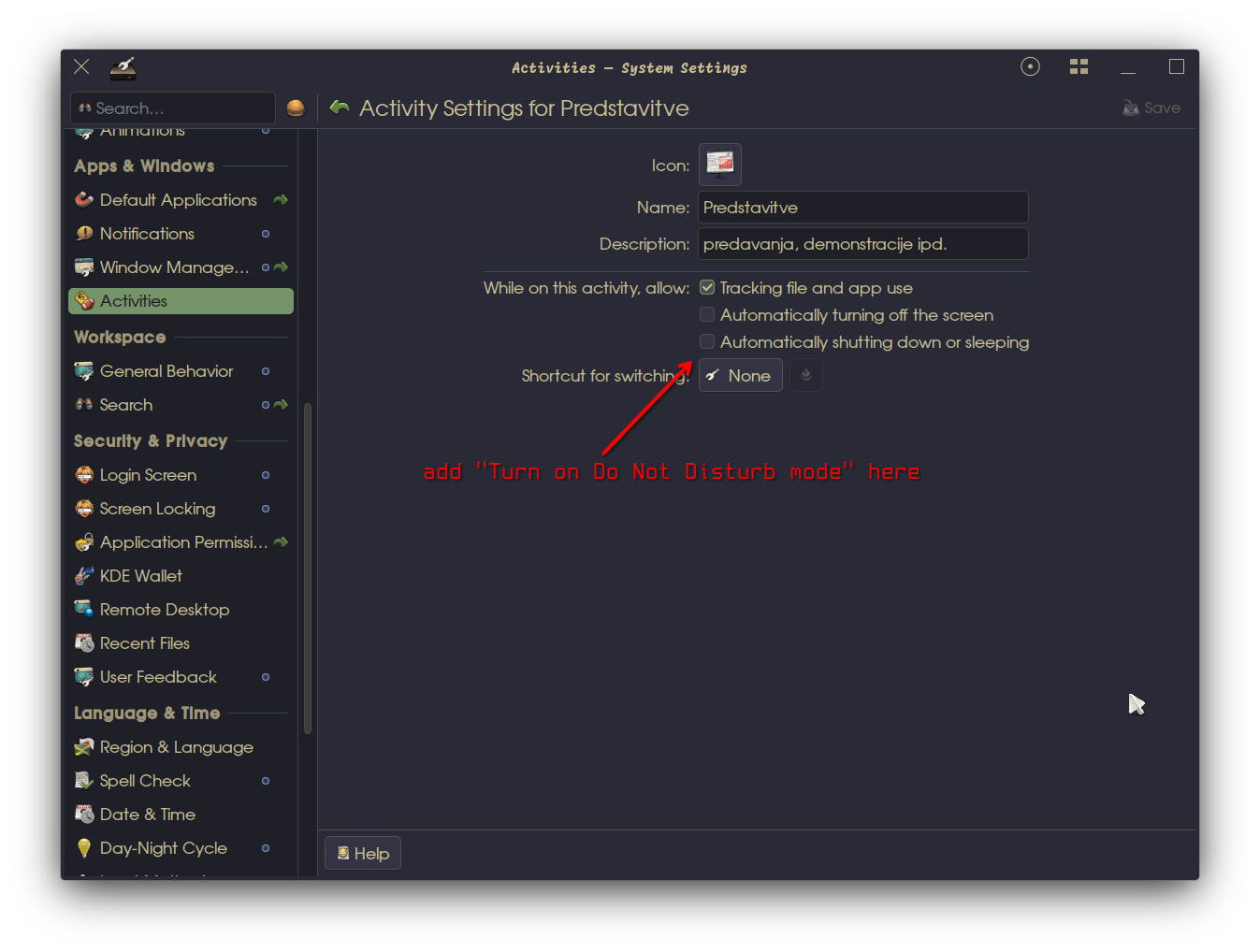
Screenshot of the System Settings showing an Activity’s settings, with annotation where the “Do not disturb” option should go

Another one that sounds like it would be a great first contribution to KDE.

The Workflow idea – the star of the show

While we were discussing all of the smaller and bigger things that we could do to make Activities better and compared how each of us understand and uses them, sharing papercuts and frustrations … an idea started crystallizing.

And I think we are on to something that could indeed be the next big step in how we use desktops.

Some friction that we all noticed with Activities is that they take time to set up – not much, but it adds up. What we need is a way to quickly start and quickly stop Activities.

So we started thinking what about if we flipped the Activity creation over and instead make it more like saving a file or a session. And that snowballed into the following use case:

  1. you are working on something on your computer
  2. you decide to do something else, but want to get back to that thing later on
  3. you click “save Activity” and the dialog asks you to:
    • provide the name for what you were working on (and icon), so you can find it later on
    • optionally, provide the description of what this thing is you are working on (or motivational message), so you can remember better
    • optionally, write a note on what you did (changelog)
  4. everything you were working on – the desktop setup (background, plasmoids, icons), files, application windows, scrapbook, etc. – gets shoved aside
  5. with a quick prompt you select whether you want to continue an Activity you saved before, or start a new one (from a template or blank)
  6. let us say, you decide to continue writing your thesis, that you have not touched since summer
  7. you are greeted with your last description/note and the changelog to quickly remind you where you left of
  8. a familiar desktop setup (backround, plasmoids, icons) gets you back in the mood, while scrolling through the history plasmoid’s timeline and seeing your thesis scrapbook provide the necessary context to start working on it again; you immediately see the relevant files too, as they are top on the recent and commonly used list here (or you even “favourited them”); the right Kate session is already there too, and the notifications are automatically blocked … everything you need to continue your research, apart from a nice cup of tea
  9. GOTO 1

As an analogy, one BoF participant called these “work snapshots”.

To achieve this without (re-)introducing needless friction again, such a workflow needs to accommodate for:

  • perpetual Activites – such as organizing, communication, general reading, time wasting, gaming, system tweaking, …
  • project Activities that have a start and and end – writing your thesis or book, a research paper, a programming project, planning the next vacation, etc.
  • single-use Activities – even shorter than projects, where you do not care about the history, you just want a clean slate to concentrate (perhaps from a template)
  • fall-back Activity – the “hallway” from which you choose where to go next
  • easy to create/modify Activity templates

What I described above is just the simple use case we collectively thought up during the BoF session. Shortly thereafter Andy Betts was amazing and started a more detailed design document in the KDE VDG. That is where you should go next, if this “Workflow idea” interests you.

There is still work to be done here and details to iron out, but this seems very achievable and it could turn out to be a killer feature of KDE Plasma.

More tricky ideas

As opposed to the above, I think7 that the below are some ideas that would need quite a bit more work added to get them working without breaking things elsewhere.

Activity-based app settings profiles

A common problem with Activities, and a reason for many to give up on them, is that unless a program has been specifically written to be Activity-aware, it can be a bit quirky and tricky to force it to work differently in several Activities.

To combat that, an idea was to use Activities as profiles/sandboxes for application settings. That would mean that if a program is not Activity-aware, its settings would get stored per Activity so it would essentially still act differently in different Activities. There is some ongoing work here already as part of a wider settings management system, but it is very early days.

If this works out, an interesting bonus would be that it might be possible to import/export settings or even sync whole Activities across different devices.

There are several complications to take into consideration though. Just to name a few that were mentioned at the BoF:

  • How to handle single-instance apps (e.g. KMail, KOrganizer, most communication apps …) that do their damnest to make sure there is only one instance of this app running?
  • Related to that, how to make sure that an application can be used with the same settings in different Activities, if the user wants that instead? And how to we present the two options to the user?
  • How to detect if a program works nicely with Activities or if it needs settings sandboxing?

Luckily, there is already an example of how this can work (or at least similar enough) – Activity-aware Firefox]11 creates a Firefox Profiles for each Plasma Activity to separate the tabs, history, settings between them. It works pretty well, but it has some caveats.

One participant presented a detailed use case on how they would like to use one Activity per client they consult. In each activity, they would like to have different Dolphin places/bookmarks, browser sessions/cookies (e.g. profile), recent files/history, projects/settings in the IDE, sticky notes/scratchpad, search settings in Baloo and separate MS Teams tenants.

Better context isolation (against AI)

Continuing with the sandboxing, the other talk that mentioned Activities (by Eva Brucherseifer and Jan Mühlig) was about a suggestion on how one could safely (and optionally) use AI on the desktop.

At the BoF we agreed that whatever we intend with Activities should work with no AI/LLM needed at all and that our scope is limited to Plasma and Activities.

I will still take this opportunity to point out a few things that I found interesting regarding that talk and even more so in the hallway discussions – and here I am not speaking for the BoF, but just sharing my personal thoughts12:

  • I found it interesting and exciting that others at the same Akademy, completely separately, decided to talk about Activities as a foundation for work separation and project-focused workflows. This reassures me that the base idea of a better and more prominent Activities workflow is sound.
  • LLM and AI agents are a thing. While no-one should be forced to use it, IMHO it is only time until we see wide-spread “AI agent as payload” malware – and with that not just voluntary, but also involuntary AI use.
  • From what I heard in the hallway, the way things are right now, once you install an AI agent on any desktop – FOSS or closed-source – it basically gets complete access to do whatever the user can do on it. That is scary.
  • Activities can be, and indeed seem like a good option, an integral part of setting guardrails around contexts, so an AI agent cannot access more than it is allowed to (within that Activity).

So, IMHO even if you do not subscribe to the workflow proposed by Eva and Jan, there is a lot of good points about hardening the desktop to make sure if an AI agent gains access to it, the damage to the privacy and security can be negated or at least contained.

Because this is a touchy subject, let me reiterate that this is out of scope of the Activities BoF and our current plans for making Activities easier to find and better to use.

… and now back to our regularly scheduled programme …

Better resource and session management with Activities

Resource management is also a topic, of course.

If this Activity-based Workflow takes off, we need to figure out how to manage resources on devices where a dozen – or even dozens! – of Activities are running at the same time.

Until a few versions ago, you were able to stop an Activity and later resume it. The idea was brilliant and I relied on it a lot in order to manage my cca. two dozen Activities. The problem was, that there were way so many edge case problems, you might as well look at a circle. So it got removed. (Some of us mourned, but it was the right decision.)

Still, if we run something like two dozen Activities and each of them has its own set of applications with different settings, as well as custom wallpapers and plasmoids – things add up.

An interesting idea that popped up during the BoF was that perhaps we could simply dedicate less resources to Activities that were not used in a while.

Luckily on Linux and other Unix-like systems we can tweak the “niceness” of processes. So we could make it that the longer an Activity has been inactive (i.e. not currently focused), the lower the nice and ionice values for the processes in it would get. And then at some point, we could even prompt the user if they want to close (and save the session of) an Activity that has been inactive for very long.

Especially the idea of closing of a session was something that we think is worth exploring even further. Even though the way Activities stopped/suspended before did not work really well, now that support for sessions in Wayland is progressing in Plasma, there is potential to do it right. From what I understand, the new xdg-session-management protocol would be key here (relevant news article).

Per-Activity sessions would greatly support the Activity-based Workflow.

Once you decide to do something else, when you end your current Activity, you could decide to either put it into background or stop it, so the resources it was using get released, (or delete it completely). If it runs in the background, it would become “nicer and nicer” in time. If it was stopped, the session would be saved to be later loaded up again.

Some further thoughts we gathered for future consideration on this topic:

  • What should be the default when switching from an Activity? Some suggestions to consider:
    • Perpetual Activities, when unfocused, should not automatically ask to be stopped even after a long time. The user can manually stop them anyway.
    • Is there any reason to ask the user when an (e.g. project or single-use) Activity gets unfocused, what they want to do with that Activity? Or is is too much chatter/friction and we should simply leave it to the “niceness and propose close session”-algorithm and the user’s direct control?
  • On reboot/login how should Activities get loaded, by default? Some suggestions to consider:
    • Perpetual Activities should get automatically loaded.
    • There should be an option to set an Activity to only load if explicitly requested by the user (i.e. “do not ask on reboot/login” option).
    • For the rest of Activities the user should get presented as suggestions to load after reboot/logging in. Maybe this specific option is a bad idea and we should only auto-load Perpetual Activities and let the user load the rest as they decide what they want to do.

Varia

Unorganized notes

Some more notes from BoF participants that I do not have enough context (ha!) about to expand in more detail:

  • private Activities (sandbox + Tor/proxy automatic setup)
  • separate Activities in System Monitor / grouping resources
  • premade templates
  • power management in Activities – probably not going to happen, that was removed a few releases ago for a reason
  • enable plugins in all subsequent sesisons for KDevelop/Kate
  • more Activity support from apps / KDE Gear: Kate, Kaidan, KMail, …
  • project overview in Activity
  • Activities as profiles with data isolation
  • switching between desktop layouts and themes
  • similar to profile features on mobile phone / sub-users
  • stopped using Activities because they did not stay on one project in an Activity, but got sidetracked all the time … and then forgot Activities exist
  • better WM support when cycling through windows
  • clarify difference with virtual desktops; often new users find about Activities, because they want to have a different wallpaper on each virtual desktop, and then they find a recommendation online that says to use Activities instead, so you can do that (but not what else are the differences)
  • it should be easier to build your own plasmoid, or even your own Activity layout
  • security and privacy options per Activity
  • I do not use Activities, but rely on virtual desktops for context separation and on (X11) session management; switching between contexts needs to be “instant”; time tracking would ne useful

The naming (non-)issue

Pretty early on in the discussion the naming issue arose. Because we were short on time and history has shown that this debate has no end, I decided to cut it short. To make up for that, let me explain myself here.

To get the obvious out of the way first: Yes, I agree “Activities” is not the best word to describe all that is possible with them, but I argue that that is fine.

When we think of a desktop environment, we think of windows, icons, menus and pointers – those are words we throw around every day, but have you ever thought how they bizarrely look nothing like their real-world physical counterparts13?

Imagine for a minute – and really try hard to imagine the following physical objects while you are looking at your actual physical desk14:

  • you repurpose a printed paper, intended to put on a wall instead on your empty wooden desk to make it pretty
  • then you put a bunch of religious art on said wall-decoration-covered desk
  • when poking a piece of religious art with a rod, a window magically appears on the desk (without a wall to support it)
  • oddly enough “opening” a window makes it appear – usually windows first have to exist, before you can open or close them
  • again, oddly enough, “closing” the window, destroys the window
  • through the window you see a bunch of text and a handful of buttons that are somehow stitched to whatever magic fabric is “in” the window (possibly the same invisible material as the wall holding the windows that you can freely move around and change the sizes of)
  • poking the buttons with the rod (through the window) sometimes makes things that you see through the window change
  • (all of this is still happening on your actual desk, keep that in mind)
  • there are files and folders on the desk – that at least make sense
  • you can put files into folders, but you cannot put folders into files (sic!)
  • in order to open a file or folder you need to poke the piece of religious art, that represents it, with the rod, and then a new window appears (“opens”) on your desk and you can see the inside of the folder through said window

Now tell me which drugs you were on if any of this made sense … and can I have some? 😅

And then even if we get the English naming just right, the question remains how that word can get translated into the 100+ languages of KDE.

Since Activities have existed since 2010 (and have their established translations), I think that it is fine to continue to use this name for them, as long as we explain and show in a better way what they actually are.

If an ideal name happens to drop into our collective laps, I agree we should take it into consideration, of course. But that is a much much lower priority than basically anything else in Activities.

What is Plasma anyway?

I recall a discussion with another participant that, just as me, has been a long-time heavy KDE user that I think is worth mentioning.

At an Akademy social event I claimed that KDE 3.5 with SuperKaramba was peak old/traditional desktop and that it would be a huge pity if we threw away all that massive innovation and work that went into the Plasma 4 rewrite, if we simply removed or hide all the weird cool stuff in order to make it look like a traditional desktop again. I argued that since no-one else is innovating, we would simply re-invent the KDE 3.5 with SuperKaramba again, just with better graphics.

KDE 3.5 with SuperKaramba (2005) … … compared to Plasma 6 (2026)

And Jason, I think his name was15, reminded me why “Plasma” was called the way it is (I am paraphrasing):

Plasma is a neither a gas, nor a solid(, nor a liquid).

And similarly, KDE Plasma is a malleable thing full of potential. Panels, windows, widgets, etc. – they are all there for the user to define what they want them to be. A chat, for example, can be in a window or it can be in a widget. That widget can be on the desktop or in a panel and you can move it from one into the other.

Apparently that was super noticeable on netbooks, where Activities were a central part.

This is also part of the reason why quite a few things on Plasma are abstracted into Baloo, Akonadi, etc. – because the same thing can be used in several places at the same time, sharing a common (local) backend.

With all the pain that came with Plasma 4.0’s instability, there was a great deal of innovation and flexibility – including Activities. And with ironing out the kinks and polishing, in time Plasma got more and more predictable, stable … and boring. And on one hand, that is great.

But, on the other hand, I think we should also continue KDE’s mantra of “Simple by default, powerful when needed” and not shy away from its powerful components and building exciting, fun and useful stuff with it.

If you have not yet, I warmly recommend you watch the KDE Documentary and browse the KDE Timeline.

Wrapping up

That was a long read …

So to summarize the important parts:

  • Activities are cool and we plan to improve them a lot
  • what I wrote above are a bunch of ideas in different levels of maturity, but none are set in stone or with a dedicated developer
  • we need help – if you are interested in any of the ideas above of Activities in general – join us on Matrix, Invent and the Activity Workflows issue

hook out → I apologize that this report took way too long, but I had a lot on my plate … some of which I will blog about very soon


P.S. People at the BoF complained that I used Oxygen icons. I hope my switch to Buuf made them happier 🤣


  1. Mostly because it is not as important as how people (can) use them. But also, because I am really not the right person to explain how Activities work underneath, as I have close to no clue. ↩

  2. Back in Plasma 4.x times, there was this plugin called WorkFlow, the description and short demo videos of which may be worth looking at to get a clue on how a visual way of using them looked like. ↩

  3. As an example, I am currently using 9 VDs, ordered in a 3×3 grid, which I have mapped to the NumPad. ↩

  4. Some others at the BoF had a similar analogy for Activites, but with rooms – office, kitchen, gaming room, study room etc. ↩

  5. Even if you “do not use Activities”, you are actually just using one Activity, so you do not notice the difference. Once you add another Activity, you will see that the “history” and “most used” in KickOff will be different between them. You can even set an Activity to not store the history at all. ↩

  6. Those already exist. Have for a long time. In fact, there used to be more power-management options you could trigger through Activities, but they got removed for technical reasons. ↩

  7. Then again, I am not (much of) a programmer, so I may be grossly misestimating things here. ↩↩

  8. In the same KIO slave, a somewhat hidden function is that you can limit it to just files with recentlyused:/files/; and to folders with recentlyused:/locations/. If I understand the KIO documentation correctly, there is more fine-grained information available there too, at least for files. ↩

  9. Crazy idea: can we make plasmoids slide out of windows? Imagine, pressing a global shortcut and the scrapbook slides out of the active window as in Scott’s demo, sharing the active window focus with the window it is attached to. If the windos is full-screen, it could slide out into the window instead, from the same edge. A repeat press of the shortcut key combination would close the scrapbook. ↩

  10. For those of us working remotely / from home, it would be really nice to get a reminder that work time is over. ↩

  11. Yes, I know the 1.0.0 should have been released quite a while ago, but my limited shell scripting knowledge is the bottle neck here. Some brave souls have volunteered to look into it and help out. Activity-aware Firefox 1.0.0 together with support for the new Firefox settings location should come out before end of year though. ↩

  12. For transparency’s sake, my current thoughts on AI are that LLMs are overhyped and that the bubble will burst soon-ish. In its wake, we may be left with some smaller, open-source, ethically trained, transparent local models and non-LLM AI, which if the environmental and societal negative impact can be drastically reduced, may be acceptable. I do not use LLM on my personal devices, but am open to limited other AI use (e.g. e-mail spam filters, face recognition in DigiKam, small local language model translations), again if FOSS and transparent/explainable. At work we have access to some LLM agents and while I am part of the team that reviews AI use (me, particularly, its impact on our intellectual properly), I extremely rarely use any LLM, as I typically do not find them very helpful. At this point, personally, I do not want an AI agent on my machine, but would like to have it hardened against that possibility. ↩

  13. Let us not even start with how “water vapour in the sky” / a common meteorological phenomenon suddenly means a bunch of remote computers and similar nonesense. ↩

  14. Bonus madness: (Virtual) desktops are running on a desktop (computer) that used to be situated on top of a desk, but is in practice commonly beneath it. Often, said computer is replaced by a laptop, which rarely sits on top of one’s lap and is most of the time (on top of a riser) on top of the desk. So a desktop computer is under the desk, while a laptop computer is on the desk. 🤔 ↩

  15. I am terrible with names, I apologize. I think your name was Jason, please correct me if I am wrong. ↩

So... the last few days have been mostly about Oxygen's symbolic action icons.

And there are A LOT of them.

Search, mail, drawing tools, dialogs, graphs, distribution, alignment... and then another icon whose name sends me off trying to figure out what the thing actually does before I can even start drawing it 🙂

One of those jobs where you finish a whole bunch, look at the list, and somehow the list still looks ridiculously long.

55 Oxygen symbolic action icons on a white background
A wider selection from the workbench: search, mail, drawing, distribution, dialogs and navigation. Click to inspect the full sheet.

These are just a selection. Fifty five little things, which looks like quite a bit when you put them together... and then you remember each one can need several size versions.

So yes... quite a bit of work. A frankly silly amount of work.

Drawing, adjusting, comparing, cleaning up the SVG, checking the other sizes, finding something that feels wrong, going back to the first one. Repeat. Repeat a few hundred more times 😀

I wrote about this before in “Small Icons, Big Problems”, but its probably even easier to miss with symbolic icons. They look simple. A few lines, a small blue detail, surely that cant take very long...

heee...

At 16 pixels some of those lines simply dont fit anymore. So the drawing changes. Details disappear, proportions move around, and the thing still has to explain the same action. At 32 you have a bit more room to breathe. The 24 pixel versions often use the 22 pixel drawing with padding around it, so those are not necessarily a new drawing either.

Have a look at the mail icons below. Especially the forwarded/replied one. Same job, different little solutions depending on how much space there is to do it.

Ten icons compared at 16, 22, 24 and 32 pixels
Different size drawings, rendered smoothly. Click for the full sheet.

The bigger examples above are rendered smoothly from each size's own SVG, with the small version beside them. So you can actually see what changes without needing to put your nose against the screen 😉

And then there is the other part of this work...

The spreadsheet.

Yes. Very glamorous. Come for the icons, stay for the spreadsheet 😀

I'm filling in an icon inventory spreadsheet, comparing whats there in Breeze, Oxygen and the symbolic set, keeping track of the different sizes and links, and adding notes as I go. What does this action mean? Where is it used? What is the distinction between these two almost identical things?

Some of the notes are just there so I dont have to investigate the same thing all over again next week. Others are clarifications that actually matter when deciding what to draw. A graph icon gets a lot easier to think about once you know what the button is supposed to do 🙂

I'm also noting possible names for the future. Something a bit more “freedesktop-ish”, more consistent and a little less of a guessing game.

For example, dfrac has Math-fraction-display written down as a possible name. There are notes for making some of the LabPlot layout names easier to read too. These are working notes, not a finished naming scheme, and certainly not me saying everything has already been renamed. Still plenty to figure out there.

The spreadsheet linked here is a snapshot of that work in progress. Expect gaps, questions and things I will probably change my mind about. Thats rather the point of writing them down 🙂

So thats where quite a few of the last few days have gone. Into an enormous pile of very small drawings, their other sizes, and notes about what on earth some of them are supposed to mean.

Not quite as shiny as a new application icon with an unreasonable number of reflections... but there is a ridiculous amount of care going into these little things too.

And still a ridiculous amount left to do.

Anyway... back to the list 😉

Welcome to a new issue of This Week in Plasma!

This week the Plasma team continued to polish up Plasma 6.8, fixing many bugs. Most of the regressions reported in Plasma 6.8 have been resolved now, so the team moved onto older bugs and squashed a very large number of them! In addition, there are some nice UI and performance improvements:

Notable UI improvements

Plasma 6.8.2

The Power & Battery widget’s “Manually Block Sleep and Screen Locking” switch now synchronizes its state across multiple instances of the widget. (Christoph Wolk, KDE Bugzilla #527560)

Plasma 6.8.3

When Plasma is asked to load a third-party shell package with invalid QML in it, it no longer crashes in a loop, but rather fails to loads and shows you an error message indicating what the problem is. (Marco Martin, libplasma MR #1610 and libplasma MR #1617)

When using the Window List widget, really long window titles can no longer push other widgets sharing the same panel off the end; now the maximum length is capped at a certain point, and the text elides. (Niccolò Venerandi, KDE Bugzilla #456148)

Using the Kickoff Application Launcher widget’s “Switch sidebar categories when hovering over them” setting no longer unnecessarily changes the height of the sidebar list items. (Niccolò Venerandi, KDE Bugzilla #524003)

The Folder View widget no longer lets you configure it to use manual positioning in cases where this isn’t actually supported. (Niccolò Venerandi, KDE Bugzilla #513880)

If you use the Pager widget at a large size, the app icons it shows now grow when needed to fit better within their window outlines. (Niccolò Venerandi, KDE Bugzilla #518625)

Plasma 6.9

Discover now lets you share and copy appstream:// URLs for locally-installed Flatpak packages too, not just ones that were installed over the network. (Taras Oleksyn, KDE Bugzilla #459827)

Pressing the “Full Screen” button on a website shown in the Web Browser widget now shows the content full screen, as you would expect it to. (Niccolò Venerandi, KDE Bugzilla #507460)

The Timer widget has received a significant round of visual and functional polish to make sure it looks and works well at all different sizes of panels. More is on the way for this widget, too! (Christoph Wolk, kdeplasma-addons MR #1131)

Windows marked as excluded from screencasting are now also excluded from the Task Manager widget’s tooltip thumbnails. (Ramil Nurmanov, KDE Bugzilla #516184)

The Konsole Profiles widget now shows the default profile too, not just custom ones that you created yourself. (Niccolò Venerandi, KDE Bugzilla #465553)

Notable bug fixes

Plasma 6.6.8

Panel tooltips throughout Plasma that only show a single label no longer use reduced opacity for the text; now this is only done for subtitles when there’s a larger title. (Filip Fila, libplasma #1611)

Before
After

Tab buttons throughout Plasma no longer have a weird almost invisible background. (Christoph Wolk, KDE Bugzilla MR #519745)

Plasma 6.7.6

Fixed a bug that could make screens that powered down in an unusual way get stuck at 30% brightness (or a similarly low level) when they woke up again. (Jakob Petsovits, KDE Bugzilla #523988)

Plasma 6.8.2

Fixed three cases where Discover could crash while checking for updates. (Aleix Pol Gonzalez, discover MR #1200, discover MR #1446, and discover MR #1447)

Fixed a regression that made notifications inappropriately appear in the top-left corner of the primary screen when configured to follow the Notifications widget while the only Notifications widget was located on a different screen. (Sven Muckl, KDE Bugzilla #525536)

Fixed a regression caused by a Qt change that made text in the Icons and Text Task Manager widget elide too early. (Nate Graham, KDE Bugzilla #526972)

Fixed an issue that made remote desktop sessions occasionally fail to start from Flatpak apps. (Matteo Beretta, KDE Bugzilla #527555)

The setting to remember the active keyboard layout on a per-application basis now works on Wayland the way it did on X11. (Marián Kadaňka, KDE Bugzilla #452445 and KDE Bugzilla #476831)

Fixed a regression that made the Digital Clock widget only respect some OpenType features in the font it’s using, rather than all of them. (Niccolò Venerandi, KDE Bugzilla #524257)

Fixed a small bug that requires clicking the “Exit Edit Mode” button twice after the first time you entered Edit Mode after logging in. (Niccolò Venerandi, KDE Bugzilla #527738)

Plasma now displays HTML tags containing single-quotes correctly in notifications. (Niccolò Venerandi, KDE Bugzilla #506733)

The “Picture of the Day” wallpaper’s preview thumbnail now reflects the final appearance on the desktop, taking into account the chosen scaling/cropping mode. (Niccolò Venerandi, KDE Bugzilla #505690)

Plasma 6.8.3

Fixed a regression that made Plasma crash when opening the launcher widget with a keyboard shortcut on systems with a combined total of screens, virtual desktops, and activities greater than 16. (Mauricio Šmit, KDE Bugzilla #527810)

Fixed a regression that made panels cloned onto other screens forget which screen they lived on and move over to the primary screen. Unfortunately this does not fix the issue for panels that already moved around; you’ll have to move them back yourself. But it does fix the issue for newly-cloned panels. (Méven Car, KDE Bugzilla #527445)

Fixed a regression caused by a Qt change that made many tooltips throughout Plasma lose their styling. (Filip Fila, KDE Bugzilla #527730)

The tooltip in Info Center’s energy usage graph now shows the correct year, rather than a year 57 years in the future! (Shehriyar Qureshi, kinfocenter MR #321)

Battery charge limits you’ve configured are now mentioned in the Power & Battery widget only for the batteries they affect, and not — for example — for any Bluetooth mice and headsets’ batteries shown there. (Niccolò Venerandi, KDE Bugzilla #448020)

The desktop context menu’s “New Folder” menu item now shows its keyboard shortcut as expected. (Niccolò Venerandi, KDE Bugzilla #473045)

“New Folder” menu item showing its expected Ctrl+Shift+N shortcut

Fixed a fairly obscure bug that would make un-favorited apps in launcher menus become favorites again after a restart under certain conditions. (Christoph Wolk, KDE Bugzilla #527651)

Plasma 6.9

Fixed an issue that occasionally broke the display of window thumbnails in the Task Manager widget’s tooltips. (Zhongli Wu, KDE Bugzilla #524881)

System Settings’ sidebar now respects the use of transparency in your color scheme or application style. (Christoph Wolk, KDE Bugzilla #507622)

Fixed a glitch in the desktop’s selection rectangle that could make it reset its origin point if you deleted items using the keyboard while still dragging the rectangle using the pointer. (Christoph Wolk, KDE Bugzilla #526073)

Notable in performance & technical

Plasma 6.6.8

Fixed the Astronomy Picture of the Day wallpaper after it broke following a data change on NASA’s side. (Anuj Dhavalikar, KDE Bugzilla #526447)

Plasma 6.8.2

Fixed a regression that significantly degraded game performance. (Xaver Hugl, KDE Bugzilla #527628)

Plasma 6.9

The image upscaling filter used in KWin’s Zoom effect now has a substantially lower performance impact. (Oliver Schramm, kwin MR #9992)

Plasma now automatically cleans up stale entries for desktop file and folder positions in its config file, preventing the file from growing to a massive size over time and slowing down Plasma in a variety of ways. (Akseli Lahtinen, KDE Bugzilla #469445)

KRunner’s browser bookmark search feature now works with modern versions of Firefox (and its forks) that store their configuration data in ~/.config. Note that this fix only affects non-Flatpak packaging; more work will be needed to add support for Flatpak packaging. (Méven Car, KDE Bugzilla #519712)

Frameworks 6.32

A major data integrity bug has been fixed at long last: progress indicators moving or copying files to an external disk are now fully accurate! Read more about it on Méven’s KDE blog. (Méven Car, KDE Bugzilla #281270)

Moving or copying files over locally-mounted network shares is now substantially faster. (Méven Car, KDE Bugzilla #458001)

How you can help

KDE has become important in the world, and your time and contributions have helped us get there. As we grow, we need your support to keep KDE sustainable.

Would you like to help put together this weekly report? Introduce yourself in the Matrix room and join the team!

Beyond that, you can help KDE by directly getting involved in any other projects. Donating time is actually more impactful than donating money. Each contributor makes a huge difference in KDE — you are not a number or a cog in a machine! You don’t have to be a programmer, either; many other opportunities exist.

You can also help out by making a donation! This helps cover operational costs, salaries, travel expenses for contributors, and in general just keeps KDE bringing Free Software to the world.

To get a new Plasma feature or a bug fix mentioned here

Push a commit to the relevant merge request on invent.kde.org.

Friday, 30 October 2026

Haruna version 1.9.0 is released.

If you like Haruna then support its development


Download

flathub logo

Windows version:

Availability of other package formats depends on your distro and the people who package Haruna.

Feature requests and bugs should be posted on bugs.kde.org, ignoring the bug report template can result in your report being ignored.


Known issues

  • Chapter markers can have different widths when using fractional scaling

  • The animation for the playlist can be stuttery/slow when playback is active. You can improve it by creating two custom commands that run on startup:

    • set display-fps-override 75 (replace 75 with your monitor's refresh rate)
    • set video-sync display-resample

    These don't work for variable refresh rate monitors.

Changelog

1.9.0

Features

  • open folder, available in the file menu, hamburger menu, context menu and through the Ctrl+Alt+O shortcut
  • Osd settings page, with control over which actions show the osd
  • transcript panel that shows the subtitles, can be accessed with Ctrl-P and from the subtitles menu
  • explanatory tooltips can be turned off in Settings > General > Show explanatory tooltips (can still be shown by pressing alt key)
  • for youtube urls the seekbar shows the buffered part of the video that can be immediately seeked to
  • youtube urls are resolved in a better way, instead of one yt-dlp process per url, now one process handles multiple urls and only 3 processes run at the same time
  • Database settings page, allows clearing database tables
  • file metadata is cached in the database for faster loading, can be updated through the playlist's context menu
  • simplified chapter marker to just a vertical line, chapter title is shown in a tooltip together with the time position and preview thumbnail

Playlist

  • only active playlist is loaded at startup, the others are loded when switched to
  • playlist tabs are closed immediately with middle click rather than having to hold the button pressed
  • moved toolbar under the tabs
  • default playlist is saved and restored like the other playlists too, rather than being populated based on last played item
  • extended M3U playlists are supported now, only title and duration
  • removed compact style

Bugfixes

  • wrong playlist item marked as playing after removing an item before the playing one
  • broken thumbnail generation
  • subtitles settings page being slow to open

Last weekend I joined the OSM Hack Weekend at Wikimedia Deutschland’s office in Berlin, mainly to work on a few Transitous-related topics.

A bunch of participants with laptops sitting around large tables.
OSM Hack Weekend at Wikimedia Deutschland (source)

Schedule data augmentation

One topic we wanted to move forward was how Transitous can augment the public transport data provided by operators and agencies, as having people from Transitous, OpenStreetMap and Wikidata together in one room is the ideal place for that.

Official public transport data often only covers the bare minimum, while Transitous and apps using it such as KDE’s Itinerary are continuously increasing the level of detail. A few examples:

  • Translated, transliterated or otherwise localized names for operators, stops, lines, etc.
  • Extended route types rather than just “train” or “bus”.
  • Line colors and logos.
  • Accessibility information about stops or vehicles.
  • Information whether a service requires a mandatory reservation or a surcharge.
  • Information whether taking along a bike is allowed, and whether that might require an extra ticket/surcharge.

Crowd-sourcing works for filling such gaps, and people are spending quite some effort on this, as seen e.g. in an 8.000 lines Lua import script patching line colors into the German public transport dataset. This isn’t really maintainable and scalable though.

That’s where OSM and Wikidata come in. Some of the extra data we want is already in there, and more importantly many of the objects we want to augment already exist in there (stops, operators/agencies, public transport lines, vehicle types). Collecting data in there would also make this more widely usable than just for Transitous.

Easier said than done though, as it’s not always obvious what should live in OSM and what should live in Wikidata. Public transport lines are particularly contentious, as they have a geospatial aspect but are difficult to maintain in OSM due to the way they are modeled, and likewise Wikidata wouldn’t want to see every bus stop in the world added just to model line stop sequences.

Another challenge is how to efficiently collect and match all this to the existing public transport data, as that generally doesn’t come with stable identifiers we can rely on. The approach currently explored is to generate a partial pseudo-GTFS feed from the OSM and Wikidata data, which MOTIS should be able to match and merge against the schedule data with little changes, using its existing matching and de-duplication infrastructure.

With another relatively small change to MOTIS we should also be able to retain and pass through Wikidata ids to clients, potentially enabling other interesting usecases there.

For more details also see the meeting notes in the Transitous wiki.

Mandatory reservations and surcharges

We also discussed how to model mandatory reservations and required surcharges in GTFS. MOTIS can also consider mandatory reservations during routing and avoid such services, which can be useful when you have a flat rate ticket for other services already. No matter whether operators provide this information themselves or whether it’s augmented from other sources, it needs to be properly represented in the data model though, which currently isn’t the case.

This tends to be somewhat abstract work, coming up with definitions of what a reservation and a surcharge are, and working through possible similarities, interactions, conflicts and ambiguities with existing elements of the GTFS data model such as the pick-up and drop-off constraints.

The best approach we could find would be an extension to the booking rules object, something currently mostly aimed at on-demand services but which should be flexible enough to also model e.g. services that require a reservation only during parts of their run, such as DB ICEs crossing into France.

Transitous usage policy

Something that unfortunately needs continuous attention is adapting and fine-tuning the Transitous Usage Policy. In recent weeks the main Transitous Matrix channel has been flooded with overly lengthy LLM-generated usage approval requests for LLM-generated single-use applications. These were not and are not the intended target audience of Transitous, but given their single-use nature most of those will never result in a relevant resource usage. The biggest problem they cause for now is making our main communication channel hard to use.

If the usage policy is actually read and understood we should hopefully see an improvement there now.

Upcoming conferences

We also did a bit of coordination and preparation for the larger events coming up in the second half of the conference season and which all have their CfP deadlines (very) soon:

Those are good opportunities to meet the Transitous team or the Open Transport community in general, same for the upcoming hack weekends listed on the Transitous website.

Recently I had the pleasure of talking with Jonah Naylor of the SteamOS Gamer magazine for an interview about KDE’s 30th birthday!

The interview appears in issue 2, which you can buy in digital or print form (or as an ongoing subscription). Here’s a preview:

We had a nice discussion about KDE’s history, the Steam Deck, weird quirks about me, and my favorite video games — this latter part unfortunately being woefully out of date, as I’ve become completely obsessed with the magnificent Terra Invicta since the magazine went to press!

Thursday, 29 October 2026

Kirigami Addons 1.16.0 is out! Kirigami Addons is a growing collection of nice components you can use in your Kirigami and QML applications.

Platform Integration

A huge chunk of the development for this release was dedicated to better platform integration.

Material

The highlight is the support for the Qt Quick Controls Material style. This means when using Kirigami Addons components with the Material style, they will blend more with a native application on Android. It’s not perfect yet and there are still some rough edges in the whole stack, but it seems promising for our flagship applications on Android like Itinerary or Tokodon.

Here are some screenshots:


Note that this is still missing a new release of Kirigami and there are a bunch of merge requests still under review (but the list is getting smaller).

I am hoping this will make the Kirigami ecosystem more attractive to mobile application developers as they can target both Android and Plasma Mobile, while having a native look and feel. Additionally, I am working on material icons theme which goes hand to hand with this style.

macOS and iOS

On iOS, Máté Gyöngyösi fixed a build issue on iOS with static linking.

And on macOS, Ishan Mitra made the settings dialog use a regular modal window with a title bar and close button.

Similar to the material style, if anyone is interested in working on macOS or iOS styling, while I don’t have access to the hardware, I am happy to help and support this initiative.

FormCard

The FormCard module also received several improvements.

Méven made FormCardDialog scrollable when there is too much content.

FormCardDialog also has a new API autoSeparators which is similar to the one added in the last release for FormCard. Internally all uses of FormCardDialog and FormCard now use this as this makes the code simpler.

The FormLinkDelegate now has a tooltip to show the destination URL and we disabled the mobile-centric long-press menu on desktop, but it is still available via right click.

There were also various small improvements and bug fixes to the AboutPage. The hard-wrapped license texts are now correctly displayed. We are now supporting bug-report addresses which are email addresses. Some visibility binding loops were fixed in the AboutPage and FormGridContainer and finally the accessibility was improved.


Settings

Search in the settings dialog now includes the contents of settings pages that use FormCards, and keyboard navigation has also been improved.


I18n

We migrated to the relatively new I18nContext system from ki18n, which means we don’t rely on deprecated context properties for internationalization anymore, which helps with the modern QML tooling.

Other

  • The date and time popups are now working correctly with right-to-left layouts.

  • ConvergentContextMenu handles actions with mnemonic text.

  • Jonah Brüchert made KirigamiAppDefaults handle setting a QWidgets style when using org.kde.desktop style. And Bill Trần fixed a crash in KirigamiAppDefaults.

  • Mathis Brüchert made some small styling changes to RadioSelector.

  • Sarah Stamper fixed multi-char emojis in the Avatar and AvatarButton components.

  • Christoph Martin improved the navigation in the documentation.

Thanks to everyone who contributed fixes, ideas, and bug reports!

Packager section

You can find the package on download.kde.org (kirigami addons) and it has been signed with my GPG key.

I honestly love the 3d view of harmonicon, but it’s just eye candy. The amount of lines of code is exceeding 75.000 so I took the difficult decision to remove it, so I can focus on more important tasks.

I believe that harmonicon currently is the best harmonica song editor that exists, and removing some eye candy helps me focus on what it actually needs: polish and bugfixes.

That’s all.

Tuesday, 27 October 2026

We are happy to announce the release of Qt Creator 21 RC.