The Facebook Like Box WordPress Plugin by WPdevart and smplug-in helps you promote pages and post, same as you normally do on the Facebook site itself.
There are many WordPress Plugins for adding Facebook like boxes to a WordPress site. This one is different as it adds more than just a like box. A Facebook Like Box allows visitors to “like” your post or Page content and connect it by sharing on their Facebook site. This Plugin adds a WordPress Widget, a shortcode for embedding in the site’s content, and the ability to actually create popups for Likes and Facebook sharing.
The Plugin is also highly customizable, allowing height and width to be set, languages, and colors. You can also set it as a Sticky box, and show or hide Friend Faces, and other visual elements. Continue reading Facebook Like Box WordPress Plugin→
Do you like Time Travel? Do you also like saving your work files? Well now you can do both at the same time by using Git to save your files while keeping track of each change, to each file along the way. Once you’ve saved (committed) a file in the project, the old version is saved forever allowing you to travel back through time to make changes or revert back to old files when needed.
Imagine your just uploaded your beautiful new custom theme to your WordPress site and you realize that you forgot to save your old CSS file and you’ve just overwritten the old one on your web server. You now have no way to revert back to your latest version of the old layout in case you have problems with browser compatibility in the new layout.
Git is a very powerful version control system that allows you to keep track of all your files during a project so losing file version along the way will never happen. This requires a few extra steps during your saving process, but it has saved the skins of many programmers from all over the world every day. Now, we should all try to save backups of our projects and files to protect from data loss and keeping old versions. Git takes that idea but saves each version of that file since it was created. It also protects someone from editing a file at the same time someone else is, preventing overwriting of each others new version.
Let’s take a look at the Git structure to get a clear picture of how the system checks out and references each file.
Git file reference structure
This table shows us how Git associates each file to the master project. Each time a change is made, a “snapshot” of the entire file structure is made. This allows us to see our project in front of us, while old versions are saved and hidden from view unless we physically use our time travel capability to revert. Additionally, if no changes were made to a file in a new commit, the old version will automatically be referenced instead of uploading the unchanged file into the project commit. These basic features are why Git is so powerful and efficient, that might explain why 42.9% of professional software developers reporting that they use Git as their primary content version control system.
To learn more about Git the features and the benefits, please refer to these links from which this article was sourced.
The NextGEN Gallery Plugin is the most popular gallery plugin in WordPress. Its a powerful engine for uploading and managing galleries of images, as well as batch upload, import meta data, add/delete, rearrange, and sort images.. you can edit thumbnails and group galleries into albums
This is what our Gallery page looks like before the WordPress Plugin.
After activating the WordPress Plugin, the gallery button is added on posts and Pages. Click it to add images from the gallery Plugin.
Click to add files then drag and highlight all the images you want to put into the gallery, then click upload.
After you have uploaded the images for the gallery there are many other options for managing your galleries and your albums that can be found in 3 places shown in the images below.
Instagram Journal WordPress Plugin that allows you to host Instagram API content on your WordPress.org blog. The plugin comes with many features and special effects that can be applied to your photo journals. This lends itself to a dynamic user/viewer experience.
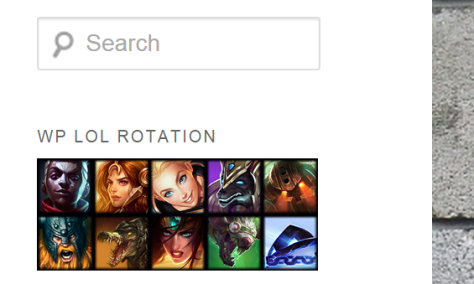
WP LOL Rotation WordPress Plugin by WordPress development legend Ozh Richards is great for anyone looking to create a League of Legends oriented site. It allows you to display the current free champions available for a summoner (League of Legends players). This Plugin creates a widget that updates automatically with the weeks free champions.
This is a great Plugin for admins who are hoping to inform a fellow League of Legends player of who they can play free this week. Sites like mobafire use widget similar to this one to help reader stay informed on who is free or entice a reader to try a champion previous unavailable to them.
After activating it, you can go to Dashboard>Appearance>Widgets and dragging it into the Main Side Bar to have it display on your site.
This is what WP LOL Rotation looks like in the Widgets Menu.
MailChimp is a Plugin that allows you to add sign-up forms and sign-up checkboxes to your website.
You can use the sign-up forms anywhere in your website where you would use a short-code, widget, or template function. You can use the sign-up checkboxes in places like your contact page in order to boost your email or newsletter subscribers.
The F1 widget is for serious race enthusiasts. It’s a countdown clock that shows time left until the next Formula 1 competition race. It updates automatically for the next race. You can use the F1 real time countdown widget on your site, phone, blog or other online platform. Always be prepared for the next race. Keep this one on your computer desktop or blog/webpage too.
Here is the widget
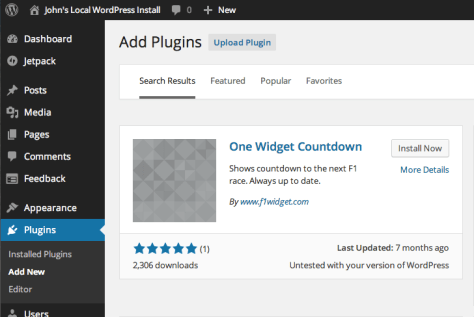
Add Plugin
Start by going to your WordPress backend and select “Plugins.” Search for “One Widget Countdown.” Select “Install Now.”
Install Plugin
From “Appearance” select “Widgets” and then drag the “Formula 1 Countdown Widget” into the sidebar or other widget area based on your theme.
Configure Plugin
In the sidebar you can then configure the widget to display as narrow or wide, choose the language (default is English), and then choose F1 cars or MotoGP motorcycles.
Language
Narrow
Wide
Code
In addition to adding a widget in WordPress, you can copy code provided on their website and add flash to other non-WordPress sites.
The Formula 1 Widget is very easy to install. Whether you use a widget in WordPress or just copy the code and insert it into your site or blog wherever you want, you can keep a close watch on the countdown to the next big race. That is all, enjoy!
bbPress is the forum creation WordPress Plugin for WordPress sites. It is used by many users and is worked on by the same teams at Automattic. Forums are used all over the web to increase the amount of continued reader/follower interaction. Almost any type of company can benefit from adding forums to their site. You can you use them for support of a product that you sell, and as a way of having other people in the community around your site help each other. You can also use forums to bring your discussions out your comments and into a single place where it can be more structured.
You’ve just started your new WordPress site, and you are browsing the selection of Themes WordPress has to offer. You fall in love with a Theme and start filling it with content. Then you discover a huge flaw. You hate how your pictures align, and how your headings look. With a Sandbox post you can alleviate that issue.
A Sandbox is a term related to the sandbox you might have played in and built sand castles in as a child. It is a playground for working on concepts and exploring your imagination. Test Driving WordPress – WordPress Codex
Jetpack is a single plugin that gives you the most powerful WordPress.com features, hooking your self-hosted WordPress site to WordPress.com’s infrastructure to take advantage of robust stats, easy social sharing, customization, traffic, mobile, content, and performance tools. These powerful features were previously only available to WordPress.com users.
The Jetpack team is made up of employees of Automattic, the makers of WordPress.com. Years ago WordPress.com blogs had easy access to a lot of features that really weren’t available to self-hosted WordPress sites unless you wanted to install and maintain many individual plugins. After enough interest from self-hosted sites to have access to the same features with only a click of the mouse, the great developers of Automattic created Jetpack. Self-hosted WordPress users can install over two dozen popular plugins with only one click. And of course it’s that easy to update them as well.
WP Tavern reports that AppBuddy, a social networking app for iOS and Android that helps to create a social media app for WordPress sites, has a new extension and it was presented at BuddyCamp for BuddyPress users.
This new extension is designed for WordCamps, WordPress conferences, that are being hosted by the Armchair program. On May 9, 2014, this extension was made assessable to customers who had the Agency bundle.
The team of created AppBuddy is working on making the app run faster by using the local storage. The usability of the camera is already in place. Live updates to BuddyPress notification are being made possible in the next couple of weeks. In the future the team of AppBuddy hopes they can make the phone contacts able to connect with this app to make it easier to connect with friends. According to the developer, Messenlehner:
It is a powerful tool for people who have big ideas but don’t have the development skills to realize them and don’t want to spend $100,000 developing a custom app.
The AppBuddy can be downloaded from WP Armchair site or through the app stores.
WordPress is already a fantastic platform for search engine optimization, however WordPress SEO by Yoast, a SEO enhancement Plugin, takes the power of the Internet and places it right in your hands. Properly configured websites that take advantage of SEO can reap the potential benefit of some serious traffic for your site.
It not only usefully supplies the titles and descriptions of a site’s pages and posts, but it helps with the site’s design process by designing it from the inside, out.
Create Content that People will See
The snippet preview lets you see what your page will look like in the search results so that adjustments can be made (such as shortening or elongating code or tags) accordingly to make all the meta data and other attributes fit your SEO plan, and assure that the search engines properly process your site.
Domain Name Services (DNS) is a service which exist to help us humanize the addresses of networked resources. Humans remember words as a whole easier than numbers representing octal based Internet Protocol addresses of those same networked resources be them across the Wide World Web or just an arms length away on our local network.
That was a mouth full. Essentially through DNS you can type in a URL into your favorite web browser and through the process of name resolution your system contacts a server acting in your behalf to find the correct IP address that matches the human oriented address you type in.
Sounds simple but a lot of chatter between various servers near and far may happen just to pull up that favorite site that you wish to view. First your own system will see if it has the particular IP/URL pairing locally in it’s own tables. On your computer this information will be kept in a host.txt file and depending on the operating system the location varies. Continue reading Domain Name Services: Postman of the Internet→
Ozh’ Tweet Archiver is a plugin that was designed to be a powerful plugin tool that will give Twitter users the ability to archive all their tweets to their current or even a new Twitter Themed WordPress site. The Ozh Tweet Archiver is a very resourceful plugin for active Twitter users who have sent out over 3200 tweets, and are having difficulties tracking down some of those older tweets they sent out days, months, or years ago.
Good luck finding them because Twitter does not keep track of them.
How Ozh’ Tweet Archiver Plugin Works
Ozh’ Tweet Archiver plugin should be installed on a fresh WordPress.com site or a sub-domain of a current WordPress site. This free plugin will archive all of your tweets to your WordPress site, automatically. The Ozh’ Tweet Archive plugin will make life so much easier since searching on WordPress is way more effortless then Twitter.


 The NextGEN Gallery Plugin is the most popular gallery plugin in WordPress. Its a powerful engine for uploading and managing galleries of images, as well as batch upload, import meta data, add/delete, rearrange, and sort images.. you can edit thumbnails and group galleries into albums







 ClarkWP WordPress Magazine