

Popis
Finally, WordPress analytics you’ll actually use
Google Analytics is overkill. Most other WordPress statistics plugins are cluttered and confusing. You just want to track visitors and know what’s happening on your site, without a data science degree.
Burst Statistics gives you a clean, intuitive analytics dashboard focused on the metrics that actually matter. No external analytics accounts. No complex setup. Install, activate, and understand your website traffic in seconds.
Trusted by 200,000+ WordPress sites. Built by the team behind Team Updraft, known for UpdraftPlus, WP-Optimize, and All-In-One Security (AIOS).
Co říkají naši uživatelé
„Finally, an analytics plugin I can actually explain to clients.“
— @anguskeystone on wordpress.org„I tried WP Statistics and Independent Analytics, but they’re overloaded and confusing. Burst’s UI is intuitive and focused on what matters to me.“
— @vallered on wordpress.org
Proč Burst Statistics?
Analytics designed to be actionable
Other analytics plugins throw everything at you. Burst shows what matters, visitors, pageviews, referrers, top pages, in a dashboard you’ll actually use. No data overload. No confusing menus. See why Burst is perfect for bloggers.
Privacy analytics by design
All site stats stay on your server, making Burst a true local analytics solution. No external tracking. Your data is yours, we never see it without your explicit permission. Designed for GDPR compliant analytics out of the box. Read why Burst Statistics is privacy-friendly.
Zero setup friction
Install, activate, done. No Google Analytics account, no GA4 setup, no tracking codes, no configuration headaches. Start seeing live visitors immediately. New to analytics? Start with our guide on WordPress analytics.
WordPress-native analytics
Not a port from another platform. Built specifically for WordPress with native performance and seamless integration. Works with WooCommerce, blogs, business sites and membership sites.
Lightweight analytics, fast by default
Optimized database queries. A tiny tracking script under 4 KB. No external dependencies slowing down your pages. Designed to track accurately even when using aggressive server-side caching. See the proof in does Burst slow down my website.
Vlastnosti
Understand your website traffic
- Top performing pages and posts at a glance
- Track key metrics: visitors, sessions, pageviews, bounce rate
- Breakdown of visitors by device (desktop, tablet, mobile)
- Filtrovat data podle vlastních časových rozsahů
- Compare traffic between periods
Analýza v reálném čase
- Zjisti, odkud přicházejí návštěvníci v reálném čase
- See the specific pages users are visiting now
- Live count of active users on your site
Podívej se, jaký obsah funguje nejlépe
- Nejlepší stránky a příspěvky seřazené podle zobrazení
- Porovnejte libovolný časový rozsah
- Sleduj výkon jednotlivých stránek
Custom conversion and goal tracking
- Track views, clicks and WordPress hooks
- Track WooCommerce analytics & sales (Burst Pro Business)
- Track custom events and conversions
- Step-by-step setup in our goals guide
Privacy-friendly analytics without compromise
- 100% self-hosted, all statistics stored locally in your WordPress database
- Cookieless tracking option, a cookie free analytics setup with no consent banner required in many countries
- Analytics designed to support GDPR, CCPA, DSGVO, AVG, RGPD and PECR compliance
- No data shared with Google, Facebook or any third party
Zůstaňte v obraze
- Týdenní nebo měsíční e-mailové reporty doručené do vaší schránky
- Porovnej období a odhal trendy
- Dostávejte upozornění, když sledování nefunguje
A WordPress-native Google Analytics alternative
If you’ve outgrown Google Analytics, or never wanted GA4 in the first place, Burst is built for you. As a Google Analytics alternative, Burst trades GA4’s complexity for clarity. You get the metrics that matter on a single dashboard, without sampling, without data thresholding, and without sending your visitors through Google’s ad network.
GA4 is built to make Google’s ad business better. Burst is built to make your website better.
Curious about the full picture? Read why WordPress site owners are leaving Google Analytics behind or the head-to-head Burst Statistics vs Google Analytics.
From the team behind UpdraftPlus, WP-Optimize and All-In-One Security
Burst Statistics is part of Team Updraft, the team behind some of the most installed WordPress plugins on the market:
- UpdraftPlus – WP backup and migration plugin
- WP-Optimize – cache, image compression, minification and database cleanup
- All-In-One Security (AIOS) – security and firewall
Who is Burst Statistics for?
Burst works for any WordPress site, but we’ve built specific solutions for the four audiences who get the most out of it:
- Bloggers and content creators, see which posts resonate with your audience
- Entrepreneurs and small business owners, understand your traffic and campaigns without complexity
- WooCommerce stores, track visitor behavior, revenue and product performance
- Agencies and freelancers, manage analytics and reporting for multiple client sites
- Privacy-conscious site owners, GDPR compliant analytics without consent banners
- Anyone tired of Google Analytics, get clarity instead of confusion
Zdarma vs Pro
Burst Statistics (free) includes everything you need to understand your website traffic. Visitors, pageviews, referrers, top content, device stats, goal tracking, email reports and more.
Burst Pro adds advanced features for businesses and professionals. Compare all plans on the pricing page.
CREATOR PLAN
- UTM campaign tracking, see which marketing efforts drive results
- Geographic data, country and city-level visitor insights
- Advanced filtering, segment data by any dimension
- Data archiving settings, keep your database lean automatically
- Priority support, direct contact with our developers
BUSINESS PLAN
- Everything in the Creator plan, plus
- Full WooCommerce sales dashboard, see which content brings in the most revenue
- Revenue attribution, connect WooCommerce sales to traffic sources
AGENCY PLAN
- Everything in the Business plan, plus
- Reporting, generate shareable performance reports for clients
All Burst Pro plans include priority support. You’ll have direct contact with our developers, real humans, not a chatbot.
How Burst compares to other WordPress analytics plugins
We’re often asked how Burst stacks up against other tools. Honest, short version:
- Google Analytics / GA4, GA4 is powerful but built for advertisers, not site owners. It’s complex, applies sampling and thresholding to your numbers, and requires a cookie banner in most countries. Burst is a simpler, privacy-friendly GA4 alternative that shows real numbers without the setup. Read the full comparison.
- MonsterInsights, MonsterInsights is a connector that pipes your data into Google Analytics. If you want a true MonsterInsights alternative that keeps data on your own site instead of sending it to Google, Burst is a better fit.
- Independent Analytics, a respectful competitor with a similar privacy-first, WordPress-native approach. Burst leans harder into actionable dashboards, deeper UTM and goal tracking, WooCommerce revenue analytics and Agency-tier reporting. Try both and pick the one that clicks.
- Koko Analytics, a clean, lightweight option that focuses on the basics. Burst goes further with goal tracking, real-time analytics, UTM campaigns, WooCommerce analytics and email reports.
- WP Statistics, a long-standing WordPress stats plugin with a lot of options. Many users find the interface cluttered. Burst focuses on a single, clear dashboard designed for clarity over feature count.
- Matomo, self-hostable and feature-rich, but heavier and more complex to run. Burst is the simpler, faster, fully WordPress-native option.
Useful guides and resources
Learn the metrics, fix common problems, get more out of your analytics. All free, all on burst-statistics.com.
Getting started
- WordPress analytics and the metrics that actually matter
- How to install Burst Statistics from the WordPress Repository
- How to set up your first goal
Privacy and GDPR
- Why Burst Statistics is privacy-friendly
- How to configure your website without a cookie banner
- How Burst tracks website visitors without cookies
Metrics and data interpretation
- How to reduce bounce rate in WordPress
- What is bounce rate?
- What is a pageview?
- What is conversion rate?
Campaigns and conversions
- How to track UTM (and Burst) parameters
- Campaign URL builder
- How to create and A/B test marketing campaigns with Burst
WooCommerce
- 10 proven ways to reduce WooCommerce cart abandonment
- Introducing sales analytics for WooCommerce in Burst Pro
Browse the full Learn hub for more.
Instalace
- Go to Plugins → Add New in your WordPress dashboard
- Hledat Burst
- Klikni na Instalovat nyní, pak na Aktivovat
- Visit Statistics → Dashboard to see your analytics
That’s it. No external accounts. No tracking codes to paste. Burst starts collecting site stats immediately.
Prefer installing manually or via Composer? See installing Burst Statistics with Composer.
Snímky obrazovky
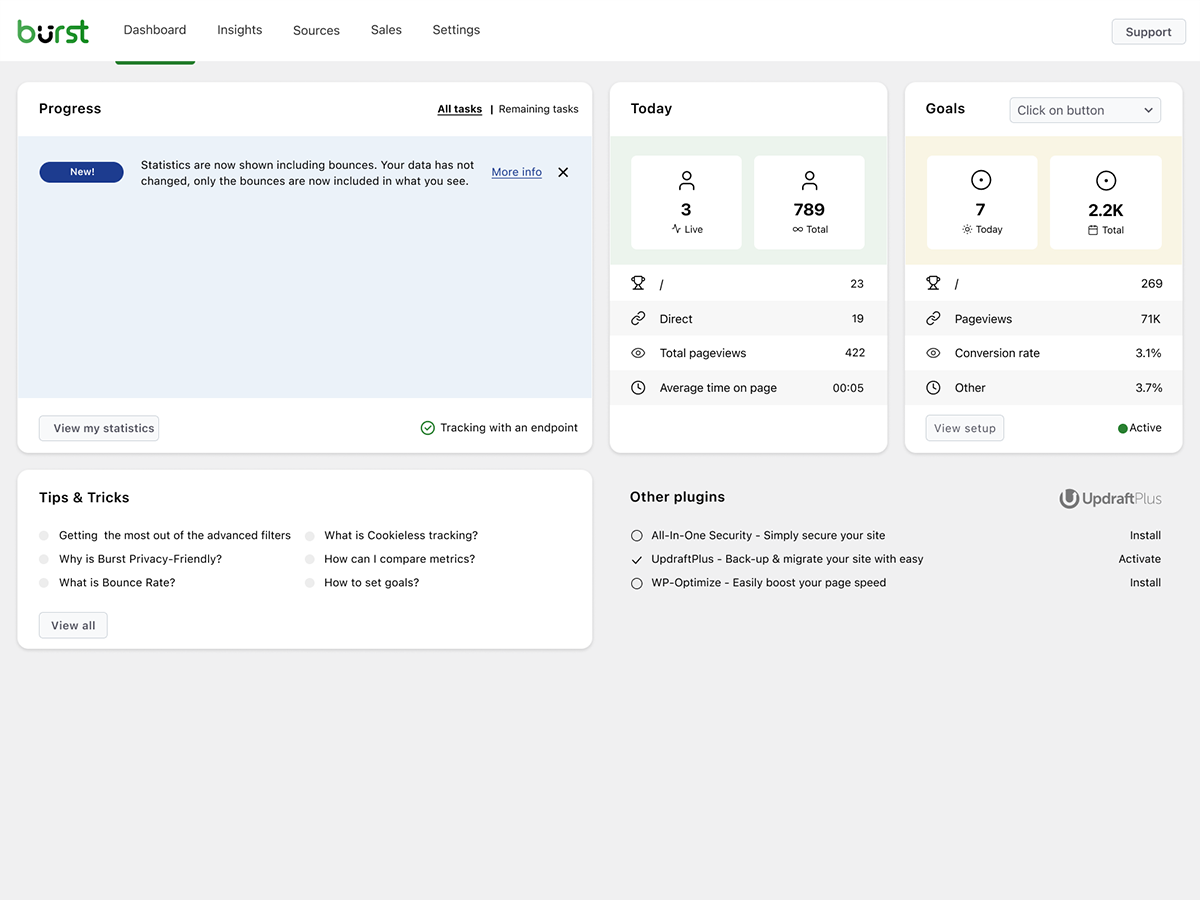


Bloky
Tento plugin poskytuje 1 blok.
- Pageviews Counter
Nejčastější dotazy
Is Burst Statistics really free?
Yes. Burst Statistics is 100% free with no tracking limits. Burst Pro is optional for users who need advanced features like UTM tracking, revenue attribution, geographic data or client reporting. That’s how we keep Burst Statistics free for most users.
Kde jsou data uložena?
All statistics are stored in your own WordPress database. Unlike Google Analytics or cloud-based tools, we have zero access to your data. Your data never leaves your server, unless you manually opt in to share anonymous usage insights with us. Read more about how Burst handles your data.
Je Burst dobrá alternativa k Google Analytics?
Yes. If you find GA4 too complex, or you’re concerned about sending visitor data to Google, Burst is a clean replacement. You get the website traffic stats you actually need, visitors, referrers, top pages, conversions, without the overwhelm. Read our Google Analytics alternative guide for the full comparison.
Is Burst a good GA4 alternative?
Yes. Burst was built as a privacy-friendly GA4 alternative for site owners who want clarity instead of complexity. No Google account, no tag manager, no cookie banner in most cases. See why WordPress site owners are leaving Google Analytics behind.
Is Burst a MonsterInsights alternative?
Yes. MonsterInsights connects your WordPress site to Google Analytics, so your data still flows to Google. Burst keeps everything on your own server, with its own dashboard inside WordPress. If you want analytics that don’t depend on Google, Burst is the simpler MonsterInsights alternative.
How is Burst different from WP Statistics, Independent Analytics or Koko Analytics?
Burst focuses on clarity over quantity. While some other WordPress analytics plugins can feel cluttered, Burst’s dashboard is designed to show you what matters without the noise. Independent Analytics is closest in spirit, with a shared privacy-first, WordPress-native approach. Burst differentiates with deeper UTM tracking, WooCommerce analytics and Agency-tier reporting. WP Statistics offers a wider feature set, but many users find it overwhelming. Koko Analytics is intentionally minimal, so it works well for very basic needs.
How is Burst different from Matomo?
Matomo tries to be a full Google Analytics replacement. Burst tries to be the clearest, most actionable WordPress analytics tool. If you want simplicity, fast setup and a native WordPress experience, Burst is the better fit. If you need granular configuration and a full GA-style feature set, Matomo may suit you better.
Potřebuji účet?
No, you don’t need an account, no data is sent to another website.
Existuje limit na počet návštěvníků, které mohu sledovat?
No. The only limiting factor is your own database and server.
There is an option to use cookieless tracking if you prefer. By default, Burst uses cookies because they’re more accurate and lightweight. Even with cookies, Burst remains privacy-friendly because all data is anonymous and stored on your server. Read more about why cookies are misunderstood.
Burst Statistics can be used without setting cookies or storing data in browsers. This can affect accuracy slightly, so a hybrid option with cookies after consent is also possible. See how Burst tracks visitors without cookies.
Is Burst GDPR compliant?
Burst is designed to support GDPR, CCPA, DSGVO, AVG, RGPD and PECR compliance. Data stays on your server, tracking is anonymous, and you can disable cookies entirely. For most setups, no consent banner is needed for analytics. See how to configure your website without a cookie banner.
Můžu používat Burst spolu s Google Analytics?
Yes. Many users run both during a transition period, or keep GA4 for historical data while using Burst for daily insights. There’s no conflict.
Does Burst Statistics slow down my website?
No. Burst is built for performance with optimized database queries, a minimal tracking script and a Turbo Mode if speed matters more than perfect accuracy. The full breakdown is in does Burst Statistics slow down my website.
Funguje Burst s WooCommerce?
Yes. Basic pageview tracking works in the free version. For full WooCommerce analytics, revenue tracking, product performance and sales attribution, you’ll need Burst Pro Business.
Jak přejdu z jiného analytického pluginu?
Install and activate Burst, it starts tracking immediately. Historical data from other plugins can’t be imported, but you can run both side-by-side during a transition period.
Je možné nainstalovat Burst Statistics pomocí Composeru?
Yes. Both the free and premium plugins can be managed with Composer. Read the Composer installation guide for more information.
Mohu poskytnout zpětnou vazbu k pluginu?
Vaše zpětná vazba je pro nás důležitá. Můžete odeslat žádost o podporu na fórech WordPress a my vám rychle odpovíme.
Recenze


Autoři
Burst Statistics – Simple WordPress Analytics (Google Analytics Alternative) je otevřený software. Následující lidé přispěli k vývoji tohoto pluginu.
Spolupracovníci


Plugin „Burst Statistics – Simple WordPress Analytics (Google Analytics Alternative)“ byl přeložen do 56 jazyků. Děkujeme všem překladatelům za jejich pomoc.
Zajímá vás vývoj?
Prohledejte kód, podívejte se do SVN repozitáře, nebo se přihlaste k odběru protokolu vývoje pomocí RSS.
Přehled změn
3.5.0
- June 3rd 2026
- Improvement: AI chat availability checks and ability registration, preventing PHP notices and duplicate ability registrations.
- Fix: AI Chat integration with AI plugin.
- Fix: missing GROUP BY in a statistics query.
3.4.3
- May 20th 2026
- Fix: AI chat enablement and MainWP integration reminder tasks can now be dismissed permanently.
- Fix: AI chat assistant is now hidden for users without the manage_burst_statistics capability.
- Fix: modal position calculation in the shared viewer.
- Fix: scope application password auth probing to Burst REST endpoints, so authentication on unrelated REST routes (e.g. WooCommerce) is no longer affected.
- Security: harden rest api optimizer, Props Sanjay Singh Jhala.
- Improvement: performance of background aggregated table build, time out guards on sql queries, additional indexes on the burst_statistics table.
- Improvement: AI chat enablement task now links to the „Ask Burst anything“ setup guide.
3.4.2
- May 12th 2026
- New: AI chat integration via the WordPress Abilities API, including granular datatable abilities with metric allow-listing for pages, parameters, referrers, countries, campaigns, sales and subscription products.
- New: granular datatable REST endpoints (data/datatable/{id} and data/ecommerce/datatable/{id}) so the dashboard and AI abilities can request a specific table by id.
- Improvement: refactor the Share class into dedicated Share_Tokens, Share_Routing, Share_Auth and Share_UI services for clearer responsibilities and easier maintenance.
- Improvement: dark mode initialization respects an explicit „light“ preference so users on a dark OS no longer briefly see a dark skeleton when they have forced light mode.
- Improvement: upgrade routine corrects the stored activation time for sites with older data.
- Improvement: replace native checkboxes with Radix checkboxes in the Share dialog for consistent styling.
- Improvement: shared-link capability checks now reflect the currently requested dashboard tab instead of a single cached value, so per-tab permissions are enforced correctly during batch REST requests.
- Fix: dashboard route returns a 404 when the user is not allowed to load it, instead of rendering an empty page.
- Security: limit Share link viewer statistics access, props Sanjay Singh Jhala.
- Security: REST API optimizer now matches the Burst namespace strictly against the URL path (anchored at burst/v1), props Sanjay Singh Jhala.
- Security: harden MainWP proxy authentication. Props Sanjay Singh Jhala, Chloe Chamberland & PRISM – Wordfence
- Security: Auto Installer now requires the install_plugins capability instead of activate_plugins and only accepts download URLs from official Burst hosts. Props Sanjay Singh Jhala.
3.4.1.1
- May 5th 2026
- Fix: CSS styling regression due to obsolete javascript files being included in the dashboard build.
3.4.1
- April 29th 2026
- New: automated tests for subscription statistics dashboard.
- New: abilities API integration.
- Improvement: move plugin activation logic to bootstrap class.
- Improvement: split ajax fallback logic into do_action and get_action.
- Fix: broken upgrade url in report settings.
- Fix: When both Story report and share links are generated, the UX could generate an error.
- Security: increase minimum required capability from view to manage in get_posts endpoint, Props Sanjay Singh Jhala.
- Security: hardened MainWP proxy authentication and CORS origin validation, Props Sanjay Singh Jhala.
3.4.0
- 22. dubna 2026
- Novinka: podpora tmavého režimu pro panel Burst Statistics.
- Novinka: podpora integrace s MainWP.
- Novinka: výběr časového období v kalendáři.
- Novinka: podpora aplikačních hesel. Nyní je možné využívat koncové body rozhraní Burst Rest API s aplikačními hesly.
- Vylepšení: přidat detekci blokovačů reklam. Pokud blokovač reklam způsobí poruchu ovládacího panelu Burst, zobrazit o tom varování.
- Oprava: Varování PHP ohledně neexistující tabulky referrerů při vymazání tabulky.
- Oprava: obnovení filtru odskoků, umožňujícího přepsat výchozí čas, podle kterého se určuje, zda se jedná o odskok.
- Oprava: opravena chyba ve výpočtu počtu návštěvníků z odkazujících stránek, způsobená změnami v nastavení možnosti „exclude“ ve filtrech, díky @bikew1se.
- Oprava: Relace sdílených odkazů se nyní každý den maží, aby se zabránilo přístupu k odkazu po uplynutí nastavené doby platnosti. Díky, Sanjay Singh Jhala.
- Zabezpečení: Záložní řešení AJAX pro koncový bod get_reports nechtěně umožňovalo uživatelům s oprávněním burst_view nahlížet do konfigurace reportů. Díky, Sanjay Singh Jhala.
3.3.0
- 1. dubna 2026
- Novinka: Filtr „Doba trvání relace“, který umožňuje filtrování podle délky návštěvy.
- Novinka: Podpora tmavého režimu pro e-mailové reporty.
- Vylepšení: Přesuňte sloupce ze statistik do tabulky relací, čímž snížíte úložiště dat a zlepšíte výkon dotazů.
- Vylepšení: Data o relacích jsou zahrnuta v exportech CSV archivu.
- Vylepšení: Přidejte chybějící indexy databáze pro lepší výkon.
- Zabezpečení: Diváci sdíleného odkazu mohli vidět data z reportu (e-mailové adresy příjemců, nastavení plánování). Díky Sanjay Singh Jhala.
- Zabezpečení: Uživatelé s odkazem na sdílení mohli vidět data o e-commerce/prodeji, i když byl odkaz omezen pouze na karty nesouvisející s prodejem. Díky Sanjay Singh Jhala.
- Oprava: Skupinování grafu přehledů podle měsíců bylo nesprávné.
- Oprava: Nesoulad protokolu Cron URL mohl způsobit, že by se do e-mailové zprávy dostal odkaz http, i když je adresa webu https.
- Oprava: Problém s typem filtru, který narušoval filtrování v bloku zařízení, díky Andrew.
- Oprava: Chyba duplicitního klíče v SQL dotazu pro aktualizaci hash.
- Oprava: Zarovnání loga v e-mailovém reportu a stylování pro tmavý režim.
- Oprava: Rychlý testovací zásah mohl být použit k obejití vestavěného blokování IP, díky Sanjay Singh Jhala.
3.2.3
- 12. března 2026
- Oprava: odkaz na sdílení pro nepřihlášené uživatele nenačítá stránku.
3.2.1
- 9. března 2026
- Oprava zabezpečení: Opraveno chybějící ověření oprávnění, které umožňovalo uživatelům s oprávněním Burst View spravovat reporty. Díky Sanjay Singh Jhala.
- Vylepšení: nastavit turbo jako výchozí povolené a přidat upozornění, které doporučuje jeho povolení, když je zapnuto sledování bez cookies.
- Vylepšení: zkontrolujte, zda je na serveru nainstalována třída PharData, abyste předešli fatálním chybám.
- Oprava: Uložení schématu pro použití během cron úloh. Během cron úloh je site_url http. Pro generování javascriptu potřebujeme, aby odráželo skutečné schéma, obvykle https.
- Oprava: duplicitní pole v nastavení reportování, když je odkaz ke sdílení otevřen administrátorem.
- Oprava: varování o nenalezené URL při generování klasické prémiové zprávy.
- Oprava: příliš přísné použití sanitizérů způsobovalo, že se předpony tabulek měnily na malá písmena. díky @parkentosh
3.2.0
- 25. února 2026
- Novinka: anonymně sdílejte data, abyste nám pomohli vylepšit Burst Statistics: vytvářet průmyslové standardy, cílený vývoj funkcí a zlepšení výkonu.
- Novinka: přidejte oznámení o Discordu, pozvěte uživatele, aby se připojili k našemu Discord serveru.
- Novinka: Snadno sdílejte statistiky se svým týmem nebo klienty pomocí tlačítka pro sdílení na panelu Burst Statistics.
- Oprava: zachytit data, která nejsou kódována jako JSON, při sledování Rest API, díky @rajkumarreddyv
- Oprava: Výpočty odrazů a míry odrazů nyní správně počítají jednotlivé odražené relace místo sčítání příznaků odrazů, což zabraňuje nadhodnoceným číslům.
- Oprava: logika výchozí hodnoty pro ‚sloučení proměnných a skriptů‘ znemožnila vypnout toto nastavení.
3.1.6
- 20. ledna 2026
- Oprava: mazání starých dat v archivační funkci nefungovalo kvůli nesprávné SQL syntaxi.
- Oprava: Neprobíhá filtrování dat o prohlížeči/OS podle zařízení v bloku přehledů, díky @alisontaylorbc.
- Vylepšení: přidat automatický test pro mazání dat.
- Vylepšení: přidat trvalé řazení do bloku datové tabulky, díky @ankush.
- Vylepšení: filtrování podle kontinentu.
3.1.5
- 7. ledna 2026
- Vylepšení: automatické zavírání oznámení v pravém dolním rohu obrazovky.
- Vylepšení: drobná vylepšení pro mobilní responzivitu.
- Vylepšení: rozšířit automatizované testy o test živých návštěvníků.
- Vylepšení: zalamování dlouhých URL v zobrazení živých návštěvníků.
- Vylepšení: rozšířené pokrytí PHPCS.
- Oprava: když je místní úložiště prohlížeče plné, přidání filtrů může způsobit chybu.
- Oprava: vynutit https na kombinovaných proměnných a URL skriptů, aby se předešlo varováním o smíšeném obsahu.
- Oprava: onboarding pro RTL jazyky se pokoušel načíst neexistující RTL CSS soubor.
3.1.4
- 23. prosince 2025
- Vylepšení: stylování bloků datových tabulek a stavů načítání.
- Vylepšení: zlepšení výkonu dotazů na referrer.
- Vylepšení: zlepšení výkonu dotazů s parametry.
- Vylepšení: vyloučit sledování zásahu přes Rest Api z Burst Rest Api Optimizeru, tímto způsobem se při zásahu načtou všechny pluginy, což je nutné pro cíle háků.
- Vylepšení: přidána záložní možnost pro kombinování proměnných a skriptů, pokud není možné zapisovat do adresáře pro nahrávání.
- Vylepšení: upozornění ‚cron neběží‘ už nelze zavřít, protože se jedná o kritický problém.
- Vylepšení: umožněno vyhledávání formátovaných dat v datových tabulkách, např. nyní můžete hledat ‚United States‘ místo US v tabulce lokalit.
- Vylepšení: přidat filtrování parametrů.
- Oprava: filtrování v bloku zařízení.
3.1.0.3
- 1. prosince
- Oprava: po uložení počátečních změn bylo nutné znovu načíst stránku, aby se uložily další změny nastavení.
- Výkon: Vylepšení výkonu díky přesunu náročných procesů během sledování na cron ve skupinách
- Vylepšení: Vylepšení parseru uživatelských agentů, odstranění neplatných prohlížečů
- Oprava: rozbalovací nabídka pro pokročilé filtry nefiltruje seznam.
- Oprava: nedefinovaná karta způsobená neúplným odstraněním prodejního menu, když není detekován WooCommerce nebo EDD.
- Oprava: ukládání objektů do mezipaměti při počítání stránek způsobovalo pomalou aktualizaci počtu stránek, díky @fveits
3.0.2
- 25. listopadu 2025
- Oprava: některá upozornění byla během ověřování nesprávně ignorována.
- Vylepšení: přidán automatizovaný test pro cíle hooků.
- Vylepšení: přidán automatizovaný test pro obnovení archivace.
3.0.0
- 11. listopadu 2025
- Oprava: kompatibilita s neznámým pluginem, umožnění nulové hodnoty v get_timerange_dropdown() na přehledu produktů WooCommerce, díky @tegid
- Oprava: nepovažujte www a non-www domény za různé domény při detekci nastavení více domén.
- Oprava: odstranění zastaralého lomítka při načítání skriptu cílů, které na některých nastaveních způsobuje jeho blokování, díky @jhndkrvzc
- Oprava: Počet v horní liště nezobrazoval ‚k‘ pro tisíce, ‚M‘ pro miliony atd., ukazoval pouze 1 místo 1k.
- Novinka: zvýšení minimálních požadovaných verzí pro PHP na 8.0, pro WordPress na 6.4