Info
Not sure if this is a bug or a feature request.
I was digging around in the code to understand what's going on. It seems like the only way on getting what I want is to use RTL instead of LTR on the overlay panel. I didn't actually change this in the code, but I did change the value in Dev Tools while running my code and it was positioned correctly. However this should be set dynamically when the Auto complete panel doesn't fit.
I also tried to change the preferredPositions to use originX=end instead of start. But it didn't change the outcome
Reproduction
https://stackblitz.com/edit/angular-material-2-yzct7d
Steps to reproduce:
- Focus the input field and watch the Autocomplete panel
Expected Behavior
When the panel doesn't fit within the viewport's width I expect the panel to grow from right to left instead.
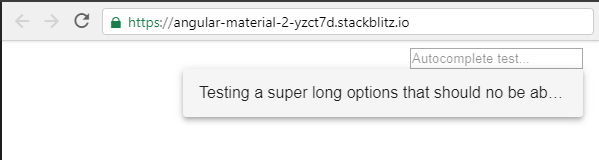
Actual Behavior
The box doesn't fit in the viewport

Environment
- Angular: 9.x.x
- CDK/Material: 9.x.x
- Browser(s): Chrome
- Operating System (e.g. Windows, macOS, Ubuntu): Windows
Info
Not sure if this is a bug or a feature request.
I was digging around in the code to understand what's going on. It seems like the only way on getting what I want is to use RTL instead of LTR on the overlay panel. I didn't actually change this in the code, but I did change the value in Dev Tools while running my code and it was positioned correctly. However this should be set dynamically when the Auto complete panel doesn't fit.
I also tried to change the
preferredPositionsto useoriginX=endinstead of start. But it didn't change the outcomeReproduction
https://stackblitz.com/edit/angular-material-2-yzct7d
Steps to reproduce:
Expected Behavior
When the panel doesn't fit within the viewport's width I expect the panel to grow from right to left instead.
Actual Behavior
The box doesn't fit in the viewport
Environment