hexml.c seems to have quite a few vulnerabilities that could lead to code execution, according to AFL. Here's how to start with that:
Install afl, and some of the extra tools, like libdislocator (a hardened memory allocator)
$ wget http://lcamtuf.coredump.cx/afl/releases/afl-latest.tgz
$ tar xf afl-latest.tgz
$ cd afl-*
$ make
$ cd llvm_mode && make && cd ../
$ sudo make install
$ cd libdislocator
$ make && sudo make install
What this does:
- Installs AFL
- Builds
afl-clang-fast, a tool built on LLVM, which uses a compiler plugin to instrument the compiled code. afl-clang-fast results in much faster code than using the traditional afl-gcc tool, which is vital for fast fuzzing. You will need the LLVM development tools, and clang installed for your distro.
- Builds and installs
libdislocator.so, which is a tool for hardening memory allocations while you're fuzzing your program to help find more bugs.
Start with this fuzzing harness:
#include <stdio.h>
#include <stdlib.h>
#include <string.h>
#include "hexml.c"

int main(int ac, char** av)
{
#ifdef __AFL_HAVE_MANUAL_CONTROL
  __AFL_INIT();
#endif

  while(__AFL_LOOP(1000)) {
    FILE *f = fopen(av[1], "rb");
    fseek(f, 0, SEEK_END);
    size_t fsize = ftell(f);
    rewind(f);

    char* string = malloc(fsize+1);
    memset(string, 0, fsize+1);
    (void)fread(string, fsize, 1, f);
    fclose(f);

    document *doc = document_parse(string, fsize);
    document_free(doc);
    free(string);
  }
  return 0;
}
And you can compile it:
$ AFL_HARDEN=1 afl-clang-fast -O2 fuzz.c
afl-clang-fast 2.35b by <lszekeres@google.com>
afl-llvm-pass 2.35b by <lszekeres@google.com>
[+] Instrumented 277 locations (hardened mode, ratio 100%).
AFL_HARDEN=1 means the compiler uses even more anti-exploit tools (detecting stack overflows, etc) which causes a very minor performance hit, but finds more bugs.
Create the initial, starting corpus. This is what AFL begins with as it tries to find bugs. You technically don't need this, it's just a nice starting point.
$ mkdir corpus
$ cat > corpus/start.xml
<a b="c">d</a>
$
Also, grab the xml dictionary to help improve the fuzzing. Fuzzers like AFL can use "language dictionaries" which describe the syntax of the file format you're investigating. AFL & other tools then use dictionaries to help guide the input mutation and generation, because it knows what syntax is valid. This improves performance and finds bugs even faster.
AFL comes with an xml.dict dictionary you can use after you install it.
$ cp /usr/local/share/afl/dictionaries/xml.dict .
Now, begin fuzzing:
$ AFL_PRELOAD=/usr/local/lib/afl/libdislocator.so afl-fuzz -T hexml -x $PWD/xml.dict -i $PWD/corpus -o $PWD/results -- $PWD/a.out @@
What this does:
- Tells AFL to load
libdislocator.so to harden allocations.
- Starts the fuzzer with the given dictionary (
xml.dict) using the -x flag.
-i $PWD/corpus tells afl where to look for the initial starting set of inputs.-o $PWD/results tells afl where to put all the resulting crashes, hangs, etc.- The syntax
-- $PWD/a.out @@ means "Invoke a.out and replace @@ with the name of a filename afl generates and passes as the first argument." This means afl just creates temporary files and feeds them to the harness.
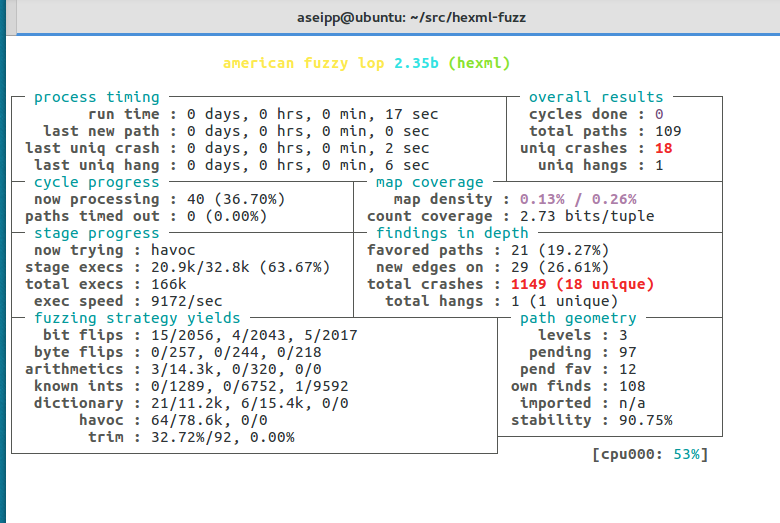
That should be about it! You should begin getting bugs very, very quickly. I'll also post a quick follow up on minimizing the corpus, but this should be good to start with.
hexml.cseems to have quite a few vulnerabilities that could lead to code execution, according to AFL. Here's how to start with that:Install afl, and some of the extra tools, like
libdislocator(a hardened memory allocator)What this does:
afl-clang-fast, a tool built on LLVM, which uses a compiler plugin to instrument the compiled code.afl-clang-fastresults in much faster code than using the traditionalafl-gcctool, which is vital for fast fuzzing. You will need the LLVM development tools, andclanginstalled for your distro.libdislocator.so, which is a tool for hardening memory allocations while you're fuzzing your program to help find more bugs.Start with this fuzzing harness:
And you can compile it:
AFL_HARDEN=1means the compiler uses even more anti-exploit tools (detecting stack overflows, etc) which causes a very minor performance hit, but finds more bugs.Create the initial, starting corpus. This is what AFL begins with as it tries to find bugs. You technically don't need this, it's just a nice starting point.
Also, grab the
xmldictionary to help improve the fuzzing. Fuzzers like AFL can use "language dictionaries" which describe the syntax of the file format you're investigating. AFL & other tools then use dictionaries to help guide the input mutation and generation, because it knows what syntax is valid. This improves performance and finds bugs even faster.AFL comes with an
xml.dictdictionary you can use after you install it.Now, begin fuzzing:
What this does:
libdislocator.soto harden allocations.xml.dict) using the-xflag.-i $PWD/corpustells afl where to look for the initial starting set of inputs.-o $PWD/resultstells afl where to put all the resulting crashes, hangs, etc.-- $PWD/a.out @@means "Invokea.outand replace@@with the name of a filename afl generates and passes as the first argument." This means afl just creates temporary files and feeds them to the harness.That should be about it! You should begin getting bugs very, very quickly. I'll also post a quick follow up on minimizing the corpus, but this should be good to start with.