
Wireshark Tutorial: Network & Passwords Sniffer
 Oliver Jones
⚡ Smart Summary
Wireshark passwords sniffer tutorials show how attackers capture credentials moving over a network and how defenders stop them. This guide walks through Wireshark capture, plaintext HTTP analysis, MAC flooding, and the encryption controls that neutralize sniffing.

Computers communicate using networks. These networks could be on a local area network (LAN) or exposed to the internet. Network sniffers are programs that capture low-level packet data transmitted over a network. An attacker can analyze this information to discover valuable details such as user IDs and passwords.
In this article, you will learn common network sniffing techniques, the tools attackers and ethical hackers use to sniff networks, and the countermeasures that protect sensitive information on the wire. The Wireshark walk-through below is provided for educational and authorized testing only.
What is Network Sniffing?
Computers communicate by broadcasting messages on a network using IP addresses. Once a message has been sent on a network, the recipient computer with the matching IP address responds with its MAC address.
Network sniffing is the process of intercepting data packets sent over a network. It can be performed with specialized software, a hardware tap, or a configured port mirror. Sniffing can be used to:
- Capture sensitive data such as login credentials
- Eavesdrop on chat messages
- Capture files that have been transmitted over a network
The following protocols are vulnerable to sniffing when login details travel in plain text:
Modern equivalents (HTTPS, SMTPS, IMAPS, SFTP, SSH) encrypt the payload so a sniffer sees ciphertext rather than credentials.
Passive and Active Sniffing
Before we look at passive and active sniffing, let us look at two devices commonly used to network computers: hubs and switches.
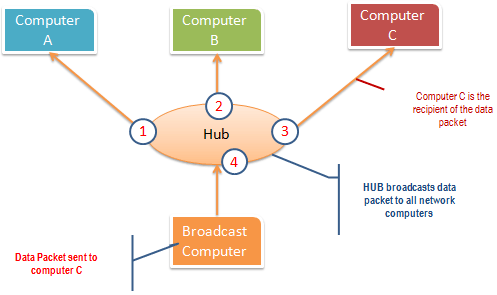
A hub works by sending broadcast messages to every output port except the one that sent the broadcast. The recipient computer responds to the broadcast if the IP address matches. Every machine on a hub-based segment can therefore see every frame. A hub operates at the physical layer (layer 1) of the OSI Model.
The diagram below illustrates how the hub works.
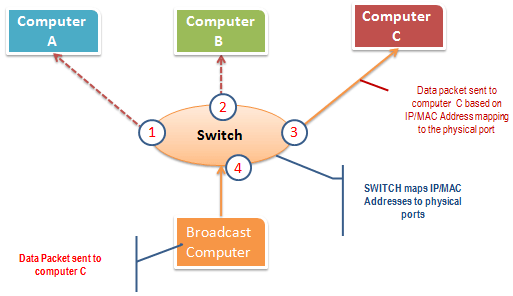
A switch works differently; it maps IP and MAC addresses to physical ports. Frames are forwarded only to the port that matches the recipient’s MAC address, so other hosts on the LAN do not see the traffic. Switches operate at the data link layer (layer 2) and, with routing features, at the network layer (layer 3).
The diagram below illustrates how the switch works.
Passive sniffing is intercepting packets transmitted over a network that uses a hub. It is called passive because the attacker does not inject traffic, which makes it hard to detect. It is also easy to perform because the hub sends broadcast messages to every host on the network.
Active sniffing is intercepting packets transmitted over a network that uses a switch. Two main techniques are used to sniff switched networks: ARP poisoning and MAC flooding.
Hacking Activity: Sniff Network Traffic
In this practical scenario, we are going to use Wireshark to sniff data packets transmitted over the HTTP protocol. We will capture traffic on the local interface and then log in to a sample web application that does not use secure communication, the Guru99 training site at http://www.techpanda.org/.
The login address is admin@google.com and the password is Password2010.
Note: we will log in to the web app for demonstration purposes only and on a network we own. The same technique can also reveal data packets from other hosts on the same network as the sniffer, which is why you must obtain written authorization before running Wireshark on any network you do not control. The sniffing is not limited to techpanda.org; Wireshark captures HTTP and other protocol traffic flowing past the interface.

ManageEngine Firewall Analyzer is a robust policy management and auditing solution designed to enhance network security and transparency. It provides real-time visibility into firewall traffic, helping administrators identify security loopholes, optimize rule sets, and monitor bandwidth usage.
Sniffing the Network using Wireshark
The illustration below shows the steps you will carry out to complete this exercise without confusion.
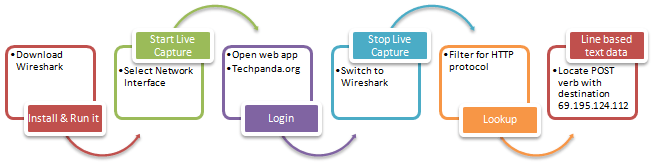
Download Wireshark from wireshark.org/download.html. The current stable branch is Wireshark 4.x, which runs on Windows, macOS, and Linux.
- Open Wireshark
- You will see the following welcome screen

- Select the network interface you want to sniff. This walk-through uses a wireless connection; on a wired LAN, choose the Ethernet adapter instead.
- Click the start (shark fin) button shown above.
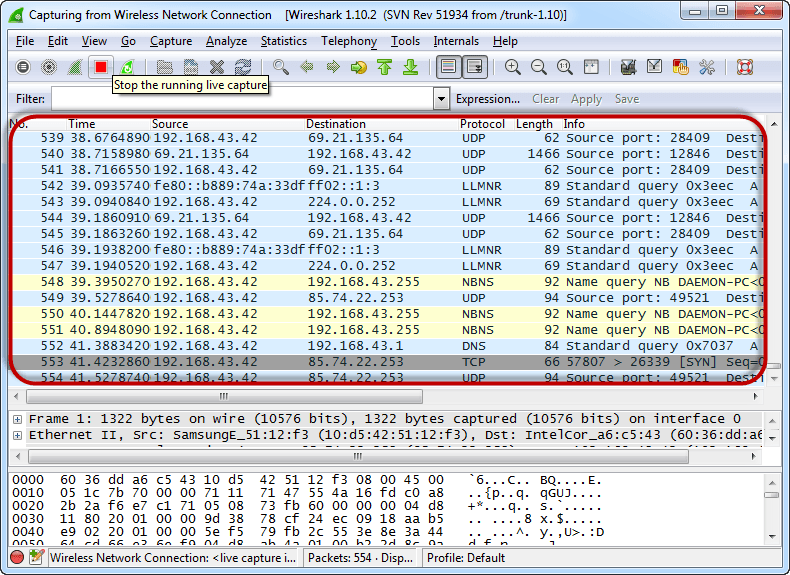
- Open your web browser and visit http://www.techpanda.org/.
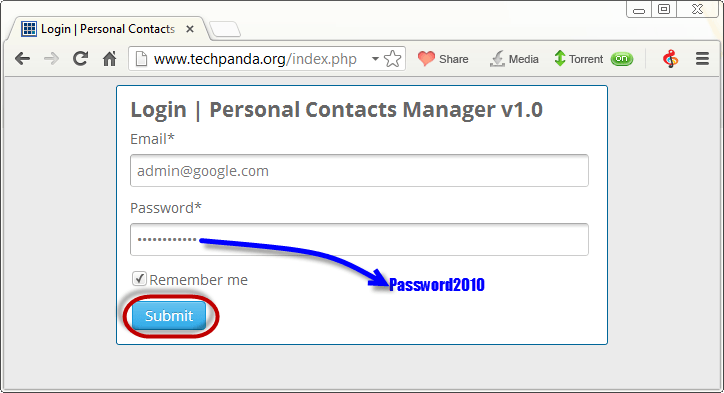
- The login email is admin@google.com and the password is Password2010.
- Click the submit button.
- A successful logon should show the following dashboard.

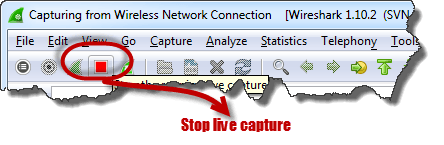
- Switch back to Wireshark and stop the live capture.
- Filter for HTTP traffic only by typing http into the display filter bar.

- Locate the Info column and look for an entry with the HTTP verb POST, then click on it.

- Below the log entries is a panel with a summary of the captured data. Look for the line Line-based text data: application/x-www-form-urlencoded.
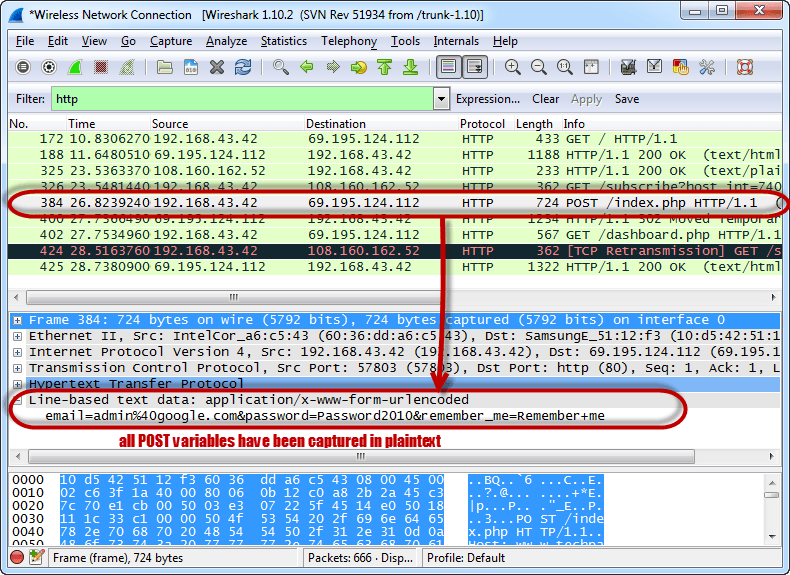
- You should now be able to read the plaintext values of every POST variable submitted to the server over HTTP, including the email and password fields.
What is MAC Flooding?
MAC flooding is a network sniffing technique that floods the switch CAM (MAC address) table with fake MAC addresses. Once the table is full, the switch can no longer learn legitimate destinations and starts forwarding frames to every port, acting like a hub. The attacker can then capture data packets as they cross the network.
Counter Measures Against MAC Flooding
- Switch port security. Limit the number of MAC addresses allowed per port, sticky-learn the first MAC seen, and lock or shut down the port if the limit is breached.
- Authentication, Authorization, and Accounting (AAA) servers can be used with 802.1X to filter discovered MAC addresses and accept only authenticated devices.
- Dynamic ARP Inspection and DHCP snooping mitigate the related ARP poisoning attack that often pairs with MAC flooding.
Sniffing Counter Measures
- Restrict access to the physical media. Locked patch panels, port-disabled wall jacks, and segmented VLANs reduce the chance of a sniffer being installed in the first place.
- Encrypt traffic in transit. HTTPS (TLS 1.3), SSH, IPsec, and modern VPN protocols make captured packets unreadable to an attacker.
- Replace insecure protocols. Move from Telnet to SSH, from FTP to SFTP or FTPS, and from HTTP to HTTPS sitewide.
- Harden Wi-Fi. Use WPA3 or WPA2-AES with a strong passphrase to stop wireless sniffing on the air.
- Monitor with an IDS. Tools such as Suricata, Zeek, and Snort raise alerts when ARP poisoning, MAC table overflow, or promiscuous interfaces appear.
How AI Strengthens Network Sniffing Defense
Modern intrusion detection and SIEM platforms now layer machine learning on top of packet capture to detect sniffing-related activity faster than rule sets alone can. AI models baseline normal ARP, DHCP, and MAC table behavior, then flag deviations such as unusual broadcast volume, duplicate IP-to-MAC mappings, or sudden CAM table churn that point to ARP poisoning or MAC flooding.
Large language models also help analysts triage Wireshark and Zeek logs by summarizing suspicious flows in plain English, suggesting filters, and cross-referencing observed IOCs against threat intelligence feeds. Defenders should still verify AI findings against the raw capture, but the speed gain on a busy network is significant.
Summary
- Network sniffing intercepts packets as they travel over the network and can expose plaintext credentials.
- Passive sniffing runs on hub-based networks and is hard to detect; active sniffing targets switches and is easier to spot.
- Wireshark 4.x is the standard open-source analyzer used in this walk-through to read HTTP POST data.
- MAC flooding overloads the switch CAM table so the switch behaves like a hub.
- Encryption (HTTPS, SSH, VPN), switch port security, WPA3 Wi-Fi, and AI-assisted monitoring together neutralize most sniffing attacks.
