Try this if your CD is not working.


Last week, I popped in a cd on the book of Daniel by Chuck Missler. For whatever, reason the CD-ROM wasn’t working. I figured i would have to pick up another CD Rom, so I went around looking for ones on Amazon.com. I was told that they were pretty inexpensive. Boy,  sure glad waited.  I decided not to buy. God must have had a reason for me to wait. It turns out that Microsoft.com had something that worked perfectly. A Fix. I will provide a link this is for Windows Vista, Windows XP, and Windows 7 and windows 8.1.

https://support.microsoft.com/en-us/mats/cd_dvd_drive_problems

click the “Run now” button

Fix it

after downloading the file, click run

diagnostic

After accepting to the agreement, the program will run a diagnostic

installing Microsoft Fix it

This next step is either have Microsoft do this for you or for you to pick, if your like me you probably just want to get it over  with in that case click Recommend.

applying the fixes (Recommended)

Detecting problems

Next you can either select your device if it’s listed, otherwise select not listed.

selecting cd drive

Then you will be asked if your trying to read or write to that particular drive

Trying to read or write to device

Once it finishes your CD ROM should be working normally.

Thank you Jesus

Putting God First

Windows media player (ripping)


Today, we are going to be talking about the Windows Media Player:   I have a friend who ran into a problem in getting his CD‘s to rip inside Windows 7 and so I figured if he had the problem maybe there might be others.

Windows Media Player

When you first open Windows Media Player, you have two options  Express or Custom.  Choosing Custom allows the user to decide what is important. Now, if you’re in a hurry and just want to delve into the Windows media player the user can choose Express.

At the next window  the user can select what privacy options they prefer.

selecting privacy options


Display media information from the internet and Update music files by retrieving media information from the internet will help the user to download album art and titles of those songs.

usage rights, which has Windows media player to acquire digital rights if you are trying to use a protected file. This protects the artist of the music  Under the Privacy tab is how Microsoft handles your personal information and goes into detail on Usage Rights.

Under Enhanced content is sending unique player ID, what this means, is that when streaming Media content, this identifies your specific computer to the server. Which also gathers statistics and may help improve quality.

cookies tab, Gives the user the option to modify the use of cookies. Cookies: allow the user to enter their favorite website without having to re-enter the password.

Windows Media Player customer experience improvement program is designed to send information to Microsoft, which covers the type of Hardware you use and how to improve the software.

History is your most recently played music files.

Next you are given the option to place an icon on the task-bar and on the desktop. On default you can set this to play all your music.

By selecting choose file types, this will bring up a list of type of files that you can listen to on the media player.

Click select All.set associations

Click Media Files and Finish.

Once you have windows media player running, Press Alt on the keyboard, and this will bring up the main menu.
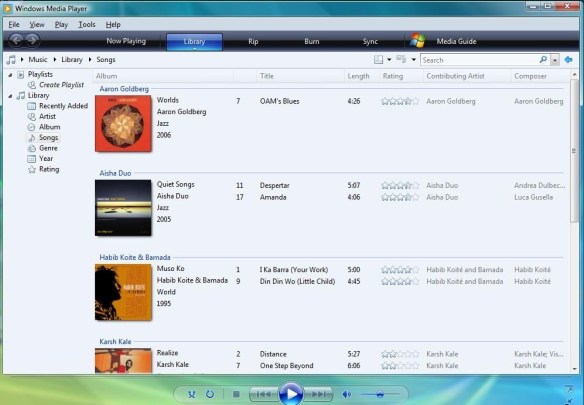
Menu

Click on Tools, Options and this menu will appear
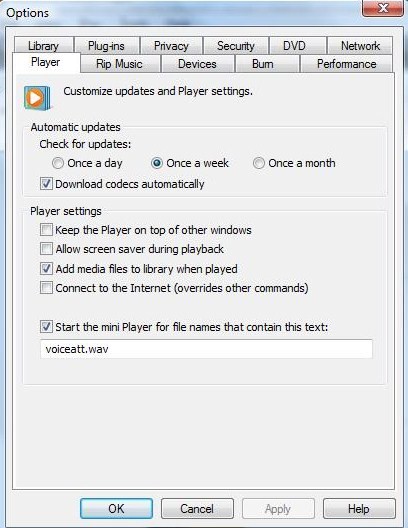
Options

Upon clicking Rip Music go down where you see Windows media Audio then depending on your preference click the proper box, click Apply and OK.

rip music

Putting God First

God Bless

The Optical drive or Disc Drive


English: DVD-RW recorder

English: DVD-RW recorder (Photo credit: Wikipedia)

Today, we are going to be talking about the disc drive or Optical Drive. It is used to retrieve and store data to be transferred to a Compact Disc.  When your looking for  a disc drive to replace the one that has gone bad, you want to make sure that the specifications  is  compatible to play Digital Versatile Disc”  DVDs, or Compact disk’s.

If you want to use it as a burner, such as transferring your favorite music to a Compact Disc. You will want to see somewhere on the device that it is  a Compact Disc rewritable.  or DVD rewritable.   Now, if you only see Compact Disc, than it will play Compact disc’s but, you won’t be able to burn or transfer your music to a blank Compact Disc. This goes also for DVD players, if it isn’t marked DVD,  it won’t play  DVD’s.  Happy Computing and God Bless


Apple and the incredible vanishing CD drive | Macworld


Apple and the incredible vanishing CD drive | Macworld.

Why disc drives are an endangered species – CNN.com


Is it possible that the disc drive could go bye bye  such as the floppy drive?

Why disc drives are an endangered species – CNN.com.

Beginner Geek: How to Burn an Audio Disc in Windows 8 – How-To Geek


Beginner Geek: How to Burn an Audio Disc in Windows 8 – How-To Geek.


transferring pictures through windows vista


This slideshow requires JavaScript.

Today we are going to talk about saving all your pictures on one compact disc. First off you want to click on the start button (aero) >then pictures,this will bring up the pictures pane> click on the burn tab at the top>it will display “Insert Disc” either pick a cd or Dvd> close the cd-rom, click next on formating the disc>after this is done, it will copy the items. Push the eject on the Cd-rom. It will display “Preparing to Eject please wait while session is closed” Happy computing

cleaning Dvd’s and compact disc’s


English: Compact Disc Nederlands: Compact Disc

English: Compact Disc Netherlands: Compact Disc (Photo credit: Wikipedia)

Sometimes DVDs and compact discs don’t want to work. This is due to a film that has somehow gotten on the surface. To quickly get rid of this take some liquid dish-washing soap, pour it on the surface run it under water. Moving the soap around the disc in a circle. Once you have the disc covered rinse it off.

You want to take a clean towel, than wiping it from the center and out to the edge. Do this around the whole disc. You don’t want to dry it in a circular motion due to the thin aluminum film will tear and your Cd’s and movies will be ruined.