
Let’s say we have some music or videos and the disc is not playing. Today we are going to be using Windows Vista, and what were are going to be doing is taking files that are not working and placing them on a new compact disc. To get started, go the start button. You will notice that off to the right is a set of tabs, click on computer and a window will pop open. computer WorkGroup

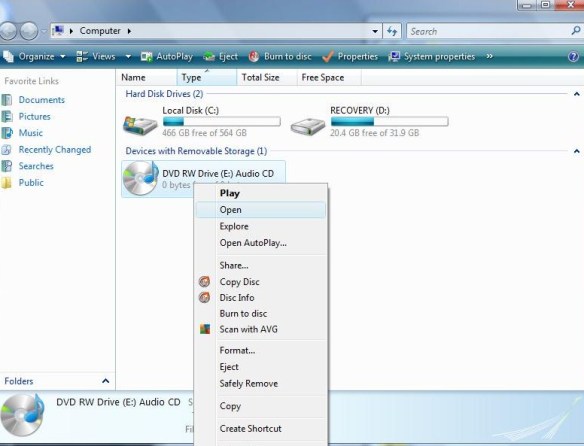
Locate the Cd-ROM, Right click, on disc, then Left click this will open the files on the disc.
(Remember, each mouse has two parts, a left side and a right side. so if you are right clicking, use the right side.)
(Below is what pictures of files on computer)

(Setting up a Folder)
On setting up a folder, Go to the desktop, right-click, and a menu will open up move down to where you see NEW, then click on FOLDER

After naming the folder,
Set both folders, next to each other (The blank folder and the computer folder)
The next step is to highlight those songs or videos you wish to copy. While holding down the shift key, hold down the arrow key that points down. This function will high-light your files. You can either Right or Left-click then Drag contents to the empty folder.

Now, you have the option to play your music from the desktop .
To do this Right click on the folder, when the menu opens up, it will ask if you wish to open the file, choose either open or Play whichever player is set as the default.. “Play with VLC media player. Once you click on this the player should take over.

The next step is to transfer the files to a compact disc,. The way to carry out this is to open Computer Window, Left click on the file FOLDER on the desktop and drag it over to the device labeled DVD RW Drive and release. You will be prompted to insert a BLANK disc, after the computer has set up the disc for formatting, your files will be transferred and you’ll be on your way, to listening to favorite music.
Remember, Focus on Jesus, not your problem
Putting God First
God Bless
 INFOTECHCOMPUTING MINSTRIES: Where God Gets the Glory