Skip to primary content
Skip to secondary content

INFOTECHCOMPUTING MINSTRIES: Where God Gets the Glory

Where GOD gets the GLORY

INFOTECHCOMPUTING MINSTRIES:   Where God Gets the Glory

Main menu

  • Home
  • A new version of the old IRS scam is spreading | Komando.com
  • About Me
  • Free Malware Bytes
  • Is there an alternative to Microsoft Office?
  • Looking for a DVD player for Windows 8 or 10?
  • Ransom Ware
  • when it’s crucial in upgrading your memory
  • Which PDF works best

Category Archives: File Folder

Windows 8

Video

3

Today I have decided to update the Windows 8 blog that I recently wrote when Windows first came out.  I’m just going over
a few pointers that will help you get started. The first thing that you will see after switching on the computer for the first time is the Lock-screen. To move the lock-screen, push down on the space bar or press the Enter button.

The next step you have to maneuver past is setting up a Hotmail account, if you already have this, just log in like you would on your account. Setting up a Hotmail account is only needed if you want the windows 8 to keep settings on all your devices. You do not have to set up an administrator account, to get started.   For setting up  a limited account you can use your Gmail or Yahoo Account. After you have created a User Account, you will see what is the new look for  Windows 8  “Live Tiles” for the Start Menu.

If you are looking for the desktop, you will have to go no further than the start menu. Click on the Live Tile marked “Desktop”  You can rearrange these live tiles by clicking on them, and then moving them wherever how you want  them. If you want to remove a live tile, you can do this by right clicking on the tile, this gives you the option to unpin from the Start Menu, Uninstall, or make it smaller
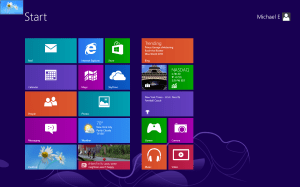
 Start MenuStart Menu

Once on the desktop, Look for the  windows explorer or File folder. This will be on the bottom on the Taskbar.  From here you can get to computer, Pictures, Music, pretty much anything.
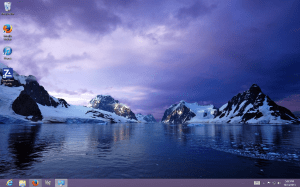
 Windows Explorer file folder Library

By moving the mouse pointer to the top right and then down, you activate the Charm Bar. This can also be accessed by clicking down on the Windows Key and the Letter C. Charm Bar which lists the following areas of interest  Search, Share, Start, Devices and settings. Under Settings ,you will be able to  shut-down,  restart , adjust  volume, Access Control Panel, Personalization, and PC Information.
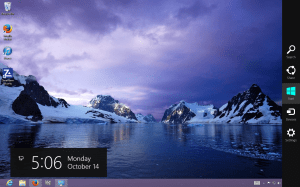
Under Settings you will find PC Settings for  changing the lock-screen picture, Ease of Access,  Windows UpdatePC settings,   if you are on another page and wish to get back to the start menu,just  move  the mouse pointer down to the bottom left hand corner and the start menu will appear.

If you Looking  for the applications feature,  move  the mouse pointer to the top right hand corner than move  it down clicking  on search this will display the applications of programs on your computer.App Search

Microsoft Windows comes with MSE (Microsoft Security Essentials ) Windows Defender. If you prefer to reload a different Anti-virus, you can do this by first going to the search bar and typing in Windows Defender.  Once Windows Defender is loaded go to  Settings, Uncheck the box next to  Turn on Real Time Protection to shut Windows Defender off Save changes. Restart the computer and install your favorite Anti-Virus.
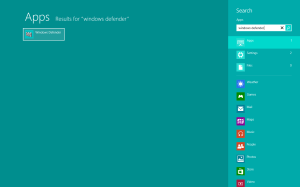
Windows Defender Turning off real-time protection

Below are links.

Free Avg Anti-virus

.http://download.cnet.com/AVG-AntiVirus-Free-2014/3000-2239_4-10320142.html

Free ZoneAlarm  firewall and Anti-virus

http://download.cnet.com/ZoneAlarm-Free-Antivirus-Firewall/3000-2239_4-75708651.html?tag=mncol;5

People that run into a problem with windows 8 trying to watch a DVD, this article will explain what you need to do

How To Play DVDs on Windows 8 – How-To Geek.

Share this:

  • Email a link to a friend (Opens in new window) Email
  • Print (Opens in new window) Print
  • Share on Facebook (Opens in new window) Facebook
  • More
  • Share on Reddit (Opens in new window) Reddit
  • Share on LinkedIn (Opens in new window) LinkedIn
  • Share on X (Opens in new window) X
  • Share on Tumblr (Opens in new window) Tumblr
  • Share on Pinterest (Opens in new window) Pinterest
Like Loading...
15 Oct 2013 by infotechcomputing
Posted in File Folder, User Account, windows 8, Windows defender, ZoneAlarm Tagged Anti-Virus, AVG, Microsoft, Microsoft Security Essentials, Microsoft Windows, Personal computer, Start menu, Windows, Windows 8, Windows Defender, Windows Update, Zonealarm 3 Replies
June 2026
M T W T F S S
1234567
891011121314
15161718192021
22232425262728
2930  
« May    
Follow INFOTECHCOMPUTING MINSTRIES: Where God Gets the Glory on WordPress.com

Enter your email address to follow this blog and receive notifications of new posts by email.

Join 38 other subscribers

Translate

  • Unknown's avatar
  • Unknown's avatar
  • Unknown's avatar
  • Unknown's avatar
  • Unknown's avatar
  • Unknown's avatar
  • Unknown's avatar
  • Unknown's avatar
  • humanity777's avatar
  • Unknown's avatar
  • Unknown's avatar
  • D. Dadu's avatar
  • Unknown's avatar
  • Unknown's avatar
  • Unknown's avatar
  • Unknown's avatar
  • Unknown's avatar
  • Unknown's avatar
  • gregsrecipes's avatar
  • ikeiaconis's avatar
  • Unknown's avatar
  • rickerobinette's avatar
  • sethsnap's avatar
  • Unknown's avatar
  • gus22m's avatar
  • emily's avatar
  • Unknown's avatar
  • Unknown's avatar
  • Unknown's avatar
  • Unknown's avatar
  • thefisherdaniel's avatar
  • Unknown's avatar
  • Food Aristries's avatar
  • Unknown's avatar
  • ihavethecats's avatar
  • Unknown's avatar
  • jassicaharry's avatar
  • Unknown's avatar
  • Unknown's avatar
  • Unknown's avatar
  • Ido Lanuel's avatar
  • kittenswhoblog's avatar
  • Unknown's avatar
  • Unknown's avatar
  • Unknown's avatar
  • Unknown's avatar
  • Unknown's avatar
  • Unknown's avatar
  • Unknown's avatar
  • Unknown's avatar

Archives

Pages

  • A new version of the old IRS scam is spreading | Komando.com
  • About Me
  • Free Malware Bytes
  • Is there an alternative to Microsoft Office?
  • Looking for a DVD player for Windows 8 or 10?
  • Ransom Ware
  • when it’s crucial in upgrading your memory
  • Which PDF works best

Recent Posts

  • Putting music on my new iPhone 17 pro
  • lost windows games on 7
  • blue screen
  • America to Hand Off Internet Domain Name Control : snopes.com
  • HP Mini 110-3518cl

Top Posts & Pages

  • Putting music on my new iPhone 17 pro
  • lost windows games on 7
  • blue screen
  • A new version of the old IRS scam is spreading | Komando.com
  • America to Hand Off Internet Domain Name Control : snopes.com
  • HP Mini 110-3518cl
  • Windows 7 showing black screen with Cursor
  • Which PDF works best
  • 3 scary eBay scams costing shoppers | Komando.com
  • How to boost your Wi-Fi for $50 | Komando.com
Blog at WordPress.com.
Privacy & Cookies: This site uses cookies. By continuing to use this website, you agree to their use.
To find out more, including how to control cookies, see here: Cookie Policy
  • Subscribe Subscribed
    • INFOTECHCOMPUTING MINSTRIES: Where God Gets the Glory
    • Join 38 other subscribers
    • Already have a WordPress.com account? Log in now.
    • INFOTECHCOMPUTING MINSTRIES: Where God Gets the Glory
    • Subscribe Subscribed
    • Sign up
    • Log in
    • Report this content
    • View site in Reader
    • Manage subscriptions
    • Collapse this bar

Loading Comments...

    %d
      Design a site like this with WordPress.com
      Get started