
I recently was having some trouble with my computer. I was trying to watch a sermon from Greg Laurie at his website http://www.harvest.org. It was becoming very glitchy and I couldn’t figure out what was going on. I believe I was reminded by the Lord, about the video card on my computer which i had totally forgotten about. The Video Card is a Ati Radeon HD 2600 Xt. What I had forgotten to do was load the driver on the computer, after I had recently reinstalled Windows Vista. i began searching all over for the disk but, to no avail. I then began checking the internet for a possible website, turns out there are a lot of companies out there that will try to solve your problem, like driver update websites, some end up not helping you at all, just giving you more problems. Lucky I was able to find a link from Microsoft.com, which had a link to the AMD website. I have provided a link below
http://support.amd.com/en-us/download
when you get to the website,

go down where you see Latest AMD Drivers and Software, I had tried the Automatically Detect and Install you Driver, and found this was not much help for me, maybe your results will be different.
Once you locate your specific driver, for your particular Video card you will notice that there is not one listed for the Windows Vista,

here click “OTHER” which will take you to another page, which ask if you have a 32 or 64 bit. To find out you will need to go to Start> type in the Search Field “System” once you click on this, you will be taken to another window, look under “System Type, here is displayed if your computer is a 32 or 64.

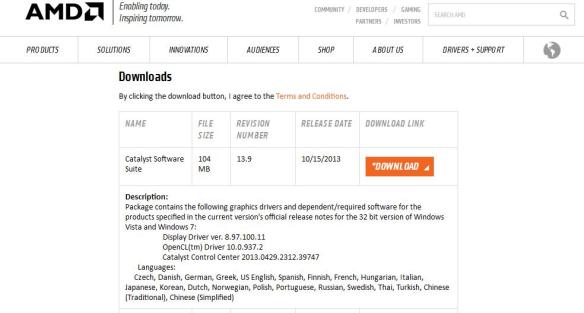
Once you have clicked on the proper bit size go down to where you see Downloads click on where you see Catalyst Software Suite
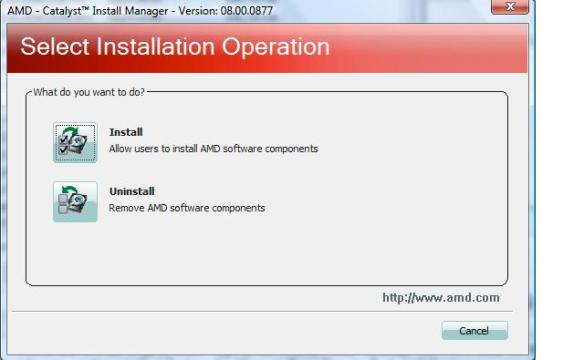
After downloading the program, a Window will open up, click install.
Once the program has loaded you will be prompted to click Next, and install.
Here you will have the option to either choose Express or Custom,
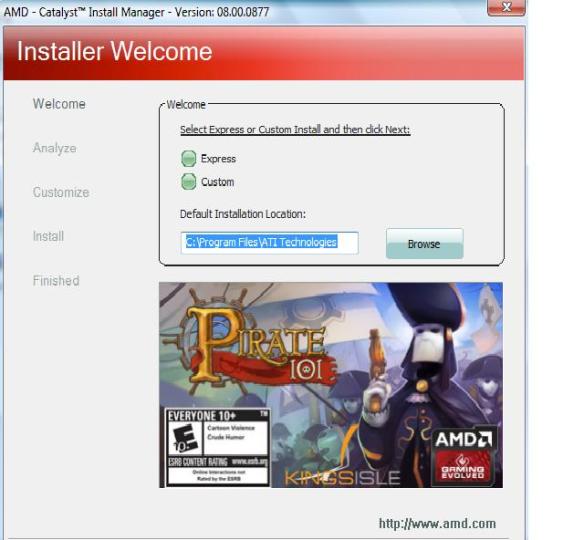
choosing Custom will provide you more security when downloading programs. After clicking next the program will start loading.

Make sure to read the End User License Agreement, before excepting.

After the program loads it will make some adjustments to your computer monitor, the screen will go blank for a couple of minutes, click Finish and your done.
Putting God First!!!


 INFOTECHCOMPUTING MINSTRIES: Where God Gets the Glory