

説明
A page builder that is fast & easy, Brizy is a next-gen website builder that anyone can use. No designer or developer skills required. Once you go Brizy, nothing else feels easy!
Highlights
Smart & clutter free
他の多くのページビルダーは、リモートサイドバーの特定の要素のすべてのオプションを混雑させているため、目前のタスクに集中するのが困難です。
編集している要素の近くに、必要なものだけを前面と中央に表示します。
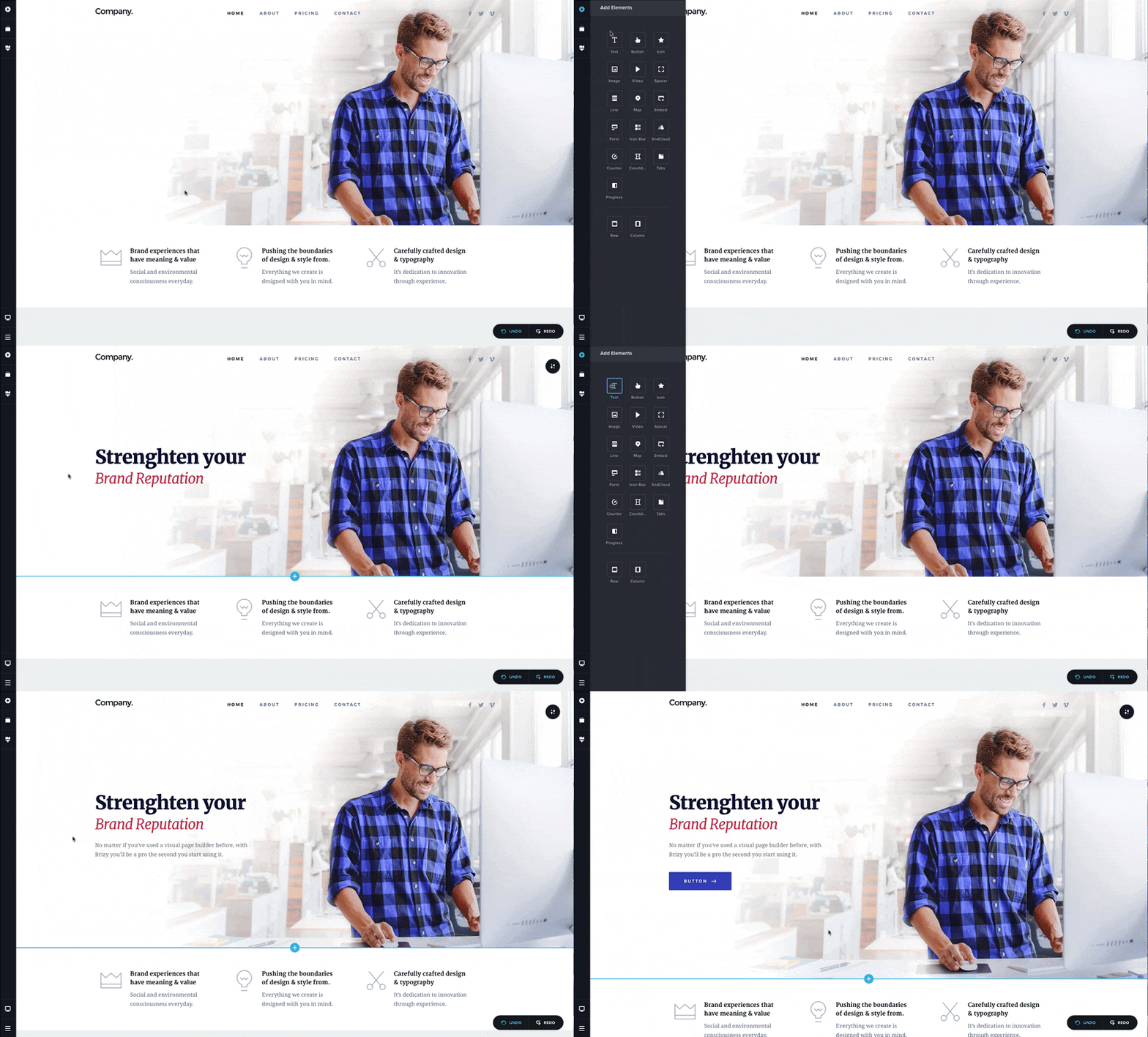
Intuitive drag & drop
コンテンツ要素、列、または行の移動は、直感的なドラッグアンドドロップ機能で簡単に行えます。
それらをつかんで目的の位置にドラッグするだけで、すべてが即座に所定の位置に収まります。
Page Builder Design elements
テキスト、ボタン、画像、アイコン、ビデオ、マップなど、ページデザインをすばやく作成するのに役立つ多くの準備が整っています。
Over 500 pre-made blocks
Expertly crafted with conversions in mind, the Brizy website builder design kit is a collection of 500+ blocks that will enable you to create websites in minutes.
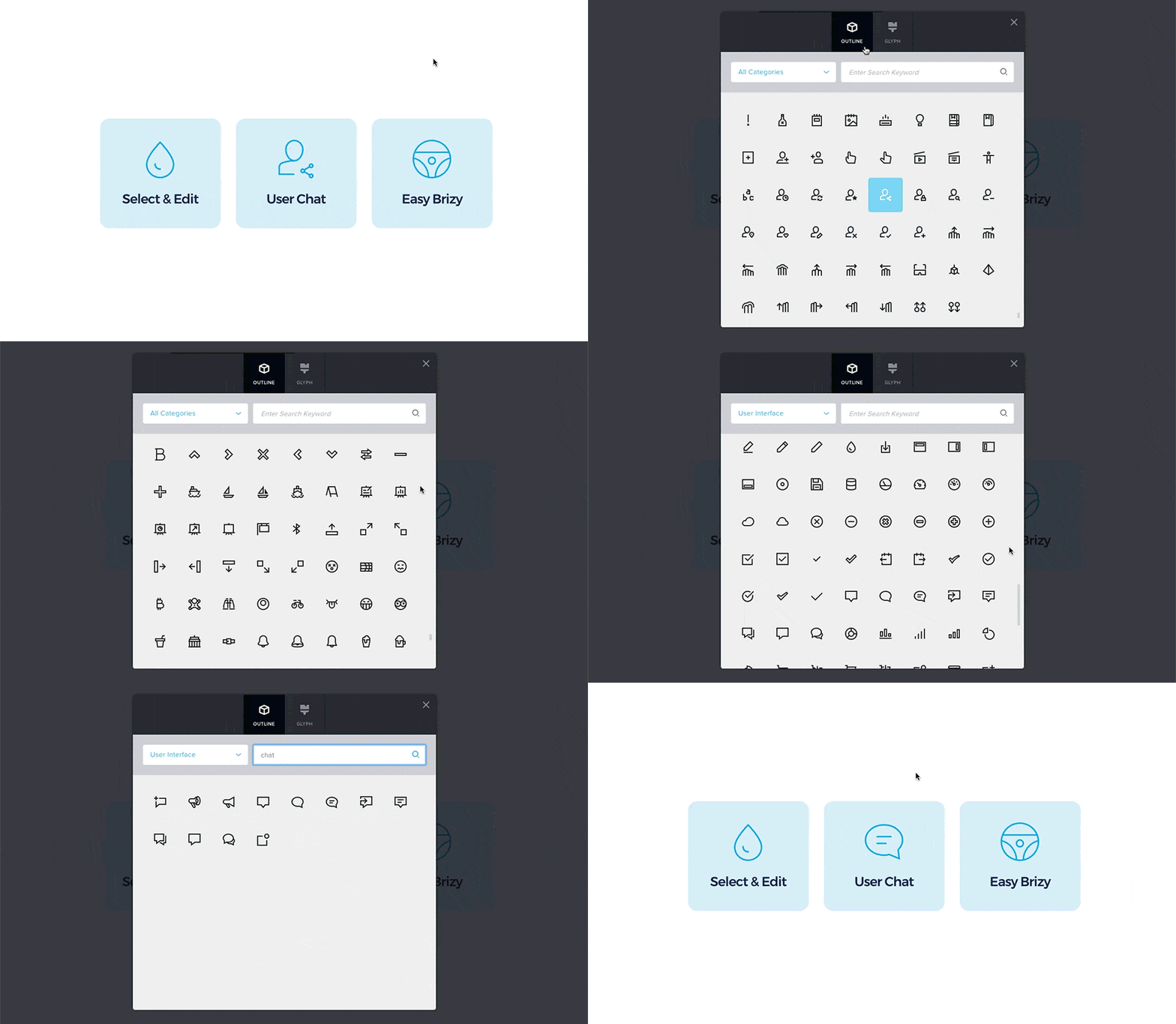
Over 4000 icons included
アウトラインバージョンと絵文字バージョンの両方を利用可能で、最も要求の厳しいアイコンのニーズもカバーしています。
カテゴリで絞り込みや、キーワードで検索で素早く便利に探せます。
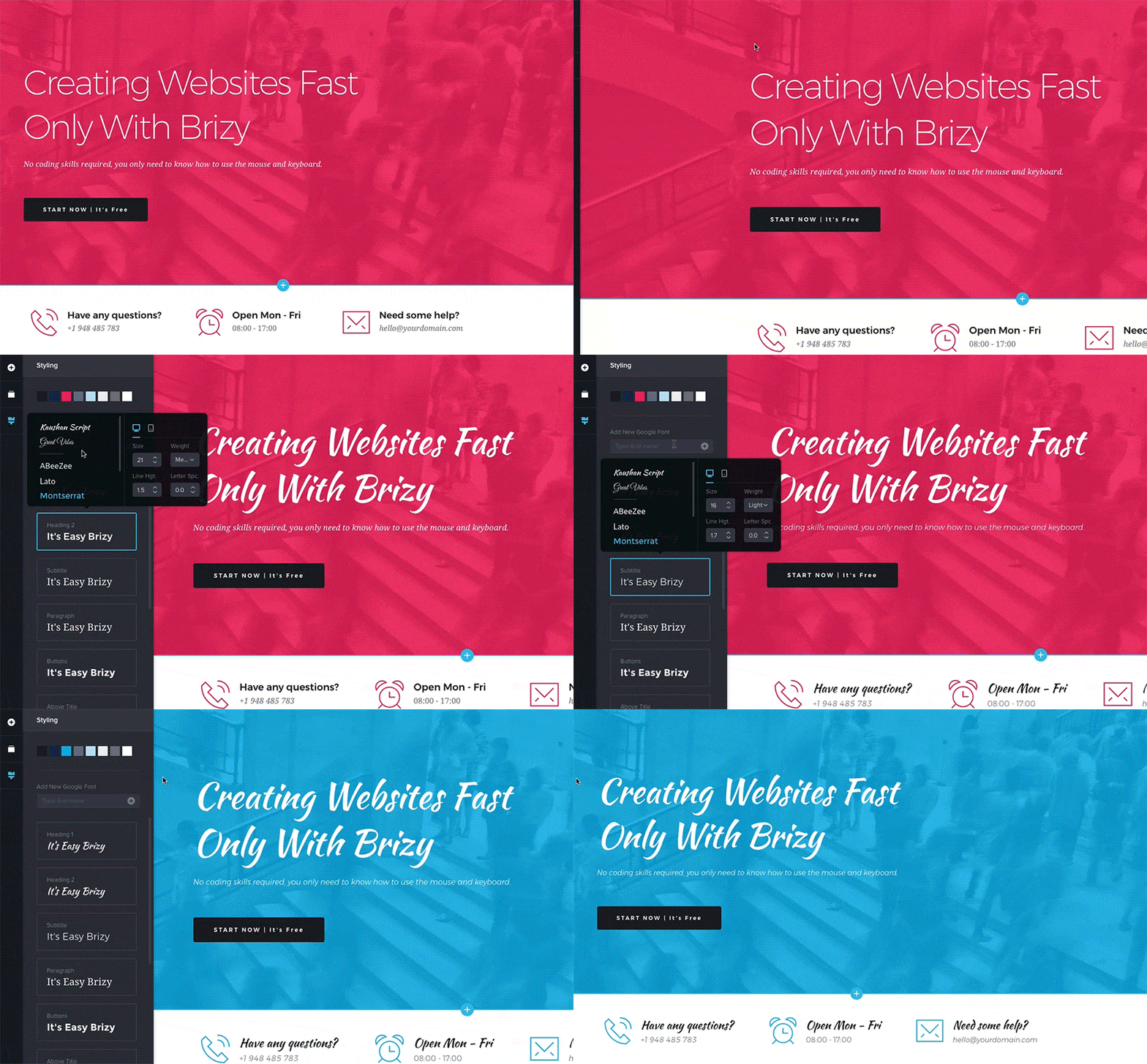
Global styling
ワンクリックで Web ページのすべての同様の色を変更したいと思ったことはありませんか ?
Brizy ならできます。更には同じプロパティを共有するすべてのテキストを一度に変更できます。
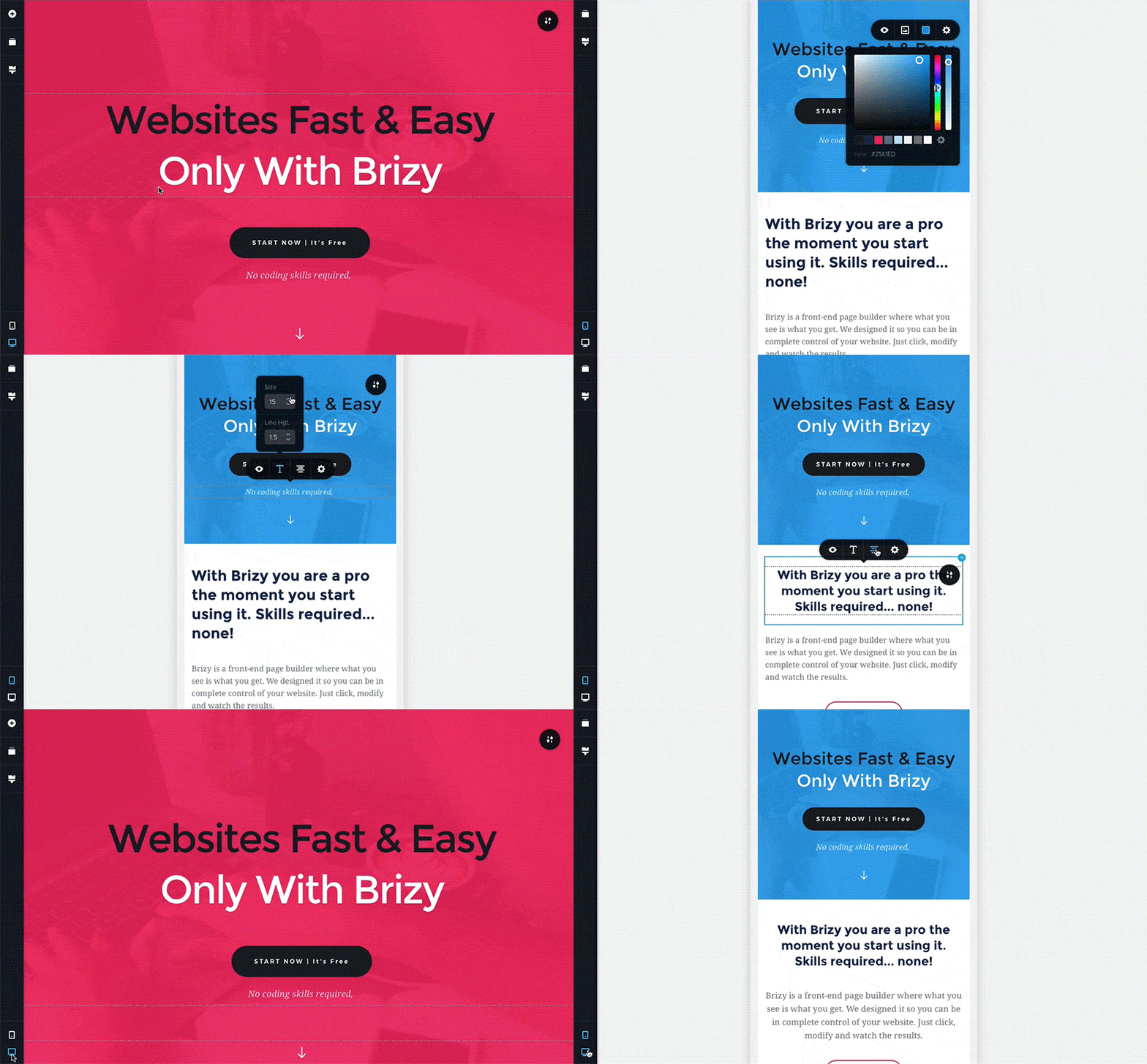
Mobile Friendly
すぐにモバイルビューモードに切り替えます。
このモードでは、このタイプのデバイスにのみ適用される変更を加えます。
これにより、ページデザインを差別化し、小さな画面に最適化できます。
Smart text editor
クリックして入力するだけで、すべてのテキストをその場で編集できます。
色、フォント、レイアウトを変更でき、最終的にデザインがどのように見えるかを完璧に表現できます。
Images done right
Brizy page builder は、強力で使いやすいオプションを利用して、サイトの画像をコントロールできます。
アップロード、フォーカス、ズーム、サイズ変更を、数秒で簡単に行えます。
Content adjustments
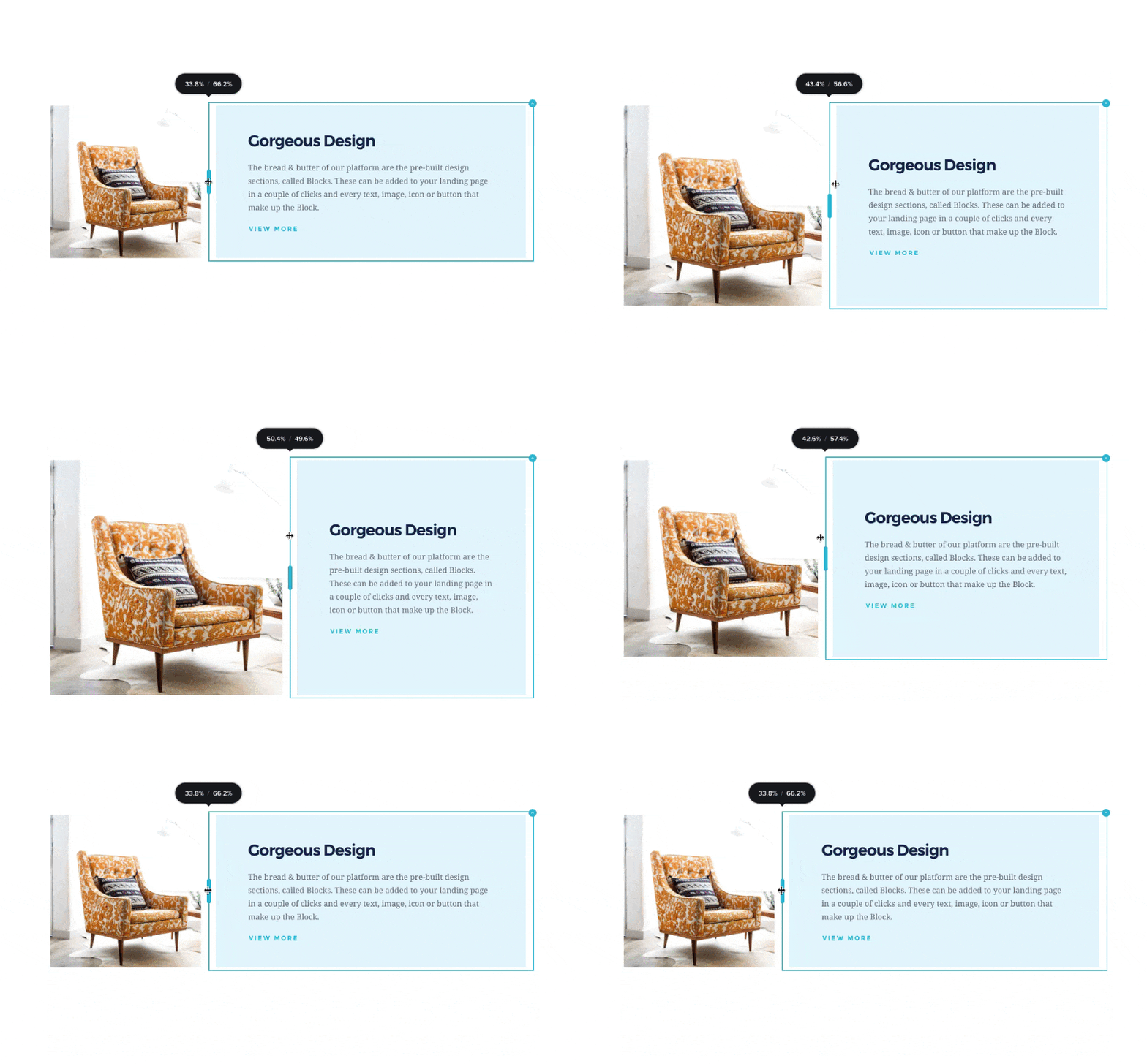
コンテンツの幅、高さ、配置の調整は、数回クリックするだけです。
すべて直感的に操作でき、あるべき場所にレイアウトされます。
Undo / Redo
間違えたり、変えてはいけないものを削除しても心配いりません。
元に戻すを使って、すべてを戻せます。
Liked Brizy?
- Join our Facebook Group.
スクリーンショット





インストール
Minimum Requirements
- WordPress 4.5 or greater
- PHP version 5.4 or greater
- MySQL version 5.0 or greater
We recommend your host supports:
- PHP version 7.0 or greater
- MySQL version 5.6 or greater
- WP Memory limit of 64 MB or greater (128 MB or higher is preferred)
Installation
- Install using the WordPress built-in Plugin installer, or Extract the zip file and drop the contents in the
wp-content/plugins/directory of your WordPress installation. - Activate the plugin through the ‘Plugins’ menu in WordPress.
- Go to Pages > Add New
- Press the ‘Edit with Brizy’ button.
Terms of Service
FAQ
-
Source Code, Suggestions & Issues
-
ON THE PUBLIC GITHUB YOU CAN
-
How can I report security bugs?
-
You can report security bugs through the Patchstack Vulnerability Disclosure Program. The Patchstack team helps validate, triage and handle any security vulnerabilities. Report a security vulnerability.
評価


貢献者と開発者


変更履歴
2.8.16 – 2026-06-09
- Fixed: PHP compatibility version
2.8.15 – 2026-06-09
- New: Builder tools support for Audio, SoundCloud, Video Playlist, Lottie, Animated Headline, Switcher, Timeline, Table, Calendly, Table of Contents, Image Comparison, PayPal, Breadcrumbs, Login and Chart
- New: Builder project tools
- New: Form date field language and format options
- New: Responsive color editing for all widgets
- New: Italic font support
- New: Option to disable font sorting in Typography via config
- New: Form confirmation message auto-hides after 5 seconds
- New: Forms now use SVG flag icons instead of emojis
- New: Increased maximum value for PayPal price inputs
- New: Added Pinterest to social modules
- Improved: Builder performance and compatibility with new plugin system
- Improved: Replaced Webpack with Rspack for faster builds
- Improved: Removed unused CSS style tags
- Improved: Context menu performance
- Improved: Updated React Facebook library
- Improved: Migrated editor styling from Tailwind to native CSS
- Improved: Replaced react-contexify with Radix UI Context Menu
- Improved: Updated react-window library
- Improved: Updated TypeScript and TypeScript project references
- Improved: HubSpot API key naming updates
- Improved: Builder addBlock updated to addBlocks with array support
- Fixed: Animations not working when carousel is present on the page
- Fixed: New phone field in forms
- Fixed: Form select field preview issues
- Fixed: Initial editor compilation issues
- Fixed: Incorrect preview positioning for buttons/icons with scroll effects
- Fixed: Extra spacing between words for some fonts
- Fixed: Form capitalize option not working correctly for messages
- Fixed: Color picker opacity automatically changing colors
- Fixed: Image sizes now respect thumbnail/medium/large settings instead of always using full size
- Fixed: Image toolbar colors now match overlay colors
- Fixed: Form phone select positioning
- Fixed: Video looping behavior with start option
- Fixed: Column hover animations with links
- Fixed: Right sidebar content width for Effects panel
- Fixed: Form button gap in Story mode
- Fixed: Gallery infinite loading option
- Fixed: Line element hover toolbar styles
- Fixed: Animated Headline displaying on separate lines
- Fixed: Phone field preview issues in forms
- Fixed: CSS style tag order in
- Fixed: Custom style class collisions across editor instances
- Fixed: Duplicate search labels in preview
- Fixed: Form reset now restores default phone country selector
2.8.14 – 2026-05-05
- Fixed: The delay that caused the menu/header to load after about 1 second
2.8.13 – 2026-04-28
- Fixed: Deleting Pro elements on free sites causes infinite loading and prevents update
2.8.12 – 2026-04-09
- Fixed: form leads in admin panel
2.8.11 – 2026-04-08
- Fixed: Elements Accesibility
- Fixed: Thumbnail Not Loading in WP When Importing ZIP Archives
2.8.10 – 2026-04-06
- Fixed: Global block compilation bug
2.8.9 – 2026-04-01
- New: Accessibility improvements for Accordion element
- New: Accessibility improvements for Tabs element
- New: Button – added ARIA attributes
- New: Accessibility improvements for Map element
- New: Accessibility improvements for Video element
- New: Accessibility improvements for Audio element
- New: Accessibility improvements for Counter element
- New: Countdown – added ARIA attributes
- New: Accessibility improvements for Progress Bar element
- New: Accessibility improvements for Translation element
- New: Accessibility improvements for Section Slider
- New: Accessibility improvements for Tooltip
2.8.8 – 2026-03-27
- Fixed: Auth for multi site instances
2.8.7 – 2026-03-25
- Fixed: Templates category filter not working after adding AI banner in WP dashboard
2.8.6 – 2026-03-19
- Fixed: Templates category filter not working after adding AI banner in WP dashboard
2.8.5 – 2026-03-17
- Fixed: compilation checking for old global blocks
2.8.3 – 2026-03-16
- Fixed: Form submission button customization
2.8.2 – 2026-03-13
- fix: Bump min compiler version
2.8.1 – 2026-03-11
- New: Typography search
- New: Reveal animation effect
- Improved: Builder bundle size and overall performance
- Fixed: Rich text transform and decoration properties
- Fixed: Button gradient background color
- Fixed: Video element play icon display in Safari
- Fixed: Custom icon visibility
- Fixed: Section custom height
2.8.0 – 2026-03-09
- New: AI integration for WordPress
2.7.24 – 2026-02-10
- Fixed: Generate global styles bug
- Fixed: Menu Jump bug
- Fixed: Access control bug
- Improved: Extend multiselects for data refetching
2.7.23 – 2026-01-22
- New: Scrollable tabs
2.7.22 – 2026-01-21
- New:Change element titles by double-clicking them in the Explorer
- New:Animated gradient option
- New:Custom color options for counter prefix and suffix
- Improved: Keyboard accessibility for Mega Menu and Dropdown
- Improved: Publish button now supports pages with scheduled status
- Improved: Updated internal libraries and dependencies
- Fixed: Buttons now preserve global styles even when customized
- Fixed: Custom videos correctly fill the screen in fullscreen mode
- Fixed: CSS generator output issues resolved
2.7.21 – 2025-12-18
- Fixed: Text copy and paste shows editable text in preview
2.7.20 – 2025-12-15
- New: Translations now add country codes to image alt text
- New: Form agreement checkbox option
- New: Column element includes a max-height option
- New: Block kits selection issue resolved
- Fixed: Tabs toolbar no longer opens incorrect tabs
- Fixed: RichText slider options no longer trigger infinite re-render
- Fixed: Page compilation error resolved
- Fixed: Video element default link now works correctly
- Fixed: Global style font changes now apply correctly in preview
- Improved: Lazy loading added for preview.pro.min.css
- Improved: Builder upgraded to the latest Redux version
- Improved: State management migrated from Recoil to Valtio
- Improved: ESLint and related dependencies updated
- Improved: Testing Library React dependencies updated
- Improved: Editor now uses an internal scrollbar instead of react-custom-scrollbars
2.7.19 – 2025-12-03
- Fixed: Richtext does not works correctly for emails
2.7.18 – 2025-12-01
- Improved: Input Text – retains its value when the toolbar is closed instantly
- Improved: Removed old JavaScript code for cleaner performance
- Fixed: Rich-Text – added static className support for background image blots
- Fixed: Rich-Text – dynamic content for third-party integrations now replaces correctly
- Fixed: Rich-Text – image mask restored for third-party instances
- Fixed: Rich-Text – preview now shows latest edits for third-party use
- Fixed: Rich-Text – links now work properly in third-party preview
- Fixed: Media Library – select menu now opens correctly
- Fixed: Addable – improved third-party compatibility and behavior
- Fixed: Icons – outline icons display correctly in the editor
- Fixed: Box Shadow – blur 0 now applies properly
- Fixed: Tabs – toolbar now opens the correct tab
2.7.17 – 2025-11-10
- New: Navigator component
- Fixed: Flatten families object before getCopiedValue processing
- Fixed: Empty button link appends ‘#’ at the end
- Fixed: Icon prompt not loading icons on first render
- Improved: Audio added possibility to hide custom audio via config
- Improved: Placeholder loading performance
- Improved: Builder code refactoring — moved all from redux/selectors.js to new selector-new.ts and renamed selector-new
2.7.16 – 2025-10-21
- New: Counter – added “fix value” option for better number control
- New: Context Menu – improved copy/paste styling on Firefox
- New: Section – introduced CSS variable for full-height sections
- New: Typography – improved custom-style handling
- Fixed: Story – widget sizes preserved when pasting styles
- Fixed: Story – custom attributes now work correctly
- Fixed: Typography – toolbar now applies default font style properly
- Fixed: Row – “show on device” visibility works correctly
- Fixed: Link – absolute URLs keep their original link format
2.7.15 – 2025-09-30
- New: Rich-Text – added tags support for dynamic content
- New: Rich-Text – toolbar now toggles automatically while typing
- New: Forms – dynamic IDs for checkboxes and radio fields
- New: Third-Party – new toolbar placement option
- Fixed: Colors – updated Brizy UI version to resolve styling issues
2.7.14 – 2025-09-04
- New: Links – phone numbers and email addresses now automatically prepend tel: and mailto:
- New: Image – option to enable/disable lazy loading
- New: Rich-Text – toolbar now opens directly next to the selected text
- New: Webhooks – display name shown instead of full URL
- New: Posts – placeholder added when no content is available
- New: Conditions – improved selection for global block conditions
- Fixed: Global Blocks – updating a global block no longer causes infinite loading
- Fixed: Context Menu – no empty context menu appears for the first container inside a popup
- Fixed: Section – elements are correctly added inside Section Slider (fade mode)
2.7.13 – 2025-09-01
- Fixed: Security enhancements
2.7.12 – 2025-08-26
- New: Rich-Text – tooltip option added
- New: Update Button – hover color now white for better visibility
- New: Section – hotkeys for faster block actions
- Fixed: Jenkins – workspace now cleaned after each build, tags publish correctly
- Fixed: Links – smooth scroll behavior
- Fixed: Links – “rel” attribute now includes ‘noreferrer’ for blank pages
- Fixed: Links – block linking now works correctly
- Fixed: reCAPTCHA – z-index styles corrected
- Fixed: Controls (Select2) – popper now renders correctly
- Fixed: Form – submit button no longer “jumps” on hover
- Fixed: Form – select field in Mega Menu works correctly in editor
- Fixed: Button – alignment Fixed when using hover animations
- Fixed: Editor – padding removed between content and scrollbar in tablet/mobile view
- Fixed: Visual – file upload from ‘ElementModel’ always returns a model
- Fixed: Context Menu – now closes properly in Firefox
- Fixed: Screenshots – block screenshot ID updates when backend provides New ID
- Fixed: Publish Button – no more infinite loading when saving a draft
- Fixed: Global Blocks – link redirects to global blocks work correctly
- Fixed: Background – overlay now works on responsive devices even if opacity is 0 on desktop
- Fixed: Animated Headline – text no longer wraps into multiple rows incorrectly
- Fixed: Section – global blocks are no longer duplicated
- Fixed: Rich-Text – tooltip retrieves dynamic CSS correctly in preview
- Fixed: Compiler – missing sections in preview now render properly
- Improved: Image element converted to TypeScript for better stability and maintainability
2.7.11 – 2025-08-18
- Fixed: Readme file typos
2.7.10 – 2025-08-18
- Fixed: The links to the global block do not always work.
2.7.9 – 2025-08-18
- Fixed: The links to the global block do not always work.
2.7.8 – 2025-08-14
- Fixed: global block name in anchor link is not showed
- Fixed: CORS error for custom icons
2.7.7 – 2025-08-11
- Fixed: Compiler editor version
2.7.6 – 2025-08-11
- Fixed: Compiler editor version
2.7.5 – 2025-08-11
- New: Tooltip option for Icon, Button and Image elements
- New: Role and ARIA-hidden attributes for Icon element (accessibility improvement)
- New: Focus indicators for buttons, links and form items (accessibility improvement)
- New: Captions support for video and audio elements
- New: Title display for uploaded audio tracks
- New: Stop-animation option for Carousel and Section Slider
- New: Multi-step form – set custom width for navigation buttons
- New: Form validation errors for empty fields and invalid emails
- New: Added a third-party container for integrations
- New: Context menu now closes reliably after use
- New: White Label – “Brizy” name is hidden in exported block/layout JSON files
- Improved: Video element height handling
- Improved: Image element – better width/height calculation
- Improved: Image element – smoother re-render process
- Improved: Pass media configuration to browser compiler
- Improved: Added utility function to get image source for third-party components
- Improved: Select dropdown positioning
- Improved: Widget positioning in accessibility mode
- Improved: Rich-text – consistent “em” font size in dynamic content
- Improved: Split some visual editor components into editor/preview files for faster loading, plus cleaned up imports
- Fixed: CSS – styleBgColorHex now works correctly with palette colours
- Fixed: Form – fields now receive focus correctly
- Fixed: Internal Link – search now finds items correctly
- Fixed: Sections – smoother scrolling between sections in Blocksy theme
- Fixed: Row – reverse columns option works as expected
- Fixed: Image links now update correctly when moving a staging site to production
2.7.4 – 2025-07-23
- Fixed: reverse column
- Fixed: popup trigger once condition
2.7.3 – 2025-07-18
- Fixed: html sanitize on compile page
2.7.2 – 2025-07-17
- Fixed: Removed redundant cache invalidation
2.7.1 – 2025-07-16
- Fixed: Missing global blocks
2.7.0 – 2025-07-15
- New: Animated Headline element for attention‑grabbing text
- New: AlphaModal component replaces deprecated defaults
- New: Column element gains full RTL support
- New: Icon element now has an ARIA‑LABEL field for better accessibility
- New: Fonts upload is handled by the faster API client
- New: Context menu closes reliably after use
- New: First‑Block Adder height refined for cleaner layouts
- Improved: Compiled Sections – pages are rendered server‑side for faster load times
- Improved: Rich‑Text toolbar – bold, italic and underline work consistently
- Improved: Visual settings can now be adjusted via add/apply filters
- Improved: Sidebar alignment and other UI optimisations
- Improved: Colour palette and UI contrast tweaks
- Improved: User‑role handling inside the builder
- Improved: Global‑typography CSS output is leaner
- Improved: Transition CSS de‑duplicated to avoid repeats
- Improved: CSS generator works faster on large pages
- Improved: Smaller compiler bundle and section‑level runtime compilation
- Improved: Deep context‑menu trees load more quickly
- Fixed: Conditional Display – no more slow‑downs on sites with a large user base when the rule checks the logged‑in user
- Fixed: Button – hover fill effect not working
- Fixed: Button – fill effect not working for hover (duplicate issue resolved)
- Fixed: Button – box resizer wrong position in Story mode
- Fixed: Builder – chartType selector is stable
- Fixed: Builder – global theme CSS variables load correctly
- Fixed: Left Sidebar – collapsed‑category state is saved
- Fixed: Left Sidebar (RTL) – layout displays correctly
- Fixed: Rich‑Text – @ address sign renders correctly
- Fixed: Rich‑Text – opacity values below 1 apply
- Fixed: Section – duplicate display‑style values removed
- Fixed: Section – background video plays only on active slide
- Fixed: RTL – dropdowns and selects display properly
- Fixed: RTL – prompt dialogs align correctly
- Fixed: RTL – menu dropdowns support RTL
- Fixed: RTL – overall UI layout no longer breaks
- Fixed: Colours – UI palette improvements
- Fixed: Right Sidebar – separator now inherits theme colour
- Fixed: Editor – no more crashes on archive pages
- Fixed: Form – select field uses correct font size with Blocksy theme
- Fixed: Menu – free menu works in editor mode
- Fixed: Build Environment – added develop branch for WP Free
- Fixed: Toolbar – section‑header toolbar no longer hidden behind menus
- Fixed: Animated Headline – loop‑off option previews correctly
- Fixed: Internal Link – alignment options now respected
- Fixed: Visual – config via filter applies correctly
- Fixed: Roles – user permission fixes applied
- Fixed: Colours – additional UI colour tweaks
- Fixed: Visual – sidebar alignment & minor optimisations
- Fixed: Fonts – upload process via API client stable
- Fixed: First‑Block Adder – height calculation fixed
- Fixed: Context Menu – closes properly on exit
2.6.22 – 2025-06-10
- Improved: Enhanced performance for image resizing.
2.6.21 – 2025-05-28
- Fixed: Check if the current user can “list_users” on Posts component
2.6.20 – 2025-05-28
- Fixed: Removed all user sensitive info from user list endpoint
2.6.19 – 2025-05-26
- Fixed: Image UID validation
2.6.18 – 2025-05-13
- New: Add a hover image to the Image element
- New: Image titles now show up in the preview
- Improved: Leaner HTML for buttons, icons, rows, columns and sections
- Improved: Better right-to-left (RTL) editing
- Fixed: Dynamic and hover background images display correctly
- Fixed: Button hover colors save as expected
- Fixed: Progress bars without a percentage preview properly
- Fixed: Button text no longer gets cut off on small screens
- Fixed: Style copy-and-paste works on tablet and mobile
- Fixed: Rich-text option list works in Story mode
- Fixed: No more crashes when adding a new font
- Fixed: Variable-font weight tab shows correctly
- Fixed: Context menu appears on responsive views
- Fixed: Parallax effect no longer conflicts with other plugins
2.6.17 – 2025-04-23
- Fixed: Force page recompilation
2.6.16 – 2025-04-22
- Fixed: Internal page links
2.6.15 – 2025-04-17
- Fixed: Not all weights in Fonts tab for Adobe Fonts
2.6.14 – 2025-03-20
- Fixed: Squirrly SEO plugin compatibility
2.6.13 – 2025-03-13
- Fixed: Elements not displayed in preview
- Fixed: User with Editor role cannot edit page
2.6.12 – 2025-02-25
- Improved: 3rd party API
- Improved: Compiler Bundle Size
- Updated: Removed icons from blocks
- Fixed: Bug with Menu failing to open when clicked multiple times
- Fixed: Parallax animation in preview with open popup
- Fixed: Scroll on parallax in Safari
- Fixed: Mixed content error when Brizy is installed on subfolder
- Fixed: Deleting images on Media Gallery
2.6.11 – 2025-02-18
- Fixed: Gallery with layout justify
= 2.6.10 – 2025-02-11
* Fixed: SVG attachment creation
* Fixed: added a security fix on API endpoint
2.6.9 – 2025-01-30
- Fixed: Image upload
- Fixed: Importing starter template erases code snippet
- Fixed: Global block code gets added to SEO description
- Fixed: Images are not responsive
- Fixed: Blurry Image
2.6.8 – 2025-01-16
- Fixed: Bug with the html escape in preview
2.6.7 – 2025-01-15
- Fixed: Increased the minimum compiler version
2.6.6 – 2025-01-15
- Fixed: Image side load
2.6.4 – 2024-12-17
- Fixed: Incorrect style of Tabs element in table and mobile
- Fixed: Icon Box is not displayed correctly in preview
2.6.3 – 2024-11-19
- Fixed: SQL query using wrong prefixes
2.6.2 – 2024-11-18
- Fixed: Simplify the check if compilation is required
2.6.1 – 2024-11-15
- Fixed: Invalidate cached image URLs after site migration.
2.6.0 – 2024-11-12
- New: Added video “URL” option for the Playlist element
- New: Added “Blending Mode” styling option for the Image element
- New: Ability to add multi-line text in one Buttons
- New: Add mask on Video
- New:: Added decimal sizes for VW, EM, and REM font size option
- Fixed: Publish button not available on private pages
- Fixed: When scrolling to a block, consider the height of the menu
- Fixed: Global block renaming
- Fixed: Paralax effect
- Fixed: Download saved blocks and layouts on Firefox
- Fixed: Some WP templates broke the view in Editor
- Fixed: Translate Press switcher is not displayed correctly
- Fixed: Images loading in editor
- Fixed: Warnings displayed on Brizy pages
- Improved: Color Hex code input
- Updated: Brizy-ui library
2.5.9 – 2024-10-21
- Fixed: CSS styles in Hamburger Menu
- Fixed: File upload extension issues
- Fixed: Image links pointing incorrectly
- Improved: Page, Popup and Global Blocks dependencies
2.5.8 – 2024-09-19
- Fixed: Anchor link with dynamic ID placeholder
- Fixed: Missing Icon for help video
- Fixed: Global typography – Missing generate method in config
2.5.7 – 2024-09-18
- Fixed: Astra Pro compatibility issue
2.5.6 – 2024-09-18
- Fixed: Simplified the method that obtain the attachment by UID
2.5.5 – 2024-09-17
- Fixed: Simplified the method that obtain the attachment by UID
2.5.4 – 2024-09-17
- New: Hover animations for Buttons
- New: Paypal element
- New: Slideshow option for Section
- New: Text transform options for typography
- New: Subscript and superscript for Text element
- New: Background color option for Video element
- New: Background video for responsive modes for Section, Row and Column
- New: Regenerate Global styles with AI
- New: Ability to pin elements in left sidebar
- Improved: Ability to copy and paste effects and animations
- Improved: Box resizer restrictions for Map
- Improved: Removed “To dashboard” button
- Improved: After upload, Image element by default has original size
- Improved: Increase width of column resizer bar
- Improved: Tollbar options code base and migrate Map, Line and Video to new CSS generator
- Improved: Center “Styling” and “Effects” toolbar buttons:
- Fixed: Disabled zoom option for Section,Row and Column for respondive modes:
- Fixed: Background video error after cloning the container element:
- Fixed: Text selection opacity if mask/gradinent is set
- Fixed: Box resizer in responsive modes for all elements
- Fixed: Copya and paste styles for responsive modes
- Fixed: Bullet list alignment in Text element
- Fixed: Text formatting after clear in Story
- Fixed: Button size with default fill type
- Fixed: Size of typography text decoration icons
- Fixed: Background color does not remove on clear formatting on Text element
- Fixed: Paste style of font style in Text element
- Fixed: Section slider content snaps after slider load
- Fixed: Slider block hover arrow color
- Fixed: Slider block remains active after deleting
- Fixed: Close dropdown of internal link after selection
- Fixed: Compilation error
- Fixed: Excerpt recursion when using Brizy posts in post loops
- Fixed: Global block rule matching
2.5.3 – 2024-08-16
- Fixed: Send the form nonce on submit when the user is authenticated
2.5.2 – 2024-08-01
- Fixed: Assets not loading on subfolder WordPress instances
2.5.1 – 2024-07-26
- Fixed: Icons not loading on subfolder WordPress instances
- Fixed: 404 templates not displaying correctly
- Fixed: Restored backward compatibility support for Astra
- Fixed: reCAPTCHA issues for current users
- Fixed: Page content visibility in wp-admin when editing pages
2.5.0 – 2024-07-22
- New: HTML Compilation process for major page-loading improvements
- Fixed: Copy-Paste Styles for Text Element when using selected text
- Fixed: Various vulnerabilities
- Fixed: Global Styles not saving current state in some instances
- Fixed: Text multi-select with gradients bug
- Fixed: Section background displaying incorrect option
- Improved: Uploading images in WEBP format
- Improved: Moved Form element from FREE to PRO
- Improved: Added rich-text formatting clearance
- Improved: Reload the preview tab if already open instead of new tab
- Updated: Builder developer dependencies
2.4.45 – 2024-07-05
- Fixed: small fixes in how the uploaded files are hnadled
2.4.44 – 2024-05-14
- Fixed: Fixed vulnerabilities reported by Worldfence
2.4.43 – 2024-03-26
- Fixed: dynamic content
- FIxed: Embed element is not working
2.4.42 – 2024-03-20
- Fixed: Drag and drop functionality not working outside the visible viewport
- Fixed: Copy and Paste for Text element with color gradient
- Fixed: Selecting all text via shortcut then writing does not show new texts
- Fixed: Text element with selection for text-transform
- Fixed: Mask for Text element when using Dynamic Image not working
- Fixed: Screenshots for blocks inside Reorder sidebar
- Fixed: Global Typography in responsive viewports
- Fixed: Text element broken error
- Improved: Added fade option for Carousel element and Slider option in blocks
- Improved: Added ‘Open in new tab’ option for internal page links
- Improved: Added Underline for links on hover
- Improved: Changed UI for Dynamic population option
- Improved: Text element performance with color change
2.4.41 – 2024-02-13
- Fixed: Text color from hex when we have the type transparent
- Fixed: Text Copy and Paste
- Fixed: Added image content validator on import blocks
- Fixed: Directory Traversal on screenshot update
2.4.40 – 2024-02-07
- New: Help video functionality inside the builder
- New: Added variable fonts
- New: Text highlight color
- Improved: Custom Attributes position in the right sidebar
- Improved: Include Global Style when saving layouts
- Improved: Toolbar options arrow position on Rows
- Improved: Extract React from editor build, and add this as standalone script in HTML
- Improved: Disable shorten/extend actions for AI text in some cases
- Improved: Drag and drop for Icons and Buttons
- Improved: Tabs UI colors in right sidebar
- Fixed: Progress bar comes out of the wrapper
- Fixed: Text Link option pasted value doesn’t save if instantly closing toolbar
- Fixed: Video player won’t extend on mobile on IOS
- Fixed: Form Select arrow
- Fixed: Column align when Effects are enabled
- Fixed: Writing long texts in Form fields
- Fixed: Video element crashed when imported with a block
- Fixed: Column alignment doesn’t work on Auto distribute option
- Fixed: Toolbar css issue when searching a Collection Type name
- Fixed: Copy Styles don’t apply for Dynamic Content Rich Text
- Fixed: Background button and icon hover color didn’t match preview
- Fixed: Video background for blocks and columns unable to pause
2.4.39 – 2024-01-17
- New: Add Right Click Context Menu to Tabs Element
- New: Added tooltip message when saving draft pages
- Improved: Speed when searching pages URL for Links
- Improved: Reduced file size of the Client API
- Improved: UI Translation
- Fixed: Link To option loses focus
- Fixed: Icon Background corner is not active
- Fixed: Save selected Page in Link option on any Text element
- Fixed: Scroll in toolbara and typography is not working when parallax effect is set
- Fixed: Some Saved Blocks thumbnails are not displayed
- Fixed: Styling Dividers Show thin line on some mobile devices
- Fixed: Background color on hover “Get a pro Plan” button
- Fixed: Drag & Drop for Posts, Accordion Tab elements
- Fixed: Drag & Drop Lines remain active randomly
- Fixed: Padding bottom for Video with Cover Image
2.4.38 – 2023-12-28
- Fixed: Small layout fixes in templates
2.4.37 – 2023-12-28
- New: Added 16 new templates.
2.4.36 – 2023-12-19
- New: Added corner radius styling for tabs in Tab Element
- New: Added ability to filter by keywords in the element panel
- New: Added ability to delete, duplicate all buttons or icons at once
- Improved: Added additional styling for the dynamic placeholder in Text elements
- Improved: Localisation strings for Icons tab
- Improved: Localisation strings for Audio element
- Improved: Localisation strings for Video element
- Improved: Localisation strings for Accordion element
- Improved: Localisation strings for Accordion tags
- Improved: Localisation strings for Block option translation
- Improved: Localisation strings for Form element
- Improved: Localisation strings for “View as” option in left sidebar
- Improved: Localisation for Right Sidebar
- Improved: Localisation for Posts element
- Improved: Localisation for Blocks popup
- Improved: Localisation for Counter element
- Improved: Localisation for Text
- Improved: Localisation for Right Sidebar effects
- Improved: Localisation for Shortcuts popup
- Improved: Hide longer title options in UI with elipse
- Fixed: Unable to delete title in Saved Blocks and Layouts
- Fixed: Youtube Shorts in Video element
- Fixed: Hover effects break column dimensions
- Fixed: Show explicit error messages when import saved blocks
- Fixed: Fix the JSON data before sending to compiler
2.4.35 – 2023-12-07
- Improved: Reduce text generation time
2.4.34 – 2023-12-05
- Fixed: Lightbox option on images is not working on frontend
- Fixed: Accordion icon size issue on front end
2.4.33 – 2023-12-01
- Fixed: Buttons width in preview
- Fixed: Overlay was visible under gradient color
2.4.32 – 2023-11-29
- New: Use system default fonts instead of Google or custom fonts
- Improved: Reduce icons size
- Improved: Save form checkbox value in preview
- Improved: Move “Show on Desktop” icon under the Basic tab in the right sidebar
- Improved: Delete dynamic content inside Text in one backspace
- Improved: Optimised code output for the Accordion element
- Improved: Optimised code output for the Tabs element
- Improved: Optimised code output for the Icon element
- Improved: Optimised code output for the Button element
- Improved: Reduced ID length in HTML attributes
- Improved: Removed “data-uid” and “name” attributes from section in preview
- Improved: Integrations API new data output format
- Fixed: Drag image with link
- Fixed: Icon sizes values in the Icon element
- Fixed: Dynamic content text color in preview
- Fixed: Sound of video with cover image plays twice
- Fixed: Custom video loop not working
- Fixed: Copy and Paste styles for hover overlay
- Fixed: Return empty for placeholders that are working with WooCommerce functions
2.4.31 – 2023-11-08
- Fixed: Malformed attribute selector data-brz-popup
- Fixed: Order By feature in Posts and Archive element is not displayed
2.4.30 – 2023-11-06
- New: Added title and tags for global blocks
- New: Added delete option for form integrations
- Improved: Brizy UI Library in Editor
- Improved: Added notification for outdated Safari browser (version 16.3 and below)
- Improved: Styling option for the Button element in responsive
- Improved: Removed Effects from the Text element in responsive
- Improved: Various option toolbars where the title of the label is too long
- Improved: Added scroll navigation to active element when device mode changes
- Improved: Added GET, POST for Form webhooks
- Improved: Prefixed all data-attributes
- Improved: Added width in PX …