<?xml version="1.0" encoding="utf-8"?>
    <feed xmlns="http://www.w3.org/2005/Atom">
      <title>Blog — PlanetScale</title>
      <subtitle>Posts about the PlanetScale platform, MySQL, PostgreSQL, databases, and more.</subtitle>
      <link href="https://planetscale.com" />
      <link rel="alternate" type="text/html" hreflang="en" href="https://planetscale.com/blog" />
      <link rel="self" type="application/atom+xml" href="https://planetscale.com/blog/feed.atom" />
      <id>https://planetscale.com/blog/feed.atom</id>
      <updated>2026-10-20T04:00:00.000Z</updated>

  
      <entry>
        <title>Neki update: $50 Metal, read-only replicas, Azure, and more</title>
        <link href="https://planetscale.com/blog/neki-updates-and-preparing-for-production" />
        <id>https://planetscale.com/blog/neki-updates-and-preparing-for-production</id>
        <published>2026-10-20T04:00:00.000Z</published>
        <updated>2026-10-20T04:00:00.000Z</updated>
        
        <author>
          <name>Nick Van Wiggeren</name>
        </author>
        
        
        <category term="product" />
        
        <category term="neki" />
        
        <content type="html"><![CDATA[<p>Neki, our sharded Postgres, has been in platform preview for about a month. The team continues to work towards the path to production-readiness, and we&#x27;ve added quite a few new features and capabilities since launch.</p><p>Here&#x27;s a quick look at what&#x27;s landed since the preview opened and how you can start evaluating Neki for your workload today.</p><h2 id="whats-shipped"><a href="https://planetscale.com/blog/neki-updates-and-preparing-for-production#whats-shipped">What&#x27;s shipped</a></h2><p>We&#x27;ve recently added both read-only replicas and smaller Metal instances to Neki starting at just $50 per month.</p><p><a href="https://planetscale.com/changelog/neki-read-only-replicas">Read-only replicas</a> were a hotly-requested feature for Postgres, particularly for customers with a large, global userbase. Neki now also supports read-only replicas for shards in your cluster.</p><p>We also <a href="https://planetscale.com/changelog/neki-metal-m-10-to-m-160">now support smaller Metal node sizes</a>, going all the way down to database nodes with 1/8th vCPU, 1GB RAM, and 10GB of locally-attached NVMe SSD.</p><p>You can try both of these capabilities on Neki in PlanetScale today. These are just a few amongst many others, including:</p><ul><li><strong><a href="https://planetscale.com/changelog/neki-extensions-terraform-cli">Manage Neki extensions with Terraform and the CLI</a></strong> (Sept 18). Enable extensions by name with <code>extensions</code> in a <code>planetscale_neki_configuration_profile</code> resource or with <code>pscale branch config-profile update --extensions</code>, and change their settings in the same update.</li><li><strong><a href="https://planetscale.com/changelog/mcp-branch-metrics">Branch metrics in the PlanetScale MCP server</a></strong> (Oct 9). <code>planetscale_get_branch_metrics</code> pulls CPU, memory, disk, replication lag, and connections into your AI agent, or wherever you connect to your infrastructure via MCP. It works for Neki, Postgres, and Vitess.</li><li><strong><a href="https://planetscale.com/changelog/planetscale-on-azure">PlanetScale on Azure</a></strong> (Oct 13). You can now create Neki and Postgres databases in Azure regions, alongside AWS and Google Cloud.</li><li><strong><a href="https://planetscale.com/changelog/neki-router-parameters-terraform">Neki router parameters in Terraform</a></strong> (Oct 14). Terraform provider v1.13.0 adds parameter management to <code>planetscale_neki_router</code>, and the <code>planetscale_databases</code> data source can now filter by <code>kind</code> (<code>mysql</code>, <code>postgresql</code>, or <code>neki</code>).</li><li><strong><a href="https://planetscale.com/changelog/cli-parameters-need-update">CLI shows which parameters need an update</a></strong> (Oct 14). CLI v0.346.0 adds a &quot;requires update&quot; column for Neki configuration profiles, admins, and sidecars, plus a <code>requires_update</code> field in JSON output.</li><li><strong><a href="https://planetscale.com/changelog/postgres-neki-huge-pages">Huge pages for Neki and Postgres</a></strong> (Oct 15). Set <code>huge_pages</code> to <code>on</code> in a configuration profile&#x27;s Parameters tab on supported cluster sizes. The change requires a restart.</li></ul><h2 id="under-the-hood-query-layer"><a href="https://planetscale.com/blog/neki-updates-and-preparing-for-production#under-the-hood-query-layer">Under the hood: query layer</a></h2><p>Much of the engineering effort since preview has gone into the query layer: making more of your existing SQL run on a sharded database without changes, and making the standard Postgres tools you already use work against Neki.</p><p>The team has merged more than 650 changes since the preview opened. A few more highlights:</p><ul><li>More of your SQL just works. INSERT ... SELECT ... ON CONFLICT, cross-shard <code>UPDATE ... FROM</code>, <code>DELETE ... USING</code> and <code>MERGE</code>, correlated <code>EXISTS</code> almost anywhere in a query, <code>ARRAY(SELECT ...)</code>, SQL cursors, <code>LISTEN</code>/<code>NOTIFY</code>, materialized views, and PL/pgSQL exception handlers are all now supported.</li><li>Export with standard tools. <code>COPY ... TO STDOUT</code> now works on sharded tables in text, CSV, and binary, so pg_dump and other export tools can read data out of a sharded Neki database.</li><li>Faster bulk writes. Distributed <code>INSERT ... SELECT</code> is about 76x faster than at launch, and COPY ingest is roughly 5x faster.</li><li>See how your query runs on every shard. <code>EXPLAIN (NEKI_PG_PLAN)</code> shows Neki&#x27;s distributed plan together with the Postgres plan each shard ran. The output follows Postgres&#x27;s own EXPLAIN format, so pgAdmin, DBeaver, <code>explain.dalibo.com</code>, and <code>explain.depesz.com</code> can read it.</li></ul><h2 id="start-evaluating-now"><a href="https://planetscale.com/blog/neki-updates-and-preparing-for-production#start-evaluating-now">Start evaluating now</a></h2><p>If you&#x27;re running Postgres and expect to need sharding or any other Neki features like online schema changes or no downtime version upgrades, now is a good time to start the conversation. Email us at <a href="mailto:neki@planetscale.com">neki@planetscale.com</a> or <a href="https://planetscale.com/contact">fill out the form</a>, and we&#x27;ll set up a call with our solutions team.</p><p>If you want to learn more about Neki, we recommend starting with <a href="https://planetscale.com/docs/neki/when-to-shard">When to shard</a>, <a href="https://planetscale.com/docs/neki/best-practices">Neki best practices</a>, and <a href="https://planetscale.com/docs/neki/data-topology">Data topology</a>.</p>]]></content>
        <summary><![CDATA[Postgres compatibility, read-only replicas, smaller Metal instances, Azure, and more have landed for Neki since platform preview.]]></summary>
      </entry>
    
      <entry>
        <title>Sequences and other volatiles in Neki</title>
        <link href="https://planetscale.com/blog/neki-volatile-expressions" />
        <id>https://planetscale.com/blog/neki-volatile-expressions</id>
        <published>2026-10-14T00:00:00.000Z</published>
        <updated>2026-10-14T00:00:00.000Z</updated>
        
        <author>
          <name>Mats Rydberg</name>
        </author>
        
        
        <category term="engineering" />
        
        <category term="neki" />
        
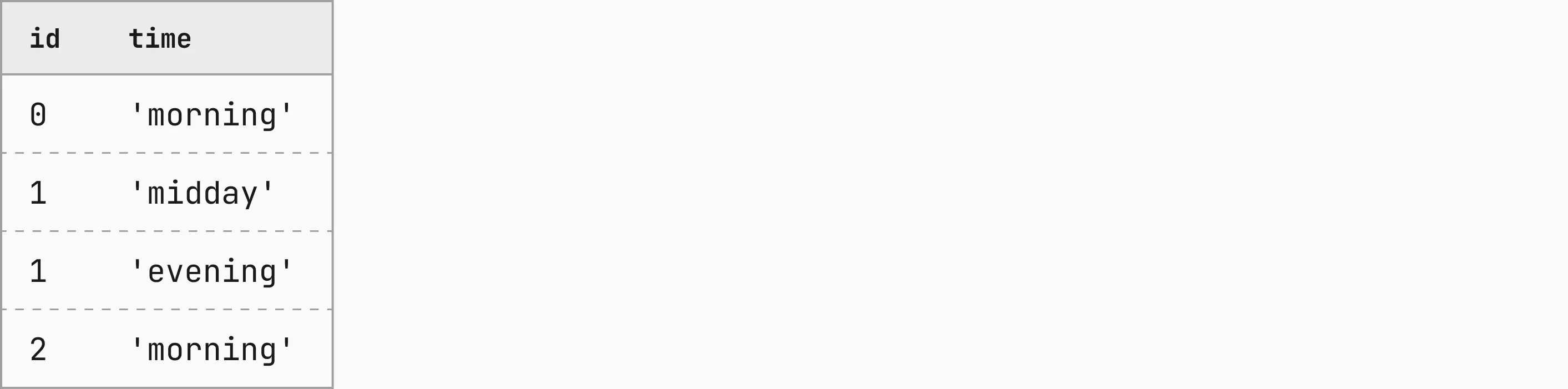
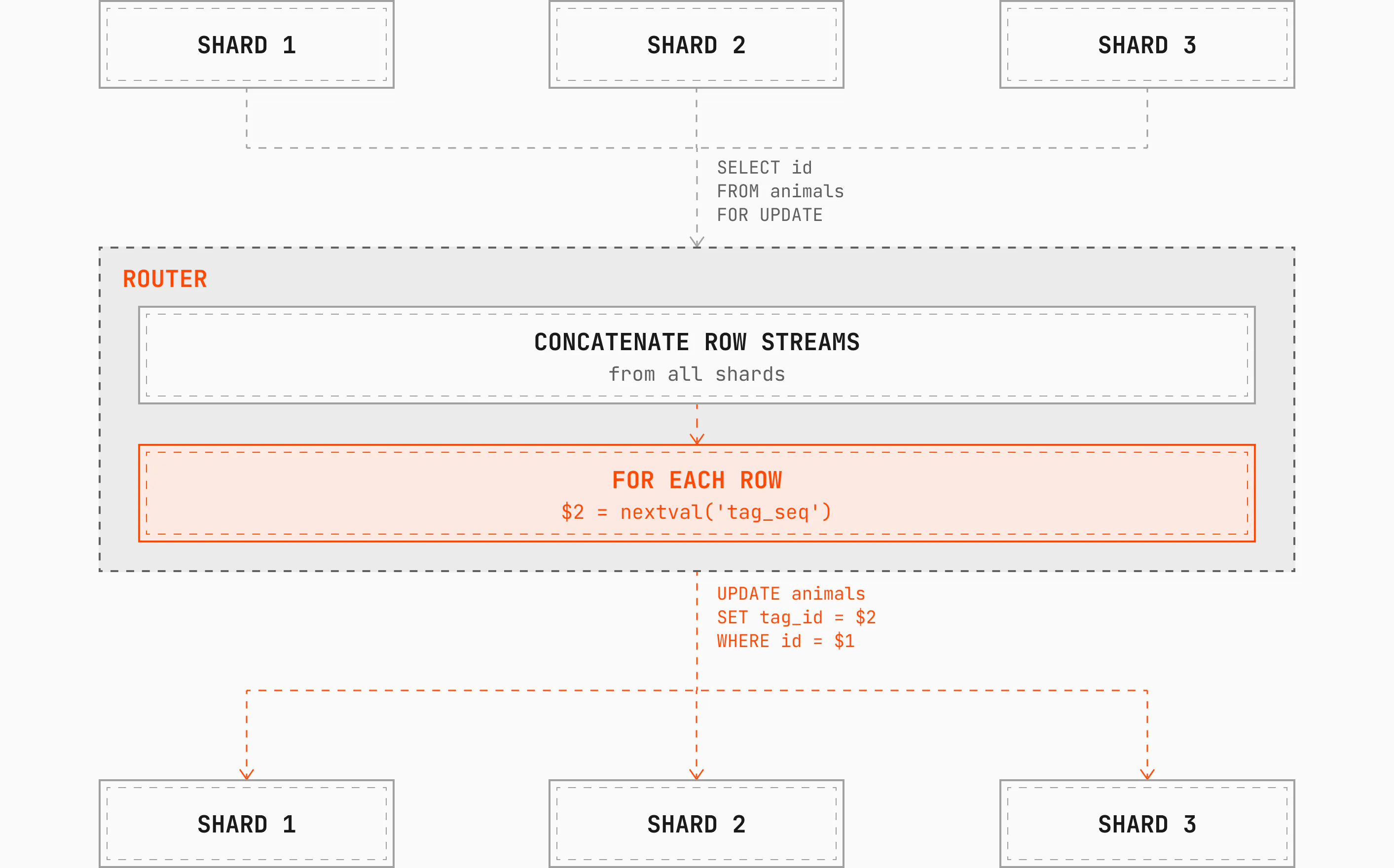
        <content type="html"><![CDATA[<p>Hi there! My name is Mats, and I have been working on database systems for a bit over ten years. My focus has shifted, but a topic that has stuck with me is the query language; its syntax, semantics, and implementation. I have contributed to ISO standardization efforts, researched and developed query language features from scratch, and implemented features in both runtime layers and query planners.</p><p>For the past eight months, that work has been the Neki query planner and its runtime engine. In this blog, I will discuss how Neki, PlanetScale&#x27;s sharded Postgres, implements sequences in our sharded system to match native Postgres. I will focus on two aspects that need special attention: volatile expressions and cross-shard synchronous evaluation. For some additional background on Neki, see these blogs: <a href="https://planetscale.com/blog/the-architecture-of-neki">Neki&#x27;s architecture</a> and <a href="https://planetscale.com/blog/what-is-a-data-topology">What is a data topology</a>.</p><h2 id="implementing-postgres-sequences-in-neki"><a href="https://planetscale.com/blog/neki-volatile-expressions#implementing-postgres-sequences-in-neki">Implementing Postgres sequences in Neki</a></h2><p>In PostgreSQL, sequences are ubiquitous. A sequence is abstractly a unique number generator, which can be used to implement a counter, an identity, or a surrogate key.</p><p>A key property of sequences is their guarantee to never generate the same value more than one time. (That guarantee has a caveat of its own: a sequence can be reset or cycled, which clearly would repeat values, but these aspects are out of scope for this post.) Interestingly, a sequence does not guarantee that its output numbers are always consecutive; when transactions roll back, for example, consumed sequence numbers are not reclaimed.</p><h2 id="can-postgres-handle-sequences-for-us"><a href="https://planetscale.com/blog/neki-volatile-expressions#can-postgres-handle-sequences-for-us">Can Postgres handle sequences for us?</a></h2><p>Each Neki shard is its own complete database system with its own query planner and an extensive SQL language support, so the Neki query planner can offload a lot of work to it. In fact, we view it as a virtue to do so: if we can relay the entire query to the shard, that is the best possible case. But generally, that is not possible to do.</p><p>The most obvious reason is that no shard has all the data, they only have their slice. Detecting these best cases requires a careful and complicated analysis of the SQL statement and the <a href="https://planetscale.com/blog/what-is-a-data-topology">Neki data topology</a>, with a strong understanding of the semantics of the SQL language and its PostgreSQL dialect with its various unique features.</p><p>That&#x27;s where we come in.</p><p>But this post is not about these best cases and how we detect them. Instead, our focus is on some of the pathological cases where we <em>cannot</em> relay all the work to one of the shards. As I will explain, sequences fall into this category where we must assume centralized control. But before we go into sequences, we must understand some details of Neki query planning.</p><h2 id="the-general-case-of-neki-query-planning"><a href="https://planetscale.com/blog/neki-volatile-expressions#the-general-case-of-neki-query-planning">The general case of Neki query planning</a></h2><p>In the most general case, each shard only needs to provide raw data. Everything else has to be possible in the router itself. For a simple query like Query 1 below, each shard hosting the (sharded) table <code>animals</code> returns its rows with the requested columns, and the router concatenates those rowsets into the full result and returns it to the client.</p><p><strong>Query 1: <code>SELECT...FROM</code></strong></p><p><picture class="block"><source media="(prefers-color-scheme: light), (prefers-color-scheme: no-preference)" srcSet="https://planetscale-images.imgix.net/assets/query-1-CKsPnZkt.png?auto=compress%2Cformat"><source media="(prefers-color-scheme: dark)" srcSet="https://planetscale-images.imgix.net/assets/query-1-darkmode-HBf8wSOO.png?auto=compress%2Cformat"><img alt="SELECT age, name FROM animals; with the expressions age and name highlighted" src="https://planetscale-images.imgix.net/assets/query-1-CKsPnZkt.png?auto=compress%2Cformat" width="2826" height="216" loading="lazy"></picture></p><p>If we extend this query with some simple expressions over the columns, seen in Query 2, we now have a choice: evaluate the expressions in the <code>router</code>, or on the <code>shard</code>?</p><p><strong>Query 2: add simple expressions</strong></p><p><picture class="block"><source media="(prefers-color-scheme: light), (prefers-color-scheme: no-preference)" srcSet="https://planetscale-images.imgix.net/assets/query-2-B-pAduw2.png?auto=compress%2Cformat"><source media="(prefers-color-scheme: dark)" srcSet="https://planetscale-images.imgix.net/assets/query-2-darkmode-CFjbCGaN.png?auto=compress%2Cformat"><img alt="SELECT age + 1, lower(name) FROM animals; with the operator and function expressions highlighted" src="https://planetscale-images.imgix.net/assets/query-2-B-pAduw2.png?auto=compress%2Cformat" width="2826" height="216" loading="lazy"></picture></p><p>Both choices will give the correct result, so the question is one of optimization, which as it turns out is nontrivial:</p><ul><li>Is the router or the shard more resource-constrained?</li><li>Which of the two is actually fastest to evaluate?</li><li>Is it more efficient to network-transfer the evaluated expression, or the raw data from the column?</li><li>What about nested expressions; shall we split them and evaluate one part here and one part there?</li><li>and so on</li></ul><p>For the purpose of simplicity, we will here assume that Neki is using a simple heuristic whereby we <em>always push</em> the evaluation to the shard if we can.</p><h3 id="router-only-expressions"><a href="https://planetscale.com/blog/neki-volatile-expressions#router-only-expressions">Router-only expressions</a></h3><p>But some expressions don’t give us that choice. Neki defines this class of expressions as <em>router-only</em>: they must be evaluated on the <code>router</code> and we must <strong>never</strong> push them down to the shard.</p><p>One example of such an expression is the <code>now()</code> function. It returns the wall clock time recorded at the start of the transaction.</p><p>If we let each shard evaluate it, the natural clock drift and the different arrival times of the request would produce different values on different shards, which violates the semantics of the expression. So we need to evaluate it in the router.</p><p>Consider Query 3, which adds <code>now()</code> to the mix.</p><p><strong>Query 3: adding <code>now()</code></strong></p><p><picture class="block"><source media="(prefers-color-scheme: light), (prefers-color-scheme: no-preference)" srcSet="https://planetscale-images.imgix.net/assets/query-3-B-SWgxUl.png?auto=compress%2Cformat"><source media="(prefers-color-scheme: dark)" srcSet="https://planetscale-images.imgix.net/assets/query-3-darkmode-CKGJrBmN.png?auto=compress%2Cformat"><img alt="SELECT age + 1, lower(name), now() FROM animals; with the router-only expression now() highlighted" src="https://planetscale-images.imgix.net/assets/query-3-B-SWgxUl.png?auto=compress%2Cformat" width="2826" height="216" loading="lazy"></picture></p><p>A valid approach here is to run Query 2 on the shards, concatenate the results, and then evaluate <code>now()</code> in the router and append the value to each row. We don’t know how many rows the shards will return, so we have to make sure evaluating now() repeatedly in the router always gives the same value. There are a couple of ways to guarantee that.</p><p>We could evaluate it once into a single-row, single-column table and join that with the rows from the shards. Or we could cache the value per statement and read from the cache on repeated evaluations. Either way, every row gets the same wall clock time.</p><p>And this summarizes the Neki query planner&#x27;s general model:</p><ul><li>Detect what parts of the query cannot run on the shards</li><li>Compose a plan wherein those parts instead run in the <code>router</code></li><li>Send most other things into the shards</li></ul><h2 id="how-postgres-classifies-expressions"><a href="https://planetscale.com/blog/neki-volatile-expressions#how-postgres-classifies-expressions">How Postgres classifies expressions</a></h2><p>So far, so good, but what about sequences? In order to fully understand how to deal with sequences, we need to understand PostgreSQL&#x27;s expression classification of <code>immutable</code>, <code>stable</code>, and <code>volatile</code>. During semantic analysis, one of the phases of query planning, every expression in the statement gets one of these classifications based on its own definition and its inputs.</p><p>I&#x27;ve already shown you examples of the first two classes.</p><h3 id="the-immutable-class"><a href="https://planetscale.com/blog/neki-volatile-expressions#the-immutable-class">The <code>immutable</code> class</a></h3><p>In Query 2, all the expressions are <code>immutable</code>. This means that they will produce the same output each time they operate on the same inputs, regardless of how many times they are evaluated and even between statements. Such expressions are the majority, and they are simple enough to not warrant additional discussion here.</p><h3 id="the-stable-class"><a href="https://planetscale.com/blog/neki-volatile-expressions#the-stable-class">The <code>stable</code> class</a></h3><p>A <code>stable</code> expression produces the same output <em>within a statement</em>. The <code>now()</code> function from Query 3 is one example. <code>to_char()</code> is another, and a useful one since it takes inputs.</p><p>The output of <code>now()</code> depends on the <code>TimeZone</code> GUC, as shown below:</p><p><strong>Table 1</strong></p><p><picture class="block"><source media="(prefers-color-scheme: light), (prefers-color-scheme: no-preference)" srcSet="https://planetscale-images.imgix.net/assets/table-1-CR9JzWwV.png?auto=compress%2Cformat"><source media="(prefers-color-scheme: dark)" srcSet="https://planetscale-images.imgix.net/assets/table-1-darkmode-CtHUkVEu.png?auto=compress%2Cformat"><img alt="Table with columns TimeZone, now(): UTC, 2026-09-09 00:00:00+00; Pacific/Auckland, 2026-09-09 12:00:00+12" src="https://planetscale-images.imgix.net/assets/table-1-CR9JzWwV.png?auto=compress%2Cformat" width="2826" height="419" loading="lazy"></picture></p><p><code>to_char()</code> takes a datetime value and a format string. Even with identical inputs, its output can differ because it depends on the <code>lc_time</code> GUC for display formatting. Table 2 shows this for a few <code>lc_time</code> values.</p><p><strong>Table 2</strong></p><p><picture class="block"><source media="(prefers-color-scheme: light), (prefers-color-scheme: no-preference)" srcSet="https://planetscale-images.imgix.net/assets/table-2-FVRVni0d.png?auto=compress%2Cformat"><source media="(prefers-color-scheme: dark)" srcSet="https://planetscale-images.imgix.net/assets/table-2-darkmode-CHNNbftn.png?auto=compress%2Cformat"><img alt="Table with columns lc_time, to_char(&#x27;2026-09-09&#x27;::date, &#x27;TMDay&#x27;): en_US, Wednesday; sv_SE, Onsdag; zh_CN, 星期三" src="https://planetscale-images.imgix.net/assets/table-2-FVRVni0d.png?auto=compress%2Cformat" width="2826" height="560" loading="lazy"></picture></p><p>For Neki, this means we cannot blindly push <code>stable</code> expressions to the shards. We must also make sure their dependencies are the same on every shard. Otherwise we might get <code>&#x27;Wednesday&#x27;</code> back on one row and <code>&#x27;Onsdag&#x27;</code> on another.</p><p>This can happen when a user includes a <code>SET lc_time = ...;</code> in their session. In this case, we have to push that statement to any shard that needs it for evaluation. The <code>set_config()</code> function is treated the same way. <code>now()</code> as I explained above is <code>router-only</code> for clock-synchronization reasons, but <code>to_char()</code> is not.</p><h2 id="enter-volatility"><a href="https://planetscale.com/blog/neki-volatile-expressions#enter-volatility">Enter volatility</a></h2><p>A <code>stable</code> expression returns the same value every time it&#x27;s evaluated within a statement. A <code>volatile</code> expression makes no such promise. It may produce a different output <em>on every single invocation</em>. It doesn&#x27;t always, but it can.</p><p>As an example, consider the <code>nextval()</code> function. It takes the name of a sequence and returns a new, unique value each time it&#x27;s evaluated. This is very useful, and can be used to implement a counter in a query or a table.</p><p>A sequence is created either using <code>CREATE SEQUENCE</code> in a dedicated DDL statement, or declared on a column with <code>GENERATED AS IDENTITY</code> (or <code>serial</code> in older versions), or <code>DEFAULT nextval(&#x27;seq&#x27;)</code> syntax in a <code>CREATE TABLE</code> statement.</p><p>In Neki, these sequence tables exist on all shards, but they all start with an empty sequence. Since it is possible to reference any sequence in any query (assuming no ACL rules), evaluations on sequences require centralized governance to avoid duplicate values across shards.</p><p>Thus, sequence operations are all <code>router-only</code>. The authoritative shard is the physical host for all sequences, which the router uses to get new sequence values to distribute. This is how Neki achieves cross-shard synchronization for sequence allocation.</p><p>So, all&#x27;s good then? Well, there is one more complication: cardinality. This is a fancy word for &quot;number of rows&quot;, and is relevant in the context of volatility. In order to evaluate volatile expressions the correct number of times, we need to evaluate them with the correct cardinality (again, number of rows). So how do we know what the cardinality is? We need to understand the definition of a <em>table expression</em>.</p><h2 id="table-expressions"><a href="https://planetscale.com/blog/neki-volatile-expressions#table-expressions">Table expressions</a></h2><p>The driving force to evaluate expressions in the query execution model is the row cardinality. That is, each expression must be evaluated once per row to obtain the output needed for that row. That seems simple enough, but the complexity lies in &quot;once per row&quot; — as it turns out, determining that is also non-trivial!</p><p>A SQL statement is made up of clauses that form an abstract data model. We will not go into all details of that here, but I will define what a <em>table expression</em> is.</p><p>Consider Query 4, which joins two tables <code>animals</code> and <code>feedings</code>, forming an intermediate result table, with an additional predicate in the <code>WHERE</code> clause.</p><p><strong>Query 4: Building a table expression from a <code>JOIN</code></strong></p><p><picture class="block"><source media="(prefers-color-scheme: light), (prefers-color-scheme: no-preference)" srcSet="https://planetscale-images.imgix.net/assets/query-4-DmPZf5ya.png?auto=compress%2Cformat"><source media="(prefers-color-scheme: dark)" srcSet="https://planetscale-images.imgix.net/assets/query-4-darkmode-BQ238rQ0.png?auto=compress%2Cformat"><img alt="SELECT age + 1, lower(name), nextval(&#x27;tag_seq&#x27;) FROM animals JOIN feedings ON animals.id = feedings.id WHERE feedings.time = &#x27;morning&#x27;; annotated with its clauses, expressions, predicate, and table expression" src="https://planetscale-images.imgix.net/assets/query-4-DmPZf5ya.png?auto=compress%2Cformat" width="2826" height="376" loading="lazy"></picture></p><p>The composition of <code>FROM ... JOIN ... WHERE ...</code> (and <code>GROUP BY</code>, <code>HAVING</code>, and more) form a logical unit known as a <code>table expression</code>. The table expression forms the basis for the evaluation of all expressions in the <code>SELECT</code> clause&#x27;s output list. It is the rows of the table expression that determine the &quot;once per row&quot; condition of the <code>volatile</code> expressions. To understand the nuances of this, assume that the tables <code>animals</code> and <code>feedings</code> exist as shown in Table 3 and Table 4, and that they are both sharded.</p><p><strong>Table 3, <code>animals</code></strong></p><p><picture class="block"><source media="(prefers-color-scheme: light), (prefers-color-scheme: no-preference)" srcSet="https://planetscale-images.imgix.net/assets/table-3-Cw0slzUo.png?auto=compress%2Cformat"><source media="(prefers-color-scheme: dark)" srcSet="https://planetscale-images.imgix.net/assets/table-3-darkmode-CDYpcqgs.png?auto=compress%2Cformat"><img alt="Table with columns id, age, name, tag_id: 0, 8, &#x27;BISMUTH&#x27;, NULL; 1, 13, &#x27;DOGE&#x27;, NULL" src="https://planetscale-images.imgix.net/assets/table-3-Cw0slzUo.png?auto=compress%2Cformat" width="2826" height="419" loading="lazy"></picture></p><p><strong>Table 4, <code>feedings</code></strong></p><p><picture class="block"><source media="(prefers-color-scheme: light), (prefers-color-scheme: no-preference)" srcSet="https://planetscale-images.imgix.net/assets/table-4-DUcz6pgf.png?auto=compress%2Cformat"><source media="(prefers-color-scheme: dark)" srcSet="https://planetscale-images.imgix.net/assets/table-4-darkmode-CbFOgw2l.png?auto=compress%2Cformat"><img alt="Table with columns id, time: 0, &#x27;morning&#x27;; 1, &#x27;midday&#x27;; 1, &#x27;evening&#x27;; 2, &#x27;morning&#x27;" src="https://planetscale-images.imgix.net/assets/table-4-DUcz6pgf.png?auto=compress%2Cformat" width="2826" height="701" loading="lazy"></picture></p><p>Joining the tables on their <code>id</code> columns gives us every pair of rows where the <code>id</code> values match. That’s an inner join, which is the default when <code>JOIN</code> has no qualifier in front of it. In our case, that matches both rows of <code>animals</code> with the first three rows of <code>feedings</code>, so the join table has three rows, shown in Table 5.</p><p><strong>Table 5, <code>animals JOIN feedings ON animals.id = feedings.id</code></strong></p><p><picture class="block"><source media="(prefers-color-scheme: light), (prefers-color-scheme: no-preference)" srcSet="https://planetscale-images.imgix.net/assets/table-5-BVZI63C2.png?auto=compress%2Cformat"><source media="(prefers-color-scheme: dark)" srcSet="https://planetscale-images.imgix.net/assets/table-5-darkmode-B-vwZopl.png?auto=compress%2Cformat"><img alt="Table with columns id, age, name, tag_id, time: 0, 8, &#x27;BISMUTH&#x27;, NULL, &#x27;morning&#x27;; 1, 13, &#x27;DOGE&#x27;, NULL, &#x27;midday&#x27;; 1, 13, &#x27;DOGE&#x27;, NULL, &#x27;evening&#x27;" src="https://planetscale-images.imgix.net/assets/table-5-BVZI63C2.png?auto=compress%2Cformat" width="2826" height="560" loading="lazy"></picture></p><p>But we also have the predicate in the <code>WHERE</code> clause, which only retains rows where <code>feedings.time</code> is <code>&#x27;morning&#x27;</code>. That leaves us with just one row in our final table expression, shown in Table 6.</p><p><strong>Table 6, <code>animals JOIN feedings ON animals.id = feedings.id WHERE feedings.time = &#x27;morning&#x27;</code></strong></p><p><picture class="block"><source media="(prefers-color-scheme: light), (prefers-color-scheme: no-preference)" srcSet="https://planetscale-images.imgix.net/assets/table-6-CCA0R8Bc.png?auto=compress%2Cformat"><source media="(prefers-color-scheme: dark)" srcSet="https://planetscale-images.imgix.net/assets/table-6-darkmode-Cf4fA1qw.png?auto=compress%2Cformat"><img alt="Table with columns id, age, name, tag_id, time: 0, 8, &#x27;BISMUTH&#x27;, NULL, &#x27;morning&#x27;" src="https://planetscale-images.imgix.net/assets/table-6-CCA0R8Bc.png?auto=compress%2Cformat" width="2826" height="278" loading="lazy"></picture></p><p>It is this table expression that forms the basis of evaluation for our <code>SELECT</code> clause expressions. So, we would compute <code>8 + 1</code>, <code>lower(&#x27;BISMUTH&#x27;)</code>, <code>nextval(&#x27;tag_seq&#x27;)</code>, and then we are good to return results! We know that we will only evaluate the <code>volatile</code> <code>nextval(&#x27;tag_seq&#x27;)</code> expression one time, and thus we will only consume one sequence value.</p><p>Now, assume that we drop the <code>WHERE</code> predicate, and we use instead Query 5.</p><p><strong>Query 5: drop the <code>WHERE</code></strong></p><p><picture class="block"><source media="(prefers-color-scheme: light), (prefers-color-scheme: no-preference)" srcSet="https://planetscale-images.imgix.net/assets/query-5-CaJiHFit.png?auto=compress%2Cformat"><source media="(prefers-color-scheme: dark)" srcSet="https://planetscale-images.imgix.net/assets/query-5-darkmode-DVmHnAVu.png?auto=compress%2Cformat"><img alt="SELECT age + 1, lower(name), nextval(&#x27;tag_seq&#x27;) FROM animals JOIN feedings ON animals.id = feedings.id; with the volatile expression nextval(&#x27;tag_seq&#x27;) highlighted" src="https://planetscale-images.imgix.net/assets/query-5-CaJiHFit.png?auto=compress%2Cformat" width="2826" height="296" loading="lazy"></picture></p><p>Now, our table expression would be equal to Table 5, and we now have three rows to evaluate. The keen observer will note, as could a sophisticated optimizer, that the values of <code>age</code> and <code>name</code> are equal over two rows, since these are join-multiplied copies from the same source row from <code>animals</code>.</p><p>So it would be tempting to not evaluate these expressions more than is necessary. For the data scale we are using in this example, it would not make much difference, but for millions of rows it could. But here we must take into account the volatility aspect: we cannot make this optimization for the <code>nextval(&#x27;tag_seq&#x27;)</code> expression, since it will give a different value each time and must be evaluated afresh on each row.</p><h2 id="the-neki-case-a-distributed-query-planner"><a href="https://planetscale.com/blog/neki-volatile-expressions#the-neki-case-a-distributed-query-planner">The Neki case: a distributed query planner</a></h2><p>Now, I must also mention that it is entirely valid to swap the order of evaluation between the <code>JOIN</code> and the <code>WHERE</code>. That is, it would be fine for us to first filter down <code>feedings</code> to its two <code>&#x27;morning&#x27;</code> rows, and then join that subset table with <code>animals</code>. Which order to do it is a general optimization problem, but it is often beneficial to filter first and join afterwards, since evaluating the predicate is often cheap.</p><p>Optimizing the operation of computing the table expression is a core focus of any query planner&#x27;s optimizer, known generally as join ordering optimization (e.g. consider a longer list of <code>JOIN</code>s and which one to do first). The PostgreSQL planner has its own optimization algorithms for this, and it is not guaranteed that Neki and Postgres agree on the order of evaluation. If <code>volatile</code> expressions are part of any of the predicates (in <code>WHERE</code> or in <code>JOIN ... ON</code>), then results are not always deterministic, but they are correct. But let&#x27;s return to the case for Neki, where we have a <em>distributed</em> query planner.</p><p>In Neki, a very large cost is the network-transport time between <code>router</code> and <code>shard</code>. In the case of a cross-shard join, which we are focusing on here, we have to go to some shards to fetch data for <code>animals</code> and some (same or different) shards to fetch data for <code>feedings</code>. Only when we have both concatenated sets of data are we able to perform our join. We are unable to do it on any given <code>shard</code>, since it does not have all of the data either. Thus, we have a great interest in minimizing the traffic going between <code>router</code> and <code>shard</code>.</p><p>Neki is able to determine when all rows of the table expression can be assembled independently on each shard, which typically requires that the join predicate uses the table&#x27;s shard index. That is, if <code>animals</code> and <code>feedings</code> were both sharded on their <code>id</code> column, then we know that we can do a shard-local join, and concatenate the results from that instead of computing the join on the router. This is correct because rows from other shards would all be unequal on the join columns. In this case, each shard contributes a subset of the table expression.</p><h2 id="putting-it-all-together"><a href="https://planetscale.com/blog/neki-volatile-expressions#putting-it-all-together">Putting it all together</a></h2><p>All right, bringing everything together, assume again that we have sharded tables <code>animals</code> and <code>feedings</code> on their <code>id</code> columns, respectively, and that we are processing Query 6.</p><p><strong>Query 6: add <code>now()</code> back</strong></p><p><picture class="block"><source media="(prefers-color-scheme: light), (prefers-color-scheme: no-preference)" srcSet="https://planetscale-images.imgix.net/assets/query-6-BJu4iXxR.png?auto=compress%2Cformat"><source media="(prefers-color-scheme: dark)" srcSet="https://planetscale-images.imgix.net/assets/query-6-darkmode-CjdVoBVF.png?auto=compress%2Cformat"><img alt="SELECT age + 1, lower(name), nextval(&#x27;tag_seq&#x27;), now() FROM animals JOIN feedings ON animals.id = feedings.id; with the router-only expressions nextval(&#x27;tag_seq&#x27;) and now() highlighted" src="https://planetscale-images.imgix.net/assets/query-6-BJu4iXxR.png?auto=compress%2Cformat" width="2826" height="296" loading="lazy"></picture></p><p>We note that the table expression can be evaluated shard-locally, and thus we can push down to shard-local evaluation on all the immutable expressions (first two columns). But we still have to evaluate both <code>now()</code> and <code>nextval(&#x27;tag_seq&#x27;)</code> on the router to avoid the uncoordinated shards from generating conflicting values.</p><p><code>now()</code> is <code>stable</code>, so we evaluate it once and use the same value on all the outgoing rows. <code>nextval(&#x27;tag_seq&#x27;)</code> is <code>volatile</code>, so we must generate a new value for each row. And since we don&#x27;t know how many rows each shard will return, we cannot generate the sequence values in advance and then draw from a cache. We must interpose the evaluations on top of the dynamic stream.</p><p>We will close by considering a more complex case, shown in Query 7, and by applying our concepts from above.</p><p><strong>Query 7: an <code>UPDATE</code> with <code>nextval()</code></strong></p><p><picture class="block"><source media="(prefers-color-scheme: light), (prefers-color-scheme: no-preference)" srcSet="https://planetscale-images.imgix.net/assets/query-7-BPmEhIq9.png?auto=compress%2Cformat"><source media="(prefers-color-scheme: dark)" srcSet="https://planetscale-images.imgix.net/assets/query-7-darkmode-Bau-SPF8.png?auto=compress%2Cformat"><img alt="UPDATE animals SET tag_id = nextval(&#x27;tag_seq&#x27;); with the volatile expression nextval(&#x27;tag_seq&#x27;) highlighted" src="https://planetscale-images.imgix.net/assets/query-7-BPmEhIq9.png?auto=compress%2Cformat" width="2826" height="216" loading="lazy"></picture></p><p>This is a DML (Data Modifying Language) query. It updates each row of the <code>animals</code> table by setting the <code>tag_id</code> column to the next sequence value from the sequence <code>&#x27;tag_seq&#x27;</code>. In an <code>UPDATE</code> query, the table expression is expressed in a different syntactic form. You can build a complex one with <code>WHERE</code> and <code>FROM</code> clauses, but here we&#x27;ll stick with the trivial case: the table expression is just the relation named after <code>UPDATE</code>, which is <code>animals</code>.</p><p>This is a challenge for Neki.</p><p>The cardinality of <code>animals</code> is unknown, and its rows are spread out across the shards in an unknown distribution. We cannot send <code>nextval(&#x27;tag_seq&#x27;)</code> to the shard, as we discussed above, and we don&#x27;t know how many values to produce. So what query do we send to the shards?</p><p>The answer is not obvious, and there is more than one solution. What Neki does today is first establish the table expression in the router using Query 8, interpose evaluation of <code>nextval(&#x27;tag_seq&#x27;)</code> on top, and run the actual update, feeding it with parameterized sequence values.</p><p><strong>Query 8: what Neki sends first</strong></p><p><picture class="block"><source media="(prefers-color-scheme: light), (prefers-color-scheme: no-preference)" srcSet="https://planetscale-images.imgix.net/assets/query-8-DxkHiNoo.png?auto=compress%2Cformat"><source media="(prefers-color-scheme: dark)" srcSet="https://planetscale-images.imgix.net/assets/query-8-darkmode-CQPRxDZ_.png?auto=compress%2Cformat"><img alt="SELECT animals.id FROM animals FOR UPDATE" src="https://planetscale-images.imgix.net/assets/query-8-DxkHiNoo.png?auto=compress%2Cformat" width="2826" height="216" loading="lazy"></picture></p><p>While in theory the trivial table expression includes all columns of <code>animals</code>, Neki knows that for Query 7, only the primary key columns and sharding index columns are necessary. In this case, <code>id</code> serves both purposes. The additional <code>FOR UPDATE</code> locks the rows until the Query 9 requests come in to complete the modification.</p><p>For each incoming row to the <code>router</code>, Neki evaluates <code>nextval(&#x27;tag_seq&#x27;)</code> and sends the shard-global unique sequence value down to be set on the correct shard&#x27;s row. Neki routes to the shard using the <code>id</code> value as the shard index, and filters down to the correct row with a <code>WHERE</code> clause using the <code>id</code> value as primary key.</p><p><strong>Query 9: what Neki sends per row</strong></p><p><picture class="block"><source media="(prefers-color-scheme: light), (prefers-color-scheme: no-preference)" srcSet="https://planetscale-images.imgix.net/assets/query-9-DGmaGFW9.png?auto=compress%2Cformat"><source media="(prefers-color-scheme: dark)" srcSet="https://planetscale-images.imgix.net/assets/query-9-darkmode-gX6n4ipP.png?auto=compress%2Cformat"><img alt="UPDATE animals SET tag_id = $2 WHERE id = $1" src="https://planetscale-images.imgix.net/assets/query-9-DGmaGFW9.png?auto=compress%2Cformat" width="2826" height="296" loading="lazy"></picture></p><p>An illustration of the data flow:</p><p><picture class="block"><source media="(prefers-color-scheme: light), (prefers-color-scheme: no-preference)" srcSet="https://planetscale-images.imgix.net/assets/data-flow-C2s4MBhm.png?auto=compress%2Cformat"><source media="(prefers-color-scheme: dark)" srcSet="https://planetscale-images.imgix.net/assets/data-flow-darkmode-C9kkQzxw.png?auto=compress%2Cformat"><img alt="Data flow: shards 1, 2 and 3 return rows for SELECT id FROM animals FOR UPDATE to the router, which concatenates the row streams and, for each row, evaluates $2 = nextval(&#x27;tag_seq&#x27;), then sends UPDATE animals SET tag_id = $2 WHERE id = $1 back to each shard" src="https://planetscale-images.imgix.net/assets/data-flow-C2s4MBhm.png?auto=compress%2Cformat" width="2826" height="1760" loading="lazy"></picture></p><p>I leave for the reader&#x27;s exercise the question of how a <code>stable</code> expression such as <code>now()</code> would be handled for a variation of Query 7. It is much simpler than the <code>volatile</code> discussion since it is not dependent on the cardinality.</p><p>I hope this deep dive into Neki query planning brought you insights into our complex system, and how the classical problems of query planning map to the distributed system that is Neki.</p><p>Happy hacking!</p><p>Mats</p>]]></content>

        <summary><![CDATA[How Neki evaluates PostgreSQL volatile expressions with the right cardinality to preserve sequence semantics across shards.]]></summary>
      </entry>
    
      <entry>
        <title>PlanetScale is now available on Azure</title>
        <link href="https://planetscale.com/blog/planetscale-is-now-on-azure" />
        <id>https://planetscale.com/blog/planetscale-is-now-on-azure</id>
        <published>2026-10-13T00:00:00.000Z</published>
        <updated>2026-10-13T00:00:00.000Z</updated>
        
        <author>
          <name>Joe Miller</name>
        </author>
        
        <author>
          <name>Matt Layher</name>
        </author>
        
        
        <category term="product" />
        
        <category term="company" />
        
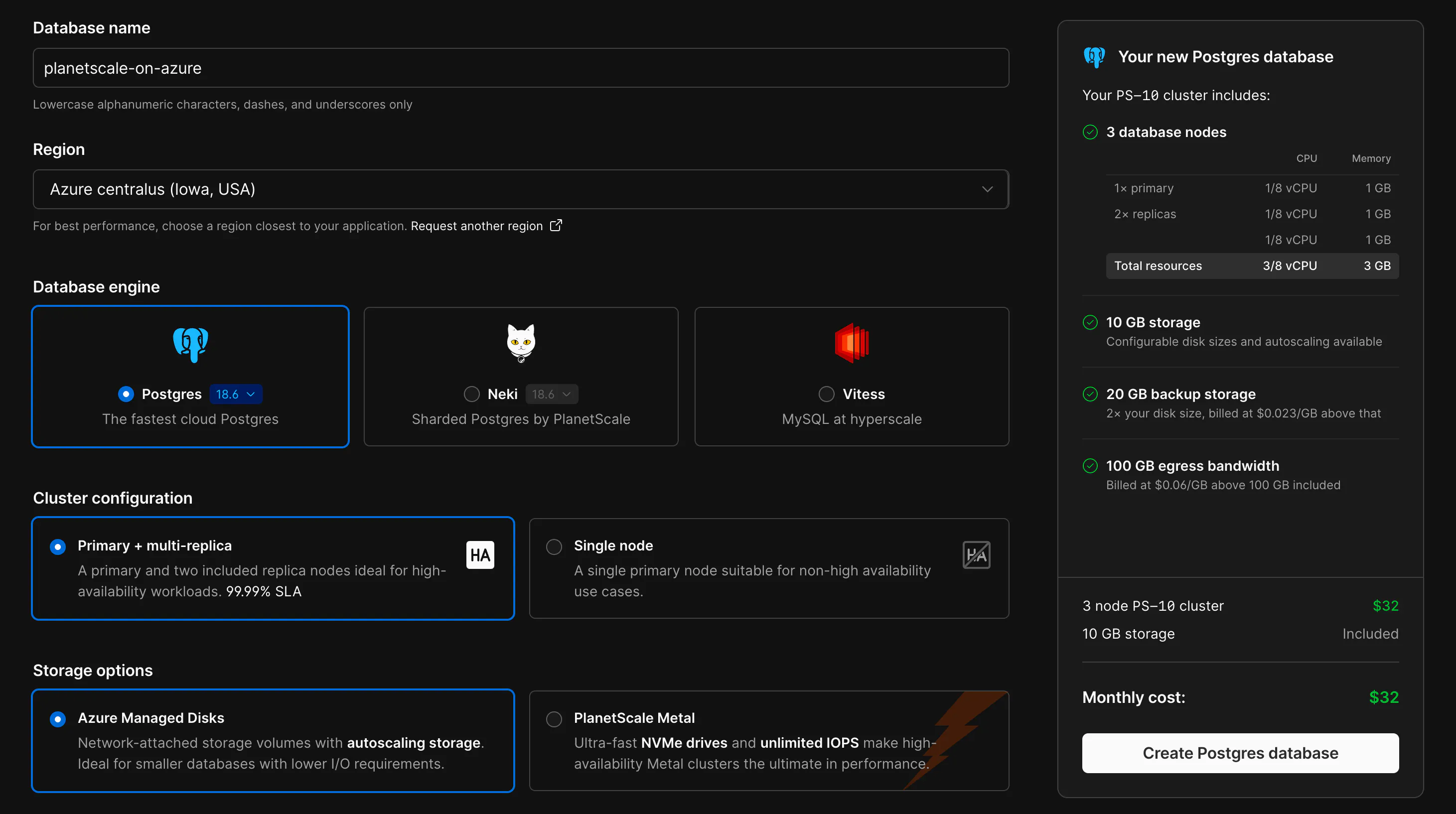
        <content type="html"><![CDATA[<p>PlanetScale is now available on Microsoft Azure. Starting today, you can create PlanetScale Postgres and Neki databases in select Azure regions, alongside the AWS and Google Cloud regions we already support. Vitess databases are not currently available on Azure.</p><p><picture class="block"><source media="(prefers-color-scheme: light), (prefers-color-scheme: no-preference)" srcSet="https://planetscale-images.imgix.net/assets/create-database-azure-BMkK-98L.png?auto=compress%2Cformat"><img alt="Creating a PlanetScale Postgres database in the Azure centralus region" src="https://planetscale-images.imgix.net/assets/create-database-azure-BMkK-98L.png?auto=compress%2Cformat" width="2922" height="1634" loading="lazy"></picture></p><h2 id="why-azure"><a href="https://planetscale.com/blog/planetscale-is-now-on-azure#why-azure">Why Azure?</a></h2><p>Many teams run their apps on Azure, and we&#x27;ve received consistent requests, especially over the past year, to bring PlanetScale to where they&#x27;re building. Now those teams can use PlanetScale alongside all their other Azure compute and infrastructure.</p><h2 id="whats-included"><a href="https://planetscale.com/blog/planetscale-is-now-on-azure#whats-included">What&#x27;s included?</a></h2><p>Databases on Azure get the same PlanetScale features you use on our other clouds: high availability with a primary and replicas spread across 3 availability zones, Query Insights, schema recommendations, automated backups, and more. That includes Metal clusters with locally attached NVMe storage, the fastest way to run databases  in the cloud.</p><h2 id="supported-azure-regions"><a href="https://planetscale.com/blog/planetscale-is-now-on-azure#supported-azure-regions">Supported Azure regions</a></h2><p>Azure support is currently available in the following regions:</p><ul><li><code>centralus</code> (Iowa, USA)</li><li><code>eastus2</code> (Virginia, USA)</li><li><code>westeurope</code> (Netherlands)</li></ul><p>If you&#x27;d like to see PlanetScale in other Azure regions, <a href="https://ps-regions.io/">let us know</a>. See the <a href="https://planetscale.com/docs/plans/regions">regions documentation</a> for the full list across all cloud providers.</p><h2 id="what-it-took"><a href="https://planetscale.com/blog/planetscale-is-now-on-azure#what-it-took">What it took</a></h2><p>Bringing PlanetScale to a new cloud took significant time, particularly in testing and ensuring it behaves just as seamlessly on Azure as it does on AWS and GCP. Every cloud has its quirks, and Azure is no exception.</p><p>Kubernetes pod networking is a good example. PlanetScale runs databases on Kubernetes, and every database pod needs its own IP address on the network. We wanted those addresses to come from the Azure virtual network directly, with native routing and no overlay for maximum performance and low latency.</p><p>The simple approach is to request one IP from Azure per pod, which causes two problems. Azure caps a virtual network at 65,536 private IP addresses, which would limit the whole network to about 65,000 pods. It also puts the Kubernetes API server in the path of every pod start, which slows things down under load.</p><p>We solved both by handing out addresses in blocks. Each node gets blocks of 16 IPs (<code>/28</code> prefixes) on its network interface, and Azure counts each block as a single address toward the cap. That increases our overall IP capacity by 16x, to over a million pod IPs per network. A background service on each node tracks its blocks, and a lightweight CNI plugin assigns pod IPs from them locally, so the API server stays out of the way. When a node gets down to 8 free addresses, it grabs another block, up to 256 blocks (4,096 pod IPs) per node.</p><p>This sounds like a simple solution, but it took a surprising amount of custom work to get just right.</p><p>Azure had a few additional networking challenges along the way. <code>/28</code> is the only block size it offers, so the design had to work around that. Older versions of the network interface API don&#x27;t return prefixes at all, and the block&#x27;s range comes back in a field normally used for a single address. There&#x27;s also a chicken-and-egg problem: system pods need IPs before the Kubernetes operator that manages the blocks is running. To handle that, the operator has a bootstrap mode that runs on the host network.</p><p>In scale testing, one cluster ran over 6,700 pods across more than 100 node pools, with the busiest nodes holding 15 blocks (240 IPs) each.</p><p>This is just one of many pieces we had to carefully construct to make PlanetScale on Azure a seamless experience for our customers. Storage, load balancing, identity, and backups all needed the same level of care. All of that work culminates in today&#x27;s launch.</p><h2 id="getting-started"><a href="https://planetscale.com/blog/planetscale-is-now-on-azure#getting-started">Getting started</a></h2><p>To create a database on Azure, choose Azure as the cloud provider when you create a new database, then select a region. Existing databases can be migrated to Azure by contacting <a href="https://support.planetscale.com/">support</a>.</p><p>If you have questions or want help planning a move, <a href="https://planetscale.com/contact">get in touch</a>.</p>]]></content>
        <summary><![CDATA[PlanetScale Postgres and Neki databases can now be deployed on Microsoft Azure]]></summary>
      </entry>
    
      <entry>
        <title>What gets TOASTed in Postgres</title>
        <link href="https://planetscale.com/blog/what-gets-toasted-in-postgres" />
        <id>https://planetscale.com/blog/what-gets-toasted-in-postgres</id>
        <published>2026-10-12T00:00:00.000Z</published>
        <updated>2026-10-12T00:00:00.000Z</updated>
        
        <author>
          <name>Ahmed Darwich</name>
        </author>
        
        
        <category term="engineering" />
        
        <category term="postgres" />
        
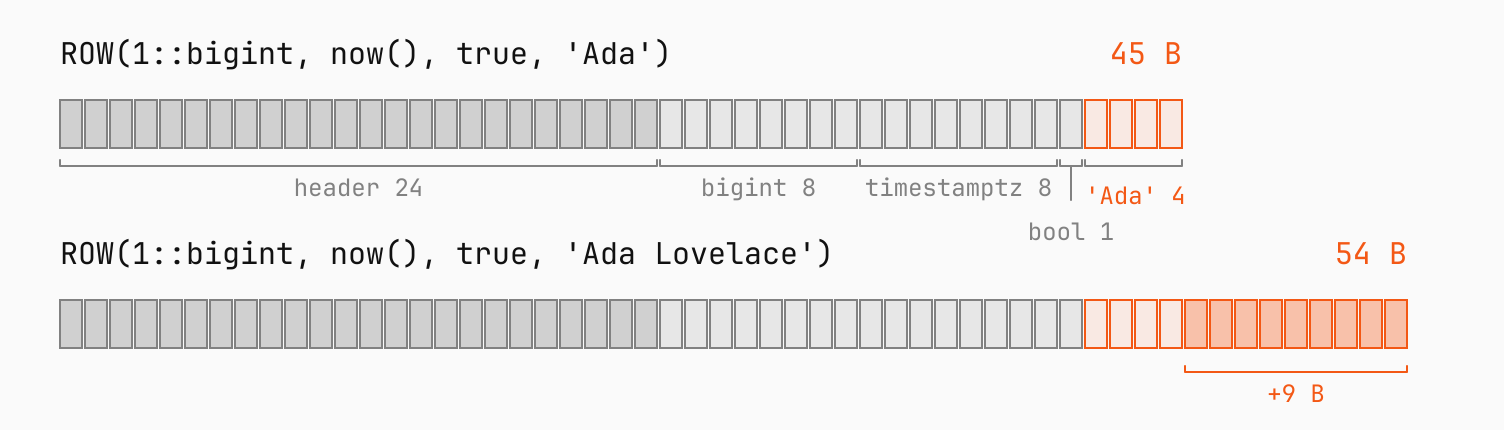
        <content type="html"><![CDATA[<p>Insert 2,000 copies of the letter <code>x</code> into a table with an <code>int</code> ID and a <code>text</code> column, and Postgres stores all 2,000 bytes uncompressed. Insert 2,001, and Postgres compresses the value to 26 bytes with LZ4.</p><p>That one extra byte is enough to trigger <strong>TOAST</strong>, the part of Postgres that compresses values once their row gets too big, and moves them out of the row when compressing isn&#x27;t enough.</p><p>Postgres 19, now in beta, changes how TOAST compresses, switching the <a href="https://github.com/postgres/postgres/commit/34dfca293">default</a> from pglz to LZ4 in builds with LZ4 support. PlanetScale already made this switch on Postgres 17 and 18.</p><p>Here, we look at which values get TOASTed, what TOAST does to them, and when LZ4 is the right choice. Let&#x27;s dig in!</p><h2 id="what-a-row-costs-in-bytes"><a href="https://planetscale.com/blog/what-gets-toasted-in-postgres#what-a-row-costs-in-bytes">What a row costs in bytes</a></h2><p>Compression is all about saving bytes, so we&#x27;ll start with where the bytes in a row go.</p><p>Postgres stores table data in fixed 8 KB pages. A row can&#x27;t be split across pages, so every row has to fit inside one.</p><p>Each row starts with a 24-byte header that Postgres uses to <a href="https://planetscale.com/blog/postgresql-mvcc">track which transactions can see it</a>, followed by the values of its columns. The space those values take depends on their type, and every type falls into one of two groups:</p><ul><li><strong>Fixed-width types</strong> like <code>bigint</code>, <code>timestamptz</code>, and <code>boolean</code> always take the same number of bytes.</li><li><strong>Variable-length types</strong> like <code>text</code>, <code>jsonb</code>, and <code>bytea</code> take as many bytes as the value needs, plus a length header: 1 byte for values up to 126 bytes, and 4 bytes for anything longer.</li></ul><p><code>pg_column_size</code> shows both groups in a single row:</p><div class="code-block" data-language="sql"><div class="max-w-full min-w-0"><pre class="shiki shiki-themes planetscale-light planetscale-dark" style="--shiki-light:#2b2b2b;--shiki-dark:#e1e1e1;--shiki-light-bg:#ebebeb;--shiki-dark-bg:#1a1a1a" tabindex="0"><code><span class="line"><span style="--shiki-light:#F35815;--shiki-dark:#F35815">SELECT</span><span style="--shiki-light:#2B2B2B;--shiki-dark:#E1E1E1"> pg_column_size(</span><span style="--shiki-light:#F35815;--shiki-dark:#F35815">ROW</span><span style="--shiki-light:#2B2B2B;--shiki-dark:#E1E1E1">(</span><span style="--shiki-light:#D92038;--shiki-dark:#FF7082">1</span><span style="--shiki-light:#2B2B2B;--shiki-dark:#E1E1E1">::</span><span style="--shiki-light:#F35815;--shiki-dark:#F35815">bigint</span><span style="--shiki-light:#2B2B2B;--shiki-dark:#E1E1E1">, </span><span style="--shiki-light:#F35815;--shiki-dark:#F35815">now</span><span style="--shiki-light:#616161;--shiki-dark:#C1C1C1">()</span><span style="--shiki-light:#2B2B2B;--shiki-dark:#E1E1E1">, true, </span><span style="--shiki-light:#13862E;--shiki-dark:#75DB8C">'Ada'</span><span style="--shiki-light:#2B2B2B;--shiki-dark:#E1E1E1">::</span><span style="--shiki-light:#F35815;--shiki-dark:#F35815">text</span><span style="--shiki-light:#2B2B2B;--shiki-dark:#E1E1E1">));</span></span>
<span class="line"><span style="--shiki-light:#2B2B2B;--shiki-dark:#E1E1E1"> pg_column_size</span></span>
<span class="line"><span style="--shiki-light:#818181;--shiki-dark:#A1A1A1">----------------</span></span>
<span class="line"><span style="--shiki-light:#D92038;--shiki-dark:#FF7082">             45</span></span>
<span class="line"><span style="--shiki-light:#2B2B2B;--shiki-dark:#E1E1E1">(</span><span style="--shiki-light:#D92038;--shiki-dark:#FF7082">1</span><span style="--shiki-light:#F35815;--shiki-dark:#F35815"> row</span><span style="--shiki-light:#2B2B2B;--shiki-dark:#E1E1E1">)</span></span>
<span class="line"></span></code></pre></div></div><p>That&#x27;s the 24-byte header, 17 bytes for the <code>bigint</code>, <code>timestamptz</code>, and <code>boolean</code> (8, 8, and 1), and 4 bytes for <code>&#x27;Ada&#x27;</code>: three characters plus a 1-byte length header. Change <code>&#x27;Ada&#x27;</code> to <code>&#x27;Ada Lovelace&#x27;</code>, and the row grows to 54 bytes while the other columns stay at 17.</p><p><picture class="block"><source media="(prefers-color-scheme: light), (prefers-color-scheme: no-preference)" srcSet="https://planetscale-images.imgix.net/assets/row-bytes-CjuBUSw2.svg?auto=compress%2Cformat"><source media="(prefers-color-scheme: dark)" srcSet="https://planetscale-images.imgix.net/assets/row-bytes-darkmode-D2mZ0m3i.svg?auto=compress%2Cformat"><img alt="Two rows drawn byte by byte. Both start with a 24-byte header, 8 bytes for the bigint, 8 for the timestamptz, and 1 for the boolean. &#x27;Ada&#x27; takes 4 bytes, for 45 in total. &#x27;Ada Lovelace&#x27; adds 9 bytes, for 54. Only the text cells change." src="https://planetscale-images.imgix.net/assets/row-bytes-CjuBUSw2.svg?auto=compress%2Cformat" width="1504" height="430" loading="lazy"></picture></p><p>Variable-length values are what make a row grow, and the only ones Postgres can compress.</p><h2 id="small-rows-dont-trigger-compression"><a href="https://planetscale.com/blog/what-gets-toasted-in-postgres#small-rows-dont-trigger-compression">Small rows don&#x27;t trigger compression</a></h2><p>TOAST stands for The Oversized-Attribute Storage Technique. As the name suggests, TOAST only steps in when a row gets too big.</p><p>Postgres treats a row as oversized once it&#x27;s larger than 2,032 bytes, about a quarter of an 8 KB page. This <a href="https://github.com/postgres/postgres/blob/REL_18_STABLE/src/include/access/heaptoast.h">threshold</a> was set so that at least four rows fit on every page, after room for the page header and a pointer to each row.</p><p>Here&#x27;s what happens when we store the most compressible value possible, a single repeated letter, at lengths just below and just above the threshold. <code>pg_column_compression</code> returns the algorithm that compressed each value, or null if the value isn&#x27;t compressed, which we display as <code>none</code>. The <code>COMPRESSION lz4</code> clause picks the algorithm.</p><div class="code-block" data-language="sql"><div class="max-w-full min-w-0"><pre class="shiki shiki-themes planetscale-light planetscale-dark" style="--shiki-light:#2b2b2b;--shiki-dark:#e1e1e1;--shiki-light-bg:#ebebeb;--shiki-dark-bg:#1a1a1a" tabindex="0"><code><span class="line"><span style="--shiki-light:#F35815;--shiki-dark:#F35815">CREATE</span><span style="--shiki-light:#F35815;--shiki-dark:#F35815"> TABLE</span><span style="--shiki-light:#5E49AF;--shiki-dark:#B7A5FB"> t</span><span style="--shiki-light:#2B2B2B;--shiki-dark:#E1E1E1"> (id </span><span style="--shiki-light:#F35815;--shiki-dark:#F35815">int</span><span style="--shiki-light:#F35815;--shiki-dark:#F35815"> PRIMARY KEY</span><span style="--shiki-light:#2B2B2B;--shiki-dark:#E1E1E1">, body </span><span style="--shiki-light:#F35815;--shiki-dark:#F35815">text</span><span style="--shiki-light:#F35815;--shiki-dark:#F35815"> COMPRESSION</span><span style="--shiki-light:#2B2B2B;--shiki-dark:#E1E1E1"> lz4);</span></span>
<span class="line"></span>
<span class="line"><span style="--shiki-light:#F35815;--shiki-dark:#F35815">INSERT INTO</span><span style="--shiki-light:#2B2B2B;--shiki-dark:#E1E1E1"> t </span><span style="--shiki-light:#F35815;--shiki-dark:#F35815">VALUES</span></span>
<span class="line"><span style="--shiki-light:#2B2B2B;--shiki-dark:#E1E1E1">  (</span><span style="--shiki-light:#D92038;--shiki-dark:#FF7082">1500</span><span style="--shiki-light:#2B2B2B;--shiki-dark:#E1E1E1">, </span><span style="--shiki-light:#F35815;--shiki-dark:#F35815">repeat</span><span style="--shiki-light:#2B2B2B;--shiki-dark:#E1E1E1">(</span><span style="--shiki-light:#13862E;--shiki-dark:#75DB8C">'x'</span><span style="--shiki-light:#2B2B2B;--shiki-dark:#E1E1E1">, </span><span style="--shiki-light:#D92038;--shiki-dark:#FF7082">1500</span><span style="--shiki-light:#2B2B2B;--shiki-dark:#E1E1E1">)),</span></span>
<span class="line"><span style="--shiki-light:#2B2B2B;--shiki-dark:#E1E1E1">  (</span><span style="--shiki-light:#D92038;--shiki-dark:#FF7082">2000</span><span style="--shiki-light:#2B2B2B;--shiki-dark:#E1E1E1">, </span><span style="--shiki-light:#F35815;--shiki-dark:#F35815">repeat</span><span style="--shiki-light:#2B2B2B;--shiki-dark:#E1E1E1">(</span><span style="--shiki-light:#13862E;--shiki-dark:#75DB8C">'x'</span><span style="--shiki-light:#2B2B2B;--shiki-dark:#E1E1E1">, </span><span style="--shiki-light:#D92038;--shiki-dark:#FF7082">2000</span><span style="--shiki-light:#2B2B2B;--shiki-dark:#E1E1E1">)),</span></span>
<span class="line"><span style="--shiki-light:#2B2B2B;--shiki-dark:#E1E1E1">  (</span><span style="--shiki-light:#D92038;--shiki-dark:#FF7082">2001</span><span style="--shiki-light:#2B2B2B;--shiki-dark:#E1E1E1">, </span><span style="--shiki-light:#F35815;--shiki-dark:#F35815">repeat</span><span style="--shiki-light:#2B2B2B;--shiki-dark:#E1E1E1">(</span><span style="--shiki-light:#13862E;--shiki-dark:#75DB8C">'x'</span><span style="--shiki-light:#2B2B2B;--shiki-dark:#E1E1E1">, </span><span style="--shiki-light:#D92038;--shiki-dark:#FF7082">2001</span><span style="--shiki-light:#2B2B2B;--shiki-dark:#E1E1E1">));</span></span>
<span class="line"></span>
<span class="line"><span style="--shiki-light:#F35815;--shiki-dark:#F35815">SELECT</span><span style="--shiki-light:#2B2B2B;--shiki-dark:#E1E1E1"> id </span><span style="--shiki-light:#F35815;--shiki-dark:#F35815">AS</span><span style="--shiki-light:#2B2B2B;--shiki-dark:#E1E1E1"> chars,</span></span>
<span class="line"><span style="--shiki-light:#2B2B2B;--shiki-dark:#E1E1E1">       pg_column_size(body) </span><span style="--shiki-light:#F35815;--shiki-dark:#F35815">AS</span><span style="--shiki-light:#2B2B2B;--shiki-dark:#E1E1E1"> stored_bytes,</span></span>
<span class="line"><span style="--shiki-light:#0B6EC5;--shiki-dark:#73C7F9">       coalesce</span><span style="--shiki-light:#2B2B2B;--shiki-dark:#E1E1E1">(pg_column_compression(body), </span><span style="--shiki-light:#13862E;--shiki-dark:#75DB8C">'none'</span><span style="--shiki-light:#2B2B2B;--shiki-dark:#E1E1E1">) </span><span style="--shiki-light:#F35815;--shiki-dark:#F35815">AS</span><span style="--shiki-light:#F35815;--shiki-dark:#F35815"> compression</span></span>
<span class="line"><span style="--shiki-light:#F35815;--shiki-dark:#F35815">FROM</span><span style="--shiki-light:#2B2B2B;--shiki-dark:#E1E1E1"> t </span><span style="--shiki-light:#F35815;--shiki-dark:#F35815">ORDER BY</span><span style="--shiki-light:#2B2B2B;--shiki-dark:#E1E1E1"> id;</span></span>
<span class="line"><span style="--shiki-light:#2B2B2B;--shiki-dark:#E1E1E1"> chars | stored_bytes | </span><span style="--shiki-light:#F35815;--shiki-dark:#F35815">compression</span></span>
<span class="line"><span style="--shiki-light:#818181;--shiki-dark:#A1A1A1">-------+--------------+-------------</span></span>
<span class="line"><span style="--shiki-light:#D92038;--shiki-dark:#FF7082">  1500</span><span style="--shiki-light:#2B2B2B;--shiki-dark:#E1E1E1"> |         </span><span style="--shiki-light:#D92038;--shiki-dark:#FF7082">1504</span><span style="--shiki-light:#2B2B2B;--shiki-dark:#E1E1E1"> | </span><span style="--shiki-light:#F35815;--shiki-dark:#F35815">none</span></span>
<span class="line"><span style="--shiki-light:#D92038;--shiki-dark:#FF7082">  2000</span><span style="--shiki-light:#2B2B2B;--shiki-dark:#E1E1E1"> |         </span><span style="--shiki-light:#D92038;--shiki-dark:#FF7082">2004</span><span style="--shiki-light:#2B2B2B;--shiki-dark:#E1E1E1"> | </span><span style="--shiki-light:#F35815;--shiki-dark:#F35815">none</span></span>
<span class="line"><span style="--shiki-light:#D92038;--shiki-dark:#FF7082">  2001</span><span style="--shiki-light:#2B2B2B;--shiki-dark:#E1E1E1"> |           </span><span style="--shiki-light:#D92038;--shiki-dark:#FF7082">26</span><span style="--shiki-light:#2B2B2B;--shiki-dark:#E1E1E1"> | lz4</span></span>
<span class="line"><span style="--shiki-light:#2B2B2B;--shiki-dark:#E1E1E1">(</span><span style="--shiki-light:#D92038;--shiki-dark:#FF7082">3</span><span style="--shiki-light:#F35815;--shiki-dark:#F35815"> rows</span><span style="--shiki-light:#2B2B2B;--shiki-dark:#E1E1E1">)</span></span>
<span class="line"></span></code></pre></div></div><p>The first two values aren&#x27;t compressed. Each takes 4 bytes more than its length, for the length header. The third value, however, is just one character longer, and it&#x27;s compressed to 26 bytes.</p><p>The 2,000-character row is exactly 2,032 bytes: 24 for the row header, 4 for the <code>int</code>, and 2,004 for the text. That&#x27;s right on the threshold, so TOAST leaves it alone. The 2,001-character row is one byte over.</p><h2 id="toast-does-two-different-jobs"><a href="https://planetscale.com/blog/what-gets-toasted-in-postgres#toast-does-two-different-jobs">TOAST does two different jobs</a></h2><p>The threshold applies to the whole row, but TOAST works on individual variable-length values. Once a row is over the threshold, TOAST has two ways to shrink it:</p><ul><li><strong>Compress</strong> a value, and keep the smaller version in the row, like the 2,001-character row.</li><li><strong>Move</strong> a value out of the row, into a separate table.</li></ul><p>That separate table is called a <strong>TOAST table</strong>. Tables with columns that can hold large values get one automatically in the <code>pg_toast</code> schema.</p><p>A value moved to the TOAST table isn&#x27;t stored in one piece, though. TOAST splits it into chunks of up to 1,996 bytes and stores each chunk as its own row, tagged with the value&#x27;s ID (<code>chunk_id</code>) and its position in the value (<code>chunk_seq</code>). The rest of the 2,032 bytes holds the chunk row&#x27;s header and IDs, so four chunk rows fit on a page. The original row keeps an 18-byte pointer, so Postgres can find the chunks and reassemble them.</p><p>TOAST works through a row&#x27;s values from largest to smallest. As soon as the row is back under 2,032 bytes, the table&#x27;s <code>toast_tuple_target</code>, it stops.</p><p>To see every outcome, we store four very different values in one table: a short string, 10 KB of repeated text, 200 KB of random characters, and 1.1 MB of a repeated sentence. <code>stored_bytes</code> is the value&#x27;s size wherever it ended up, including the TOAST table for a moved-out value. <code>octet_length</code> returns a value&#x27;s uncompressed size, and <code>pg_column_toast_chunk_id</code> (Postgres 17+) returns its ID in the TOAST table, or null if the value is still in the row.</p><div class="code-block" data-language="sql"><div class="max-w-full min-w-0"><pre class="shiki shiki-themes planetscale-light planetscale-dark" style="--shiki-light:#2b2b2b;--shiki-dark:#e1e1e1;--shiki-light-bg:#ebebeb;--shiki-dark-bg:#1a1a1a" tabindex="0"><code><span class="line"><span style="--shiki-light:#F35815;--shiki-dark:#F35815">CREATE</span><span style="--shiki-light:#F35815;--shiki-dark:#F35815"> TABLE</span><span style="--shiki-light:#5E49AF;--shiki-dark:#B7A5FB"> docs</span><span style="--shiki-light:#2B2B2B;--shiki-dark:#E1E1E1"> (id </span><span style="--shiki-light:#F35815;--shiki-dark:#F35815">int</span><span style="--shiki-light:#F35815;--shiki-dark:#F35815"> PRIMARY KEY</span><span style="--shiki-light:#2B2B2B;--shiki-dark:#E1E1E1">, body </span><span style="--shiki-light:#F35815;--shiki-dark:#F35815">text</span><span style="--shiki-light:#F35815;--shiki-dark:#F35815"> COMPRESSION</span><span style="--shiki-light:#2B2B2B;--shiki-dark:#E1E1E1"> lz4);</span></span>
<span class="line"></span>
<span class="line"><span style="--shiki-light:#F35815;--shiki-dark:#F35815">INSERT INTO</span><span style="--shiki-light:#2B2B2B;--shiki-dark:#E1E1E1"> docs </span><span style="--shiki-light:#F35815;--shiki-dark:#F35815">VALUES</span></span>
<span class="line"><span style="--shiki-light:#2B2B2B;--shiki-dark:#E1E1E1">  (</span><span style="--shiki-light:#D92038;--shiki-dark:#FF7082">1</span><span style="--shiki-light:#2B2B2B;--shiki-dark:#E1E1E1">, </span><span style="--shiki-light:#F35815;--shiki-dark:#F35815">repeat</span><span style="--shiki-light:#2B2B2B;--shiki-dark:#E1E1E1">(</span><span style="--shiki-light:#13862E;--shiki-dark:#75DB8C">'x'</span><span style="--shiki-light:#2B2B2B;--shiki-dark:#E1E1E1">, </span><span style="--shiki-light:#D92038;--shiki-dark:#FF7082">200</span><span style="--shiki-light:#2B2B2B;--shiki-dark:#E1E1E1">)),</span></span>
<span class="line"><span style="--shiki-light:#2B2B2B;--shiki-dark:#E1E1E1">  (</span><span style="--shiki-light:#D92038;--shiki-dark:#FF7082">2</span><span style="--shiki-light:#2B2B2B;--shiki-dark:#E1E1E1">, </span><span style="--shiki-light:#F35815;--shiki-dark:#F35815">repeat</span><span style="--shiki-light:#2B2B2B;--shiki-dark:#E1E1E1">(</span><span style="--shiki-light:#13862E;--shiki-dark:#75DB8C">'abc'</span><span style="--shiki-light:#2B2B2B;--shiki-dark:#E1E1E1">, </span><span style="--shiki-light:#D92038;--shiki-dark:#FF7082">3400</span><span style="--shiki-light:#2B2B2B;--shiki-dark:#E1E1E1">)),</span></span>
<span class="line"><span style="--shiki-light:#2B2B2B;--shiki-dark:#E1E1E1">  (</span><span style="--shiki-light:#D92038;--shiki-dark:#FF7082">3</span><span style="--shiki-light:#2B2B2B;--shiki-dark:#E1E1E1">, (</span><span style="--shiki-light:#F35815;--shiki-dark:#F35815">SELECT</span><span style="--shiki-light:#0B6EC5;--shiki-dark:#73C7F9"> string_agg</span><span style="--shiki-light:#2B2B2B;--shiki-dark:#E1E1E1">(md5(random</span><span style="--shiki-light:#616161;--shiki-dark:#C1C1C1">()</span><span style="--shiki-light:#2B2B2B;--shiki-dark:#E1E1E1">::</span><span style="--shiki-light:#F35815;--shiki-dark:#F35815">text</span><span style="--shiki-light:#2B2B2B;--shiki-dark:#E1E1E1">), </span><span style="--shiki-light:#13862E;--shiki-dark:#75DB8C">''</span><span style="--shiki-light:#2B2B2B;--shiki-dark:#E1E1E1">) </span><span style="--shiki-light:#F35815;--shiki-dark:#F35815">FROM</span><span style="--shiki-light:#0B6EC5;--shiki-dark:#73C7F9"> generate_series</span><span style="--shiki-light:#2B2B2B;--shiki-dark:#E1E1E1">(</span><span style="--shiki-light:#D92038;--shiki-dark:#FF7082">1</span><span style="--shiki-light:#2B2B2B;--shiki-dark:#E1E1E1">, </span><span style="--shiki-light:#D92038;--shiki-dark:#FF7082">6250</span><span style="--shiki-light:#2B2B2B;--shiki-dark:#E1E1E1">))),</span></span>
<span class="line"><span style="--shiki-light:#2B2B2B;--shiki-dark:#E1E1E1">  (</span><span style="--shiki-light:#D92038;--shiki-dark:#FF7082">4</span><span style="--shiki-light:#2B2B2B;--shiki-dark:#E1E1E1">, </span><span style="--shiki-light:#F35815;--shiki-dark:#F35815">repeat</span><span style="--shiki-light:#2B2B2B;--shiki-dark:#E1E1E1">(</span><span style="--shiki-light:#13862E;--shiki-dark:#75DB8C">'The quick brown fox jumps over the lazy dog. '</span><span style="--shiki-light:#2B2B2B;--shiki-dark:#E1E1E1">, </span><span style="--shiki-light:#D92038;--shiki-dark:#FF7082">25000</span><span style="--shiki-light:#2B2B2B;--shiki-dark:#E1E1E1">));</span></span>
<span class="line"></span>
<span class="line"><span style="--shiki-light:#F35815;--shiki-dark:#F35815">SELECT</span><span style="--shiki-light:#2B2B2B;--shiki-dark:#E1E1E1"> id,</span></span>
<span class="line"><span style="--shiki-light:#2B2B2B;--shiki-dark:#E1E1E1">       octet_length(body) </span><span style="--shiki-light:#F35815;--shiki-dark:#F35815">AS</span><span style="--shiki-light:#2B2B2B;--shiki-dark:#E1E1E1"> raw_bytes,</span></span>
<span class="line"><span style="--shiki-light:#2B2B2B;--shiki-dark:#E1E1E1">       pg_column_size(body) </span><span style="--shiki-light:#F35815;--shiki-dark:#F35815">AS</span><span style="--shiki-light:#2B2B2B;--shiki-dark:#E1E1E1"> stored_bytes,</span></span>
<span class="line"><span style="--shiki-light:#0B6EC5;--shiki-dark:#73C7F9">       coalesce</span><span style="--shiki-light:#2B2B2B;--shiki-dark:#E1E1E1">(pg_column_compression(body), </span><span style="--shiki-light:#13862E;--shiki-dark:#75DB8C">'none'</span><span style="--shiki-light:#2B2B2B;--shiki-dark:#E1E1E1">) </span><span style="--shiki-light:#F35815;--shiki-dark:#F35815">AS</span><span style="--shiki-light:#F35815;--shiki-dark:#F35815"> compression</span><span style="--shiki-light:#2B2B2B;--shiki-dark:#E1E1E1">,</span></span>
<span class="line"><span style="--shiki-light:#2B2B2B;--shiki-dark:#E1E1E1">       pg_column_toast_chunk_id(body) </span><span style="--shiki-light:#F35815;--shiki-dark:#F35815">IS NOT NULL</span><span style="--shiki-light:#F35815;--shiki-dark:#F35815"> AS</span><span style="--shiki-light:#2B2B2B;--shiki-dark:#E1E1E1"> moved_out</span></span>
<span class="line"><span style="--shiki-light:#F35815;--shiki-dark:#F35815">FROM</span><span style="--shiki-light:#2B2B2B;--shiki-dark:#E1E1E1"> docs </span><span style="--shiki-light:#F35815;--shiki-dark:#F35815">ORDER BY</span><span style="--shiki-light:#2B2B2B;--shiki-dark:#E1E1E1"> id;</span></span>
<span class="line"><span style="--shiki-light:#2B2B2B;--shiki-dark:#E1E1E1"> id | raw_bytes | stored_bytes | </span><span style="--shiki-light:#F35815;--shiki-dark:#F35815">compression</span><span style="--shiki-light:#2B2B2B;--shiki-dark:#E1E1E1"> | moved_out</span></span>
<span class="line"><span style="--shiki-light:#818181;--shiki-dark:#A1A1A1">----+-----------+--------------+-------------+-----------</span></span>
<span class="line"><span style="--shiki-light:#D92038;--shiki-dark:#FF7082">  1</span><span style="--shiki-light:#2B2B2B;--shiki-dark:#E1E1E1"> |       </span><span style="--shiki-light:#D92038;--shiki-dark:#FF7082">200</span><span style="--shiki-light:#2B2B2B;--shiki-dark:#E1E1E1"> |          </span><span style="--shiki-light:#D92038;--shiki-dark:#FF7082">204</span><span style="--shiki-light:#2B2B2B;--shiki-dark:#E1E1E1"> | </span><span style="--shiki-light:#F35815;--shiki-dark:#F35815">none</span><span style="--shiki-light:#2B2B2B;--shiki-dark:#E1E1E1">        | f</span></span>
<span class="line"><span style="--shiki-light:#D92038;--shiki-dark:#FF7082">  2</span><span style="--shiki-light:#2B2B2B;--shiki-dark:#E1E1E1"> |     </span><span style="--shiki-light:#D92038;--shiki-dark:#FF7082">10200</span><span style="--shiki-light:#2B2B2B;--shiki-dark:#E1E1E1"> |           </span><span style="--shiki-light:#D92038;--shiki-dark:#FF7082">60</span><span style="--shiki-light:#2B2B2B;--shiki-dark:#E1E1E1"> | lz4         | f</span></span>
<span class="line"><span style="--shiki-light:#D92038;--shiki-dark:#FF7082">  3</span><span style="--shiki-light:#2B2B2B;--shiki-dark:#E1E1E1"> |    </span><span style="--shiki-light:#D92038;--shiki-dark:#FF7082">200000</span><span style="--shiki-light:#2B2B2B;--shiki-dark:#E1E1E1"> |       </span><span style="--shiki-light:#D92038;--shiki-dark:#FF7082">200000</span><span style="--shiki-light:#2B2B2B;--shiki-dark:#E1E1E1"> | </span><span style="--shiki-light:#F35815;--shiki-dark:#F35815">none</span><span style="--shiki-light:#2B2B2B;--shiki-dark:#E1E1E1">        | t</span></span>
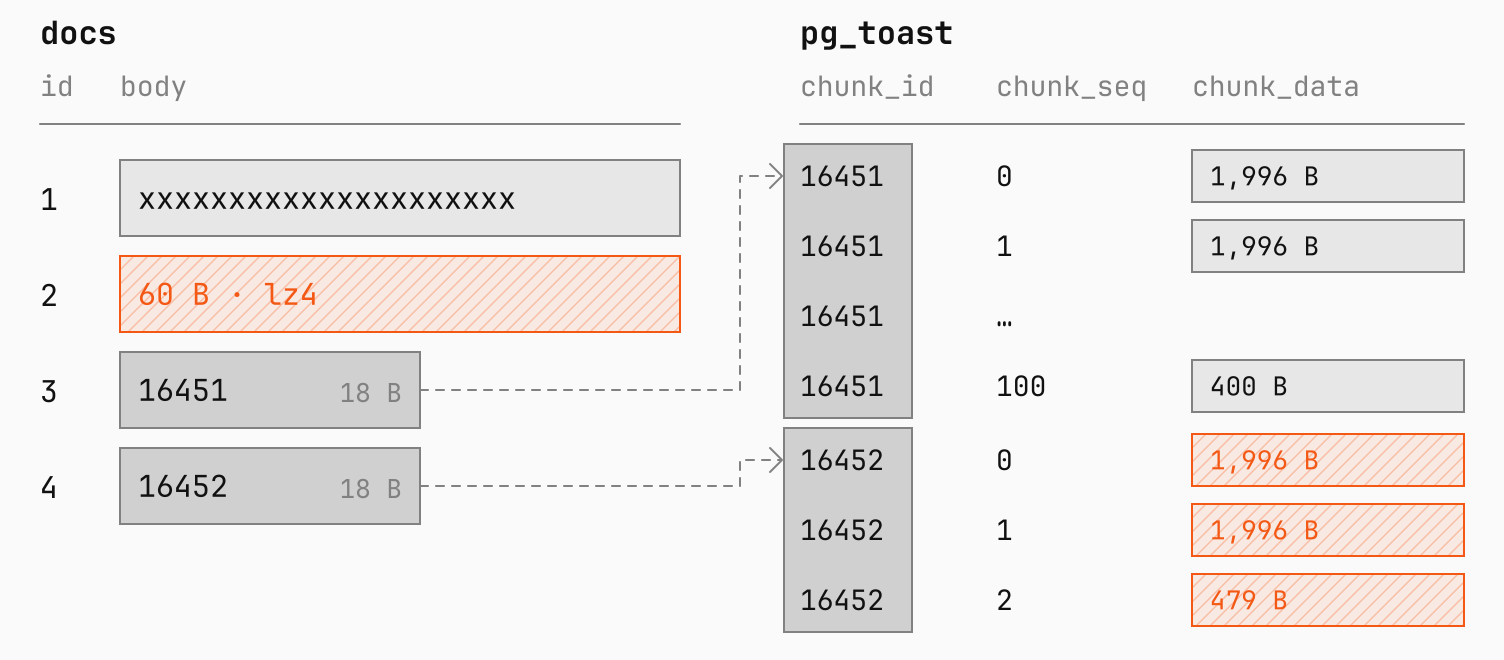
<span class="line"><span style="--shiki-light:#D92038;--shiki-dark:#FF7082">  4</span><span style="--shiki-light:#2B2B2B;--shiki-dark:#E1E1E1"> |   </span><span style="--shiki-light:#D92038;--shiki-dark:#FF7082">1125000</span><span style="--shiki-light:#2B2B2B;--shiki-dark:#E1E1E1"> |         </span><span style="--shiki-light:#D92038;--shiki-dark:#FF7082">4471</span><span style="--shiki-light:#2B2B2B;--shiki-dark:#E1E1E1"> | lz4         | t</span></span>
<span class="line"><span style="--shiki-light:#2B2B2B;--shiki-dark:#E1E1E1">(</span><span style="--shiki-light:#D92038;--shiki-dark:#FF7082">4</span><span style="--shiki-light:#F35815;--shiki-dark:#F35815"> rows</span><span style="--shiki-light:#2B2B2B;--shiki-dark:#E1E1E1">)</span></span>
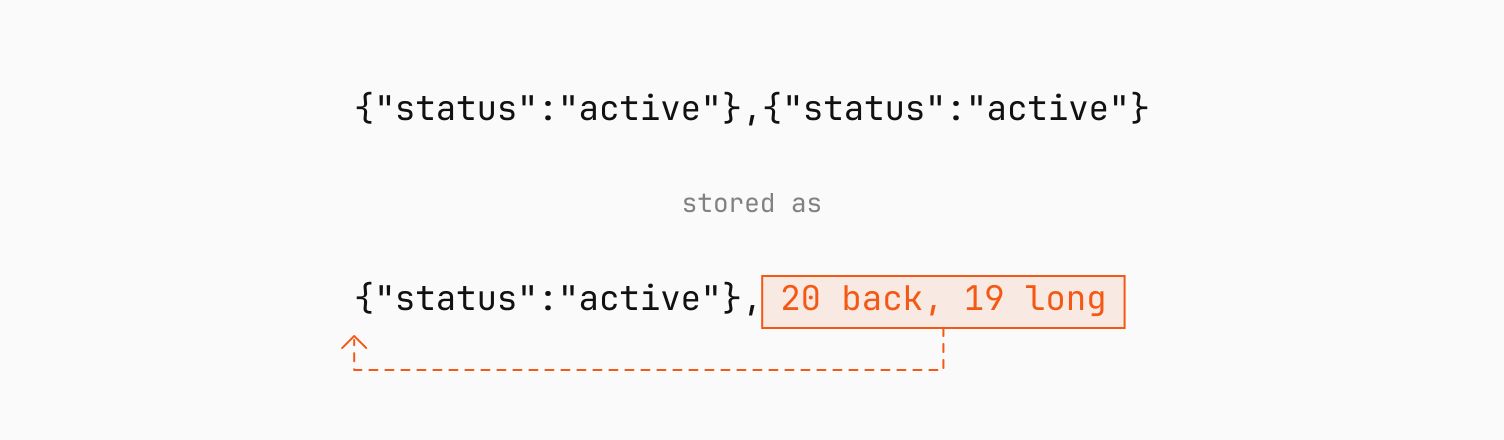
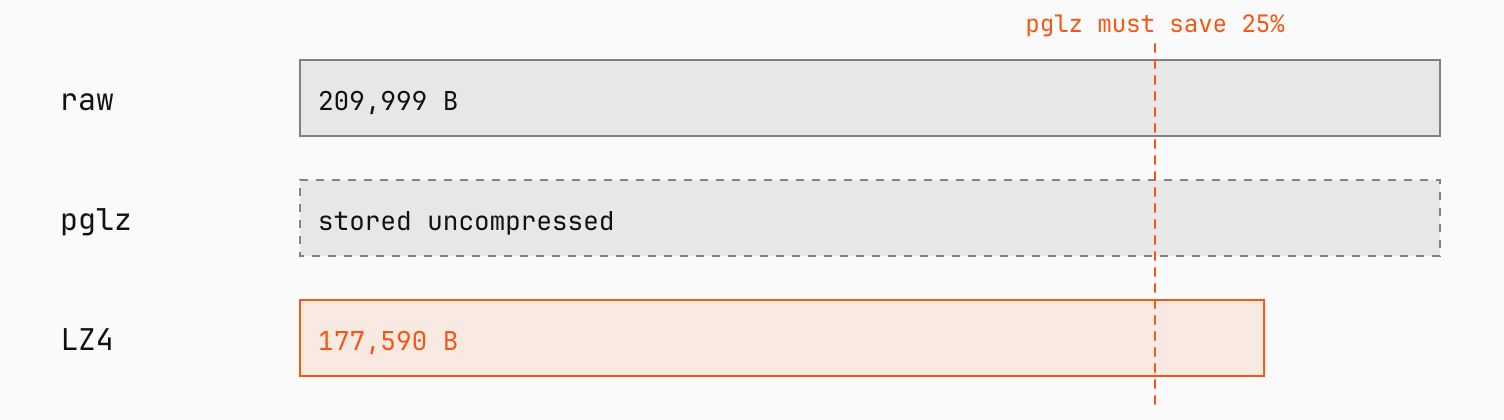
<span class="line"></span></code></pre></div></div><p>Each value lands somewhere different:</p><ul><li><strong>Row 1</strong> is under the threshold, so TOAST never touches it.</li><li><strong>Row 2</strong> compresses from 10 KB to 60 bytes, small enough to stay in the row.</li><li><strong>Row 3</strong> is random, so compressing it doesn&#x27;t save space. TOAST moves the value out uncompressed.</li><li><strong>Row 4</strong> compresses to 4,471 bytes, which is still too big for the row, so TOAST compresses it <em>and</em> moves it out.</li></ul><p><picture class="block"><source media="(prefers-color-scheme: light), (prefers-color-scheme: no-preference)" srcSet="https://planetscale-images.imgix.net/assets/docs-and-pg-toast-D0PeS2zH.svg?auto=compress%2Cformat"><source media="(prefers-color-scheme: dark)" srcSet="https://planetscale-images.imgix.net/assets/docs-and-pg-toast-darkmode-Bzk6y4wJ.svg?auto=compress%2Cformat"><img alt="The docs table next to its pg_toast table. Row 1 holds its value directly. Row 2 holds the 60-byte LZ4 result. Rows 3 and 4 hold 18-byte pointers, 16451 and 16452. In pg_toast, chunk_id 16451 has uncompressed chunks numbered 0 to 100, of 1,996 bytes each except the last at 400 bytes. chunk_id 16452 has three compressed chunks of 1,996, 1,996, and 479 bytes." src="https://planetscale-images.imgix.net/assets/docs-and-pg-toast-D0PeS2zH.svg?auto=compress%2Cformat" width="1504" height="660" loading="lazy"></picture></p><p>Each column&#x27;s <strong>storage strategy</strong> decides which of those jobs TOAST can do:</p><ul><li><strong><code>PLAIN</code></strong>: neither. Used by fixed-width types like <code>int</code>.</li><li><strong><code>EXTENDED</code></strong>: compress, then move out if needed. The default for <code>text</code>, <code>jsonb</code>, and <code>bytea</code>.</li><li><strong><code>EXTERNAL</code></strong>: move out, but never compress.</li><li><strong><code>MAIN</code></strong>: compress, but keep the value in the row even above the usual TOAST target if the row still fits on a page. Move it out only as a last resort. The default for <code>numeric</code>.</li></ul><p>You can change a column&#x27;s strategy with <code>ALTER TABLE docs ALTER COLUMN body SET STORAGE EXTERNAL</code>. It doesn&#x27;t, however, change values already stored.</p><h2 id="toast-isnt-a-large-object"><a href="https://planetscale.com/blog/what-gets-toasted-in-postgres#toast-isnt-a-large-object">TOAST isn&#x27;t a large object</a></h2><p>Postgres has a second way to store big values, called <strong>large objects</strong>, built for whole files like videos or PDFs.</p><p>In <a href="https://www.youtube.com/watch?v=pfu8OoCIU6g">Can you put a video in Postgres?</a>, we stored a 4 GB video as a large object. <code>lo_import</code> loads the file into the <code>pg_largeobject</code> system table, split into about 2 million 2 KB chunks, and returns an OID that our <code>video</code> table keeps as a reference. To stream the video to a browser, <code>lo_get</code> reads any byte range straight from those chunks.</p><p>TOAST and large objects both store big values in chunks, but they differ in three ways:</p><ul><li><strong>TOAST is automatic.</strong> It applies to any variable-length column without you asking. A large object only exists if you create one.</li><li><strong>TOAST values top out at 1 GB.</strong> Large objects can hold up to 4 TB.</li><li><strong>TOAST values are deleted with their row.</strong> A large object stays until you remove it with <code>lo_unlink</code>, even after the row that references it is gone.</li></ul><p>For files over 1 GB, you need a large object. Anything smaller fits in a regular column, where TOAST can also compress it.</p><h2 id="how-pglz-and-lz4-work"><a href="https://planetscale.com/blog/what-gets-toasted-in-postgres#how-pglz-and-lz4-work">How pglz and LZ4 work</a></h2><p>Postgres can compress a TOAST value with one of two algorithms, <strong>pglz</strong> or <strong>LZ4</strong>. A column uses the one its <code>COMPRESSION</code> clause names, or the <code>default_toast_compression</code> setting if it doesn&#x27;t name one. Changing either only affects values compressed from then on. Values already compressed keep their algorithm, even when you copy them with <code>INSERT ... SELECT</code> or rewrite the table with <code>VACUUM FULL</code>.</p><div class="mb-3 border p-3 border-blue-600 dark:border-blue-500"><p><span class="bg-blue-600 px-sm text-white dark:bg-blue-500 dark:text-black">Note</span></p><p><strong>zstd</strong> isn&#x27;t an option for column compression. Postgres uses it elsewhere, like write-ahead log (WAL) compression through <code>wal_compression</code> (Postgres 15+) and backups.</p></div><p>Both algorithms work the same basic way. They scan a value from start to finish, looking for bytes that already appeared earlier. When they find a repeat, they replace it with a short note saying where the earlier copy is and how long it is.</p><p>In <code>{&quot;status&quot;:&quot;active&quot;},{&quot;status&quot;:&quot;active&quot;}</code>, the second object is stored as a few-byte note pointing back to the first.</p><p><picture class="block"><source media="(prefers-color-scheme: light), (prefers-color-scheme: no-preference)" srcSet="https://planetscale-images.imgix.net/assets/match-note-DhzGdQOY.svg?auto=compress%2Cformat"><source media="(prefers-color-scheme: dark)" srcSet="https://planetscale-images.imgix.net/assets/match-note-darkmode-BJyb-U_O.svg?auto=compress%2Cformat"><img alt="The text {&quot;status&quot;:&quot;active&quot;},{&quot;status&quot;:&quot;active&quot;}. Stored, the second object is replaced by a short note reading &quot;20 back, 19 long&quot; that points at the first object." src="https://planetscale-images.imgix.net/assets/match-note-DhzGdQOY.svg?auto=compress%2Cformat" width="1504" height="440" loading="lazy"></picture></p><p>There&#x27;s a limit, though, to how far back that note can point, called the <strong>window</strong>. If the earlier copy is farther back than the window, the algorithm can&#x27;t see it and stores the repeat in full.</p><p><strong>pglz</strong> is Postgres&#x27;s own compressor. Its window is 4 KB, and at each position it checks several earlier matches and keeps the longest. Postgres throws a pglz result away unless it saves more than 25%, and pglz gives up early on data where it finds no repeats at all.</p><p><strong>LZ4</strong> is a general-purpose compressor used well beyond Postgres. Postgres has supported it since version 14. Its window is 64 KB, but instead of searching, it checks a single earlier candidate from a small lookup table, which makes it much faster. That table keeps overwriting older entries with newer ones, so the farther back a repeat is, the less likely LZ4 is to find it. Postgres keeps an LZ4 result as long as it saves more than 2 bytes.</p><p>To test the window, we build a long string out of 30,000 random six-character words. With a space after each one, every word takes 7 bytes, so the string is about 210 KB.</p><p>We build it twice, once picking from 500 different words and once from 5,000. With 500, a word shows up again about 500 words later on average, or 3.5 KB back. With 5,000, it&#x27;s about 35 KB back.</p><p>We store each string in both a pglz column and an LZ4 column. <code>setseed</code> makes the random words the same on every run, so the sizes below repeat on Postgres 18:</p><div class="code-block" data-language="sql"><div class="max-w-full min-w-0"><pre class="shiki shiki-themes planetscale-light planetscale-dark" style="--shiki-light:#2b2b2b;--shiki-dark:#e1e1e1;--shiki-light-bg:#ebebeb;--shiki-dark-bg:#1a1a1a" tabindex="0"><code><span class="line"><span style="--shiki-light:#F35815;--shiki-dark:#F35815">CREATE</span><span style="--shiki-light:#F35815;--shiki-dark:#F35815"> TABLE</span><span style="--shiki-light:#5E49AF;--shiki-dark:#B7A5FB"> words</span><span style="--shiki-light:#2B2B2B;--shiki-dark:#E1E1E1"> (vocab </span><span style="--shiki-light:#F35815;--shiki-dark:#F35815">int</span><span style="--shiki-light:#2B2B2B;--shiki-dark:#E1E1E1">, pglz </span><span style="--shiki-light:#F35815;--shiki-dark:#F35815">text</span><span style="--shiki-light:#F35815;--shiki-dark:#F35815"> COMPRESSION</span><span style="--shiki-light:#2B2B2B;--shiki-dark:#E1E1E1"> pglz, lz4 </span><span style="--shiki-light:#F35815;--shiki-dark:#F35815">text</span><span style="--shiki-light:#F35815;--shiki-dark:#F35815"> COMPRESSION</span><span style="--shiki-light:#2B2B2B;--shiki-dark:#E1E1E1"> lz4);</span></span>
<span class="line"></span>
<span class="line"><span style="--shiki-light:#F35815;--shiki-dark:#F35815">SELECT</span><span style="--shiki-light:#2B2B2B;--shiki-dark:#E1E1E1"> setseed(</span><span style="--shiki-light:#D92038;--shiki-dark:#FF7082">0</span><span style="--shiki-light:#2B2B2B;--shiki-dark:#E1E1E1">.</span><span style="--shiki-light:#D92038;--shiki-dark:#FF7082">42</span><span style="--shiki-light:#2B2B2B;--shiki-dark:#E1E1E1">);</span></span>
<span class="line"></span>
<span class="line"><span style="--shiki-light:#F35815;--shiki-dark:#F35815">INSERT INTO</span><span style="--shiki-light:#2B2B2B;--shiki-dark:#E1E1E1"> words</span></span>
<span class="line"><span style="--shiki-light:#F35815;--shiki-dark:#F35815">SELECT</span><span style="--shiki-light:#2B2B2B;--shiki-dark:#E1E1E1"> vocab, body, body</span></span>
<span class="line"><span style="--shiki-light:#F35815;--shiki-dark:#F35815">FROM</span><span style="--shiki-light:#2B2B2B;--shiki-dark:#E1E1E1"> (</span></span>
<span class="line"><span style="--shiki-light:#F35815;--shiki-dark:#F35815">  SELECT</span><span style="--shiki-light:#2B2B2B;--shiki-dark:#E1E1E1"> vocab, </span><span style="--shiki-light:#0B6EC5;--shiki-dark:#73C7F9">string_agg</span><span style="--shiki-light:#2B2B2B;--shiki-dark:#E1E1E1">(substr(md5(</span><span style="--shiki-light:#0B6EC5;--shiki-dark:#73C7F9">floor</span><span style="--shiki-light:#2B2B2B;--shiki-dark:#E1E1E1">(random</span><span style="--shiki-light:#616161;--shiki-dark:#C1C1C1">()</span><span style="--shiki-light:#F35815;--shiki-dark:#F35815"> *</span><span style="--shiki-light:#2B2B2B;--shiki-dark:#E1E1E1"> vocab)::</span><span style="--shiki-light:#F35815;--shiki-dark:#F35815">text</span><span style="--shiki-light:#2B2B2B;--shiki-dark:#E1E1E1">), </span><span style="--shiki-light:#D92038;--shiki-dark:#FF7082">1</span><span style="--shiki-light:#2B2B2B;--shiki-dark:#E1E1E1">, </span><span style="--shiki-light:#D92038;--shiki-dark:#FF7082">6</span><span style="--shiki-light:#2B2B2B;--shiki-dark:#E1E1E1">), </span><span style="--shiki-light:#13862E;--shiki-dark:#75DB8C">' '</span><span style="--shiki-light:#2B2B2B;--shiki-dark:#E1E1E1">) </span><span style="--shiki-light:#F35815;--shiki-dark:#F35815">AS</span><span style="--shiki-light:#2B2B2B;--shiki-dark:#E1E1E1"> body</span></span>
<span class="line"><span style="--shiki-light:#F35815;--shiki-dark:#F35815">  FROM</span><span style="--shiki-light:#2B2B2B;--shiki-dark:#E1E1E1"> (</span><span style="--shiki-light:#F35815;--shiki-dark:#F35815">VALUES</span><span style="--shiki-light:#2B2B2B;--shiki-dark:#E1E1E1"> (</span><span style="--shiki-light:#D92038;--shiki-dark:#FF7082">500</span><span style="--shiki-light:#2B2B2B;--shiki-dark:#E1E1E1">), (</span><span style="--shiki-light:#D92038;--shiki-dark:#FF7082">5000</span><span style="--shiki-light:#2B2B2B;--shiki-dark:#E1E1E1">)) </span><span style="--shiki-light:#F35815;--shiki-dark:#F35815">AS</span><span style="--shiki-light:#2B2B2B;--shiki-dark:#E1E1E1"> v(vocab), </span><span style="--shiki-light:#0B6EC5;--shiki-dark:#73C7F9">generate_series</span><span style="--shiki-light:#2B2B2B;--shiki-dark:#E1E1E1">(</span><span style="--shiki-light:#D92038;--shiki-dark:#FF7082">1</span><span style="--shiki-light:#2B2B2B;--shiki-dark:#E1E1E1">, </span><span style="--shiki-light:#D92038;--shiki-dark:#FF7082">30000</span><span style="--shiki-light:#2B2B2B;--shiki-dark:#E1E1E1">)</span></span>
<span class="line"><span style="--shiki-light:#F35815;--shiki-dark:#F35815">  GROUP BY</span><span style="--shiki-light:#2B2B2B;--shiki-dark:#E1E1E1"> vocab</span></span>
<span class="line"><span style="--shiki-light:#2B2B2B;--shiki-dark:#E1E1E1">) s;</span></span>
<span class="line"></span>
<span class="line"><span style="--shiki-light:#F35815;--shiki-dark:#F35815">SELECT</span><span style="--shiki-light:#2B2B2B;--shiki-dark:#E1E1E1"> vocab,</span></span>
<span class="line"><span style="--shiki-light:#2B2B2B;--shiki-dark:#E1E1E1">       octet_length(pglz) </span><span style="--shiki-light:#F35815;--shiki-dark:#F35815">AS</span><span style="--shiki-light:#2B2B2B;--shiki-dark:#E1E1E1"> raw_bytes,</span></span>
<span class="line"><span style="--shiki-light:#2B2B2B;--shiki-dark:#E1E1E1">       pg_column_size(pglz) </span><span style="--shiki-light:#F35815;--shiki-dark:#F35815">AS</span><span style="--shiki-light:#2B2B2B;--shiki-dark:#E1E1E1"> pglz_bytes,</span></span>
<span class="line"><span style="--shiki-light:#2B2B2B;--shiki-dark:#E1E1E1">       pg_column_size(lz4) </span><span style="--shiki-light:#F35815;--shiki-dark:#F35815">AS</span><span style="--shiki-light:#2B2B2B;--shiki-dark:#E1E1E1"> lz4_bytes</span></span>
<span class="line"><span style="--shiki-light:#F35815;--shiki-dark:#F35815">FROM</span><span style="--shiki-light:#2B2B2B;--shiki-dark:#E1E1E1"> words </span><span style="--shiki-light:#F35815;--shiki-dark:#F35815">ORDER BY</span><span style="--shiki-light:#2B2B2B;--shiki-dark:#E1E1E1"> vocab;</span></span>
<span class="line"><span style="--shiki-light:#2B2B2B;--shiki-dark:#E1E1E1"> vocab | raw_bytes | pglz_bytes | lz4_bytes</span></span>
<span class="line"><span style="--shiki-light:#818181;--shiki-dark:#A1A1A1">-------+-----------+------------+-----------</span></span>
<span class="line"><span style="--shiki-light:#D92038;--shiki-dark:#FF7082">   500</span><span style="--shiki-light:#2B2B2B;--shiki-dark:#E1E1E1"> |    </span><span style="--shiki-light:#D92038;--shiki-dark:#FF7082">209999</span><span style="--shiki-light:#2B2B2B;--shiki-dark:#E1E1E1"> |     </span><span style="--shiki-light:#D92038;--shiki-dark:#FF7082">105457</span><span style="--shiki-light:#2B2B2B;--shiki-dark:#E1E1E1"> |     </span><span style="--shiki-light:#D92038;--shiki-dark:#FF7082">96022</span></span>
<span class="line"><span style="--shiki-light:#D92038;--shiki-dark:#FF7082">  5000</span><span style="--shiki-light:#2B2B2B;--shiki-dark:#E1E1E1"> |    </span><span style="--shiki-light:#D92038;--shiki-dark:#FF7082">209999</span><span style="--shiki-light:#2B2B2B;--shiki-dark:#E1E1E1"> |     </span><span style="--shiki-light:#D92038;--shiki-dark:#FF7082">209999</span><span style="--shiki-light:#2B2B2B;--shiki-dark:#E1E1E1"> |    </span><span style="--shiki-light:#D92038;--shiki-dark:#FF7082">177590</span></span>
<span class="line"><span style="--shiki-light:#2B2B2B;--shiki-dark:#E1E1E1">(</span><span style="--shiki-light:#D92038;--shiki-dark:#FF7082">2</span><span style="--shiki-light:#F35815;--shiki-dark:#F35815"> rows</span><span style="--shiki-light:#2B2B2B;--shiki-dark:#E1E1E1">)</span></span>
<span class="line"></span></code></pre></div></div><p>With 500 words, the average gap is inside pglz&#x27;s 4 KB window, but the gaps vary, and about 30% of repeats land farther back. LZ4 finds most of those, so its value comes out about 9% smaller than pglz&#x27;s.</p><p>With 5,000 words, most repeats are out of pglz&#x27;s reach. It can&#x27;t save more than 25%, so Postgres stores the value uncompressed. LZ4 still reduces it by about 15%, from the repeats that happen to land close.</p><p><picture class="block"><source media="(prefers-color-scheme: light), (prefers-color-scheme: no-preference)" srcSet="https://planetscale-images.imgix.net/assets/pglz-cutoff-BB1DZatr.svg?auto=compress%2Cformat"><source media="(prefers-color-scheme: dark)" srcSet="https://planetscale-images.imgix.net/assets/pglz-cutoff-darkmode-CKMv0eUe.svg?auto=compress%2Cformat"><img alt="Three bars for the 5,000-word string. Raw is 209,999 bytes. pglz is stored uncompressed, because its result had to save 25% and didn&#x27;t. LZ4 is 177,590 bytes." src="https://planetscale-images.imgix.net/assets/pglz-cutoff-BB1DZatr.svg?auto=compress%2Cformat" width="1504" height="420" loading="lazy"></picture></p><h2 id="pglz-wins-on-these-json-documents"><a href="https://planetscale.com/blog/what-gets-toasted-in-postgres#pglz-wins-on-these-json-documents">pglz wins on these JSON documents</a></h2><p>In a JSON array, the same keys come back in every object, close enough for both algorithms to find them.</p><p>We loaded 10,000 order documents into three tables on PlanetScale Postgres 18: one using <code>EXTERNAL</code> so nothing gets compressed, one using pglz, and one using LZ4. Each document has 25 to 100 line items, and every line item repeats the same five keys: <code>sku</code>, <code>name</code>, <code>qty</code>, <code>price_cents</code>, and <code>tags</code>.</p><p>The uncompressed table is 103 MB. The pglz table is 19 MB and the LZ4 table is 24 MB.</p><p>Since both find the keys, the size comes down to pglz&#x27;s extra searching, which finds longer matches. LZ4 makes up for it in speed: in two runs each, it loaded the same documents in 0.48 and 1.09 s, against 1.59 and 1.73 s for pglz.</p><h2 id="pglz-is-faster-for-previews"><a href="https://planetscale.com/blog/what-gets-toasted-in-postgres#pglz-is-faster-for-previews">pglz is faster for previews</a></h2><p>pglz also wins when you only read the start of a large value, like a 200-character preview with <code>left(body, 200)</code>. pglz never needs more than 9 bits to store a byte of the original, plus 2 bytes overall, so Postgres can put a ceiling on how many compressed bytes a prefix needs. A character takes 1 to 4 bytes, so 200 characters are at most 800 bytes, and 800 bytes of output need at most 902 compressed bytes. That&#x27;s less than the 1,996 bytes in a chunk, so Postgres fetches only the first one. Postgres has no equivalent ceiling for LZ4, so it fetches the whole value first.</p><p>We stored 100 text values of about 1 MB each, which both algorithms compress to about half their size. For the first 200 characters of each, pglz needed 301 page lookups, all from memory, in about 1 ms, while LZ4 needed 6,234 in about 16 ms. The uncompressed <code>EXTERNAL</code> version also needed 301, but takes about twice the disk.</p><p><picture class="block"><source media="(prefers-color-scheme: light), (prefers-color-scheme: no-preference)" srcSet="https://planetscale-images.imgix.net/assets/preview-read-BCNUGO7m.svg?auto=compress%2Cformat"><source media="(prefers-color-scheme: dark)" srcSet="https://planetscale-images.imgix.net/assets/preview-read-darkmode-DmY0NEC0.svg?auto=compress%2Cformat"><img alt="For left(body, 200), pglz needs at most 902 compressed bytes, so it fetches only chunk_seq 0: 301 pages, 1 ms. LZ4 has no way to know how many, so it fetches every chunk: 6,234 pages, 16 ms." src="https://planetscale-images.imgix.net/assets/preview-read-BCNUGO7m.svg?auto=compress%2Cformat" width="1504" height="540" loading="lazy"></picture></p><h2 id="when-to-skip-compression"><a href="https://planetscale.com/blog/what-gets-toasted-in-postgres#when-to-skip-compression">When to skip compression</a></h2><p>Compressed values take fewer pages, which means less disk, more of a table in memory, and less WAL to send to replicas and back up. The cost is CPU, on every write that crosses the threshold and every read of a compressed value. Compression also doesn&#x27;t reduce <a href="https://planetscale.com/blog/database-egress">egress</a>, since Postgres decompresses values before sending them.</p><p>Two kinds of data are better off uncompressed, with <code>EXTERNAL</code>:</p><ul><li><strong>Already-compressed data</strong>, like the JPEG frames in our <a href="https://planetscale.com/blog/video-conferencing-with-postgres">video conferencing demo</a>. LZ4 spends CPU on every frame and saves little or nothing.</li><li><strong>Large <code>bytea</code> values read from the middle</strong>, like seeking in a file.</li></ul><p>With <code>EXTERNAL</code>, every chunk but the last holds exactly 1,996 bytes of the value, so Postgres can work out which chunk any byte is in. The first 250 chunks cover 499,000 bytes, so the 200 bytes starting at 500,000 are all in chunk 250, and Postgres fetches only that one. Compressed, a chunk still holds 1,996 bytes, but there&#x27;s no telling how much of the value they decompress to. So with LZ4, Postgres fetches every chunk and decompresses from the start. pglz has its ceiling from <code>left()</code>, but for byte 500,000 that ceiling is larger than the whole stored value, so it reads every chunk too.</p><p>Doing that read on the same 100 values, stored as <code>bytea</code>, took 0.6 ms uncompressed with <code>EXTERNAL</code>, against 43 ms with LZ4 and 116 ms with pglz.</p><p><picture class="block"><source media="(prefers-color-scheme: light), (prefers-color-scheme: no-preference)" srcSet="https://planetscale-images.imgix.net/assets/middle-read-CVQjyj0d.svg?auto=compress%2Cformat"><source media="(prefers-color-scheme: dark)" srcSet="https://planetscale-images.imgix.net/assets/middle-read-darkmode-BXKng_lR.svg?auto=compress%2Cformat"><img alt="For substr(body, 500000, 200), EXTERNAL divides 500,000 by 1,996 to get chunk 250, which holds bytes 499,000 to 500,995, and fetches only that chunk: 0.6 ms. With LZ4, there is no way to know which chunk, so Postgres fetches every chunk: 43 ms." src="https://planetscale-images.imgix.net/assets/middle-read-CVQjyj0d.svg?auto=compress%2Cformat" width="1504" height="600" loading="lazy"></picture></p><div class="mb-3 border p-3 border-blue-600 dark:border-blue-500"><p><span class="bg-blue-600 px-sm text-white dark:bg-blue-500 dark:text-black">Note</span></p><p>In a UTF-8 database, jumping to a chunk only works with <code>bytea</code>. <code>text</code> characters take 1 to 4 bytes, so Postgres reads from the start.</p></div><h2 id="wrapup"><a href="https://planetscale.com/blog/what-gets-toasted-in-postgres#wrapup">Wrapup</a></h2><p>TOAST only steps in once a row passes 2,032 bytes, so plenty of values, like the 2,000 <code>x</code>s from the start, never get compressed at all. For the ones that do, LZ4 is the right default for most tables: its speed matters more than the size difference, which can go either way. For a few kinds of data, it&#x27;s worth choosing pglz or <code>EXTERNAL</code> by hand:</p><p><picture class="block"><source media="(prefers-color-scheme: light), (prefers-color-scheme: no-preference)" srcSet="https://planetscale-images.imgix.net/assets/which-compression-CPA59gsC.svg?auto=compress%2Cformat"><source media="(prefers-color-scheme: dark)" srcSet="https://planetscale-images.imgix.net/assets/which-compression-darkmode-BOm65CQZ.svg?auto=compress%2Cformat"><img alt="A decision chart for a column&#x27;s storage. Already-compressed data like JPEG frames, video, or zip goes to EXTERNAL. bytea read in byte ranges goes to EXTERNAL. Large text read mostly as previews goes to pglz. Repetitive JSON where disk matters most goes to pglz. Everything else uses LZ4, the default." src="https://planetscale-images.imgix.net/assets/which-compression-CPA59gsC.svg?auto=compress%2Cformat" width="1504" height="900" loading="lazy"></picture></p>]]></content>
        <summary><![CDATA[Postgres 19 switches TOAST compression from pglz to LZ4. LZ4 is faster, but it isn't always smaller, and some reads get slower with it.]]></summary>
      </entry>
    
      <entry>
        <title>TIN v1.0.6: 2-3x faster, with support for stemming</title>
        <link href="https://planetscale.com/blog/tin-v106" />
        <id>https://planetscale.com/blog/tin-v106</id>
        <published>2026-10-08T00:00:00.000Z</published>
        <updated>2026-10-08T00:00:00.000Z</updated>
        
        <author>
          <name>Patrick Reynolds</name>
        </author>
        
        <author>
          <name>Eric Ridge</name>
        </author>
        
        
        <category term="engineering" />
        
        <category term="postgres" />
        
        <content type="html"><![CDATA[<p>Three weeks ago, we <a href="https://planetscale.com/blog/introducing-tin">released TIN</a>, the fastest full-text search index for Postgres.</p><p>Some customers asked for stemming support. Another customer asked for heap attribute tiebreakers in top-k <code>ORDER BY</code> clauses. One competitor optimized their full-text index and identified one read-only use case where their index was briefly faster than TIN. So we got to work. The result is <a href="https://planetscale.com/changelog/tin-1-0-4">TIN v1.0.4</a>, released last week, and TIN v1.0.6, which is rolling out to all customers over the next week.</p><p>Spoiler alert: TIN is back to being the fastest.</p><h2 id="stemming"><a href="https://planetscale.com/blog/tin-v106#stemming">Stemming</a></h2><p>In full-text search, <strong>stemming</strong> means replacing each word with its stem form when indexing and querying. The stem form of a word is often a base word, but not always. For example, the stem of <code>database</code> is <code>databas</code>. The idea is to map a group of similar words to a single stem. In a search index, for example, if the text we want to index contains the word <code>running</code>, we would store an entry for the word <code>run</code> in the index. Then, when a user searches for the word <code>runs</code>, we would also search for <code>run</code>. As a result, a query for any of <code>run</code>, <code>runs</code>, and <code>running</code> would match any document containing any of those three.</p><p>Because plural words, noun forms, and verb conjugations vary from one language to another, stemming is language specific. TIN uses the <code>rust_stemmers</code> crate, which means that we now support <a href="https://github.com/CurrySoftware/rust-stemmers#supported-algorithms">the same 18 languages</a> that crate supports, using stemming algorithms from the <a href="https://snowballstem.org/">Snowball project</a>. Those languages are, in alphabetical order: Arabic, Armenian, Danish, Dutch, English, French, German, Greek, Hungarian, Italian, Norwegian, Portuguese, Romanian, Russian, Spanish, Swedish, Tamil, and Turkish.</p><p>Because stemming changes what content goes into an index, you&#x27;ll have to rebuild TIN indexes if you want to take advantage of the feature. First, you have to update your TIN to at least v1.0.4. If you do not already have TIN v1.0.4, <a href="https://planetscale.com/docs/postgres/cluster-configuration/updates">update your cluster</a> to get it. Then rebuild the index. For example:</p><div class="code-block" data-language="sql"><div class="max-w-full min-w-0"><pre class="shiki shiki-themes planetscale-light planetscale-dark" style="--shiki-light:#2b2b2b;--shiki-dark:#e1e1e1;--shiki-light-bg:#ebebeb;--shiki-dark-bg:#1a1a1a" tabindex="0"><code><span class="line"><span style="--shiki-light:#F35815;--shiki-dark:#F35815">ALTER</span><span style="--shiki-light:#2B2B2B;--shiki-dark:#E1E1E1"> EXTENSION tin </span><span style="--shiki-light:#F35815;--shiki-dark:#F35815">UPDATE</span><span style="--shiki-light:#2B2B2B;--shiki-dark:#E1E1E1">;</span></span>
<span class="line"><span style="--shiki-light:#F35815;--shiki-dark:#F35815">CREATE</span><span style="--shiki-light:#F35815;--shiki-dark:#F35815"> INDEX</span><span style="--shiki-light:#5E49AF;--shiki-dark:#B7A5FB"> CONCURRENTLY</span><span style="--shiki-light:#2B2B2B;--shiki-dark:#E1E1E1"> new_idx_name </span><span style="--shiki-light:#F35815;--shiki-dark:#F35815">ON</span><span style="--shiki-light:#2B2B2B;--shiki-dark:#E1E1E1"> some_table</span></span>
<span class="line"><span style="--shiki-light:#F35815;--shiki-dark:#F35815">  USING</span><span style="--shiki-light:#2B2B2B;--shiki-dark:#E1E1E1"> tin(some_column) </span><span style="--shiki-light:#F35815;--shiki-dark:#F35815">WITH</span><span style="--shiki-light:#2B2B2B;--shiki-dark:#E1E1E1"> (stemmer </span><span style="--shiki-light:#F35815;--shiki-dark:#F35815">=</span><span style="--shiki-light:#13862E;--shiki-dark:#75DB8C"> 'en'</span><span style="--shiki-light:#2B2B2B;--shiki-dark:#E1E1E1">);</span></span>
<span class="line"><span style="--shiki-light:#F35815;--shiki-dark:#F35815">DROP</span><span style="--shiki-light:#F35815;--shiki-dark:#F35815"> INDEX</span><span style="--shiki-light:#2B2B2B;--shiki-dark:#E1E1E1"> CONCURRENTLY old_idx_name;</span></span>
<span class="line"></span></code></pre></div></div><h2 id="tiebreakers"><a href="https://planetscale.com/blog/tin-v106#tiebreakers">Tiebreakers</a></h2><p>Normally, a ranked, top-k TIN search looks like this:</p><div class="code-block" data-language="sql"><div class="max-w-full min-w-0"><pre class="shiki shiki-themes planetscale-light planetscale-dark" style="--shiki-light:#2b2b2b;--shiki-dark:#e1e1e1;--shiki-light-bg:#ebebeb;--shiki-dark-bg:#1a1a1a" tabindex="0"><code><span class="line"><span style="--shiki-light:#F35815;--shiki-dark:#F35815">SELECT</span><span style="--shiki-light:#2B2B2B;--shiki-dark:#E1E1E1"> fields</span></span>
<span class="line"><span style="--shiki-light:#F35815;--shiki-dark:#F35815">  FROM</span><span style="--shiki-light:#F35815;--shiki-dark:#F35815"> table</span></span>
<span class="line"><span style="--shiki-light:#F35815;--shiki-dark:#F35815">  WHERE</span><span style="--shiki-light:#2B2B2B;--shiki-dark:#E1E1E1"> column </span><span style="--shiki-light:#F35815;--shiki-dark:#F35815">==></span><span style="--shiki-light:#13862E;--shiki-dark:#75DB8C"> 'query'</span></span>
<span class="line"><span style="--shiki-light:#F35815;--shiki-dark:#F35815">  ORDER BY</span><span style="--shiki-light:#7D5903;--shiki-dark:#FED54A"> tin</span><span style="--shiki-light:#2B2B2B;--shiki-dark:#E1E1E1">.</span><span style="--shiki-light:#7D5903;--shiki-dark:#FED54A">score</span><span style="--shiki-light:#2B2B2B;--shiki-dark:#E1E1E1">(ctid) </span><span style="--shiki-light:#F35815;--shiki-dark:#F35815">DESC</span></span>
<span class="line"><span style="--shiki-light:#F35815;--shiki-dark:#F35815">  LIMIT</span><span style="--shiki-light:#D92038;--shiki-dark:#FF7082"> 10</span><span style="--shiki-light:#2B2B2B;--shiki-dark:#E1E1E1">;</span></span>
<span class="line"></span></code></pre></div></div><p>For some cases, though, multiple rows have equal scores, and we want a deterministic tiebreaker, like insert time, or just a primary key ID:</p><div class="code-block" data-language="sql"><div class="max-w-full min-w-0"><pre class="shiki shiki-themes planetscale-light planetscale-dark" style="--shiki-light:#2b2b2b;--shiki-dark:#e1e1e1;--shiki-light-bg:#ebebeb;--shiki-dark-bg:#1a1a1a" tabindex="0"><code><span class="line"><span style="--shiki-light:#F35815;--shiki-dark:#F35815">SELECT</span><span style="--shiki-light:#2B2B2B;--shiki-dark:#E1E1E1"> fields</span></span>
<span class="line"><span style="--shiki-light:#F35815;--shiki-dark:#F35815">  FROM</span><span style="--shiki-light:#F35815;--shiki-dark:#F35815"> table</span></span>
<span class="line"><span style="--shiki-light:#F35815;--shiki-dark:#F35815">  WHERE</span><span style="--shiki-light:#2B2B2B;--shiki-dark:#E1E1E1"> column </span><span style="--shiki-light:#F35815;--shiki-dark:#F35815">==></span><span style="--shiki-light:#13862E;--shiki-dark:#75DB8C"> 'query'</span></span>
<span class="line"><span style="--shiki-light:#F35815;--shiki-dark:#F35815">  ORDER BY</span><span style="--shiki-light:#7D5903;--shiki-dark:#FED54A"> tin</span><span style="--shiki-light:#2B2B2B;--shiki-dark:#E1E1E1">.</span><span style="--shiki-light:#7D5903;--shiki-dark:#FED54A">score</span><span style="--shiki-light:#2B2B2B;--shiki-dark:#E1E1E1">(ctid) </span><span style="--shiki-light:#F35815;--shiki-dark:#F35815">DESC</span><span style="--shiki-light:#2B2B2B;--shiki-dark:#E1E1E1">, created_at </span><span style="--shiki-light:#F35815;--shiki-dark:#F35815">DESC</span><span style="--shiki-light:#2B2B2B;--shiki-dark:#E1E1E1">, id</span></span>
<span class="line"><span style="--shiki-light:#F35815;--shiki-dark:#F35815">  LIMIT</span><span style="--shiki-light:#D92038;--shiki-dark:#FF7082"> 10</span><span style="--shiki-light:#2B2B2B;--shiki-dark:#E1E1E1">;</span></span>
<span class="line"></span></code></pre></div></div><p>In the GA version of TIN, that first query used a block-max algorithm, but the tiebreaker query had to identify and score all documents matching the specified keywords. TIN v1.0.6 uses the same block-max plan for both sorts of queries.</p><h2 id="benchmarks-again"><a href="https://planetscale.com/blog/tin-v106#benchmarks-again">Benchmarks, again</a></h2><p>Competition is good. It&#x27;s our goal for TIN to be the fastest Postgres full-text index for all supported use cases. ParadeDB optimized one use case until their extension was faster: BM25-ranked, top-10 queries of read-only data. TIN remained faster at counting queries and <a href="https://planetscale.com/blog/introducing-tin#disjunction-queries-with-concurrent-writes">dramatically faster at any workload that involved concurrent writes</a>, because <a href="https://planetscale.com/blog/introducing-tin#document-identification">ctid-based document identifiers</a> make both counting and <a href="https://planetscale.com/blog/introducing-tin#segments-and-merging">segment merging</a> much more efficient than they would be with ordinal document identifiers. We believe TIN&#x27;s on-disk index format and opportunities for SIMD optimizations meant we could be the fastest at top-k queries, too. So we got to work optimizing top-k queries. Results are below; TIN is the fastest again.</p><h3 id="corpus-and-test-environment"><a href="https://planetscale.com/blog/tin-v106#corpus-and-test-environment">Corpus and test environment</a></h3><p>After our optimizations, we ran another round of benchmarks with the same benchmark methodology <a href="https://planetscale.com/blog/introducing-tin#workloads-and-corpus">as before</a>, which ParadeDB <a href="https://www.paradedb.com/blog/opening-a-closed-tin">also used</a> for their tests. It&#x27;s still the same corpus: 85 GB of questions and answers from Stack Exchange, totaling 150 million documents. It&#x27;s the same search trace: 1,254 synthetic queries, each interpreted as a disjunction query (match any word), a conjunction query (match all words), and a phrase query (match all words in consecutive order). It&#x27;s the same EC2 instance: an i7i.8xlarge. It&#x27;s the same parameters as before: Postgres defaults from <a href="https://github.com/planetscale/paradedb-benchmarker">our fork of the ParadeDB Benchmarker</a>, except for three: <code>max_parallel_workers</code> is 8, <code>shared_buffers</code> is 24 GB, and <code>maintenance_work_mem</code> is 24 GB, to best match the resources of the container. As before, we ran the Benchmarker on the same EC2 instance as the target Postgres server, to ensure that network latency did not impact the measurements. We have increased the resources of the containers on that host in which we run each target Postgres instance; they now have 8 vCPUs and 64 GB of RAM, so that anyone who wants to reproduce the results can use a PlanetScale M-640 i7i database to do it. Finally, we now use CPU pinning in the target container to minimize the effects of CPU migration and contention on measurements.</p><p>ParadeDB ran their benchmarks on <a href="https://www.paradedb.com/blog/opening-a-closed-tin#closing-thoughts">version 0.26.0-rc.2</a> of their extension. Our benchmarks here are based on the more recent, final release version: 0.26.0. Following <a href="https://www.paradedb.com/blog/opening-a-closed-tin#paradedb-syntax">ParadeDB&#x27;s recommendations</a>, we used the <code>|||</code>, <code>&amp;&amp;&amp;</code>, and <code>###</code> operators specific to disjunction, conjunction, and phrase queries. Our benchmarks for TIN use v1.0.6, which is rolling out to all customers over the course of the next week.</p><h3 id="benchmark-results"><a href="https://planetscale.com/blog/tin-v106#benchmark-results">Benchmark results</a></h3><p>We ran the four scenarios from ParadeDB&#x27;s blog post: conjunction queries, disjunction queries, phrase queries, and a mix of all three types. For all scenarios, the query requests the top ten results by decreasing BM25 score. All four benchmarks have an unchanging table, an index built in one shot, and a clean VACUUM. Aside from the fact that the index is about twice the size of the shared buffers (24 GB), this is basically a best-case scenario for any text-search index.</p><p>Each table and graph shows performance for both an Intel CPU (<a href="https://aws.amazon.com/ec2/instance-types/i7i/">i7i EC2 instances</a> use 5th generation Xeon processors) and an ARM64 CPU (<a href="https://aws.amazon.com/ec2/instance-types/i8g/">i8g EC2 instances</a> use Graviton4 processors). ARM CPUs are a little bit cheaper, but x86-64 CPUs are significantly faster for text-search workloads, most likely because AVX-512 has wider vector registers and larger SIMD issue width than Neoverse V2. There&#x27;s enough of a difference from one CPU type to another that we strongly encourage anyone performing benchmarks to disclose the specific instance types (either the EC2 node type, or the CPU model number), for the sake of both consistency and reproducibility.</p><p>Throughout the results, &quot;TIN&quot; refers to TIN in its default configuration, which omits certain common terms from BM25 scoring. For &quot;TIN_FULL&quot; runs, we executed the same queries with BM25 scores based on all query terms. More on that trade-off <a href="https://planetscale.com/blog/tin-v106#scoring-common-terms">below</a>.</p><p><strong>Conjunction queries, top-10 ranked</strong></p><div class="code-block"><div class="max-w-full min-w-0"><pre class="shiki shiki-themes planetscale-light planetscale-dark" style="--shiki-light:#2b2b2b;--shiki-dark:#e1e1e1;--shiki-light-bg:#ebebeb;--shiki-dark-bg:#1a1a1a" tabindex="0"><code><span class="line"><span>┌──────────────────────────────────────────────────────────────────┐</span></span>
<span class="line"><span>│                  QPS    p99    MB/query   QPS    p99    MB/query │</span></span>
<span class="line"><span>│                │    x86-64 (i7i)        │    ARM64 (i8g)         │</span></span>
<span class="line"><span>├────────────────┼─────┬───────┬──────────┼─────┬───────┬──────────┤</span></span>
<span class="line"><span>│ TIN            │ 842 │  57ms │       21 │ 594 │  94ms │       21 │</span></span>
<span class="line"><span>├────────────────┼─────┼───────┼──────────┼─────┼───────┼──────────┤</span></span>
<span class="line"><span>│ TIN_FULL       │ 501 │ 117ms │       34 │ 336 │ 195ms │       34 │</span></span>
<span class="line"><span>├────────────────┼─────┼───────┼──────────┼─────┼───────┼──────────┤</span></span>
<span class="line"><span>│ ParadeDB       │ 169 │ 253ms │       44 │ 142 │ 278ms │       43 │</span></span>
<span class="line"><span>└────────────────┴─────┴───────┴──────────┴─────┴───────┴──────────┘</span></span>
<span class="line"><span></span></span></code></pre></div></div><iframe src="https://planetscale.com/blog/tin-v106/iframe#conj-topk" title="Conjunction queries, top-10 ranked" loading="lazy"></iframe><p><strong>Disjunction queries, top-10 ranked</strong></p><div class="code-block"><div class="max-w-full min-w-0"><pre class="shiki shiki-themes planetscale-light planetscale-dark" style="--shiki-light:#2b2b2b;--shiki-dark:#e1e1e1;--shiki-light-bg:#ebebeb;--shiki-dark-bg:#1a1a1a" tabindex="0"><code><span class="line"><span>┌───────────────────────────────────────────────────────────────────┐</span></span>
<span class="line"><span>│                  QPS     p99    MB/query   QPS    p99    MB/query │</span></span>
<span class="line"><span>│                │    x86-64 (i7i)         │    ARM64 (i8g)         │</span></span>
<span class="line"><span>├────────────────┼─────┬────────┬──────────┼─────┬───────┬──────────┤</span></span>
<span class="line"><span>│ TIN            │ 236 │  132ms │       31 │ 143 │ 243ms │       31 │</span></span>
<span class="line"><span>├────────────────┼─────┼────────┼──────────┼─────┼───────┼──────────┤</span></span>
<span class="line"><span>│ TIN_FULL       │  85 │  331ms │      106 │  58 │ 548ms │      106 │</span></span>
<span class="line"><span>├────────────────┼─────┼────────┼──────────┼─────┼───────┼──────────┤</span></span>
<span class="line"><span>│ ParadeDB       │  65 │  532ms │      128 │  45 │ 684ms │      126 │</span></span>
<span class="line"><span>└────────────────┴─────┴────────┴──────────┴─────┴───────┴──────────┘</span></span>
<span class="line"><span></span></span></code></pre></div></div><iframe src="https://planetscale.com/blog/tin-v106/iframe#disj-topk" title="Disjunction queries, top-10 ranked" loading="lazy"></iframe><p><strong>Phrase queries, top-10 ranked</strong></p><div class="code-block"><div class="max-w-full min-w-0"><pre class="shiki shiki-themes planetscale-light planetscale-dark" style="--shiki-light:#2b2b2b;--shiki-dark:#e1e1e1;--shiki-light-bg:#ebebeb;--shiki-dark-bg:#1a1a1a" tabindex="0"><code><span class="line"><span>┌────────────────────────────────────────────────────────────────────┐</span></span>
<span class="line"><span>│                  QPS     p99    MB/query   QPS     p99    MB/query │</span></span>
<span class="line"><span>│                │    x86-64 (i7i)         │    ARM64 (i8g)          │</span></span>
<span class="line"><span>├────────────────┼─────┬────────┬──────────┼─────┬────────┬──────────┤</span></span>
<span class="line"><span>│ TIN            │ 514 │  120ms │       28 │ 381 │  202ms │       28 │</span></span>
<span class="line"><span>├────────────────┼─────┼────────┼──────────┼─────┼────────┼──────────┤</span></span>
<span class="line"><span>│ TIN_FULL       │ 386 │  157ms │       37 │ 284 │  246ms │       37 │</span></span>
<span class="line"><span>├────────────────┼─────┼────────┼──────────┼─────┼────────┼──────────┤</span></span>
<span class="line"><span>│ ParadeDB       │ 166 │  327ms │       73 │ 122 │  415ms │       72 │</span></span>
<span class="line"><span>└────────────────┴─────┴────────┴──────────┴─────┴────────┴──────────┘</span></span>
<span class="line"><span></span></span></code></pre></div></div><iframe src="https://planetscale.com/blog/tin-v106/iframe#phrase-topk" title="Phrase queries, top-10 ranked" loading="lazy"></iframe><p><strong>Conjunction, disjunction, and phrase queries, top-10 ranked</strong></p><div class="code-block"><div class="max-w-full min-w-0"><pre class="shiki shiki-themes planetscale-light planetscale-dark" style="--shiki-light:#2b2b2b;--shiki-dark:#e1e1e1;--shiki-light-bg:#ebebeb;--shiki-dark-bg:#1a1a1a" tabindex="0"><code><span class="line"><span>┌───────────────────────────────────────────────────────────────────┐</span></span>
<span class="line"><span>│                         QPS     p99    MB/q   QPS    p99     MB/q │</span></span>
<span class="line"><span>│                       │    x86-64 (i7i)     │    ARM64 (i8g)      │</span></span>
<span class="line"><span>├───────────────────────┼─────┬────────┬──────┼─────┬────────┬──────┤</span></span>
<span class="line"><span>│ TIN                   │ 413 │  119ms │   27 │ 265 │  218ms │   27 │</span></span>
<span class="line"><span>├───────────────────────┼─────┼────────┼──────┼─────┼────────┼──────┤</span></span>
<span class="line"><span>│ TIN_FULL              │ 180 │  275ms │   59 │ 125 │  444ms │   59 │</span></span>
<span class="line"><span>├───────────────────────┼─────┼────────┼──────┼─────┼────────┼──────┤</span></span>
<span class="line"><span>│ TIN v1.0.2            │ 110 │  643ms │   64 │ 135 │  435ms │   63 │</span></span>
<span class="line"><span>├───────────────────────┼─────┼────────┼──────┼─────┼────────┼──────┤</span></span>
<span class="line"><span>│ TIN_FULL v1.0.2       │  36 │ 2150ms │  128 │  44 │ 1743ms │  130 │</span></span>
<span class="line"><span>├───────────────────────┼─────┼────────┼──────┼─────┼────────┼──────┤</span></span>
<span class="line"><span>│ ParadeDB              │  98 │  442ms │   81 │  79 │  548ms │   80 │</span></span>
<span class="line"><span>└───────────────────────┴─────┴────────┴──────┴─────┴────────┴──────┘</span></span>
<span class="line"><span></span></span></code></pre></div></div><iframe src="https://planetscale.com/blog/tin-v106/iframe#mixed-topk" title="Mixed queries, top-10 ranked" loading="lazy"></iframe><h3 id="scoring-common-terms"><a href="https://planetscale.com/blog/tin-v106#scoring-common-terms">Scoring common terms</a></h3><p>The discussion in ParadeDB&#x27;s benchmark post <a href="https://www.paradedb.com/blog/opening-a-closed-tin#handling-common-terms">takes issue with</a> an important TIN optimization: omitting terms that appear in more than 10% of documents from BM25 scores. We believe that&#x27;s a good trade-off, which is why we made it the default. But if you need BM25 scores to include all the words in your query, that&#x27;s tunable at query time: order by <code>tin.full_score(ctid)</code>. If you want to omit scores for some terms, but at a different threshold than the 10% default, make your queries order by <code>tin.score(ctid, dense_ratio =&gt; F)</code>, where F is the fraction (between 0 and 1) of documents below which a term will be included in scoring.</p><p>Terms that appear in more than 10% of documents do not affect BM25 scores very much, since each term&#x27;s score increases with the <a href="https://en.wikipedia.org/wiki/Okapi_BM25#The_ranking_function">inverse document frequency</a>, or rarity, of the term. But it takes a lot of CPU time to include those common terms in the scores. TIN still ensures that conjunctions, disjunctions, and phrases match as usual; the scoring optimization only affects the scores.</p><p>Does TIN&#x27;s version of scoring still qualify as BM25? That&#x27;s a bit of a semantic question. Most text indexes omit a fixed list of common words, called stop words, from the index, which removes the ability to search for those terms or use them for scoring. TIN doesn&#x27;t. Instead, it includes all words in the index and in search logic, and it omits a configurable, corpus-specific set from scoring. The words TIN scores use the standard BM25 formula.</p><p>For completeness, we included both scoring approaches in today&#x27;s benchmarks. TIN is faster than TIN_FULL, as expected; both are once again faster than ParadeDB.</p><h3 id="free-lunch-or-lack-thereof"><a href="https://planetscale.com/blog/tin-v106#free-lunch-or-lack-thereof">Free lunch, or lack thereof</a></h3><p>One of the optimizations in ParadeDB 0.26.0 increases the index size from 52.1 GB to 67.3 GB for the 85 GB Stack Exchange corpus, an increase of 29%. Benefiting from that optimization requires customers to rebuild all their text indexes. TIN v1.0.6 is a drop-in replacement; the index format did not change or grow, and customers do not need to take any action.</p><h2 id="summary"><a href="https://planetscale.com/blog/tin-v106#summary">Summary</a></h2><p>TIN is once again the fastest Postgres full-text index. When used with its default scoring methodology, TIN has 3.1-5.0x higher throughput and 2.7-4.4x lower p99 latency than ParadeDB on x86-64; on ARM64, it has 3.1-4.2x higher throughput and 2.1-3.0x lower p99 latency. For queries that use <code>tin.full_score</code>, TIN has 1.3-3.0x higher throughput and 1.6-2.2x lower p99 latency on x86-64, and 1.3-2.4x higher throughput and 1.2-1.7x lower p99 latency on ARM64.</p><p>When creating a new database, consider an x86-64 instance with AVX-512 support if text search is a large part of your workload.</p><p>Get started with TIN <a href="https://planetscale.com/docs/postgres/search/get-started">here</a>.</p>]]></content>
        <summary><![CDATA[TIN v1.0.6 supports stemming in 18 languages and is 2-3x as fast as the GA version]]></summary>
      </entry>
    
      <entry>
        <title>What today&apos;s software owes to Bronze Age clocks</title>
        <link href="https://planetscale.com/blog/leaky-buckets-in-software-explained" />
        <id>https://planetscale.com/blog/leaky-buckets-in-software-explained</id>
        <published>2026-10-07T00:00:00.000Z</published>
        <updated>2026-10-07T00:00:00.000Z</updated>
        
        <author>
          <name>Simeon Griggs</name>
        </author>
        
        
        <category term="engineering" />
        
        <category term="postgres" />
        
        <content type="html"><![CDATA[<p>Here&#x27;s a deceptively simple question: should this function execute?</p><p>Sometimes, the answer is obvious. Is the user logged in? Does their role have the required permissions?</p><p>Sometimes it&#x27;s less obvious. Are there sufficient resources available? Is this work a higher priority than everything else?</p><p>There are many names for the mechanisms that block or allow actions in software. Most commonly they are referred to as <strong>admission control</strong>. Perhaps you&#x27;ll be familiar with a <strong>leaky bucket</strong> implementation.</p><h2 id="a-brief-history-of-leaky-buckets"><a href="https://planetscale.com/blog/leaky-buckets-in-software-explained#a-brief-history-of-leaky-buckets">A brief history of leaky buckets</a></h2><p>Engineering applications for leaky buckets predate computers. From around 1600 BC the Babylonians, Egyptians, and Persians all used vessels with a small hole in the bottom as primitive clocks, measuring elapsed time by the volume of the container as it drained at a constant rate.</p><iframe src="https://planetscale.com/blog/leaky-buckets-in-software-explained/iframe#water-clock" title="Animated: a simplified isometric model of Ctesibius&#x27; water clock" loading="lazy"></iframe><p>By around 200 BC the Greeks had advanced leaky buckets into accurate clocks. A floating regulator kept water flowing steadily from one bucket into a second, where a rising float moved a pointer to show the hour. A siphon emptied the second bucket once it was full. Most notably, Ctesibius added gears to regularly advance each &quot;tick&quot; of the clock, turning the display which indicated the current season.</p><p>A mechanical movement driven by a leaky bucket was born, and it became the gold standard of timekeeping for centuries.</p><p>Water-based clocks were used as a form of admission control. In Athenian courts, the length of time a speaker had to plead their case was measured by the time water took to drain from a vessel. The amount of water poured into the vessel was determined by the severity of the case.</p><p>Finally, in the computer age, Jonathan Turner is said to have used the term &quot;leaky bucket&quot; first in 1986, writing &quot;New directions in communications&quot; for IEEE Comms Magazine. The piece describes how a system can police the pace at which packets are sent over broadband connections. (If you haven&#x27;t read it, spoiler: it&#x27;s not much slower than your connection at home today.)</p><h2 id="leaky-buckets-in-software"><a href="https://planetscale.com/blog/leaky-buckets-in-software-explained#leaky-buckets-in-software">Leaky buckets in software</a></h2><p>There are two kinds of leaky buckets in software, to implement a <strong>meter</strong> or a <strong>queue</strong>.</p><p>In both, each unit of &quot;work&quot; is assigned a value which is checked against the current volume of a &quot;bucket.&quot; If the bucket lacks capacity for the size of new work, that work is rejected. Otherwise the work is allowed and its value adds to the bucket&#x27;s current volume. The bucket drains (or leaks, if you will), so over time, new work can&#x27;t be admitted faster than the bucket drains. The drain rate is based on time elapsed, not on the completion of work.</p><p>When used as a <strong>meter</strong>, the bucket defines if and how much work is permitted to <em>immediately proceed</em>. As a <strong>queue</strong>, the bucket defines the volume of work that can <em>wait to proceed</em>, but work only begins as it drains from the bucket.</p><p>In this post we&#x27;ll focus on leaky buckets as a meter.</p><p>Typically, leaky buckets are implemented in software to keep systems healthy. A sort of resource management to ensure the system is not overwhelmed.</p><p>It&#x27;s not hard to imagine this being useful in a database. Imagine being able to block or allow queries, before they execute, based on available resources or concurrency limits. One can dream!</p><iframe src="https://planetscale.com/blog/leaky-buckets-in-software-explained/iframe" title="Interactive: a leaky bucket with adjustable volume and drain rate" loading="lazy"></iframe><p><em>The leaky bucket can be tweaked by modifying its volume and the rate at which it drains.</em></p><p>At its core a leaky bucket prevents work, but it also forces us to reason about the total volume of work that results in a block, how quickly more capacity becomes available, and how to handle the expected failure state when work is rejected.</p><h3 id="leaky-buckets-in-api-design"><a href="https://planetscale.com/blog/leaky-buckets-in-software-explained#leaky-buckets-in-api-design">Leaky buckets in API design</a></h3><p>Shopify&#x27;s GraphQL Admin API implements rate limiting with a <a href="https://shopify.dev/docs/apps/build/apis/graphql-admin/rate-limits">documented leaky bucket</a>. Each app on each store gets a bucket with a fixed size and restore rate.</p><p>Each request costs a different amount based on what the query asks for, not how many requests are made. Before a query runs, the bucket must have room for its estimated cost. Once it completes, the bucket is refunded or charged any difference between the estimated and actual cost. Apps can burst faster than the restore rate until the bucket has no room left, at which point requests are throttled.</p><p>Responses include the current state of the bucket, so apps can slow down before they&#x27;re throttled and treat throttling as an expected outcome, not a surprise.</p><h3 id="classification-as-admission-control"><a href="https://planetscale.com/blog/leaky-buckets-in-software-explained#classification-as-admission-control">Classification as admission control</a></h3><p>Now let&#x27;s consider the AI age. Jev, a &quot;System One&quot; model (perhaps better named a &quot;<a href="https://x.com/Mappletons/status/2101560333441610133">Decision Model</a>&quot;), recently launched, making classification through inference cheap and fast. It could classify &quot;should this work proceed or not&quot; based on a predefined set of options and return a response in hundreds of milliseconds.</p><div class="mb-3 border p-3 border-blue-600 dark:border-blue-500"><p><span class="bg-blue-600 px-sm text-white dark:bg-blue-500 dark:text-black">Note</span></p><p>Fun full-circle fact: In 1907, the French scientist Lapicque modeled neurons as a charge that accumulates, leaks away, and fires at a threshold, later called the &quot;leaky integrate-and-fire&quot; model. So something like a leaky bucket has long been used to describe <strong>neurons</strong>, making it part of the origin story of <strong>neural networks</strong>, and so of Jev.</p></div><p>Whether our decision gate is <em>mechanical</em> (leaky bucket) or requires <em>inference</em> (Jev), the requirement is the same: answering &quot;should this proceed?&quot;</p><h3 id="low-cost-throttling"><a href="https://planetscale.com/blog/leaky-buckets-in-software-explained#low-cost-throttling">Low cost throttling</a></h3><p>One of the great benefits of leaky buckets in software is how cheap they are. What we&#x27;ve described as a slowly draining bucket isn&#x27;t a long-running process that is using CPU to &quot;drain&quot;.</p><p>Simply put, a bucket is a stateful object that holds two values:</p><ol><li><strong>how full</strong> it was the last time anyone looked</li><li><strong>when</strong> that was</li></ol><p>From those values, you can work out how full the bucket is now:</p><div class="code-block"><div class="max-w-full min-w-0"><pre class="shiki shiki-themes planetscale-light planetscale-dark" style="--shiki-light:#2b2b2b;--shiki-dark:#e1e1e1;--shiki-light-bg:#ebebeb;--shiki-dark-bg:#1a1a1a" tabindex="0"><code><span class="line"><span>level_now = max(0, level_then - drain_rate × (now - then))</span></span>
<span class="line"><span></span></span></code></pre></div></div><p>Any work rejected or admitted by the bucket updates its current state. In this way, buckets are lazily drained (as in, only when checked) and empty buckets hold no values.</p><h2 id="admission-controls-and-databases"><a href="https://planetscale.com/blog/leaky-buckets-in-software-explained#admission-controls-and-databases">Admission controls and databases</a></h2><p>Just like hardware, operating systems, applications, and ancient Greeks, databases benefit from leaky buckets.</p><p>However, open-source databases like Postgres and MySQL don&#x27;t have this functionality baked in.</p><p>One of the most common failure modes for databases in production is the inability to deliberately reject work they cannot complete. Blast a billion queries at your typical relational database, and it&#x27;ll try its best to execute them. Success isn&#x27;t likely. Some hardware, configuration, or connection limitation will unwittingly play the role of an admission control system and start blocking work in some unhandled, undesirable way.</p><p>Some proprietary databases have a form of resource management so that workloads can be throttled (but not rejected). For example, in 1999 the Oracle Database Resource Manager added mapping rules to sessions for users, services, clients, and more, which could then be used to apply limits on things like resource use and concurrency.</p><p>In 2008, SQL Server added the SQL Server Resource Governor, which added classifier functions to sessions that can then apply rules to queries in that session.</p><p>Postgres has some configuration options to control expensive queries that have <em>already</em> consumed resources, such as <code>statement_timeout</code>, but nothing to prevent expensive work before it happens. And so in 2026, PlanetScale brought decision gates to Postgres with Database Traffic Control®.</p><h2 id="database-traffic-control"><a href="https://planetscale.com/blog/leaky-buckets-in-software-explained#database-traffic-control">Database Traffic Control</a></h2><p>The health of your Postgres database is laid bare at the mercy of your applications. An unexpected connection storm or <a href="https://planetscale.com/blog/when-the-postgres-query-planner-goes-rogue">failure of the query planner</a> can ask more of your database than it can reasonably be expected to handle.</p><p>To protect your Postgres database from your application (and at times, from itself), we built Traffic Control, admission control for Postgres. In it, resource budgets determine how many resources or how much concurrency one or many queries can consume.</p><p>Each budget admits or blocks queries that match a specified set of tags. Those tags can be specified as comments in the query, or they can refer to the user or application that sent it. If the resource budget determines the query should not proceed, it will log a warning or block it, depending on your resource budget configuration.</p><p>Creating a resource budget opts you into an expected failure state, so it forces you to reason about the behavior your application should exhibit when queries are blocked. For this reason, we recommend creating a new budget in warning mode first, monitoring how much traffic is affected, preparing your application for blocked queries, and then updating the mode.</p><h3 id="admission-controls-but-for-traffic"><a href="https://planetscale.com/blog/leaky-buckets-in-software-explained#admission-controls-but-for-traffic">Admission controls but for traffic</a></h3><p>You configure <a href="https://planetscale.com/docs/postgres/traffic-control/concepts#resource-budget-limits">three major settings</a> on a resource budget.</p><p><picture class="block"><source media="(prefers-color-scheme: light), (prefers-color-scheme: no-preference)" srcSet="https://planetscale-images.imgix.net/assets/server-share-burst-limit-DGMkwJno.png?auto=compress%2Cformat"><source media="(prefers-color-scheme: dark)" srcSet="https://planetscale-images.imgix.net/assets/server-share-burst-limit-darkmode-DqJFlt7P.png?auto=compress%2Cformat"><img alt="Server share and burst limit settings on a resource budget" src="https://planetscale-images.imgix.net/assets/server-share-burst-limit-DGMkwJno.png?auto=compress%2Cformat" width="1244" height="569" loading="lazy"></picture></p><p><strong>Server share and burst limit</strong>, the token* bucket. Server share determines how fast the bucket replenishes with tokens, expressed as a percentage of server resources. The burst limit sets the maximum capacity of the bucket, expressed in whole-server seconds.</p><p>Because a database doesn&#x27;t know the cost of a query before execution, Traffic Control estimates its cost based on the query plan and historical behavior of queries with that shape. If the budget has sufficient capacity the query proceeds. After execution, the cost of the query is calculated and any difference is either refunded or charged to the token bucket.</p><p>Why is the refill rate measured in server capacity instead of seconds? Because not all time spent executing a query is equal. A query that took 8 cores a single second is different from a query that took one core a single second. Consider different server sizes as well: a 25% server share means a quarter of your server&#x27;s capacity drains back every second, whether that server has 2 cores or 64.</p><div class="mb-3 border p-3 border-blue-600 dark:border-blue-500"><p><span class="bg-blue-600 px-sm text-white dark:bg-blue-500 dark:text-black">Note</span></p><p>*Hold on, <strong>token</strong> bucket?</p><p>A <em>token</em> bucket works the same as a <em>leaky</em> bucket, but with a reversed metaphor. The bucket starts filled with &quot;tokens&quot; and each piece of work is assigned a &quot;cost.&quot; Work is only admitted if there are sufficient tokens remaining for that work. Tokens refill over time. It&#x27;s a bit easier to reason about the remaining capacity of a resource budget in terms of a bucket&#x27;s remaining tokens than its current fill level.</p><p>Naming things, right?</p></div><p><picture class="block"><source media="(prefers-color-scheme: light), (prefers-color-scheme: no-preference)" srcSet="https://planetscale-images.imgix.net/assets/per-query-limit-ZNVEaYkv.png?auto=compress%2Cformat"><source media="(prefers-color-scheme: dark)" srcSet="https://planetscale-images.imgix.net/assets/per-query-limit-darkmode-BXdR_omg.png?auto=compress%2Cformat"><img alt="Per-query limit setting on a resource budget" src="https://planetscale-images.imgix.net/assets/per-query-limit-ZNVEaYkv.png?auto=compress%2Cformat" width="1244" height="307" loading="lazy"></picture></p><p><strong>Per-query limit</strong> sets an upper limit on the maximum capacity a single query can consume. This makes an admission-control decision directly on a single query instead of measuring it against available capacity in a bucket.</p><p><picture class="block"><source media="(prefers-color-scheme: light), (prefers-color-scheme: no-preference)" srcSet="https://planetscale-images.imgix.net/assets/max-concurrent-workers-DrvFI6m-.png?auto=compress%2Cformat"><source media="(prefers-color-scheme: dark)" srcSet="https://planetscale-images.imgix.net/assets/max-concurrent-workers-darkmode-8SARE59j.png?auto=compress%2Cformat"><img alt="Maximum concurrent workers setting on a resource budget" src="https://planetscale-images.imgix.net/assets/max-concurrent-workers-DrvFI6m-.png?auto=compress%2Cformat" width="1244" height="341" loading="lazy"></picture></p><p><strong>Maximum concurrent workers</strong> similarly controls the resources a single query can consume, but measures it by available workers instead of execution time.</p><p>A query may be targeted by multiple resource budgets and must satisfy all of them to proceed.</p><p>For specific scenarios where resource budgets help, along with how to tag queries in your codebase, see <a href="https://planetscale.com/blog/patterns-for-postgres-traffic-control">Patterns for Postgres Traffic Control</a>.</p><h2 id="summary"><a href="https://planetscale.com/blog/leaky-buckets-in-software-explained#summary">Summary</a></h2><p>Admission control forces you to decide what should happen when work can&#x27;t proceed, and leaky buckets have been a cheap way to make that decision for a very long time. Traffic Control makes that decision for Postgres before an expensive query runs, not after.</p><p>Get started with <a href="https://planetscale.com/docs/postgres/traffic-control">Database Traffic Control</a></p>]]></content>
        <summary><![CDATA[Admission controls in software determine what does or doesn't happen next, and the most common implementation has ancient roots.]]></summary>
      </entry>
    
      <entry>
        <title>Introducing Dedicated Read Replicas for Postgres</title>
        <link href="https://planetscale.com/blog/introducing-postgres-dedicated-read-replicas" />
        <id>https://planetscale.com/blog/introducing-postgres-dedicated-read-replicas</id>
        <published>2026-10-06T00:00:00.000Z</published>
        <updated>2026-10-06T00:00:00.000Z</updated>
        
        <author>
          <name>Etienne Berube</name>
        </author>
        
        <author>
          <name>Nick Holden</name>
        </author>
        
        <author>
          <name>Chris Sinjakli</name>
        </author>
        
        
        <category term="product" />
        
        <category term="postgres" />
        
        <content type="html"><![CDATA[<p>Starting today, you can create dedicated read replicas for Postgres databases on PlanetScale. This has been a widely requested feature on our platform, and you now have full control over creating, sizing, and connecting to them.</p><h2 id="why-dedicated-read-replicas"><a href="https://planetscale.com/blog/introducing-postgres-dedicated-read-replicas#why-dedicated-read-replicas">Why dedicated read replicas?</a></h2><p>Dedicated read replicas are additional Postgres instances that replicate asynchronously from the primary cluster.</p><p>A common use case for this is reducing read latency for a global set of clients. Your primary database cluster exists in one region (say, <code>us-east-1</code>), while dedicated read replicas are stood up in European data centers (<code>eu-west-1</code> and <code>eu-central</code>). Read traffic for clients and customers in Europe can be directed to one of these nodes, speeding up the end-user experience.</p><p>In your PlanetScale dashboard, this looks like:</p><p><picture class="block"><source media="(prefers-color-scheme: light), (prefers-color-scheme: no-preference)" srcSet="https://planetscale-images.imgix.net/assets/dedicated-read-replicas-kEt1545Y.png?auto=compress%2Cformat"><source media="(prefers-color-scheme: dark)" srcSet="https://planetscale-images.imgix.net/assets/dedicated-read-replicas-darkmode-Bwa9JeVW.png?auto=compress%2Cformat"><img alt="Distinguishing between the primary cluster and dedicated read replicas on the dashboard" src="https://planetscale-images.imgix.net/assets/dedicated-read-replicas-kEt1545Y.png?auto=compress%2Cformat" width="2481" height="1962" loading="lazy"></picture></p><p>You may not require a globally distributed database, but dedicated read replicas are useful even within a single cloud region.</p><p>You can create one or more dedicated read replicas within the same region and create connection credentials targeting them individually, allowing you to control precisely which work each is doing. For example, you can have your primary set up to handle all writes and general OLTP traffic, a dedicated read replica for vector search with <code>pgvector</code>, and an additional replica to handle analytics and longer-running queries that you don&#x27;t want impacting production.</p><h2 id="creation-and-management"><a href="https://planetscale.com/blog/introducing-postgres-dedicated-read-replicas#creation-and-management">Creation and management</a></h2><p>You can create and manage dedicated read replicas from the &quot;Clusters&quot; page in the PlanetScale dashboard, the API, or the CLI.</p><p>Each replica may have different requirements for RAM, latency, and performance. You can configure the instance size and disk characteristics of every node, letting you tune them for each use case.</p><p><picture class="block"><source media="(prefers-color-scheme: light), (prefers-color-scheme: no-preference)" srcSet="https://planetscale-images.imgix.net/assets/managing-drrs-JKmT7Lgw.png?auto=compress%2Cformat"><source media="(prefers-color-scheme: dark)" srcSet="https://planetscale-images.imgix.net/assets/managing-drrs-darkmode-D13Od_0p.png?auto=compress%2Cformat"><img alt="Managing dedicated read replicas" src="https://planetscale-images.imgix.net/assets/managing-drrs-JKmT7Lgw.png?auto=compress%2Cformat" width="1835" height="1565" loading="lazy"></picture></p><p>For example, above we can see the <code>eu-read-node</code> instance is running on an <code>M-640</code> with 8 vCPUs, 64GB of RAM, and a fast local NVMe drive. The <code>dublin-double</code> is configured as two <code>PS-320</code> instances, with storage options like disk size, IOPS, and throughput being configurable separately from the primary configuration.</p><h2 id="get-started"><a href="https://planetscale.com/blog/introducing-postgres-dedicated-read-replicas#get-started">Get started</a></h2><p>Learn more about using dedicated read replicas and their limitations <a href="https://planetscale.com/docs/postgres/scaling/dedicated-read-replicas">in the docs</a> and give them a try on your database today.</p>]]></content>
        <summary><![CDATA[Use dedicated read replicas to isolate read-only workloads and distribute your data across data centers around the world.]]></summary>
      </entry>
    
      <entry>
        <title>Building a faster, lazier router for Postgres</title>
        <link href="https://planetscale.com/blog/designing-neki-for-performance" />
        <id>https://planetscale.com/blog/designing-neki-for-performance</id>
        <published>2026-10-01T00:00:00.000Z</published>
        <updated>2026-10-01T00:00:00.000Z</updated>
        
        <author>
          <name>Dirkjan Bussink</name>
        </author>
        
        
        <category term="engineering" />
        
        <category term="neki" />
        
        <content type="html"><![CDATA[<p>Nothing is as fast as not doing anything. That sounds obvious, but it is also surprisingly easy to forget when building software.</p><p><a href="https://planetscale.com/blog/announcing-neki">Neki</a> adds a layer between a PostgreSQL client and PostgreSQL. We need that layer to route queries to shards and to make <a href="https://planetscale.com/blog/making-768-servers-look-like-1">many PostgreSQL servers look like one</a>. The downside is that every query now has another network hop and has to pass through the <a href="https://planetscale.com/blog/what-is-a-neki-router">router</a>.</p><p>We can&#x27;t make that hop disappear, so a lot of the performance work in Neki comes down to what we can avoid doing while the query passes through it. If the router doesn&#x27;t need to understand a result, why decode it? If it only needs one column, why decode the other ten columns in the same row?</p><p>The key part here is that we can design this to be lazy and composable. Walking the PostgreSQL messages in a response does not mean we also need to construct rows. Finding the rows does not mean we need to decode their columns either. Even if the router needs one value, the rest of the row can stay as protocol bytes.</p><h2 id="why-not-decode-everything-up-front"><a href="https://planetscale.com/blog/designing-neki-for-performance#why-not-decode-everything-up-front">Why not decode everything up front?</a></h2><p>The usual way to build a layer like this is to parse whatever comes over the wire into your own types as soon as it arrives. Every row becomes a list of values, and the rest of the code only ever deals with those. It&#x27;s a sensible default because it gives the rest of the system one consistent thing to work with.</p><p>Vitess, the MySQL sharding system we maintain, works this way, so it&#x27;s a useful comparison. Vitess sends query results between its components using protobuf. Leaving out the fields that aren&#x27;t important here, <a href="https://github.com/vitessio/vitess/blob/main/proto/query.proto"><code>QueryResult</code> and <code>Row</code></a> look like this:</p><div class="code-block" data-language="json"><div class="max-w-full min-w-0"><pre class="shiki shiki-themes planetscale-light planetscale-dark" style="--shiki-light:#2b2b2b;--shiki-dark:#e1e1e1;--shiki-light-bg:#ebebeb;--shiki-dark-bg:#1a1a1a" tabindex="0"><code><span class="line"><span style="--shiki-light:#2B2B2B;--shiki-dark:#E1E1E1">message QueryResult </span><span style="--shiki-light:#616161;--shiki-dark:#C1C1C1">{</span></span>
<span class="line"><span style="--shiki-light:#C11027;--shiki-dark:#FF909F">  repeated</span><span style="--shiki-light:#C11027;--shiki-dark:#FF909F"> Field</span><span style="--shiki-light:#C11027;--shiki-dark:#FF909F"> fields</span><span style="--shiki-light:#C11027;--shiki-dark:#FF909F"> =</span><span style="--shiki-light:#C11027;--shiki-dark:#FF909F"> 1;</span></span>
<span class="line"><span style="--shiki-light:#C11027;--shiki-dark:#FF909F">  uint64</span><span style="--shiki-light:#C11027;--shiki-dark:#FF909F"> rows_affected</span><span style="--shiki-light:#C11027;--shiki-dark:#FF909F"> =</span><span style="--shiki-light:#C11027;--shiki-dark:#FF909F"> 2;</span></span>
<span class="line"><span style="--shiki-light:#C11027;--shiki-dark:#FF909F">  uint64</span><span style="--shiki-light:#C11027;--shiki-dark:#FF909F"> insert_id</span><span style="--shiki-light:#C11027;--shiki-dark:#FF909F"> =</span><span style="--shiki-light:#C11027;--shiki-dark:#FF909F"> 3;</span></span>
<span class="line"><span style="--shiki-light:#C11027;--shiki-dark:#FF909F">  repeated</span><span style="--shiki-light:#C11027;--shiki-dark:#FF909F"> Row</span><span style="--shiki-light:#C11027;--shiki-dark:#FF909F"> rows</span><span style="--shiki-light:#C11027;--shiki-dark:#FF909F"> =</span><span style="--shiki-light:#C11027;--shiki-dark:#FF909F"> 4;</span></span>
<span class="line"><span style="--shiki-light:#C11027;--shiki-dark:#FF909F">  string</span><span style="--shiki-light:#C11027;--shiki-dark:#FF909F"> info</span><span style="--shiki-light:#C11027;--shiki-dark:#FF909F"> =</span><span style="--shiki-light:#C11027;--shiki-dark:#FF909F"> 6;</span></span>
<span class="line"><span style="--shiki-light:#C11027;--shiki-dark:#FF909F">  string</span><span style="--shiki-light:#C11027;--shiki-dark:#FF909F"> session_state_changes</span><span style="--shiki-light:#C11027;--shiki-dark:#FF909F"> =</span><span style="--shiki-light:#C11027;--shiki-dark:#FF909F"> 7;</span></span>
<span class="line"><span style="--shiki-light:#C11027;--shiki-dark:#FF909F">  bool</span><span style="--shiki-light:#C11027;--shiki-dark:#FF909F"> insert_id_changed</span><span style="--shiki-light:#C11027;--shiki-dark:#FF909F"> =</span><span style="--shiki-light:#C11027;--shiki-dark:#FF909F"> 8;</span></span>
<span class="line"><span style="--shiki-light:#616161;--shiki-dark:#C1C1C1">}</span></span>
<span class="line"></span>
<span class="line"><span style="--shiki-light:#2B2B2B;--shiki-dark:#E1E1E1">message Row </span><span style="--shiki-light:#616161;--shiki-dark:#C1C1C1">{</span></span>
<span class="line"><span style="--shiki-light:#818181;--shiki-dark:#A1A1A1">  // -1 means NULL.</span></span>
<span class="line"><span style="--shiki-light:#C11027;--shiki-dark:#FF909F">  repeated</span><span style="--shiki-light:#C11027;--shiki-dark:#FF909F"> sint64</span><span style="--shiki-light:#C11027;--shiki-dark:#FF909F"> lengths</span><span style="--shiki-light:#C11027;--shiki-dark:#FF909F"> =</span><span style="--shiki-light:#C11027;--shiki-dark:#FF909F"> 1;</span></span>
<span class="line"></span>
<span class="line"><span style="--shiki-light:#818181;--shiki-dark:#A1A1A1">  // All non-NULL values concatenated together.</span></span>
<span class="line"><span style="--shiki-light:#C11027;--shiki-dark:#FF909F">  bytes</span><span style="--shiki-light:#C11027;--shiki-dark:#FF909F"> values</span><span style="--shiki-light:#C11027;--shiki-dark:#FF909F"> =</span><span style="--shiki-light:#C11027;--shiki-dark:#FF909F"> 2;</span></span>
<span class="line"><span style="--shiki-light:#616161;--shiki-dark:#C1C1C1">}</span></span>
<span class="line"></span></code></pre></div></div><p>This is a pretty compact protobuf representation. <code>lengths</code> tells us where the values are in the shared <code>values</code> byte string, so the protobuf doesn&#x27;t need a separate allocation for every value. The query engine can&#x27;t use the protobuf rows directly though. At the RPC boundary, <a href="https://github.com/vitessio/vitess/blob/main/go/sqltypes/proto3.go"><code>proto3ToRows</code></a> converts all of them:</p><div class="code-block" data-language="go"><div class="max-w-full min-w-0"><pre class="shiki shiki-themes planetscale-light planetscale-dark" style="--shiki-light:#2b2b2b;--shiki-dark:#e1e1e1;--shiki-light-bg:#ebebeb;--shiki-dark-bg:#1a1a1a" tabindex="0"><code><span class="line"><span style="--shiki-light:#F35815;--shiki-dark:#F35815">func</span><span style="--shiki-light:#5E49AF;--shiki-dark:#B7A5FB"> proto3ToRows</span><span style="--shiki-light:#616161;--shiki-dark:#C1C1C1">(</span><span style="--shiki-light:#A78103;--shiki-dark:#F2B600">fields</span><span style="--shiki-light:#616161;--shiki-dark:#C1C1C1"> []</span><span style="--shiki-light:#F35815;--shiki-dark:#F35815">*querypb</span><span style="--shiki-light:#616161;--shiki-dark:#C1C1C1">.</span><span style="--shiki-light:#F35815;--shiki-dark:#F35815">Field</span><span style="--shiki-light:#616161;--shiki-dark:#C1C1C1">,</span><span style="--shiki-light:#A78103;--shiki-dark:#F2B600"> rows</span><span style="--shiki-light:#616161;--shiki-dark:#C1C1C1"> []</span><span style="--shiki-light:#F35815;--shiki-dark:#F35815">*querypb</span><span style="--shiki-light:#616161;--shiki-dark:#C1C1C1">.</span><span style="--shiki-light:#F35815;--shiki-dark:#F35815">Row</span><span style="--shiki-light:#616161;--shiki-dark:#C1C1C1">)</span><span style="--shiki-light:#616161;--shiki-dark:#C1C1C1"> [][]</span><span style="--shiki-light:#F35815;--shiki-dark:#F35815">Value</span><span style="--shiki-light:#616161;--shiki-dark:#C1C1C1"> {</span></span>
<span class="line"><span style="--shiki-light:#A78103;--shiki-dark:#F2B600">    result</span><span style="--shiki-light:#F35815;--shiki-dark:#F35815"> :=</span><span style="--shiki-light:#5E49AF;--shiki-dark:#B7A5FB"> make</span><span style="--shiki-light:#616161;--shiki-dark:#C1C1C1">([][]</span><span style="--shiki-light:#F35815;--shiki-dark:#F35815">Value</span><span style="--shiki-light:#616161;--shiki-dark:#C1C1C1">,</span><span style="--shiki-light:#5E49AF;--shiki-dark:#B7A5FB"> len</span><span style="--shiki-light:#616161;--shiki-dark:#C1C1C1">(</span><span style="--shiki-light:#A78103;--shiki-dark:#F2B600">rows</span><span style="--shiki-light:#616161;--shiki-dark:#C1C1C1">))</span></span>
<span class="line"><span style="--shiki-light:#F35815;--shiki-dark:#F35815">    for</span><span style="--shiki-light:#A78103;--shiki-dark:#F2B600"> i</span><span style="--shiki-light:#616161;--shiki-dark:#C1C1C1">,</span><span style="--shiki-light:#A78103;--shiki-dark:#F2B600"> r</span><span style="--shiki-light:#F35815;--shiki-dark:#F35815"> :=</span><span style="--shiki-light:#F35815;--shiki-dark:#F35815"> range</span><span style="--shiki-light:#A78103;--shiki-dark:#F2B600"> rows</span><span style="--shiki-light:#616161;--shiki-dark:#C1C1C1"> {</span></span>
<span class="line"><span style="--shiki-light:#A78103;--shiki-dark:#F2B600">        result</span><span style="--shiki-light:#616161;--shiki-dark:#C1C1C1">[</span><span style="--shiki-light:#A78103;--shiki-dark:#F2B600">i</span><span style="--shiki-light:#616161;--shiki-dark:#C1C1C1">]</span><span style="--shiki-light:#F35815;--shiki-dark:#F35815"> =</span><span style="--shiki-light:#5E49AF;--shiki-dark:#B7A5FB"> MakeRowTrusted</span><span style="--shiki-light:#616161;--shiki-dark:#C1C1C1">(</span><span style="--shiki-light:#A78103;--shiki-dark:#F2B600">fields</span><span style="--shiki-light:#616161;--shiki-dark:#C1C1C1">,</span><span style="--shiki-light:#A78103;--shiki-dark:#F2B600"> r</span><span style="--shiki-light:#616161;--shiki-dark:#C1C1C1">)</span></span>
<span class="line"><span style="--shiki-light:#616161;--shiki-dark:#C1C1C1">    }</span></span>
<span class="line"><span style="--shiki-light:#F35815;--shiki-dark:#F35815">    return</span><span style="--shiki-light:#A78103;--shiki-dark:#F2B600"> result</span></span>
<span class="line"><span style="--shiki-light:#616161;--shiki-dark:#C1C1C1">}</span></span>
<span class="line"></span></code></pre></div></div><p>And <a href="https://github.com/vitessio/vitess/blob/main/go/sqltypes/result.go"><code>MakeRowTrusted</code></a> walks every column in every row:</p><div class="code-block" data-language="go"><div class="max-w-full min-w-0"><pre class="shiki shiki-themes planetscale-light planetscale-dark" style="--shiki-light:#2b2b2b;--shiki-dark:#e1e1e1;--shiki-light-bg:#ebebeb;--shiki-dark-bg:#1a1a1a" tabindex="0"><code><span class="line"><span style="--shiki-light:#F35815;--shiki-dark:#F35815">func</span><span style="--shiki-light:#5E49AF;--shiki-dark:#B7A5FB"> MakeRowTrusted</span><span style="--shiki-light:#616161;--shiki-dark:#C1C1C1">(</span><span style="--shiki-light:#A78103;--shiki-dark:#F2B600">fields</span><span style="--shiki-light:#616161;--shiki-dark:#C1C1C1"> []</span><span style="--shiki-light:#F35815;--shiki-dark:#F35815">*querypb</span><span style="--shiki-light:#616161;--shiki-dark:#C1C1C1">.</span><span style="--shiki-light:#F35815;--shiki-dark:#F35815">Field</span><span style="--shiki-light:#616161;--shiki-dark:#C1C1C1">,</span><span style="--shiki-light:#A78103;--shiki-dark:#F2B600"> row</span><span style="--shiki-light:#F35815;--shiki-dark:#F35815"> *querypb</span><span style="--shiki-light:#616161;--shiki-dark:#C1C1C1">.</span><span style="--shiki-light:#F35815;--shiki-dark:#F35815">Row</span><span style="--shiki-light:#616161;--shiki-dark:#C1C1C1">)</span><span style="--shiki-light:#616161;--shiki-dark:#C1C1C1"> []</span><span style="--shiki-light:#F35815;--shiki-dark:#F35815">Value</span><span style="--shiki-light:#616161;--shiki-dark:#C1C1C1"> {</span></span>
<span class="line"><span style="--shiki-light:#A78103;--shiki-dark:#F2B600">    sqlRow</span><span style="--shiki-light:#F35815;--shiki-dark:#F35815"> :=</span><span style="--shiki-light:#5E49AF;--shiki-dark:#B7A5FB"> make</span><span style="--shiki-light:#616161;--shiki-dark:#C1C1C1">([]</span><span style="--shiki-light:#F35815;--shiki-dark:#F35815">Value</span><span style="--shiki-light:#616161;--shiki-dark:#C1C1C1">,</span><span style="--shiki-light:#5E49AF;--shiki-dark:#B7A5FB"> len</span><span style="--shiki-light:#616161;--shiki-dark:#C1C1C1">(</span><span style="--shiki-light:#A78103;--shiki-dark:#F2B600">row</span><span style="--shiki-light:#616161;--shiki-dark:#C1C1C1">.</span><span style="--shiki-light:#A78103;--shiki-dark:#F2B600">Lengths</span><span style="--shiki-light:#616161;--shiki-dark:#C1C1C1">))</span></span>
<span class="line"><span style="--shiki-light:#F35815;--shiki-dark:#F35815">    var</span><span style="--shiki-light:#A78103;--shiki-dark:#F2B600"> offset</span><span style="--shiki-light:#F35815;--shiki-dark:#F35815"> int64</span></span>
<span class="line"><span style="--shiki-light:#F35815;--shiki-dark:#F35815">    for</span><span style="--shiki-light:#A78103;--shiki-dark:#F2B600"> i</span><span style="--shiki-light:#616161;--shiki-dark:#C1C1C1">,</span><span style="--shiki-light:#A78103;--shiki-dark:#F2B600"> length</span><span style="--shiki-light:#F35815;--shiki-dark:#F35815"> :=</span><span style="--shiki-light:#F35815;--shiki-dark:#F35815"> range</span><span style="--shiki-light:#A78103;--shiki-dark:#F2B600"> row</span><span style="--shiki-light:#616161;--shiki-dark:#C1C1C1">.</span><span style="--shiki-light:#A78103;--shiki-dark:#F2B600">Lengths</span><span style="--shiki-light:#616161;--shiki-dark:#C1C1C1"> {</span></span>
<span class="line"><span style="--shiki-light:#F35815;--shiki-dark:#F35815">        if</span><span style="--shiki-light:#A78103;--shiki-dark:#F2B600"> length</span><span style="--shiki-light:#F35815;--shiki-dark:#F35815"> &#x3C;</span><span style="--shiki-light:#D92038;--shiki-dark:#FF7082"> 0</span><span style="--shiki-light:#616161;--shiki-dark:#C1C1C1"> {</span></span>
<span class="line"><span style="--shiki-light:#F35815;--shiki-dark:#F35815">            continue</span></span>
<span class="line"><span style="--shiki-light:#616161;--shiki-dark:#C1C1C1">        }</span></span>
<span class="line"><span style="--shiki-light:#A78103;--shiki-dark:#F2B600">        sqlRow</span><span style="--shiki-light:#616161;--shiki-dark:#C1C1C1">[</span><span style="--shiki-light:#A78103;--shiki-dark:#F2B600">i</span><span style="--shiki-light:#616161;--shiki-dark:#C1C1C1">]</span><span style="--shiki-light:#F35815;--shiki-dark:#F35815"> =</span><span style="--shiki-light:#5E49AF;--shiki-dark:#B7A5FB"> MakeTrusted</span><span style="--shiki-light:#616161;--shiki-dark:#C1C1C1">(</span></span>
<span class="line"><span style="--shiki-light:#A78103;--shiki-dark:#F2B600">            fields</span><span style="--shiki-light:#616161;--shiki-dark:#C1C1C1">[</span><span style="--shiki-light:#A78103;--shiki-dark:#F2B600">i</span><span style="--shiki-light:#616161;--shiki-dark:#C1C1C1">].</span><span style="--shiki-light:#A78103;--shiki-dark:#F2B600">Type</span><span style="--shiki-light:#616161;--shiki-dark:#C1C1C1">,</span></span>
<span class="line"><span style="--shiki-light:#A78103;--shiki-dark:#F2B600">            row</span><span style="--shiki-light:#616161;--shiki-dark:#C1C1C1">.</span><span style="--shiki-light:#A78103;--shiki-dark:#F2B600">Values</span><span style="--shiki-light:#616161;--shiki-dark:#C1C1C1">[</span><span style="--shiki-light:#A78103;--shiki-dark:#F2B600">offset</span><span style="--shiki-light:#616161;--shiki-dark:#C1C1C1">:</span><span style="--shiki-light:#A78103;--shiki-dark:#F2B600">offset</span><span style="--shiki-light:#F35815;--shiki-dark:#F35815">+</span><span style="--shiki-light:#A78103;--shiki-dark:#F2B600">length</span><span style="--shiki-light:#616161;--shiki-dark:#C1C1C1">],</span></span>
<span class="line"><span style="--shiki-light:#616161;--shiki-dark:#C1C1C1">        )</span></span>
<span class="line"><span style="--shiki-light:#A78103;--shiki-dark:#F2B600">        offset</span><span style="--shiki-light:#F35815;--shiki-dark:#F35815"> +=</span><span style="--shiki-light:#A78103;--shiki-dark:#F2B600"> length</span></span>
<span class="line"><span style="--shiki-light:#616161;--shiki-dark:#C1C1C1">    }</span></span>
<span class="line"><span style="--shiki-light:#F35815;--shiki-dark:#F35815">    return</span><span style="--shiki-light:#A78103;--shiki-dark:#F2B600"> sqlRow</span></span>
<span class="line"><span style="--shiki-light:#616161;--shiki-dark:#C1C1C1">}</span></span>
<span class="line"></span></code></pre></div></div><p><code>MakeTrusted</code> doesn&#x27;t turn every integer into a Go integer. A <code>Value</code> can still point at the bytes in the protobuf row. What we do get is a slice for every row and a <code>Value</code> for every non-NULL column before the query engine can do anything with the result. Going back across an RPC boundary does the reverse. <a href="https://github.com/vitessio/vitess/blob/main/go/sqltypes/proto3.go"><code>RowToProto3Inplace</code></a> first walks all the values to build the lengths and then walks them again to concatenate their bytes.</p><p>The protobuf result sits between separate Vitess components, while the query engine works with <code>[][]Value</code>. Converting at the boundary gives the engine one consistent type to work with. The downside is that every result gets converted, even when the router never looks at a value.</p><p>We wanted Neki to perform better, and therefore do less work in such cases.</p><h2 id="keeping-the-postgresql-response"><a href="https://planetscale.com/blog/designing-neki-for-performance#keeping-the-postgresql-response">Keeping the PostgreSQL response</a></h2><p>Neki also uses protobuf between the router and the <a href="https://planetscale.com/blog/the-architecture-of-neki#sidecar">sidecar</a> that sits in front of each PostgreSQL instance, but the result protobuf looks very different. Our <code>ExecuteResponse</code> is mostly a byte string:</p><div class="code-block" data-language="protobuf"><div class="max-w-full min-w-0"><pre class="shiki shiki-themes planetscale-light planetscale-dark" style="--shiki-light:#2b2b2b;--shiki-dark:#e1e1e1;--shiki-light-bg:#ebebeb;--shiki-dark-bg:#1a1a1a" tabindex="0"><code><span class="line"><span>message ExecuteResponse {</span></span>
<span class="line"><span>  bytes raw = 1;</span></span>
<span class="line"><span>  int64 conn_id = 2;</span></span>
<span class="line"><span>  ...</span></span>
<span class="line"><span>}</span></span>
<span class="line"><span></span></span></code></pre></div></div><p><code>raw</code> contains PostgreSQL response messages. A <code>DataRow</code> in there is already a valid PostgreSQL <code>DataRow</code> that we can send to the client. Of course we still have to decode the <code>ExecuteResponse</code> protobuf to get the <code>raw</code> byte slice. That still leaves us with one byte slice. What we avoid is a protobuf object for every row, another slice of lengths for that row and a value for every column.</p><p>That doesn&#x27;t mean the router ignores the response. <code>NewQueryResponse</code> walks the five-byte message headers, validates the lengths, handles <code>CommandComplete</code> and finds the region containing the <code>DataRow</code> and <code>NoticeResponse</code> messages. This is stored as one byte slice in <code>DataRows</code>. We only open it further if the query needs us to.</p><p>For the examples here, we&#x27;ll use an <code>orders</code> table sharded by <code>account_id</code>:</p><div class="code-block" data-language="sql"><div class="max-w-full min-w-0"><pre class="shiki shiki-themes planetscale-light planetscale-dark" style="--shiki-light:#2b2b2b;--shiki-dark:#e1e1e1;--shiki-light-bg:#ebebeb;--shiki-dark-bg:#1a1a1a" tabindex="0"><code><span class="line"><span style="--shiki-light:#F35815;--shiki-dark:#F35815">CREATE</span><span style="--shiki-light:#F35815;--shiki-dark:#F35815"> TABLE</span><span style="--shiki-light:#5E49AF;--shiki-dark:#B7A5FB"> orders</span><span style="--shiki-light:#2B2B2B;--shiki-dark:#E1E1E1"> (</span></span>
<span class="line"><span style="--shiki-light:#2B2B2B;--shiki-dark:#E1E1E1">    id uuid </span><span style="--shiki-light:#F35815;--shiki-dark:#F35815">NOT NULL</span><span style="--shiki-light:#2B2B2B;--shiki-dark:#E1E1E1">,</span></span>
<span class="line"><span style="--shiki-light:#2B2B2B;--shiki-dark:#E1E1E1">    account_id </span><span style="--shiki-light:#F35815;--shiki-dark:#F35815">bigint</span><span style="--shiki-light:#F35815;--shiki-dark:#F35815"> NOT NULL</span><span style="--shiki-light:#2B2B2B;--shiki-dark:#E1E1E1">,</span></span>
<span class="line"><span style="--shiki-light:#F35815;--shiki-dark:#F35815">    status</span><span style="--shiki-light:#F35815;--shiki-dark:#F35815"> text</span><span style="--shiki-light:#F35815;--shiki-dark:#F35815"> NOT NULL</span><span style="--shiki-light:#2B2B2B;--shiki-dark:#E1E1E1">,</span></span>
<span class="line"><span style="--shiki-light:#2B2B2B;--shiki-dark:#E1E1E1">    created_at </span><span style="--shiki-light:#F35815;--shiki-dark:#F35815">timestamptz</span><span style="--shiki-light:#F35815;--shiki-dark:#F35815"> NOT NULL</span><span style="--shiki-light:#2B2B2B;--shiki-dark:#E1E1E1">,</span></span>
<span class="line"><span style="--shiki-light:#2B2B2B;--shiki-dark:#E1E1E1">    total </span><span style="--shiki-light:#F35815;--shiki-dark:#F35815">numeric</span><span style="--shiki-light:#F35815;--shiki-dark:#F35815"> NOT NULL</span><span style="--shiki-light:#2B2B2B;--shiki-dark:#E1E1E1">,</span></span>
<span class="line"><span style="--shiki-light:#F35815;--shiki-dark:#F35815">    PRIMARY KEY</span><span style="--shiki-light:#2B2B2B;--shiki-dark:#E1E1E1"> (account_id, id)</span></span>
<span class="line"><span style="--shiki-light:#2B2B2B;--shiki-dark:#E1E1E1">);</span></span>
<span class="line"></span></code></pre></div></div><h2 id="a-result-we-dont-need-to-decode"><a href="https://planetscale.com/blog/designing-neki-for-performance#a-result-we-dont-need-to-decode">A result we don&#x27;t need to decode</a></h2><p>The simplest example is a point lookup:</p><div class="code-block" data-language="sql"><div class="max-w-full min-w-0"><pre class="shiki shiki-themes planetscale-light planetscale-dark" style="--shiki-light:#2b2b2b;--shiki-dark:#e1e1e1;--shiki-light-bg:#ebebeb;--shiki-dark-bg:#1a1a1a" tabindex="0"><code><span class="line"><span style="--shiki-light:#F35815;--shiki-dark:#F35815">SELECT</span><span style="--shiki-light:#2B2B2B;--shiki-dark:#E1E1E1"> id, </span><span style="--shiki-light:#F35815;--shiki-dark:#F35815">status</span><span style="--shiki-light:#2B2B2B;--shiki-dark:#E1E1E1">, total</span></span>
<span class="line"><span style="--shiki-light:#F35815;--shiki-dark:#F35815">FROM</span><span style="--shiki-light:#2B2B2B;--shiki-dark:#E1E1E1"> orders</span></span>
<span class="line"><span style="--shiki-light:#F35815;--shiki-dark:#F35815">WHERE</span><span style="--shiki-light:#2B2B2B;--shiki-dark:#E1E1E1"> account_id </span><span style="--shiki-light:#F35815;--shiki-dark:#F35815">=</span><span style="--shiki-light:#2B2B2B;--shiki-dark:#E1E1E1"> $</span><span style="--shiki-light:#D92038;--shiki-dark:#FF7082">1</span></span>
<span class="line"><span style="--shiki-light:#F35815;--shiki-dark:#F35815">  AND</span><span style="--shiki-light:#2B2B2B;--shiki-dark:#E1E1E1"> id </span><span style="--shiki-light:#F35815;--shiki-dark:#F35815">=</span><span style="--shiki-light:#2B2B2B;--shiki-dark:#E1E1E1"> $</span><span style="--shiki-light:#D92038;--shiki-dark:#FF7082">2</span><span style="--shiki-light:#2B2B2B;--shiki-dark:#E1E1E1">;</span></span>
<span class="line"></span></code></pre></div></div><p>Because <code>account_id</code> is the sharding key, Neki needs the value in <code>$1</code> to pick the shard. It doesn&#x27;t need to understand <code>id</code>, <code>status</code> or <code>total</code> when they come back. Those values only need to make it from PostgreSQL to the client. We can use the same approach on the way into the router too.</p><h3 id="bind-parameters-are-rows-going-the-other-way"><a href="https://planetscale.com/blog/designing-neki-for-performance#bind-parameters-are-rows-going-the-other-way">Bind parameters are rows going the other way</a></h3><p>With PostgreSQL&#x27;s extended query protocol, <code>$1</code> and <code>$2</code> arrive in a <a href="https://www.postgresql.org/docs/current/protocol-message-formats.html"><code>Bind</code> message</a>. Each parameter is length-prefixed as a column in a <code>DataRow</code>:</p><div class="code-block" data-language="text"><div class="max-w-full min-w-0"><pre class="shiki shiki-themes planetscale-light planetscale-dark" style="--shiki-light:#2b2b2b;--shiki-dark:#e1e1e1;--shiki-light-bg:#ebebeb;--shiki-dark-bg:#1a1a1a" tabindex="0"><code><span class="line"><span>NULL:     Int32(-1)</span></span>
<span class="line"><span>non-NULL: Int32(length), followed by value bytes</span></span>
<span class="line"><span></span></span></code></pre></div></div><p>The difference is where the format comes from. <code>Bind</code> includes format codes for its parameters, while the formats for <code>DataRow</code> columns come from <code>RowDescription</code>. The <a href="https://www.postgresql.org/docs/current/protocol-message-formats.html">PostgreSQL protocol message documentation</a> has all the details if you want to know all the fun little bits about the protocol.</p><p>Neki keeps the original <code>Bind</code> message and a cache for the parameters it has decoded. For our point lookup, the router scans the parameter frames, decodes the bigint in <code>$1</code> and caches it. We don&#x27;t need <code>$2</code> for routing. When the query is sent to the shard, Neki writes the original parameter frames directly as long as the client encoding hasn&#x27;t changed.</p><p>Keeping the original frames also helps when we rewrite a query. A rewritten query might use only some parameters, put them in a different order or use the same one multiple times. A mapping like <code>[1, 0, 1]</code> copies the parameter frames into a new <code>Bind</code>. We can use the same approach when adding parameters to the existing list.</p><p><a href="https://en.wikipedia.org/wiki/Nested_loop_join">Nested loop joins</a> have a similar case. A column from a row on the left becomes a parameter for a query on the right. Neki copies the complete length-prefixed column frame from the <code>DataRow</code> into the new <code>Bind</code>. We only turn the join key into a typed value if we also need it for routing or evaluation.</p><h3 id="text-stays-text-and-binary-stays-binary"><a href="https://planetscale.com/blog/designing-neki-for-performance#text-stays-text-and-binary-stays-binary">Text stays text and binary stays binary</a></h3><p>There is one more wrinkle: PostgreSQL values can be sent as text or binary. The client uses <code>Bind</code> to tell PostgreSQL which formats it used for the parameters and wants for the result columns. Instead of up-front conversions like Vitess would require, Neki keeps values in the original formats.</p><p>When a query selects <code>id</code> and <code>account_id</code> but orders by <code>created_at</code> without selecting it, <code>id</code> and <code>account_id</code> use the formats requested by the client. The extra <code>created_at</code> column uses binary because only Neki needs it. The client will never see those column values.</p><p>If Neki needs to decode a value, <code>RowDescription</code> tells it whether to use the text or binary decoder. If it doesn&#x27;t, the bytes stay untouched. When Neki produces a new value, it uses the format requested by the client.</p><p>Conversion is still needed if <code>client_encoding</code> changes between <code>Bind</code> and <code>Execute</code>. Affected text parameters are recoded before they are sent to PostgreSQL. The other parameters stay as they are.</p><p>Now let&#x27;s go back to the result from the point lookup. <code>DataRows</code> can hold one raw byte slice, a slice of rows that point into those bytes or a slice of pointers used to select and reorder those rows. It only creates the next representation when a query needs it.</p><p>In this case, Neki writes the raw bytes straight to the client.</p><p>No <code>DataRow</code> structs and no columns! Just the PostgreSQL messages that we already had in the correct Postgres wire format. This also works for cross-shard queries. In the query below, <code>status</code> isn&#x27;t the sharding key so it will have to get passed along to every shard to collect results:</p><div class="code-block" data-language="sql"><div class="max-w-full min-w-0"><pre class="shiki shiki-themes planetscale-light planetscale-dark" style="--shiki-light:#2b2b2b;--shiki-dark:#e1e1e1;--shiki-light-bg:#ebebeb;--shiki-dark-bg:#1a1a1a" tabindex="0"><code><span class="line"><span style="--shiki-light:#F35815;--shiki-dark:#F35815">SELECT</span><span style="--shiki-light:#2B2B2B;--shiki-dark:#E1E1E1"> id, account_id, </span><span style="--shiki-light:#F35815;--shiki-dark:#F35815">status</span></span>
<span class="line"><span style="--shiki-light:#F35815;--shiki-dark:#F35815">FROM</span><span style="--shiki-light:#2B2B2B;--shiki-dark:#E1E1E1"> orders</span></span>
<span class="line"><span style="--shiki-light:#F35815;--shiki-dark:#F35815">WHERE</span><span style="--shiki-light:#F35815;--shiki-dark:#F35815"> status</span><span style="--shiki-light:#F35815;--shiki-dark:#F35815"> =</span><span style="--shiki-light:#13862E;--shiki-dark:#75DB8C"> 'pending'</span><span style="--shiki-light:#2B2B2B;--shiki-dark:#E1E1E1">;</span></span>
<span class="line"></span></code></pre></div></div><p>There is no global order and no sums / averages to calculate across the results. This means we can optimize. After sending the scatter queries, Neki streams response chunks from each shard, combines the separate <code>CommandComplete</code> messages with <code>Collapse</code>, and <code>DataRow</code>s can be passed along unmodified. It&#x27;s a &quot;complex&quot; distributed query, but there is nothing in the rows we need to decode.</p><h2 id="adding-limit"><a href="https://planetscale.com/blog/designing-neki-for-performance#adding-limit">Adding <code>LIMIT</code></a></h2><p>Now let&#x27;s add a limit:</p><div class="code-block" data-language="sql"><div class="max-w-full min-w-0"><pre class="shiki shiki-themes planetscale-light planetscale-dark" style="--shiki-light:#2b2b2b;--shiki-dark:#e1e1e1;--shiki-light-bg:#ebebeb;--shiki-dark-bg:#1a1a1a" tabindex="0"><code><span class="line"><span style="--shiki-light:#F35815;--shiki-dark:#F35815">SELECT</span><span style="--shiki-light:#2B2B2B;--shiki-dark:#E1E1E1"> id, account_id, </span><span style="--shiki-light:#F35815;--shiki-dark:#F35815">status</span></span>
<span class="line"><span style="--shiki-light:#F35815;--shiki-dark:#F35815">FROM</span><span style="--shiki-light:#2B2B2B;--shiki-dark:#E1E1E1"> orders</span></span>
<span class="line"><span style="--shiki-light:#F35815;--shiki-dark:#F35815">WHERE</span><span style="--shiki-light:#F35815;--shiki-dark:#F35815"> status</span><span style="--shiki-light:#F35815;--shiki-dark:#F35815"> =</span><span style="--shiki-light:#13862E;--shiki-dark:#75DB8C"> 'pending'</span></span>
<span class="line"><span style="--shiki-light:#F35815;--shiki-dark:#F35815">LIMIT</span><span style="--shiki-light:#D92038;--shiki-dark:#FF7082"> 100</span><span style="--shiki-light:#2B2B2B;--shiki-dark:#E1E1E1">;</span></span>
<span class="line"></span></code></pre></div></div><p>Now we need to know when we&#x27;ve sent 100 rows, which means the response cannot be an opaque byte slice. <code>Limit</code> calls <code>DataRows.Len()</code>, and on the first call we walk the raw response and count the <code>DataRow</code> messages so the row slice can be allocated once. In a second pass, we create the <code>DataRow</code> wrappers which all point into the original response buffer.</p><p>Once we have the row boundaries, <code>Limit</code> builds a pointer slice for the requested window:</p><div class="code-block" data-language="go"><div class="max-w-full min-w-0"><pre class="shiki shiki-themes planetscale-light planetscale-dark" style="--shiki-light:#2b2b2b;--shiki-dark:#e1e1e1;--shiki-light-bg:#ebebeb;--shiki-dark-bg:#1a1a1a" tabindex="0"><code><span class="line"><span style="--shiki-light:#A78103;--shiki-dark:#F2B600">ptrs</span><span style="--shiki-light:#F35815;--shiki-dark:#F35815"> :=</span><span style="--shiki-light:#5E49AF;--shiki-dark:#B7A5FB"> make</span><span style="--shiki-light:#616161;--shiki-dark:#C1C1C1">([]</span><span style="--shiki-light:#F35815;--shiki-dark:#F35815">*runtime</span><span style="--shiki-light:#616161;--shiki-dark:#C1C1C1">.</span><span style="--shiki-light:#F35815;--shiki-dark:#F35815">DataRow</span><span style="--shiki-light:#616161;--shiki-dark:#C1C1C1">,</span><span style="--shiki-light:#A78103;--shiki-dark:#F2B600"> n</span><span style="--shiki-light:#616161;--shiki-dark:#C1C1C1">)</span></span>
<span class="line"><span style="--shiki-light:#F35815;--shiki-dark:#F35815">for</span><span style="--shiki-light:#A78103;--shiki-dark:#F2B600"> i</span><span style="--shiki-light:#F35815;--shiki-dark:#F35815"> :=</span><span style="--shiki-light:#F35815;--shiki-dark:#F35815"> range</span><span style="--shiki-light:#A78103;--shiki-dark:#F2B600"> n</span><span style="--shiki-light:#616161;--shiki-dark:#C1C1C1"> {</span></span>
<span class="line"><span style="--shiki-light:#A78103;--shiki-dark:#F2B600">    ptrs</span><span style="--shiki-light:#616161;--shiki-dark:#C1C1C1">[</span><span style="--shiki-light:#A78103;--shiki-dark:#F2B600">i</span><span style="--shiki-light:#616161;--shiki-dark:#C1C1C1">]</span><span style="--shiki-light:#F35815;--shiki-dark:#F35815"> =</span><span style="--shiki-light:#A78103;--shiki-dark:#F2B600"> response</span><span style="--shiki-light:#616161;--shiki-dark:#C1C1C1">.</span><span style="--shiki-light:#A78103;--shiki-dark:#F2B600">Rows</span><span style="--shiki-light:#616161;--shiki-dark:#C1C1C1">.</span><span style="--shiki-light:#5E49AF;--shiki-dark:#B7A5FB">Row</span><span style="--shiki-light:#616161;--shiki-dark:#C1C1C1">(</span><span style="--shiki-light:#F35815;--shiki-dark:#F35815">int</span><span style="--shiki-light:#616161;--shiki-dark:#C1C1C1">(</span><span style="--shiki-light:#A78103;--shiki-dark:#F2B600">startIdx</span><span style="--shiki-light:#616161;--shiki-dark:#C1C1C1">)</span><span style="--shiki-light:#F35815;--shiki-dark:#F35815"> +</span><span style="--shiki-light:#F35815;--shiki-dark:#F35815"> int</span><span style="--shiki-light:#616161;--shiki-dark:#C1C1C1">(</span><span style="--shiki-light:#A78103;--shiki-dark:#F2B600">i</span><span style="--shiki-light:#616161;--shiki-dark:#C1C1C1">))</span></span>
<span class="line"><span style="--shiki-light:#616161;--shiki-dark:#C1C1C1">}</span></span>
<span class="line"></span>
<span class="line"><span style="--shiki-light:#A78103;--shiki-dark:#F2B600">response</span><span style="--shiki-light:#616161;--shiki-dark:#C1C1C1">.</span><span style="--shiki-light:#A78103;--shiki-dark:#F2B600">Rows</span><span style="--shiki-light:#F35815;--shiki-dark:#F35815"> =</span><span style="--shiki-light:#A78103;--shiki-dark:#F2B600"> runtime</span><span style="--shiki-light:#616161;--shiki-dark:#C1C1C1">.</span><span style="--shiki-light:#5E49AF;--shiki-dark:#B7A5FB">NewDataRowsFromPtrsWithNotices</span><span style="--shiki-light:#616161;--shiki-dark:#C1C1C1">(</span></span>
<span class="line"><span style="--shiki-light:#A78103;--shiki-dark:#F2B600">    ptrs</span><span style="--shiki-light:#616161;--shiki-dark:#C1C1C1">,</span></span>
<span class="line"><span style="--shiki-light:#A78103;--shiki-dark:#F2B600">    notices</span><span style="--shiki-light:#616161;--shiki-dark:#C1C1C1">,</span></span>
<span class="line"><span style="--shiki-light:#616161;--shiki-dark:#C1C1C1">)</span></span>
<span class="line"></span></code></pre></div></div><p><code>ptrs</code> is the third representation in <code>DataRows</code>. It lets us take a subset of the rows or put them in a different order without moving row messages.</p><p>For this query Neki knows where every row starts and ends. What it <em>doesn&#x27;t</em> know is the value of a single <code>id</code>, <code>account_id</code> or <code>status</code> column. Counting rows doesn&#x27;t require that... but what if it did?</p><h2 id="sorting-means-decoding-the-sort-key"><a href="https://planetscale.com/blog/designing-neki-for-performance#sorting-means-decoding-the-sort-key">Sorting means decoding the sort key</a></h2><p>For a pending orders page, we&#x27;d probably want a stable sorting:</p><div class="code-block" data-language="sql"><div class="max-w-full min-w-0"><pre class="shiki shiki-themes planetscale-light planetscale-dark" style="--shiki-light:#2b2b2b;--shiki-dark:#e1e1e1;--shiki-light-bg:#ebebeb;--shiki-dark-bg:#1a1a1a" tabindex="0"><code><span class="line"><span style="--shiki-light:#F35815;--shiki-dark:#F35815">SELECT</span><span style="--shiki-light:#2B2B2B;--shiki-dark:#E1E1E1"> id, account_id, created_at</span></span>
<span class="line"><span style="--shiki-light:#F35815;--shiki-dark:#F35815">FROM</span><span style="--shiki-light:#2B2B2B;--shiki-dark:#E1E1E1"> orders</span></span>
<span class="line"><span style="--shiki-light:#F35815;--shiki-dark:#F35815">WHERE</span><span style="--shiki-light:#F35815;--shiki-dark:#F35815"> status</span><span style="--shiki-light:#F35815;--shiki-dark:#F35815"> =</span><span style="--shiki-light:#13862E;--shiki-dark:#75DB8C"> 'pending'</span></span>
<span class="line"><span style="--shiki-light:#F35815;--shiki-dark:#F35815">ORDER BY</span><span style="--shiki-light:#2B2B2B;--shiki-dark:#E1E1E1"> created_at </span><span style="--shiki-light:#F35815;--shiki-dark:#F35815">DESC</span></span>
<span class="line"><span style="--shiki-light:#F35815;--shiki-dark:#F35815">LIMIT</span><span style="--shiki-light:#D92038;--shiki-dark:#FF7082"> 100</span><span style="--shiki-light:#2B2B2B;--shiki-dark:#E1E1E1">;</span></span>
<span class="line"></span></code></pre></div></div><p>Each shard sorts its subset of results (within Postgres), but the router has to merge those distinct result sets into a global order. Now we finally have to decode a column. First we need the rows, the same as for <code>LIMIT</code>, and then we need to find <code>created_at</code> inside each row.</p><p>At the protocol level, a <code>DataRow</code> keeps the complete PostgreSQL message and a view of the bytes containing its columns. The column bytes start after the five-byte message header and the two-byte column count. Each column has a four-byte length followed by the value bytes. A length of <code>-1</code> means <code>NULL</code>.</p><p>To get to the third column, we have to read the lengths of the first two columns and skip their payloads. Reading the lengths of these columns doesn&#x27;t decode the values. We now know where <code>id</code> and <code>account_id</code> are, but the bytes still have no meaning to the router. With the offsets, we can jump to the correct bytes to grab <code>created_at</code> for each row.</p><p>These timestamps are cached because a row will normally be compared more than once while merging results. At this point all rows have been exposed and we&#x27;ve looked at their column framing. The actual values look like this though:</p><div class="code-block" data-language="text"><div class="max-w-full min-w-0"><pre class="shiki shiki-themes planetscale-light planetscale-dark" style="--shiki-light:#2b2b2b;--shiki-dark:#e1e1e1;--shiki-light-bg:#ebebeb;--shiki-dark-bg:#1a1a1a" tabindex="0"><code><span class="line"><span>id          frame located, payload not decoded</span></span>
<span class="line"><span>account_id  frame located, payload not decoded</span></span>
<span class="line"><span>created_at  frame located, payload decoded and cached</span></span>
<span class="line"><span></span></span></code></pre></div></div><p>The merge produces another <code>DataRows</code> with pointers to the original rows, now in the right order. Sorting rows doesn&#x27;t require copying the rows.</p><iframe src="https://planetscale.com/blog/designing-neki-for-performance/rows-as-pointers/iframe" title="Sorting DataRows by rearranging pointers while the response buffer stays unchanged" loading="lazy"></iframe><h2 id="dropping-a-column-without-decoding"><a href="https://planetscale.com/blog/designing-neki-for-performance#dropping-a-column-without-decoding">Dropping a column without decoding</a></h2><p>A small change can have a big impact on what work we can and cannot skip. How about we don&#x27;t select <code>created_at</code>:</p><div class="code-block" data-language="sql"><div class="max-w-full min-w-0"><pre class="shiki shiki-themes planetscale-light planetscale-dark" style="--shiki-light:#2b2b2b;--shiki-dark:#e1e1e1;--shiki-light-bg:#ebebeb;--shiki-dark-bg:#1a1a1a" tabindex="0"><code><span class="line"><span style="--shiki-light:#F35815;--shiki-dark:#F35815">SELECT</span><span style="--shiki-light:#2B2B2B;--shiki-dark:#E1E1E1"> id, account_id</span></span>
<span class="line"><span style="--shiki-light:#F35815;--shiki-dark:#F35815">FROM</span><span style="--shiki-light:#2B2B2B;--shiki-dark:#E1E1E1"> orders</span></span>
<span class="line"><span style="--shiki-light:#F35815;--shiki-dark:#F35815">WHERE</span><span style="--shiki-light:#F35815;--shiki-dark:#F35815"> status</span><span style="--shiki-light:#F35815;--shiki-dark:#F35815"> =</span><span style="--shiki-light:#13862E;--shiki-dark:#75DB8C"> 'pending'</span></span>
<span class="line"><span style="--shiki-light:#F35815;--shiki-dark:#F35815">ORDER BY</span><span style="--shiki-light:#2B2B2B;--shiki-dark:#E1E1E1"> created_at </span><span style="--shiki-light:#F35815;--shiki-dark:#F35815">DESC</span></span>
<span class="line"><span style="--shiki-light:#F35815;--shiki-dark:#F35815">LIMIT</span><span style="--shiki-light:#D92038;--shiki-dark:#FF7082"> 100</span><span style="--shiki-light:#2B2B2B;--shiki-dark:#E1E1E1">;</span></span>
<span class="line"></span></code></pre></div></div><p>Ordering by a column without returning it is a very normal query, but it does give the router one extra problem. The shards have to return <code>created_at</code> because Neki needs it for the merge. Before we send the rows to the client, that extra column has to be removed.</p><p>Recall from the last section that by the end we reached the point where <code>created_at</code> had been decoded, but <code>id</code> and <code>account_id</code> were still only protocol frames. For this one, there&#x27;s more to do.</p><p>The naive implementation would read <code>id</code> and <code>account_id</code> as values, build a new row and serialize them again. That&#x27;s a lot of work to remove a few bytes from the end of a message.</p><p>Instead, <code>SimpleProjection</code> stores the projection as runs of adjacent input columns. Each run contains the first and last column, so <code>{0,2}</code> is one run covering columns 0, 1 and 2. This lets <code>ProjectInto</code> copy all three column frames as one byte range. Skipping, reordering or duplicating columns creates more runs, stored in output order:</p><div class="code-block" data-language="text"><div class="max-w-full min-w-0"><pre class="shiki shiki-themes planetscale-light planetscale-dark" style="--shiki-light:#2b2b2b;--shiki-dark:#e1e1e1;--shiki-light-bg:#ebebeb;--shiki-dark-bg:#1a1a1a" tabindex="0"><code><span class="line"><span>stored runs          byte ranges copied</span></span>
<span class="line"><span>[{0,2}]              columns 0–2 in one copy</span></span>
<span class="line"><span>[{0,2}, {4,6}]       columns 0–2, then 4–6 in two copies</span></span>
<span class="line"><span>[{3,3}, {0,2}]       column 3, then 0–2 in two copies</span></span>
<span class="line"><span>[{0,0}, {0,0}]       column 0 twice in two copies</span></span>
<span class="line"><span></span></span></code></pre></div></div><p>Our query needs only one run, <code>{0,1}</code>. At execution time we find the byte range containing both length-prefixed columns, write a new <code>DataRow</code> header with a column count of two and append both columns at once.</p><p>The byte-backed projection does one append per run. <code>Values</code> is the row&#x27;s view of the column bytes, and <code>offsets</code> contains the frame boundaries found while scanning it:</p><div class="code-block" data-language="go"><div class="max-w-full min-w-0"><pre class="shiki shiki-themes planetscale-light planetscale-dark" style="--shiki-light:#2b2b2b;--shiki-dark:#e1e1e1;--shiki-light-bg:#ebebeb;--shiki-dark-bg:#1a1a1a" tabindex="0"><code><span class="line"><span style="--shiki-light:#F35815;--shiki-dark:#F35815">for</span><span style="--shiki-light:#A78103;--shiki-dark:#F2B600"> _</span><span style="--shiki-light:#616161;--shiki-dark:#C1C1C1">,</span><span style="--shiki-light:#A78103;--shiki-dark:#F2B600"> r</span><span style="--shiki-light:#F35815;--shiki-dark:#F35815"> :=</span><span style="--shiki-light:#F35815;--shiki-dark:#F35815"> range</span><span style="--shiki-light:#A78103;--shiki-dark:#F2B600"> runs</span><span style="--shiki-light:#616161;--shiki-dark:#C1C1C1"> {</span></span>
<span class="line"><span style="--shiki-light:#A78103;--shiki-dark:#F2B600">    dst</span><span style="--shiki-light:#F35815;--shiki-dark:#F35815"> =</span><span style="--shiki-light:#5E49AF;--shiki-dark:#B7A5FB"> append</span><span style="--shiki-light:#616161;--shiki-dark:#C1C1C1">(</span></span>
<span class="line"><span style="--shiki-light:#A78103;--shiki-dark:#F2B600">        dst</span><span style="--shiki-light:#616161;--shiki-dark:#C1C1C1">,</span></span>
<span class="line"><span style="--shiki-light:#A78103;--shiki-dark:#F2B600">        dr</span><span style="--shiki-light:#616161;--shiki-dark:#C1C1C1">.</span><span style="--shiki-light:#A78103;--shiki-dark:#F2B600">Values</span><span style="--shiki-light:#616161;--shiki-dark:#C1C1C1">[</span><span style="--shiki-light:#A78103;--shiki-dark:#F2B600">offsets</span><span style="--shiki-light:#616161;--shiki-dark:#C1C1C1">[</span><span style="--shiki-light:#A78103;--shiki-dark:#F2B600">r</span><span style="--shiki-light:#616161;--shiki-dark:#C1C1C1">.</span><span style="--shiki-light:#A78103;--shiki-dark:#F2B600">Start</span><span style="--shiki-light:#616161;--shiki-dark:#C1C1C1">]:</span><span style="--shiki-light:#A78103;--shiki-dark:#F2B600">offsets</span><span style="--shiki-light:#616161;--shiki-dark:#C1C1C1">[</span><span style="--shiki-light:#A78103;--shiki-dark:#F2B600">r</span><span style="--shiki-light:#616161;--shiki-dark:#C1C1C1">.</span><span style="--shiki-light:#A78103;--shiki-dark:#F2B600">End</span><span style="--shiki-light:#F35815;--shiki-dark:#F35815">+</span><span style="--shiki-light:#D92038;--shiki-dark:#FF7082">1</span><span style="--shiki-light:#616161;--shiki-dark:#C1C1C1">]]</span><span style="--shiki-light:#F35815;--shiki-dark:#F35815">...</span><span style="--shiki-light:#616161;--shiki-dark:#C1C1C1">,</span></span>
<span class="line"><span style="--shiki-light:#616161;--shiki-dark:#C1C1C1">    )</span></span>
<span class="line"><span style="--shiki-light:#616161;--shiki-dark:#C1C1C1">}</span></span>
<span class="line"></span></code></pre></div></div><iframe src="https://planetscale.com/blog/designing-neki-for-performance/data-row-projection/iframe" title="Projecting a PostgreSQL DataRow by copying complete column frames into a shared output buffer" loading="lazy"></iframe><p>This isn&#x27;t zero-copy because we are creating a different PostgreSQL message. The new header and the columns have to go somewhere. We do copy the exact <code>id</code> and <code>account_id</code> frames though, still saving a good amount of work through careful optimization.</p><p>Normally we&#x27;re projecting a complete response batch, not one random row. Neki appends all the new rows to one shared wire buffer. The finished rows are then bounded views into that buffer, so there isn&#x27;t a separate backing buffer for every output row.</p><p>The slightly funny part is that we decoded <code>created_at</code>, which the client didn&#x27;t ask for, and didn&#x27;t decode <code>id</code> or <code>account_id</code>, which it did ask for. That&#x27;s exactly the work this query required. In Neki, we take every opportunity to skip unnecessary work.</p><h2 id="when-we-really-need-values"><a href="https://planetscale.com/blog/designing-neki-for-performance#when-we-really-need-values">When we really need values</a></h2><p>Of course some queries do require the router to understand and produce values. A cross-shard aggregate is a good example:</p><div class="code-block" data-language="sql"><div class="max-w-full min-w-0"><pre class="shiki shiki-themes planetscale-light planetscale-dark" style="--shiki-light:#2b2b2b;--shiki-dark:#e1e1e1;--shiki-light-bg:#ebebeb;--shiki-dark-bg:#1a1a1a" tabindex="0"><code><span class="line"><span style="--shiki-light:#F35815;--shiki-dark:#F35815">SELECT</span><span style="--shiki-light:#F35815;--shiki-dark:#F35815"> status</span><span style="--shiki-light:#2B2B2B;--shiki-dark:#E1E1E1">, </span><span style="--shiki-light:#0B6EC5;--shiki-dark:#73C7F9">count</span><span style="--shiki-light:#2B2B2B;--shiki-dark:#E1E1E1">(</span><span style="--shiki-light:#F35815;--shiki-dark:#F35815">*</span><span style="--shiki-light:#2B2B2B;--shiki-dark:#E1E1E1">)</span></span>
<span class="line"><span style="--shiki-light:#F35815;--shiki-dark:#F35815">FROM</span><span style="--shiki-light:#2B2B2B;--shiki-dark:#E1E1E1"> orders</span></span>
<span class="line"><span style="--shiki-light:#F35815;--shiki-dark:#F35815">GROUP BY</span><span style="--shiki-light:#F35815;--shiki-dark:#F35815"> status</span><span style="--shiki-light:#2B2B2B;--shiki-dark:#E1E1E1">;</span></span>
<span class="line"></span></code></pre></div></div><p>The same <code>status</code> can exist on many shards, so we can&#x27;t rely on PostgreSQL to do the full <code>GROUP BY</code>. The Neki router must handle it.</p><p>We need the group key and the partial counts as values. There isn&#x27;t a useful byte-level trick for grouping equal values and adding the counts. The final count is also a new value produced by the router, so there are no original PostgreSQL bytes to copy.</p><p>For a row like this, we cannot get away with just passing along bytes from Postgres to clients.</p><p>When a results row from this query is sent to the client, Neki serializes those values into a new PostgreSQL <code>DataRow</code> in the format the client requested. This query MUST go through every layer:</p><div class="code-block" data-language="text"><div class="max-w-full min-w-0"><pre class="shiki shiki-themes planetscale-light planetscale-dark" style="--shiki-light:#2b2b2b;--shiki-dark:#e1e1e1;--shiki-light-bg:#ebebeb;--shiki-dark-bg:#1a1a1a" tabindex="0"><code><span class="line"><span>response messages</span></span>
<span class="line"><span>    -> result batches</span></span>
<span class="line"><span>        -> rows</span></span>
<span class="line"><span>            -> column frames</span></span>
<span class="line"><span>                -> typed values</span></span>
<span class="line"><span>                    -> newly computed values</span></span>
<span class="line"><span></span></span></code></pre></div></div><h2 id="bytes-and-values-at-the-same-time"><a href="https://planetscale.com/blog/designing-neki-for-performance#bytes-and-values-at-the-same-time">Bytes and values at the same time</a></h2><p>Neki doesn&#x27;t have one internal row representation. A row received from PostgreSQL starts wire-backed, while a row produced by an aggregate can be completely value-backed. The sorted rows from a few sections ago are a mix of the two: they keep the original message and have a cached <code>created_at</code> value.</p><div class="code-block" data-language="text"><div class="max-w-full min-w-0"><pre class="shiki shiki-themes planetscale-light planetscale-dark" style="--shiki-light:#2b2b2b;--shiki-dark:#e1e1e1;--shiki-light-bg:#ebebeb;--shiki-dark-bg:#1a1a1a" tabindex="0"><code><span class="line"><span>Original: complete PostgreSQL DataRow</span></span>
<span class="line"><span></span></span>
<span class="line"><span>values[0]: no decoded value</span></span>
<span class="line"><span>values[1]: no decoded value</span></span>
<span class="line"><span>values[2]: decoded created_at</span></span>
<span class="line"><span></span></span></code></pre></div></div><p>The original message is still available for forwarding or projection, while the cache avoids decoding <code>created_at</code> again every time the row is compared.</p><p>Cached values survive projection too. If a projection keeps or moves a decoded column, Neki copies the original frame and remaps the cached value to its new position. We took the performance hit in decoding the timestamp because the query needed it, but we want to make sure we don&#x27;t decode or serialize it again.</p><p>For PostgreSQL records this can also be necessary for correctness. A record can have a transient <code>typmod</code> describing it, which isn&#x27;t always recoverable from the wire bytes. Raw projection won&#x27;t allocate a cache in the case where none of the projected columns have decoded values.</p><h2 id="using-this-trick-elsewhere"><a href="https://planetscale.com/blog/designing-neki-for-performance#using-this-trick-elsewhere">Using this trick elsewhere</a></h2><p>This way of working with protocol frames isn&#x27;t limited to sorting and projection. For joins, we decode the keys needed to match rows. The output can still be assembled from contiguous runs of columns from the left and right rows. We avoid doing the extra work of producing values whenever we can!</p><p>When we need to spill rows to disk, we also keep things in the self-framing PostgreSQL <code>DataRow</code> format. We can write and read from disk with minimal additional decoding overhead.</p><p>Keeping bind parameters in their original length-prefixed representation is not just about performance either. Parsing and serializing a value isn&#x27;t guaranteed to give us identical bytes. A floating point NaN payload, for example, can survive PostgreSQL&#x27;s receive function but change when it is sent again.</p><p>PostgreSQL extension types are another useful case. The router might have no idea how to evaluate a value from an extension, but it can still pass the protocol bytes through.</p><h2 id="keeping-the-layers-composable"><a href="https://planetscale.com/blog/designing-neki-for-performance#keeping-the-layers-composable">Keeping the layers composable</a></h2><p>The nice part of this model is that each representation builds on the previous one. <code>DataRows</code> can start with raw response bytes, expose those bytes as a row slice and then add a pointer slice for a subset or a different order. An individual row can keep its original PostgreSQL message while also caching the values that have been decoded. Going one layer deeper for one part of a query doesn&#x27;t force all columns / values to do so.</p><p>Of course that doesn&#x27;t make the complexity disappear. Byte-level projection still has to calculate the right offsets, write a new message header and copy the right column frames in the right order. The key thing for Neki&#x27;s performance though, is that it&#x27;s all contained in the row projection and batch builder.</p><p>It also gives us a small surface we can test directly. The projection tests construct PostgreSQL messages byte by byte and cover reordering, <code>NULL</code>, empty strings, empty <code>bytea</code>, duplicate columns and the protocol-backed path.</p><p>There are a few invariants we have to maintain for that containment to work. Shared response buffers have to remain alive as long as a row still points into them. We use three-index slices because an append through one row must not overwrite the next PostgreSQL message in the same buffer. Two consumers replaying the same buffered row need their own row wrapper and value cache, while the immutable protocol bytes can still be shared.</p><p>Memory accounting also has to know that a row can grow. It starts out retaining the wire bytes, but every string, numeric or record added to the cache uses more memory. And then it all has to work with <code>NULL</code>, text and binary formats, client encodings, arrays, domains, records and user-defined types. If moving the bytes around changes the result, we&#x27;ve built a very fast bug 😉.</p><h2 id="nothing-is-still-the-fastest"><a href="https://planetscale.com/blog/designing-neki-for-performance#nothing-is-still-the-fastest">Nothing is still the fastest</a></h2><p>Neki does a lot of real work. It routes queries and sometimes has to merge, compare, group or compute values across shards, but it doesn&#x27;t have to do all of that for every column in every query. A point lookup can keep the result as PostgreSQL messages. <code>LIMIT</code> needs row boundaries. Sorting needs the sort keys. Projection can move existing column frames around. An aggregate generates newly computed values because there is no earlier layer where it can stop.</p><p>For every query the router tries to do the least possible work. The best way to make software fast is to avoid work at all costs.</p>]]></content>
        <summary><![CDATA[Nothing is as fast as not doing anything. How Neki keeps great performance by only decoding the parts of a PostgreSQL result the router actually needs.]]></summary>
      </entry>
    
      <entry>
        <title>Handling hot shards</title>
        <link href="https://planetscale.com/blog/hot-shards-hotter-tenants" />
        <id>https://planetscale.com/blog/hot-shards-hotter-tenants</id>
        <published>2026-09-28T00:00:00.000Z</published>
        <updated>2026-09-28T00:00:00.000Z</updated>
        
        <author>
          <name>Simeon Griggs</name>
        </author>
        
        
        <category term="engineering" />
        
        <category term="vitess" />
        
        <category term="neki" />
        
        <category term="postgres" />
        
        <content type="html"><![CDATA[<p>Since the launch of Neki we&#x27;ve talked a lot about sharding with basic examples to demonstrate how Neki splits a table&#x27;s rows evenly across shards. Neki&#x27;s router reads your <a href="https://planetscale.com/blog/what-is-a-data-topology">data topology</a> to handle the placement of writes and to find the correct shard for reads.</p><p>But life in production is never so simple.</p><p>Imagine your application&#x27;s Neki database is sharding on a <code>tenant_id</code> column. Makes sense. You want a nice even distribution of tenants across shards. But your app takes off, congratulations! Now, some tenants are hitting their shard at a greater size or volume than most. New product opportunities emerge that require cross-tenant queries.</p><p>Suddenly an even distribution of <em>tenants</em> is less useful than an even distribution of <em>data</em>.</p><p>You probably just have the wrong shard key, at least for some of your data. No problem, Neki gives you the tools to mitigate increased pressure on shards, and adapt your resharding strategy, without downtime.</p><h2 id="a-story-of-resharding-success"><a href="https://planetscale.com/blog/hot-shards-hotter-tenants#a-story-of-resharding-success">A story of resharding success</a></h2><p>While Neki is new, sharding isn&#x27;t. Neki is built by the maintainers of Vitess: a proven, scalable and flexible solution that has a great history of solving these exact problems.</p><p>Slack has published multiple articles (<a href="https://planetscale.com/blog/hot-shards-hotter-tenants#footnotes">1</a>, <a href="https://planetscale.com/blog/hot-shards-hotter-tenants#footnotes">2</a>) and talks (<a href="https://planetscale.com/blog/hot-shards-hotter-tenants#footnotes">3</a>) on how they had to modify their approach to sharding as product demand and requirements changed over time thanks to Slack&#x27;s rapid rise in popularity.</p><p>Their original tidy and <em>obvious</em> way to shard <strong>message</strong> and <strong>channel</strong> data was by the ID of the <strong>workspace</strong> to which they belonged. The logic of which <strong>workspace</strong> belonged to which <strong>shard</strong> was maintained in a cluster dedicated to sharding metadata.</p><p>The assumption was reasonable, that no single customer would ever outgrow the biggest database. But then a workspace of 10s of 1000s of users lands. Then 100s of 1000s. Vertical scaling and isolation bought time, but not enough.</p><p>Over time this became problematic.</p><iframe src="https://planetscale.com/blog/hot-shards-hotter-tenants/iframe#workspace-groups" title="Messages and channels grouped by workspace across two shards" loading="lazy"></iframe><p><em>With per-workspace sharding, a single hot tenant&#x27;s messages table quickly overwhelms the shard</em></p><p>As the product got more successful, some workspaces were far more demanding than others. Workspaces for large enterprises could contain over 100,000 users, which ballooned the initial payload the client application needed. Some <strong>workspaces&#x27; messages</strong> tables were getting too large for any one shard. Cross-workspace messaging became a requirement. A new enterprise grid feature needed to organize multiple workspaces under a single enterprise organization. All of this was being made complicated by the current &quot;shard by workspace&quot; strategy.</p><p>Their solution involved Vitess, a sharding solution for MySQL, to simplify resharding, starting with sharding <strong>messages</strong> by <strong>channel</strong> instead of <strong>workspace</strong>.</p><p>Not every table changed. Each table was explicitly sharded by the column that made the most sense for it: user ID, channel ID, <em>or</em> workspace ID. This created a simpler path to spreading out data load across shards and enabling cross-workspace communication.</p><iframe src="https://planetscale.com/blog/hot-shards-hotter-tenants/iframe#spread" title="Channels stay on two workspace shards. Messages from every workspace land on two message shards." loading="lazy"></iframe><p><em>Sharding the messages table by channel across shards smoothed out load and unlocked new product opportunities</em></p><h3 id="explicit-vs-automatic-sharding"><a href="https://planetscale.com/blog/hot-shards-hotter-tenants#explicit-vs-automatic-sharding">Explicit vs automatic sharding</a></h3><p>Among other benefits, shard allocation was no longer hidden in application logic and a separate metadata cluster. It was defined explicitly in Vitess and enforced by VTGate. Neki&#x27;s equivalent is the data topology: a declarative configuration that agents and humans can read to reason about where data is written and where it can be read from. You define the columns on which specific tables are sharded and the range of values each shard receives.</p><p>This is in contrast to automatic sharding solutions, where the database decides placement for you, which can result in unexpected or unpredictable placement of rows.</p><p>Agents love declarative configuration like a data topology because it&#x27;s foolproof to reason about exactly where data will land and why. Which tables are sharded, which key they&#x27;re sharded by, and which shards sharded rows are sharded to are all determined by the data topology.</p><p>At any time, you can add shards and change sharding strategies. After which, <a href="https://planetscale.com/docs/neki/data-migration#reshard-existing-tables">Reshard</a> copies existing rows to new shards as required and streams ongoing writes while the source keeps serving. When you switch traffic, Neki moves reads and writes to the new placement without taking the application offline.</p><h2 id="solving-resharding-with-neki"><a href="https://planetscale.com/blog/hot-shards-hotter-tenants#solving-resharding-with-neki">Solving resharding with Neki</a></h2><p>Should you suffer from the same success, and have already migrated to Neki, you&#x27;re in a great position as it gives you the tools to mitigate increased demand and/or adjust your sharding strategy with minimal effort and disruption.</p><p>Here&#x27;s three ways to handle increased demand and requirements. The first two buy you time, the last one is the best long-term solution.</p><h3 id="fix-1-scale-up"><a href="https://planetscale.com/blog/hot-shards-hotter-tenants#fix-1-scale-up">Fix 1: Scale up</a></h3><p>If increased demand has your databases hitting their limits, the easy answer is just &quot;add more resources.&quot; You could do that and stop here.</p><p>Each shard in a Neki database is a distinct Postgres cluster with its own resources. Configuration profiles can be distinct or shared across shards. You can temporarily solve your large tenant problem by assigning its shard a unique profile, vertically scaling it, and going about your business.</p><p>On Vitess, <a href="https://planetscale.com/docs/vitess/cluster-configuration/per-shard-sizing">per-shard sizing</a> does the same job by giving a hot shard a larger cluster size than the rest of its keyspace.</p><h3 id="fix-2-isolate-large-tenants"><a href="https://planetscale.com/blog/hot-shards-hotter-tenants#fix-2-isolate-large-tenants">Fix 2: Isolate large tenants</a></h3><p>Additionally, if your larger tenants are causing issues for their neighbours, you can isolate the range of tenants on any one shard.</p><p>Here&#x27;s a visual representation of distributing rows across shards. Note that <code>xxhash</code> doesn&#x27;t create a perfectly even balance of this small dataset, but would be relatively even over 1000s or more rows.</p><iframe src="https://planetscale.com/blog/hot-shards-hotter-tenants/iframe" title="Interactive: hash-range shards with a whale tenant isolated into its own key range" loading="lazy"></iframe><p>Since you&#x27;re in control, distribution can be as broad or fine grained as you like. In a simplified sharding example, an even distribution of hashed IDs across two shards would look like this:</p><div class="code-block" data-language="json"><div class="max-w-full min-w-0"><pre class="shiki shiki-themes planetscale-light planetscale-dark" style="--shiki-light:#2b2b2b;--shiki-dark:#e1e1e1;--shiki-light-bg:#ebebeb;--shiki-dark-bg:#1a1a1a" tabindex="0"><code><span class="line"><span style="--shiki-light:#616161;--shiki-dark:#C1C1C1">{</span></span>
<span class="line"><span style="--shiki-light:#616161;--shiki-dark:#C1C1C1">  "</span><span style="--shiki-light:#F35815;--shiki-dark:#F35815">key_ranges</span><span style="--shiki-light:#616161;--shiki-dark:#C1C1C1">"</span><span style="--shiki-light:#616161;--shiki-dark:#C1C1C1">:</span><span style="--shiki-light:#616161;--shiki-dark:#C1C1C1"> [</span></span>
<span class="line"><span style="--shiki-light:#616161;--shiki-dark:#C1C1C1">    {</span><span style="--shiki-light:#616161;--shiki-dark:#C1C1C1"> "</span><span style="--shiki-light:#F35815;--shiki-dark:#F35815">shard_uid</span><span style="--shiki-light:#616161;--shiki-dark:#C1C1C1">"</span><span style="--shiki-light:#616161;--shiki-dark:#C1C1C1">:</span><span style="--shiki-light:#13862E;--shiki-dark:#75DB8C"> "shard-a"</span><span style="--shiki-light:#616161;--shiki-dark:#C1C1C1">,</span><span style="--shiki-light:#616161;--shiki-dark:#C1C1C1"> "</span><span style="--shiki-light:#F35815;--shiki-dark:#F35815">end</span><span style="--shiki-light:#616161;--shiki-dark:#C1C1C1">"</span><span style="--shiki-light:#616161;--shiki-dark:#C1C1C1">:</span><span style="--shiki-light:#13862E;--shiki-dark:#75DB8C"> "80"</span><span style="--shiki-light:#616161;--shiki-dark:#C1C1C1"> },</span></span>
<span class="line"><span style="--shiki-light:#616161;--shiki-dark:#C1C1C1">    {</span><span style="--shiki-light:#616161;--shiki-dark:#C1C1C1"> "</span><span style="--shiki-light:#F35815;--shiki-dark:#F35815">shard_uid</span><span style="--shiki-light:#616161;--shiki-dark:#C1C1C1">"</span><span style="--shiki-light:#616161;--shiki-dark:#C1C1C1">:</span><span style="--shiki-light:#13862E;--shiki-dark:#75DB8C"> "shard-b"</span><span style="--shiki-light:#616161;--shiki-dark:#C1C1C1">,</span><span style="--shiki-light:#616161;--shiki-dark:#C1C1C1"> "</span><span style="--shiki-light:#F35815;--shiki-dark:#F35815">start</span><span style="--shiki-light:#616161;--shiki-dark:#C1C1C1">"</span><span style="--shiki-light:#616161;--shiki-dark:#C1C1C1">:</span><span style="--shiki-light:#13862E;--shiki-dark:#75DB8C"> "80"</span><span style="--shiki-light:#616161;--shiki-dark:#C1C1C1"> }</span></span>
<span class="line"><span style="--shiki-light:#616161;--shiki-dark:#C1C1C1">  ]</span></span>
<span class="line"><span style="--shiki-light:#616161;--shiki-dark:#C1C1C1">}</span></span>
<span class="line"></span></code></pre></div></div><p>The start and end ranges in the code example above are only matching the first two characters of a hashed ID. You can go much finer and create a tighter range around the whale&#x27;s <code>tenant_id</code>.</p><p>Isolating the whale&#x27;s data will require resharding all tenants&#x27; data. Reshard copies rows onto new shards, so we cannot re-use the original source shards <code>shard-a</code> and <code>shard-b</code>. With three new shards created, the new layout below describes an updated placement to isolate the hot tenant&#x27;s data.</p><div class="code-block" data-language="json"><div class="max-w-full min-w-0"><pre class="shiki shiki-themes planetscale-light planetscale-dark" style="--shiki-light:#2b2b2b;--shiki-dark:#e1e1e1;--shiki-light-bg:#ebebeb;--shiki-dark-bg:#1a1a1a" tabindex="0"><code><span class="line"><span style="--shiki-light:#616161;--shiki-dark:#C1C1C1">{</span></span>
<span class="line"><span style="--shiki-light:#616161;--shiki-dark:#C1C1C1">  "</span><span style="--shiki-light:#F35815;--shiki-dark:#F35815">key_ranges</span><span style="--shiki-light:#616161;--shiki-dark:#C1C1C1">"</span><span style="--shiki-light:#616161;--shiki-dark:#C1C1C1">:</span><span style="--shiki-light:#616161;--shiki-dark:#C1C1C1"> [</span></span>
<span class="line"><span style="--shiki-light:#616161;--shiki-dark:#C1C1C1">    {</span><span style="--shiki-light:#616161;--shiki-dark:#C1C1C1"> "</span><span style="--shiki-light:#F35815;--shiki-dark:#F35815">shard_uid</span><span style="--shiki-light:#616161;--shiki-dark:#C1C1C1">"</span><span style="--shiki-light:#616161;--shiki-dark:#C1C1C1">:</span><span style="--shiki-light:#13862E;--shiki-dark:#75DB8C"> "shard-c"</span><span style="--shiki-light:#616161;--shiki-dark:#C1C1C1">,</span><span style="--shiki-light:#616161;--shiki-dark:#C1C1C1"> "</span><span style="--shiki-light:#F35815;--shiki-dark:#F35815">end</span><span style="--shiki-light:#616161;--shiki-dark:#C1C1C1">"</span><span style="--shiki-light:#616161;--shiki-dark:#C1C1C1">:</span><span style="--shiki-light:#13862E;--shiki-dark:#75DB8C"> "80a3f1"</span><span style="--shiki-light:#616161;--shiki-dark:#C1C1C1"> },</span></span>
<span class="line"><span style="--shiki-light:#616161;--shiki-dark:#C1C1C1">    {</span><span style="--shiki-light:#616161;--shiki-dark:#C1C1C1"> "</span><span style="--shiki-light:#F35815;--shiki-dark:#F35815">shard_uid</span><span style="--shiki-light:#616161;--shiki-dark:#C1C1C1">"</span><span style="--shiki-light:#616161;--shiki-dark:#C1C1C1">:</span><span style="--shiki-light:#13862E;--shiki-dark:#75DB8C"> "whale"</span><span style="--shiki-light:#616161;--shiki-dark:#C1C1C1">,</span><span style="--shiki-light:#616161;--shiki-dark:#C1C1C1"> "</span><span style="--shiki-light:#F35815;--shiki-dark:#F35815">start</span><span style="--shiki-light:#616161;--shiki-dark:#C1C1C1">"</span><span style="--shiki-light:#616161;--shiki-dark:#C1C1C1">:</span><span style="--shiki-light:#13862E;--shiki-dark:#75DB8C"> "80a3f1"</span><span style="--shiki-light:#616161;--shiki-dark:#C1C1C1">,</span><span style="--shiki-light:#616161;--shiki-dark:#C1C1C1"> "</span><span style="--shiki-light:#F35815;--shiki-dark:#F35815">end</span><span style="--shiki-light:#616161;--shiki-dark:#C1C1C1">"</span><span style="--shiki-light:#616161;--shiki-dark:#C1C1C1">:</span><span style="--shiki-light:#13862E;--shiki-dark:#75DB8C"> "80a3f2"</span><span style="--shiki-light:#616161;--shiki-dark:#C1C1C1"> },</span></span>
<span class="line"><span style="--shiki-light:#616161;--shiki-dark:#C1C1C1">    {</span><span style="--shiki-light:#616161;--shiki-dark:#C1C1C1"> "</span><span style="--shiki-light:#F35815;--shiki-dark:#F35815">shard_uid</span><span style="--shiki-light:#616161;--shiki-dark:#C1C1C1">"</span><span style="--shiki-light:#616161;--shiki-dark:#C1C1C1">:</span><span style="--shiki-light:#13862E;--shiki-dark:#75DB8C"> "shard-d"</span><span style="--shiki-light:#616161;--shiki-dark:#C1C1C1">,</span><span style="--shiki-light:#616161;--shiki-dark:#C1C1C1"> "</span><span style="--shiki-light:#F35815;--shiki-dark:#F35815">start</span><span style="--shiki-light:#616161;--shiki-dark:#C1C1C1">"</span><span style="--shiki-light:#616161;--shiki-dark:#C1C1C1">:</span><span style="--shiki-light:#13862E;--shiki-dark:#75DB8C"> "80a3f2"</span><span style="--shiki-light:#616161;--shiki-dark:#C1C1C1"> }</span></span>
<span class="line"><span style="--shiki-light:#616161;--shiki-dark:#C1C1C1">  ]</span></span>
<span class="line"><span style="--shiki-light:#616161;--shiki-dark:#C1C1C1">}</span></span>
<span class="line"></span></code></pre></div></div><p>However, you&#x27;ve now created an environment where one very large tenant can have one extremely large table. A table so large it too would benefit from being sharded. If CPU demands don&#x27;t get you, storage will. It may be time to make some structural sharding changes.</p><h3 id="fix-3-reshard-some-tables"><a href="https://planetscale.com/blog/hot-shards-hotter-tenants#fix-3-reshard-some-tables">Fix 3: Reshard some tables</a></h3><p>Vertical scaling and isolation of a tenant will only get you so far, but neither of the previous two fixes solves the root cause of your problem. Yesterday&#x27;s sharding strategy is unsuitable for today&#x27;s requirements.</p><p>Changing sharding strategy doesn&#x27;t mean sharding or resharding everything. Unless you&#x27;re Meta or Google you probably don&#x27;t need to shard your users table.</p><p>Investigate your application&#x27;s access patterns and query shapes to work out what other dimensions data can be sharded by. Look for tables which are regularly joined by a common column key, reshard so they are kept together.</p><p>Back to Slack&#x27;s example, messages were always queried by channel, never by workspace, and channel ID was already part of the messages table&#x27;s primary key. The right shard key had been there all along. Sharding messages by channel ID made fetching a channel and its messages a single-shard query, even when those messages were authored by users in different workspaces.</p><iframe src="https://planetscale.com/blog/hot-shards-hotter-tenants/iframe#by-channel" title="Before: messages, channels, and users share two workspace shards. After: messages spread onto two new shards, and channels and users stay." loading="lazy"></iframe><p>Cross-channel queries for messages, which would now be cross-shard queries, were limited to administrative or batch operations, not the critical path. This change cooled off hot spots and gave the team a lot more runway in terms of CPU and storage. Meanwhile, keeping the users table together was critical, as searching for &quot;all users in this workspace&quot; was a common access path.</p><p>While resharding isn&#x27;t something you&#x27;ll want to do often, it&#x27;s simpler once you are already within a sharded database. During resharding, Neki will continue to serve queries to existing data until the operation is complete.</p><h2 id="conclusion"><a href="https://planetscale.com/blog/hot-shards-hotter-tenants#conclusion">Conclusion</a></h2><p>Landing big customers and growing your product are good problems to have, but how much stress it causes you depends on the foundation you already have in place. With Neki as that foundation, you are choosing something you and your agents can easily understand, change, and adapt to, no matter which dimension your data grows by.</p><p>The longer you wait, the more tables outgrow their original shard key. What could have been one change becomes several at once. Don&#x27;t wait for a perfect future state. Shard the table that hurts today and address the rest as they need it.</p><p>Shard what hurts now.</p><h2 id="footnotes"><a href="https://planetscale.com/blog/hot-shards-hotter-tenants#footnotes">Footnotes</a></h2><ol><li><a href="https://slack.engineering/scaling-datastores-at-slack-with-vitess/">Scaling Datastores at Slack with Vitess</a></li><li><a href="https://slack.engineering/unified-grid-how-we-re-architected-slack-for-our-largest-customers/">Unified Grid: How We Re-Architected Slack for Our Largest Customers</a></li><li><a href="https://www.infoq.com/presentations/slack-scalability-2018/">Scaling Slack</a></li></ol>]]></content>
        <summary><![CDATA[What makes a good sharding strategy today might not work so well tomorrow. What happens when you have one tenant hitting your database orders of magnitude more than any other? Or product managers knocking down your door with new requirements? If you're already on Neki, fortunately these are issues we can solve.]]></summary>
      </entry>
    
      <entry>
        <title>When to choose x86-64 vs aarch64</title>
        <link href="https://planetscale.com/blog/when-to-choose-x86-64-vs-aarch64" />
        <id>https://planetscale.com/blog/when-to-choose-x86-64-vs-aarch64</id>
        <published>2026-09-25T00:00:00.000Z</published>
        <updated>2026-09-25T00:00:00.000Z</updated>
        
        <author>
          <name>Ahmed Darwich</name>
        </author>
        
        
        <category term="engineering" />
        
        <category term="postgres" />
        
        <category term="neki" />
        
        <content type="html"><![CDATA[<p>Not all cloud vCPUs are created equal.</p><p>When you create a PlanetScale Postgres or Neki database, you have to choose between <code>aarch64</code> (ARM) and <code>x86-64</code>. Two clusters on different architectures can have the same vCPU count and RAM, yet perform very differently.</p><p>It&#x27;s worth understanding the implications, since you can&#x27;t easily switch the CPU architecture on your cluster later.</p><h2 id="arm-and-x86-were-built-for-different-problems"><a href="https://planetscale.com/blog/when-to-choose-x86-64-vs-aarch64#arm-and-x86-were-built-for-different-problems">ARM and x86 were built for different problems</a></h2><p>x86 grew up on the desktop, prioritizing backward compatibility and performance. It began at Intel in 1978 and IBM’s decision to use an x86 processor in the original PC helped make it a fixture in personal computers.</p><p>Acorn, the British computer company that developed the first ARM processor, wanted to keep manufacturing costs down by using a cheap plastic package for the chip. To keep it from overheating, the team set a power budget of one watt.</p><p>When Acorn’s engineers first powered up the chip in April 1985, it worked, but the <a href="https://www.theregister.com/on-prem/2012/05/03/arm-creators-sophie-wilson-and-steve-furber/616100">power supply meter read zero</a>. A fault on the test board meant the chip wasn&#x27;t connected to its power supply at all. It was running on current leaking in from the surrounding circuits. Once connected properly, it drew about a tenth of a watt, well under the one-watt budget. ARM designer Sophie Wilson later called that efficiency <a href="https://arstechnica.com/gadgets/2022/09/a-history-of-arm-part-1-building-the-first-chip/">a complete accident</a>.</p><p>ARM’s low power consumption made it a good fit for phones. As datacenter operators looked for ways to cut electricity and cooling costs, that efficiency became attractive for servers too. AWS and Google now build their own ARM processors for cloud servers: Graviton and Axion, respectively.</p><h2 id="how-cpu-architecture-affects-postgres"><a href="https://planetscale.com/blog/when-to-choose-x86-64-vs-aarch64#how-cpu-architecture-affects-postgres">How CPU architecture affects Postgres</a></h2><p>For your database, the differences start with what the cloud provider counts as a vCPU.</p><h3 id="what-is-hyperthreading"><a href="https://planetscale.com/blog/when-to-choose-x86-64-vs-aarch64#what-is-hyperthreading">What is hyperthreading?</a></h3><p>A CPU core has several execution units, but a single thread rarely keeps them all busy. Often it&#x27;s stalled, waiting on data from memory.</p><p>Hyperthreading lets one core keep two threads loaded at once. When one stalls, the core runs instructions from the other.</p><p>Think of two cooks in one kitchen. They can get more food out, but they&#x27;re sharing the oven and the sink. On x86 instances with hyperthreading, the cloud sells each thread as a vCPU.</p><p>ARM server chips like AWS Graviton and Google Axion don&#x27;t use hyperthreading. Each vCPU is a whole core. Each has its own oven and sink.</p><p><picture class="block"><source media="(prefers-color-scheme: light), (prefers-color-scheme: no-preference)" srcSet="data:image/svg+xml;base64, https://planetscale.com/blog/PHN2ZyB4bWxucz0iaHR0cDovL3d3dy53My5vcmcvMjAwMC9zdmciIHdpZHRoPSI4MDAiIGhlaWdodD0iNDE2IiB2aWV3Qm94PSIwIDAgODAwIDQxNiIgZmlsbD0ibm9uZSIgcm9sZT0iaW1nIiBhcmlhLWxhYmVsbGVkYnk9ImRlc2MiPgo8ZGVzYyBpZD0iZGVzYyI+dmNwdSBjb3JlIGFsbG9jYXRpb248L2Rlc2M+CjxyZWN0IHdpZHRoPSI4MDAiIGhlaWdodD0iNDE2IiBmaWxsPSIjZmFmYWZhIi8+CjxnIGZvbnQtZmFtaWx5PSInU0YgTW9ubycsIFNGTW9uby1SZWd1bGFyLCBNZW5sbywgQ29uc29sYXMsIG1vbm9zcGFjZSIgZm9udC1zaXplPSIyMCIgc3Ryb2tlLWxpbmVjYXA9ImJ1dHQiIHN0cm9rZS1saW5lam9pbj0ibWl0ZXIiPgo8dGV4dCB4PSIzMiIgeT0iNDIiIGZvbnQtc2l6ZT0iMjQiIGZpbGw9IiMyYjJiMmIiIHRleHQtYW5jaG9yPSJzdGFydCI+eDg2PC90ZXh0Pgo8dGV4dCB4PSIzMiIgeT0iNzMiIGZvbnQtc2l6ZT0iMTgiIGZpbGw9IiM0MTQxNDEiIHRleHQtYW5jaG9yPSJzdGFydCI+SHlwZXJ0aHJlYWRpbmcgZW5hYmxlZDwvdGV4dD4KPHRleHQgeD0iMzIiIHk9IjExMCIgZm9udC1zaXplPSIyMiIgZmlsbD0iIzJiMmIyYiIgdGV4dC1hbmNob3I9InN0YXJ0Ij40IHZDUFVzPC90ZXh0Pgo8dGV4dCB4PSI0MTYiIHk9IjQyIiBmb250LXNpemU9IjI0IiBmaWxsPSIjMmIyYjJiIiB0ZXh0LWFuY2hvcj0ic3RhcnQiPkFSTTwvdGV4dD4KPHRleHQgeD0iNDE2IiB5PSI3MyIgZm9udC1zaXplPSIxOCIgZmlsbD0iIzQxNDE0MSIgdGV4dC1hbmNob3I9InN0YXJ0Ij5HcmF2aXRvbiAvIEF4aW9uPC90ZXh0Pgo8dGV4dCB4PSI0MTYiIHk9IjExMCIgZm9udC1zaXplPSIyMiIgZmlsbD0iIzJiMmIyYiIgdGV4dC1hbmNob3I9InN0YXJ0Ij40IHZDUFVzPC90ZXh0Pgo8cmVjdCB4PSIzMiIgeT0iMTM4IiB3aWR0aD0iMzUyIiBoZWlnaHQ9Ijk0IiBmaWxsPSIjZmFmYWZhIiBzdHJva2U9IiNjMWMxYzEiIHN0cm9rZS13aWR0aD0iMS41Ii8+Cjx0ZXh0IHg9IjQ4IiB5PSIxNjUiIGZvbnQtc2l6ZT0iMTYiIGZpbGw9IiM0MTQxNDEiIHRleHQtYW5jaG9yPSJzdGFydCI+Q09SRSAxPC90ZXh0Pgo8cmVjdCB4PSI0OCIgeT0iMTgwIiB3aWR0aD0iMTUyIiBoZWlnaHQ9IjM2IiBmaWxsPSIjZWJlYmViIiBzdHJva2U9IiNmMzU4MTUiIHN0cm9rZS13aWR0aD0iMS41Ii8+Cjx0ZXh0IHg9IjEyNCIgeT0iMjA0IiBmb250LXNpemU9IjE4IiBmaWxsPSIjMmIyYjJiIiB0ZXh0LWFuY2hvcj0ibWlkZGxlIj52Q1BVIDE8L3RleHQ+CjxyZWN0IHg9IjIxNiIgeT0iMTgwIiB3aWR0aD0iMTUyIiBoZWlnaHQ9IjM2IiBmaWxsPSIjZWJlYmViIiBzdHJva2U9IiNmMzU4MTUiIHN0cm9rZS13aWR0aD0iMS41Ii8+Cjx0ZXh0IHg9IjI5MiIgeT0iMjA0IiBmb250LXNpemU9IjE4IiBmaWxsPSIjMmIyYjJiIiB0ZXh0LWFuY2hvcj0ibWlkZGxlIj52Q1BVIDI8L3RleHQ+CjxyZWN0IHg9IjMyIiB5PSIyNTIiIHdpZHRoPSIzNTIiIGhlaWdodD0iOTQiIGZpbGw9IiNmYWZhZmEiIHN0cm9rZT0iI2MxYzFjMSIgc3Ryb2tlLXdpZHRoPSIxLjUiLz4KPHRleHQgeD0iNDgiIHk9IjI3OSIgZm9udC1zaXplPSIxNiIgZmlsbD0iIzQxNDE0MSIgdGV4dC1hbmNob3I9InN0YXJ0Ij5DT1JFIDI8L3RleHQ+CjxyZWN0IHg9IjQ4IiB5PSIyOTQiIHdpZHRoPSIxNTIiIGhlaWdodD0iMzYiIGZpbGw9IiNlYmViZWIiIHN0cm9rZT0iI2YzNTgxNSIgc3Ryb2tlLXdpZHRoPSIxLjUiLz4KPHRleHQgeD0iMTI0IiB5PSIzMTgiIGZvbnQtc2l6ZT0iMTgiIGZpbGw9IiMyYjJiMmIiIHRleHQtYW5jaG9yPSJtaWRkbGUiPnZDUFUgMzwvdGV4dD4KPHJlY3QgeD0iMjE2IiB5PSIyOTQiIHdpZHRoPSIxNTIiIGhlaWdodD0iMzYiIGZpbGw9IiNlYmViZWIiIHN0cm9rZT0iI2YzNTgxNSIgc3Ryb2tlLXdpZHRoPSIxLjUiLz4KPHRleHQgeD0iMjkyIiB5PSIzMTgiIGZvbnQtc2l6ZT0iMTgiIGZpbGw9IiMyYjJiMmIiIHRleHQtYW5jaG9yPSJtaWRkbGUiPnZDUFUgNDwvdGV4dD4KPHJlY3QgeD0iNDE2IiB5PSIxMzgiIHdpZHRoPSIxNjgiIGhlaWdodD0iOTQiIGZpbGw9IiNmYWZhZmEiIHN0cm9rZT0iI2MxYzFjMSIgc3Ryb2tlLXdpZHRoPSIxLjUiLz4KPHRleHQgeD0iNDMyIiB5PSIxNjUiIGZvbnQtc2l6ZT0iMTYiIGZpbGw9IiM0MTQxNDEiIHRleHQtYW5jaG9yPSJzdGFydCI+Q09SRSAxPC90ZXh0Pgo8cmVjdCB4PSI0MzIiIHk9IjE4MCIgd2lkdGg9IjEzNiIgaGVpZ2h0PSIzNiIgZmlsbD0iI2ViZWJlYiIgc3Ryb2tlPSIjZjM1ODE1IiBzdHJva2Utd2lkdGg9IjEuNSIvPgo8dGV4dCB4PSI1MDAiIHk9IjIwNCIgZm9udC1zaXplPSIxOCIgZmlsbD0iIzJiMmIyYiIgdGV4dC1hbmNob3I9Im1pZGRsZSI+dkNQVSAxPC90ZXh0Pgo8cmVjdCB4PSI2MDAiIHk9IjEzOCIgd2lkdGg9IjE2OCIgaGVpZ2h0PSI5NCIgZmlsbD0iI2ZhZmFmYSIgc3Ryb2tlPSIjYzFjMWMxIiBzdHJva2Utd2lkdGg9IjEuNSIvPgo8dGV4dCB4PSI2MTYiIHk9IjE2NSIgZm9udC1zaXplPSIxNiIgZmlsbD0iIzQxNDE0MSIgdGV4dC1hbmNob3I9InN0YXJ0Ij5DT1JFIDI8L3RleHQ+CjxyZWN0IHg9IjYxNiIgeT0iMTgwIiB3aWR0aD0iMTM2IiBoZWlnaHQ9IjM2IiBmaWxsPSIjZWJlYmViIiBzdHJva2U9IiNmMzU4MTUiIHN0cm9rZS13aWR0aD0iMS41Ii8+Cjx0ZXh0IHg9IjY4NCIgeT0iMjA0IiBmb250LXNpemU9IjE4IiBmaWxsPSIjMmIyYjJiIiB0ZXh0LWFuY2hvcj0ibWlkZGxlIj52Q1BVIDI8L3RleHQ+CjxyZWN0IHg9IjQxNiIgeT0iMjUyIiB3aWR0aD0iMTY4IiBoZWlnaHQ9Ijk0IiBmaWxsPSIjZmFmYWZhIiBzdHJva2U9IiNjMWMxYzEiIHN0cm9rZS13aWR0aD0iMS41Ii8+Cjx0ZXh0IHg9IjQzMiIgeT0iMjc5IiBmb250LXNpemU9IjE2IiBmaWxsPSIjNDE0MTQxIiB0ZXh0LWFuY2hvcj0ic3RhcnQiPkNPUkUgMzwvdGV4dD4KPHJlY3QgeD0iNDMyIiB5PSIyOTQiIHdpZHRoPSIxMzYiIGhlaWdodD0iMzYiIGZpbGw9IiNlYmViZWIiIHN0cm9rZT0iI2YzNTgxNSIgc3Ryb2tlLXdpZHRoPSIxLjUiLz4KPHRleHQgeD0iNTAwIiB5PSIzMTgiIGZvbnQtc2l6ZT0iMTgiIGZpbGw9IiMyYjJiMmIiIHRleHQtYW5jaG9yPSJtaWRkbGUiPnZDUFUgMzwvdGV4dD4KPHJlY3QgeD0iNjAwIiB5PSIyNTIiIHdpZHRoPSIxNjgiIGhlaWdodD0iOTQiIGZpbGw9IiNmYWZhZmEiIHN0cm9rZT0iI2MxYzFjMSIgc3Ryb2tlLXdpZHRoPSIxLjUiLz4KPHRleHQgeD0iNjE2IiB5PSIyNzkiIGZvbnQtc2l6ZT0iMTYiIGZpbGw9IiM0MTQxNDEiIHRleHQtYW5jaG9yPSJzdGFydCI+Q09SRSA0PC90ZXh0Pgo8cmVjdCB4PSI2MTYiIHk9IjI5NCIgd2lkdGg9IjEzNiIgaGVpZ2h0PSIzNiIgZmlsbD0iI2ViZWJlYiIgc3Ryb2tlPSIjZjM1ODE1IiBzdHJva2Utd2lkdGg9IjEuNSIvPgo8dGV4dCB4PSI2ODQiIHk9IjMxOCIgZm9udC1zaXplPSIxOCIgZmlsbD0iIzJiMmIyYiIgdGV4dC1hbmNob3I9Im1pZGRsZSI+dkNQVSA0PC90ZXh0Pgo8dGV4dCB4PSIyMDgiIHk9IjM4OCIgZm9udC1zaXplPSIyMSIgZmlsbD0iIzJiMmIyYiIgdGV4dC1hbmNob3I9Im1pZGRsZSI+MiBwaHlzaWNhbCBjb3JlczwvdGV4dD4KPHRleHQgeD0iNTkyIiB5PSIzODgiIGZvbnQtc2l6ZT0iMjEiIGZpbGw9IiMyYjJiMmIiIHRleHQtYW5jaG9yPSJtaWRkbGUiPjQgcGh5c2ljYWwgY29yZXM8L3RleHQ+CjwvZz4KPC9zdmc+Cg=="><source media="(prefers-color-scheme: dark)" srcSet="data:image/svg+xml;base64, https://planetscale.com/blog/PHN2ZyB4bWxucz0iaHR0cDovL3d3dy53My5vcmcvMjAwMC9zdmciIHdpZHRoPSI4MDAiIGhlaWdodD0iNDE2IiB2aWV3Qm94PSIwIDAgODAwIDQxNiIgZmlsbD0ibm9uZSIgcm9sZT0iaW1nIiBhcmlhLWxhYmVsbGVkYnk9ImRlc2MiPgo8ZGVzYyBpZD0iZGVzYyI+dmNwdSBjb3JlIGFsbG9jYXRpb248L2Rlc2M+CjxyZWN0IHdpZHRoPSI4MDAiIGhlaWdodD0iNDE2IiBmaWxsPSIjMTExMTExIi8+CjxnIGZvbnQtZmFtaWx5PSInU0YgTW9ubycsIFNGTW9uby1SZWd1bGFyLCBNZW5sbywgQ29uc29sYXMsIG1vbm9zcGFjZSIgZm9udC1zaXplPSIyMCIgc3Ryb2tlLWxpbmVjYXA9ImJ1dHQiIHN0cm9rZS1saW5lam9pbj0ibWl0ZXIiPgo8dGV4dCB4PSIzMiIgeT0iNDIiIGZvbnQtc2l6ZT0iMjQiIGZpbGw9IiNlYmViZWIiIHRleHQtYW5jaG9yPSJzdGFydCI+eDg2PC90ZXh0Pgo8dGV4dCB4PSIzMiIgeT0iNzMiIGZvbnQtc2l6ZT0iMTgiIGZpbGw9IiNjMWMxYzEiIHRleHQtYW5jaG9yPSJzdGFydCI+SHlwZXJ0aHJlYWRpbmcgZW5hYmxlZDwvdGV4dD4KPHRleHQgeD0iMzIiIHk9IjExMCIgZm9udC1zaXplPSIyMiIgZmlsbD0iI2ViZWJlYiIgdGV4dC1hbmNob3I9InN0YXJ0Ij40IHZDUFVzPC90ZXh0Pgo8dGV4dCB4PSI0MTYiIHk9IjQyIiBmb250LXNpemU9IjI0IiBmaWxsPSIjZWJlYmViIiB0ZXh0LWFuY2hvcj0ic3RhcnQiPkFSTTwvdGV4dD4KPHRleHQgeD0iNDE2IiB5PSI3MyIgZm9udC1zaXplPSIxOCIgZmlsbD0iI2MxYzFjMSIgdGV4dC1hbmNob3I9InN0YXJ0Ij5HcmF2aXRvbiAvIEF4aW9uPC90ZXh0Pgo8dGV4dCB4PSI0MTYiIHk9IjExMCIgZm9udC1zaXplPSIyMiIgZmlsbD0iI2ViZWJlYiIgdGV4dC1hbmNob3I9InN0YXJ0Ij40IHZDUFVzPC90ZXh0Pgo8cmVjdCB4PSIzMiIgeT0iMTM4IiB3aWR0aD0iMzUyIiBoZWlnaHQ9Ijk0IiBmaWxsPSIjMTExMTExIiBzdHJva2U9IiM4MTgxODEiIHN0cm9rZS13aWR0aD0iMS41Ii8+Cjx0ZXh0IHg9IjQ4IiB5PSIxNjUiIGZvbnQtc2l6ZT0iMTYiIGZpbGw9IiNjMWMxYzEiIHRleHQtYW5jaG9yPSJzdGFydCI+Q09SRSAxPC90ZXh0Pgo8cmVjdCB4PSI0OCIgeT0iMTgwIiB3aWR0aD0iMTUyIiBoZWlnaHQ9IjM2IiBmaWxsPSIjMWExYTFhIiBzdHJva2U9IiNmMzU4MTUiIHN0cm9rZS13aWR0aD0iMS41Ii8+Cjx0ZXh0IHg9IjEyNCIgeT0iMjA0IiBmb250LXNpemU9IjE4IiBmaWxsPSIjZWJlYmViIiB0ZXh0LWFuY2hvcj0ibWlkZGxlIj52Q1BVIDE8L3RleHQ+CjxyZWN0IHg9IjIxNiIgeT0iMTgwIiB3aWR0aD0iMTUyIiBoZWlnaHQ9IjM2IiBmaWxsPSIjMWExYTFhIiBzdHJva2U9IiNmMzU4MTUiIHN0cm9rZS13aWR0aD0iMS41Ii8+Cjx0ZXh0IHg9IjI5MiIgeT0iMjA0IiBmb250LXNpemU9IjE4IiBmaWxsPSIjZWJlYmViIiB0ZXh0LWFuY2hvcj0ibWlkZGxlIj52Q1BVIDI8L3RleHQ+CjxyZWN0IHg9IjMyIiB5PSIyNTIiIHdpZHRoPSIzNTIiIGhlaWdodD0iOTQiIGZpbGw9IiMxMTExMTEiIHN0cm9rZT0iIzgxODE4MSIgc3Ryb2tlLXdpZHRoPSIxLjUiLz4KPHRleHQgeD0iNDgiIHk9IjI3OSIgZm9udC1zaXplPSIxNiIgZmlsbD0iI2MxYzFjMSIgdGV4dC1hbmNob3I9InN0YXJ0Ij5DT1JFIDI8L3RleHQ+CjxyZWN0IHg9IjQ4IiB5PSIyOTQiIHdpZHRoPSIxNTIiIGhlaWdodD0iMzYiIGZpbGw9IiMxYTFhMWEiIHN0cm9rZT0iI2YzNTgxNSIgc3Ryb2tlLXdpZHRoPSIxLjUiLz4KPHRleHQgeD0iMTI0IiB5PSIzMTgiIGZvbnQtc2l6ZT0iMTgiIGZpbGw9IiNlYmViZWIiIHRleHQtYW5jaG9yPSJtaWRkbGUiPnZDUFUgMzwvdGV4dD4KPHJlY3QgeD0iMjE2IiB5PSIyOTQiIHdpZHRoPSIxNTIiIGhlaWdodD0iMzYiIGZpbGw9IiMxYTFhMWEiIHN0cm9rZT0iI2YzNTgxNSIgc3Ryb2tlLXdpZHRoPSIxLjUiLz4KPHRleHQgeD0iMjkyIiB5PSIzMTgiIGZvbnQtc2l6ZT0iMTgiIGZpbGw9IiNlYmViZWIiIHRleHQtYW5jaG9yPSJtaWRkbGUiPnZDUFUgNDwvdGV4dD4KPHJlY3QgeD0iNDE2IiB5PSIxMzgiIHdpZHRoPSIxNjgiIGhlaWdodD0iOTQiIGZpbGw9IiMxMTExMTEiIHN0cm9rZT0iIzgxODE4MSIgc3Ryb2tlLXdpZHRoPSIxLjUiLz4KPHRleHQgeD0iNDMyIiB5PSIxNjUiIGZvbnQtc2l6ZT0iMTYiIGZpbGw9IiNjMWMxYzEiIHRleHQtYW5jaG9yPSJzdGFydCI+Q09SRSAxPC90ZXh0Pgo8cmVjdCB4PSI0MzIiIHk9IjE4MCIgd2lkdGg9IjEzNiIgaGVpZ2h0PSIzNiIgZmlsbD0iIzFhMWExYSIgc3Ryb2tlPSIjZjM1ODE1IiBzdHJva2Utd2lkdGg9IjEuNSIvPgo8dGV4dCB4PSI1MDAiIHk9IjIwNCIgZm9udC1zaXplPSIxOCIgZmlsbD0iI2ViZWJlYiIgdGV4dC1hbmNob3I9Im1pZGRsZSI+dkNQVSAxPC90ZXh0Pgo8cmVjdCB4PSI2MDAiIHk9IjEzOCIgd2lkdGg9IjE2OCIgaGVpZ2h0PSI5NCIgZmlsbD0iIzExMTExMSIgc3Ryb2tlPSIjODE4MTgxIiBzdHJva2Utd2lkdGg9IjEuNSIvPgo8dGV4dCB4PSI2MTYiIHk9IjE2NSIgZm9udC1zaXplPSIxNiIgZmlsbD0iI2MxYzFjMSIgdGV4dC1hbmNob3I9InN0YXJ0Ij5DT1JFIDI8L3RleHQ+CjxyZWN0IHg9IjYxNiIgeT0iMTgwIiB3aWR0aD0iMTM2IiBoZWlnaHQ9IjM2IiBmaWxsPSIjMWExYTFhIiBzdHJva2U9IiNmMzU4MTUiIHN0cm9rZS13aWR0aD0iMS41Ii8+Cjx0ZXh0IHg9IjY4NCIgeT0iMjA0IiBmb250LXNpemU9IjE4IiBmaWxsPSIjZWJlYmViIiB0ZXh0LWFuY2hvcj0ibWlkZGxlIj52Q1BVIDI8L3RleHQ+CjxyZWN0IHg9IjQxNiIgeT0iMjUyIiB3aWR0aD0iMTY4IiBoZWlnaHQ9Ijk0IiBmaWxsPSIjMTExMTExIiBzdHJva2U9IiM4MTgxODEiIHN0cm9rZS13aWR0aD0iMS41Ii8+Cjx0ZXh0IHg9IjQzMiIgeT0iMjc5IiBmb250LXNpemU9IjE2IiBmaWxsPSIjYzFjMWMxIiB0ZXh0LWFuY2hvcj0ic3RhcnQiPkNPUkUgMzwvdGV4dD4KPHJlY3QgeD0iNDMyIiB5PSIyOTQiIHdpZHRoPSIxMzYiIGhlaWdodD0iMzYiIGZpbGw9IiMxYTFhMWEiIHN0cm9rZT0iI2YzNTgxNSIgc3Ryb2tlLXdpZHRoPSIxLjUiLz4KPHRleHQgeD0iNTAwIiB5PSIzMTgiIGZvbnQtc2l6ZT0iMTgiIGZpbGw9IiNlYmViZWIiIHRleHQtYW5jaG9yPSJtaWRkbGUiPnZDUFUgMzwvdGV4dD4KPHJlY3QgeD0iNjAwIiB5PSIyNTIiIHdpZHRoPSIxNjgiIGhlaWdodD0iOTQiIGZpbGw9IiMxMTExMTEiIHN0cm9rZT0iIzgxODE4MSIgc3Ryb2tlLXdpZHRoPSIxLjUiLz4KPHRleHQgeD0iNjE2IiB5PSIyNzkiIGZvbnQtc2l6ZT0iMTYiIGZpbGw9IiNjMWMxYzEiIHRleHQtYW5jaG9yPSJzdGFydCI+Q09SRSA0PC90ZXh0Pgo8cmVjdCB4PSI2MTYiIHk9IjI5NCIgd2lkdGg9IjEzNiIgaGVpZ2h0PSIzNiIgZmlsbD0iIzFhMWExYSIgc3Ryb2tlPSIjZjM1ODE1IiBzdHJva2Utd2lkdGg9IjEuNSIvPgo8dGV4dCB4PSI2ODQiIHk9IjMxOCIgZm9udC1zaXplPSIxOCIgZmlsbD0iI2ViZWJlYiIgdGV4dC1hbmNob3I9Im1pZGRsZSI+dkNQVSA0PC90ZXh0Pgo8dGV4dCB4PSIyMDgiIHk9IjM4OCIgZm9udC1zaXplPSIyMSIgZmlsbD0iI2ViZWJlYiIgdGV4dC1hbmNob3I9Im1pZGRsZSI+MiBwaHlzaWNhbCBjb3JlczwvdGV4dD4KPHRleHQgeD0iNTkyIiB5PSIzODgiIGZvbnQtc2l6ZT0iMjEiIGZpbGw9IiNlYmViZWIiIHRleHQtYW5jaG9yPSJtaWRkbGUiPjQgcGh5c2ljYWwgY29yZXM8L3RleHQ+CjwvZz4KPC9zdmc+Cg=="><img alt="Four vCPUs occupy two physical cores on x86 with hyperthreading, or four cores on Graviton and Axion." src="data:image/svg+xml;base64,PHN2ZyB4bWxucz0iaHR0cDovL3d3dy53My5vcmcvMjAwMC9zdmciIHdpZHRoPSI4MDAiIGhlaWdodD0iNDE2IiB2aWV3Qm94PSIwIDAgODAwIDQxNiIgZmlsbD0ibm9uZSIgcm9sZT0iaW1nIiBhcmlhLWxhYmVsbGVkYnk9ImRlc2MiPgo8ZGVzYyBpZD0iZGVzYyI+dmNwdSBjb3JlIGFsbG9jYXRpb248L2Rlc2M+CjxyZWN0IHdpZHRoPSI4MDAiIGhlaWdodD0iNDE2IiBmaWxsPSIjZmFmYWZhIi8+CjxnIGZvbnQtZmFtaWx5PSInU0YgTW9ubycsIFNGTW9uby1SZWd1bGFyLCBNZW5sbywgQ29uc29sYXMsIG1vbm9zcGFjZSIgZm9udC1zaXplPSIyMCIgc3Ryb2tlLWxpbmVjYXA9ImJ1dHQiIHN0cm9rZS1saW5lam9pbj0ibWl0ZXIiPgo8dGV4dCB4PSIzMiIgeT0iNDIiIGZvbnQtc2l6ZT0iMjQiIGZpbGw9IiMyYjJiMmIiIHRleHQtYW5jaG9yPSJzdGFydCI+eDg2PC90ZXh0Pgo8dGV4dCB4PSIzMiIgeT0iNzMiIGZvbnQtc2l6ZT0iMTgiIGZpbGw9IiM0MTQxNDEiIHRleHQtYW5jaG9yPSJzdGFydCI+SHlwZXJ0aHJlYWRpbmcgZW5hYmxlZDwvdGV4dD4KPHRleHQgeD0iMzIiIHk9IjExMCIgZm9udC1zaXplPSIyMiIgZmlsbD0iIzJiMmIyYiIgdGV4dC1hbmNob3I9InN0YXJ0Ij40IHZDUFVzPC90ZXh0Pgo8dGV4dCB4PSI0MTYiIHk9IjQyIiBmb250LXNpemU9IjI0IiBmaWxsPSIjMmIyYjJiIiB0ZXh0LWFuY2hvcj0ic3RhcnQiPkFSTTwvdGV4dD4KPHRleHQgeD0iNDE2IiB5PSI3MyIgZm9udC1zaXplPSIxOCIgZmlsbD0iIzQxNDE0MSIgdGV4dC1hbmNob3I9InN0YXJ0Ij5HcmF2aXRvbiAvIEF4aW9uPC90ZXh0Pgo8dGV4dCB4PSI0MTYiIHk9IjExMCIgZm9udC1zaXplPSIyMiIgZmlsbD0iIzJiMmIyYiIgdGV4dC1hbmNob3I9InN0YXJ0Ij40IHZDUFVzPC90ZXh0Pgo8cmVjdCB4PSIzMiIgeT0iMTM4IiB3aWR0aD0iMzUyIiBoZWlnaHQ9Ijk0IiBmaWxsPSIjZmFmYWZhIiBzdHJva2U9IiNjMWMxYzEiIHN0cm9rZS13aWR0aD0iMS41Ii8+Cjx0ZXh0IHg9IjQ4IiB5PSIxNjUiIGZvbnQtc2l6ZT0iMTYiIGZpbGw9IiM0MTQxNDEiIHRleHQtYW5jaG9yPSJzdGFydCI+Q09SRSAxPC90ZXh0Pgo8cmVjdCB4PSI0OCIgeT0iMTgwIiB3aWR0aD0iMTUyIiBoZWlnaHQ9IjM2IiBmaWxsPSIjZWJlYmViIiBzdHJva2U9IiNmMzU4MTUiIHN0cm9rZS13aWR0aD0iMS41Ii8+Cjx0ZXh0IHg9IjEyNCIgeT0iMjA0IiBmb250LXNpemU9IjE4IiBmaWxsPSIjMmIyYjJiIiB0ZXh0LWFuY2hvcj0ibWlkZGxlIj52Q1BVIDE8L3RleHQ+CjxyZWN0IHg9IjIxNiIgeT0iMTgwIiB3aWR0aD0iMTUyIiBoZWlnaHQ9IjM2IiBmaWxsPSIjZWJlYmViIiBzdHJva2U9IiNmMzU4MTUiIHN0cm9rZS13aWR0aD0iMS41Ii8+Cjx0ZXh0IHg9IjI5MiIgeT0iMjA0IiBmb250LXNpemU9IjE4IiBmaWxsPSIjMmIyYjJiIiB0ZXh0LWFuY2hvcj0ibWlkZGxlIj52Q1BVIDI8L3RleHQ+CjxyZWN0IHg9IjMyIiB5PSIyNTIiIHdpZHRoPSIzNTIiIGhlaWdodD0iOTQiIGZpbGw9IiNmYWZhZmEiIHN0cm9rZT0iI2MxYzFjMSIgc3Ryb2tlLXdpZHRoPSIxLjUiLz4KPHRleHQgeD0iNDgiIHk9IjI3OSIgZm9udC1zaXplPSIxNiIgZmlsbD0iIzQxNDE0MSIgdGV4dC1hbmNob3I9InN0YXJ0Ij5DT1JFIDI8L3RleHQ+CjxyZWN0IHg9IjQ4IiB5PSIyOTQiIHdpZHRoPSIxNTIiIGhlaWdodD0iMzYiIGZpbGw9IiNlYmViZWIiIHN0cm9rZT0iI2YzNTgxNSIgc3Ryb2tlLXdpZHRoPSIxLjUiLz4KPHRleHQgeD0iMTI0IiB5PSIzMTgiIGZvbnQtc2l6ZT0iMTgiIGZpbGw9IiMyYjJiMmIiIHRleHQtYW5jaG9yPSJtaWRkbGUiPnZDUFUgMzwvdGV4dD4KPHJlY3QgeD0iMjE2IiB5PSIyOTQiIHdpZHRoPSIxNTIiIGhlaWdodD0iMzYiIGZpbGw9IiNlYmViZWIiIHN0cm9rZT0iI2YzNTgxNSIgc3Ryb2tlLXdpZHRoPSIxLjUiLz4KPHRleHQgeD0iMjkyIiB5PSIzMTgiIGZvbnQtc2l6ZT0iMTgiIGZpbGw9IiMyYjJiMmIiIHRleHQtYW5jaG9yPSJtaWRkbGUiPnZDUFUgNDwvdGV4dD4KPHJlY3QgeD0iNDE2IiB5PSIxMzgiIHdpZHRoPSIxNjgiIGhlaWdodD0iOTQiIGZpbGw9IiNmYWZhZmEiIHN0cm9rZT0iI2MxYzFjMSIgc3Ryb2tlLXdpZHRoPSIxLjUiLz4KPHRleHQgeD0iNDMyIiB5PSIxNjUiIGZvbnQtc2l6ZT0iMTYiIGZpbGw9IiM0MTQxNDEiIHRleHQtYW5jaG9yPSJzdGFydCI+Q09SRSAxPC90ZXh0Pgo8cmVjdCB4PSI0MzIiIHk9IjE4MCIgd2lkdGg9IjEzNiIgaGVpZ2h0PSIzNiIgZmlsbD0iI2ViZWJlYiIgc3Ryb2tlPSIjZjM1ODE1IiBzdHJva2Utd2lkdGg9IjEuNSIvPgo8dGV4dCB4PSI1MDAiIHk9IjIwNCIgZm9udC1zaXplPSIxOCIgZmlsbD0iIzJiMmIyYiIgdGV4dC1hbmNob3I9Im1pZGRsZSI+dkNQVSAxPC90ZXh0Pgo8cmVjdCB4PSI2MDAiIHk9IjEzOCIgd2lkdGg9IjE2OCIgaGVpZ2h0PSI5NCIgZmlsbD0iI2ZhZmFmYSIgc3Ryb2tlPSIjYzFjMWMxIiBzdHJva2Utd2lkdGg9IjEuNSIvPgo8dGV4dCB4PSI2MTYiIHk9IjE2NSIgZm9udC1zaXplPSIxNiIgZmlsbD0iIzQxNDE0MSIgdGV4dC1hbmNob3I9InN0YXJ0Ij5DT1JFIDI8L3RleHQ+CjxyZWN0IHg9IjYxNiIgeT0iMTgwIiB3aWR0aD0iMTM2IiBoZWlnaHQ9IjM2IiBmaWxsPSIjZWJlYmViIiBzdHJva2U9IiNmMzU4MTUiIHN0cm9rZS13aWR0aD0iMS41Ii8+Cjx0ZXh0IHg9IjY4NCIgeT0iMjA0IiBmb250LXNpemU9IjE4IiBmaWxsPSIjMmIyYjJiIiB0ZXh0LWFuY2hvcj0ibWlkZGxlIj52Q1BVIDI8L3RleHQ+CjxyZWN0IHg9IjQxNiIgeT0iMjUyIiB3aWR0aD0iMTY4IiBoZWlnaHQ9Ijk0IiBmaWxsPSIjZmFmYWZhIiBzdHJva2U9IiNjMWMxYzEiIHN0cm9rZS13aWR0aD0iMS41Ii8+Cjx0ZXh0IHg9IjQzMiIgeT0iMjc5IiBmb250LXNpemU9IjE2IiBmaWxsPSIjNDE0MTQxIiB0ZXh0LWFuY2hvcj0ic3RhcnQiPkNPUkUgMzwvdGV4dD4KPHJlY3QgeD0iNDMyIiB5PSIyOTQiIHdpZHRoPSIxMzYiIGhlaWdodD0iMzYiIGZpbGw9IiNlYmViZWIiIHN0cm9rZT0iI2YzNTgxNSIgc3Ryb2tlLXdpZHRoPSIxLjUiLz4KPHRleHQgeD0iNTAwIiB5PSIzMTgiIGZvbnQtc2l6ZT0iMTgiIGZpbGw9IiMyYjJiMmIiIHRleHQtYW5jaG9yPSJtaWRkbGUiPnZDUFUgMzwvdGV4dD4KPHJlY3QgeD0iNjAwIiB5PSIyNTIiIHdpZHRoPSIxNjgiIGhlaWdodD0iOTQiIGZpbGw9IiNmYWZhZmEiIHN0cm9rZT0iI2MxYzFjMSIgc3Ryb2tlLXdpZHRoPSIxLjUiLz4KPHRleHQgeD0iNjE2IiB5PSIyNzkiIGZvbnQtc2l6ZT0iMTYiIGZpbGw9IiM0MTQxNDEiIHRleHQtYW5jaG9yPSJzdGFydCI+Q09SRSA0PC90ZXh0Pgo8cmVjdCB4PSI2MTYiIHk9IjI5NCIgd2lkdGg9IjEzNiIgaGVpZ2h0PSIzNiIgZmlsbD0iI2ViZWJlYiIgc3Ryb2tlPSIjZjM1ODE1IiBzdHJva2Utd2lkdGg9IjEuNSIvPgo8dGV4dCB4PSI2ODQiIHk9IjMxOCIgZm9udC1zaXplPSIxOCIgZmlsbD0iIzJiMmIyYiIgdGV4dC1hbmNob3I9Im1pZGRsZSI+dkNQVSA0PC90ZXh0Pgo8dGV4dCB4PSIyMDgiIHk9IjM4OCIgZm9udC1zaXplPSIyMSIgZmlsbD0iIzJiMmIyYiIgdGV4dC1hbmNob3I9Im1pZGRsZSI+MiBwaHlzaWNhbCBjb3JlczwvdGV4dD4KPHRleHQgeD0iNTkyIiB5PSIzODgiIGZvbnQtc2l6ZT0iMjEiIGZpbGw9IiMyYjJiMmIiIHRleHQtYW5jaG9yPSJtaWRkbGUiPjQgcGh5c2ljYWwgY29yZXM8L3RleHQ+CjwvZz4KPC9zdmc+Cg==" width="800" height="416" loading="lazy"></picture></p><h3 id="many-workers-or-one-heavy-query"><a href="https://planetscale.com/blog/when-to-choose-x86-64-vs-aarch64#many-workers-or-one-heavy-query">Many workers, or one heavy query</a></h3><p>This is where ARM does well: those extra cores help when many queries arrive at once. An online store, for example, might be fetching products, checking stock, and updating shopping carts for hundreds of customers. Each query is small, but the database can spread them across its cores.</p><p>Those cores also leave room for parallel query workers and autovacuum, Postgres’s background cleanup, to run alongside application queries.</p><p>Now consider a reporting dashboard where one query spends several seconds calculating totals across millions of sales records. If that query is CPU-bound and doesn’t use parallel workers, extra cores won’t make it finish sooner. Here the speed of a single core matters more, and that&#x27;s where x86 tends to have the edge. x86 server chips usually run at a higher clock speed, the rate at which a core works through instructions, so one core can get through a single query faster.</p><h3 id="wide-vector-registers"><a href="https://planetscale.com/blog/when-to-choose-x86-64-vs-aarch64#wide-vector-registers">Wide vector registers</a></h3><p>A core’s performance also depends on how much work it can do per instruction. Some instructions process several values at once.</p><p>Suppose you need to compare two lists of 32-bit numbers. A vector instruction can compare several pairs in one step: four with 128-bit vectors, eight with 256-bit vectors, or sixteen with 512-bit vectors.</p><p>A wider vector lets one instruction process more data. That can mean fewer instructions to do the same work.</p><p>On x86, AVX2 is a set of vector instructions that works with 256-bit vectors. Some chips also support AVX-512, which extends that width to 512 bits. AWS’s ARM server chips, <a href="https://aws.github.io/graviton/">Graviton4 and Graviton5, use 128-bit vectors</a>.</p><p><picture class="block"><source media="(prefers-color-scheme: light), (prefers-color-scheme: no-preference)" srcSet="https://planetscale-images.imgix.net/assets/vector-widths-AQZlPWPw.svg?auto=compress%2Cformat"><source media="(prefers-color-scheme: dark)" srcSet="https://planetscale-images.imgix.net/assets/vector-widths-darkmode-BblQBhH1.svg?auto=compress%2Cformat"><img alt="The same 16 pairs of 32-bit numbers take four vector comparison instructions at 128 bits, two at 256 bits, or one at 512 bits. Outlined groups show the pairs handled by each instruction." src="https://planetscale-images.imgix.net/assets/vector-widths-AQZlPWPw.svg?auto=compress%2Cformat" width="800" height="480" loading="lazy"></picture></p><p><a href="https://planetscale.com/blog/introducing-tin">TIN, PlanetScale’s full-text search index for Postgres</a>, uses vector instructions to compare bitmaps. Each page-level bitmap contains 256 bits, with each bit recording whether a database page contains a search term.</p><p>For an <code>articles</code> table with a text column called <code>body</code>, we can create a TIN index and search for articles containing both “postgres” and “replication”:</p><div class="code-block" data-language="sql"><div class="max-w-full min-w-0"><pre class="shiki shiki-themes planetscale-light planetscale-dark" style="--shiki-light:#2b2b2b;--shiki-dark:#e1e1e1;--shiki-light-bg:#ebebeb;--shiki-dark-bg:#1a1a1a" tabindex="0"><code><span class="line"><span style="--shiki-light:#F35815;--shiki-dark:#F35815">CREATE</span><span style="--shiki-light:#F35815;--shiki-dark:#F35815"> INDEX</span><span style="--shiki-light:#5E49AF;--shiki-dark:#B7A5FB"> articles_body_tin</span><span style="--shiki-light:#F35815;--shiki-dark:#F35815"> ON</span><span style="--shiki-light:#2B2B2B;--shiki-dark:#E1E1E1"> articles </span><span style="--shiki-light:#F35815;--shiki-dark:#F35815">USING</span><span style="--shiki-light:#2B2B2B;--shiki-dark:#E1E1E1"> tin (body);</span></span>
<span class="line"></span>
<span class="line"><span style="--shiki-light:#F35815;--shiki-dark:#F35815">SELECT</span><span style="--shiki-light:#F35815;--shiki-dark:#F35815"> *</span></span>
<span class="line"><span style="--shiki-light:#F35815;--shiki-dark:#F35815">FROM</span><span style="--shiki-light:#2B2B2B;--shiki-dark:#E1E1E1"> articles</span></span>
<span class="line"><span style="--shiki-light:#F35815;--shiki-dark:#F35815">WHERE</span><span style="--shiki-light:#2B2B2B;--shiki-dark:#E1E1E1"> body </span><span style="--shiki-light:#F35815;--shiki-dark:#F35815">==></span><span style="--shiki-light:#13862E;--shiki-dark:#75DB8C"> 'postgres AND replication'</span><span style="--shiki-light:#2B2B2B;--shiki-dark:#E1E1E1">;</span></span>
<span class="line"></span></code></pre></div></div><p>The <code>==&gt;</code> operator performs the TIN search. TIN intersects the two terms’ bitmaps to find pages that could contain both words. On x86, it can intersect all 256 bits with one AVX2 <code>AND</code>.</p><p><code>pgvector</code>, a Postgres extension for vector similarity search, has some optimizations specific to x86 as well. Its <a href="https://github.com/pgvector/pgvector/blob/efa08fda9ec485d80292d0487a77939c087dedcc/src/bitutils.c">AVX-512 code</a> calculates Hamming and Jaccard distances, which measure how two bit vectors differ or overlap. On ARM, those calculations use its general-purpose code. So for some index types, x86 has a distinct advantage.</p><h2 id="why-you-cant-change-architectures-on-an-existing-cluster"><a href="https://planetscale.com/blog/when-to-choose-x86-64-vs-aarch64#why-you-cant-change-architectures-on-an-existing-cluster">Why you can’t change architectures on an existing cluster</a></h2><p>Postgres runs on both architectures, but the files it writes to disk aren&#x27;t portable between them.</p><p>The usual way to move a Postgres database to new hardware is to set up a replica there and then promote it to primary. That doesn&#x27;t work across architectures, because of how replicas are built.</p><p>A replica doesn&#x27;t rebuild the database from scratch. It starts with a byte-for-byte copy of the files the primary keeps on disk, including its tables and indexes. Then it replays the write-ahead log, a running record of every change, to stay up to date. Differences in how the two machines interpret those files can produce incorrect results.</p><p><code>pg_trgm</code>, Postgres&#x27;s extension for fast text matching and similarity searches, shows how subtle this can get. It wasn&#x27;t designed with moving its indexes between architectures in mind.</p><p>Postgres is written in C, where the compiler decides whether a plain <code>char</code> is signed or unsigned. GCC and Clang, two common C compilers, default to signed <code>char</code> on x86-64 Linux and unsigned <code>char</code> on ARM64 Linux. So the same byte, <code>0xFF</code>, means −1 on one and 255 on the other.</p><p><picture class="block"><source media="(prefers-color-scheme: light), (prefers-color-scheme: no-preference)" srcSet="data:image/svg+xml;base64, https://planetscale.com/blog/PHN2ZyB4bWxucz0iaHR0cDovL3d3dy53My5vcmcvMjAwMC9zdmciIHdpZHRoPSI4MDAiIGhlaWdodD0iMzgwIiB2aWV3Qm94PSIwIDAgODAwIDM4MCIgZmlsbD0ibm9uZSIgcm9sZT0iaW1nIiBhcmlhLWxhYmVsbGVkYnk9ImRlc2MiPgo8ZGVzYyBpZD0iZGVzYyI+VGhlIHNhbWUgc3RvcmVkIGJ5dGUgMHhGRiBpcyBpbnRlcnByZXRlZCBhcyBtaW51cyAxIG9yIDI1NSB3aXRoIEdDQyBhbmQgQ2xhbmcgZGVmYXVsdHMgb24gTGludXguPC9kZXNjPgo8cmVjdCB3aWR0aD0iODAwIiBoZWlnaHQ9IjM4MCIgZmlsbD0iI2ZhZmFmYSIvPgo8ZyBmb250LWZhbWlseT0iJ1NGIE1vbm8nLCBTRk1vbm8tUmVndWxhciwgTWVubG8sIENvbnNvbGFzLCBtb25vc3BhY2UiIHN0cm9rZS1saW5lY2FwPSJidXR0IiBzdHJva2UtbGluZWpvaW49Im1pdGVyIj4KPHRleHQgeD0iNDAwIiB5PSIzNSIgZm9udC1zaXplPSIxOCIgZmlsbD0iIzQxNDE0MSIgdGV4dC1hbmNob3I9Im1pZGRsZSI+U2FtZSBzdG9yZWQgYnl0ZTwvdGV4dD4KPHJlY3QgeD0iMzI0IiB5PSI1MiIgd2lkdGg9IjE1MiIgaGVpZ2h0PSI1MiIgZmlsbD0iI2ViZWJlYiIgc3Ryb2tlPSIjZjM1ODE1IiBzdHJva2Utd2lkdGg9IjEuNSIvPgo8dGV4dCB4PSI0MDAiIHk9Ijg3IiBmb250LXNpemU9IjI4IiBmaWxsPSIjZjM1ODE1IiB0ZXh0LWFuY2hvcj0ibWlkZGxlIj4weEZGPC90ZXh0Pgo8cGF0aCBkPSJNNDAwIDEwNCBWMTMyIE0yMDggMTU2IFYxMzIgSDU5MiBWMTU2IiBzdHJva2U9IiNjMWMxYzEiIHN0cm9rZS13aWR0aD0iMS41Ii8+Cjx0ZXh0IHg9IjIwOCIgeT0iMTg0IiBmb250LXNpemU9IjE4IiBmaWxsPSIjNDE0MTQxIiB0ZXh0LWFuY2hvcj0ibWlkZGxlIj54ODYtNjQgTGludXg8L3RleHQ+Cjx0ZXh0IHg9IjIwOCIgeT0iMjExIiBmb250LXNpemU9IjE1IiBmaWxsPSIjNDE0MTQxIiB0ZXh0LWFuY2hvcj0ibWlkZGxlIj5HQ0MgLyBDbGFuZyBkZWZhdWx0czwvdGV4dD4KPHRleHQgeD0iMjA4IiB5PSIyNDMiIGZvbnQtc2l6ZT0iMjEiIGZpbGw9IiMyYjJiMmIiIHRleHQtYW5jaG9yPSJtaWRkbGUiPnNpZ25lZCBjaGFyPC90ZXh0Pgo8dGV4dCB4PSIyMDgiIHk9IjI5NSIgZm9udC1zaXplPSI0MCIgZmlsbD0iIzJiMmIyYiIgdGV4dC1hbmNob3I9Im1pZGRsZSI+4oiSMTwvdGV4dD4KPHRleHQgeD0iMjA4IiB5PSIzMzciIGZvbnQtc2l6ZT0iMjAiIGZpbGw9IiM0MTQxNDEiIHRleHQtYW5jaG9yPSJtaWRkbGUiPnNvcnRzIGJlZm9yZSA2NTwvdGV4dD4KPHRleHQgeD0iNTkyIiB5PSIxODQiIGZvbnQtc2l6ZT0iMTgiIGZpbGw9IiM0MTQxNDEiIHRleHQtYW5jaG9yPSJtaWRkbGUiPkFSTTY0IExpbnV4PC90ZXh0Pgo8dGV4dCB4PSI1OTIiIHk9IjIxMSIgZm9udC1zaXplPSIxNSIgZmlsbD0iIzQxNDE0MSIgdGV4dC1hbmNob3I9Im1pZGRsZSI+R0NDIC8gQ2xhbmcgZGVmYXVsdHM8L3RleHQ+Cjx0ZXh0IHg9IjU5MiIgeT0iMjQzIiBmb250LXNpemU9IjIxIiBmaWxsPSIjMmIyYjJiIiB0ZXh0LWFuY2hvcj0ibWlkZGxlIj51bnNpZ25lZCBjaGFyPC90ZXh0Pgo8dGV4dCB4PSI1OTIiIHk9IjI5NSIgZm9udC1zaXplPSI0MCIgZmlsbD0iIzJiMmIyYiIgdGV4dC1hbmNob3I9Im1pZGRsZSI+MjU1PC90ZXh0Pgo8dGV4dCB4PSI1OTIiIHk9IjMzNyIgZm9udC1zaXplPSIyMCIgZmlsbD0iIzQxNDE0MSIgdGV4dC1hbmNob3I9Im1pZGRsZSI+c29ydHMgYWZ0ZXIgNjU8L3RleHQ+CjwvZz4KPC9zdmc+Cg=="><source media="(prefers-color-scheme: dark)" srcSet="data:image/svg+xml;base64, https://planetscale.com/blog/PHN2ZyB4bWxucz0iaHR0cDovL3d3dy53My5vcmcvMjAwMC9zdmciIHdpZHRoPSI4MDAiIGhlaWdodD0iMzgwIiB2aWV3Qm94PSIwIDAgODAwIDM4MCIgZmlsbD0ibm9uZSIgcm9sZT0iaW1nIiBhcmlhLWxhYmVsbGVkYnk9ImRlc2MiPgo8ZGVzYyBpZD0iZGVzYyI+VGhlIHNhbWUgc3RvcmVkIGJ5dGUgMHhGRiBpcyBpbnRlcnByZXRlZCBhcyBtaW51cyAxIG9yIDI1NSB3aXRoIEdDQyBhbmQgQ2xhbmcgZGVmYXVsdHMgb24gTGludXguPC9kZXNjPgo8cmVjdCB3aWR0aD0iODAwIiBoZWlnaHQ9IjM4MCIgZmlsbD0iIzExMTExMSIvPgo8ZyBmb250LWZhbWlseT0iJ1NGIE1vbm8nLCBTRk1vbm8tUmVndWxhciwgTWVubG8sIENvbnNvbGFzLCBtb25vc3BhY2UiIHN0cm9rZS1saW5lY2FwPSJidXR0IiBzdHJva2UtbGluZWpvaW49Im1pdGVyIj4KPHRleHQgeD0iNDAwIiB5PSIzNSIgZm9udC1zaXplPSIxOCIgZmlsbD0iI2MxYzFjMSIgdGV4dC1hbmNob3I9Im1pZGRsZSI+U2FtZSBzdG9yZWQgYnl0ZTwvdGV4dD4KPHJlY3QgeD0iMzI0IiB5PSI1MiIgd2lkdGg9IjE1MiIgaGVpZ2h0PSI1MiIgZmlsbD0iIzFhMWExYSIgc3Ryb2tlPSIjZjM1ODE1IiBzdHJva2Utd2lkdGg9IjEuNSIvPgo8dGV4dCB4PSI0MDAiIHk9Ijg3IiBmb250LXNpemU9IjI4IiBmaWxsPSIjZjM1ODE1IiB0ZXh0LWFuY2hvcj0ibWlkZGxlIj4weEZGPC90ZXh0Pgo8cGF0aCBkPSJNNDAwIDEwNCBWMTMyIE0yMDggMTU2IFYxMzIgSDU5MiBWMTU2IiBzdHJva2U9IiM4MTgxODEiIHN0cm9rZS13aWR0aD0iMS41Ii8+Cjx0ZXh0IHg9IjIwOCIgeT0iMTg0IiBmb250LXNpemU9IjE4IiBmaWxsPSIjYzFjMWMxIiB0ZXh0LWFuY2hvcj0ibWlkZGxlIj54ODYtNjQgTGludXg8L3RleHQ+Cjx0ZXh0IHg9IjIwOCIgeT0iMjExIiBmb250LXNpemU9IjE1IiBmaWxsPSIjYzFjMWMxIiB0ZXh0LWFuY2hvcj0ibWlkZGxlIj5HQ0MgLyBDbGFuZyBkZWZhdWx0czwvdGV4dD4KPHRleHQgeD0iMjA4IiB5PSIyNDMiIGZvbnQtc2l6ZT0iMjEiIGZpbGw9IiNlYmViZWIiIHRleHQtYW5jaG9yPSJtaWRkbGUiPnNpZ25lZCBjaGFyPC90ZXh0Pgo8dGV4dCB4PSIyMDgiIHk9IjI5NSIgZm9udC1zaXplPSI0MCIgZmlsbD0iI2ViZWJlYiIgdGV4dC1hbmNob3I9Im1pZGRsZSI+4oiSMTwvdGV4dD4KPHRleHQgeD0iMjA4IiB5PSIzMzciIGZvbnQtc2l6ZT0iMjAiIGZpbGw9IiNjMWMxYzEiIHRleHQtYW5jaG9yPSJtaWRkbGUiPnNvcnRzIGJlZm9yZSA2NTwvdGV4dD4KPHRleHQgeD0iNTkyIiB5PSIxODQiIGZvbnQtc2l6ZT0iMTgiIGZpbGw9IiNjMWMxYzEiIHRleHQtYW5jaG9yPSJtaWRkbGUiPkFSTTY0IExpbnV4PC90ZXh0Pgo8dGV4dCB4PSI1OTIiIHk9IjIxMSIgZm9udC1zaXplPSIxNSIgZmlsbD0iI2MxYzFjMSIgdGV4dC1hbmNob3I9Im1pZGRsZSI+R0NDIC8gQ2xhbmcgZGVmYXVsdHM8L3RleHQ+Cjx0ZXh0IHg9IjU5MiIgeT0iMjQzIiBmb250LXNpemU9IjIxIiBmaWxsPSIjZWJlYmViIiB0ZXh0LWFuY2hvcj0ibWlkZGxlIj51bnNpZ25lZCBjaGFyPC90ZXh0Pgo8dGV4dCB4PSI1OTIiIHk9IjI5NSIgZm9udC1zaXplPSI0MCIgZmlsbD0iI2ViZWJlYiIgdGV4dC1hbmNob3I9Im1pZGRsZSI+MjU1PC90ZXh0Pgo8dGV4dCB4PSI1OTIiIHk9IjMzNyIgZm9udC1zaXplPSIyMCIgZmlsbD0iI2MxYzFjMSIgdGV4dC1hbmNob3I9Im1pZGRsZSI+c29ydHMgYWZ0ZXIgNjU8L3RleHQ+CjwvZz4KPC9zdmc+Cg=="><img alt="With GCC and Clang defaults, the same byte 0xFF means minus 1 as signed char on x86-64 Linux and 255 as unsigned char on ARM64 Linux, sorting before or after 65." src="data:image/svg+xml;base64,PHN2ZyB4bWxucz0iaHR0cDovL3d3dy53My5vcmcvMjAwMC9zdmciIHdpZHRoPSI4MDAiIGhlaWdodD0iMzgwIiB2aWV3Qm94PSIwIDAgODAwIDM4MCIgZmlsbD0ibm9uZSIgcm9sZT0iaW1nIiBhcmlhLWxhYmVsbGVkYnk9ImRlc2MiPgo8ZGVzYyBpZD0iZGVzYyI+VGhlIHNhbWUgc3RvcmVkIGJ5dGUgMHhGRiBpcyBpbnRlcnByZXRlZCBhcyBtaW51cyAxIG9yIDI1NSB3aXRoIEdDQyBhbmQgQ2xhbmcgZGVmYXVsdHMgb24gTGludXguPC9kZXNjPgo8cmVjdCB3aWR0aD0iODAwIiBoZWlnaHQ9IjM4MCIgZmlsbD0iI2ZhZmFmYSIvPgo8ZyBmb250LWZhbWlseT0iJ1NGIE1vbm8nLCBTRk1vbm8tUmVndWxhciwgTWVubG8sIENvbnNvbGFzLCBtb25vc3BhY2UiIHN0cm9rZS1saW5lY2FwPSJidXR0IiBzdHJva2UtbGluZWpvaW49Im1pdGVyIj4KPHRleHQgeD0iNDAwIiB5PSIzNSIgZm9udC1zaXplPSIxOCIgZmlsbD0iIzQxNDE0MSIgdGV4dC1hbmNob3I9Im1pZGRsZSI+U2FtZSBzdG9yZWQgYnl0ZTwvdGV4dD4KPHJlY3QgeD0iMzI0IiB5PSI1MiIgd2lkdGg9IjE1MiIgaGVpZ2h0PSI1MiIgZmlsbD0iI2ViZWJlYiIgc3Ryb2tlPSIjZjM1ODE1IiBzdHJva2Utd2lkdGg9IjEuNSIvPgo8dGV4dCB4PSI0MDAiIHk9Ijg3IiBmb250LXNpemU9IjI4IiBmaWxsPSIjZjM1ODE1IiB0ZXh0LWFuY2hvcj0ibWlkZGxlIj4weEZGPC90ZXh0Pgo8cGF0aCBkPSJNNDAwIDEwNCBWMTMyIE0yMDggMTU2IFYxMzIgSDU5MiBWMTU2IiBzdHJva2U9IiNjMWMxYzEiIHN0cm9rZS13aWR0aD0iMS41Ii8+Cjx0ZXh0IHg9IjIwOCIgeT0iMTg0IiBmb250LXNpemU9IjE4IiBmaWxsPSIjNDE0MTQxIiB0ZXh0LWFuY2hvcj0ibWlkZGxlIj54ODYtNjQgTGludXg8L3RleHQ+Cjx0ZXh0IHg9IjIwOCIgeT0iMjExIiBmb250LXNpemU9IjE1IiBmaWxsPSIjNDE0MTQxIiB0ZXh0LWFuY2hvcj0ibWlkZGxlIj5HQ0MgLyBDbGFuZyBkZWZhdWx0czwvdGV4dD4KPHRleHQgeD0iMjA4IiB5PSIyNDMiIGZvbnQtc2l6ZT0iMjEiIGZpbGw9IiMyYjJiMmIiIHRleHQtYW5jaG9yPSJtaWRkbGUiPnNpZ25lZCBjaGFyPC90ZXh0Pgo8dGV4dCB4PSIyMDgiIHk9IjI5NSIgZm9udC1zaXplPSI0MCIgZmlsbD0iIzJiMmIyYiIgdGV4dC1hbmNob3I9Im1pZGRsZSI+4oiSMTwvdGV4dD4KPHRleHQgeD0iMjA4IiB5PSIzMzciIGZvbnQtc2l6ZT0iMjAiIGZpbGw9IiM0MTQxNDEiIHRleHQtYW5jaG9yPSJtaWRkbGUiPnNvcnRzIGJlZm9yZSA2NTwvdGV4dD4KPHRleHQgeD0iNTkyIiB5PSIxODQiIGZvbnQtc2l6ZT0iMTgiIGZpbGw9IiM0MTQxNDEiIHRleHQtYW5jaG9yPSJtaWRkbGUiPkFSTTY0IExpbnV4PC90ZXh0Pgo8dGV4dCB4PSI1OTIiIHk9IjIxMSIgZm9udC1zaXplPSIxNSIgZmlsbD0iIzQxNDE0MSIgdGV4dC1hbmNob3I9Im1pZGRsZSI+R0NDIC8gQ2xhbmcgZGVmYXVsdHM8L3RleHQ+Cjx0ZXh0IHg9IjU5MiIgeT0iMjQzIiBmb250LXNpemU9IjIxIiBmaWxsPSIjMmIyYjJiIiB0ZXh0LWFuY2hvcj0ibWlkZGxlIj51bnNpZ25lZCBjaGFyPC90ZXh0Pgo8dGV4dCB4PSI1OTIiIHk9IjI5NSIgZm9udC1zaXplPSI0MCIgZmlsbD0iIzJiMmIyYiIgdGV4dC1hbmNob3I9Im1pZGRsZSI+MjU1PC90ZXh0Pgo8dGV4dCB4PSI1OTIiIHk9IjMzNyIgZm9udC1zaXplPSIyMCIgZmlsbD0iIzQxNDE0MSIgdGV4dC1hbmNob3I9Im1pZGRsZSI+c29ydHMgYWZ0ZXIgNjU8L3RleHQ+CjwvZz4KPC9zdmc+Cg==" width="800" height="380" loading="lazy"></picture></p><p><code>pg_trgm</code> uses <code>char</code> comparisons to sort trigrams (groups of three characters) inside its indexes. Copy the index to the other architecture, and the new machine could disagree with its ordering.</p><p><a href="https://www.postgresql.org/message-id/E1tlXkn-000VZr-2D%40gemulon.postgresql.org">Postgres addressed this in version 18</a>. But it&#x27;s a good illustration of the problem: copying the bytes doesn&#x27;t guarantee both machines agree on what they mean.</p><p>PlanetScale keeps the primary and its replicas on the same CPU architecture. In Neki, the architecture is fixed in the configuration profile used by the shards.</p><p>None of this affects everyday changes. Resizing a cluster or adding replicas keeps the same architecture, so those work as usual.</p><p>If you do decide to switch architectures, you&#x27;ll need to migrate to a new cluster. You set up the tables and indexes there, then use logical replication to copy the rows and keep up with incoming writes. The destination then builds its own index entries from those rows, so the ordering matches its comparison rules.</p><h2 id="which-one-to-pick"><a href="https://planetscale.com/blog/when-to-choose-x86-64-vs-aarch64#which-one-to-pick">Which one to pick</a></h2><p>For a new application doing ordinary reads and writes, ARM is a good default when creating the cluster. It has a great price:performance ratio, and handles parallelism nicely. On PlanetScale, ARM sizes usually cost a bit less than x86 sizes with the same vCPUs and memory, though it varies by size and region. See <a href="https://planetscale.com/docs/postgres/pricing">pricing</a> for current rates.</p><p>Give x86 a closer look if a few CPU-heavy queries account for most of your workload.</p><p>If performance really matters for your workload and you want to pick the best architecture for it, run it on separate ARM and x86 clusters before committing to either. Keep the data and settings the same, and test at the concurrency you expect during busy periods. Compare throughput, slower-query response times, and cost.</p><p>Moving an existing PlanetScale database to the other architecture requires a migration, so make sure the performance or cost improvement is worth that work.</p>]]></content>
        <summary><![CDATA[ARM and x86 can give you different performance at the same vCPU count. Here's what differs, what to measure, and how to choose.]]></summary>
      </entry>
    
      <entry>
        <title>TIN Postgres search is faster, better, and cheaper</title>
        <link href="https://planetscale.com/blog/searching-hn-with-tin" />
        <id>https://planetscale.com/blog/searching-hn-with-tin</id>
        <published>2026-09-23T00:00:00.000Z</published>
        <updated>2026-09-23T00:00:00.000Z</updated>
        
        <author>
          <name>Patrick Reynolds</name>
        </author>
        
        
        <category term="engineering" />
        
        <category term="postgres" />
        
        <content type="html"><![CDATA[<p>Last week <a href="https://x.com/rishi_raj_jain_">Rishi Raj Jain</a> built an app to search Hacker News posts and comments using Postgres full-text search, hosted on Neon Lakebase. It&#x27;s a good app and a good <a href="https://x.com/rishi_raj_jain_/status/2099387257354584289">demo video</a> except for one thing: this tilde.</p><p><picture class="block"><source media="(prefers-color-scheme: light), (prefers-color-scheme: no-preference)" srcSet="https://planetscale-images.imgix.net/assets/tilde-3400-bdza_Xu8.png?auto=compress%2Cformat"><img alt="Search results showing tilde (about) 3400 matches" src="https://planetscale-images.imgix.net/assets/tilde-3400-bdza_Xu8.png?auto=compress%2Cformat" width="458" height="456" loading="lazy"></picture></p><p>Why can&#x27;t Lakebase provide an exact count? For that matter, why should it take over 3.6 seconds to rank what Lakebase claims is just 3,400 documents?</p><p>I knew <a href="https://planetscale.com/docs/postgres/search">TIN</a> could do a better job than that, so I forked <a href="https://github.com/rishi-raj-jain/hn-search">Rishi&#x27;s app</a> and started building. We&#x27;ve already shown that <a href="https://planetscale.com/blog/introducing-tin">TIN is really fast</a>, but sometimes being fast gives you the space to build more interesting features, too. Let me show you what I built.</p><h2 id="stop-debouncing"><a href="https://planetscale.com/blog/searching-hn-with-tin#stop-debouncing">Stop debouncing</a></h2><p>First thing to do is stop debouncing keystrokes. Rishi&#x27;s original app, on the left, waits 250ms after each keystroke before it even begins the search. The TIN version, on the right, searches immediately after every keystroke. Postgres with TIN can comfortably handle immediately sending off the query at every change, since it is so much faster.</p><p><picture class="block"><source media="(prefers-color-scheme: light), (prefers-color-scheme: no-preference)" srcSet="https://planetscale-images.imgix.net/assets/search-1-planetscale-ZCEho2aV.webp"><img alt="Searching for `planetscale` in two apps at once. The TIN app, on the right, finishes faster and flickers less." src="https://planetscale-images.imgix.net/assets/search-1-planetscale-ZCEho2aV.webp" width="2364" height="1344" loading="lazy"></picture></p><h2 id="autocomplete"><a href="https://planetscale.com/blog/searching-hn-with-tin#autocomplete">Autocomplete</a></h2><p>TIN supports wildcard searches. So in my app, I made any incomplete final word a wildcard: typing <code>planetscale datab</code> in the textbox actually searches for <code>planetscale datab*</code>, which naturally matches <code>planetscale database</code>. (Also: <code>datablindnes</code>, <code>Databall</code>, and <code>DATAbEEF</code>, but not in a conjunction query with <code>planetscale</code>.)</p><p><picture class="block"><source media="(prefers-color-scheme: light), (prefers-color-scheme: no-preference)" srcSet="https://planetscale-images.imgix.net/assets/search-2-planetscale-datab-C-TgW89k.webp"><img alt="Searching for `planetscale datab`. The TIN app, on the right, finds results with `database` in them." src="https://planetscale-images.imgix.net/assets/search-2-planetscale-datab-C-TgW89k.webp" width="2366" height="1346" loading="lazy"></picture></p><p>Autocomplete is nice if you don&#x27;t know how to spell a word or just want to avoid typing the whole thing.</p><p><picture class="block"><source media="(prefers-color-scheme: light), (prefers-color-scheme: no-preference)" srcSet="https://planetscale-images.imgix.net/assets/search-3-antdis-Dm1BJ_5e.png?auto=compress%2Cformat"><img alt="Searching for `antidis`. Only TIN, on the right, shows results, matching against much longer words." src="https://planetscale-images.imgix.net/assets/search-3-antdis-Dm1BJ_5e.png?auto=compress%2Cformat" width="2370" height="1250" loading="lazy"></picture></p><h2 id="fuzzy-matching"><a href="https://planetscale.com/blog/searching-hn-with-tin#fuzzy-matching">Fuzzy matching</a></h2><p>TIN supports fuzzy matching, specifically <a href="https://en.wikipedia.org/wiki/Levenshtein_distance">Levenshtein edit distance</a>. In my version of the app, if the search as you&#x27;ve typed it returns too few results overall, the app performs a <code>COUNT(*)</code> search for each term individually, then allows an edit distance of two for the least popular term. If that still doesn&#x27;t find enough results, it repeats the process until all terms are fuzzed, if necessary. So here, I&#x27;ve typed <code>planetscale databse</code>, and because <code>databse</code> isn&#x27;t a real word (it&#x27;s found ten times across the whole history of Hacker News), we end up searching for <code>planetscale databse~2</code>. The results show you which word(s) got fuzzed.</p><p><picture class="block"><source media="(prefers-color-scheme: light), (prefers-color-scheme: no-preference)" srcSet="https://planetscale-images.imgix.net/assets/search-4-planetscale-databse-Cz_S_96s.webp"><img alt="Searching for `planetscale databse`, typo intentional.  TIN, on the right, finds results with `database` in them." src="https://planetscale-images.imgix.net/assets/search-4-planetscale-databse-Cz_S_96s.webp" width="2362" height="1350" loading="lazy"></picture></p><h2 id="stop-words"><a href="https://planetscale.com/blog/searching-hn-with-tin#stop-words">Stop words</a></h2><p>Most index implementations, including Lakebase, encourage developers to configure their index to ignore the hundred-or-so most common English words, called <strong>stop words</strong>. That&#x27;s a trade-off: smaller, faster indexes, but no way to search for common words. TIN is fast enough that it can afford to just index everything. Good luck searching for &quot;to be or not to be&quot; or &quot;The Who&quot; if your index contains none of those words.</p><p><picture class="block"><source media="(prefers-color-scheme: light), (prefers-color-scheme: no-preference)" srcSet="https://planetscale-images.imgix.net/assets/search-5-to-be-or-not-to-be-BH1iP3XF.webp"><img alt="Searching for `to be or not to be`.  Lakebase, on the left, shows no results.  TIN, on the right, finds plenty." src="https://planetscale-images.imgix.net/assets/search-5-to-be-or-not-to-be-BH1iP3XF.webp" width="2366" height="1346" loading="lazy"></picture></p><p>Blink and you might miss it: as I was typing, TIN searched for <code>to b</code>, counted 1,054,718 results, and ranked the top 30 of them in 11ms.</p><h2 id="ok-about-that-tilde"><a href="https://planetscale.com/blog/searching-hn-with-tin#ok-about-that-tilde">OK, about that tilde</a></h2><p>TIN is <a href="https://planetscale.com/blog/introducing-tin#work-elision-and-vectorization">especially well optimized</a> for <a href="https://planetscale.com/blog/introducing-tin#when-the-index-fits-in-memory"><code>COUNT(*)</code> queries</a>. For even very large numbers of results, even on complicated multi-term queries, TIN can provide an exact count in just a few milliseconds. Here&#x27;s a search for <code>show hn</code>, the example from Rishi&#x27;s original demo. Lakebase takes 3.6 seconds and estimates there are 3,400 results. Actual count: exactly 213,447.</p><p><picture class="block"><source media="(prefers-color-scheme: light), (prefers-color-scheme: no-preference)" srcSet="https://planetscale-images.imgix.net/assets/search-6-show-hn-FJ577smW.webp"><img alt="Searching for `show hn`.  Lakebase, on the left, is slow and claims about 3400 results.  TIN, on the right, is fast and gets a much higher correct count." src="https://planetscale-images.imgix.net/assets/search-6-show-hn-FJ577smW.webp" width="2364" height="1244" loading="lazy"></picture></p><h2 id="how-much-would-you-expect-to-pay"><a href="https://planetscale.com/blog/searching-hn-with-tin#how-much-would-you-expect-to-pay">How much would you expect to pay?</a></h2><p>Rishi&#x27;s original app <a href="https://github.com/rishi-raj-jain/hn-search/blob/37bb45d9c73233107bc768a7306b483d09b16846/neon.ts#L9-L11">provisions</a> a Neon instance with 32 CUs, which requires the <a href="https://neon.com/pricing">Scale plan</a>. It also configures the instance to never sleep, so the cost continues all month long: 32 × 730 × $0.222 ≈ $5,186.</p><p>The <a href="https://github.com/planetscale/hn-search/tree/piki/tin-can">TIN version</a> uses an HA cluster of three <a href="https://planetscale.com/pricing?engine=postgres&architecture=x86-64&cluster=M-160&storage=D-METAL-118&backup=20">M-160</a> instances, specifically M-160s instances with x86-64 CPUs and 118 GB of NVMe storage each.</p><div class="table-overflow"><table><thead><tr><th></th><th>Lakebase</th><th>TIN</th></tr></thead><tbody><tr><td>Instance size</td><td>Scale: 32 CU</td><td>M-160</td></tr><tr><td>CPU cores</td><td>32</td><td>2</td></tr><tr><td>RAM</td><td>128 GB</td><td>16 GB</td></tr><tr><td>Monthly price</td><td>$5,186</td><td>$609</td></tr></tbody></table></div><p>TIN is faster and can implement many more useful features, for less than 1/8 the price.</p><p>If you like better, cheaper, faster, we have the technology. <a href="https://planetscale.com/docs/postgres/search/get-started">Get started with TIN search for Postgres</a>.</p>]]></content>
        <summary><![CDATA[A good Postgres search demo was doing the rounds online. Let's see what happens when we upgrade it to TIN.]]></summary>
      </entry>
    
      <entry>
        <title>Anatomy of a (Postgres) search engine</title>
        <link href="https://planetscale.com/blog/anatomy-of-a-postgres-search-engine" />
        <id>https://planetscale.com/blog/anatomy-of-a-postgres-search-engine</id>
        <published>2026-09-22T00:00:00.000Z</published>
        <updated>2026-09-22T00:00:00.000Z</updated>
        
        <author>
          <name>Patrick Reynolds</name>
        </author>
        
        <author>
          <name>Eric Ridge</name>
        </author>
        
        
        <category term="engineering" />
        
        <category term="postgres" />
        
        <content type="html"><![CDATA[<p>Databases use indexes to make queries fast. Rather than check every row in a table for a matching value, look up that value in an index and seek directly to the right rows.</p><p>Most database indexes are <a href="https://planetscale.com/blog/btrees-and-database-indexes">b-trees or b+trees</a>, which sort a column&#x27;s values in a total order and can quickly find matching values by exact value, a range of values, or a prefix. So, for example, a b-tree can quickly find all users with the name <code>Rick</code>, all products with a price below $5, or all repositories with a creation date in November of a given year. But a b-tree is useless for matching content in the middle of a string. That&#x27;s where full-text search indexes come in.</p><p>Do not do this, which checks every <code>name</code> in your <code>users</code> table:</p><div class="code-block" data-language="sql"><div class="max-w-full min-w-0"><pre class="shiki shiki-themes planetscale-light planetscale-dark" style="--shiki-light:#2b2b2b;--shiki-dark:#e1e1e1;--shiki-light-bg:#ebebeb;--shiki-dark-bg:#1a1a1a" tabindex="0"><code><span class="line"><span style="--shiki-light:#F35815;--shiki-dark:#F35815">SELECT</span><span style="--shiki-light:#F35815;--shiki-dark:#F35815"> *</span><span style="--shiki-light:#F35815;--shiki-dark:#F35815"> FROM</span><span style="--shiki-light:#2B2B2B;--shiki-dark:#E1E1E1"> users</span></span>
<span class="line"><span style="--shiki-light:#F35815;--shiki-dark:#F35815">  WHERE</span><span style="--shiki-light:#F35815;--shiki-dark:#F35815"> name</span><span style="--shiki-light:#F35815;--shiki-dark:#F35815"> LIKE</span><span style="--shiki-light:#13862E;--shiki-dark:#75DB8C"> '% Royal'</span><span style="--shiki-light:#2B2B2B;--shiki-dark:#E1E1E1">;</span></span>
<span class="line"></span></code></pre></div></div><p>And especially do not do this, which checks every <code>description</code> in your <code>vendors</code> table three times:</p><div class="code-block" data-language="sql"><div class="max-w-full min-w-0"><pre class="shiki shiki-themes planetscale-light planetscale-dark" style="--shiki-light:#2b2b2b;--shiki-dark:#e1e1e1;--shiki-light-bg:#ebebeb;--shiki-dark-bg:#1a1a1a" tabindex="0"><code><span class="line"><span style="--shiki-light:#F35815;--shiki-dark:#F35815">SELECT</span><span style="--shiki-light:#F35815;--shiki-dark:#F35815"> *</span><span style="--shiki-light:#F35815;--shiki-dark:#F35815"> FROM</span><span style="--shiki-light:#2B2B2B;--shiki-dark:#E1E1E1"> vendors</span></span>
<span class="line"><span style="--shiki-light:#F35815;--shiki-dark:#F35815">  WHERE</span><span style="--shiki-light:#F35815;--shiki-dark:#F35815"> description</span><span style="--shiki-light:#F35815;--shiki-dark:#F35815"> LIKE</span><span style="--shiki-light:#13862E;--shiki-dark:#75DB8C"> '%postgres%'</span></span>
<span class="line"><span style="--shiki-light:#F35815;--shiki-dark:#F35815">  AND</span><span style="--shiki-light:#F35815;--shiki-dark:#F35815"> description</span><span style="--shiki-light:#F35815;--shiki-dark:#F35815"> LIKE</span><span style="--shiki-light:#13862E;--shiki-dark:#75DB8C"> '%reliable%'</span></span>
<span class="line"><span style="--shiki-light:#F35815;--shiki-dark:#F35815">  AND</span><span style="--shiki-light:#F35815;--shiki-dark:#F35815"> description</span><span style="--shiki-light:#F35815;--shiki-dark:#F35815"> LIKE</span><span style="--shiki-light:#13862E;--shiki-dark:#75DB8C"> '%fast%'</span><span style="--shiki-light:#2B2B2B;--shiki-dark:#E1E1E1">;</span></span>
<span class="line"></span></code></pre></div></div><p>The right tool for that job is an inverted index, which is how essentially all full-text search engines locate documents quickly by the words they contain.</p><div class="mb-3 border p-3 border-blue-600 dark:border-blue-500"><p><span class="bg-blue-600 px-sm text-white dark:bg-blue-500 dark:text-black">Note</span></p><p>PlanetScale TIN is a comprehensive full-text search index for Postgres. We have a deep dive on TIN&#x27;s features, performance, and implementation <a href="https://planetscale.com/blog/introducing-tin">in another article</a>. Anyone who needs a general refresher on full-text search indexes should continue here.</p></div><h2 id="inverted-index-overview"><a href="https://planetscale.com/blog/anatomy-of-a-postgres-search-engine#inverted-index-overview">Inverted index overview</a></h2><p>An inverted index is a data structure, usually on disk, that maps terms to locations. It works like the index at the back of a book. It even works a lot like a b-tree, except that instead of being keyed by a text column&#x27;s entire value, an inverted index is keyed by each individual word within a text field.</p><p>Quick aside: then why is it &quot;inverted?&quot; It&#x27;s inverted relative to the text itself, not relative to other indexes. The text is a series of implicit locations, each with a word. An inverted index is a list of words, each with one or more locations where it can be found.</p><p>Back to the structure of the thing. At a minimum, an inverted index has a term dictionary and postings lists. Depending on its feature set, it may also have positional data and frequency data.</p><p>Try some searches here, and see how your queries compute either the union or the intersection of the document IDs in postings lists in the index.</p><iframe src="https://planetscale.com/blog/anatomy-of-a-postgres-search-engine/iframe#inverted-index" title="Interactive inverted index overview" loading="lazy"></iframe><h3 id="term-dictionary"><a href="https://planetscale.com/blog/anatomy-of-a-postgres-search-engine#term-dictionary">Term dictionary</a></h3><p>The <strong>term dictionary</strong> maps all the terms found across all your documents to postings lists. On disk, this is often a b-tree or some other lexicographically sorted structure. When a search query arrives, it looks up all the query&#x27;s terms in the term dictionary.</p><p>Queries with wildcards and fuzzy matches may scan part or all of the term dictionary looking for appropriate exact terms. For example, <code>g*</code> would look up both <code>gonna</code> and <code>give</code>, while <code>u~2</code> would look up all terms <a href="https://en.wikipedia.org/wiki/Levenshtein_distance">within two character edits</a> of <code>u</code>: the terms <code>you</code> and <code>up</code>. Try it in the figure above!</p><h3 id="postings-lists"><a href="https://planetscale.com/blog/anatomy-of-a-postgres-search-engine#postings-lists">Postings lists</a></h3><p>Each term in the term dictionary points to a list of locations called a <strong>postings list</strong>. These locations are document identifiers of some kind, enough for the database or search engine to find the document in a table or file storage. In most inverted indexes, these are sequential numbers; an index with ten documents uses the numbers zero through nine (or one through ten). However, any unambiguous identifier will do. Since a database needs to map values back to a row rather than to the nth document added to an inverted index, the inverted index either needs to store an additional map of document IDs to rows, or it needs to store the row identifiers directly in the postings list.</p><p>Postings lists are almost always sorted, then compressed in some way. If all the document IDs are under 256, they would be stored with at most eight bits each. If they are dense (i.e., many documents contain a given term), then the postings list may store only the differences between the numbers: <code>id1</code>, <code>id2-id1</code>, <code>id3-id2</code>, and so forth. These differences are always smaller than the IDs themselves, so they can be stored with fewer bits. Consider, for example, an index with 300,000 documents, of which 100,000 contain the word &quot;who.&quot; Storing each ID literally would take <code>lg(n) = 19</code> bits per posting. But the average gap between any two successive IDs (remember, the postings list is sorted) is just three, which can be stored in two bits.</p><p>If the postings are very dense, the postings list may store a bitmap. If document <em>n</em> contains a word, then the <em>nth</em> bit in the bitmap is one; otherwise, it&#x27;s zero. Such an encoding takes exactly <em>n</em> bits for <em>n</em> documents and is optimal once around half of all documents contain a given term.</p><p>Taking the union or intersection of two postings lists that are sorted is fast, because it can be done in a single, O(n) pass. Taking the union or intersection of two postings lists stored as bitmaps is extremely fast, because recent CPUs with vector instructions can <code>OR</code> or <code>AND</code> 128, 256, or even 512 bits in a single instruction.</p><h3 id="positional-data"><a href="https://planetscale.com/blog/anatomy-of-a-postgres-search-engine#positional-data">Positional data</a></h3><p>Some search engines support span queries and phrase queries. A <strong>span query</strong> is a query that requires terms to be in a specific part of the document or requires them to be within a specific maximum distance of each other. For example, <code>rules IN FIRST 5%</code> or <code>gotta NEAR/3 understand.</code> A <strong>phrase query</strong> is a special case of a span query that requires words to appear in exact sequence.</p><p>To support span and phrase queries, an inverted index can store positional data. The postings list identifies which documents each term appears in; positional data identifies where in the documents the term appears.</p><p>Because most queries aren&#x27;t span or positional queries, positional data is usually stored separately from the postings lists so it can be loaded only when needed.</p><h3 id="frequency-data"><a href="https://planetscale.com/blog/anatomy-of-a-postgres-search-engine#frequency-data">Frequency data</a></h3><p>Some search engines support scoring and ranking documents. One common scoring method is BM25 (more on that <a href="https://planetscale.com/blog/anatomy-of-a-postgres-search-engine#scoring-bm25-and-top-k">below</a>), which needs to know some statistics about the indexed documents: the length of each document, the length of the average document, how often each term <em>t</em> appears in each document <em>d</em>, and how many total documents contain the term <em>t</em>. The index precomputes all of this data so it can be fetched quickly when scoring results for each query.</p><h3 id="index-size"><a href="https://planetscale.com/blog/anatomy-of-a-postgres-search-engine#index-size">Index size</a></h3><p>The set of all indexed documents is called the <strong>corpus</strong>. The size of the index is usually some factor of the size of the corpus, with that factor depending on what features the index supports. An index with no positional or score data might be roughly 20% of the size of the corpus. A code-search index with overlapping tokens (to support exact-match and regular-expression search) and positional data could be as much as 300% of the size of the corpus. English-language text indexes with positional data and frequency statistics often are 30-50% the size of the corpus. Those numbers can vary depending on factors like document length and vocabulary size, but they give you an idea of the relative cost of implementing different features.</p><h2 id="tokenizers"><a href="https://planetscale.com/blog/anatomy-of-a-postgres-search-engine#tokenizers">Tokenizers</a></h2><p>Each indexed document is a long string of text. Breaking that text into terms is called <strong>tokenizing</strong> it. Different use cases, especially different languages, require different tokenizers. Is <code>you&#x27;re</code> one token or two? Are there any tokens at all in <code>{[] =&gt; []}</code>?</p><p>Unicode defines <a href="https://www.unicode.org/reports/tr29/">a good default</a> set of rules to identify word boundaries.</p><p>After tokenization, a search engine may modify or omit terms before adding them to the inverted index. Eliminating linguistic suffixes is called <strong>stemming</strong>. For example, mapping <code>strangers</code> to <code>stranger</code> or mapping <code>thinking</code> to <code>think</code> allows a user to search for a word but match documents containing any form of that word.</p><p>Words so common they&#x27;re not (usually) useful for searches are called <strong>stop words</strong>, and many search engines do not index them at all. However, an index that considers <code>new</code> a stop word can&#x27;t distinguish between documents containing <code>York</code> or <code>New York</code>. An index that drops both <code>the</code> and <code>who</code> can&#x27;t search for The Who at all. Stop words are a trade-off: the index is smaller and faster, but it&#x27;s less precise in cases where those words matter.</p><h2 id="scoring-bm25-and-top-k"><a href="https://planetscale.com/blog/anatomy-of-a-postgres-search-engine#scoring-bm25-and-top-k">Scoring: BM25 and top-k</a></h2><p>Some search use cases require retrieving a few &quot;best&quot; results, rather than all matching results. This is in contrast to SQL, where <code>SELECT &lt;something&gt; LIMIT 10</code> is allowed to return any ten rows available. One of many ways to determine the best results is to score them with <strong>BM25</strong>. BM25 is <a href="https://en.wikipedia.org/wiki/Okapi_BM25">a formula</a> that scores how good a given document is as an answer for all the terms in a given query. It multiplies a function capturing term frequency (how many times a term appears in the given document, relative to that document&#x27;s length) with a function capturing the inverse document frequency (what fraction of documents contain the term at least once), then sums up that subscore across all the terms in the query. BM25 captures the intuition that rarer terms are more significant, and a document that mentions a given term lots of times is a better result for that term.</p><p>Scoring is almost always used in conjunction with a desired number of results, like SQL&#x27;s <code>LIMIT 10</code>. That allows an important optimization.<br>Postings lists can be broken up into blocks, with <a href="https://planetscale.com/blog/anatomy-of-a-postgres-search-engine#frequency-data">frequency statistics</a> for each block. When an index looks for the <em>k</em> documents with the highest score, known as a <strong>top-k query</strong>, it may be able to skip whole blocks of postings if the statistics for those blocks indicate that none of the documents in the block would produce a higher score than the best <em>k</em> documents the index has already found. This significantly speeds up top-k queries, especially for small values of <em>k</em>.</p><h2 id="segments-merging-and-mutability"><a href="https://planetscale.com/blog/anatomy-of-a-postgres-search-engine#segments-merging-and-mutability">Segments, merging, and mutability</a></h2><p>The simplest way to build an inverted index is all at once, in one shot. A small enough index can be built entirely in memory; after all, an inverted index is little more than a <code>Map&lt;String, Vector&lt;ID&gt;&gt;</code>. Indexes larger than memory are written piece by piece. The index creation process runs until memory is full, then dumps a self-contained inverted index to disk representing the first <em>n</em> documents. Then it repeats until memory is full again, dumps that self-contained inverted index to disk for the next <em>n</em> documents, and so on. Each self-contained inverted index is called a <strong>segment</strong>. When processing a query, the overall index must check for matches in all segments and then merge the results.</p><p>Of course, many data sets change over time. A corpus can grow as more documents are added. New documents can be batched in memory until there are enough to form a segment, or each can be added immediately to a mutable data structure on disk. That mutable storage has a less efficient layout than an immutable segment, but it has the advantage of being, well, mutable: documents can be added efficiently without knowing all of them in advance. Then the documents in mutable storage are searched alongside all the immutable segments in each query.</p><p>TIN uses a mutable segment containing postings lists, like a less efficient version of the immutable segments. Because the mutable segment is slow, it must eventually be <strong>sealed</strong> and converted to an immutable segment.</p><p>Try some inserts, updates, and deletes in the example segments below. For simplicity, the example shows at most two immutable segments. When the mutable segment reaches its size limit, the example immediately merges it into whichever immutable segment is smaller. In practice, a mutable segment that gets sealed would exist for a while as a small, standalone immutable segment.</p><iframe src="https://planetscale.com/blog/anatomy-of-a-postgres-search-engine/iframe#segments" title="Interactive search index segments" loading="lazy"></iframe><p>Eventually, there will be too many segments. An index that searches hundreds or thousands of small segments will spend some amount of CPU and memory just tracking all the segments and merging the query results. So, inverted indexes normally need to <strong>merge</strong> segments. In a merge, two or more segments become a single, larger one. If the document IDs are sequential numbers local to each segment, they all must be reassigned; document <em>i</em> from one segment must not be confused with document <em>i</em> from another.</p><p>Merging is algorithmically straightforward; it&#x27;s just a linear pass through the term dictionary and each postings list. But a merge requires a lot of disk space and a lot of I/O. Merging takes two or more immutable segments as input and produces a new output segment equal to the size of all the input segments, minus the postings for any documents that have been deleted. Segments can easily be many gigabytes each, so a merge process might read and write tens of gigabytes and consume, temporarily, that much extra disk space. Segment merging is always a trade-off between the I/O cost of merging and the efficiency penalty of keeping a larger number of segments around.</p><p>But that&#x27;s just how we insert documents. What about deleting them? It&#x27;s impractical to delete document IDs from the middle of a postings list, which would require recompressing part or all of the list. So deletion just creates a <strong>tombstone</strong>. A tombstone is an entry in a table indicating that a given document ID is no longer valid. The inverted index will still produce that document ID as a query result, but it checks each result against the tombstones and will remove that ID before returning it to the caller.</p><p>That creates another trade-off. Every deleted document still takes up disk space in the index and wastes CPU time retrieving it from a postings list and filtering it out of the list of results. But the only way to get rid of tombstones is to merge segments and filter the document IDs written to the output segment against the tombstone list. Sometimes, when a large fraction (nearing half) of the documents in a segment have been deleted, it may be worth rewriting that segment by itself, just to get rid of the deleted documents.</p><p>Updating a document is nothing more than deleting (tombstoning) its old version and inserting its new one. Immutable segments as described here can&#x27;t do in-place updates.</p><h2 id="how-it-works-in-postgres"><a href="https://planetscale.com/blog/anatomy-of-a-postgres-search-engine#how-it-works-in-postgres">How it works in Postgres</a></h2><p>Finally, we come to how inverted indexes work to provide full-text search in Postgres. How can we make this work?</p><div class="code-block" data-language="sql"><div class="max-w-full min-w-0"><pre class="shiki shiki-themes planetscale-light planetscale-dark" style="--shiki-light:#2b2b2b;--shiki-dark:#e1e1e1;--shiki-light-bg:#ebebeb;--shiki-dark-bg:#1a1a1a" tabindex="0"><code><span class="line"><span style="--shiki-light:#F35815;--shiki-dark:#F35815">CREATE</span><span style="--shiki-light:#F35815;--shiki-dark:#F35815"> INDEX</span><span style="--shiki-light:#5E49AF;--shiki-dark:#B7A5FB"> ON</span><span style="--shiki-light:#2B2B2B;--shiki-dark:#E1E1E1"> songs </span><span style="--shiki-light:#F35815;--shiki-dark:#F35815">USING</span><span style="--shiki-light:#2B2B2B;--shiki-dark:#E1E1E1"> tin(lyrics);</span></span>
<span class="line"><span style="--shiki-light:#F35815;--shiki-dark:#F35815">SELECT</span><span style="--shiki-light:#2B2B2B;--shiki-dark:#E1E1E1"> title, performer</span></span>
<span class="line"><span style="--shiki-light:#F35815;--shiki-dark:#F35815">  FROM</span><span style="--shiki-light:#2B2B2B;--shiki-dark:#E1E1E1"> songs</span></span>
<span class="line"><span style="--shiki-light:#F35815;--shiki-dark:#F35815">  WHERE</span><span style="--shiki-light:#2B2B2B;--shiki-dark:#E1E1E1"> lyrics </span><span style="--shiki-light:#F35815;--shiki-dark:#F35815">==></span><span style="--shiki-light:#13862E;--shiki-dark:#75DB8C"> 'make you cry'</span></span>
<span class="line"><span style="--shiki-light:#F35815;--shiki-dark:#F35815">  ORDER BY</span><span style="--shiki-light:#7D5903;--shiki-dark:#FED54A"> tin</span><span style="--shiki-light:#2B2B2B;--shiki-dark:#E1E1E1">.</span><span style="--shiki-light:#7D5903;--shiki-dark:#FED54A">score</span><span style="--shiki-light:#2B2B2B;--shiki-dark:#E1E1E1">(ctid) </span><span style="--shiki-light:#F35815;--shiki-dark:#F35815">DESC</span></span>
<span class="line"><span style="--shiki-light:#F35815;--shiki-dark:#F35815">  LIMIT</span><span style="--shiki-light:#D92038;--shiki-dark:#FF7082"> 10</span><span style="--shiki-light:#2B2B2B;--shiki-dark:#E1E1E1">;</span></span>
<span class="line"></span></code></pre></div></div><p>Each document is a row&#x27;s value for a single text column. So if an index is on the column <code>lyrics</code> in the table <code>songs</code>, then each song&#x27;s lyrics would be a single document. The inverted index has to provide a row identifier, the ctid, to tell the Postgres executor which ten rows to fetch <code>title</code> and <code>performer</code> from.</p><p>The whole inverted index needs to be stored somewhere, preferably as a WAL-logged index relation so Postgres replication and backups include it. When segments get deleted, their old storage is freed, but space in the middle of a relation can&#x27;t be returned to the OS. Instead, the index must maintain a list of freed pages so it can reuse them later.</p><p>Merges are often triggered when a segment crosses some size threshold or its tombstone list crosses a threshold fraction of the total documents. But we&#x27;d really prefer not to perform a merge (remember: tens of gigabytes read and written, possibly several minutes to execute) inline in an <code>INSERT</code>, <code>UPDATE</code>, or <code>DELETE</code>. So we need a job queue and background maintenance workers.</p><p>Because it&#x27;s Postgres, <a href="https://www.postgresql.org/docs/current/sql-vacuum.html">VACUUM</a> needs to work. <code>VACUUM</code> removes dead row versions from the heap and asks each index to remove entries that point to them. <code>VACUUM FULL</code> rewrites all the rows in a table, so the ctids change. If the inverted index stores ctids, it needs to update them.</p><p>Document insertions and deletions must be associated with a transaction number so they aren&#x27;t visible to other transactions until committed, and so that they can be rolled back. The index must return all the results that are visible and none that aren&#x27;t. Even in the face of that requirement, a top-k query must actually return <em>k</em> rows. To make <code>COUNT(*)</code> and top-k queries work efficiently, the inverted index needs access to row-level visibility and page-level <a href="https://www.postgresql.org/docs/current/storage-vm.html">visibility maps</a>.</p><p>Queries often combine inverted full-text constraints like <code>lyrics ==&gt; &#x27;make you cry&#x27;</code> with traditional SQL constraints like <code>year = 1987</code>. The query planner needs to know when to use a full-text index, when to use a b-tree, and when to use both and combine the results with a bitmap intersection. A query with full-text constraints on multiple columns, like <code>title</code> and <code>lyrics</code>, should use a CustomScan to filter both entirely within the index implementation, because that&#x27;s much faster than returning a result set for each column and letting Postgres take the intersection.</p><h2 id="solving-this-optimally-for-postgres"><a href="https://planetscale.com/blog/anatomy-of-a-postgres-search-engine#solving-this-optimally-for-postgres">Solving this optimally for Postgres</a></h2><p>For details on how we solved all these challenges and how well it worked, go read the <a href="https://planetscale.com/blog/introducing-tin">deep dive on TIN</a>, PlanetScale&#x27;s new full-text search extension for Postgres.</p>]]></content>
        <summary><![CDATA[How a full-text search engine works, and how it works in Postgres]]></summary>
      </entry>
    
      <entry>
        <title>Blocking cutovers to save replication slots</title>
        <link href="https://planetscale.com/blog/how-to-make-a-replication-slot-survive-a-cutover" />
        <id>https://planetscale.com/blog/how-to-make-a-replication-slot-survive-a-cutover</id>
        <published>2026-09-21T00:00:00.000Z</published>
        <updated>2026-09-21T00:00:00.000Z</updated>
        
        <author>
          <name>Simeon Griggs</name>
        </author>
        
        
        <category term="engineering" />
        
        <content type="html"><![CDATA[<p>Reliability is kinda our whole thing at PlanetScale. We maintain a flawless uptime record and preach the gospel of high availability. It might seem counterintuitive, but this involves embracing failure.</p><p>A resilient system anticipates the server failures inherent to cloud-native environments.</p><h2 id="when-well-block-a-cutover"><a href="https://planetscale.com/blog/how-to-make-a-replication-slot-survive-a-cutover#when-well-block-a-cutover">When we&#x27;ll block a cutover</a></h2><iframe src="https://planetscale.com/blog/how-to-make-a-replication-slot-survive-a-cutover/iframe#consent" title="Primary and replicas consent to a cutover; PlanetScale does not" loading="lazy"></iframe><p>Most stuff in your primary database makes its way into its replicas without issue. The write-ahead log (WAL) streams updates from the primary to replicas, so after a brief moment (replication lag), the databases are effectively the same.</p><p>In the event of a resize or configuration change, a replica that is an exact match of the primary is &quot;promoted&quot; to become the new primary. The only penalty is a few seconds of primary unavailability and dropped connections (except to PgBouncers).</p><p>Most commonly, you might think that a replica is promotion-ready because it has replayed WAL to completion. A less obvious condition is whether the replica has a synchronized, usable copy of logical replication slots.</p><p>In vanilla Postgres, you can proceed with a promotion even if replication slots aren&#x27;t caught up, potentially breaking your connected applications.</p><p>On PlanetScale Postgres, we&#x27;ll block you. It&#x27;s for your own good.</p><h2 id="wait-whats-a-replication-slot"><a href="https://planetscale.com/blog/how-to-make-a-replication-slot-survive-a-cutover#wait-whats-a-replication-slot">Wait, what&#x27;s a replication slot?</a></h2><p>Postgres contains two types of replication slots, which act as &quot;bookmarks&quot; in the WAL.</p><ul><li><strong>Physical slots</strong> belong to the replicas. Each one tracks how far a replica has gotten through the WAL.</li><li><strong>Logical slots</strong> decode WAL into per-row change events, which are typically piped to external subscribers such as search indexes, analytics tools, and queues.</li></ul><p>This post is concentrated on the latter. Postgres is designed to be okay with replica promotion so long as the data is caught up, but with no concern for whether logical slots exist on the replica.</p><p>Without a copy of that bookmark on the promoted replica, the database is fine, but the change stream is not. Consumers of that slot miss every event since they last acknowledged one, or they stall until you take a new snapshot. Promoting an incomplete replica to primary is a data-loss event for your downstream applications.</p><h2 id="whos-responsible-for-a-cutover"><a href="https://planetscale.com/blog/how-to-make-a-replication-slot-survive-a-cutover#whos-responsible-for-a-cutover">Who&#x27;s responsible for a cutover?</a></h2><p>It&#x27;s helpful to put a box around PlanetScale and Postgres and define their roles and responsibilities in creating a seamless cutover experience.</p><p><em>Click on any of the boxes in the diagram below for more details</em></p><iframe src="https://planetscale.com/blog/how-to-make-a-replication-slot-survive-a-cutover/iframe" title="Postgres capabilities nested inside PlanetScale" loading="lazy"></iframe><h3 id="postgres-cutover-features"><a href="https://planetscale.com/blog/how-to-make-a-replication-slot-survive-a-cutover#postgres-cutover-features">Postgres&#x27; cutover features</a></h3><p>Postgres provides a lot of functionality to create a high-availability architecture. It understands the concept of a primary and replicas, and the WAL allows the former to stream updates to the latter, keeping their data synchronized.</p><p>(Note: What PlanetScale calls <em>replicas</em>, Postgres documentation calls <em>standbys</em>. The additional layer of confusion this adds to writing about <em>replication slots</em> is not lost on the author of this post.)</p><p>Postgres can report a replica&#x27;s current state, including whether it&#x27;s connected, how far through the WAL it is, replication lag, and more.</p><p>Postgres won&#x27;t provision servers, decide which replica to promote, or decide whether a replica is ready for promotion. The operator makes these decisions.</p><h3 id="the-planetscale-operator"><a href="https://planetscale.com/blog/how-to-make-a-replication-slot-survive-a-cutover#the-planetscale-operator">The PlanetScale operator</a></h3><p>The joy of PlanetScale Postgres is its custom Kubernetes operator, which, among other things, makes critical operations like resizing, reconfiguring, or reviving a database from failure much safer.</p><p>In relation to logical replication slots, it will:</p><ul><li><strong>Detect misconfigured slots.</strong> The operator watches <code>pg_replication_slots</code> and records any misconfigurations such as missing <code>failover = true</code> or whether <code>hot_standby_feedback</code> or <code>sync_replication_slots</code> are <code>off</code>. The next section covers the correct configuration.</li><li><strong>Alert you.</strong> In the event of a misconfiguration being detected you will receive email alerts and a promenant banner is displayed in the PlanetScale dashboard with details on how to correct.</li><li><strong>Block problematic planned cutovers.</strong> A resize, parameter change, or maintenance that would silently drop a slot is blocked by the operator, protecting downstream applications from data loss events.</li><li><strong>Wait for the slot to be usable.</strong> Before a promotion event takes place, the operator waits for the failover-enabled slots to report a ready state. It also manages <code>synchronized_standby_slots</code> so one dead replica doesn&#x27;t block all logical replication.</li></ul><p>If you take no action, we will allow blocked cutovers to proceed after the grace period. However, you risk downstream consumers missing updates with no trustworthy position from which to resume.</p><h2 id="getting-replication-slots-promotion-ready"><a href="https://planetscale.com/blog/how-to-make-a-replication-slot-survive-a-cutover#getting-replication-slots-promotion-ready">Getting replication slots promotion-ready</a></h2><p>This blog post isn&#x27;t a full guide to setting up replication slots; it just highlights how to do it correctly on PlanetScale.</p><p>Say you&#x27;re creating a slot called <code>analytics_cdc</code>. The last parameter matters most: it ensures the slot stays in sync with replicas. You must set <code>failover = true</code>. Double-check any implementation code from your CDC tooling.</p><div class="code-block" data-language="sql"><div class="max-w-full min-w-0"><pre class="shiki shiki-themes planetscale-light planetscale-dark" style="--shiki-light:#2b2b2b;--shiki-dark:#e1e1e1;--shiki-light-bg:#ebebeb;--shiki-dark-bg:#1a1a1a" tabindex="0"><code><span class="line"><span style="--shiki-light:#F35815;--shiki-dark:#F35815">SELECT</span><span style="--shiki-light:#2B2B2B;--shiki-dark:#E1E1E1"> pg_create_logical_replication_slot(</span></span>
<span class="line"><span style="--shiki-light:#13862E;--shiki-dark:#75DB8C">  'analytics_cdc'</span><span style="--shiki-light:#2B2B2B;--shiki-dark:#E1E1E1">,</span></span>
<span class="line"><span style="--shiki-light:#13862E;--shiki-dark:#75DB8C">  'pgoutput'</span><span style="--shiki-light:#2B2B2B;--shiki-dark:#E1E1E1">,</span></span>
<span class="line"><span style="--shiki-light:#2B2B2B;--shiki-dark:#E1E1E1">  false, </span><span style="--shiki-light:#818181;--shiki-dark:#A1A1A1">-- temporary</span></span>
<span class="line"><span style="--shiki-light:#2B2B2B;--shiki-dark:#E1E1E1">  false, </span><span style="--shiki-light:#818181;--shiki-dark:#A1A1A1">-- two_phase</span></span>
<span class="line"><span style="--shiki-light:#2B2B2B;--shiki-dark:#E1E1E1">  true   </span><span style="--shiki-light:#818181;--shiki-dark:#A1A1A1">-- 👈 failover</span></span>
<span class="line"><span style="--shiki-light:#2B2B2B;--shiki-dark:#E1E1E1">);</span></span>
<span class="line"></span></code></pre></div></div><p>If you already have a replication slot with <code>failover = false</code>, you can modify it, just be aware this will hang if the slot is already being consumed. In a separate session you&#x27;ll have to terminate the consumer to apply this change.</p><div class="code-block" data-language="sql"><div class="max-w-full min-w-0"><pre class="shiki shiki-themes planetscale-light planetscale-dark" style="--shiki-light:#2b2b2b;--shiki-dark:#e1e1e1;--shiki-light-bg:#ebebeb;--shiki-dark-bg:#1a1a1a" tabindex="0"><code><span class="line"><span style="--shiki-light:#2B2B2B;--shiki-dark:#E1E1E1">ALTER_REPLICATION_SLOT analytics_cdc (</span><span style="--shiki-light:#F35815;--shiki-dark:#F35815">FAILOVER</span><span style="--shiki-light:#2B2B2B;--shiki-dark:#E1E1E1"> true);</span></span>
<span class="line"></span></code></pre></div></div><p>If you haven&#x27;t already updated your database configuration for replication slots, you should soon receive an email from PlanetScale notifying you that changes are required, and you&#x27;ll see a new banner in the dashboard.</p><p><picture class="block"><source media="(prefers-color-scheme: light), (prefers-color-scheme: no-preference)" srcSet="https://planetscale-images.imgix.net/assets/replication-slot-warning-CaN4ZEYh.png?auto=compress%2Cformat"><source media="(prefers-color-scheme: dark)" srcSet="https://planetscale-images.imgix.net/assets/replication-slot-warning-darkmode-CFoDpe1K.png?auto=compress%2Cformat"><img alt="Required changes dialog listing the analytics_cdc slot and the Postgres parameters to enable" src="https://planetscale-images.imgix.net/assets/replication-slot-warning-CaN4ZEYh.png?auto=compress%2Cformat" width="2874" height="1818" loading="lazy"></picture></p><p>Setting <code>failover = true</code> in the replication slot makes it sync to replicas.</p><p>Additionally, you&#x27;ll need to set two Postgres settings to <code>on</code> in your parameters configuration.</p><ul><li><code>hot_standby_feedback = &#x27;on&#x27;</code> keeps that bookmark copy valid so it can be used after promotion</li><li><code>sync_replication_slots = &#x27;on&#x27;</code> instructs Postgres to copy slot state to replicas</li></ul><p>This is a one-time operation that will cover all replication slots.</p><p>With this done, your replicas and their replication slots are cutover-ready.</p><h3 id="why-are-these-parameters-off-by-default"><a href="https://planetscale.com/blog/how-to-make-a-replication-slot-survive-a-cutover#why-are-these-parameters-off-by-default">Why are these parameters off by default?</a></h3><p>Setting these two parameters to <code>off</code> is the perfect default for a database with no CDC consumers. Some folks believe they should be <code>on</code> by default. Since you&#x27;re using logical replication slots, you need both on, but it&#x27;s worth knowing the consequences.</p><ul><li><code>hot_standby_feedback</code> determines if a replica tells a primary which old rows it is still reading. The <code>off</code> default means a replica cannot pin the primary&#x27;s vacuum horizon, while <code>on</code> deliberately pins that vacuum for correctness, but at the cost of adding bloat to the primary. Be aware, long-running transactions against replicas can cause problems with this enabled.</li><li><code>sync_replication_slots</code> is the worker that copies slot state onto replicas. Turn it <code>on</code> without <code>hot_standby_feedback</code> and the copy can be invalidated the first time vacuum runs past the slot&#x27;s horizon.</li></ul><p>Most databases never create a logical slot, so Postgres&#x27; defaults assume you&#x27;re better off without the extra work that these introduce.</p><h2 id="conclusion"><a href="https://planetscale.com/blog/how-to-make-a-replication-slot-survive-a-cutover#conclusion">Conclusion</a></h2><p>While Postgres understands high-availability architecture, its default behavior doesn&#x27;t have downstream applications&#x27; best interests in mind. The combination of what Postgres <em>can</em> do and what PlanetScale <em>lets you</em> do saves you from finding that out the hard way.</p>]]></content>
        <summary><![CDATA[Postgres understands high-availability architecture, but its defaults assume you don't have replication slots. This can get you into trouble in a cutover event. The combination of what Postgres can do and what PlanetScale lets you do is what keeps connected applications safe.]]></summary>
      </entry>
    
      <entry>
        <title>The architecture of Neki</title>
        <link href="https://planetscale.com/blog/the-architecture-of-neki" />
        <id>https://planetscale.com/blog/the-architecture-of-neki</id>
        <published>2026-09-18T00:00:00.000Z</published>
        <updated>2026-09-18T00:00:00.000Z</updated>
        
        <author>
          <name>Harshit Gangal</name>
        </author>
        
        
        <category term="engineering" />
        
        <category term="neki" />
        
        <content type="html"><![CDATA[<p>Meet Neki: sharding for Postgres. Neki allows applications to connect to massive, sharded databases over a single connection string. This post takes apart the architecture from the bottom up, one piece at a time, starting with what&#x27;s underneath all of it.</p><h2 id="real-postgres"><a href="https://planetscale.com/blog/the-architecture-of-neki#real-postgres">Real Postgres</a></h2><p>Neki is built as a sharding and scaling solution for real Postgres. It&#x27;s not a fork, nor a wire-compatible reimplementation, nor a MySQL sharding idea wearing a Postgres label. Neki uses ordinary PostgreSQL instances that store rows in Postgres data pages using MVCC, carry out transactions, and work as you would expect with <code>psql</code> and other Postgres drivers. Neki builds around those instances to let you shard them, scale them, and manage them as one database.</p><p>Let&#x27;s take a look:</p><p><picture class="block"><source media="(prefers-color-scheme: light), (prefers-color-scheme: no-preference)" srcSet="https://planetscale-images.imgix.net/assets/neki-cluster-architecture-DVbFbIVf.svg?auto=compress%2Cformat"><source media="(prefers-color-scheme: dark)" srcSet="https://planetscale-images.imgix.net/assets/neki-cluster-architecture-darkmode-DZFLB57F.svg?auto=compress%2Cformat"><img alt="The full Neki cluster: an application talking to the Router, two shards each with a primary and a replica running Sidecar, Postgres, and Replicator, PostgresManager controlling each Postgres instance, Admin and etcd forming the control plane, and an Operator provisioning every pod." src="https://planetscale-images.imgix.net/assets/neki-cluster-architecture-DVbFbIVf.svg?auto=compress%2Cformat" width="1504" height="1058" loading="lazy"></picture></p><h2 id="postgresmanager"><a href="https://planetscale.com/blog/the-architecture-of-neki#postgresmanager">PostgresManager</a></h2><p>Using vanilla Postgres means Neki needs a way to run and manage each instance. That includes starting and stopping Postgres, owning its data directory, and configuring replication so a new instance can join a shard. <strong>PostgresManager</strong> handles this coordination, running as the first process in the Postgres container and managing the <code>postgres</code> process directly.</p><h2 id="sidecar"><a href="https://planetscale.com/blog/the-architecture-of-neki#sidecar">Sidecar</a></h2><p>Postgres uses a separate backend process for each connection and limits how many can be open at once. Neki’s <strong>Sidecar</strong> sits in front of each instance and pools connections, letting many client connections share fewer Postgres backends.</p><p><picture class="block"><source media="(prefers-color-scheme: light), (prefers-color-scheme: no-preference)" srcSet="https://planetscale-images.imgix.net/assets/neki-sidecar-highlight-LLGg_e2-.svg?auto=compress%2Cformat"><source media="(prefers-color-scheme: dark)" srcSet="https://planetscale-images.imgix.net/assets/neki-sidecar-highlight-darkmode-CSbhoWT-.svg?auto=compress%2Cformat"><img alt="A close-up of one Neki shard: the Router sends queries to a primary and replica, each with its own Sidecar highlighted in orange alongside Postgres, PostgresManager, and Replicator." src="https://planetscale-images.imgix.net/assets/neki-sidecar-highlight-LLGg_e2-.svg?auto=compress%2Cformat" width="704" height="555" loading="lazy"></picture></p><p>The Router, which is the component that accepts external client connections, communicates with the Postgres nodes via these Sidecars.</p><p>It also reports each Postgres instance&#x27;s health and whether it is a primary or replica, so the rest of the cluster knows whether it can receive write queries.</p><p>The pool doesn&#x27;t treat every connection the same way. The length of time a connection is checked out for use varies depending on what it&#x27;s being used for. A multi-statement transaction holds on to its connection until <code>commit</code> or <code>rollback</code>. A session-scoped advisory lock needs a connection of its own, because the lock has to outlive whatever transaction is open at the time and can&#x27;t share that connection. Everything else checks a connection out and hands it back the moment the statement finishes.</p><p><picture class="block"><source media="(prefers-color-scheme: light), (prefers-color-scheme: no-preference)" srcSet="https://planetscale-images.imgix.net/assets/neki-sidecar-pooling-tiers-VAwYbEUp.svg?auto=compress%2Cformat"><source media="(prefers-color-scheme: dark)" srcSet="https://planetscale-images.imgix.net/assets/neki-sidecar-pooling-tiers-darkmode-D2UpeHY6.svg?auto=compress%2Cformat"><img alt="Three connection-pool lifetimes in the Sidecar: a shared connection for an autocommit statement, a dedicated connection for an open transaction, and a reserved connection for a session advisory lock." src="https://planetscale-images.imgix.net/assets/neki-sidecar-pooling-tiers-VAwYbEUp.svg?auto=compress%2Cformat" width="1504" height="454" loading="lazy"></picture></p><p>The Sidecar knows which of the three to use because the Router sends the necessary information with the query: autocommit, an open transaction, or a session that has to stay on one backend.</p><h2 id="shards"><a href="https://planetscale.com/blog/the-architecture-of-neki#shards">Shards</a></h2><p>Each Postgres instance gets its own Sidecar and PostgresManager pair. Real deployments need more than one instance: a primary and its replicas. Neki calls that group a <strong>shard</strong>, the unit it splits data across. It&#x27;s always advised to run a shard with a primary and 2+ replicas for high availability, as well as for additional read query capacity.</p><p>A shard is considered one Postgres cluster. Its replicas are physical copies of the primary, so they share a catalog and the same object identifiers.</p><p>Object Identifiers (OIDs) are how Postgres tracks objects internally, rather than by name. A client reads a column’s type OID off the wire to interpret its bytes and may cache that OID for later re-use. A custom type therefore needs to carry the same OID no matter which shard answers the query. Independent shards can assign that type different OIDs, so Neki designates one shard in the entire Neki cluster as the <strong>authoritative shard</strong>. This shard is the source of truth for translating custom type OIDs in responses from other shards to match. It ensures OIDs are consistent across the many shards of the Neki cluster.</p><p>The authoritative shard&#x27;s Sidecar also watches for schema changes and reports them to the Routers. This keeps the Routers&#x27; view of the schema current when a table is renamed or a column is dropped.</p><h2 id="admin"><a href="https://planetscale.com/blog/the-architecture-of-neki#admin">Admin</a></h2><p>In a distributed system, instances can fail independently while the rest of the system lives on. Neki is no different. A primary or replica can go down at any moment while its fellow instances on the shard are healthy. The <strong>Admin</strong>&#x27;s job is to detect failures, promote a replica, and maintain each shard’s durability policy.</p><p><picture class="block"><source media="(prefers-color-scheme: light), (prefers-color-scheme: no-preference)" srcSet="https://planetscale-images.imgix.net/assets/neki-admin-highlight-utI4RFsa.svg?auto=compress%2Cformat"><source media="(prefers-color-scheme: dark)" srcSet="https://planetscale-images.imgix.net/assets/neki-admin-highlight-darkmode-DFbC_dyz.svg?auto=compress%2Cformat"><img alt="The same cluster diagram with Admin and the control plane highlighted and everything else faded." src="https://planetscale-images.imgix.net/assets/neki-admin-highlight-utI4RFsa.svg?auto=compress%2Cformat" width="1504" height="1058" loading="lazy"></picture></p><p>It health-checks every Sidecar, tracks replication lag for each replica, and decides when a shard needs a new primary. When a primary goes down, it coordinates an emergency failover, promoting a replica to take its place. It can also coordinate a planned switchover, which are needed for intentional node resizes and version upgrades. In both situations, Admin uses <code>pg_rewind</code> to bring diverged instances onto the new primary’s timeline, copying only the data that changed since the timelines diverged.</p><p>Each shard has a durability policy that determines when a commit is acknowledged:</p><ul><li><strong>Async:</strong> The primary acknowledges the commit without waiting for a replica.</li><li><strong>Sync:</strong> The primary waits for a replica to confirm the commit, protecting against the loss of a single node.</li><li><strong>Cross-zone sync:</strong> The primary waits for confirmation from a replica in another availability zone, protecting against the loss of the primary’s zone.</li></ul><p>Postgres enforces whichever one is configured, using its own synchronous replication machinery. The Admin keeps that configuration correct as replicas join or leave shards, or a failover moves the primary to a different zone.</p><p>Much of Admin’s work, however, doesn’t involve changing the primary. It repoints replicas to the correct replication source and corrects roles when Postgres and the topology disagree.</p><h2 id="operator"><a href="https://planetscale.com/blog/the-architecture-of-neki#operator">Operator</a></h2><p>Neki’s components need to be deployed, updated, and replaced when their machines fail. Neki is built Kubernetes-first, and the <strong>Operator</strong> manages this full lifecycle.</p><p><picture class="block"><source media="(prefers-color-scheme: light), (prefers-color-scheme: no-preference)" srcSet="https://planetscale-images.imgix.net/assets/neki-operator-highlight-BSzSr8SQ.svg?auto=compress%2Cformat"><source media="(prefers-color-scheme: dark)" srcSet="https://planetscale-images.imgix.net/assets/neki-operator-highlight-darkmode-L_OKbSBD.svg?auto=compress%2Cformat"><img alt="The same cluster diagram with the Operator highlighted and everything else faded." src="https://planetscale-images.imgix.net/assets/neki-operator-highlight-BSzSr8SQ.svg?auto=compress%2Cformat" width="1504" height="1058" loading="lazy"></picture></p><p>The Operator models a cluster as a hierarchy. A cluster owns routers and shards, and each shard owns the pods running its Postgres instances and Sidecars. When the Neki cluster configuration changes, the Operator works out which pods need to be created, updated, or removed.</p><p>How it replaces an instance depends on whether that instance is still running. For a live instance, the Operator builds a replacement and confirms it has caught up before deleting the old one. If a node fails and loses its ephemeral storage, the Operator rebuilds the lost instance from scratch once its safety checks pass.</p><p>Admin and the Router handle the database side of those disruptions. Admin coordinates a switchover for planned primary replacements or a failover when a primary goes down. The Router can buffer queries that are safe to retry while a healthy primary becomes available.</p><h2 id="router"><a href="https://planetscale.com/blog/the-architecture-of-neki#router">Router</a></h2><p>We&#x27;ve talked a lot about how the Neki cluster operates and handles failure internally. What we&#x27;ve yet to dive into is how applications use the thing!</p><p>The <strong>Router</strong> is the entry point for clients connecting to a Neki cluster, presenting a single Postgres wire-protocol endpoint to connect to a (potentially) massive sharded database. Applications use Postgres drivers to send SQL and open transactions without managing connections to individual shards.</p><p><picture class="block"><source media="(prefers-color-scheme: light), (prefers-color-scheme: no-preference)" srcSet="https://planetscale-images.imgix.net/assets/neki-router-highlight-Db72rv-H.svg?auto=compress%2Cformat"><source media="(prefers-color-scheme: dark)" srcSet="https://planetscale-images.imgix.net/assets/neki-router-highlight-darkmode-BBVEK1HZ.svg?auto=compress%2Cformat"><img alt="The same cluster diagram with the Router and etcd highlighted and everything else faded." src="https://planetscale-images.imgix.net/assets/neki-router-highlight-Db72rv-H.svg?auto=compress%2Cformat" width="1504" height="1058" loading="lazy"></picture></p><p>Authentication and role checks are done as if it were the Postgres instance itself, and the protocol&#x27;s own extended-query flow and prepared-statement lifecycle are all built into the Router.</p><p>Once a query arrives, the Router runs a Postgres-compatible parser against the authoritative shard&#x27;s catalog, plans it against the current sharding layout, and sends it to whichever Sidecar needs to run it over gRPC.</p><p>Not every query can run on a single shard. A join may need data from several shards or an aggregate may need to read from all of them. The <strong>Router</strong> coordinates that work as a <a href="https://planetscale.com/blog/what-is-a-neki-router">distributed query</a>.</p><p>Whenever possible, it leaves the work to the Postgres instances. If both sides of a join are on the same shard, the Router sends the join to that shard. When a join needs to run across shards, the Router executes it itself, choosing between nested-loop, hash, and merge joins based on cost estimations.</p><div class="mb-3 border p-3 border-blue-600 dark:border-blue-500"><p><span class="bg-blue-600 px-sm text-white dark:bg-blue-500 dark:text-black">Note</span></p><p>Read more about Routers, parsing, and sharded query planning in our other blog, <a href="https://planetscale.com/blog/the-lifecycle-of-a-sharded-postgres-query">The lifecycle of a sharded Postgres query</a>.</p></div><p>Earlier, we covered how Admin promotes a new primary during a switchover or failover. If that happens, the Router can buffer queries, giving the Admin time to complete the handover. For queries that can safely be retried after failing against a primary, the Router buffers the query and waits, for a fixed time, for a healthy primary. Once a healthy primary is available, the Router releases queued queries gradually.</p><p><picture class="block"><source media="(prefers-color-scheme: light), (prefers-color-scheme: no-preference)" srcSet="https://planetscale-images.imgix.net/assets/neki-router-buffering-blWD4uWF.svg?auto=compress%2Cformat"><source media="(prefers-color-scheme: dark)" srcSet="https://planetscale-images.imgix.net/assets/neki-router-buffering-darkmode-Ck1ByFNK.svg?auto=compress%2Cformat"><img alt="A query hits an unavailable primary and gets buffered. Usually the primary recovers within the time and size limit and the queued query is released gradually, so the client sees nothing. Rarely, the limit is reached first and an error is returned to the client." src="https://planetscale-images.imgix.net/assets/neki-router-buffering-blWD4uWF.svg?auto=compress%2Cformat" width="1504" height="500" loading="lazy"></picture></p><h2 id="data-topology"><a href="https://planetscale.com/blog/the-architecture-of-neki#data-topology">Data Topology</a></h2><p>Router, Sidecars, and Admin all need a consistent picture of which shards exist, what key ranges they own, and which tables are sharded at all. If the Router&#x27;s copy is wrong, a query can land on the wrong shard. This is all specified with a <a href="https://planetscale.com/blog/what-is-a-data-topology">Data Topology</a>, and <strong>etcd</strong> holds the single, authoritative copy of it. When the Data Topology changes, the Router, Sidecars, and Admin pick up the updated configuration without a restart or manual synchronization.</p><p>The Data Topology defines <strong>shard groups</strong>, named sets of physical shards, each owning a range of routing keys. Each table belongs to a shard group. <strong>Shard indexes</strong> specify the columns or expressions and the strategy used to turn row values into routing keys. Those keys determine which shard receives each row.</p><h2 id="replicator"><a href="https://planetscale.com/blog/the-architecture-of-neki#replicator">Replicator</a></h2><p>As a database grows, its layout may need to change. Tables need to be imported, shards need to be split, and schemas need to change all while applications keep using the database.</p><p>Neki&#x27;s <strong>Replicator</strong> handles the data movement behind all such operations. It runs as a separate process colocated with a shard&#x27;s Sidecar and Postgres. It is responsible for copying existing rows to new destinations, and also keeping the data current by decoding changes from a Postgres logical replication stream and applying them as SQL.</p><p><picture class="block"><source media="(prefers-color-scheme: light), (prefers-color-scheme: no-preference)" srcSet="https://planetscale-images.imgix.net/assets/neki-replicator-highlight-DMADfE-G.svg?auto=compress%2Cformat"><source media="(prefers-color-scheme: dark)" srcSet="https://planetscale-images.imgix.net/assets/neki-replicator-highlight-darkmode-BilIVgxG.svg?auto=compress%2Cformat"><img alt="A close-up of one Neki shard, with the separate Replicator beside each Postgres instance and its connection from Postgres highlighted in orange." src="https://planetscale-images.imgix.net/assets/neki-replicator-highlight-DMADfE-G.svg?auto=compress%2Cformat" width="704" height="385" loading="lazy"></picture></p><p>Three workflows use the Replicator:</p><ul><li><strong>MoveTables</strong> relocates a set of tables, including imports from an external Postgres instance</li><li><strong>Reshard</strong> redistributes data across shard key ranges, allowing a shard to be split when it outgrows its capacity</li><li><strong>OnlineDDL</strong> changes a table&#x27;s schema by building a shadow table alongside the original and keeping it current through the same change-data-capture pipeline MoveTables and Reshard use to relocate rows. A final rename swaps the new table into place. This supports changes such as repartitioning a table, alongside changes that would otherwise require a blocking operation.</li></ul><p>Once the data has been copied and the destination is caught up, the workflow switches from the original tables or shards to their replacements. This is the cutover. The Router uses the same buffering mechanism that handles primary changes for this step. It buffers queries during that switch and releases them afterward.</p><p>Together, these components let Neki scale Postgres horizontally while presenting a single database to applications.</p><h2 id="get-started"><a href="https://planetscale.com/blog/the-architecture-of-neki#get-started">Get started</a></h2><p>Neki is in Platform Preview right now.</p><p>Start a <a href="https://app.planetscale.com/new">Neki</a> cluster today: build on it from scratch, or import an existing Postgres database.</p>]]></content>
        <summary><![CDATA[Sharded Postgres, from the team behind Vitess]]></summary>
      </entry>
    
      <entry>
        <title>Introducing Lead: TIN-compatible full-text search for CI</title>
        <link href="https://planetscale.com/blog/introducing-lead" />
        <id>https://planetscale.com/blog/introducing-lead</id>
        <published>2026-09-17T00:00:00.000Z</published>
        <updated>2026-09-17T00:00:00.000Z</updated>
        
        <author>
          <name>Patrick Reynolds</name>
        </author>
        
        <author>
          <name>Eric Ridge</name>
        </author>
        
        
        <category term="engineering" />
        
        <category term="postgres" />
        
        <content type="html"><![CDATA[<p>Yesterday, we <a href="https://planetscale.com/blog/introducing-tin">announced TIN</a>, a fast, full-featured search index extension for Postgres. We got a question from several readers and customers: how can I build apps on this if I can&#x27;t run it in CI? Here&#x27;s our answer: <a href="https://github.com/planetscale/lead">Lead</a>. It&#x27;s another Postgres full-text search extension, with the same feature set as TIN. All the same SQL statements and all the same <a href="https://planetscale.com/docs/postgres/search/tinql">TINQL searches</a> will work fine.</p><p>One big difference: it&#x27;s slow.</p><h2 id="what-lead-is"><a href="https://planetscale.com/blog/introducing-lead#what-lead-is">What Lead is</a></h2><p>Lead has the same features as TIN.</p><p>Search results are correct, even for complicated SQL and TINQL queries.</p><p>Tokenizing is the same.  What&#x27;s a word in TIN is a word in Lead.  As we add fancier tokenizers to TIN, they&#x27;ll come to Lead, too.</p><p>Writes work: <code>CREATE INDEX</code>, <code>INSERT</code>, <code>UPDATE</code>, and <code>DELETE</code>.</p><p>It&#x27;s even ACID, with correct snapshot isolation.  Really.  If you insert rows in a transaction, <s>TIN</s> Lead searches in that transaction will see them, and concurrent transactions won&#x27;t.  If you <code>ROLLBACK</code>, the rows disappear.</p><p>It&#x27;s durable across restarts.  If your tests need to restart Postgres, that&#x27;s OK.</p><p>BM25 scoring works, including <code>tin.score</code> and <code>tin.max_score</code>.</p><p>It has hit highlighting, including both HTML and ANSI.</p><h2 id="what-lead-isnt"><a href="https://planetscale.com/blog/introducing-lead#what-lead-isnt">What Lead isn&#x27;t</a></h2><p>Lead will never be fast.  Every search is a full table scan.  The 8.0 GB Wikipedia corpus that <a href="https://planetscale.com/blog/introducing-tin#when-the-index-fits-in-memory">TIN can search at 10,260 QPS with a p99 of 2ms</a> takes four minutes per query with Lead.  We tried it so you don&#x27;t have to.  Keep your tables in CI under a few MB, and Lead will be fine.  Unofficial benchmarking has it searching <a href="https://www.gutenberg.org/ebooks/2600">War and Peace</a> -- 3.4 MB, around half a million words -- in 170ms.</p><p>We&#x27;ve left out all the parts that make TIN <a href="https://planetscale.com/blog/introducing-tin#why-tin-is-fast">fast</a>, but kept the rest.</p><h2 id="building-on-lead"><a href="https://planetscale.com/blog/introducing-lead#building-on-lead">Building on Lead</a></h2><p>You can <a href="https://github.com/planetscale/lead">download Lead</a> today.  (And be sure to star the repo!)  Build your production search apps <a href="https://planetscale.com/docs/postgres/search/get-started">on TIN</a> and build your tests, CI, dev, and staging on Lead.  If you find ways you need Lead to be more like TIN, <a href="https://planetscale.com/contact?initial=support">open a support ticket</a> or find us <a href="https://pscale.link/community">on Discord</a>.</p>]]></content>
        <summary><![CDATA[Lead is a feature-equivalent version of TIN you can run in CI]]></summary>
      </entry>
    
      <entry>
        <title>Introducing TIN: full-text search for Postgres</title>
        <link href="https://planetscale.com/blog/introducing-tin" />
        <id>https://planetscale.com/blog/introducing-tin</id>
        <published>2026-09-16T00:00:00.000Z</published>
        <updated>2026-09-16T00:00:00.000Z</updated>
        
        <author>
          <name>Eric Ridge</name>
        </author>
        
        <author>
          <name>Patrick Reynolds</name>
        </author>
        
        
        <category term="engineering" />
        
        <category term="postgres" />
        
        <content type="html"><![CDATA[<p>One of the Postgres features our customers ask us for the most is full-text search. Today, we are excited to announce TIN: a fast, full-featured, reliable full-text search extension for Postgres. TIN stands for &quot;Text INdex,&quot; and that is what it does.</p><p>TIN is <a href="https://planetscale.com/docs/postgres/search/get-started">available immediately</a> as a GA release for all Postgres and Neki databases. Check it out:</p><div class="code-block" data-language="sql"><div class="max-w-full min-w-0"><pre class="shiki shiki-themes planetscale-light planetscale-dark" style="--shiki-light:#2b2b2b;--shiki-dark:#e1e1e1;--shiki-light-bg:#ebebeb;--shiki-dark-bg:#1a1a1a" tabindex="0"><code><span class="line"><span style="--shiki-light:#F35815;--shiki-dark:#F35815">CREATE</span><span style="--shiki-light:#F35815;--shiki-dark:#F35815"> INDEX</span><span style="--shiki-light:#5E49AF;--shiki-dark:#B7A5FB"> an_index_name</span><span style="--shiki-light:#F35815;--shiki-dark:#F35815"> ON</span><span style="--shiki-light:#2B2B2B;--shiki-dark:#E1E1E1"> table_name </span><span style="--shiki-light:#F35815;--shiki-dark:#F35815">USING</span><span style="--shiki-light:#2B2B2B;--shiki-dark:#E1E1E1"> tin(text_column_name);</span></span>
<span class="line"><span style="--shiki-light:#F35815;--shiki-dark:#F35815">SELECT</span><span style="--shiki-light:#F35815;--shiki-dark:#F35815"> *</span><span style="--shiki-light:#F35815;--shiki-dark:#F35815"> FROM</span><span style="--shiki-light:#2B2B2B;--shiki-dark:#E1E1E1"> table_name</span></span>
<span class="line"><span style="--shiki-light:#F35815;--shiki-dark:#F35815">  WHERE</span><span style="--shiki-light:#2B2B2B;--shiki-dark:#E1E1E1"> text_column_name </span><span style="--shiki-light:#F35815;--shiki-dark:#F35815">==></span><span style="--shiki-light:#13862E;--shiki-dark:#75DB8C"> 'some words'</span><span style="--shiki-light:#2B2B2B;--shiki-dark:#E1E1E1">;</span></span>
<span class="line"></span></code></pre></div></div><p>We built TIN because we believe a good text index should support:</p><ul><li>Boolean expressions, phrase queries, and span queries</li><li>Fuzzy, wildcard, and regular-expression matching for terms</li><li>Case and accent folding</li><li><code>COUNT(*)</code> queries and BM25-scored top-k queries</li></ul><p>A good text index <em>in Postgres</em> must support all of those things while also handling joins, complicated <code>WHERE</code> clauses across full-text and other column types, continuous updates, replication, backups, and correct transaction visibility.</p><p>Although there are at least three existing text-search indexes for Postgres already, none of them met all of those requirements. TIN does. TIN is also really, mind-blowingly fast.</p><h2 id="what-tin-is-for"><a href="https://planetscale.com/blog/introducing-tin#what-tin-is-for">What TIN is for</a></h2><p>Application developers use text indexes to build a variety of search features. An e-commerce platform might need to search for the top ten products containing all keywords in the search:</p><div class="code-block" data-language="sql"><div class="max-w-full min-w-0"><pre class="shiki shiki-themes planetscale-light planetscale-dark" style="--shiki-light:#2b2b2b;--shiki-dark:#e1e1e1;--shiki-light-bg:#ebebeb;--shiki-dark-bg:#1a1a1a" tabindex="0"><code><span class="line"><span style="--shiki-light:#F35815;--shiki-dark:#F35815">SELECT</span><span style="--shiki-light:#F35815;--shiki-dark:#F35815"> *</span><span style="--shiki-light:#F35815;--shiki-dark:#F35815"> FROM</span><span style="--shiki-light:#2B2B2B;--shiki-dark:#E1E1E1"> products</span></span>
<span class="line"><span style="--shiki-light:#F35815;--shiki-dark:#F35815">  WHERE</span><span style="--shiki-light:#F35815;--shiki-dark:#F35815"> description</span><span style="--shiki-light:#F35815;--shiki-dark:#F35815"> ==></span><span style="--shiki-light:#13862E;--shiki-dark:#75DB8C"> 'stretch denim jeans'</span></span>
<span class="line"><span style="--shiki-light:#F35815;--shiki-dark:#F35815">  ORDER BY</span><span style="--shiki-light:#7D5903;--shiki-dark:#FED54A"> tin</span><span style="--shiki-light:#2B2B2B;--shiki-dark:#E1E1E1">.</span><span style="--shiki-light:#7D5903;--shiki-dark:#FED54A">score</span><span style="--shiki-light:#2B2B2B;--shiki-dark:#E1E1E1">(ctid) </span><span style="--shiki-light:#F35815;--shiki-dark:#F35815">DESC</span></span>
<span class="line"><span style="--shiki-light:#F35815;--shiki-dark:#F35815">  LIMIT</span><span style="--shiki-light:#D92038;--shiki-dark:#FF7082"> 10</span></span>
<span class="line"></span></code></pre></div></div><p>A legal discovery platform might be required to return every document containing one or more of a set of keywords, but not care at all about ranking:</p><div class="code-block" data-language="sql"><div class="max-w-full min-w-0"><pre class="shiki shiki-themes planetscale-light planetscale-dark" style="--shiki-light:#2b2b2b;--shiki-dark:#e1e1e1;--shiki-light-bg:#ebebeb;--shiki-dark-bg:#1a1a1a" tabindex="0"><code><span class="line"><span style="--shiki-light:#F35815;--shiki-dark:#F35815">SELECT</span><span style="--shiki-light:#F35815;--shiki-dark:#F35815"> *</span><span style="--shiki-light:#F35815;--shiki-dark:#F35815"> FROM</span><span style="--shiki-light:#2B2B2B;--shiki-dark:#E1E1E1"> emails</span></span>
<span class="line"><span style="--shiki-light:#F35815;--shiki-dark:#F35815">  WHERE</span><span style="--shiki-light:#2B2B2B;--shiki-dark:#E1E1E1"> body </span><span style="--shiki-light:#F35815;--shiki-dark:#F35815">==></span><span style="--shiki-light:#13862E;--shiki-dark:#75DB8C"> '[insider trading conspiracy]'</span></span>
<span class="line"></span></code></pre></div></div><p>A photo tagging platform might show an exact count of photographs with a particular tag:</p><div class="code-block" data-language="sql"><div class="max-w-full min-w-0"><pre class="shiki shiki-themes planetscale-light planetscale-dark" style="--shiki-light:#2b2b2b;--shiki-dark:#e1e1e1;--shiki-light-bg:#ebebeb;--shiki-dark-bg:#1a1a1a" tabindex="0"><code><span class="line"><span style="--shiki-light:#F35815;--shiki-dark:#F35815">SELECT</span><span style="--shiki-light:#0B6EC5;--shiki-dark:#73C7F9"> COUNT</span><span style="--shiki-light:#2B2B2B;--shiki-dark:#E1E1E1">(</span><span style="--shiki-light:#F35815;--shiki-dark:#F35815">*</span><span style="--shiki-light:#2B2B2B;--shiki-dark:#E1E1E1">) </span><span style="--shiki-light:#F35815;--shiki-dark:#F35815">FROM</span><span style="--shiki-light:#2B2B2B;--shiki-dark:#E1E1E1"> photos</span></span>
<span class="line"><span style="--shiki-light:#F35815;--shiki-dark:#F35815">  WHERE</span><span style="--shiki-light:#2B2B2B;--shiki-dark:#E1E1E1"> tags </span><span style="--shiki-light:#F35815;--shiki-dark:#F35815">==></span><span style="--shiki-light:#13862E;--shiki-dark:#75DB8C"> '"san francisco"'</span><span style="--shiki-light:#2B2B2B;--shiki-dark:#E1E1E1">;</span></span>
<span class="line"></span></code></pre></div></div><p>Most applications also need to insert, update, and delete documents, even while continuing to query the index. Search queries must return matches based on new or changed rows as soon as they&#x27;ve been committed.</p><h2 id="tin-performance-and-benchmarking"><a href="https://planetscale.com/blog/introducing-tin#tin-performance-and-benchmarking">TIN performance and benchmarking</a></h2><p>We ran benchmarks to assess performance for all the above use cases and more. We tried workloads:</p><ul><li>With conjunction (must contain all words), disjunction (must contain any word), and phrase (must contain all words in sequence) queries and a mix of all three.</li><li>That count documents or that ask for the top <em>k</em> by BM25 score.</li><li>With and without clients writing new data to the index concurrently with the benchmark query workload.</li></ul><h3 id="workloads-and-corpus"><a href="https://planetscale.com/blog/introducing-tin#workloads-and-corpus">Workloads and corpus</a></h3><p>We have measured TIN against a variety of text corpora: all of Wikipedia, a collection of Reddit comments totaling 2.3 TB, and a mixed workload we call simply &quot;pile&quot; with 797 GB of open-access research papers, legal documents, public domain books, and Enron emails. The benchmark results we share in this article are from an export of questions and answers from Stack Exchange: an 85 GB corpus with 150 million documents. Because the corpus has no standard query trace, we generated a synthetic one by sampling substrings ranging from 2 to 15 terms. We interpreted each substring three ways: as a conjunction, as a disjunction, and as a phrase query, for a total of 3,762 queries.</p><h3 id="test-environment"><a href="https://planetscale.com/blog/introducing-tin#test-environment">Test environment</a></h3><p>We ran our benchmarks on an AWS i7i.8xlarge EC2 instance with local NVMe storage and a modern, AVX-512-capable CPU. For each text-search extension, we set up Postgres 18.6 in an isolated container limited to 8 vCPUs and 32 GB of RAM. That&#x27;s small enough to show how each index system performs when the index doesn&#x27;t just fit in Postgres buffers. The benchmark phases ran sequentially, so the engines did not compete for resources. We chose a standalone EC2 instance to minimize the impact of operational overhead and replication and to ensure that anyone who wants to reproduce our benchmarks of competing text-search indexes can do so using the same instance type and container limits.</p><p>To drive the search traffic against the Postgres containers, we used the <a href="https://github.com/paradedb/benchmarker">ParadeDB Benchmarker</a>. We have <a href="https://github.com/planetscale/paradedb-benchmarker">a forked version</a> that pre-warms before beginning measurement and adds metrics for bytes read and WAL bytes written. We left all Postgres parameters at the defaults that the Benchmarker supplies, except for three: we set <code>max_parallel_workers</code> to 8 (from 40), <code>shared_buffers</code> to 24 GB (from 128 MB), and <code>maintenance_work_mem</code> to 24 GB (from 64 MB), to best match the resources of the container. We ran the Benchmarker on the same EC2 instance as the target Postgres server, to ensure that network latency did not impact the measurements.</p><p>For each scenario, we measured the performance of TIN v1.0.2 against all the other Postgres text-search indexes that were capable of running the workload at all: ParadeDB v0.25.2, pg_textsearch v1.4.0, and the GIN index built into Postgres v18.6. Aside from TIN, only ParadeDB was able to complete all of the benchmarks.</p><h3 id="index-build-time-and-size"><a href="https://planetscale.com/blog/introducing-tin#index-build-time-and-size">Index build time and size</a></h3><p>Indexes range from 33% to 61% of the size of the corpus, and they took from 8 to 129 minutes to prepare, build, and finalize. The three engines other than TIN failed with the container&#x27;s configured 32 GB limit, so for index builds only, we increased the available RAM as shown in the table. Before running queries, we set the container back to 32 GB of RAM for everyone.</p><div class="table-overflow"><table><thead><tr><th></th><th>Total time</th><th>Index size</th><th>Required RAM</th></tr></thead><tbody><tr><td>TIN</td><td>8m10s</td><td>50.7 GB</td><td>32 GB</td></tr><tr><td>ParadeDB</td><td>19m20s</td><td>52.1 GB</td><td>64 GB</td></tr><tr><td>pg_textsearch</td><td>26m49s</td><td>41.5 GB</td><td>128 GB</td></tr><tr><td>Postgres GIN</td><td>2h09m04s</td><td>28.0 GB</td><td>64 GB</td></tr></tbody></table></div><h3 id="mixed-queries-top-10-ranked"><a href="https://planetscale.com/blog/introducing-tin#mixed-queries-top-10-ranked">Mixed queries, top-10 ranked</a></h3><p>Our first benchmark compares TIN against ParadeDB, for a workload with mixed (conjunction, disjunction, and phrase) queries, top-10 results by BM25 score, with no concurrent writes to the index. TIN handles 25× as many queries per second as ParadeDB does, with p99 latencies 26× lower. GIN can&#x27;t complete this benchmark, because it runs out of memory performing the disjunction searches. pg_textsearch can&#x27;t complete the benchmark because it handles <em>only</em> disjunction searches.</p><iframe src="https://planetscale.com/blog/announcing-tin/iframe#mixed-topk-ro" title="Mixed queries, top-10 ranked, read-only" loading="lazy"></iframe><h3 id="conjunction-and-phrase-queries-top-10-ranked"><a href="https://planetscale.com/blog/introducing-tin#conjunction-and-phrase-queries-top-10-ranked">Conjunction and phrase queries, top-10 ranked</a></h3><p>Our next benchmark compares TIN against ParadeDB and Postgres GIN, for top-10 conjunction and phrase queries, with no concurrent writes. TIN and ParadeDB rank using BM25, while GIN ranks using <code>ts_rank_cd</code>. TIN handles 10× as many queries as ParadeDB and 541× as many as GIN, with p99 latencies 6× and 1,356× lower, respectively. pg_textsearch is again absent because it handles only disjunction queries.</p><iframe src="https://planetscale.com/blog/announcing-tin/iframe#conj-topk-ro" title="Conjunction and phrase queries, top-10 ranked, read-only" loading="lazy"></iframe><h3 id="disjunction-queries-with-concurrent-writes"><a href="https://planetscale.com/blog/introducing-tin#disjunction-queries-with-concurrent-writes">Disjunction queries with concurrent writes</a></h3><p>Our third result compares TIN against both ParadeDB and pg_textsearch, for a workload with disjunction queries, top-10 results by BM25 score, and a concurrent client targeting 1,000 <code>UPDATE</code> queries per second. TIN handles 36× as many queries as pg_textsearch and 57× as many queries as ParadeDB, with p99 latencies 24× and 36× lower, respectively. Over the course of a ten-minute run, TIN completes 270,279 updates, while ParadeDB completes 185,584, and pg_textsearch completes only 735.</p><p>ParadeDB&#x27;s approach to accepting writes sacrifices read throughput and latency. pg_textsearch maintains the same 3.5 QPS for readers both with and without writes because continuous read traffic prevents write traffic from ever getting the locks it needs, so writes stall after just a few seconds. GIN is again absent because it runs out of memory on disjunction queries.</p><iframe src="https://planetscale.com/blog/announcing-tin/iframe#disj-topk-rw" title="Disjunction queries, top-10 ranked, read-write" loading="lazy"></iframe><h3 id="when-the-index-fits-in-memory"><a href="https://planetscale.com/blog/introducing-tin#when-the-index-fits-in-memory">When the index fits in memory</a></h3><p>In the intro, we claimed that TIN is mind-blowingly fast.</p><p>Our final graph shows what TIN, ParadeDB, and Postgres GIN can do when the index fully fits in shared buffers. This workload counts (but does not rank) the documents that match a disjunction query against Wikipedia, an 8.0 GB corpus. pg_textsearch is absent here because it can only perform top-k queries, not counting queries.</p><iframe src="https://planetscale.com/blog/announcing-tin/iframe#disj-count-ro" title="Disjunction queries, COUNT(*), read-only" loading="lazy"></iframe><h3 id="full-results"><a href="https://planetscale.com/blog/introducing-tin#full-results">Full results</a></h3><p>That is perhaps enough graphs, but it doesn&#x27;t cover all of our use cases. Here are those same scenarios, plus several more, in table form. The &quot;MB/query&quot; column shows how much data each index read from the disk or block cache for each query. TIN&#x27;s lower numbers for MB/query are part of why it&#x27;s faster, and they also reduce the impact of TIN queries on the block cache and I/O capacity, meaning that other queries on the same server stay fast, too.</p><div class="code-block"><div class="max-w-full min-w-0"><pre class="shiki shiki-themes planetscale-light planetscale-dark" style="--shiki-light:#2b2b2b;--shiki-dark:#e1e1e1;--shiki-light-bg:#ebebeb;--shiki-dark-bg:#1a1a1a" tabindex="0"><code><span class="line"><span>Conjunction, disjunction, and phrase queries; top-10</span></span>
<span class="line"><span>┌────────────────────────────────────────────────────────────────────┐</span></span>
<span class="line"><span>│                            QPS        p99    MB/query     Updates  │</span></span>
<span class="line"><span>├─────────────────────────┬───────┬──────────┬───────────┬───────────┤</span></span>
<span class="line"><span>│ TIN - read-only         │  199  │   256ms  │       65  │           │</span></span>
<span class="line"><span>│     - with updates      │  172  │   284ms  │       88  │  271,398  │</span></span>
<span class="line"><span>├─────────────────────────┼───────┼──────────┼───────────┼───────────┤</span></span>
<span class="line"><span>│ ParadeDB - read-only    │  7.9  │ 6,765ms  │      582  │           │</span></span>
<span class="line"><span>│          - with updates │  6.0  │ 7,990ms  │      591  │  193,487  │</span></span>
<span class="line"><span>└─────────────────────────┴───────┴──────────┴───────────┴───────────┘</span></span>
<span class="line"><span></span></span></code></pre></div></div><div class="code-block"><div class="max-w-full min-w-0"><pre class="shiki shiki-themes planetscale-light planetscale-dark" style="--shiki-light:#2b2b2b;--shiki-dark:#e1e1e1;--shiki-light-bg:#ebebeb;--shiki-dark-bg:#1a1a1a" tabindex="0"><code><span class="line"><span>Conjunction and phrase queries; top-10 (read-only)</span></span>
<span class="line"><span>┌───────────────────────────────────────────────┐</span></span>
<span class="line"><span>│                  QPS         p99    MB/query  │</span></span>
<span class="line"><span>├───────────────┬───────┬───────────┬───────────┤</span></span>
<span class="line"><span>│ TIN           │  242  │     212ms │        73 │</span></span>
<span class="line"><span>├───────────────┼───────┼───────────┼───────────┤</span></span>
<span class="line"><span>│ ParadeDB      │   24  │   1,279ms │       668 │</span></span>
<span class="line"><span>├───────────────┼───────┼───────────┼───────────┤</span></span>
<span class="line"><span>│ Postgres GIN  │  0.4  │ 288,066ms │       595 │</span></span>
<span class="line"><span>└───────────────┴───────┴───────────┴───────────┘</span></span>
<span class="line"><span></span></span></code></pre></div></div><div class="code-block"><div class="max-w-full min-w-0"><pre class="shiki shiki-themes planetscale-light planetscale-dark" style="--shiki-light:#2b2b2b;--shiki-dark:#e1e1e1;--shiki-light-bg:#ebebeb;--shiki-dark-bg:#1a1a1a" tabindex="0"><code><span class="line"><span>Disjunction queries; top-10</span></span>
<span class="line"><span>┌────────────────────────────────────────────────────────────────────────┐</span></span>
<span class="line"><span>│                                 QPS         p99    MB/query   Updates  │</span></span>
<span class="line"><span>├──────────────────────────────┬───────┬───────────┬─────────┬───────────┤</span></span>
<span class="line"><span>│ TIN - read-only              │  148  │    324ms  │     48  │           │</span></span>
<span class="line"><span>│     - with updates           │  125  │    354ms  │     77  │  270,279  │</span></span>
<span class="line"><span>├──────────────────────────────┼───────┼───────────┼─────────┼───────────┤</span></span>
<span class="line"><span>│ ParadeDB - read-only         │   17  │  2,385ms  │    303  │           │</span></span>
<span class="line"><span>│          - with updates      │  2.2  │ 12,634ms  │    394  │  185,584  │</span></span>
<span class="line"><span>├──────────────────────────────┼───────┼───────────┼─────────┼───────────┤</span></span>
<span class="line"><span>│ pg_textsearch - read-only    │  3.5  │  8,646ms  │ 11,639  │           │</span></span>
<span class="line"><span>│               - with updates │  3.5  │  8,409ms  │ 11,656  │      735  │</span></span>
<span class="line"><span>└──────────────────────────────┴───────┴───────────┴─────────┴───────────┘</span></span>
<span class="line"><span></span></span></code></pre></div></div><div class="code-block"><div class="max-w-full min-w-0"><pre class="shiki shiki-themes planetscale-light planetscale-dark" style="--shiki-light:#2b2b2b;--shiki-dark:#e1e1e1;--shiki-light-bg:#ebebeb;--shiki-dark-bg:#1a1a1a" tabindex="0"><code><span class="line"><span>Conjunction, disjunction, and phrase queries; COUNT(*) (read-only)</span></span>
<span class="line"><span>┌─────────────────────────────────────────┐</span></span>
<span class="line"><span>│              QPS      p99     MB/query  │</span></span>
<span class="line"><span>├───────────┬───────┬──────────┬──────────┤</span></span>
<span class="line"><span>│ TIN       │  179  │   438ms  │      97  │</span></span>
<span class="line"><span>├───────────┼───────┼──────────┼──────────┤</span></span>
<span class="line"><span>│ ParadeDB  │   10  │ 2,704ms  │     544  │</span></span>
<span class="line"><span>└───────────┴───────┴──────────┴──────────┘</span></span>
<span class="line"><span></span></span></code></pre></div></div><div class="code-block"><div class="max-w-full min-w-0"><pre class="shiki shiki-themes planetscale-light planetscale-dark" style="--shiki-light:#2b2b2b;--shiki-dark:#e1e1e1;--shiki-light-bg:#ebebeb;--shiki-dark-bg:#1a1a1a" tabindex="0"><code><span class="line"><span>Disjunction queries; COUNT(*); Wikipedia corpus (read-only)</span></span>
<span class="line"><span>┌───────────────────────────────────────────────────┐</span></span>
<span class="line"><span>│                     QPS         p99     MB/query  │</span></span>
<span class="line"><span>├───────────────┬──────────┬─────────────┬──────────┤</span></span>
<span class="line"><span>│ TIN           │  10,260  │        2ms  │     1.7  │</span></span>
<span class="line"><span>├───────────────┼──────────┼─────────────┼──────────┤</span></span>
<span class="line"><span>│ ParadeDB      │     291  │       95ms  │      22  │</span></span>
<span class="line"><span>├───────────────┼──────────┼─────────────┼──────────┤</span></span>
<span class="line"><span>│ Postgres GIN  │     1.4  │   30,292ms  │     2.5  │</span></span>
<span class="line"><span>└───────────────┴──────────┴─────────────┴──────────┘</span></span>
<span class="line"><span></span></span></code></pre></div></div><p>As you can see, in a wide variety of scenarios, TIN has throughput at least 8× higher than the alternatives, reads far less data from the disk, and experiences only a small performance drop even while the index is updating hundreds of rows per second.</p><h2 id="why-tin-is-fast"><a href="https://planetscale.com/blog/introducing-tin#why-tin-is-fast">Why TIN is fast</a></h2><p>TIN&#x27;s performance in benchmarks may be hard to believe. In the hopes of making it more believable, or at least satisfying the reader&#x27;s curiosity, we&#x27;ll explain a bit about architectural choices that make TIN so fast. In short: all document postings are Postgres <code>ctid</code>s rather than contiguous document identifiers, and this lends itself to highly vectorized intersection and union operations on modern CPUs.</p><h3 id="document-identification"><a href="https://planetscale.com/blog/introducing-tin#document-identification">Document identification</a></h3><p>A text index needs an identifier for each version of each document it indexes. It groups those identifiers into highly compressed postings lists; each postings list tracks all the documents that contain one given word. In a large corpus, a postings list for a common word like &quot;the&quot; may contain billions of postings, while the postings list for a term like &quot;xyz-9876&quot; would contain only a few.</p><p>Most text search systems organize their indexes into <strong>segments</strong>. The <em>n</em> documents whose postings exist in a segment are usually assigned document identifiers 1 to <em>n</em>. Sequential document identifiers allow postings lists to be highly compressed using various techniques such as delta-encoding and bit-packing. But it also means document identifiers in different segments are assigned independently; document ID <code>42</code> in segment 4 is a completely different document than ID <code>42</code> in segment 7.</p><p>TIN also organizes its index into segments, but not for purposes of document numbering. Instead, TIN directly uses Postgres&#x27; <code>ctid</code> value as a document identifier.</p><p>Every version of every row (tuple) stored in a Postgres table has an associated <code>ctid</code> value. <code>ctid</code> is short for &quot;current tuple identifier.&quot; Any row inserted or updated gets a new <code>ctid</code>. It is a 48-bit number that directly identifies a tuple&#x27;s physical location in the Postgres heap. Represented textually as <code>(&lt;block number&gt;, &lt;offset number&gt;)</code>, the upper 32 bits indicate the block number and the lower 16 indicate the offset within that block. From now on, we will refer to the <code>&lt;block number&gt;</code> part as the &quot;page number&quot; or &quot;page.&quot;</p><p>Given the <code>ctid</code> of <code>(190, 17)</code> we know that the tuple it represents is the one at the 17th slot on page 190. Instant O(1) lookup! You can even query and retrieve rows from the heap directly using <code>ctid</code>s:</p><div class="code-block" data-language="sql"><div class="max-w-full min-w-0"><pre class="shiki shiki-themes planetscale-light planetscale-dark" style="--shiki-light:#2b2b2b;--shiki-dark:#e1e1e1;--shiki-light-bg:#ebebeb;--shiki-dark-bg:#1a1a1a" tabindex="0"><code><span class="line"><span style="--shiki-light:#818181;--shiki-dark:#A1A1A1">-- retrieve the first 10 rows from "books" in physical heap order</span></span>
<span class="line"><span style="--shiki-light:#F35815;--shiki-dark:#F35815">SELECT</span><span style="--shiki-light:#2B2B2B;--shiki-dark:#E1E1E1"> ctid, id, title </span><span style="--shiki-light:#F35815;--shiki-dark:#F35815">FROM</span><span style="--shiki-light:#2B2B2B;--shiki-dark:#E1E1E1"> books </span><span style="--shiki-light:#F35815;--shiki-dark:#F35815">ORDER BY</span><span style="--shiki-light:#2B2B2B;--shiki-dark:#E1E1E1"> ctid </span><span style="--shiki-light:#F35815;--shiki-dark:#F35815">LIMIT</span><span style="--shiki-light:#D92038;--shiki-dark:#FF7082"> 10</span><span style="--shiki-light:#2B2B2B;--shiki-dark:#E1E1E1">;</span></span>
<span class="line"></span>
<span class="line"><span style="--shiki-light:#818181;--shiki-dark:#A1A1A1">-- no scan required!  instant O(1) lookup of the row</span></span>
<span class="line"><span style="--shiki-light:#F35815;--shiki-dark:#F35815">SELECT</span><span style="--shiki-light:#F35815;--shiki-dark:#F35815"> *</span><span style="--shiki-light:#F35815;--shiki-dark:#F35815"> FROM</span><span style="--shiki-light:#2B2B2B;--shiki-dark:#E1E1E1"> books </span><span style="--shiki-light:#F35815;--shiki-dark:#F35815">WHERE</span><span style="--shiki-light:#2B2B2B;--shiki-dark:#E1E1E1"> ctid </span><span style="--shiki-light:#F35815;--shiki-dark:#F35815">=</span><span style="--shiki-light:#13862E;--shiki-dark:#75DB8C"> '(190, 17)'</span><span style="--shiki-light:#2B2B2B;--shiki-dark:#E1E1E1">;</span></span>
<span class="line"></span></code></pre></div></div><p>TIN directly uses <code>ctid</code>s because Postgres internally uses <code>ctid</code>s. Postgres extensions that implement a new index type must return <code>ctid</code>s. Postgres bitmap scans are backed by potentially lossy bitmaps of <code>ctid</code>s. Postgres&#x27; internal index types (b-tree, GIN, GiST, and hash) use <code>ctid</code>s as their postings. <code>ctid</code>s are everywhere within Postgres.</p><p>To operate within Postgres, a text search system that assigns sequential identifiers must, at some point, convert those identifiers back into a <code>ctid</code> in order for Postgres to work with it. Both ParadeDB and pg_textsearch maintain a separate data structure just to perform this mapping. If a text search matches 10 million rows, ParadeDB and pg_textsearch have to look up 10 million identifiers in their <code>ctid</code> mappings. TIN avoids that work completely.</p><h3 id="48-bit-identifiers-are-crazy"><a href="https://planetscale.com/blog/introducing-tin#48-bit-identifiers-are-crazy">48-bit identifiers are crazy</a></h3><p>Normal postings-list compression techniques don&#x27;t work well with discontiguous 48-bit numbers. Delta encoding breaks at each page boundary, and bitmaps are too sparse to be efficient. Fortunately, some interesting properties of Postgres pages make two-level bitmap encoding practical. An 8KB page can never contain more than 291 tuples (<a href="https://www.postgresql.org/docs/current/storage-page-layout.html">8192 bytes, minus 24 for the page header, divided by at least 28 per non-empty tuple</a>), and for table schemas with <code>TEXT</code> and other columns, pages often contain 32 or fewer tuples. So the list of page numbers is dense enough to use a bitmap, and within each page, the list of offset numbers is dense enough (and small enough) to use tiny bitmaps per page.</p><p>Savings relative to naively storing 48-bit <code>ctid</code> values can be quite significant. Over an entire corpus, high-frequency terms approach 1 bit per posting, medium-frequency terms settle around 7 bits per posting, and rare-frequency terms can approach 25 bits per posting. Terms that appear only once are not stored as bitmaps at all.</p><h3 id="work-elision-and-vectorization"><a href="https://planetscale.com/blog/introducing-tin#work-elision-and-vectorization">Work elision and vectorization</a></h3><p>TIN&#x27;s page-level bitmaps (which pages contain a given term) have 256 bits, which fits nicely into vector registers on any x86 CPU with AVX2 or higher. That allows several optimizations.</p><p>Consider the query <code>the AND rareword</code>. TIN <code>AND</code>s the page-level bitmaps, 256 bits (pages) at a time. Any bit that&#x27;s absent from the intersection is a page whose offset-level bitmaps TIN doesn&#x27;t need to decode at all.</p><p>For <code>COUNT(*)</code> disjunction queries such as <code>the OR rareword</code>, TIN often skips reading postings lists entirely. TIN&#x27;s index metadata stores each term&#x27;s exact posting counts. If the page-level bitmaps for two words have no bits in common, the count of their disjunction is just the sum of those exact posting counts.</p><p>Every page-level bitmap fits into a single AVX2 register, and every offset-level bitmap fits into either one AVX-512 register or two AVX2 registers. Conjunction and disjunction queries are just <code>AND</code> and <code>OR</code> instructions on those vector registers, respectively. Queries that count the number of matches can use CPU-native <code>POPCNT</code> instructions to count the bits in the resulting bitmap. Expensive loops and branch instructions are largely avoidable.</p><p>A query that wants rows rather than counts computes the <code>ctid</code> from the bit position rather than looking it up on disk. The position of a set bit <em>is</em> the <code>ctid</code>.</p><p>The document <code>ctid</code>s that TIN returns to Postgres from a given segment naturally identify pages, and tuples within a page, in heap order. This means that when Postgres needs to read matched tuples from the heap, it happens in heap order. Even with modern NVMe disks, sequential access is far faster than random access; TIN gets this optimization for free.</p><h3 id="solving-mvcc"><a href="https://planetscale.com/blog/introducing-tin#solving-mvcc">Solving MVCC</a></h3><p>TIN returns results that are MVCC-correct, meaning a statement executed at any point in time sees or operates only on tuples that are currently visible to it. This means every heap-backed query result needs to be checked for visibility relative to the current snapshot.</p><h4 id="heap-checks"><a href="https://planetscale.com/blog/introducing-tin#heap-checks">Heap checks</a></h4><p>There are a few different approaches to this. Some queries are inherently heap checked:</p><div class="code-block" data-language="sql"><div class="max-w-full min-w-0"><pre class="shiki shiki-themes planetscale-light planetscale-dark" style="--shiki-light:#2b2b2b;--shiki-dark:#e1e1e1;--shiki-light-bg:#ebebeb;--shiki-dark-bg:#1a1a1a" tabindex="0"><code><span class="line"><span style="--shiki-light:#F35815;--shiki-dark:#F35815">SELECT</span><span style="--shiki-light:#2B2B2B;--shiki-dark:#E1E1E1"> a, b, c </span><span style="--shiki-light:#F35815;--shiki-dark:#F35815">FROM</span><span style="--shiki-light:#2B2B2B;--shiki-dark:#E1E1E1"> lyrics </span><span style="--shiki-light:#F35815;--shiki-dark:#F35815">WHERE</span><span style="--shiki-light:#2B2B2B;--shiki-dark:#E1E1E1"> content </span><span style="--shiki-light:#F35815;--shiki-dark:#F35815">==></span><span style="--shiki-light:#13862E;--shiki-dark:#75DB8C"> 'give you up'</span></span>
<span class="line"></span></code></pre></div></div><p>Because the query returns actual heap data (the <code>a, b, c</code> columns), TIN must fetch from the heap all matching <code>ctid</code>s returned by <code>==&gt; &#x27;give you up&#x27;</code> anyway. When TIN asks Postgres for the physical tuple data behind each <code>ctid</code>, Postgres tells TIN whether that tuple is visible to the current snapshot. If it is, TIN returns it; otherwise, TIN moves to the next matching <code>ctid</code>, until all visible matches have been returned.</p><h4 id="visibility-map"><a href="https://planetscale.com/blog/introducing-tin#visibility-map">Visibility map</a></h4><p>Other query shapes can be executed similarly to Postgres&#x27; &quot;Index Only Scan&quot; where the answer is returned directly from the index without touching the heap (or at least hopefully not all of the heap). Consider a count-only query like this:</p><div class="code-block" data-language="sql"><div class="max-w-full min-w-0"><pre class="shiki shiki-themes planetscale-light planetscale-dark" style="--shiki-light:#2b2b2b;--shiki-dark:#e1e1e1;--shiki-light-bg:#ebebeb;--shiki-dark-bg:#1a1a1a" tabindex="0"><code><span class="line"><span style="--shiki-light:#F35815;--shiki-dark:#F35815">SELECT</span><span style="--shiki-light:#0B6EC5;--shiki-dark:#73C7F9"> COUNT</span><span style="--shiki-light:#2B2B2B;--shiki-dark:#E1E1E1">(</span><span style="--shiki-light:#F35815;--shiki-dark:#F35815">*</span><span style="--shiki-light:#2B2B2B;--shiki-dark:#E1E1E1">) </span><span style="--shiki-light:#F35815;--shiki-dark:#F35815">FROM</span><span style="--shiki-light:#2B2B2B;--shiki-dark:#E1E1E1"> lyrics </span><span style="--shiki-light:#F35815;--shiki-dark:#F35815">WHERE</span><span style="--shiki-light:#2B2B2B;--shiki-dark:#E1E1E1"> content </span><span style="--shiki-light:#F35815;--shiki-dark:#F35815">==></span><span style="--shiki-light:#13862E;--shiki-dark:#75DB8C"> 'give you up'</span></span>
<span class="line"></span></code></pre></div></div><p>If every heap page is marked all-visible, TIN can return that count without touching a single heap page.</p><p>Not all data is static, of course, and in the case of mutated heaps, TIN does additional optimizations to ensure it&#x27;s only counting visible rows by performing direct intersections with Postgres&#x27; visibility map. TIN&#x27;s page-level bitmaps are exactly the right mechanism to intersect efficiently against Postgres visibility maps, which are also page-level bitmaps. Only <code>ctid</code>s on not-all-visible pages need to be checked against the heap. Normally, a Postgres index returns all <code>ctid</code>s that match regardless of visibility, and the Postgres executor checks visibility for each one. TIN plans custom scans that move visibility checks into TIN itself, where they can take advantage of vector instructions on page-level bitmaps.</p><h4 id="vacuum-and-tins-liveness-bitmap"><a href="https://planetscale.com/blog/introducing-tin#vacuum-and-tins-liveness-bitmap">VACUUM and TIN&#x27;s liveness bitmap</a></h4><p>Text indexes that support deleting documents typically keep some kind of &quot;tombstone&quot; list that&#x27;s appropriate to their engine. TIN is no different. TIN keeps a per-segment liveness bitmap, one bit per <code>ctid</code>, organized the same way the page-level and offset bitmaps work. When VACUUM runs and determines a <code>ctid</code> has been deleted from the heap (as the result of an UPDATE or DELETE), TIN clears that <code>ctid</code>&#x27;s liveness bit. Groups of pages with at least one cleared bit are marked, and when a query touches a marked page group, TIN also ANDs the offset bitmaps from the postings list against the liveness bitmap, so it never returns or counts a tuple that has truly been deleted.</p><h3 id="segments-and-merging"><a href="https://planetscale.com/blog/introducing-tin#segments-and-merging">Segments and merging</a></h3><p>When it first creates a new index for a table, TIN creates <em>n</em> immutable segments, each containing postings for <em>1/n</em> of the pages associated with that table in the heap. As data is changed, TIN creates mutable segments, which are less efficient for searches but allow easy insertion of new documents. Eventually, a background worker promotes each mutable segment to an immutable segment: unchanging, but much more efficient to search.</p><p>After a while, TIN will begin to merge immutable segments into larger immutable segments. This also happens in the background.</p><p>Text indexing systems that use <a href="https://planetscale.com/blog/introducing-tin#document-identification">sequential document identifiers</a> are required to renumber all documents when they create a new, merged segment. As mentioned above, document ID <code>42</code> in segment 4 is not the same as ID <code>42</code> in segment 7. So when segments 4 and 7 are merged, a new numbering must be applied to the combined set of documents and the entirety of each segment&#x27;s data gets repacked, recompressed, and rewritten. While it&#x27;s not quite 2× the storage to merge two segments, it can be close.</p><p>TIN does not suffer the renumbering problem nor its downstream write-amplification effects.</p><p>Because TIN uses Postgres&#x27; <code>ctid</code> values as its document identifiers, there is nothing to renumber. A posting like <code>(190, 17)</code> means the same thing in every segment. Page-level and offset-level bitmaps mean the same thing in every segment. When TIN merges segments, many bitmaps from each old segment can be reused intact in the new segment. They don&#x27;t have to be recompressed <em>or even copied</em>; TIN can simply transfer ownership of bitmaps stored on disk from the old segments to the new one. This reduces write amplification and saves most of the CPU and I/O costs normally associated with merging segments.</p><h2 id="summary"><a href="https://planetscale.com/blog/introducing-tin#summary">Summary</a></h2><p>So that&#x27;s why TIN is at least 8× faster in every benchmark: the downstream effects of choosing <code>ctid</code> as the native format for each posting in the index.</p><p>If you want to see how fast TIN is on your text data, read more about the <a href="https://planetscale.com/docs/postgres/search">features</a> or jump straight to the <a href="https://planetscale.com/docs/postgres/search/get-started">getting started guide</a>. We look forward to seeing what you build with it.</p><h2 id="errata"><a href="https://planetscale.com/blog/introducing-tin#errata">Errata</a></h2><p>September 20, 2026: We originally reported using 1,719 queries in the StackExchange benchmark. We actually used 3,762.</p>]]></content>
        <summary><![CDATA[TIN is a fast, full-featured, full-text search index for Postgres]]></summary>
      </entry>
    
      <entry>
        <title>118 million queries per second on Neki</title>
        <link href="https://planetscale.com/blog/118-million-queries-per-second-on-neki" />
        <id>https://planetscale.com/blog/118-million-queries-per-second-on-neki</id>
        <published>2026-09-11T00:00:00.000Z</published>
        <updated>2026-09-11T00:00:00.000Z</updated>
        
        <author>
          <name>Florent Poinsard</name>
        </author>
        
        <author>
          <name>Hirad Pourtahmasbi</name>
        </author>
        
        
        <category term="neki" />
        
        <category term="engineering" />
        
        <content type="html"><![CDATA[<p>We released <a href="https://planetscale.com/blog/introducing-neki">Neki</a> in platform preview yesterday. To celebrate the release, we wanted to test out running 1 million queries per second on Neki. We hit this goal pretty quickly on 5 shards and decided to see how much further we could push it.</p><p>This next run ended with 512 shards running 118 million queries per second with 1.22 PiB of data.</p><p><picture class="block"><source media="(prefers-color-scheme: light), (prefers-color-scheme: no-preference)" srcSet="https://planetscale-images.imgix.net/assets/dashboard-overview-CCY2qufS.png?auto=compress%2Cformat"><img alt="Grafana dashboard at peak: 1.22 PiB stored across 513 shards and 483 routers, 118.75M req/s total, router p50 960 microseconds and p99 6.13 ms, 87.3% of reads served from cache, with throughput, read IOPS, per-shard QPS and router efficiency plotted over the run" src="https://planetscale-images.imgix.net/assets/dashboard-overview-CCY2qufS.png?auto=compress%2Cformat" width="1960" height="878" loading="lazy"></picture></p><h2 id="linear-scalability"><a href="https://planetscale.com/blog/118-million-queries-per-second-on-neki#linear-scalability">Linear scalability</a></h2><p>The benchmark was very simple. A single-shard point select, one row fetched per-query by primary key. No writes, joins, or cross-shard queries. The workload that each shard receives is isolated, in that there are no single queries that span multiple shards.</p><p>Our target was to sustain 200k QPS on each shard, and then grow the cluster to increase throughput. Five shards, then fifty, then 512.</p><div class="table-overflow"><table><thead><tr><th>Shards</th><th>Routers</th><th>Delivered QPS</th><th>QPS per shard</th></tr></thead><tbody><tr><td>5</td><td>12</td><td>999,624</td><td>199,925</td></tr><tr><td>50</td><td>48</td><td>9,923,900</td><td>198,478</td></tr><tr><td>512</td><td>480</td><td>118,538,803</td><td>231,521</td></tr></tbody></table></div><p>Ten times the shards, ten times the throughput. Then ten times again. From 5 shards to 50 the per-shard rate held within 0.8%. At 512 the shards still had headroom, so we let the load generator use it and each shard settled at 231k QPS instead of 200k.</p><h2 id="1185-million-qps"><a href="https://planetscale.com/blog/118-million-queries-per-second-on-neki#1185-million-qps">118.5 million QPS</a></h2><p>We sustained <code>118,538,803</code> QPS for 16 minutes across 512 shards and 1.22 PiB of data. Our largest recording was <code>118,747,267</code>.</p><p><picture class="block"><source media="(prefers-color-scheme: light), (prefers-color-scheme: no-preference)" srcSet="https://planetscale-images.imgix.net/assets/qps-graph-dDtimBJk.png?auto=compress%2Cformat"><img alt="QPS graph showing sustained 118 million qps" src="https://planetscale-images.imgix.net/assets/qps-graph-dDtimBJk.png?auto=compress%2Cformat" width="2844" height="814" loading="lazy"></picture></p><ul><li>512 shards, each with one Postgres primary each on an <code>r8g.16xlarge</code></li><li>480 Neki routers, each on its own <code>8xlarge</code> instance</li><li>p99 latency of 6.06ms at the router and 13.95ms at the client</li><li>67 errors per second, about one query in 1.8 million</li><li>15.8M read IOPS across the fleet</li><li>over 2 Tb per second on the network</li></ul><iframe src="https://planetscale.com/blog/120-million-queries-per-second-on-neki/scaling-log-log/iframe" title="Interactive: delivered QPS against shard count on logarithmic axes, a straight line through 400K at 2 shards to 118.5M at 512" loading="lazy"></iframe><p>Worth being clear about this run: the shards were primary-only with no replicas, the workload is read-only across queries ranging in complexity, and we did not fail over during the measured window.</p><p>We will go into details on the engineering effort and interesting challenges we faced along the way to reaching 100 million QPS in a future article.</p>]]></content>
        <summary><![CDATA[We ran a massive, sharded Postgres database at 118.5 million queries per second, with 200k queries per second on each shard across 512 shards.]]></summary>
      </entry>
    
      <entry>
        <title>Introducing Neki</title>
        <link href="https://planetscale.com/blog/introducing-neki" />
        <id>https://planetscale.com/blog/introducing-neki</id>
        <published>2026-09-10T12:00:00.000Z</published>
        <updated>2026-09-10T12:00:00.000Z</updated>
        
        <author>
          <name>Nick Van Wiggeren</name>
        </author>
        
        
        <category term="product" />
        
        <category term="neki" />
        
        <content type="html"><![CDATA[<p>Neki is now available in platform preview.</p><p><a href="https://neki.dev/">Neki</a> is built from lessons we’ve learned over eight years of running some of the largest sharded MySQL clusters in the world. Thousands of production workloads with millions of queries per second for companies where even a few seconds of downtime is a very public event. We know what it means to power the world’s biggest tier 0 workloads.</p><p>When we released PlanetScale Postgres a year and a half ago, we knew we needed to do more. In that time we’ve onboarded several thousands of customers on PlanetScale, some of them rivaling the size of our largest MySQL customers. Time and time again, we watched teams approach the ceiling of a single machine with Postgres. Metal bought them time, but with customers hitting the upper limit of what a single machine is capable of, we found there was no good option to hand them. Enter Neki.</p><h2 id="what-is-neki"><a href="https://planetscale.com/blog/introducing-neki#what-is-neki">What is Neki?</a></h2><p>Neki is sharded Postgres from PlanetScale. It lets you scale a Postgres database across many machines while keeping real Postgres on every shard.</p><p>Your application connects to a Neki router over the standard Postgres wire protocol, so your existing drivers, ORMs, and connection string keep working. Each shard is a full Postgres cluster with one primary and at least two replicas across 3 availability zones. There is no custom storage engine, so extensions, SQL support, and performance behave the way Postgres does.</p><p>You choose the shard key and control how tables are grouped and distributed through a JSON data topology. Schema changes, version upgrades, failovers, imports, and resharding all run as built-in fully online workflows. You also get the PlanetScale features you already rely on, including Insights, schema recommendations, branching, and MCP.</p><p>You don&#x27;t have to shard on day one. Run Neki as a single primary with replicas, and when you outgrow one machine, resharding is a workflow you run against the cluster you already have.</p><h2 id="why-neki"><a href="https://planetscale.com/blog/introducing-neki#why-neki">Why Neki?</a></h2><p>You already know the problems that come with fast-growing Postgres databases: tables too large to vacuum or index without affecting traffic, backups taking hours, connection limits, maintenance windows for schema changes, transaction wraparound and so much more.</p><p>You can move to a bigger instance, but eventually you run out of big enough machines, and the problems don’t scale linearly as you add more cores and IOPS.</p><p>The existing answers each ask you to give something up. Application-level sharding pushes routing into your code. Postgres-”compatible” distributed databases hide the shard key from you, take away your extensions, and add complexity and latency which becomes difficult to handle and debug.</p><p>So we built Neki with a few principles, the biggest one being: stick to Postgres, don’t work around it, fake it, or turn away from it.</p><h2 id="how-does-neki-work"><a href="https://planetscale.com/blog/introducing-neki#how-does-neki-work">How does Neki work?</a></h2><p>We architected Neki from first principles for Postgres, with real Postgres on every shard. There are four moving parts.</p><h3 id="neki-routers"><a href="https://planetscale.com/blog/introducing-neki#neki-routers">Neki routers</a></h3><p>Your application first connects to a Neki router. The router speaks the Postgres wire protocol so your existing drivers and ORMs keep working with a single connection string. A router has a full Postgres query parser, a distributed query planner, query buffering and more. It parses your query, builds a plan that decides which shards should run it, sends the work out, and combines the results back into one stream. Routers can scale vertically and horizontally, so no single router becomes the bottleneck.</p><h3 id="sharding-and-shard-groups"><a href="https://planetscale.com/blog/introducing-neki#sharding-and-shard-groups">Sharding and shard groups</a></h3><p>Every shard in Neki is real Postgres with 1 primary and at least 2 replicas, spread across availability zones. There is no modified storage engine. Extensions, SQL support, and performance behave the way Postgres behaves, because it <em>is</em> Postgres.</p><p>Shards are organized into shard groups, so different tables or workloads can live on different sets of shards. Each shard uses a configuration profile that defines its instance size, replica count, storage, Postgres parameters, and extensions, so you can size each group for its own traffic.</p><h3 id="connection-pooling"><a href="https://planetscale.com/blog/introducing-neki#connection-pooling">Connection pooling</a></h3><p>Sidecars run alongside every Postgres instance. This is the piece that makes Neki&#x27;s connection handling meaningfully better than just sticking PgBouncer in front of a database. Because Neki controls both ends of the connection, the router side and the Postgres side, it can size pools to what each instance can actually serve instead of estimating from outside the process.</p><h3 id="control-plane"><a href="https://planetscale.com/blog/introducing-neki#control-plane">Control plane</a></h3><p>The control plane tracks the health of every node, runs planned switchovers and unplanned failovers, and coordinates the workflows that reshard data, apply schema changes, and perform version upgrades.</p><h3 id="data-topology"><a href="https://planetscale.com/blog/introducing-neki#data-topology">Data topology</a></h3><p>Tying it together is the <a href="https://planetscale.com/blog/what-is-a-data-topology">data topology</a>, a JSON configuration that maps your logical tables onto physical shards. You define shard indexes, which specify the column Neki routes on and how that value gets hashed, and shard groups, which control how many shards a set of tables spreads across and which shards those are. Routers cache the topology and consult it on every plan.</p><h2 id="what-you-get-beyond-sharding"><a href="https://planetscale.com/blog/introducing-neki#what-you-get-beyond-sharding">What you get beyond sharding</a></h2><p>Everything you would normally schedule a maintenance window for runs as a built-in workflow in Neki. Workflows provision new target nodes, catch them up with replication, switch traffic with a <code>__neki</code> metafunction, and retire the old nodes. All through the same <code>psql</code> connection your application uses.</p><p>This online operations model covers schema changes, version upgrades, planned and unplanned failovers, imports, and resharding.</p><p>Neki also includes all of the features you’ve come to rely on with PlanetScale: Insights, schema recommendations, branching, MCP, and more.</p><p>You can also run Neki unsharded, as a single primary with replicas. You get the improved connection pooling, online DDL, zero downtime upgrades, and health monitoring before you need to shard. When you do, resharding is a workflow you run against the cluster you already have.</p><h2 id="what-is-a-platform-preview"><a href="https://planetscale.com/blog/introducing-neki#what-is-a-platform-preview">What is a platform preview?</a></h2><p>We wanted to get Neki into your hands as soon as possible. You should not run production workloads on Neki during the platform preview. The product is still changing, and some of those changes will be breaking.</p><p>If you have any feedback, questions, or face any issues during the platform preview, please let us know. Fill out a <a href="https://planetscale.com/contact">support ticket</a> or <a href="https://pscale.link/community">join our Discord</a></p><h2 id="try-neki-today"><a href="https://planetscale.com/blog/introducing-neki#try-neki-today">Try Neki today</a></h2><p>Sign in to PlanetScale, opt in to the platform preview, and create a Neki cluster. Read the <a href="https://planetscale.com/docs/neki">Neki docs</a> for more information about Neki&#x27;s architecture, how to shard, and more.</p><p>If you have a large Postgres cluster and are curious whether Neki is a good fit, <a href="https://planetscale.com/contact">get in touch</a>. We would love to do a private demo for your team, dig into your schema and query patterns, and give you real suggestions on how to shard.</p>]]></content>
        <summary><![CDATA[Neki, sharded Postgres by PlanetScale, is now available in platform preview.]]></summary>
      </entry>
    
      <entry>
        <title>The lifecycle of a sharded Postgres query</title>
        <link href="https://planetscale.com/blog/the-lifecycle-of-a-sharded-postgres-query" />
        <id>https://planetscale.com/blog/the-lifecycle-of-a-sharded-postgres-query</id>
        <published>2026-09-10T00:00:00.000Z</published>
        <updated>2026-09-10T00:00:00.000Z</updated>
        
        <author>
          <name>PlanetScale</name>
        </author>
        
        
        <category term="engineering" />
        
        <category term="neki" />
        
        <content type="html"><![CDATA[<p>Follow a SQL query through the router, across four Postgres shards, and back.</p>]]></content>
        <summary><![CDATA[Follow a SQL query through the router, across four Postgres shards, and back.]]></summary>
      </entry>
    
      <entry>
        <title>What is a Neki router?</title>
        <link href="https://planetscale.com/blog/what-is-a-neki-router" />
        <id>https://planetscale.com/blog/what-is-a-neki-router</id>
        <published>2026-09-01T00:00:00.000Z</published>
        <updated>2026-09-01T00:00:00.000Z</updated>
        
        <author>
          <name>Andres Taylor</name>
        </author>
        
        <author>
          <name>Harshit Gangal</name>
        </author>
        
        <author>
          <name>Ahmed Darwich</name>
        </author>
        
        
        <category term="engineering" />
        
        <category term="neki" />
        
        <category term="postgres" />
        
        <content type="html"><![CDATA[<p>The core challenge in operating a sharded database is deciding which shard(s) should execute a query. Each query passes through two plans.</p><p>The Neki router builds the first plan using the <a href="https://planetscale.com/blog/what-is-a-data-topology">data topology</a> to decide which shard(s) receive the work and how results from multiple shards should be handled. Postgres then builds the plan you already know how to read, which decides how each selected shard executes its work.</p><h2 id="a-fleet-of-routers"><a href="https://planetscale.com/blog/what-is-a-neki-router#a-fleet-of-routers">A fleet of routers</a></h2><p>One of Postgres&#x27;s fundamental scaling constraints is its <strong>process-per-connection</strong> architecture. Every direct connection requires a backend process on the Postgres instance it reaches. Those processes consume memory, and large process counts add scheduling overhead.</p><p>This becomes a bottleneck for applications that want thousands of client connections.</p><p>Neki changes this relationship by putting a fleet of routers between the application and Postgres. Routers handle client connections within their own process instead of requiring a separate Postgres backend process for each connection. On one side, the application connects with a single connection string. On the other is a database that can span anywhere from a single shard to thousands, each backed by a Postgres primary and its replicas.</p><p>Neki routers are operationally stateless. They do not store durable application data, and their cached data topology, table definitions, and query plans can be rebuilt. This makes it easy to add, resize, or even remove routers as workloads change. If a router fails, the sessions connected to it are lost. Clients can reconnect to a different healthy router.</p><p>This gives a Neki database two different scaling knobs. Shards scale data and the core database engine (Postgres). Routers scale distributed query processing and client connection handling.</p><h2 id="the-router-speaks-postgres"><a href="https://planetscale.com/blog/what-is-a-neki-router#the-router-speaks-postgres">The router speaks Postgres</a></h2><p>To an application, a Neki router provides one dedicated Postgres connection to one database. Existing drivers, frameworks, and tools connect normally.</p><p>Behind that connection, the router may coordinate work over shared connections to many Postgres instances.</p><p>Making this work requires more than speaking the Postgres protocol. With Neki, the router becomes the application&#x27;s Postgres endpoint, removing the need for a separate PgBouncer layer. However, it does more than either a conventional connection pooler or a transparent TCP proxy. It understands Postgres protocol messages, parses the SQL it receives, and can break statements into work for individual shards and coordinate the results. This matters most for complex joins and aggregations, where the SQL sent to each shard can look very different from the original query. It also owns and preserves the client session state. When needed, it applies the relevant session state to work sent to Postgres.</p><p>Each Postgres instance has a Neki sidecar running beside it. Once the router has planned a statement, it sends work over gRPC to a sidecar for each selected shard. The sidecar does not parse or plan the SQL. It forwards the work to Postgres over a pooled connection and streams the response back to the router.</p><p><picture class="block"><source media="(prefers-color-scheme: light), (prefers-color-scheme: no-preference)" srcSet="https://planetscale-images.imgix.net/assets/router-request-path-Dlr_6P7b.svg?auto=compress%2Cformat"><source media="(prefers-color-scheme: dark)" srcSet="https://planetscale-images.imgix.net/assets/router-request-path-darkmode-0GVu-Oif.svg?auto=compress%2Cformat"><img alt="Applications connect to a fleet of Neki routers over the Postgres wire protocol. The router builds the Neki plan that decides which shards run the query, then sends work over gRPC to each selected shard&#x27;s sidecar, which manages the connections to a Postgres instance that builds its own plan." src="https://planetscale-images.imgix.net/assets/router-request-path-Dlr_6P7b.svg?auto=compress%2Cformat" width="1504" height="610" loading="lazy"></picture></p><h2 id="one-query-two-plans"><a href="https://planetscale.com/blog/what-is-a-neki-router#one-query-two-plans">One query, two plans</a></h2><p>Let’s follow one query through its Neki plan and Postgres plan.</p><p>Say we have an <code>orders</code> table sharded on <code>user_id</code> using <code>xxhash</code>.</p><div class="code-block" data-language="sql"><div class="max-w-full min-w-0"><pre class="shiki shiki-themes planetscale-light planetscale-dark" style="--shiki-light:#2b2b2b;--shiki-dark:#e1e1e1;--shiki-light-bg:#ebebeb;--shiki-dark-bg:#1a1a1a" tabindex="0"><code><span class="line"><span style="--shiki-light:#F35815;--shiki-dark:#F35815">SELECT</span><span style="--shiki-light:#2B2B2B;--shiki-dark:#E1E1E1"> id, total_cents</span></span>
<span class="line"><span style="--shiki-light:#F35815;--shiki-dark:#F35815">FROM</span><span style="--shiki-light:#2B2B2B;--shiki-dark:#E1E1E1"> orders</span></span>
<span class="line"><span style="--shiki-light:#F35815;--shiki-dark:#F35815">WHERE</span><span style="--shiki-light:#2B2B2B;--shiki-dark:#E1E1E1"> user_id </span><span style="--shiki-light:#F35815;--shiki-dark:#F35815">=</span><span style="--shiki-light:#D92038;--shiki-dark:#FF7082"> 42</span><span style="--shiki-light:#2B2B2B;--shiki-dark:#E1E1E1">;</span></span>
<span class="line"></span></code></pre></div></div><h3 id="the-neki-plan-decides-where-the-query-runs"><a href="https://planetscale.com/blog/what-is-a-neki-router#the-neki-plan-decides-where-the-query-runs">The Neki plan decides where the query runs</a></h3><p>First, we can ask the router to show us its <em>Neki plan</em>:</p><div class="code-block" data-language="sql"><div class="max-w-full min-w-0"><pre class="shiki shiki-themes planetscale-light planetscale-dark" style="--shiki-light:#2b2b2b;--shiki-dark:#e1e1e1;--shiki-light-bg:#ebebeb;--shiki-dark-bg:#1a1a1a" tabindex="0"><code><span class="line"><span style="--shiki-light:#2B2B2B;--shiki-dark:#E1E1E1">EXPLAIN (NEKI_PLAN, FORMAT </span><span style="--shiki-light:#F35815;--shiki-dark:#F35815">TEXT</span><span style="--shiki-light:#2B2B2B;--shiki-dark:#E1E1E1">, COSTS FALSE)</span></span>
<span class="line"><span style="--shiki-light:#F35815;--shiki-dark:#F35815">SELECT</span><span style="--shiki-light:#2B2B2B;--shiki-dark:#E1E1E1"> id, total_cents</span></span>
<span class="line"><span style="--shiki-light:#F35815;--shiki-dark:#F35815">FROM</span><span style="--shiki-light:#2B2B2B;--shiki-dark:#E1E1E1"> orders</span></span>
<span class="line"><span style="--shiki-light:#F35815;--shiki-dark:#F35815">WHERE</span><span style="--shiki-light:#2B2B2B;--shiki-dark:#E1E1E1"> user_id </span><span style="--shiki-light:#F35815;--shiki-dark:#F35815">=</span><span style="--shiki-light:#D92038;--shiki-dark:#FF7082"> 42</span><span style="--shiki-light:#2B2B2B;--shiki-dark:#E1E1E1">;</span></span>
<span class="line"></span></code></pre></div></div><div class="code-block" data-language="text"><div class="max-w-full min-w-0"><pre class="shiki shiki-themes planetscale-light planetscale-dark" style="--shiki-light:#2b2b2b;--shiki-dark:#e1e1e1;--shiki-light-bg:#ebebeb;--shiki-dark-bg:#1a1a1a" tabindex="0"><code><span class="line"><span>Route [EqualUnique]</span></span>
<span class="line"><span>  Query: SELECT id, total_cents FROM public.orders WHERE user_id = $1</span></span>
<span class="line"><span>  ShardGroup: user_data</span></span>
<span class="line"><span>  Values: $1</span></span>
<span class="line"><span></span></span></code></pre></div></div><p>What does this mean, though?</p><p><code>EqualUnique</code> confirms that the router can route this query to one shard.</p><p><code>Values: $1</code> marks the shard key as a bind parameter instead of the literal <code>42</code>. The router caches this plan and reuses it for any <code>user_id</code>, substituting the real value into <code>xxhash</code> each time it runs.</p><p><code>ShardGroup: user_data</code> identifies the shard group containing <code>orders</code>.</p><p><code>Query</code> is the SQL sent to Postgres. Here, the router added the <code>public</code> schema qualifier and replaced <code>42</code> with <code>$1</code>. Because the entire plan is one <code>Route</code>, the router isn&#x27;t aggregating or reordering rows on the way back. It gets one Postgres response and streams it straight to the client.</p><h3 id="the-postgres-plan-decides-how-the-shard-runs-it"><a href="https://planetscale.com/blog/what-is-a-neki-router#the-postgres-plan-decides-how-the-shard-runs-it">The Postgres plan decides how the shard runs it</a></h3><p>After the router builds the Neki plan, it sends the <code>Query</code> to Postgres, where the regular Postgres plan is created. A regular <code>EXPLAIN</code> shows how Postgres plans the query on that shard:</p><div class="code-block" data-language="sql"><div class="max-w-full min-w-0"><pre class="shiki shiki-themes planetscale-light planetscale-dark" style="--shiki-light:#2b2b2b;--shiki-dark:#e1e1e1;--shiki-light-bg:#ebebeb;--shiki-dark-bg:#1a1a1a" tabindex="0"><code><span class="line"><span style="--shiki-light:#2B2B2B;--shiki-dark:#E1E1E1">EXPLAIN (FORMAT </span><span style="--shiki-light:#F35815;--shiki-dark:#F35815">TEXT</span><span style="--shiki-light:#2B2B2B;--shiki-dark:#E1E1E1">, COSTS FALSE)</span></span>
<span class="line"><span style="--shiki-light:#F35815;--shiki-dark:#F35815">SELECT</span><span style="--shiki-light:#2B2B2B;--shiki-dark:#E1E1E1"> id, total_cents</span></span>
<span class="line"><span style="--shiki-light:#F35815;--shiki-dark:#F35815">FROM</span><span style="--shiki-light:#2B2B2B;--shiki-dark:#E1E1E1"> orders</span></span>
<span class="line"><span style="--shiki-light:#F35815;--shiki-dark:#F35815">WHERE</span><span style="--shiki-light:#2B2B2B;--shiki-dark:#E1E1E1"> user_id </span><span style="--shiki-light:#F35815;--shiki-dark:#F35815">=</span><span style="--shiki-light:#D92038;--shiki-dark:#FF7082"> 42</span><span style="--shiki-light:#2B2B2B;--shiki-dark:#E1E1E1">;</span></span>
<span class="line"></span></code></pre></div></div><div class="code-block" data-language="text"><div class="max-w-full min-w-0"><pre class="shiki shiki-themes planetscale-light planetscale-dark" style="--shiki-light:#2b2b2b;--shiki-dark:#e1e1e1;--shiki-light-bg:#ebebeb;--shiki-dark-bg:#1a1a1a" tabindex="0"><code><span class="line"><span>Index Scan using orders_pkey on orders</span></span>
<span class="line"><span>  Index Cond: (user_id = 42)</span></span>
<span class="line"><span></span></span></code></pre></div></div><p>Postgres chose an index scan using <code>orders_pkey</code>. <code>Index Cond</code> shows that it uses <code>user_id = 42</code> to search the index instead of scanning the whole table.</p><h2 id="how-neki-plans-a-scatter-gather-query"><a href="https://planetscale.com/blog/what-is-a-neki-router#how-neki-plans-a-scatter-gather-query">How Neki plans a scatter-gather query</a></h2><p>The first query gave the router <code>user_id = 42</code>, which was narrow enough to send the query on to a single Postgres shard. Now, let’s see what happens if we ask for up to 100 paid orders without specifying a <code>user_id</code>:</p><div class="code-block" data-language="sql"><div class="max-w-full min-w-0"><pre class="shiki shiki-themes planetscale-light planetscale-dark" style="--shiki-light:#2b2b2b;--shiki-dark:#e1e1e1;--shiki-light-bg:#ebebeb;--shiki-dark-bg:#1a1a1a" tabindex="0"><code><span class="line"><span style="--shiki-light:#F35815;--shiki-dark:#F35815">SELECT</span><span style="--shiki-light:#2B2B2B;--shiki-dark:#E1E1E1"> id, total_cents</span></span>
<span class="line"><span style="--shiki-light:#F35815;--shiki-dark:#F35815">FROM</span><span style="--shiki-light:#2B2B2B;--shiki-dark:#E1E1E1"> orders</span></span>
<span class="line"><span style="--shiki-light:#F35815;--shiki-dark:#F35815">WHERE</span><span style="--shiki-light:#F35815;--shiki-dark:#F35815"> status</span><span style="--shiki-light:#F35815;--shiki-dark:#F35815"> =</span><span style="--shiki-light:#13862E;--shiki-dark:#75DB8C"> 'paid'</span></span>
<span class="line"><span style="--shiki-light:#F35815;--shiki-dark:#F35815">LIMIT</span><span style="--shiki-light:#D92038;--shiki-dark:#FF7082"> 100</span><span style="--shiki-light:#2B2B2B;--shiki-dark:#E1E1E1">;</span></span>
<span class="line"></span></code></pre></div></div><p>The router cannot use the <code>status = &#x27;paid&#x27;</code> predicate to select a shard, so it falls back to scattering the query across the shard group. We can add <code>NEKI_PG_PLAN</code> to include a representative Postgres plan inside the Neki plan:</p><div class="code-block" data-language="sql"><div class="max-w-full min-w-0"><pre class="shiki shiki-themes planetscale-light planetscale-dark" style="--shiki-light:#2b2b2b;--shiki-dark:#e1e1e1;--shiki-light-bg:#ebebeb;--shiki-dark-bg:#1a1a1a" tabindex="0"><code><span class="line"><span style="--shiki-light:#2B2B2B;--shiki-dark:#E1E1E1">EXPLAIN (NEKI_PLAN, NEKI_PG_PLAN, FORMAT </span><span style="--shiki-light:#F35815;--shiki-dark:#F35815">TEXT</span><span style="--shiki-light:#2B2B2B;--shiki-dark:#E1E1E1">, COSTS FALSE)</span></span>
<span class="line"><span style="--shiki-light:#F35815;--shiki-dark:#F35815">SELECT</span><span style="--shiki-light:#2B2B2B;--shiki-dark:#E1E1E1"> id, total_cents</span></span>
<span class="line"><span style="--shiki-light:#F35815;--shiki-dark:#F35815">FROM</span><span style="--shiki-light:#2B2B2B;--shiki-dark:#E1E1E1"> orders</span></span>
<span class="line"><span style="--shiki-light:#F35815;--shiki-dark:#F35815">WHERE</span><span style="--shiki-light:#F35815;--shiki-dark:#F35815"> status</span><span style="--shiki-light:#F35815;--shiki-dark:#F35815"> =</span><span style="--shiki-light:#13862E;--shiki-dark:#75DB8C"> 'paid'</span></span>
<span class="line"><span style="--shiki-light:#F35815;--shiki-dark:#F35815">LIMIT</span><span style="--shiki-light:#D92038;--shiki-dark:#FF7082"> 100</span><span style="--shiki-light:#2B2B2B;--shiki-dark:#E1E1E1">;</span></span>
<span class="line"></span></code></pre></div></div><div class="code-block" data-language="text"><div class="max-w-full min-w-0"><pre class="shiki shiki-themes planetscale-light planetscale-dark" style="--shiki-light:#2b2b2b;--shiki-dark:#e1e1e1;--shiki-light-bg:#ebebeb;--shiki-dark-bg:#1a1a1a" tabindex="0"><code><span class="line"><span>Collapse</span></span>
<span class="line"><span>└── Limit</span></span>
<span class="line"><span>    └── Route [Scatter]</span></span>
<span class="line"><span>          Query: SELECT id, total_cents FROM public.orders WHERE status = $1 LIMIT 100</span></span>
<span class="line"><span>          ShardGroup: user_data</span></span>
<span class="line"><span>          PostgresPlan: Limit</span></span>
<span class="line"><span>              ->  Seq Scan on orders</span></span>
<span class="line"><span>                    Filter: (status = 'paid'::text)</span></span>
<span class="line"><span></span></span></code></pre></div></div><p>This is a <strong>scatter-gather query</strong>, and its Neki plan has three operators.</p><p><code>Route [Scatter]</code> sends <code>Query</code> to every shard in <code>user_data</code>. There is no <code>Values</code> field because the query does not provide a value the router can use with the table&#x27;s shard index.</p><p><code>Limit</code> caps the combined result at 100 rows. Neki also pushes <code>LIMIT 100</code> into <code>Query</code>, so each shard can return up to 100 rows, while the application receives no more than 100 rows total.</p><p><code>Collapse</code> is the gather side of the operation. It collapses the multiple shard streams into a single output stream to the application, collecting all returned rows and summing them into one <code>CommandComplete</code> tag.</p><p><code>PostgresPlan</code> is the plan returned by one representative shard for that route. That shard applies its own limit above a sequential scan of <code>orders</code>, using <code>status = &#x27;paid&#x27;</code> as a filter because the table has no index on <code>status</code>.</p><p><picture class="block"><source media="(prefers-color-scheme: light), (prefers-color-scheme: no-preference)" srcSet="https://planetscale-images.imgix.net/assets/single-shard-vs-scatter-DmC1KgZx.svg?auto=compress%2Cformat"><source media="(prefers-color-scheme: dark)" srcSet="https://planetscale-images.imgix.net/assets/single-shard-vs-scatter-darkmode-B1Z9BjXA.svg?auto=compress%2Cformat"><img alt="A predicate on the shard key gives a Neki plan of Route [EqualUnique] and a Postgres plan of Index Scan on one shard. A predicate on a non-key column gives a Neki plan of Route [Scatter], a Postgres plan of Seq Scan plus Filter on every shard, and a router gather that returns at most 100 rows." src="https://planetscale-images.imgix.net/assets/single-shard-vs-scatter-DmC1KgZx.svg?auto=compress%2Cformat" width="1504" height="941" loading="lazy"></picture></p><div class="mb-3 border p-3 border-green-600 dark:border-green-500"><p><span class="bg-green-600 px-sm text-white dark:bg-green-500 dark:text-black">Tip</span></p><p>For a deeper investigation, <code>EXPLAIN (NEKI_PLAN, ANALYZE)</code> executes the query and reports runtime details such as returned rows, remote requests, and bytes received.</p></div><p>Routers let Neki scale client connection handling and distributed query processing beyond the limits of any one Postgres instance. Shards scale data storage and write capacity, while the <a href="https://planetscale.com/blog/what-is-a-data-topology">data topology</a> tells routers how that data is distributed.</p><p>Together, Neki can scale its router and shard fleets independently as the workload grows.</p><p><a href="https://auth.planetscale.com/sign-up">Sign up for a PlanetScale account</a> to use Neki today.</p>]]></content>
        <summary><![CDATA[A Neki router gives applications a Postgres connection to one database while planning and coordinating queries across the shards behind it.]]></summary>
      </entry>
    
      <entry>
        <title>How one connection kills a database</title>
        <link href="https://planetscale.com/blog/debugging-live-database-connections" />
        <id>https://planetscale.com/blog/debugging-live-database-connections</id>
        <published>2026-08-31T00:00:00.000Z</published>
        <updated>2026-08-31T00:00:00.000Z</updated>
        
        <author>
          <name>Simeon Griggs</name>
        </author>
        
        
        <category term="product" />
        
        <category term="postgres" />
        
        <content type="html"><![CDATA[<p>Think you could land a DBA job at GitHub?</p><blockquote><p><em>You&#x27;ve just been paged. Every query is failing to execute. Find out why.</em></p></blockquote><p>Years ago at GitHub, this was a question <a href="https://x.com/samlambert">Sam Lambert</a> would ask in interviews.</p><p>The solution involved a downed database that started with a MySQL schema change needing an exclusive lock on a table, but it couldn&#x27;t get one. Another session had already touched that table and never committed. That open transaction blocked the schema change.</p><p>Once the schema change was waiting, new queries on the same table queued up behind it. Nothing was deadlocked. Nothing would time out on its own. The whole pile-up sat there until someone found the connection at the top of the chain and killed it.</p><p>(By the way, you&#x27;d avoid this MySQL lock on PlanetScale Vitess since <code>ALTER</code> would have been an online schema change, copying in the background and only taking a brief lock at cutover.)</p><p>This isn&#x27;t rare, and it isn&#x27;t exclusive to MySQL. You can reproduce the same pile-up on Postgres just as easily.</p><h2 id="want-to-see-a-stuck-database"><a href="https://planetscale.com/blog/debugging-live-database-connections#want-to-see-a-stuck-database">Want to see a stuck database?</a></h2><p>You won&#x27;t need elevated permissions. A normal application connection is enough.</p><p>All it takes is an unhandled exception and a poorly timed migration.</p><iframe src="https://planetscale.com/blog/debugging-live-database-connections/iframe#lock-queue" title="Interactive: a finished SELECT stays idle, a migration waits on it, and later queries queue behind the migration" loading="lazy"></iframe><p>Say you have a Postgres database with a hot table named <code>orders</code>.</p><p>On one <strong>connection</strong>, a <strong>transaction</strong> begins a <code>SELECT</code> <strong>query</strong>, but the app throws an exception.</p><div class="code-block" data-language="sql"><div class="max-w-full min-w-0"><pre class="shiki shiki-themes planetscale-light planetscale-dark" style="--shiki-light:#2b2b2b;--shiki-dark:#e1e1e1;--shiki-light-bg:#ebebeb;--shiki-dark-bg:#1a1a1a" tabindex="0"><code><span class="line"><span style="--shiki-light:#818181;--shiki-dark:#A1A1A1">-- Connection A: Ordinary application user</span></span>
<span class="line"><span style="--shiki-light:#F35815;--shiki-dark:#F35815">BEGIN</span><span style="--shiki-light:#2B2B2B;--shiki-dark:#E1E1E1">;</span></span>
<span class="line"></span>
<span class="line"><span style="--shiki-light:#F35815;--shiki-dark:#F35815">SELECT</span><span style="--shiki-light:#F35815;--shiki-dark:#F35815"> *</span><span style="--shiki-light:#F35815;--shiki-dark:#F35815"> FROM</span><span style="--shiki-light:#2B2B2B;--shiki-dark:#E1E1E1"> orders </span><span style="--shiki-light:#F35815;--shiki-dark:#F35815">WHERE</span><span style="--shiki-light:#2B2B2B;--shiki-dark:#E1E1E1"> id </span><span style="--shiki-light:#F35815;--shiki-dark:#F35815">=</span><span style="--shiki-light:#D92038;--shiki-dark:#FF7082"> 123</span><span style="--shiki-light:#2B2B2B;--shiki-dark:#E1E1E1">;</span></span>
<span class="line"></span>
<span class="line"><span style="--shiki-light:#818181;--shiki-dark:#A1A1A1">-- ...then the app throws an exception 💀</span></span>
<span class="line"></span></code></pre></div></div><p>The <code>SELECT</code> <strong>query</strong> finished, but Postgres keeps holding the <strong>connection</strong>, waiting for the <strong>transaction</strong> to end with <code>COMMIT</code> or <code>ROLLBACK</code>, which it never does because of the app&#x27;s thrown exception.</p><p>While Postgres waits on that connection, another connection attempts to run a migration.</p><div class="code-block" data-language="sql"><div class="max-w-full min-w-0"><pre class="shiki shiki-themes planetscale-light planetscale-dark" style="--shiki-light:#2b2b2b;--shiki-dark:#e1e1e1;--shiki-light-bg:#ebebeb;--shiki-dark-bg:#1a1a1a" tabindex="0"><code><span class="line"><span style="--shiki-light:#818181;--shiki-dark:#A1A1A1">-- Connection B: Migration role waiting on lock</span></span>
<span class="line"><span style="--shiki-light:#F35815;--shiki-dark:#F35815">ALTER</span><span style="--shiki-light:#F35815;--shiki-dark:#F35815"> TABLE</span><span style="--shiki-light:#2B2B2B;--shiki-dark:#E1E1E1"> orders </span><span style="--shiki-light:#F35815;--shiki-dark:#F35815">ADD</span><span style="--shiki-light:#2B2B2B;--shiki-dark:#E1E1E1"> COLUMN foo </span><span style="--shiki-light:#F35815;--shiki-dark:#F35815">integer</span><span style="--shiki-light:#2B2B2B;--shiki-dark:#E1E1E1">;</span></span>
<span class="line"></span></code></pre></div></div><p>The <code>SELECT</code> query only needed a read lock (<code>ACCESS SHARE</code>). The migration needs a lock that blocks all other access (<code>ACCESS EXCLUSIVE</code>), so it waits.</p><p>Postgres will not let later queries jump the queue. Every new query on <code>orders</code> waits behind the already-stuck migration, which is itself stuck behind the initial <code>SELECT</code> connection that never closed.</p><div class="code-block" data-language="sql"><div class="max-w-full min-w-0"><pre class="shiki shiki-themes planetscale-light planetscale-dark" style="--shiki-light:#2b2b2b;--shiki-dark:#e1e1e1;--shiki-light-bg:#ebebeb;--shiki-dark-bg:#1a1a1a" tabindex="0"><code><span class="line"><span style="--shiki-light:#818181;--shiki-dark:#A1A1A1">-- Connections C, D, E, etc: Waiting on the lock</span></span>
<span class="line"><span style="--shiki-light:#F35815;--shiki-dark:#F35815">SELECT</span><span style="--shiki-light:#F35815;--shiki-dark:#F35815"> *</span></span>
<span class="line"><span style="--shiki-light:#F35815;--shiki-dark:#F35815">FROM</span><span style="--shiki-light:#2B2B2B;--shiki-dark:#E1E1E1"> orders</span></span>
<span class="line"><span style="--shiki-light:#F35815;--shiki-dark:#F35815">WHERE</span><span style="--shiki-light:#2B2B2B;--shiki-dark:#E1E1E1"> customer_id </span><span style="--shiki-light:#F35815;--shiki-dark:#F35815">=</span><span style="--shiki-light:#2B2B2B;--shiki-dark:#E1E1E1"> ?;</span></span>
<span class="line"></span></code></pre></div></div><p>If the app doesn&#x27;t handle errors gracefully and depends on quick responses from <code>orders</code>, you&#x27;ve got downtime.</p><p>Not because of a hack, but because one unhandled exception prevented a <code>COMMIT</code>, kept a connection open, blocked a migration, and that migration blocked everything else.</p><p>By the way, this is preventable. It happens because the default for <code>idle_in_transaction_session_timeout</code> is disabled. Give it a value and Postgres times out transactions that haven&#x27;t closed.</p><h2 id="freeing-a-stuck-database"><a href="https://planetscale.com/blog/debugging-live-database-connections#freeing-a-stuck-database">Freeing a stuck database</a></h2><p>Debugging the state of connections in MySQL and Postgres can be clunky.</p><p>As covered in <a href="https://planetscale.com/blog/see-what-your-database-is-doing-right-now">See what your database is doing right now with Connections </a> it is possible to run a query on a loop in your terminal to see active connections. But it&#x27;s not an ideal interface.</p><p>It also depends on your database having spare connection slots. The worst-case scenario is your database is overwhelmed with connections that haven&#x27;t been closed, meaning even you can&#x27;t connect to debug and kill them.</p><p>Because this experience is so terrible, we&#x27;ve added the ability to view and kill connections in Postgres and MySQL databases on PlanetScale.</p><h2 id="connections-in-the-dashboard"><a href="https://planetscale.com/blog/debugging-live-database-connections#connections-in-the-dashboard">Connections in the dashboard</a></h2><p>PlanetScale&#x27;s connections tooling uses a reserved administrative connection so it can still show you a list of active connections and processes even when connections are exhausted and your application can&#x27;t connect.</p><p>In the PlanetScale dashboard, you can now click the Connections tab to view a live list of connections. You&#x27;ll see a bunch of useful columns like Process ID, State, and Duration, but most importantly, you will see a column for Blocked Queries.</p><p><picture class="block"><source media="(prefers-color-scheme: light), (prefers-color-scheme: no-preference)" srcSet="https://planetscale-images.imgix.net/assets/connections-pg-list-D9J8Ki6H.png?auto=compress%2Cformat"><source media="(prefers-color-scheme: dark)" srcSet="https://planetscale-images.imgix.net/assets/connections-pg-list-darkmode-DqWq7MBR.png?auto=compress%2Cformat"><img alt="The PlanetScale dashboard Connections list, with process ID, state, blocked queries, and query columns" src="https://planetscale-images.imgix.net/assets/connections-pg-list-D9J8Ki6H.png?auto=compress%2Cformat" width="2448" height="1346" loading="lazy"></picture></p><p>From here, it&#x27;s easy to see which connections are currently blocking others from proceeding. You can click into any connection to see more details, such as the query currently being performed by that connection.</p><p><picture class="block"><source media="(prefers-color-scheme: light), (prefers-color-scheme: no-preference)" srcSet="https://planetscale-images.imgix.net/assets/connections-pg-detail-B3YhOhsL.png?auto=compress%2Cformat"><source media="(prefers-color-scheme: dark)" srcSet="https://planetscale-images.imgix.net/assets/connections-pg-detail-darkmode-DDc7McTr.png?auto=compress%2Cformat"><img alt="The Connections detail panel for a selected process, with wait event, blocked queries, and a Kill process action" src="https://planetscale-images.imgix.net/assets/connections-pg-detail-B3YhOhsL.png?auto=compress%2Cformat" width="2448" height="1346" loading="lazy"></picture></p><p><strong>Kill process</strong> gives you three options, from least to most disruptive:</p><p><picture class="block"><source media="(prefers-color-scheme: light), (prefers-color-scheme: no-preference)" srcSet="https://planetscale-images.imgix.net/assets/connections-pg-kill-BBc_B223.png?auto=compress%2Cformat"><source media="(prefers-color-scheme: dark)" srcSet="https://planetscale-images.imgix.net/assets/connections-pg-kill-darkmode-CCIR1PwN.png?auto=compress%2Cformat"><img alt="The Kill process modal, with Cancel query, Terminate transaction, and Terminate connection" src="https://planetscale-images.imgix.net/assets/connections-pg-kill-BBc_B223.png?auto=compress%2Cformat" width="2448" height="1346" loading="lazy"></picture></p><ul><li><strong>Cancel query</strong> stops the running statement and leaves the connection open, so the app can send another query</li><li><strong>Terminate transaction</strong> rolls back the open transaction and closes the connection, but only if that same transaction is still running</li><li><strong>Terminate connection</strong> drops the backend entirely, whether it is idle or mid-query</li></ul><p>Thinking back to the downtime example, the idle <code>SELECT</code> had already finished, so canceling the query will not release the lock. In that scenario you would need to terminate the transaction or the connection.</p><p>Over on Vitess, each process has two options: cancel the query or terminate the connection. In a sharded database, you can view the process list per keyspace and shard.</p><p><picture class="block"><source media="(prefers-color-scheme: light), (prefers-color-scheme: no-preference)" srcSet="https://planetscale-images.imgix.net/assets/connections-vitess-list-Bd1fOrzO.png?auto=compress%2Cformat"><source media="(prefers-color-scheme: dark)" srcSet="https://planetscale-images.imgix.net/assets/connections-vitess-list-darkmode-ahtFt-ov.png?auto=compress%2Cformat"><img alt="The PlanetScale dashboard Connections list on a Vitess database, scoped to a keyspace and shard" src="https://planetscale-images.imgix.net/assets/connections-vitess-list-Bd1fOrzO.png?auto=compress%2Cformat" width="2448" height="1346" loading="lazy"></picture></p><h2 id="connections-via-cli"><a href="https://planetscale.com/blog/debugging-live-database-connections#connections-via-cli">Connections via CLI</a></h2><p>If you&#x27;d rather work with a terminal UI, launch:</p><div class="code-block"><div class="max-w-full min-w-0"><pre class="shiki shiki-themes planetscale-light planetscale-dark" style="--shiki-light:#2b2b2b;--shiki-dark:#e1e1e1;--shiki-light-bg:#ebebeb;--shiki-dark-bg:#1a1a1a" tabindex="0"><code><span class="line"><span>pscale branch connections top &#x3C;database> &#x3C;branch></span></span>
<span class="line"><span></span></span></code></pre></div></div><p><picture class="block"><source media="(prefers-color-scheme: light), (prefers-color-scheme: no-preference)" srcSet="https://planetscale-images.imgix.net/assets/live-connections-top-DLKSy3CO.png?auto=compress%2Cformat"><img alt="The pscale branch connections top view, with a stuck checkout transaction at the top" src="https://planetscale-images.imgix.net/assets/live-connections-top-DLKSy3CO.png?auto=compress%2Cformat" width="2333" height="1409" loading="lazy"></picture></p><p>This opens an interactive live view that refreshes about once every second. The most important connections are sorted toward the top. You can navigate through the view using keyboard shortcuts and open any connection to see more details.</p><p><picture class="block"><source media="(prefers-color-scheme: light), (prefers-color-scheme: no-preference)" srcSet="https://planetscale-images.imgix.net/assets/live-connections-blockers-Dc1L2c1b.png?auto=compress%2Cformat"><img alt="The blocker tree: one idle checkout-api transaction holding up the refund, payment, and cancel updates queued behind it" src="https://planetscale-images.imgix.net/assets/live-connections-blockers-Dc1L2c1b.png?auto=compress%2Cformat" width="2355" height="1418" loading="lazy"></picture></p><p>If your agents prefer the current state of connections in JSON, use this one-shot command instead of the live view:</p><div class="code-block"><div class="max-w-full min-w-0"><pre class="shiki shiki-themes planetscale-light planetscale-dark" style="--shiki-light:#2b2b2b;--shiki-dark:#e1e1e1;--shiki-light-bg:#ebebeb;--shiki-dark-bg:#1a1a1a" tabindex="0"><code><span class="line"><span>pscale branch connections show &#x3C;database> &#x3C;branch> --format json</span></span>
<span class="line"><span></span></span></code></pre></div></div><p>That output includes the IDs needed to cancel a query or terminate a connection, which you can still require confirmation for. See the <a href="https://planetscale.com/docs/cli/connections">CLI reference</a> for the kill commands that go with it.</p><h2 id="migrate-today-stress-less-later"><a href="https://planetscale.com/blog/debugging-live-database-connections#migrate-today-stress-less-later">Migrate today, stress less later</a></h2><p>The correct answer to land your dream job today is &quot;Use PlanetScale.&quot;</p><p>Next time you&#x27;re paged because everything is erroring, <a href="https://planetscale.com/migrate">I hope you&#x27;ve already migrated over</a>. The interview answer hasn&#x27;t changed, but connection management on PlanetScale has made it easier than ever before.</p>]]></content>
        <summary><![CDATA[Unblock stuck connections with live connection management in the PlanetScale CLI and dashboard]]></summary>
      </entry>
    
      <entry>
        <title>Problems with large tables in Postgres</title>
        <link href="https://planetscale.com/blog/dealing-with-large-tables-in-postgres" />
        <id>https://planetscale.com/blog/dealing-with-large-tables-in-postgres</id>
        <published>2026-08-25T00:00:00.000Z</published>
        <updated>2026-08-25T00:00:00.000Z</updated>
        
        <author>
          <name>Simeon Griggs</name>
        </author>
        
        
        <category term="engineering" />
        
        <category term="postgres" />
        
        <content type="html"><![CDATA[<p>Tell me to stop when I name the largest table in your database: <code>logs</code>, <code>ledger</code>, <code>notifications</code>, <code>feed</code>, <code>events</code>, <code>chonk</code> ... admit it, I got it, right?</p><p>Product success leads to lots of data, lots of data leads to big tables, but big tables lead to predictable problems.</p><iframe src="https://planetscale.com/blog/dealing-with-large-tables-in-postgres/iframe#tables" title="Interactive: table sizes in an imagined database" loading="lazy"></iframe><p>A table can be large (many rows), wide (many columns), or &quot;fat&quot; (oversized values). Any of these can cause you problems.</p><h2 id="how-a-large-table-can-cause-an-outage"><a href="https://planetscale.com/blog/dealing-with-large-tables-in-postgres#how-a-large-table-can-cause-an-outage">How a large table can cause an outage</a></h2><p>First, let me tell you a story.</p><p>A customer had two tables, A and B. Table B is large and unpartitioned. It has a foreign key to A with cascade delete turned on. A single delete on A has to delete every child row in B. That can be 100s or 1000s of rows in B for every one in A.</p><p>In this customer&#x27;s case, deletions from A ran in a background job and attempted to remove around 100,000 rows from A. The deletes took so long that they timed out. The job retried. Each attempt generated a pile of WAL (the write-ahead log Postgres uses to record every change), which saturated the network and CPU between the primary and its replicas. This caused the replicas to lag.</p><p>The application checked replica LSN (a replica&#x27;s position in that WAL stream) before sending a read to a secondary. The secondaries were not caught up, so every query went to the primary.</p><p>The primary was already busy writing WAL. It also had to respond to all of the reads. And so a simple cascade delete on a large table quickly became an outage.</p><h2 id="possible-fixes-for-a-large-table"><a href="https://planetscale.com/blog/dealing-with-large-tables-in-postgres#possible-fixes-for-a-large-table">Possible fixes for a large table</a></h2><p>The problems covered in this post are common to all Postgres databases but are made worse by those containing large tables. You might reach for one of a few solutions, which we&#x27;ll examine throughout.</p><p><span class="bg-orange-100/80 text-orange-700 dark:bg-orange-800/70 dark:text-orange-200">Partitioning</span> splits a large table based on a key value. For example, if your large table stores rows with a specific date, such as when an event occurred, cutting that table into partitions of months or years creates more, smaller, and more manageable tables.</p><p>This can be useful for some large-table problems.</p><p><span class="bg-yellow-100/70 text-yellow-700 dark:bg-yellow-800 dark:text-yellow-300">Vertical scaling</span> refers to adding more resources to make more space or brute-forcing your way out of performance bottlenecks such as increasing CPU, RAM, or buying larger and faster disks.</p><p>It&#x27;s almost always a band-aid solution that only hides the real problem.</p><p><span class="bg-blue-100/80 text-blue-700 dark:bg-blue-800/80 dark:text-blue-300">Sharding (horizontal scaling)</span> splits the large table, or the entire database, into separate database clusters connected by a router to act as one. Just as Vitess is sharded MySQL, <a href="https://planetscale.com/neki">Neki</a> is sharded Postgres.</p><p>With more, smaller, and isolated database clusters, almost all of your expected large table problems are resolved. More on that later in the post.</p><h2 id="slow-late-vacuum"><a href="https://planetscale.com/blog/dealing-with-large-tables-in-postgres#slow-late-vacuum">Slow, late vacuum</a></h2><p>You may already know that deleted rows in Postgres aren&#x27;t automatically removed; they are <em>marked</em> for deletion. These marked rows hold space until the vacuum process reclaims it. Read <a href="https://planetscale.com/blog/postgresql-mvcc">Every UPDATE leaves a ghost</a> to learn more.</p><p>What you might not realize is that vacuum runs <strong>per table</strong>.</p><iframe src="https://planetscale.com/blog/dealing-with-large-tables-in-postgres/iframe#vacuum" title="Interactive: small tables vacuum many times while one large table is still running" loading="lazy"></iframe><p>Vacuuming a single large table can tie up a worker for a long time. Vacuum uses a ring buffer so it does not evict the rest of <code>shared_buffers</code> (Postgres&#x27;s shared page cache), but on a table larger than RAM it still competes with user queries for the same disks.</p><p>Large tables take longer to vacuum, and they also wait longer to start.</p><p>On Postgres 17, the default trigger is 20% of the table. A table with ~500 million rows needs ~100 million dead tuples before autovacuum begins. You can modify this value cluster-wide or per table by changing <code>autovacuum_vacuum_scale_factor</code>.</p><p>Postgres 18 added <code>autovacuum_vacuum_max_threshold</code> with a default value of 100,000,000. So a billion-row table triggered autovacuum at 100 million (still a high number) instead of 200 million. Below 500 million rows, the old scale factor was still in play.</p><p><a href="https://planetscale.com/blog/whats-new-in-postgres-19">Postgres 19 adds parallel autovacuum</a>, <code>off</code> by default. Extra workers can finish one large table faster, but that still doesn&#x27;t change when vacuum starts.</p><p>Autovacuum also runs <code>ANALYZE</code>, which has the same default-doesn&#x27;t-scale problem. It samples a fixed number of rows no matter how large the table is. So the planner&#x27;s estimates potentially get worse as the table grows. Raise the target with <code>ALTER TABLE ... SET STATISTICS</code> on the columns the planner actually needs to get right.</p><p>Vacuum on large tables is late to start, slow to finish, with more dead rows while it runs. Each cycle is worse than the last, even when vacuum reports success.</p><p><span class="bg-orange-100/80 text-orange-700 dark:bg-orange-800/70 dark:text-orange-200">Partitioning</span> can be a good first move to split your large table into more reasonable-size chunks, if it has a suitable key.</p><p>Partitioning also helps avoid autovacuum&#x27;s late start. Each partition is its own smaller heap, so the 20% trigger fires after far fewer dead tuples. Workers vacuum partitions in parallel and <code>ANALYZE</code> samples a smaller relation.</p><div class="table-overflow"><table><thead><tr><th>Shape</th><th>Rows the formula sees</th><th>Default trigger (50 + 0.2 × rows)</th></tr></thead><tbody><tr><td>One heap, 500 million rows</td><td>500,000,000</td><td>~100,000,050 dead tuples</td></tr><tr><td>Same data as 12 monthly partitions</td><td>~41.7 million each</td><td>~8.3 million dead tuples per partition</td></tr></tbody></table></div><p>Disks and <code>shared_buffers</code> are still shared with the rest of the cluster, so it&#x27;s not a perfect solution.</p><p><span class="bg-yellow-100/70 text-yellow-700 dark:bg-yellow-800 dark:text-yellow-300">Vertical scaling</span> can help more workers finish sooner with faster disks. That does not change the trigger on one huge heap, and the table may still not fit in RAM.</p><p><span class="bg-blue-100/80 text-blue-700 dark:bg-blue-800/80 dark:text-blue-300">Sharding (horizontal scaling)</span> gives you the best of both worlds. Smaller tables on smaller databases, each with their own isolated resources.</p><p>Sharding also solves foundational parts of Postgres that can&#x27;t be resolved by more resources.</p><p>Every write transaction gets a 32-bit ID, and vacuum uses these IDs (<code>xmin</code>) to decide which row versions are still visible. These IDs are cluster-wide, not per-table. Vacuum freezes old tuples so XIDs can be reused; wraparound is the age of the oldest unfrozen XID (<code>relfrozenxid</code> in <code>pg_class</code>), not how many XIDs the database has ever issued. If that age reaches around 2.1 billion, Postgres goes into read-only mode. <a href="https://planetscale.com/blog/postgres-backups-under-the-hood#logical-backups-and-transaction-wraparound">Postgres backups under the hood</a> covers transaction wraparound in more detail.</p><p>Since each shard is its own cluster, a large table separated across shards is less likely to put a cluster into read-only mode.</p><p>Additionally with isolated I/O, any work vacuum does on one shard does not contend with queries on another. <code>ANALYZE</code> becomes a per-shard operation.</p><h2 id="wasted-time-on-incomplete-repacking"><a href="https://planetscale.com/blog/dealing-with-large-tables-in-postgres#wasted-time-on-incomplete-repacking">Wasted time on incomplete repacking</a></h2><p>Vacuum can be prevented from reclaiming space even if it finishes successfully.</p><iframe src="https://planetscale.com/blog/dealing-with-large-tables-in-postgres/iframe#repack" title="Interactive: vacuum needs three passes to reclaim every dead tuple" loading="lazy"></iframe><p>Vacuum can&#x27;t remove a dead tuple while any transaction in the cluster still needs it.</p><p>But a slow vacuum on a large table may have wasted its time to completion. Many of the rows it found to remove may still be required by transactions that started before vacuum finished and haven&#x27;t completed yet. Vacuum will need to walk the entire table again later.</p><p>This can be an issue on tables of any size, but is more annoying on large tables as they take longer to complete.</p><p>Free space that was successfully reclaimed can be reused for new rows, but the table file usually does not shrink. That leftover file size is bloat.</p><p>Should your table get bloated, PlanetScale Insights scans once a day and opens a recommendation when estimated bloat is over 25% and 100MB.</p><p>To compact a bloated table while reads and writes continue, enable <a href="https://planetscale.com/docs/postgres/extensions/pg_squeeze"><code>pg_squeeze</code></a> on the database&#x27;s Clusters page (that requires a restart), then run a one-time squeeze or register the table for regular cleanup.</p><p>Be aware that <code>pg_squeeze</code> has no throttle. Squeezing a large table can saturate I/O and CPU and cause an outage. Only run it when the cluster has spare capacity.</p><p><span class="bg-orange-100/80 text-orange-700 dark:bg-orange-800/70 dark:text-orange-200">Partitioning</span> creates more, smaller heaps. So a wasted pass is cheaper and can be retried sooner. Squeeze is per partition, so the spare disk you need to run squeeze is the size of a partition, not the whole table.</p><p>Splitting the table does not split the snapshot horizon. <code>xmin</code> is still cluster-wide, so a long query anywhere on the cluster still pins every partition.</p><p>You can drop old or bloated partitions instead of compacting them.</p><p><span class="bg-yellow-100/70 text-yellow-700 dark:bg-yellow-800 dark:text-yellow-300">Vertical scaling</span> adds more spare disk space, which may be the only reason squeeze can run at all and/or finish sooner. That lets you compact the same large file faster.</p><p><span class="bg-blue-100/80 text-blue-700 dark:bg-blue-800/80 dark:text-blue-300">Sharding</span> creates distinct Postgres database clusters, so a long query or dump on one shard doesn&#x27;t pin vacuum on any other. Squeeze runs only on the copy in its shard, not the entire large table. Each cluster tracks its own <code>xmin</code>.</p><p>In a sharded database, wasted vacuum passes are cheaper and less likely to happen.</p><h2 id="slow-queries-hold-connections-longer"><a href="https://planetscale.com/blog/dealing-with-large-tables-in-postgres#slow-queries-hold-connections-longer">Slow queries hold connections longer</a></h2><p>It is impossible to write a Postgres article about performance and not mention that <em>Postgres has a connection-per-process architecture</em>. Connection hygiene matters even more when your database has a large table.</p><iframe src="https://planetscale.com/blog/dealing-with-large-tables-in-postgres/iframe#connections" title="Interactive: two connections stuck on slow queries against events" loading="lazy"></iframe><p>Sequential scans (reading large segments of the table from start to finish), big sorts, and heavy joins against a large table take longer, so they hold connections longer.</p><p>Raising <code>max_connections</code> feels like a logical solution to avoid &quot;too many clients already,&quot; but this only lets more concurrent connections perform these slow queries. At best, this starves other workloads of new connections. At worst, a traffic spike on your large table is more likely to trigger an out-of-memory (OOM) event.</p><p>A large table will not stay in <code>shared_buffers</code>. More processes scanning it means more cache eviction, more disk usage, slower queries, and longer-held connections.</p><p><span class="bg-orange-100/80 text-orange-700 dark:bg-orange-800/70 dark:text-orange-200">Partitioning</span> splits your large table, which can help queries finish faster (and release connections sooner) so long as they access only one or a few partitions. But cross-partition queries can get worse.</p><p>Buy all the RAM and CPU you like with <span class="bg-yellow-100/70 text-yellow-700 dark:bg-yellow-800 dark:text-yellow-300">vertical scaling</span>, but you&#x27;re still not putting a hundreds-of-GB table into cache. You cannot spend your way out of inefficient connection handling.</p><p><span class="bg-blue-100/80 text-blue-700 dark:bg-blue-800/80 dark:text-blue-300">Sharding</span> spreads your backends across multiple clusters, where each shard-distinct query is shorter and more likely cached.</p><p>A connection held by a large table is one the rest of the product cannot use. With workloads spread across shards there may be less overlap.</p><p>A scatter-gather query with no shard key can hold more connections, not fewer. Selecting the right key to shard on is critical to seeing performance benefits from sharding.</p><h2 id="slower-backups-and-recovery"><a href="https://planetscale.com/blog/dealing-with-large-tables-in-postgres#slower-backups-and-recovery">Slower backups and recovery</a></h2><p>Postgres gives you three ways to take a backup. A large table complicates each one in a unique way.</p><iframe src="https://planetscale.com/blog/dealing-with-large-tables-in-postgres/iframe#backups" title="Interactive: copying a large table looks busy but barely makes progress" loading="lazy"></iframe><p>A logical dump with <code>pg_dump</code> writes live rows, so dead tuples stay out of the output. The dump still walks the bloated heap, and it holds a transaction snapshot the whole time. On a small table, that pin is brief. On a large table, the backup is a long-running transaction against the cluster.</p><p>A file system backup copies the data directory, bloat and all. Faster than dumping rows. A consistent copy usually means shutting the database down, or relying on atomic snapshots from the file system. You might be okay with a maintenance window for a database of small tables, but a single large table could add hours just to copy one relation.</p><p>Continuous archiving copies the data files while Postgres is still running, then keeps the WAL so you can replay through the modified bits and land on a consistent copy. No dump pin, no shutdown. You still copy the large table, bloat, and its indexes. What grows with the table is restore time. How long an incident waits on this heap plus the WAL written while the copy ran.</p><p>That third option is <a href="https://planetscale.com/blog/postgres-backups-under-the-hood">how PlanetScale backs up Postgres</a>. We copy the data files and continuously archive WAL on a throwaway node rather than on your primary, so the backup doesn&#x27;t compete with production queries for disk and doesn&#x27;t pin the primary.</p><p>We can&#x27;t skip the size of those files. A large table that doesn&#x27;t fit in memory, plus its indexes, plus its bloat, is what has to land in object storage.</p><p><span class="bg-orange-100/80 text-orange-700 dark:bg-orange-800/70 dark:text-orange-200">Partitioning</span> rearranges files but doesn&#x27;t shrink the copy. A pin held during dump is still cluster-wide. A physical backup includes the same bloat even if it is split across smaller tables.</p><p><span class="bg-yellow-100/70 text-yellow-700 dark:bg-yellow-800 dark:text-yellow-300">Vertical scaling</span> means faster copies through more resources. But the files aren&#x27;t any smaller, so restore is only quicker because the disks are faster.</p><p>But neither partitioning nor vertical scaling changes the <em>size</em> of the data.</p><p><span class="bg-blue-100/80 text-blue-700 dark:bg-blue-800/80 dark:text-blue-300">Sharding</span> breaks down backups and restores into smaller, distinct units of work, allowing them to complete much faster. Recovery time depends on the slowest shard instead of the largest table.</p><h2 id="too-many-indexes"><a href="https://planetscale.com/blog/dealing-with-large-tables-in-postgres#too-many-indexes">Too many indexes</a></h2><p>A large table isn&#x27;t viable to scan from start to finish and is likely queried in many different ways.</p><iframe src="https://planetscale.com/blog/dealing-with-large-tables-in-postgres/iframe#indexes" title="Interactive: indexes keep accumulating until they push the events table off the page" loading="lazy"></iframe><p>To keep queries fast, you keep adding indexes to the table. While indexes make queries fast, they aren&#x27;t free. They take disk, get vacuumed, get backed up, and make every write touch more files.</p><p>There are no good options here. Prune indexes and your queries get slower. Accumulate indexes and pay for it with an enlarged heap, while also vacuuming, packing, and copying many access paths.</p><p>The indexes that make a large table usable are part of what makes it too large to keep indexing.</p><p>Indexes on a <span class="bg-orange-100/80 text-orange-700 dark:bg-orange-800/70 dark:text-orange-200">partitioned</span> table are created on the logical table but stored and updated on each partition. Those smaller indexes are faster to build and cheaper to <code>REINDEX</code>.</p><p><span class="bg-yellow-100/70 text-yellow-700 dark:bg-yellow-800 dark:text-yellow-300">Vertical scaling</span> buys you more space to store more indexes ... but that&#x27;s like fixing traffic congestion by adding another lane to the freeway.</p><p><span class="bg-blue-100/80 text-blue-700 dark:bg-blue-800/80 dark:text-blue-300">Sharding</span> creates more, smaller databases, so having more indexes is less of a problem. You can afford to create many more indexes than if your large table was on a single cluster since a write only updates indexes on the shard that owns that row. Sharding is the <em>good option</em> for balancing a lot of data and many indexes.</p><h2 id="wide-tables-split-across-pages-and-files"><a href="https://planetscale.com/blog/dealing-with-large-tables-in-postgres#wide-tables-split-across-pages-and-files">Wide tables split across pages and files</a></h2><p>A table is not only large because it has many rows; it might be that the rows are wide with many columns, or each row contains a large amount of data.</p><iframe src="https://planetscale.com/blog/dealing-with-large-tables-in-postgres/iframe#wide" title="Interactive: a wide row fills most of a page so the next row has to take a new one" loading="lazy"></iframe><p>If a row exceeds ~2KB, oversized values go to TOAST, a separate table and indexes next to the heap you are already struggling to vacuum.</p><p>Each toasted value gets a 32-bit OID, about 4 billion per table. Updates of toasted values take a new OID. High-churn wide tables fill that space, and inserts slow down as Postgres hunts for a free one before the hard stop.</p><p>Whatever is left still has to fit into a single 8KB page, as Postgres will not split a row across pages. If a tuple cannot fit in the free space on any existing page, it gets a new page.</p><p>For a read-heavy table, you want pages packed tight (a high fillfactor), so scans walk as few pages as possible. For an update-heavy table, you want the opposite. Lower the fillfactor so an update can often stay on the same page instead of allocating a new one.</p><p>On a small table, the wrong fillfactor is a few wasted pages. On a large, wide table it could be terabytes of sparse pages, or a constant stream of new ones that vacuum, WAL, and backups all have to follow.</p><p>A large table is a heap, plus indexes, plus TOAST, and some operations still walk those files one at a time. <code>pg_database_size()</code> is one example. It stats every file in the database serially. On a large, wide table, that can pin a core.</p><p><span class="bg-orange-100/80 text-orange-700 dark:bg-orange-800/70 dark:text-orange-200">Partitioning</span> is a genuinely good solution for this class of large-table problems. Fillfactor can differ per-partition. Each partition gets its own TOAST table, so OID space is per slice.</p><p>However, with more files in one cluster, <code>pg_database_size()</code> can get worse.</p><p><span class="bg-yellow-100/70 text-yellow-700 dark:bg-yellow-800 dark:text-yellow-300">Vertical scaling</span> can hide a bad fillfactor for a while with extra disk space. Faster disks make TOAST vacuum and file <code>stat()</code>s cheaper. But you cannot buy greater limits than 8KB pages, the 2KB TOAST threshold, or the 4 billion OIDs.</p><p><span class="bg-blue-100/80 text-blue-700 dark:bg-blue-800/80 dark:text-blue-300">Sharding</span> creates individual Postgres instances, so TOAST OID space resets per cluster. A bad fillfactor hurts less because the heap is smaller. File walks are per shard.</p><p>Sharding does not, by itself, let hot and cold rows use different fillfactors. Partitioning still wins there.</p><h2 id="sharding-is-the-solution-to-large-tables"><a href="https://planetscale.com/blog/dealing-with-large-tables-in-postgres#sharding-is-the-solution-to-large-tables">Sharding is the solution to large tables</a></h2><p>Just as partitioning breaks up a single table into many small pieces, sharding distributes the workload of your reads and writes across many database clusters.</p><p>Let&#x27;s revisit the cascade delete story.</p><p>When replicas lagged, every read went to the primary. On a sharded database, each shard is its own cluster, with its own WAL and replicas. If the affected rows of A and B lived on one shard, that shard could still lag, and its reads pile onto its primary, but that could not fail the LSN check for the rest of the product. If those 100,000 deletes were spread across shards, the WAL burst would be split. No replica stream would have to replay the whole thing.</p><p>Your single-cluster large table likely processes a high throughput of traffic. Vertical scaling can help, but sharding does it better. With more clusters receiving and processing writes, a single table doesn&#x27;t strain the entire cluster.</p><p>Additionally, cluster limits that cannot be solved by partitioning or vertical scaling are resolved. Postgres&#x27; hard-coded ceilings of 32-bit XIDs, TOAST OID and more become per-shard limits instead.</p><p>Sharded database backups are individually smaller and can be <a href="https://planetscale.com/blog/massively-parallel-postgres-backups">massively parallelized</a>, making database restoration faster as well. Operations finish at the time of the slowest shard, not all at once waiting on large, bloated tables.</p><p>Cache eviction is a problem with large tables and their working sets. While more resources won&#x27;t fit a large table into RAM, you often can per shard. Shard-local queries become shorter and faster.</p><p>Neki, sharded Postgres, lets your application write queries as if it were a single database, while splitting a large table into smaller, automatically distributed parts.</p><p>It contains the logic for where to send reads and writes. You still have to determine how that data is spread. That fan-out is covered in our post on <a href="https://planetscale.com/blog/what-is-a-data-topology">data topologies</a>.</p><p>Sharding shares the large table load across multiple clusters. If that&#x27;s a problem you need solved, <a href="https://auth.planetscale.com/sign-up">sign up for a PlanetScale account</a> to use Neki today.</p><div class="mb-3 border p-3 border-blue-600 dark:border-blue-500"><p><span class="bg-blue-600 px-sm text-white dark:bg-blue-500 dark:text-black">Note</span></p><p>If you&#x27;re interested, we also have an article covering <a href="https://planetscale.com/blog/dealing-with-large-tables">big tables with MySQL and Vitess</a>.</p></div>]]></content>
        <summary><![CDATA[Postgres presents pretty predictable performance problems when dealing with large tables. Sharding solves this.]]></summary>
      </entry>
    
      <entry>
        <title>The history of Postgres sharding</title>
        <link href="https://planetscale.com/blog/the-history-of-postgres-sharding" />
        <id>https://planetscale.com/blog/the-history-of-postgres-sharding</id>
        <published>2026-08-24T00:00:00.000Z</published>
        <updated>2026-08-24T00:00:00.000Z</updated>
        
        <author>
          <name>Josh Brown</name>
        </author>
        
        
        <category term="engineering" />
        
        <category term="neki" />
        
        <category term="postgres" />
        
        <content type="html"><![CDATA[<p>Over the past 20 years, many companies have achieved such a scale that their database could no longer support the workload assigned to it. The solution is almost universally to shard the database, but only when absolutely necessary due to the added complexity.</p><p>MySQL was a much more popular choice for relational databases in the 2010s and because of this, the tooling around things like online schema changes and sharding progressed much quicker. Tools like <a href="https://github.com/github/gh-ost">gh-ost</a>, <a href="https://planetscale.com/vitess">Vitess</a>, and more were built around this ecosystem.</p><p>Postgres, on the other hand, had one-offs, then Citus, then proxy-like solutions. Now, in 2026, <a href="https://planetscale.com/neki">Neki</a> builds on the lessons learned from the incredible engineers that have built not only Vitess, but all the other sharding solutions that came before it.</p><p>To fully understand Neki, and why we built it, it&#x27;s important to have an understanding of how we got here.</p><p><picture class="block"><source media="(prefers-color-scheme: light), (prefers-color-scheme: no-preference)" srcSet="https://planetscale-images.imgix.net/assets/timeline-B6yj_Ow3.svg?auto=compress%2Cformat"><source media="(prefers-color-scheme: dark)" srcSet="https://planetscale-images.imgix.net/assets/timeline-darkmode-C5eUHlHZ.svg?auto=compress%2Cformat"><img alt="A twenty-year timeline from Ultima Online shards through Skype, Vitess, Instagram, Citus, and Neki." src="https://planetscale-images.imgix.net/assets/timeline-B6yj_Ow3.svg?auto=compress%2Cformat" width="1504" height="300" loading="lazy"></picture></p><h2 id="it-started-in-a-video-game"><a href="https://planetscale.com/blog/the-history-of-postgres-sharding#it-started-in-a-video-game">It started in a video game</a></h2><p><picture class="block"><source media="(prefers-color-scheme: light), (prefers-color-scheme: no-preference)" srcSet="https://planetscale-images.imgix.net/assets/uo-Co9VDuNu.png?auto=compress%2Cformat"><img alt="An Ultima Online world copied onto independent parallel shards." src="https://planetscale-images.imgix.net/assets/uo-Co9VDuNu.png?auto=compress%2Cformat" width="1280" height="878" loading="lazy"></picture></p><p>One of the more prominent theories is that the term &quot;Shard&quot; originated, of all places, from a video game. Ultima Online is an <a href="https://en.wikipedia.org/wiki/Massively_multiplayer_online_role-playing_game">MMORPG</a> created in 1997. The developers quickly realized they needed to host players on multiple servers to sustain growth.</p><p>To support this, they invented lore that would make the idea of multiple servers make sense in the fictional universe. <a href="https://www.raphkoster.com/2009/01/08/database-sharding-came-from-uo/">After digging through heaps of lore</a>, &quot;Shards&quot; seemed like the best fit.</p><p>At the end of Ultima I, an evil wizard is defeated who had tried to trap the world into a crystal. When the wizard is defeated, his crystal breaks into &quot;shards&quot;, each holding a copy of the world within it.</p><p>And thus, the term &quot;sharding&quot; was used to denote parallel, independently evolving servers. This term slowly made its way through the industry, narrowing its meaning to database sharding in particular.</p><h2 id="why-mysql-got-there-first"><a href="https://planetscale.com/blog/the-history-of-postgres-sharding#why-mysql-got-there-first">Why MySQL got there first</a></h2><p>The LAMP stack was all the rage in the early 2010s. This gave the sharding story for MySQL a head start, as most of the successful companies had started in an era where MySQL was the popular choice.</p><p>Facebook was one of the first companies to truly hit a global scale, serving over 100m active users in 2008 on roughly 1,800 MySQL nodes. Initially, sharding was done at the application level. Each user was assigned an ID that could be used to determine which shard their data lives on.</p><p>Eventually, as Facebook grew, their need for a specialized layer on top of MySQL became apparent. Facebook created <a href="https://engineering.fb.com/2013/06/25/core-infra/tao-the-power-of-the-graph/">TAO</a> to accommodate the scale and access patterns that fit their needs.</p><p>YouTube, similarly, started as a single primary node. When the load grew too high, they added replicas. When the primary could no longer handle write pressure, they began the monumental task of sharding.</p><p>Originally, their solution was also baked into the application layer itself. YouTube&#x27;s backend would determine which database server a user request should go to. Around 2010, they pulled out the routing layer into a standalone project, and thus <a href="https://vitess.io/docs/23.0/overview/history/">Vitess was born</a>.</p><p>Many companies that began scaling their LAMP-based stacks slowly consolidated on Vitess as their sharding solution.</p><p>It took Postgres much longer to get a similar solution. Many companies that would later hit Postgres scaling limits built in-house solutions. Most of these were never separated into standalone software, often due to how fine tuned they were for each company&#x27;s needs.</p><h2 id="build-it-yourself-then-live-in-it"><a href="https://planetscale.com/blog/the-history-of-postgres-sharding#build-it-yourself-then-live-in-it">Build it yourself, then live in it</a></h2><p>Early Postgres sharding was frequently built as custom, in-house solutions. If a single Postgres node couldn&#x27;t handle your scale, start spinning up more nodes, create a router, and a team of engineers to manage it.</p><p>For companies successful enough to need sharding, dedicating a team to solving database scaling was not an impossible ask. If the database can&#x27;t scale up, the application will start failing, and growth stops.</p><h3 id="skype-and-plproxy"><a href="https://planetscale.com/blog/the-history-of-postgres-sharding#skype-and-plproxy">Skype and PL/Proxy</a></h3><p>In 2007 <a href="https://plproxy.github.io/">Skype announced PL/Proxy</a> to the Postgres mailing list. The announced version was Skype&#x27;s second iteration (v2) of PL/Proxy that ran as an extension on a Postgres Proxy database.</p><p><picture class="block"><source media="(prefers-color-scheme: light), (prefers-color-scheme: no-preference)" srcSet="https://planetscale-images.imgix.net/assets/pl-proxy-DHPI1ZZe.svg?auto=compress%2Cformat"><source media="(prefers-color-scheme: dark)" srcSet="https://planetscale-images.imgix.net/assets/pl-proxy-darkmode-DHtmfdrB.svg?auto=compress%2Cformat"><img alt="PL/Proxy architecture: one central routing database sending queries to downstream shards." src="https://planetscale-images.imgix.net/assets/pl-proxy-DHPI1ZZe.svg?auto=compress%2Cformat" width="1504" height="540" loading="lazy"></picture></p><p>PL/Proxy was one of the earliest sharding solutions, allowing operators to route queries to different shards by defining SQL functions in the proxy database. The downside to this approach was that every operation that would result in a sharded query would need a defined function to route to the proper shard, defined by the user.</p><p>For instance, if you wanted to shard a <code>users</code> table, you would need to create PL/Proxy functions to insert, update, and read. For each new query pattern, you would need to create a new function and call it from the application layer.</p><p>Although this drastically improved scalability by removing the need for the application to keep track of each downstream shard, the application and database operators would need to work in tandem to ensure every query pattern is defined in the proxy and routed correctly.</p><h3 id="instagram-and-logical-shards"><a href="https://planetscale.com/blog/the-history-of-postgres-sharding#instagram-and-logical-shards">Instagram and logical shards</a></h3><p>Instagram is another early pioneer of Postgres sharding. In 2012, Instagram&#x27;s ~30 million users could no longer fit onto a single EC2 instance running Postgres.</p><p>The solution for Instagram was to do logical sharding at the application layer. The application would map thousands of logical schemas down to a few physical shards. Any given physical database could have multiple logical schemas (collections of tables) within it.</p><p>When a given schema grew too large, it could be migrated to a new physical database, and the application would re-map that logical schema to the new database address. This was an elegant solution for their use case, since it required low overhead to manage. This system helped Instagram scale for years.</p><p>Instagram had debated going with PL/Proxy, but decided to hand-roll their own solution to keep with a more minimalistic design, specifically not needing to deal with the SQL function overhead, and for reduced network latency. Their application would talk directly to each shard without a proxy.</p><p>The downside to this approach, however, is that cross shard queries must be managed in the application layer, and moving data between databases requires careful coordination between the app&#x27;s mapping of schemas and physical shards. Sharding was also <a href="https://medium.com/instagram-engineering/sharding-ids-at-instagram-1cf5a71e5a5c">limited to their custom integer ID approach</a>, so every table that needed sharding would also need an ID column.</p><h2 id="then-someone-put-it-in-postgres"><a href="https://planetscale.com/blog/the-history-of-postgres-sharding#then-someone-put-it-in-postgres">Then someone put it in Postgres</a></h2><p>Citus was the first open-source sharding solution for Postgres that was designed for wider adoption. Designed originally in 2011, Citus started as a fork of Postgres.</p><p>Later on in 2016, Citus was refactored into a pure extension of Postgres, rather than a fork. Citus shards data by defining nodes as either coordinators or workers.</p><p>Every node is a standalone Postgres instance running the Citus extension. The coordinator node holds the routing map, routes queries as needed, and keeps track of all downstream worker nodes. Worker nodes store the sharded data, and execute the queries passed on to them from the coordinator.</p><p>Citus improves on earlier Postgres sharding solutions by keeping the sharding metadata and routing logic within one central node. This adds some undesirable side effects, however. First, the coordinator becomes the bottleneck. Although some queries in Citus 11+ can go through worker nodes, your application either needs to send all requests to the coordinator node, or keep track of multiple connection strings to each worker it wants to distribute load onto.</p><p>Another downside is that shard management and backups are a semi-manual process. Adding a shard with more resources for a noisy tenant, or many small shards for a wide shard space requires substantial manual configuration of not only the database servers themselves, but wiring them up together with Citus. Managing backups is also external to Citus, so operators still need to build the proper infrastructure to accommodate disaster recovery and healing nodes as needed.</p><p><picture class="block"><source media="(prefers-color-scheme: light), (prefers-color-scheme: no-preference)" srcSet="https://planetscale-images.imgix.net/assets/citus-CBpzQboB.svg?auto=compress%2Cformat"><source media="(prefers-color-scheme: dark)" srcSet="https://planetscale-images.imgix.net/assets/citus-darkmode-CPP1ktHJ.svg?auto=compress%2Cformat"><img alt="A Citus cluster with a Citus extension wrapping Postgres on a coordinator and worker nodes." src="https://planetscale-images.imgix.net/assets/citus-CBpzQboB.svg?auto=compress%2Cformat" width="1504" height="640" loading="lazy"></picture></p><p>Other similar attempts have been made to bring sharding to Postgres such as PgDog and Aurora Limitless. PgDog is a spiritual successor to PgCat, both of which improve on Citus&#x27;s architecture substantially.</p><p>PgDog operates as a pure proxy layer in front of Postgres clusters. Although PgDog supports sharding, managing schema changes and resharding operations is still a very involved and manual task. Managing backups and disaster recovery of the Postgres nodes is also up to the operator.</p><p>Aurora operates in a similar fashion. Routers front Postgres nodes backed by EBS, with support for sharding.</p><h2 id="hide-the-shard-key"><a href="https://planetscale.com/blog/the-history-of-postgres-sharding#hide-the-shard-key">Hide the shard key</a></h2><p>Other solutions to scaling Postgres resulted in not using real Postgres at all, opting for a Postgres-compatible approach. Google published the <a href="https://cloud.google.com/spanner">Spanner</a> research paper in 2012 while using it internally, later releasing it as a public service in 2017.</p><p>Spanner&#x27;s approach hides sharding from the user and operator altogether, opting for automatic distribution of data across nodes. Instead of defining shard keys or indexes, Spanner splits and moves tables automatically as table size grows.</p><p>This is done by storing the data as key-value pairs. These key-value pairs are grouped into &quot;splits&quot; and replicated across the storage layer, using the <a href="https://en.wikipedia.org/wiki/Paxos_(computer_science)">Paxos</a> consensus algorithm to maintain consistency.</p><p><a href="https://www.cockroachlabs.com/">CockroachDB</a> and <a href="https://www.yugabyte.com/">Yugabyte</a> are similar distributed Postgres-compatible database solutions. Note that they are Postgres-compatible, not actual Postgres solutions. Inevitably this results in lower fine-tune control over the cluster compared to the large amount of settings and flags available for actual Postgres clusters.</p><div class="mb-3 border p-3 border-blue-600 dark:border-blue-500"><p><span class="bg-blue-600 px-sm text-white dark:bg-blue-500 dark:text-black">Note</span></p><p>Yugabyte and CockroachDB are open source projects. However, Spanner is closed source.</p></div><p>All of these solutions share the same pitfalls. Performance can be disjoint from expected results since the underlying data access layer is not truly Postgres.</p><p>Extension support also becomes limited, along with some Postgres native SQL features and settings.</p><p>Data placement also becomes hard to predict. Related rows can easily drift across multiple storage locations causing drastically increased latency.</p><p>Explicit sharding makes it easy for engineers to understand and plan around cross-shard latency penalties. Automatic sharding blurs these lines, making it impossible to determine when or how a table will shard, and how drastically performance will drop because of it.</p><p><picture class="block"><source media="(prefers-color-scheme: light), (prefers-color-scheme: no-preference)" srcSet="https://planetscale-images.imgix.net/assets/distributed-sql-CEYpq2Bq.svg?auto=compress%2Cformat"><source media="(prefers-color-scheme: dark)" srcSet="https://planetscale-images.imgix.net/assets/distributed-sql-darkmode-DMouKgnD.svg?auto=compress%2Cformat"><img alt="An application request fans out through multiple routers to KV store buckets, with related rows landing on different buckets." src="https://planetscale-images.imgix.net/assets/distributed-sql-CEYpq2Bq.svg?auto=compress%2Cformat" width="1504" height="640" loading="lazy"></picture></p><h2 id="building-the-best-solution"><a href="https://planetscale.com/blog/the-history-of-postgres-sharding#building-the-best-solution">Building the best solution</a></h2><p>The amount of engineering work that went into many of these systems cannot be overstated. As we have seen however, that does not make them perfect. Neki builds on the lessons and foundations from all of its predecessors.</p><p>Neki&#x27;s goal is to raise the bar for scaling Postgres.</p><p>While Spanner and CockroachDB shard data automatically, Neki requires explicit sharding. Developers have complete control over exactly how data is distributed across clusters.</p><p>Neki also uses true Postgres clusters under the hood. This means support for Postgres extensions, stronger SQL compatibility, and predictable performance.</p><p>Compared to PL/Proxy or Citus, sharding is defined by a routing file called the <a href="https://planetscale.com/blog/what-is-a-data-topology">data topology</a>, allowing database operators to define and evolve sharding schemes over time. Since each Neki router only holds a cache of the topology, routers can be horizontally scaled with ease.</p><p>One connection string can go to any router, letting your application treat 1,000 shards as <a href="https://planetscale.com/blog/making-768-servers-look-like-1">one unified database</a>. No single router becomes the bottleneck.</p><p>Each Neki shard has its own primary and replicas. If a primary dies, Neki can bring the cluster back to a healthy state. Routers sit in front, connecting all the shards together.</p><p><picture class="block"><source media="(prefers-color-scheme: light), (prefers-color-scheme: no-preference)" srcSet="https://planetscale-images.imgix.net/assets/neki-CDJ4xt0w.svg?auto=compress%2Cformat"><source media="(prefers-color-scheme: dark)" srcSet="https://planetscale-images.imgix.net/assets/neki-darkmode-DOytGnEo.svg?auto=compress%2Cformat"><img alt="An application connects to a Neki router that uses an explicit data topology to send queries to the correct Postgres shards." src="https://planetscale-images.imgix.net/assets/neki-CDJ4xt0w.svg?auto=compress%2Cformat" width="1504" height="705" loading="lazy"></picture></p><p>Neki also allows each group of shards to be independently sizeable and scalable, making it possible to precisely control resources for every part of your cluster.</p><p>Unlike PgDog or Citus, Neki handles backups, restores, node health, <a href="https://planetscale.com/docs/neki/monitoring/query-insights">Insights</a>, connection pooling, schema changes, and much more. By being more than just an extension or pure proxy, Neki can manage every part of the database life cycle.</p><p>Sharding used to be one of the scariest things a growing team could face. Neki aims to change that, making it easier than ever for teams to reach truly planet-scale with as little friction as possible, the familiarity of real Postgres, and incredible performance. <a href="https://auth.planetscale.com/sign-up">Sign up for a PlanetScale account</a> to use Neki today.</p>]]></content>
        <summary><![CDATA[Why has it taken so long to get good Postgres sharding? The last 20 years are the answer.]]></summary>
      </entry>
    
      <entry>
        <title>Poisoned Postgres connection pools</title>
        <link href="https://planetscale.com/blog/postgres-poisoned-connection-pools" />
        <id>https://planetscale.com/blog/postgres-poisoned-connection-pools</id>
        <published>2026-08-18T00:00:00.000Z</published>
        <updated>2026-08-18T00:00:00.000Z</updated>
        
        <author>
          <name>Josh Brown</name>
        </author>
        
        
        <category term="engineering" />
        
        <category term="postgres" />
        
        <content type="html"><![CDATA[<p>Did you know you can poison your Postgres connection pool?</p><p>Most people have no idea what this means, but it could take down your entire database if you&#x27;re not careful managing your connection pooler. An engineer&#x27;s worst nightmare is waking up to a seemingly read-only database with no clear issue in sight.</p><p>Unfortunately, this is exactly what one of our discord friends ran into on a Tuesday evening.</p><p><picture class="block"><source media="(prefers-color-scheme: light), (prefers-color-scheme: no-preference)" srcSet="https://planetscale-images.imgix.net/assets/discord-1-BBo89FQY.png?auto=compress%2Cformat"><img alt="Discord message reporting cannot execute INSERT in a read-only transaction" src="https://planetscale-images.imgix.net/assets/discord-1-BBo89FQY.png?auto=compress%2Cformat" width="1242" height="238" loading="lazy"></picture></p><div class="mb-3 border p-3 border-blue-600 dark:border-blue-500"><p><span class="bg-blue-600 px-sm text-white dark:bg-blue-500 dark:text-black">Note</span></p><p>Join our Discord community and catch debugging sessions like this live: <a href="https://discord.gg/planetscale">discord.gg/planetscale</a></p></div><p>At PlanetScale, we&#x27;ve helped many customers debug this issue across a variety of programming languages, ORMs, and app platforms. All of them boil down to complex interactions with connection pooling.</p><h2 id="what-is-a-connection-pool"><a href="https://planetscale.com/blog/postgres-poisoned-connection-pools#what-is-a-connection-pool">What is a connection pool</a></h2><p>Connection pools are what let Postgres scale to thousands of simultaneous connections without overwhelming it with too many query-processing backends.</p><p><a href="https://planetscale.com/docs/postgres/connecting/pgbouncer">PgBouncer</a> is the most common connection pooler for Postgres, and is what powers PlanetScale Postgres clusters. PgBouncer maintains multiple connections to the database, and multiplexes client connections over them. This is how 1,000 clients can connect to a Postgres instance while only using 20-50 direct connections under the hood.</p><p><picture class="block"><source media="(prefers-color-scheme: light), (prefers-color-scheme: no-preference)" srcSet="https://planetscale-images.imgix.net/assets/connection-pool-DxtFsqae.png?auto=compress%2Cformat"><source media="(prefers-color-scheme: dark)" srcSet="https://planetscale-images.imgix.net/assets/connection-pool-darkmode-VlNARyLZ.png?auto=compress%2Cformat"><img alt="Application threads multiplexing through a connection pool to a database" src="https://planetscale-images.imgix.net/assets/connection-pool-DxtFsqae.png?auto=compress%2Cformat" width="1504" height="628" loading="lazy"></picture></p><h2 id="what-are-poisoned-connection-pools"><a href="https://planetscale.com/blog/postgres-poisoned-connection-pools#what-are-poisoned-connection-pools">What are poisoned connection pools</a></h2><p>When PgBouncer runs in transaction mode, the most practical mode for the majority of apps and the default for PlanetScale clusters, each underlying connection can be reused across multiple clients. This is what allows them to use a lower number of direct connections through PgBouncer.</p><p>Each new client has an ability to set attributes throughout the lifecycle of its queries to the database. When a previous client leaves the pool in a undesired state, it can impact future client queries from working properly, leaving that pool &quot;poisoned&quot; with stale state.</p><p><picture class="block"><source media="(prefers-color-scheme: light), (prefers-color-scheme: no-preference)" srcSet="https://planetscale-images.imgix.net/assets/poisoned-connection-C8_p02tf.png?auto=compress%2Cformat"><source media="(prefers-color-scheme: dark)" srcSet="https://planetscale-images.imgix.net/assets/poisoned-connection-darkmode-Dklb5OvA.png?auto=compress%2Cformat"><img alt="A poisoned connection between the connection pool and the database" src="https://planetscale-images.imgix.net/assets/poisoned-connection-C8_p02tf.png?auto=compress%2Cformat" width="1504" height="628" loading="lazy"></picture></p><p>Often, this leaked state will cause major disruptions for future queries. If a query set <code>default_transaction_read_only = on</code> or applied session characteristics such as <code>SET SESSION CHARACTERISTICS AS TRANSACTION READ ONLY</code>, the underlying connection will be stuck with that state.</p><p>For one customer I was helping, the latter case caused their PgBouncer connections to get stuck as read-only sessions. In one route in their API, they had set <code>SET SESSION CHARACTERISTICS AS TRANSACTION READ ONLY</code> for a read only transaction, unknowingly forcing the session into read only-mode permanently, even outside the transaction.</p><p>Every time another API request was run after that route was hit, PgBouncer reused the previous underlying connection that was still set to read-only, causing a flood of errors.</p><p>If you have ever seen Postgres error code <code>25006</code> or seen writes fail with the below error, you have probably poisoned your pool.</p><div class="code-block"><div class="max-w-full min-w-0"><pre class="shiki shiki-themes planetscale-light planetscale-dark" style="--shiki-light:#2b2b2b;--shiki-dark:#e1e1e1;--shiki-light-bg:#ebebeb;--shiki-dark-bg:#1a1a1a" tabindex="0"><code><span class="line"><span>ERROR: cannot execute INSERT in a read-only transaction</span></span>
<span class="line"><span></span></span></code></pre></div></div><div class="mb-3 border p-3 border-blue-600 dark:border-blue-500"><p><span class="bg-blue-600 px-sm text-white dark:bg-blue-500 dark:text-black">Note</span></p><p>Poisoned pools have different errors than a read-only database cluster. If your database is in read-only mode due to disk usage, you will see the following error:</p><div class="code-block"><div class="max-w-full min-w-0"><pre class="shiki shiki-themes planetscale-light planetscale-dark" style="--shiki-light:#2b2b2b;--shiki-dark:#e1e1e1;--shiki-light-bg:#ebebeb;--shiki-dark-bg:#1a1a1a" tabindex="0"><code><span class="line"><span>pg_readonly: invalid statement because cluster is read-only</span></span>
<span class="line"><span></span></span></code></pre></div></div></div><p>This error not only shows up from poisoned pools, but can also be returned from attempts to send write queries to a replica. The first thing to check if you think you have poisoned pools is to ensure the errors are not from a replica.</p><p>With PlanetScale Insights under the Errors tab, you can see a breakdown of every SQL error from the primary or replica.</p><p><picture class="block"><source media="(prefers-color-scheme: light), (prefers-color-scheme: no-preference)" srcSet="https://planetscale-images.imgix.net/assets/error-insights-C3WG5ORV.png?auto=compress%2Cformat"><source media="(prefers-color-scheme: dark)" srcSet="https://planetscale-images.imgix.net/assets/error-insights-darkmode-Cj6647PA.png?auto=compress%2Cformat"><img alt="PlanetScale Insights Errors tab" src="https://planetscale-images.imgix.net/assets/error-insights-C3WG5ORV.png?auto=compress%2Cformat" width="3296" height="2266" loading="lazy"></picture></p><h2 id="the-antidote-to-poisoned-pools"><a href="https://planetscale.com/blog/postgres-poisoned-connection-pools#the-antidote-to-poisoned-pools">The antidote to poisoned pools</a></h2><p><picture class="block"><source media="(prefers-color-scheme: light), (prefers-color-scheme: no-preference)" srcSet="https://planetscale-images.imgix.net/assets/discord-2-wMqbkrpg.png?auto=compress%2Cformat"><img alt="Discord message asking how to undo a poisoned pool" src="https://planetscale-images.imgix.net/assets/discord-2-wMqbkrpg.png?auto=compress%2Cformat" width="1080" height="202" loading="lazy"></picture></p><p>The quick fix to restore a poisoned pool is to execute <code>DISCARD ALL</code>. <code>DISCARD ALL</code> resets the connection state to its defaults, removing <code>default_transaction_read_only = on</code> and any other session settings.</p><p>This fix needs to be applied to every connection the pooler holds, because it&#x27;s hard to tell which individual connection(s) are at fault. This can be accomplished by creating a script that calls both in parallel using as many connections as possible, or using the <code>pscale</code> cli.</p><p><code>pscale branch connections top [database] [branch]</code> lets you see every session currently running, allowing you to kill specific sessions you suspect may be poisoned.</p><p>The next step is fixing the application code that is causing the leaks in the first place.</p><h3 id="quick-fix-with-planetscales-mcp"><a href="https://planetscale.com/blog/postgres-poisoned-connection-pools#quick-fix-with-planetscales-mcp">Quick fix with PlanetScale&#x27;s MCP</a></h3><p><a href="https://planetscale.com/docs/mcp-server">PlanetScale&#x27;s MCP</a> server can see query insights, errors, and even mint temporary connection strings to check for stuck session variables. Combining PlanetScale&#x27;s MCP with the context of your codebase, an agent can quickly find where your codebase is accidentally modifying session state.</p><p>If you have a poisoned pool, set up the PlanetScale MCP server and instruct your agent to find and fix the suspected culprit with the following prompt:</p><div class="code-block"><div class="max-w-full min-w-0"><pre class="shiki shiki-themes planetscale-light planetscale-dark" style="--shiki-light:#2b2b2b;--shiki-dark:#e1e1e1;--shiki-light-bg:#ebebeb;--shiki-dark-bg:#1a1a1a" tabindex="0"><code><span class="line"><span>Use the PlanetScale MCP server and this repository to find and fix connection pools stuck in read-only mode (25006 / cannot execute INSERT in a read-only transaction).</span></span>
<span class="line"><span>Search for session-level SET default_transaction_read_only, abandoned BEGIN transactions, and timeout paths that skip ROLLBACK.</span></span>
<span class="line"><span>Prefer transaction-scoped read-only with strict timeouts, or replica connections.</span></span>
<span class="line"><span>Reset with ROLLBACK or DISCARD ALL.</span></span>
<span class="line"><span></span></span></code></pre></div></div><p>You can also point an agent at the PlanetScale <a href="https://planetscale.com/docs/postgres/troubleshooting/read-only-mode#read-only-transactions-vs-cluster-read-only-mode">documentation on read-only</a> issues for more context.</p><h2 id="preventing-read-only-poisoned-pools"><a href="https://planetscale.com/blog/postgres-poisoned-connection-pools#preventing-read-only-poisoned-pools">Preventing read-only poisoned pools</a></h2><p>To prevent read-only poisoned connection pools, the easiest solution is to send read traffic to a replica instead of enforcing read-only on primary transactions. When it&#x27;s not possible to target a replica, ensure all transactions have strict timeouts and shouldn&#x27;t set session variables such as <code>default_transaction_read_only</code> when connecting to the database through PgBouncer.</p><p>Refactoring a codebase can be a daunting task, but ORMs like Drizzle can make this easy with <a href="https://orm.drizzle.team/docs/read-replicas">replica routing</a>. Combined with the PlanetScale MCP, keeping your application safe from poisoned pools can be an afternoon of work instead of a month long refactor.</p><p>If you want to keep your connection pool healthy and your application online, install our <a href="https://planetscale.com/docs/mcp-server">MCP server</a> and see if you&#x27;re in danger of poisoned queries today.</p>]]></content>
        <summary><![CDATA[An engineer's worst nightmare is waking up to a seemingly read-only database with no clear issue in sight. Let's dig into why this happens, and how AI can help solve it.]]></summary>
      </entry>
    
      <entry>
        <title>What is a data topology?</title>
        <link href="https://planetscale.com/blog/what-is-a-data-topology" />
        <id>https://planetscale.com/blog/what-is-a-data-topology</id>
        <published>2026-08-17T00:00:00.000Z</published>
        <updated>2026-08-17T00:00:00.000Z</updated>
        
        <author>
          <name>Harshit Gangal</name>
        </author>
        
        <author>
          <name>Ahmed Darwich</name>
        </author>
        
        
        <category term="engineering" />
        
        <category term="neki" />
        
        <category term="postgres" />
        
        <content type="html"><![CDATA[<p>“Vitess for PostgreSQL” is a useful shorthand for the ambition behind Neki, but it significantly understates the architecture we have built. Neki carries forward what we learned from Vitess in a new sharding architecture designed around PostgreSQL’s internals and semantics from the start.</p><p>PlanetScale has spent years building and operating Vitess at scale. That experience has shaped how we approach query routing, data placement, and the challenge of making many database servers behave like one.</p><p>We have previously written about <a href="https://planetscale.com/blog/making-768-servers-look-like-1">how Neki makes hundreds of database servers behave like one</a>. Here, we take a closer look at the mechanism that controls where data lives and how queries are routed.</p><p>One of Neki’s core design goals is flexibility in data placement. There are many ways engineers need to map their logical database schemas onto physical shards in order to optimize for performance and scalability.</p><p>That configuration is expressed as a <strong>data topology</strong>.</p><h2 id="what-is-a-data-topology"><a href="https://planetscale.com/blog/what-is-a-data-topology#what-is-a-data-topology">What is a data topology?</a></h2><p><a href="https://planetscale.com/blog/what-is-database-sharding-and-how-does-it-work">Sharding</a> spreads data across multiple servers, but it also creates a unique routing problem. How does each query find the shard or shards that hold the data it needs?</p><p>Without a routing layer, the application would need to keep track of where its data lives and choose the correct shard for each query.</p><p>A data topology is how Neki answers that question. It is a JSON configuration that describes a PostgreSQL sharding scheme by mapping logical PostgreSQL tables to groups of physical shards and giving routers the information they need to route queries.</p><p><picture class="block"><source media="(prefers-color-scheme: light), (prefers-color-scheme: no-preference)" srcSet="https://planetscale-images.imgix.net/assets/neki-router-data-topology-shards-DNE6dqRA.svg?auto=compress%2Cformat"><source media="(prefers-color-scheme: dark)" srcSet="https://planetscale-images.imgix.net/assets/neki-router-data-topology-shards-darkmode-DQHVp1U6.svg?auto=compress%2Cformat"><img alt="A customer query enters a Neki router, which uses its cached data topology to select a PostgreSQL shard containing a primary and replicas." src="https://planetscale-images.imgix.net/assets/neki-router-data-topology-shards-DNE6dqRA.svg?auto=compress%2Cformat" width="1504" height="870" loading="lazy"></picture></p><p>A data topology has three building blocks:</p><ul><li><strong>Shard indexes</strong> specify the column or expression Neki uses to route a row and how its value is transformed for routing. The selected column or expression is called the <em>shard key</em>, and its transformed value is the <em>routing key</em> that Neki uses to select a shard.</li><li><strong>Shard groups</strong> define a set of physical shards and assign a range of routing keys to each one. They also specify the default shard index for tables in the group. Related tables that use the same shard key can be colocated, allowing joins and transactions between them to stay local.</li><li><strong>Databases</strong> bind tables to shard groups, following the PostgreSQL hierarchy of databases, schemas, and tables. A table can name its shard group directly or inherit a default from its schema, its database, or the cluster.</li></ul><p>Together, these building blocks tell Neki how to route queries.</p><p>The data topology does not provision or manage physical shards. Those shards are provisioned separately, and the topology refers to each one by a stable ID. In Neki, a shard consists of a PostgreSQL primary and its replicas.</p><h2 id="example-of-a-data-topology"><a href="https://planetscale.com/blog/what-is-a-data-topology#example-of-a-data-topology">Example of a data topology</a></h2><p>Consider a <code>store</code> database that partitions related data around its customers.</p><div class="code-block" data-language="sql"><div class="max-w-full min-w-0"><pre class="shiki shiki-themes planetscale-light planetscale-dark" style="--shiki-light:#2b2b2b;--shiki-dark:#e1e1e1;--shiki-light-bg:#ebebeb;--shiki-dark-bg:#1a1a1a" tabindex="0"><code><span class="line"><span style="--shiki-light:#F35815;--shiki-dark:#F35815">CREATE</span><span style="--shiki-light:#F35815;--shiki-dark:#F35815"> TABLE</span><span style="--shiki-light:#5E49AF;--shiki-dark:#B7A5FB"> customers</span><span style="--shiki-light:#2B2B2B;--shiki-dark:#E1E1E1"> (</span></span>
<span class="line"><span style="--shiki-light:#2B2B2B;--shiki-dark:#E1E1E1">  customer_id </span><span style="--shiki-light:#F35815;--shiki-dark:#F35815">bigint</span><span style="--shiki-light:#F35815;--shiki-dark:#F35815"> PRIMARY KEY</span><span style="--shiki-light:#2B2B2B;--shiki-dark:#E1E1E1">,</span></span>
<span class="line"><span style="--shiki-light:#F35815;--shiki-dark:#F35815">  name</span><span style="--shiki-light:#F35815;--shiki-dark:#F35815"> text</span><span style="--shiki-light:#F35815;--shiki-dark:#F35815"> NOT NULL</span><span style="--shiki-light:#2B2B2B;--shiki-dark:#E1E1E1">,</span></span>
<span class="line"><span style="--shiki-light:#F35815;--shiki-dark:#F35815">  address</span><span style="--shiki-light:#F35815;--shiki-dark:#F35815"> text</span><span style="--shiki-light:#F35815;--shiki-dark:#F35815"> NOT NULL</span></span>
<span class="line"><span style="--shiki-light:#2B2B2B;--shiki-dark:#E1E1E1">);</span></span>
<span class="line"></span></code></pre></div></div><p>Suppose the <code>customers</code> table needs to be distributed across two shards. Here&#x27;s how a data topology might look:</p><p><picture class="block"><source media="(prefers-color-scheme: light), (prefers-color-scheme: no-preference)" srcSet="https://planetscale-images.imgix.net/assets/data-topology-json-CCh5Wtoi.svg?auto=compress%2Cformat"><source media="(prefers-color-scheme: dark)" srcSet="https://planetscale-images.imgix.net/assets/data-topology-json-darkmode-CSBdTDxQ.svg?auto=compress%2Cformat"><img alt="An example Neki data topology annotated with its shard index, shard group, and database mapping." src="https://planetscale-images.imgix.net/assets/data-topology-json-CCh5Wtoi.svg?auto=compress%2Cformat" width="1504" height="1477" loading="lazy"></picture></p><h3 id="shard-indexes"><a href="https://planetscale.com/blog/what-is-a-data-topology#shard-indexes">Shard indexes</a></h3><p>The topology names this shard index <code>customer_id_xxhash</code>. It tells Neki to convert each <code>customer_id</code> into a routing key using <code>xxhash</code>.</p><p>Neki supports three shard-index strategies:</p><ul><li><strong>Hash-based</strong> indexes use a hash function to map a value into the routing space. Neki uses <code>xxhash</code>.</li><li><strong>Modulo-based</strong> indexes divide an integer by a configured modulus and use the remainder.</li><li><strong>Range-based</strong> indexes use an integer value directly, without hashing it.</li></ul><p>Each strategy takes a different path from <code>customer_id</code> to a physical shard:</p><p><picture class="block"><source media="(prefers-color-scheme: light), (prefers-color-scheme: no-preference)" srcSet="https://planetscale-images.imgix.net/assets/shard-index-routing-B0_p97UG.svg?auto=compress%2Cformat"><source media="(prefers-color-scheme: dark)" srcSet="https://planetscale-images.imgix.net/assets/shard-index-routing-darkmode-As3uSSoH.svg?auto=compress%2Cformat"><img alt="Three Neki shard-index strategies showing how hash-based routing with xxhash, modulo-based routing, and range-based routing map customer IDs to shards." src="https://planetscale-images.imgix.net/assets/shard-index-routing-B0_p97UG.svg?auto=compress%2Cformat" width="1504" height="958" loading="lazy"></picture></p><p>In this example, <code>customer_id</code> is the shard key, and its value is <code>42</code>. Each strategy transforms its value into a different routing key. <code>xxhash</code> produces <code>0x2e4fe982b68910ac</code>, which falls in the range assigned to <code>customer-shard-1</code>. <code>modulo</code> calculates <code>42 mod 4</code>, producing <code>2</code>, which falls in the range assigned to <code>customer-shard-2</code>. <code>range</code> uses <code>42</code> directly, which falls in the range assigned to <code>customer-shard-1</code>. In each case, the shard group selects the physical shard whose range contains the routing key.</p><h3 id="shard-groups"><a href="https://planetscale.com/blog/what-is-a-data-topology#shard-groups">Shard groups</a></h3><p>The <code>customer_data</code> shard group divides the possible <code>xxhash</code> results between two shards. This example focuses on hash-based routing, but shard groups work similarly with modulo-based and range-based strategies. Key-range boundaries are written as hexadecimal prefixes, so <code>80</code> expands to <code>0x8000000000000000</code>, the midpoint of the routing space:</p><div class="code-block" data-language="text"><div class="max-w-full min-w-0"><pre class="shiki shiki-themes planetscale-light planetscale-dark" style="--shiki-light:#2b2b2b;--shiki-dark:#e1e1e1;--shiki-light-bg:#ebebeb;--shiki-dark-bg:#1a1a1a" tabindex="0"><code><span class="line"><span>customer-shard-1: 0x0000000000000000 through 0x7fffffffffffffff</span></span>
<span class="line"><span>customer-shard-2: 0x8000000000000000 through 0xffffffffffffffff</span></span>
<span class="line"><span></span></span></code></pre></div></div><p>For example, these two customer IDs land on different shards because their hashes fall in different ranges.</p><div class="code-block" data-language="text"><div class="max-w-full min-w-0"><pre class="shiki shiki-themes planetscale-light planetscale-dark" style="--shiki-light:#2b2b2b;--shiki-dark:#e1e1e1;--shiki-light-bg:#ebebeb;--shiki-dark-bg:#1a1a1a" tabindex="0"><code><span class="line"><span>customer_id 42 → 0x2e4fe982b68910ac → customer-shard-1</span></span>
<span class="line"><span>customer_id 1  → 0xf36b4a1a44f78bf3 → customer-shard-2</span></span>
<span class="line"><span></span></span></code></pre></div></div><p>Neki first hashes the raw customer ID, then finds the range containing the resulting routing key.</p><p>Every data topology also names an <code>authoritative</code> group, a single-shard home for database-wide metadata such as sequences and schema information. Queries against <code>customers</code> still use <code>customer_data</code>.</p><h3 id="databases"><a href="https://planetscale.com/blog/what-is-a-data-topology#databases">Databases</a></h3><p>The <code>databases</code> section follows the familiar PostgreSQL hierarchy of databases, schemas, and tables.</p><p>Most tables do not need to appear in the data topology. An unlisted table inherits the default shard group from its schema, then its database, then the cluster, allowing a topology to shard an entire database with one default and list only the exceptions.</p><p>Put together, the explicit entry for <code>store.public.customers</code> maps it to <code>customer_data</code>, where it uses the <code>customer_id_xxhash</code> shard index and the group’s key ranges.</p><h2 id="the-foundation-of-neki-internals"><a href="https://planetscale.com/blog/what-is-a-data-topology#the-foundation-of-neki-internals">The foundation of Neki internals</a></h2><p>On one side of a Neki router is the user&#x27;s application, speaking the PostgreSQL wire protocol. On the other, the application&#x27;s data can be spread across an ever-growing number of physical shards.</p><p>The data topology connects the two, informing the router how data is divided and which shard or shards should receive a query. The result is a live configuration that maps logical databases to physical locations. Neki updates it during resharding, table moves, and imports, all while the application continues serving traffic.</p><p>From here, we can explore the rest of Neki’s architecture and how it helps <a href="https://planetscale.com/blog/making-768-servers-look-like-1">make 768 servers look like 1</a>.</p><p>Running PostgreSQL at scale? <a href="https://auth.planetscale.com/sign-up">Sign up for a PlanetScale account</a> to use Neki today.</p>]]></content>
        <summary><![CDATA[A data topology describes the sharding scheme a Neki router uses to map logical PostgreSQL tables to physical shards and route queries.]]></summary>
      </entry>
    
    </feed>