
While reading another Worpress.com blog using the Cutline theme, I noticed that the formatting of the sidebar widgets was slightly different from those on my site. Notably, the search widget was titled “Search It!” and the search box contained dummy text that said “To search, type and hit enter”. Additionally, the Recent Entries widget displayed the date of each post.
The customizable widgets available for the Cutline theme cannot be configured to match that formatting. After some research, I found that this formatting is available only to the default Cutline sidebar, with no custom widgets attached.
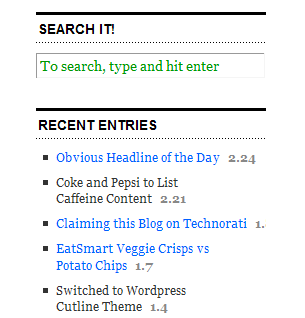
The screenshot to the right displays what my blog’s sidebar widgets look like using the default sidebar. (There is a minor glitch in that the date for my Claiming this Blog on Technorati post is cut off).
Although I like the formatting of the default sidebar, I think the default widgets are insufficient, and so I will be keeping my customized layout. It’s a shame (although admittedly a minor one) that the formats can’t be used on a customized sidebar. I suppose that is the result of the limitations needed for the theme to function as a hosted theme on WordPress.com.


 Practice Blogging