Recover lost wireless network key using WirelessKeyView

WirelessKeyView is an excellent utility to recover all wireless network keys (WEP/WPA) which are stored in your computer by the ‘Wireless Zero Configuration’ service of the Windows XP and by the ‘WLAN AutoConfig’ service of the Windows Vista operating system.

WirelessKeyView

It allows you to easily save all keys to text/html/xml file, or copy a single key to the clipboard. In the lasted version of the utility support for deleting the wireless keys of old network adapters has also been added.

Grab WirelessKeyView from here

Also read:

Do you store your passwords using Firefox?

Asterisks Password Viewer

Tools to Use: Clearing BIOS password

How to Open Password Protected PDF’s

Spoofing Explained : Another attempt to cover Hacking fundas

Do stay tuned to Technofriends for more, one of the best ways of doing so if by subscribing to our feeds. You can subscribe to Technofriends feed by clicking here.

Cheers

Vaibhav

Asterisks Password Viewer

Windows allows storing your frequently used passwords, such as the passwords in Outlook Express email or for a FTP connection. But since you no longer enter the saved password manually, you tend to forget them. The password is staring right at you, but is hiding behind a row of asterisks – ****. This feature is intended to protect your passwords; but sometimes this feature becomes more of a pain, rather than help .
APV

Asterisks Password Viewer is a software that lets you see the actual password behind the asterisks! It can recover passwords to such programs like Microsoft Outlook / Outlook Express, The BAT! and other e-mail clients, FTP clients like CuteFTP, FlashFXP etc.

Asterisks Password Viewer is available as a Giveaway of the day! You have 21 hours 30 minutes to download and install it. 

Get this from GOATD here. 

Cheers

Vaibhav

Tools to Use: Clearing BIOS password

Unfortunately, many times access to a computer gets blocked. It can happen because of a technical reason like a hardware or software glitch or because of a stupid reason like setting and then forgetting the BIOS password.
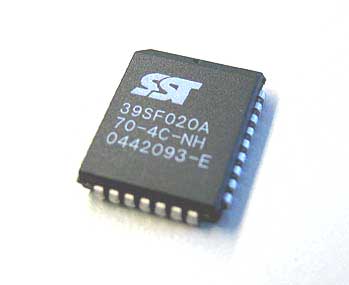
BIOS

The first trick i learnt about clearing BIOS password was way back in 1991, when one of my close friend told me that removing the CMOS battery and then putting it back again after 2 mins clears off the password. Since then, i have practically played with BIOS many a times thereby learning many new tricks to clear off the password.
In this post, i intend to share with you all that i know about clearing the BIOS password and getting access to your computer back.

CMOS Battery

There are practically the following ways to clear BIOS password.

1.) Setting the Motherboard Jumpers ( refer to your motherboard manual to get a detailed description of this.)

2.) Removing CMOS battery. You will have to restore the battery back in sometime. This also forces you to set date and time again.

3.)You can physically remove the BIOS/CMOS PROM chip from the motherboard and send it either to the motherboard manufacturer or a BIOS developer for replacement of flashing. You can also send the entire motherboard to a facility experienced in these operations.

4.)If the motherboard has a flash updateable BIOS/CMOS PROM chip, then you can download a fresh BIOS update and re-flash the PROM to eliminate the password.

5.)Using a Password cracking software to restore the password.

In this post, I will primarily focus on the password cracking part of clearing the BIOS password. Therefore, going forward, let me put down some of the tools which can be used while cracking a BIOS password.

As always, the first step in cracking any password is to guess the password. Therefore, I am putting below a list, which i feel can be used. These are some of the default BIOS passwords used with different BIOS’s, give them a try first.

* AMI
* Award
* bios
* setup
* cmos
* concat
* AMI_SW (case sensitive)
* AMI!SW/
* AMI?SW/
* j262

If the above mentioned default passwords don’t work :(, you can try out the software tools given below.

KILLCMOS: If you forgot your CMOS password, you don’t have to worry anymore! As long as you are able to boot from the floppy KILLCMOS will remove the password.

NOTE: If you’re running anti-virus software, it may detect a Trojan virus in the killcmos file. This is a mistake. There is NO virus in this file.

Rempass: Rempass is capable of finding and showing BIOS Password, collapse BIOS, save BIOS settings, restore BIOS settings. Rempass comes for a nominal fees of 5USD. There is a free version of the software also available, however, it doesn’t reveal the last 3 characters of the password.

UnAward: UnAward hacks any AWARD BIOS Password in Real Time.

CmosPwd: CmosPwd is a tool which can be used to used to find and reset CMOS password.

Do comment about your experiences with BIOS passwords and let me and the readers know.

Cheers,

Vaibhav

Safeguard your passwords using Keepass

Most of the people i talk to, follow a philosophy when it comes to choosing Passwords – ” Keep same passwords for all websites“. However, this definitely is not a philosophy worth practice. The danger to this approach lies in the fact that if someone else finds this unique password, they then have access to your various online accounts. It’s like giving someone the PIN for your credit card. Few months back, i had written about the Password Crackers in my post Top 10 Password Crackers .. REVEALED. and this time its about keeping your password safe.

For the information of all those and for all other readers, i will try to discuss about a small program which can certainly help you safeguard your passwords.

Keepass
Keepass 1.08 is a tiny program that helps you manage various passwords so that you don’t forget them. ( This is the version i have been using since sometime now)

KeePass is a password manager, or safe, which will enable you to manage your passwords in a secure way. You can put all your passwords in one database, which is locked with one master key or a key-disk. You only have to remember one single master password or insert the key-disk to unlock the whole database.

The databases are encrypted using the best and most secure encryption algorithms currently known (AES and Twofish).

Now with Keepass, you don’t need to remember all those passwords like your Windows network logon, your email account, your homepage’s ftp password, online passwords (like CodeProject member account) etc. The list is endless.

Just go on and download Keepass from here and forget remembering all those tricky passwords 😉

Related Read: Top 10 Password Crackers .. REVEALED.

Cheers,

Vaibhav

What was HOT: 1 month back on Technofriends

Cheers,

Vaibhav

Spyware Doctor added to ‘essential software collection’.

Spyware Doctor added to ‘essential software collection’.

PC Tools has announced its Spyware Doctor program as the latest addition to Google Pack, a “free collection of essential software”.

Google Pack includes Google Earth, Desktop, Picasa, Toolbar, Photos Screensaver,Star Office,Google Talk and Video Player.

It also includes partner software such as Mozilla’s Firefox, Adobe’s Reader, Norton Security Scan, RealPlayer, GalleryPlayer HD Images, Skype and now Spyware Doctor.

As part of this partnership we are providing an exclusive version of Spyware Doctor for Google Pack users,” said PC Tools chief executive Simon Clausen.

The free edition offers the usual spyware detection and removal as well as real-time protection with PC Tools’ new File Guard technology.

The free version is lacking a few features compared to the full version, such as Cookie Guard, Keylogger Guard, Startup Guard and Browser Guard. The free version also lacks phone support.

http://www.itnews.com.au/News/49233,pc-too…oogle-pack.aspx

Top 3 Keyfinder Apps

If you’re preparing to reinstall an operating system (for example, doing a clean install of Windows XP) or an application like Microsoft Office, you will need to find your copy of the software’s product key (CD key). Normally this product key is located with the manual or CD that came with your software.  more>>

DirBuster – a Multi Threaded Java Brute Forcer

DirBuster is a multi threaded java application designed to brute force directories and files names on web/application servers. Often is the case now of what looks like a web server in a state of default installation is actually not, and has pages and applications hidden within. DirBuster attempts to find these.

More >>

How to Open Password Protected PDF’s

There are sometimes genuine reasons to unlock or crack a password protected PDF file. You have the legal right to open the encrypted PDF document but forgot the password like in the case below.

Say one of your former colleague created some critical sales reports in PDF format but he is not working with the company anymore. In his absence, you have no option but to crack the PDF password in order to open, read or print these PDF files.

There are basically two types of PDF protection – the original PDF creator can either restrict opening the PDF file itself or he can restrict others from modifying, printing or copying text and graphics from the PDF file. Read More >>

Technofriends Team

Anti Spyware Applications: Here goes the ranking. :)

Spyware… Yes, we know it. Its one of the most dreaded word in the world of Internet Users. These infections not only annoy the users of the infected machine, but also present a great danger as they hook up these machines to huge botnets. These botnets are used for everything from launching DDOS attacks on websites to committing credit card frauds and other such mischief. In some cases, these spyware act as keyloggers on your machine and end up broadcasting your private data such as credit card numbers, passwords of your netbanking account and other personal details to malignant parties.

We therefore present to you the anti spyware applications we feel are top of the line.

  • Spybot Search and Destroy Spybot – Search & Destroy detects and removes spyware, a relatively new kind of threat not yet covered by common anti-virus applications. Spyware silently tracks your surfing behaviour to create a marketing profile for you that is transmitted without your knowledge to the compilers and sold to advertising companies. If you see new toolbars in your Internet Explorer that you haven’t intentionally installed, if your browser crashes inexplicably, or if your home page has been “hijacked” (or changed without your knowledge), your computer is most probably infected with spyware. Even if you don’t see the symptoms, your computer may be infected, because more and more spyware is emerging. Spybot-S&D is free, so there’s no harm giving it a try to see if something has invaded your computer. Spybot-S&D can also clean usage tracks, an interesting function if you share your computer with other users and don’t want them to see what you have been working on. And for professional users, Spybot-S&D allows you to fix some registry inconsistencies and extended reports. A list of all the apllication’s features is also available.
  • LavaSoft Ad Aware SE Persona:
    Ad-Aware Personal remains the most popular anti-spyware product for computer users around the world, with nearly one million downloads every week. Our free anti-spyware version provides you with advanced protection against spyware that secretly attaches and takes control of your computer, resulting in aggressive advertising pop-ups, sluggish computer activity, even identity theft through stolen bank details, passwords, and credit card account numbers. If you want real-time scanning capabilities, consider upgrading to Ad-Aware SE Plus for real-time protection against spyware, all the time!
  • Windows Defender: Windows Defender is a free program that helps protect your computer against pop-ups, slow performance, and security threats caused by spyware and other unwanted software. It features Real-Time Protection, a monitoring system that recommends actions against spyware when it’s detected and minimizes interruptions and helps you stay productive. Now with 2 free support incidents for Windows XP and Windows Server 2003

Cheers,

Technofriends Team