Hardware compatibility is a thing when it comes to comparing the BSDs with Linux operating systems. Because of all the corporate money behind the Linux kernel (Microsoft, IBM, Oracle, etc) and other big support, and built-in “non-free blobs” like drivers and firmware, it’s a lot easier to “plug-and-play” on most Linux distros than with even the easiest of the BSDs like NomadBSD and GhostBSD.
But my quest for “ethical purity” in my tech choices still drives me away from Linux, from Microsoft, from Mozilla, and other software from unethical and “woke” coders. Compromise may be necessary sometimes but I am always hesitant to do that. My choice, my OCD I guess. But after a fresh installation of the latest and greatest GhostBSD, I put lessons learned in my last experience to work and had a perfect, functioning OS in a few minutes!
First, update! Then I used Software Station like Christ used a whip to drive out the money-changers and “cleanse” the OS of Firefox and Thunderbird, replacing them with ungoogled-chromium and Evolution, repectively. Then I installed a few favorites, LibreOffice, Xournalapp, Inkscape, gartoon icons (just for some silly fun), the hplip printer management stuff, and a few extra fonts and goodies. Software Station is a sweet “gooey” (GUI) application that works just like the old familiar Synaptic Package Manager I enjoyed in Debian, MX, antiX, PCLinuxOS and others.
Cleansed of evil and sweetended with a few new favorite applications, the next step was to get sound working through my headphones instead of the little built-in speaker in my computer tower. For that, I returned here for easy terminal commands to get it set up in seconds:
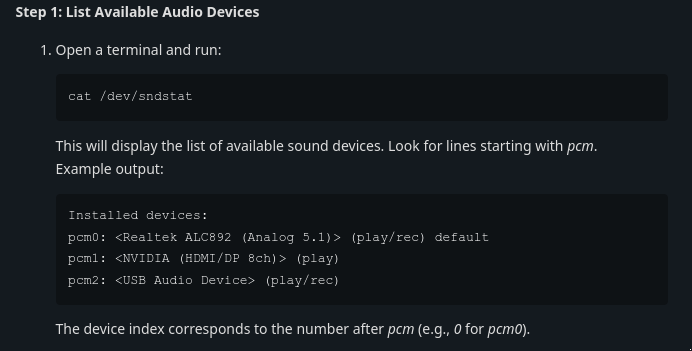
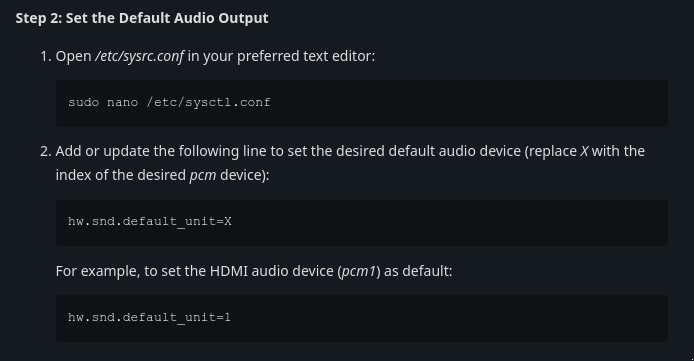
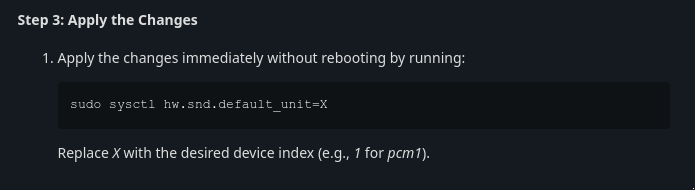
With gratitude to ericbsd, the leader of the GhostBSD Project, for this precise and simple solution. I’m using Xfce instead of MATE, so used sudo thunar to navigate to /etc/sysctl and edited the file with Mousepad. For some reason, a reboot was necessary after making these changes even though that’s not ordinarily the case. No big deal. Sound fixed!
Printer setup for most GhostBSD users is probably best done using “CUPS” like we did in Linux before Linux turned to the Dark Side. Because I have an HP printer, discovery and installation was easy using the hplip interface. “Vermaden” has an excellent page on setting up a printer in FreeBSD here. Complete with pictures so even I can understand it! 😀
Those were my only hardware issues in getting GhostBSD up and running with “purity,” beauty, and as usual, with mind-bending speed. One of the best things about GhostBSD is the presence of it’s contributors – including the project leader – in the GhostBSD forums. They can offer excellent support and some cool ideas as well.
Enjoy!


 Robin's Rants and Raves