More on Devuan and the Old Ways

Still a little weird on Devuan, and I suspect there are two reasons:

  • The first is the display, kind of wonky. But I installed a fully XLibre version of it which may explain that. Xorg and XLibre don’t quite agree, but Xorg is no longer developed and I refuse to go to Wayland until it’s ready. Wayland messes up everything it touches, far worse that XLibre working out a bug or two. Typing an email in Devuan’s version of Evolution became a pain in the rump because letters just run off the page and I had to use Format –> Wrap Lines maneuver on every single line. I suppose I could use an external editor, but gee whiz, why bother with Evolution or Geary at all if I have to do that? Pft.
  • The second, easily fixed, were the Refracta tools. Not as point-and-click simple as MX-Snapshot and MX-Live-USB Maker, but I was able to make a perfect, bootable copy of my existing Devuan system, then write it to a USB stick using “mintstick” and with persistence! Any changes I make running “Live” are preserved, which is nice! But then how am I supposed to install it to another HDD? No installer is present. RAWR! But, I was simply able to add the Refracta-installer to the LiveUSB and bingo, problem solved.

Again, it feels like I have to do things “the long way around” in Devuan compared to most other “one-size-fits-most” Linux OSes. But I do not fault Devuan for any of that. Devuan has to repackage everything from Debian, removing stupid bits of code that make a piece of software dependent on systemd. Almost everything in Gnome, for example, is increasingly systemd-dependent. Of course, it’s Gnome: Woke and part of the “new Linux” ecosystem that tries to make everyone use Wayland, systemd, pulseaudio, and everything else Red Hat / IBM and Big Tech wants. The “old” Linux is better, because it always worked, reliably and without stupid high demands on CPU and RAM. This crud all started when someone decided they should fix what wasn’t broken to begin with; then force “adoption” of their “solution;” and then kill off the old, unbroken, rock-stable and reliable predecessor that didn’t need any “fixing.”

Conformity is what they’re after. And that is exactly why projects like Devuan, OpenMandriva, antiX, Artix, and a host of others are emerging to preserve the “Old Ways,” if you will; the UNIX idea of “do one thing and do it well” and preserve the freedom of users to control their own equipment and software as they please. God bless the Old Ways.
xdg-desktop-portals-gtk broken in ubuntu 20.04, and how to fix it.

The Problem:

some programs take an extraordinary long time to start.

If you take a look at the error messages:

$ systemctl --user status xdg-desktop-portal-gtk.service ● xdg-desktop-portal-gtk.service - Portal service (GTK+/GNOME implementation) Loaded: loaded (/usr/local/lib/systemd/user/xdg-desktop-portal-gtk.service; static; vendor preset: enabled) Active: failed (Result: exit-code) since Wed 2020-05-13 23:46:05 CEST; 11min ago Process: 6937 ExecStart=/usr/local/libexec/xdg-desktop-portal-gtk (code=exited, status=127) Main PID: 6937 (code=exited, status=127) maj 13 23:46:05 octo systemd[2171]: Starting Portal service (GTK+/GNOME implementation)... maj 13 23:46:05 octo xdg-desktop-portal-gtk[6937]: /usr/local/libexec/xdg-desktop-portal-gtk: error while loading shared libraries: libgnome-desktop-3.so.18: cannot open shared object file:> maj 13 23:46:05 octo systemd[2171]: xdg-desktop-portal-gtk.service: Main process exited, code=exited, status=127/n/a maj 13 23:46:05 octo systemd[2171]: xdg-desktop-portal-gtk.service: Failed with result 'exit-code'. maj 13 23:46:05 octo systemd[2171]: Failed to start Portal service (GTK+/GNOME implementation). ...skipping... ● xdg-desktop-portal-gtk.service - Portal service (GTK+/GNOME implementation) Loaded: loaded (/usr/local/lib/systemd/user/xdg-desktop-portal-gtk.service; static; vendor preset: enabled) Active: failed (Result: exit-code) since Wed 2020-05-13 23:46:05 CEST; 11min ago Process: 6937 ExecStart=/usr/local/libexec/xdg-desktop-portal-gtk (code=exited, status=127) Main PID: 6937 (code=exited, status=127) maj 13 23:46:05 octo systemd[2171]: Starting Portal service (GTK+/GNOME implementation)... maj 13 23:46:05 octo xdg-desktop-portal-gtk[6937]: /usr/local/libexec/xdg-desktop-portal-gtk: error while loading shared libraries: libgnome-desktop-3.so.18: cannot open shared object file:> maj 13 23:46:05 octo systemd[2171]: xdg-desktop-portal-gtk.service: Main process exited, code=exited, status=127/n/a maj 13 23:46:05 octo systemd[2171]: xdg-desktop-portal-gtk.service: Failed with result 'exit-code'. maj 13 23:46:05 octo systemd[2171]: Failed to start Portal service (GTK+/GNOME implementation). 

you will see that the problem is that libgnome-3.so.18 is missing, and it is not shipped with 20.04, and can not be installed.

The fix:

We just sym-link it…

$ cd /usr/lib/x86_64-linux-gnu $ sudo ln -s libgnome-desktop-3.so libgnome-desktop-3.so.18 

Now the service can start. It seems to be a dependency issue.

Better Mozilla Replacements

Last month I wrote about replacing all the Mozilla stuff on my computer, as a kinda-sorta protest against their stupid, purely political decision to fire their CEO because he dared to hold and dared to express a politically incorrect opinion about gay “marriage.” I love the Mozilla products, especially Seamonkey – the wonderful Internet Suite risen like a phoenix from the ashes of the Netscape project. I was hoping to find an equal replacement for Seamonkey that is entirely free and open-source. I tried out a few and settled on two awesome applications that not only give me everything Seamonkey did, but with less demand on system resources.

My browser is Xfce’s own wonderful ultralight browser, Midori. It can “identify” as any browser you wish, has built-in and customizable “add-on” options like Ad Blocker (which I don’t use, by the way, perhaps more on that later). It used to crash inexplicably all the time. Now it’s rock-stable on Linux Lite, Xubuntu, and SalixOS.

KMail

KMail is a sweet little KDE application that does almost everything quickly and simply, but it doesn’t allow for embedding images while composing HTML messages. That’s it’s only drawback – that and, of course, all the KDE dependencies that come with it when trying to install it in Linux Lite (Xfce desktop environment). Very nice, but not as full-featured as Thunderbird or Seamonkey just because of the Composer.

Geary / Pantheon-Mail

Pantheon-Mail is ElementaryOS’ own fork of the little Gnome e-mail client called Geary. I found absolutely no difference between the two at all, installing Geary from the Ubuntu repositories and Pantheon-Mail from ElementaryOS’ PPA. Both seem identical to me. The only difference was the default icon for the Xfce Panel, and the absence of any icons for certain options in Pantheon-Mail. Why fork a good project just to change it’s name? I found no difference whatsoever in my week-long comparison of the two. Neither has a proper Address Book, but depend on gathered addresses from incoming and outgoing e-mail. Rich Text is available but without any choice of font – just the default font and size, and the only rich-text options are color, Bold, Italics, Strikethrough, and Underline.

I didn’t even bother with the very popular and supposedly “full-featured” email clients Claws-Mail and Slypheed. I didn’t bother because neither has a mail composer that offers anything but plain text. It’s possible to write HTML messages, but you have to add a whole ‘nother application, an external editor. Hey I’m just a simple little sidekick, still scared of “complicated” software, and I prefer to keep things simple. For those who are aware of HTML’s “risks” and prefer only plain text, these two are very popular in the Linux world.

Evolution

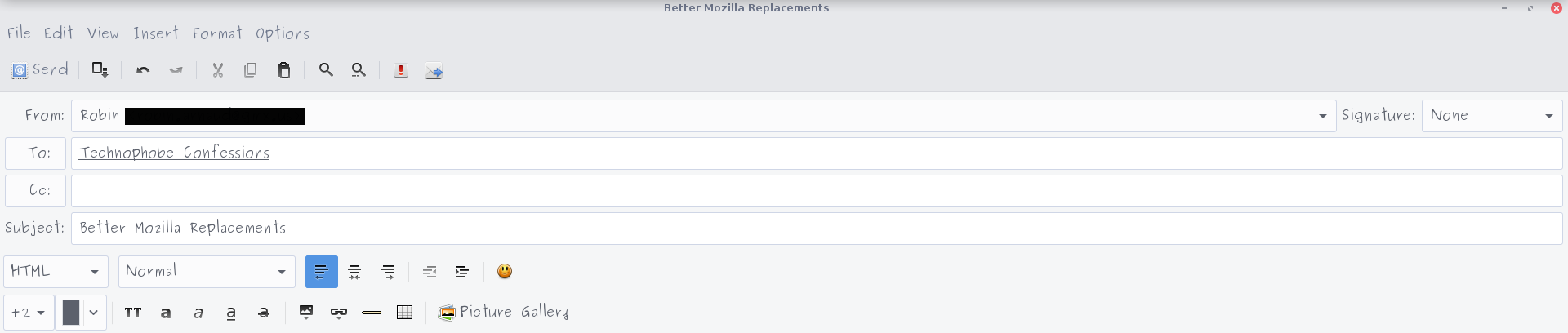
I guess I have avoided this one for so long because of it’s association with Novell, a big office software company. But it’s FOSS, released under the GPL license, officially a Gnome project distributed by Novell (whatever that means, I got my copy from the repository, lol). Not available in Slackware or Salix because there’s just no Gnome stuff available for Slackware users, it is absolutely awesome. Full HTML composing using a Thunderbird-like WYSIWYG editor (oh, that’s “What You See Is What You Get”) and a truly super-cool interface, friendly enough for a little, mildly technophobic sidekick.

That’s the options available in the Composer window. Actually more options than Seamonkey offers, believe it or not. This post is being composed and published entirely via email, which is simply the way I prefer to do it when I can. Perhaps a leftover habit from back when we were on dial-up Internet and I did all my reading and writing offline anyway using an e-mail client (Eudora on Windows, then Thunderbird on Linux, and now Evolution (on Linux but not available as a Slackware package or Slack-build). When I’m ready I’ll test them out on Void Linux and write about it!

Oh My, Slackware Has No Gnome!

Gnome has been removed from Slackware, some months ago. It’s nothing against Gnome, I guess, but I was surprised when I went to try out a couple of Gnome applications because my favorite web browser (actually, Internet Suite) Seamonkey, has started acting up.

Not available in the repository, not available as a Slackbuild. Salix has a couple of Gnome things in their repository, but not the applications I wanted to try. Geary and maybe Evolution for e-mail and maybe some other browser (besides Firefox).

But I had to use another distro to try them out! Grrrr. Oh well, back to Xubuntu for this trial-and-error experiment. But not exactly full-on Xubuntu.

Xubuntu Core
is a nice little invention. Available as an .iso file from one of the Xubu developers, the official way to get it is to install the Ubuntu Mini iso, which installs only the base Ubuntu system and a terminal without any applications or desktop environment. Then do the

sudo apt-get install xubuntu-core

thing. This installs only the Xfce desktop with some of the wonderful Xubuntu settings that set Xubu apart from other Xfce distros for it’s elegance and classy looks. No bloat, just stripped-down, ultralight Xubuntu awesomeness. Next I installed Synaptic Package Manager and chose some very lightweight applications (Abiword and Gnumeric instead of LibreOffice, for example) and the applications I wanted to try out.

Oh, by the way, note to first-timers with that Ubuntu-mini iso: After it installs and asks you to reboot from the HDD, you must bring up the Grub menu the first time it boots from the hard drive. So that by holding down the Shift key during it’s boot-up. It works better than typing

start
run
begin
commence
engage
do something, dammit!

Trying them out on Xubuntu Core, Geary just plain sucked. Random crashes in the middle of composing an e-mail or even reading one. No wonder the Elementary team forked it (Pantheon Mail). And Evolution (a Novell product, I should have known, I hated it when I had to use their crap in the Fire Department) refused to connect to the Internet. Okay then, lesson learned. No wonder Slackware dropped them, I guess. Not just the Gnome 3 debacle, but these native apps suck.

The lightweight Midori browser no longer crashes randomly, however. It always did before, every time I have given it a try over the last couple of years. Now it’s working just fine! My long-beloved Seamonkey may be replaced by Thunderbird and Midori.

It’s always trial-and-error with Linux, ain’t it? Yeah, that’s really half the fun I guess.