Better Than Timeshift

Maybe you’ve heard about MX-Linux, antiX, and PCLinuxOS having the supercool feature of being able to make a bootable .iso of your existing OS, with all your settings and installed applications intact, but you’re using a different Linux distro that you really prefer and want to keep using. Well good news!

Or if you’re like me and find Timeshift a little too weird and clunky, maybe even unreliable and hard to restore. Well good news for you too!

In my most recent install of Linux Mint (Xfce, of course, for simplicity, stability, and light weight), I deleted Timeshift and replaced it with an old favorite: Systemback! The old discontinued project has been resurrected and is actively maintained again. Systemback does what Timeshift does (only better) and it also lets you make a bootable iso of your existing system – including your /home if you select it. Not quite like Clonezilla, but more like MX-Linux’s and PCLinuxOS’ ISO Maker.

It includes a scheduler that makes regular snapshots, which you can convert at any time to an iso and burn it to a USB stick for a fully portable OS just the way you like it, settings and installed applications included. Great for bringing your desktop OS over to your laptop, or sharing it with friends.

Keeping it simple and “gooey,”
Robin

Your First Non-Microsoft, Non-Apple OS

In spite of my moderate-to-severe technophobia (to quote all the TV commercials), I have come a very long way from what we call “beginner’s” operating systems other than Microsoft Windows and iOS (Mac). Lately I have ventured even out of the Linux world into one of the BSDs. But I’m still every bit as paranoid of the terminal as I was the day I started this journey years ago. I want to point and click as much as possible, not type commands. And I want to run applications, not the operating system! I’m really not the computer hobbyist people suppose, even though I blog about this stuff regularly.

I still get asked what operating system I recommend for beginners, and until pretty recently I would recommend either Linux Lite, Linux Mint, or MX-Linux hands down without question. The only reason I hesitate to whole-heartedly recommend them now – and I’m going to catch some flak for this I’m sure – is because these great OSes have strayed so far off from the ideals and ways of doing things that made them great to begin with. Where once upon a time it mattered how they put together a great product, now the means have changed – which inevitably changes the ends. The old adage remains true: The end does not justify the means.

Non-free software and proprietary “blobs” (a tech term) get thrown into a product that is billed as “free and open-source.” Perfectly good and truly free and open-source software is replaced by the quick and easy solutions offered by Big Tech companies whose software becomes a dependency for just about everything else in the whole operating system to work. “This won’t work without systemd,” is what the developers say, but it isn’t true. Consolekit worked as well as elogind (a component of systemd), but it’s “old.” Old doesn’t mean obsolete, however. Old usually, in this context, means it did it’s one job and did it well. But Big Tech’s goal is dependency. One software to do multiple jobs instead of “do one job and do it well.” Big Tech owns Linux now. Billions of dollars flow into the Linux Foundation from Microsoft, IBM, Oracle, and other giants. They sit on the Linux Foundation’s Board of Directors and pay Linux Torvalds a million dollar salary. Put two and two together, y’all.

A handful of Linux distributions actively resist the DEPENDENCY game that Big Tech / Linux Foundation is playing upstream. And among that handful of Linux distributions, the best for beginners, by far, is PCLinuxOS. It still follows the old ways. The UNIX way. The pure and bold and time-honored way.

For some reason they call this”the Boomer Distro.” Maybe it’s because they follow the “old” ways. Boomers are supposedly old, but dangit, these guys work hard and make and maintain a superb “beginner-friendly” operating system that has all kinds of advantages.

It’s “rolling release:” Which means it doesn’t have to be re-installed every 2-5 years like Linux Lite, Linux Mint, the ‘buntus, Debian and it’s derivatives like MX-Linux.
It’s systemd-free: Not even a hint of that evil, intrusive, One-Ring-to-Rule-Them-All DEPENDENCY imposed by the Big Tech / Linux Alliance of Evil.
It’s well supported. The documentation for this OS is second to none, and the folks in the Forums are friendly, knowledgeable, and helpful. Just like most boomers.

While GhostBSD is my daily driver these days, I keep PCLinuxOS (Xfce edition, naturally) on a separate hard drive just for the cool tools that rival anything MX-Linux and the others have to offer. Cool tools that are simply not available in FreeBSD / GhostBSD yet. Also, since even GhostBSD doesn’t play nice on some hardware (compared to Linux, that is), your first non-Windows, non-Apple operating system should be PCLinuxOS! Find it here!

An Experienced Linux User’s Review of Linux Lite

[catergory Desktop Linux]

Admittedly not a fan of “newbie-friendly” Linux distros like I am, this respected reviewer had such a bad experience with the newest version of Linux Lite that his friends came close to having an “intervention” for him to preserve his sanity! Read about my friend Renard’s close call here.

I have described Linux Lite in the past as “Xubuntu done right” and lauded it’s efforts to attract users from Windows as being even better than Linux Mint’s, because of the very cool tool box it has, always being improved upon and expanded. I’m still a fan of “newbie-friendly” desktop Linux distributions like Linux Lite, but definitely not a fan of Google’s ecosystem, nor of Ubuntu’s weird turn to snaps as default packaging, it’s “ads” appearing in the terminal, and some other corporate decisions that put it on par with Microsoft and Apple in terms of commercial and proprietary policies.

Most of the Linux Lite users who were around when I first discovered Linux Lite and became a fan have moved on to Debian-based Linux OSes like MX-Linux (awesomeness on steroids) or even Bunsen Labs (Debian Openbox, the “heir of Crunchbang Linux”). I think I’m the only one among that group who went off to the Slackware universe with SalixOS. Among these, MX-Linux is the only one I would consider “newbie-friendly.” But one thing they all have in common is that they’re not based and built on Ubuntu. Most of the most popular “newbie-friendly” distros like Linux Mint, Zorin, ElelmentaryOS, and Pop!OS are Ubuntu-based, and most of them have disabled snap packaging and some of the other objectionable stuff from upstream Ubuntu.

But if you want Firefox in Linux Lite and don’t want to use a PPA (or don’t know how), Linux Lite offers Firefox as a snap package. Ewww. No thanks!

I remain a (I even made a userbar for their forum!), but my copy is so highly modified from the defaults that I only recommend my own modified version of it for newbies – and that just for the cool tools it offers. It’s the version of Linux Lite that I copy and share with others. Snaps disabled, Brave browser or Seamonkey instead of Google Spyware’s Bovine Excrement Browser, etc. The last decent version of Linux Lite was 5.8 in my opinion.

Testing Linux Lite 6.2 Release Candidate

Testing the Linux-Lite 6.2 release candidate today. First thing of course, will be to dump the stupid default browser (Google Chrome) for an old favorite (Brave, for now). Then my usual desktop customizing and off to the races.

Ubuntu-based, but snapd is disabled, thankfully, as they are in Linux Mint and some other Ubuntu derivatives. Lite Tweaks is a favorite feature of mine on this lightweight, beginner-friendly Linux distro. Point-and-click simplicity to maintain, clean, and update the OS.

It’s a little bit buggy right now, probably not for those who want a ready-out-of-the-box experience. The bottom panel disappeared when I installed my alternate browser and changed the panel to reflect the replacement browser. Once restored, it got to blinking on and off between a black background and my custom choice (transparent). A reboot fixed it. A little bit weird, but theme changes in almost every distro have their little temporary quirks. It’s FAST though! Very responsive, even on my modest li’l ‘puter.

IF YOU WANT FIREFOX, DO NOT INSTALL IT USING LITE SOFTWARE unless you’re okay with snap packaging (the default in Ubuntu, disabled in Linux Lite). Use the Mozilla PPA instead. This warning is visible in Lite Software if you select Firefox from Lite Software. But if you dislike or are the least bit hesitant about snapd, you have other options, external to Linux Lite.

Other than those minor blips, Linux Lite 6.2 (RC1) runs nimbly and quick. Added Z-RAM (from Lite Tweaks) and Preload to speed things up even more. After their first runs, apps load and run at surprising speed for such an old box.

Usability, Reliability, and Simplicity

I should claim disability for my techno-phobia or something. It’s paralyzing at times.

Reasons to be Scared of Everything Tech:

  • Systemd
  • Elogind (in systemd-free distros)
  • Google (and Google Chrome)
  • Pulseaudio
  • Snaps
  • Anything else that someone thinks might be spyware/malware

The only way to completely eliminate or mitigate exposure to all these terrors is to just unplug altogether, get off the Internet, lose the cellphone and laptop, abandon anything connectable to a server, and live off the grid. Most of us can’t do that and don’t even want to. We may end up doing that anyway if the “new world order” our leaders are pushing for succeeds. But in the meantime, I prefer to keep my devices that I rely on for paying my bills and living my middle-class life in rural America.

Reasons to Stop Being Scared of Everything Tech:

  • Necessity
  • Possibility
  • Connection with other people
  • Simplicity
  • Reliability
  • Utility

My fear of all these terrors in computing has sent me some wild goose chases along the way, changing operating systems and software to avoid them, and ending up with a computer I can’t even use comfortably, yet still free of unnecessary bloatware* and other stuff I don’t want or need. Even my Xfce-supplemented antiX mixture has extra window managers and menus and special needs (like choosing certain repositories and rejecting others for specific software installation and when updating). It’s unnecessarily complicated and cumbersome without the compatibility of most software that depends on stuff like the dreaded systemd or elogind packages.

What principles can I stick with and what priority should they have when choosing an operating system and software?

The Operating System:

  • Must be Linux or BSD, not proprietary.
  • Must be non-political.
  • Must be as free as possible while remaining functional and easy to use.

Software:

  • Must be Linux or BSD compatible.
  • Must be non-political.
  • Must be free and open-source (FOSS) whenever possible.

To meet these criteria, I really should rule out “politicized” Linux distros like antiX, even though “de-politicizing” antiX is as easy as removing bookmarks from Firefox. It “de-policizes” only my copy of antiX, but I can’t advocate for the OS I’m using! Kinda hypocritical, and I’m supposed to be a man of principle above all.

Then there’s Firefox, which has “gone woke” besides the other big issues it’s having. Firefox is out. So is Google Chrome, because Google is friggin’ evil and I won’t have anything to do with it. I’m still a Seamonkey fanboy even though it’s based on Mozilla and hosted there for the time being, because it is no longer a Mozilla product. It’s independent and therefore non-political. Same for Brave Browser: Based on Chromium (which is FOSS) but not a Google-affiliated descendant of evil geniuses trying to spy on everyone and steal their data.

To stay true to my principles, yet without crippling or severely encumbering my user experience, I could return to an old favorite, Xubuntu-based Linux Lite (which has snaps disabled, thank you very much) and dump that evil default browser and replace it using a PPA.

*Bloatware: (noun) 1. Software unneeded by the user, but required by the operating system 2. Unnecessay and unneeded software not needed by the operating system but not removable from the operating system

Best Linux Lite Yet

Wow. They heard me! That’s one little benefit of these “small” Linux distros, especially when the lead dev frequents the forums. Once I wrote that Linux Lite was not so light anymore. That might still be true I suppose, but it still runs snappy and nimble on my faithful old Dell Optiplex 7010. And the current version is better than ever!

One of the bestest, most wonderfulest and awesomeful things they’ve done – perhaps after reading Robin’s Rants and Raves (?), was make systemd less of a big honking hungry threat to computer disk space in the new-and-improved Lite Tweaks feature:

Lite Tweaks, explained

Like Linux Mint used to do with it’s Updater, Linux Lite has done by suggesting things that are completely safe, those which should be used with caution, and also categorized by function: Clean, Fix, Performance, Information, Administration. Easy to understand!

Great Choices!

Have a look at that last one: Systemd Log Cleaner. That darn systemd keeps logs which grow quickly and have even caused problems for some users (rarely, but at times) just by their sheer size. Now you can wipe them clean. I do it often, maybe just because I’m still uneasy about systemd even being there. Yet systemd is one of the reasons a lot of distros “just work” as opposed to those which have to have all kindsa work-arounds and substitute software solutions to make them work reliably. So as long as you “have to” have systemd, you may as well keep it somewhat under control. And Linux Lite makes it so you can do it in a few mouse clicks! How freaking cool is that!

Lite Tweaks is one of the big reasons I still refer “newbies” to Linux Lite. As much as I like my SalixOS system (Slackware-based, systemd-free, quick and responsive), it’s hard to get up-to-date software, and sometimes applications lose support way before the same apps are updated in the Slackware repositories. Yeah, you can add the “testing” repository, but I’d be alternately enabling and disabling it according to what software quit working (like the Xfce desktop weather applet) and what might get broken by a late update. It’s like using Debian “Old Stable.” Solid as a rock, but largely unsupported as the rest of the world moves on. Even Slackware gave way to let PulseAudio in because a lot of apps just won’t work without it, and I wonder if they’ll end up doing the same eventually with systemd. Well, I still love my Salix. But this latest Linux Lite is the best yet, and I heartily recommend it!

Moving On

My beloved Xubuntu 18.04 is good until next April, but I won’t wait that long to replace it. In my previous post I wrote about the Future of Ubuntu, and have looked closely at the new default package management, snap. The old .deb packaging will still be around for legacy apps and stuff that we all depend on, but the default in 20.04 is snap packaging. To me this will mean a ton of duplicated libraries and cruft, since snaps are kinda-sorta sandboxed and snaps do not share libraries. Bad for those of us who don’t have super-ultra-mega-terrabyte hard drives, right?

Ordinarily rolling-release distros scare me a bit. But even without selectively updating (other than the kernel), there are cool tools like Timeshift that can put things back to a “restore point” in a few clicks and a few minutes’ time. And I dislike the idea of re-installing an OS from scratch and configuring everything the way I want it, adding and removing applications, fonts, themes, and all the rest of it. Updates breaking things has always been a kind of phobia for me I guess, but maybe it’s one that I have overcome with the reassurance offered by super-simple backup-and-restore tools, and the fact that my new distro of choice has a thorough vetting process for updates that filters out a lot of buggy stuff before it hits the stable repositories.

Experimental, beta, or too-new-to-be-proven stuff appears in Ubuntu (and all it’s flavors and downstream distros) without warning all too often. I still remember how buggy PulseAudio was when it foisted upon us all. I dumped it for ALSA with every new installation for months until it wasn’t possible anymore, but by that time it was stable enough. Then Unity. Then systemd. All buggy as hell at the start, but everyone became a tester, like it or not. In a distro intended for newcomers, novices, simpletons, technophobes, and other “ordinary” desktop users, this buggy experimental stuff thrown in as the new default is – well, bullshit. Snaps is the last straw. While I grant that snap isn’t replacing apt for the time being at least, by making it the default, Ubuntu has again brought buggy beta crud to “ordinary” users. No lessons learned from the last several times they’ve pulled this kinda stuff. I’m all for innovation, but let’s not use the LTS versions for that! Enough surprises.

Goodbye again, Xubuntu. Hello, PCLinuxOS!

The Future of Ubuntu (and Ubuntu-based distros)

There are Pros and Cons for everything, but when a distro’s development team makes big changes in policy towards users, there’s always a reason for it, and it’s not always a reasonable choice. Such may be the case with Canonical’s Ubuntu Linux distribution. There’s a big discussion about it going on in their forums (clicky here to have a look). Yes, this matters a lot because it affects every flavor of Ubuntu and every “downstream” project derived from Ubuntu (Linux Mint, Linux Lite, ElementaryOS, and one zillion and twelve others).

Snaps and Flatpaks and such are probably the future anyway, but the vetting of software by a bunch of testers before distribution to users should never go away. But unless you build your own OS from scratch (and some people do), you have to live with whatever the distribution developers decide.

That would be most of us. This “apparent” decision by Ubuntu developers, while probably relieving them of the burden of maintaining packages for their users (and making their job a lot easier and not having to keep package maintainers on the job getting updates to testers and then to users), it also means that we ordinary desktop users could end up as unwitting software testers, trying to find workarounds for broken software. We’re already finding that in instances where the Snap version of a software won’t work but the .deb version from the repository works fine, or vice versa. And that, more than anything else, has been my chief complaint with Ubuntu for years: Making unwitting testers out of novices and newbies without their knowledge (let alone consent).

Read the linked discussion and offer some comments! I’d love to know what some of my Linuxer readers think of this new trend.

Guest Post: Responsible Ownership

Guest Post by “Artim:”

When I got my first car, I wasn’t allowed to drive it until I could demonstrate how to check the oil, coolant, belts, hoses, lights, signals, tires and stuff. A lot of people chipped in and got this special set of elevated pedals for it since I’m very small:
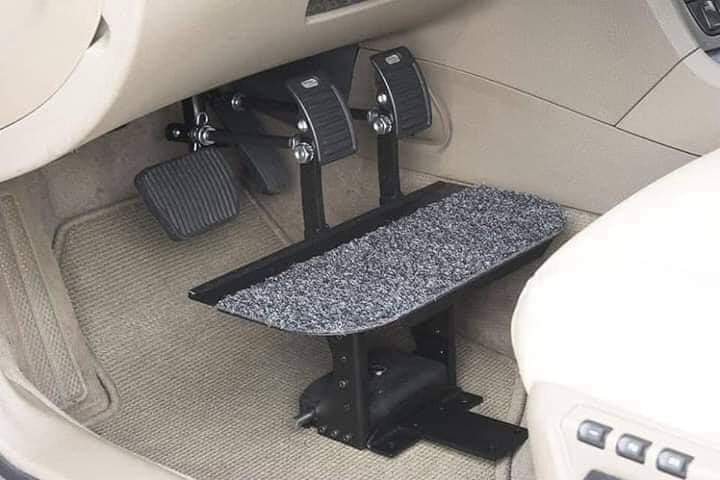
In fact I still get pulled over when I’m not in my own home town, by police responding to reports of “a small child driving a car.” The officers usually just laugh along with me after running my license, and pass the word along to other cops, LOL. The point being that a lot of good people have gone to a lots of trouble to make it possible and easy for me to operate a car, but I am still responsible to know how to maintain it as well as operating it.

Computers are the same way! A lot of good people have done a lot of work to make it possible for li’l ol’ me to use LINUX (Linux Lite, Linux Mint, etc) instead of Windows. But just like my car, I need to be responsible with it. Like any major appliance, a computer needs maintenance and you can’t just “drive” it without updates, cleanup, etc. That’s not just blowing the dust out of the box and keyboard, either. But the operating system needs to be kept up as well, with regular maintenance.

Linux has lots of advantages over Windows! It’s practically virus proof (unless you treat it like Windows, downloading stuff from web sites and installing it), it works on modest hardware or even really old 32-bit computers people used before I was even a twinkle in my daddy’s eyes. It’s amazing how awesome Linux is. It costs nothing, there’s all kindsa software for it for school, web, social media stuff, music and video editing, and even games. All at no cost (but donations are suggested for your favorite stuff).

But like me with my car, learn how to maintain it! And thanks to Linux Lite especially, much more than Linux Mint in my opinion, learning and maintaining your computer with the Linux Lite operating system is the easiest, simplest, and fastest way for new Linux users to do that. The welcome screen gives you all the steps, in order, and with point-and-click simplicity. You can even bring back the Welcome screen any time, even after you’ve been running Linux Lite for a long time. It does the updates, the cleanup, and tune-up stuff so you hardly even have to think about it!
With support for Windows7 ending in a few days, now is the perfect time to try it out. And you don’t even have to install it to try it out, just test-drive it on a USB thumbdrive without making any changes to your computer at all! Then if you like it, click to install. Just be sure you have backups for all your important stuff, like bookmarks, passwords, school papers, pictures, music, and stuff. Oh, and backing up stuff in Linux is super easy too by the way.

Since so many good people did so much hard work to make it possible for a tiny boy like me to drive a car, I drive it carefully and keep up on the maintenance. In the same way, since so many people have worked so hard to make it simple and easy for a kid with no technical expertise to use the amazing Linux Lite operating system, be sure to maintain it, just like my car, and donate if you can to the people who give us so much.

Get Linux Lite here!

Thank you!

Good News on Linux Lite

Greetings!

You were expecting a review of Ghost BSD, well that’s coming, hopefully this weekend. But I just heard this little bit of great news from Linux Lite: Series 5.x will have no added PPAs!!

All those extra PPAs have been a source of update woes, regressions, malfunctions, and frustrations to Linux Lite users for far too long. There were even PPAs in there for software that was already available to Linux Lite users in the Ubuntu repositories (Linux Lite is based on Ubuntu) without the added PPAs, which I think is counter to Linux Lite’s purpose. Aimed at new users and non-technical users, particularly those coming to Linux from Windows, Linux Lite aims to be the easiest “newbie distro” while remaining lightweight for use on older, modest hardware.

“Emerald,” the codename for Linux Lite 5 series, will have no added PPAs at all. That is the best possible news for Lite users who have been put off by the constant update issues that have plagued the distro in the past. When I was using it, one of the first things I always did was to eliminate all those extra PPAs, so I was able to dodge many of those update problems. I also removed them in new installations of Linux Lite for computers I was refurbishing for others.

Other improvements include some great new Tweaks in the Lite toolbox that accomplish lots of maintenance tasks with a few mouse clicks. One of the new ones is a way to clean up the crazy huge Systemd logs that accumulate on the users’ hard drive:

My friend Ralphy is no longer maintaining UnlockMe for Linux Lite, which was one of the tools I found especially useful on Lite, but lookie here! Much of his familiar and brilliant coding shows up in Lite Tweaks, which is maintained and even improved upon. I’m very glad to see this!

In my book these new developments will elevate Linux Lite 5.x series above even the venerable Linux Mint for introducing Linux to newcomers.