

Açıklama
Finally, WordPress analytics you’ll actually use
Google Analytics is overkill. Most other WordPress statistics plugins are cluttered and confusing. You just want to track visitors and know what’s happening on your site, without a data science degree.
Burst Statistics gives you a clean, intuitive analytics dashboard focused on the metrics that actually matter. No external analytics accounts. No complex setup. Install, activate, and understand your website traffic in seconds.
Trusted by 200,000+ WordPress sites. Built by the team behind Team Updraft, known for UpdraftPlus, WP-Optimize, and All-In-One Security (AIOS).
Kullanıcılarımız ne diyor
“Finally, an analytics plugin I can actually explain to clients.”
— @anguskeystone on wordpress.org“I tried WP Statistics and Independent Analytics, but they’re overloaded and confusing. Burst’s UI is intuitive and focused on what matters to me.”
— @vallered on wordpress.org
Neden Burst İstatistikleri?
Analytics designed to be actionable
Other analytics plugins throw everything at you. Burst shows what matters, visitors, pageviews, referrers, top pages, in a dashboard you’ll actually use. No data overload. No confusing menus. See why Burst is perfect for bloggers.
Privacy analytics by design
All site stats stay on your server, making Burst a true local analytics solution. No external tracking. Your data is yours, we never see it without your explicit permission. Designed for GDPR compliant analytics out of the box. Read why Burst Statistics is privacy-friendly.
Zero setup friction
Install, activate, done. No Google Analytics account, no GA4 setup, no tracking codes, no configuration headaches. Start seeing live visitors immediately. New to analytics? Start with our guide on WordPress analytics.
WordPress-native analytics
Not a port from another platform. Built specifically for WordPress with native performance and seamless integration. Works with WooCommerce, blogs, business sites and membership sites.
Lightweight analytics, fast by default
Optimized database queries. A tiny tracking script under 4 KB. No external dependencies slowing down your pages. Designed to track accurately even when using aggressive server-side caching. See the proof in does Burst slow down my website.
Özellikler
Understand your website traffic
- Top performing pages and posts at a glance
- Track key metrics: visitors, sessions, pageviews, bounce rate
- Breakdown of visitors by device (desktop, tablet, mobile)
- Verileri özel tarih aralıklarına göre filtrele
- Compare traffic between periods
Gerçek zamanlı analizler
- Canlı ziyaretçiler için gerçek zamanlı kaynağı belirle
- See the specific pages users are visiting now
- Live count of active users on your site
Hangi içeriklerin iyi performans gösterdiğini görün
- En çok görüntülenen sayfalar ve yazılar
- Herhangi bir tarih aralığını karşılaştır
- Tek tek sayfa performansını takip et
Custom conversion and goal tracking
- Track views, clicks and WordPress hooks
- Track WooCommerce analytics & sales (Burst Pro Business)
- Track custom events and conversions
- Step-by-step setup in our goals guide
Privacy-friendly analytics without compromise
- 100% self-hosted, all statistics stored locally in your WordPress database
- Cookieless tracking option, a cookie free analytics setup with no consent banner required in many countries
- Analytics designed to support GDPR, CCPA, DSGVO, AVG, RGPD and PECR compliance
- No data shared with Google, Facebook or any third party
Bilgilenmeye devam et
- Haftalık veya aylık e-posta raporları gelen kutunuza teslim edilir
- Trendleri görmek için dönemleri karşılaştır
- Takip çalışmadığında bildirim al
A WordPress-native Google Analytics alternative
If you’ve outgrown Google Analytics, or never wanted GA4 in the first place, Burst is built for you. As a Google Analytics alternative, Burst trades GA4’s complexity for clarity. You get the metrics that matter on a single dashboard, without sampling, without data thresholding, and without sending your visitors through Google’s ad network.
GA4 is built to make Google’s ad business better. Burst is built to make your website better.
Curious about the full picture? Read why WordPress site owners are leaving Google Analytics behind or the head-to-head Burst Statistics vs Google Analytics.
From the team behind UpdraftPlus, WP-Optimize and All-In-One Security
Burst Statistics is part of Team Updraft, the team behind some of the most installed WordPress plugins on the market:
- UpdraftPlus – WP backup and migration plugin
- WP-Optimize – cache, image compression, minification and database cleanup
- All-In-One Security (AIOS) – security and firewall
Who is Burst Statistics for?
Burst works for any WordPress site, but we’ve built specific solutions for the four audiences who get the most out of it:
- Bloggers and content creators, see which posts resonate with your audience
- Entrepreneurs and small business owners, understand your traffic and campaigns without complexity
- WooCommerce stores, track visitor behavior, revenue and product performance
- Agencies and freelancers, manage analytics and reporting for multiple client sites
- Privacy-conscious site owners, GDPR compliant analytics without consent banners
- Anyone tired of Google Analytics, get clarity instead of confusion
Ücretsiz vs Pro
Burst Statistics (free) includes everything you need to understand your website traffic. Visitors, pageviews, referrers, top content, device stats, goal tracking, email reports and more.
Burst Pro adds advanced features for businesses and professionals. Compare all plans on the pricing page.
CREATOR PLAN
- UTM campaign tracking, see which marketing efforts drive results
- Geographic data, country and city-level visitor insights
- Advanced filtering, segment data by any dimension
- Data archiving settings, keep your database lean automatically
- Priority support, direct contact with our developers
BUSINESS PLAN
- Everything in the Creator plan, plus
- Full WooCommerce sales dashboard, see which content brings in the most revenue
- Revenue attribution, connect WooCommerce sales to traffic sources
AGENCY PLAN
- Everything in the Business plan, plus
- Reporting, generate shareable performance reports for clients
All Burst Pro plans include priority support. You’ll have direct contact with our developers, real humans, not a chatbot.
How Burst compares to other WordPress analytics plugins
We’re often asked how Burst stacks up against other tools. Honest, short version:
- Google Analytics / GA4, GA4 is powerful but built for advertisers, not site owners. It’s complex, applies sampling and thresholding to your numbers, and requires a cookie banner in most countries. Burst is a simpler, privacy-friendly GA4 alternative that shows real numbers without the setup. Read the full comparison.
- MonsterInsights, MonsterInsights is a connector that pipes your data into Google Analytics. If you want a true MonsterInsights alternative that keeps data on your own site instead of sending it to Google, Burst is a better fit.
- Independent Analytics, a respectful competitor with a similar privacy-first, WordPress-native approach. Burst leans harder into actionable dashboards, deeper UTM and goal tracking, WooCommerce revenue analytics and Agency-tier reporting. Try both and pick the one that clicks.
- Koko Analytics, a clean, lightweight option that focuses on the basics. Burst goes further with goal tracking, real-time analytics, UTM campaigns, WooCommerce analytics and email reports.
- WP Statistics, a long-standing WordPress stats plugin with a lot of options. Many users find the interface cluttered. Burst focuses on a single, clear dashboard designed for clarity over feature count.
- Matomo, self-hostable and feature-rich, but heavier and more complex to run. Burst is the simpler, faster, fully WordPress-native option.
Useful guides and resources
Learn the metrics, fix common problems, get more out of your analytics. All free, all on burst-statistics.com.
Getting started
- WordPress analytics and the metrics that actually matter
- How to install Burst Statistics from the WordPress Repository
- How to set up your first goal
Privacy and GDPR
- Why Burst Statistics is privacy-friendly
- How to configure your website without a cookie banner
- How Burst tracks website visitors without cookies
Metrics and data interpretation
- How to reduce bounce rate in WordPress
- What is bounce rate?
- What is a pageview?
- What is conversion rate?
Campaigns and conversions
- How to track UTM (and Burst) parameters
- Campaign URL builder
- How to create and A/B test marketing campaigns with Burst
WooCommerce
- 10 proven ways to reduce WooCommerce cart abandonment
- Introducing sales analytics for WooCommerce in Burst Pro
Browse the full Learn hub for more.
Kurulum
- Go to Plugins → Add New in your WordPress dashboard
- Burst için ara
- Şimdi Yükle‘ye tıklayın, ardından Etkinleştir
- Visit Statistics → Dashboard to see your analytics
That’s it. No external accounts. No tracking codes to paste. Burst starts collecting site stats immediately.
Prefer installing manually or via Composer? See installing Burst Statistics with Composer.
Ekran Görüntüleri
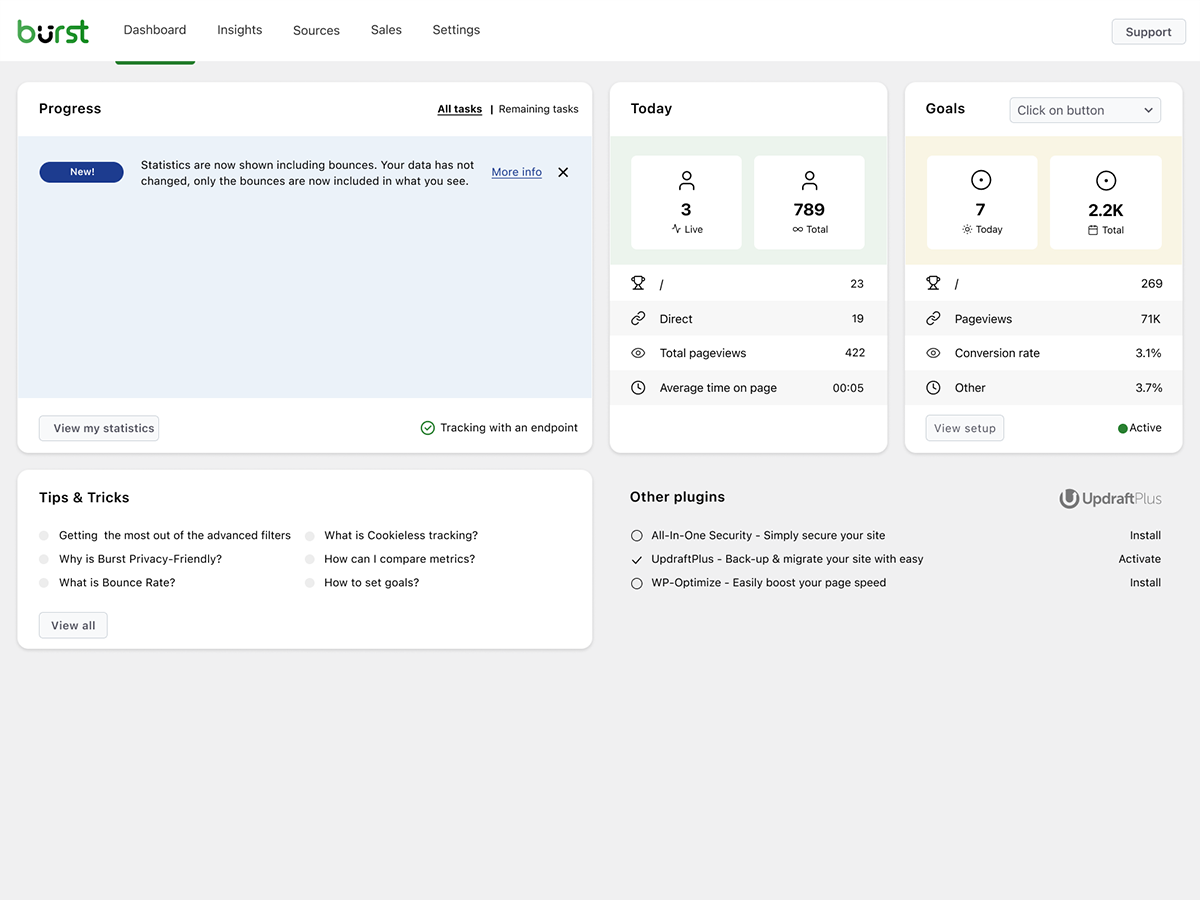


Bloklar
Bu eklenti 1 blok sağlar.
- Pageviews Counter
SSS
Is Burst Statistics really free?
Yes. Burst Statistics is 100% free with no tracking limits. Burst Pro is optional for users who need advanced features like UTM tracking, revenue attribution, geographic data or client reporting. That’s how we keep Burst Statistics free for most users.
Veriler nerede saklanıyor?
All statistics are stored in your own WordPress database. Unlike Google Analytics or cloud-based tools, we have zero access to your data. Your data never leaves your server, unless you manually opt in to share anonymous usage insights with us. Read more about how Burst handles your data.
Burst, Google Analytics’e iyi bir alternatif mi?
Yes. If you find GA4 too complex, or you’re concerned about sending visitor data to Google, Burst is a clean replacement. You get the website traffic stats you actually need, visitors, referrers, top pages, conversions, without the overwhelm. Read our Google Analytics alternative guide for the full comparison.
Is Burst a good GA4 alternative?
Yes. Burst was built as a privacy-friendly GA4 alternative for site owners who want clarity instead of complexity. No Google account, no tag manager, no cookie banner in most cases. See why WordPress site owners are leaving Google Analytics behind.
Is Burst a MonsterInsights alternative?
Yes. MonsterInsights connects your WordPress site to Google Analytics, so your data still flows to Google. Burst keeps everything on your own server, with its own dashboard inside WordPress. If you want analytics that don’t depend on Google, Burst is the simpler MonsterInsights alternative.
How is Burst different from WP Statistics, Independent Analytics or Koko Analytics?
Burst focuses on clarity over quantity. While some other WordPress analytics plugins can feel cluttered, Burst’s dashboard is designed to show you what matters without the noise. Independent Analytics is closest in spirit, with a shared privacy-first, WordPress-native approach. Burst differentiates with deeper UTM tracking, WooCommerce analytics and Agency-tier reporting. WP Statistics offers a wider feature set, but many users find it overwhelming. Koko Analytics is intentionally minimal, so it works well for very basic needs.
How is Burst different from Matomo?
Matomo tries to be a full Google Analytics replacement. Burst tries to be the clearest, most actionable WordPress analytics tool. If you want simplicity, fast setup and a native WordPress experience, Burst is the better fit. If you need granular configuration and a full GA-style feature set, Matomo may suit you better.
Bir hesaba ihtiyacım var mı?
No, you don’t need an account, no data is sent to another website.
İzleyebileceğim ziyaretçi sayısında bir sınır var mı?
No. The only limiting factor is your own database and server.
There is an option to use cookieless tracking if you prefer. By default, Burst uses cookies because they’re more accurate and lightweight. Even with cookies, Burst remains privacy-friendly because all data is anonymous and stored on your server. Read more about why cookies are misunderstood.
Burst Statistics can be used without setting cookies or storing data in browsers. This can affect accuracy slightly, so a hybrid option with cookies after consent is also possible. See how Burst tracks visitors without cookies.
Is Burst GDPR compliant?
Burst is designed to support GDPR, CCPA, DSGVO, AVG, RGPD and PECR compliance. Data stays on your server, tracking is anonymous, and you can disable cookies entirely. For most setups, no consent banner is needed for analytics. See how to configure your website without a cookie banner.
Burst’ü Google Analytics ile birlikte kullanabilir miyim?
Yes. Many users run both during a transition period, or keep GA4 for historical data while using Burst for daily insights. There’s no conflict.
Does Burst Statistics slow down my website?
No. Burst is built for performance with optimized database queries, a minimal tracking script and a Turbo Mode if speed matters more than perfect accuracy. The full breakdown is in does Burst Statistics slow down my website.
Burst, WooCommerce ile uyumlu mu?
Yes. Basic pageview tracking works in the free version. For full WooCommerce analytics, revenue tracking, product performance and sales attribution, you’ll need Burst Pro Business.
Başka bir analiz eklentisinden nasıl geçiş yaparım?
Install and activate Burst, it starts tracking immediately. Historical data from other plugins can’t be imported, but you can run both side-by-side during a transition period.
Burst Statistics’i Composer ile kurmak mümkün mü?
Yes. Both the free and premium plugins can be managed with Composer. Read the Composer installation guide for more information.
Eklenti hakkında geri bildirim verebilir miyim?
Geri bildiriminizi önemsiyoruz. WordPress forumlarında destek talebi gönderebilirsiniz ve biz de hızlı bir şekilde yanıt vereceğiz.
İncelemeler


Katkıda Bulunanlar ve Geliştiriciler
“Burst Statistics – Simple WordPress Analytics (Google Analytics Alternative)” açık kaynaklı yazılımdır. Aşağıdaki kişiler bu eklentiye katkıda bulunmuşlardır.
Katkıda bulunanlar


“Burst Statistics – Simple WordPress Analytics (Google Analytics Alternative)” 56 dile çevrildi. Katkıda bulundukları için çevirmenlere teşekkürler.
Geliştirmeyle ilgilenir misiniz?
Kodu görüntüleyin, SVN deposuna göz atın ya da RSS ile geliştirme günlüğüne abone olun.
Değişiklik Kaydı
3.5.0
- June 3rd 2026
- Improvement: AI chat availability checks and ability registration, preventing PHP notices and duplicate ability registrations.
- Fix: AI Chat integration with AI plugin.
- Fix: missing GROUP BY in a statistics query.
3.4.3
- May 20th 2026
- Fix: AI chat enablement and MainWP integration reminder tasks can now be dismissed permanently.
- Fix: AI chat assistant is now hidden for users without the manage_burst_statistics capability.
- Fix: modal position calculation in the shared viewer.
- Fix: scope application password auth probing to Burst REST endpoints, so authentication on unrelated REST routes (e.g. WooCommerce) is no longer affected.
- Security: harden rest api optimizer, Props Sanjay Singh Jhala.
- Improvement: performance of background aggregated table build, time out guards on sql queries, additional indexes on the burst_statistics table.
- Improvement: AI chat enablement task now links to the “Ask Burst anything” setup guide.
3.4.2
- May 12th 2026
- New: AI chat integration via the WordPress Abilities API, including granular datatable abilities with metric allow-listing for pages, parameters, referrers, countries, campaigns, sales and subscription products.
- New: granular datatable REST endpoints (data/datatable/{id} and data/ecommerce/datatable/{id}) so the dashboard and AI abilities can request a specific table by id.
- Improvement: refactor the Share class into dedicated Share_Tokens, Share_Routing, Share_Auth and Share_UI services for clearer responsibilities and easier maintenance.
- Improvement: dark mode initialization respects an explicit “light” preference so users on a dark OS no longer briefly see a dark skeleton when they have forced light mode.
- Improvement: upgrade routine corrects the stored activation time for sites with older data.
- Improvement: replace native checkboxes with Radix checkboxes in the Share dialog for consistent styling.
- Improvement: shared-link capability checks now reflect the currently requested dashboard tab instead of a single cached value, so per-tab permissions are enforced correctly during batch REST requests.
- Fix: dashboard route returns a 404 when the user is not allowed to load it, instead of rendering an empty page.
- Security: limit Share link viewer statistics access, props Sanjay Singh Jhala.
- Security: REST API optimizer now matches the Burst namespace strictly against the URL path (anchored at burst/v1), props Sanjay Singh Jhala.
- Security: harden MainWP proxy authentication. Props Sanjay Singh Jhala, Chloe Chamberland & PRISM – Wordfence
- Security: Auto Installer now requires the install_plugins capability instead of activate_plugins and only accepts download URLs from official Burst hosts. Props Sanjay Singh Jhala.
3.4.1.1
- May 5th 2026
- Fix: CSS styling regression due to obsolete javascript files being included in the dashboard build.
3.4.1
- April 29th 2026
- New: automated tests for subscription statistics dashboard.
- New: abilities API integration.
- Improvement: move plugin activation logic to bootstrap class.
- Improvement: split ajax fallback logic into do_action and get_action.
- Fix: broken upgrade url in report settings.
- Fix: When both Story report and share links are generated, the UX could generate an error.
- Security: increase minimum required capability from view to manage in get_posts endpoint, Props Sanjay Singh Jhala.
- Security: hardened MainWP proxy authentication and CORS origin validation, Props Sanjay Singh Jhala.
3.4.0
- April 22nd 2026
- New: dark mode support for the Burst Statistics dashboard.
- New: support for MainWP integration.
- New: all time date range for datepicker selection.
- New: support for application passwords. It is now possible to use the Burst Rest API endpoints with application passwords.
- Improvement: add detection for ad blockers. If an ad blocker breaks the Burst dashboard, show a warning about this.
- Improvement: PHP warning about not existing referrers table when clearing the table.
- Fix: restore bounces filter, allowing overriding the default time used to decide if a visit is a bounce.
- Fix: fixed a bug in the visitor calculation for referrers, caused by changes for the “exclude” option in filters, props @bikew1se.
- Fix: Share links sessions are now cleaned up daily, to prevent extended access to the link for longer than the set expiration time, Props Sanjay Singh Jhala.
- Security: ajax fallback for get_reports endpoint unintentionally allowed users with burst_view capability to see reports configuration, props Sanjay Singh Jhala.
3.3.0
- 1 Nisan 2026
- New: Time per session filter, allowing filtering by visit duration.
- Yeni: E-posta raporları için karanlık mod desteği.
- İyileştirme: İstatistiklerden oturumlar tablosuna sütunları taşıyarak veri depolamayı azaltın ve sorgu performansını artırın.
- Geliştirme: Oturum verileri arşiv CSV dışa aktarımlarına dahil edildi.
- İyileştirme: Performansı artırmak için eksik veritabanı indekslerini ekleyin.
- Güvenlik: Paylaşım linki izleyicileri, rapor verilerini görebiliyordu (alıcı e-posta adresleri, zamanlama ayarları). Katkıda bulunan: Sanjay Singh Jhala.
- Güvenlik: Paylaşım bağlantısı izleyicileri, paylaşım bağlantısı yalnızca satış dışı sekmelere yönelik olsa bile e-ticaret/satış verilerini görebiliyordu. Teşekkürler Sanjay Singh Jhala.
- Düzeltme: Insights grafiğinin aylık gruplandırılması hatalıydı.
- Düzeltme: Cron URL protokol uyumsuzluğu, site URL’si https olsa bile e-posta raporuna http bağlantısı eklenmesine neden olabiliyordu..
- Düzeltme: Cihazlar bloğunda filtrelemeyi bozan filtre türü sorunu, teşekkürler Andrew.
- Düzeltme: SQL hash güncelleme sorgusunda yinelenen anahtar hatası.
- Düzeltme: E-posta raporu logosunun ortalanması ve karanlık mod stil ayarları.
- Düzeltme: Birden fazla test isteği, yerleşik IP engelini aşmak için kullanılabiliyordu, teşekkürler Sanjay Singh Jhala.
3.2.3
- 12 Mart 2026
- Düzeltme: Giriş yapmamış kullanıcılar için paylaşım linki sayfayı yüklemiyor.
3.2.1
- 9 Mart 2026
- Güvenlik düzeltmesi: Burst View ayrıcalığına sahip kullanıcıların raporları yönetmesine izin veren eksik bir yetkilendirme kontrolü düzeltildi. Teşekkürler Sanjay Singh Jhala.
- İyileştirme: turbo varsayılan olarak etkinleştirildi ve çerezsiz izleme etkinleştirildiğinde turbo’yu etkinleştirmenizi öneren bir bildirim eklendi.
- Geliştirme: Ölümcül hataları önlemek için sunucuda PharData sınıfının yüklü olup olmadığını kontrol et.
- Düzeltme: Cron işleri sırasında kullanılmak üzere şemayı sakla. Cron sırasında, site_url http oluyor. Javascript oluşturulurken, gerçek şemayı yansıtması gerekiyor, genellikle https.
- Düzeltme: Yönetici kullanıcı tarafından paylaşım bağlantısı açıldığında raporlama ayarlarında yinelenen alanlar.
- Düzeltme: klasik premium rapor oluşturulurken url bulunamadı uyarısı.
- Düzeltme: Çok katı temizleyici kullanımı tablo öneklerinin küçük harfe dönüşmesine neden oluyordu. props @parkentosh
3.2.0
- 25 Şubat 2026
- Yeni: Burst Statistics’i geliştirmemize yardımcı olmak için verilerinizi anonim olarak paylaşın: sektör standartları oluşturun, hedefe yönelik özellik geliştirme ve performans iyileştirmeleri yapın.
- Yeni: Kullanıcıları Discord sunucumuza katılmaya davet eden bir bildirim ekleyin.
- Yeni: Burst Statistics kontrol panelindeki paylaş butonuyla istatistikleri ekibinizle veya müşterilerinizle kolayca paylaşın.
- Düzeltme: Rest API takibinde JSON ile kodlanmamış verileri yakala, katkılar @rajkumarreddyv
- Düzeltme: Hemen çıkma ve hemen çıkma oranı hesaplamaları artık hemen çıkma bayraklarını toplamak yerine, farklı hemen çıkma oturumlarını doğru bir şekilde sayıyor, böylece şişirilmiş sayılar önleniyor.
- Düzeltme: ‘değişkenleri ve betikleri birleştir’ ayarının varsayılan değer mantığı, ayarın devre dışı bırakılmasını imkansız hale getiriyordu.
3.1.6
- 20 Ocak 2026
- Düzeltme: Arşiv fonksiyonunda eski verilerin silinmesi, yanlış SQL sözdizimi nedeniyle çalışmıyordu.
- Düzeltme: Tarayıcı/OS verilerini insights bloğunda cihaz bazında filtrelememe sorunu giderildi, teşekkürler @alisontaylorbc.
- İyileştirme: veri silme için otomatik test ekle.
- Geliştirme: datatable bloğuna kalıcı sıralama ekle, katkılar @ankush.
- Geliştirme: kıtaya göre filtreleme.
3.1.5
- 7 Ocak 2026
- Geliştirme: ekranın sağ alt köşesindeki bildirimlerin otomatik kapanması.
- Geliştirme: mobil uyumlulukta bazı küçük iyileştirmeler.
- İyileştirme: otomatik testleri canlı ziyaretçi testi ile genişlet.
- İyileştirme: canlı ziyaretçi görünümünde uzun URL’lerin sarılması.
- İyileştirme: PHPCS kapsamı genişletildi.
- Düzeltme: tarayıcının yerel depolama alanı dolu olduğunda, filtre eklemek bir hataya neden olabiliyordu.
- Düzeltme: Karışık içerik uyarılarını önlemek için birleştirilmiş değişkenler ve script URL’lerinde https zorunlu hale getirildi.
- Düzeltme: RTL diller için onboarding, var olmayan bir RTL CSS dosyasını yüklemeye çalışıyordu.
3.1.4
- 23 Aralık 2025
- İyileştirme: veri tablosu bloklarının ve yükleme durumlarının stil düzenlemesi.
- Geliştirme: yönlendiren sorgu performans iyileştirmeleri.
- Geliştirme: parametre sorgusu performans iyileştirmeleri.
- Geliştirme: Burst Rest Api Optimizer’dan Rest Api üzerinden gelen izleme vuruşlarını hariç tut, bu şekilde tüm eklentiler vuruş sırasında yüklenir, bu da kanca hedefleri için gereklidir.
- İyileştirme: Yüklemeler dizini yazılabilir değilse, değişkenleri ve betikleri birleştirmek için varsayılan yönteme geri dönüş eklendi.
- Geliştirme: ‘cron çalışmıyor’ uyarısı artık kapatılamıyor, çünkü bu kritik bir sorun.
- İyileştirme: datatable’larda biçimlendirilmiş veriler için arama yapma imkanı, örneğin artık konumlar datatable’ında ‘US’ yerine ‘United States’ arayabilirsiniz.
- Geliştirme: parametre filtreleme eklendi.
- Düzeltme: cihazlar bloğunda filtreleme.
3.1.0.3
- 1 Aralık
- Düzeltme: İlk ayar değişikliklerini kaydettikten sonra ayar değişikliklerini kaydetmek için sayfayı yenilemek gerekiyordu.
- Performans: Takip sırasında kaynak tüketen işlemleri gruplar halinde cron’a aktararak performans iyileştirmeleri
- Geliştirme: Kullanıcı Aracısı Ayrıştırıcı iyileştirmeleri, geçersiz tarayıcıların kaldırılması
- Düzeltme: gelişmiş filtreler için açılır menü listeyi filtrelemiyor.
- Düzeltme: WooCommerce veya EDD algılanmadığında satış menüsünün eksik kaldırılması nedeniyle tanımsız sekme oluşması sorunu giderildi.
- Düzeltme: Sayfa sayımlarında nesne önbelleklemesi, sayfa sayımlarının yavaş güncellenmesine neden oluyordu, katkılar @fveits
3.0.2
- 25 Kasım 2025
- Düzeltme: bazı bildirimler doğrulama sırasında yanlışlıkla kapatıldı.
- İyileştirme: hook hedefleri için otomatik test eklendi.
- İyileştirme: arşiv geri yükleme için otomatik test eklendi.
3.0.0
- 11 Kasım 2025
- Düzeltme: Bilinmeyen bir eklentiyle uyumluluk, WooCommerce ürünleri genel bakışında get_timerange_dropdown() fonksiyonunda null değere izin veriyor, katkı sağlayan @tegid
- Düzeltme: Birden fazla alan adı kurulumu algılanırken www ve www olmayan alan adlarını farklı alan adları olarak değerlendirmeyin.
- Düzeltme: Bazı kurulumlarda engellenmesine neden olan hedefler scripti yüklenirken gereksiz eğik çizgiyi kaldır, katkılar @jhndkrvzc
- Düzeltme: üst çubuk sayacı binler için ‘k’, milyonlar için ‘M’ vb. göstermiyordu, sadece 1 gösteriyordu, 1k yerine.
- Yeni: PHP için minimum gereken sürümü 8.0’a, WordPress için 6.4’e yükseltin