

AI-first mailbox for teams & agents on your Cloudflare account.
The Google Workspace and Outlook alternative. Mailboxes for your team and your agents, with replies drafted by AI.
- Claude Code
- Claude
- Cursor
- Codex
- Gemini CLI
- GitHub Copilot
Google Workspace and Outlook alternative
Everything your company does with email. Without the per-seat bill.
cloudmail is the whole mail platform for a business: everyone's mailbox, shared addresses, every domain you own, sign-in and security. Moving over from Google or Microsoft takes an afternoon.
What your team gets
- Mailboxes on every domain you own: for each person and role, with aliases and catch-alls.
- Shared inboxes: support@ and sales@ for the whole team, with roles from viewer to owner.
- Sign-in and security: passwords, passkeys, authenticator 2FA and an audit log.
- Spam and strangers handled: a Screener for first-time senders, block rules and look-alike warnings.
- On your phone and desktop: install it as an app, with push notifications for new mail.
- Templates, sequences and tracking: for the mail you send more than once, with delivery, opens and clicks.
Switching from Google or Microsoft
- Bring your old mail: from Google Takeout, .mbox, .eml or any IMAP account, with labels, threads and read state.
- A guided setup: that shows every DNS change before it makes it, and checks the records live.
- Pay once, not per person: one licence for the deployment, however many people you hire.
- Your mail, in your account: each mailbox is its own database in your Cloudflare account. We never receive it.
- Leave whenever you like: export everything as .mbox files from Settings at any time.
cloudmail vs Google Workspacecloudmail vs Microsoft 365 and OutlookImport your mail from Gmail or IMAPInstall it on your phone and desktop
Agent-first
A mailbox for every person. And one for every agent.
Agents shouldn't borrow your login. In cloudmail an AI agent gets its own real address, with its own token, its own send rules and its own expiry, while people keep their mailboxes to themselves.
Mailboxes for people
- A mailbox of their own: plus the shared inboxes they work in, with a role in each.
- Replies drafted for them: new mail can arrive with a draft reply already waiting in Drafts.
- The last word on sending: anything an agent sends waits in Pending approval until a person approves it.
- An assistant in the side panel: that reads, searches, files and drafts with the mailbox's own tools.
Mailboxes for agents
- A real address of its own: agent-…@yourdomain.com, separate from every person's mailbox.
- Its own token: confined to that one mailbox, so an agent never borrows a person's login.
- Its own send rules: drafts only, approve every send, or send on its own, plus a recipient allowlist.
- Its own lifetime: set an expiry and the token is revoked and the mail archived to your R2 bucket.
AI-first
AI in every part of the inbox.
Summaries, sorting, search and drafting are part of how mail arrives, on Workers AI in your own Cloudflare account or on the model gateway you choose.


Replies drafted for you
Optional, per mailbox, with your own instructions. Drafts wait for you and are never sent on their own.
A summary on every thread
One line in the list and up to three bullets in the reader.
Labels you describe
Write a label's purpose in plain words and new mail that fits gets it. Corrections teach it.
The Screener
Mail from people you've never written to waits until you say yes or no.
Ask your inbox
Ask a question and get a short answer with links to the messages it came from.
A daily brief
What needs a reply, what is still waiting on others, and what arrived, at the time you choose.
An agent in the side panel
It reads, searches, files and drafts with your mailbox's tools, and anything it writes waits for you.
Prompt-injection screening
Mail is checked before any AI acts on it, and suspicious reads hold an agent's sends.
Your model, your gateway
Workers AI in your own account, or your own Anthropic- or OpenAI-compatible gateway, per task.
The AI email assistantAI labels and the ScreenerAsk your inbox a questionChoose your own AI model
MCP, CLI, SDKs and a Skill
Your agents already know how to use it.
Connect Claude, Cursor, Codex or your own code in a minute. Agents read, file and draft with exactly the permissions you give them, and sends wait for a person unless you decide otherwise.
- MCP server73 tools at /mcp. Clients sign in through your browser with OAuth.
- Agent SkillOne install teaches Claude Code, Codex, Cursor and other coding agents to work your mail safely.
- The cloudmail CLIPrebuilt for macOS, Linux and Windows. Tables for people, JSON for scripts, --dry-run on every change.
- TypeScript and Python SDKsEvery REST operation, with idempotency keys so a retry never sends twice.
- Webhooks and live eventsSigned events for received, sent, bounced, opened and clicked mail.
Read the developer overviewThe MCP server for emailThe email API, CLI and SDKs
# Signs in through your browser with OAuth
claude mcp add --transport http cloudmail \
  https://mail.yourdomain.com/mcp

# Headless agents use an API token instead
claude mcp add --transport http cloudmail \
  https://mail.yourdomain.com/mcp \
--header "Authorization: Bearer ttk_..."# A separate mailbox for one agent, with its own token
cloudmail agent-inbox create --domain yourdomain.com \
--purpose 'Invoice triage' --send-mode approve \
--allow @partner.com --ttl-hours 24
cloudmail agent-inbox list # addresses, send modes, time left# Claude Code
/plugin marketplace add cloudmail-hq/skills
/plugin install cloudmail@cloudmail
# Codex, Cursor, Gemini CLI, Copilot and others
npx skills add cloudmail-hq/skillscloudmail config set base-url https://mail.yourdomain.com
cloudmail auth login # paste a ttk_ token; input is hidden
cloudmail mail list --folder inbox --unread --limit 10
cloudmail mail send --to priya@example.org \
--subject 'Pilot start' --text 'Monday works.' --dry-run
cloudmail approval list # sends held for a person
cloudmail events tail --mailbox support@yourdomain.comimport { Cloudmail, isPendingApproval } from "@cloudmail/sdk";
const mail = new Cloudmail({
baseUrl: "https://mail.yourdomain.com",
token: process.env.CLOUDMAIL_TOKEN!,
});
const result = await mail.mail.send("support@yourdomain.com", {
to: "priya@example.org",
subject: "Pilot start date",
text: "Monday works.",
});
if (isPendingApproval(result)) {
// Nothing was sent. A person approves it in the app.
console.log("held:", result.approval_url);
}from cloudmail import Cloudmail, is_pending_approval
cm = Cloudmail("https://mail.yourdomain.com", token="ttk_...")
result = cm.mail.send(
"support@yourdomain.com",
to="priya@example.org",
subject="Pilot start date",
text="Monday works.",
)
if is_pending_approval(result):
print("Waiting for approval:", result.approval_url) # don't retryA tour of cloudmail
Drafts and approvals
AI drafts the reply. You press send.
Anything an AI agent sends, through the MCP server, an API token or the built-in assistant, waits in Pending approval. You see the exact message that will go out, then approve, edit or reject it. An agent can never approve its own send.
- Per mailbox: drafts only, approve every send, or let one trusted integration send on its own.
- Recipient allowlist: sends to known addresses can skip the queue.
Domains and teams
Every domain you own, in one place.
Add your domains, give each person the mailboxes they need, and send from any alias. The domain page lists every DNS record the domain needs and checks them live, so you know mail will land before you send any.
- Shared inboxes with viewer, agent, manager and owner roles.
- Your own sending: Cloudflare Email Service, Amazon SES or Resend, per domain.
- Products: group domains under one brand with its own name, colour, logo and signature.
Tracking and follow-ups
Know what happened to what you sent.
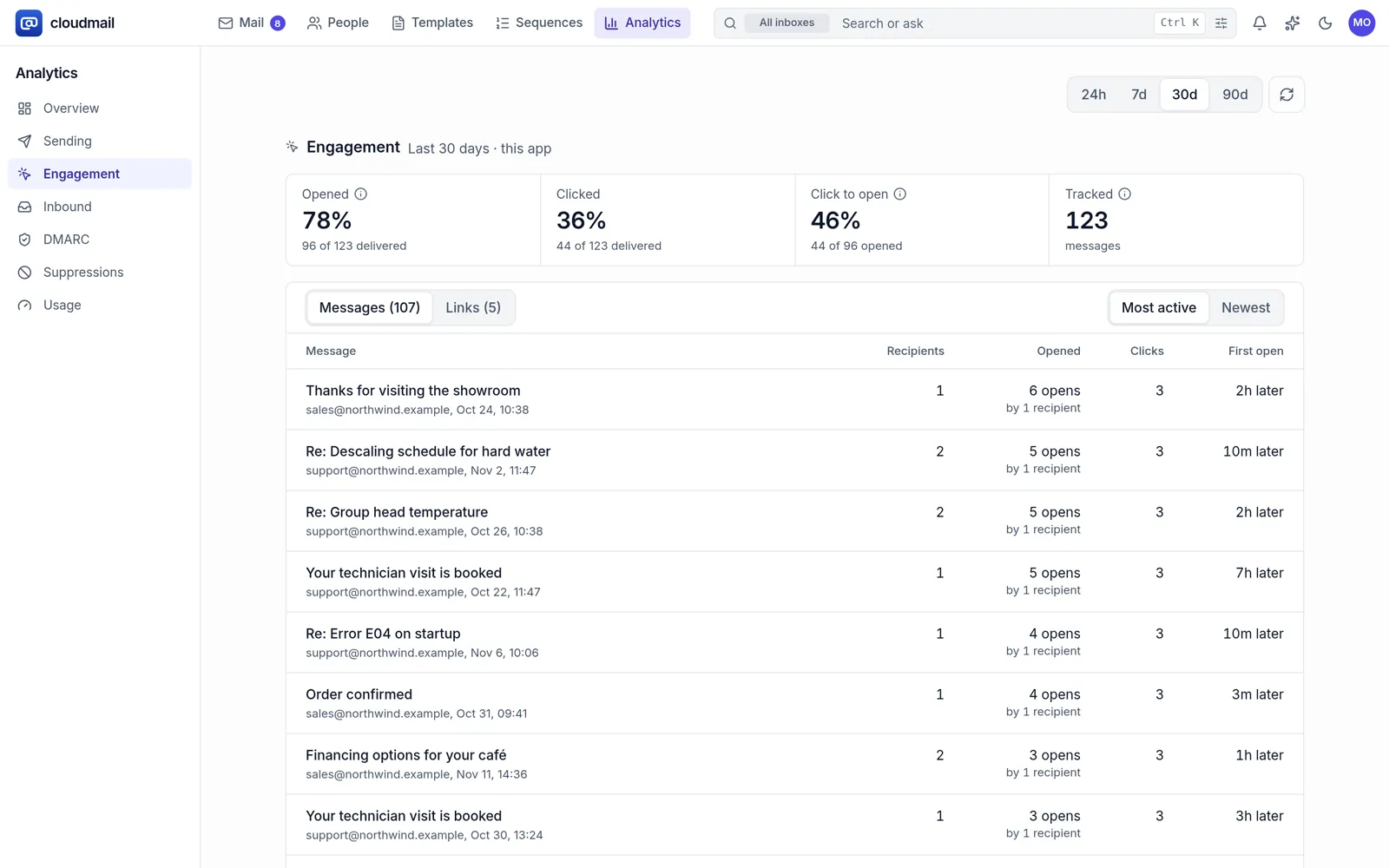
Sent mail shows whether a message was delivered, opened or clicked, and says when an open probably came from a mail-privacy proxy. Ask to be reminded if nobody replies, and the message comes back to your inbox when it's due.
- Tracking is yours to switch off, per mailbox or per message.
What it costs
Pay once. Then pay Cloudflare for what you use.
Per-seat email costs more every time you hire. cloudmail is one payment for the deployment, and about $5 a month to Cloudflare for the whole account, however many people use it.
Cloudflare's Workers Paid plan, $5 a month per account, is recommended and includes 3,000 sent emails a month. Past that, sending is $0.35 per 1,000. The app's Usage tab projects your bill and can alert you past a budget.
Over three years. The cloudmail line is the $29 licence plus $5 a month for Cloudflare Workers Paid. It leaves out usage beyond what that plan includes: sending over 3,000 emails a month, Workers AI over the free daily allowance, and storage. Per-seat prices are from Google Workspace and Microsoft 365's own pricing pages.
Deploy
From checkout to your first email.
Buy a licence
Pay once at checkout. Your licence key arrives by email.
Click Deploy to Cloudflare
Cloudflare creates the app, its storage and its AI binding in your own account, then you create the owner login.
Paste one Cloudflare token
The setup wizard shows what it will change for DNS, routing and sending, then applies it when you say so.
Pricing
Two prices. Both one-time.
Same product, every feature. The only difference is how many domains you bring.
Solo
One domainFor one business on one domain. Every feature, as many mailboxes and people as you need. Upgrade to Unlimited later from the app.
Unlimited
Unlimited domainsFor several brands or products in one deployment. Every feature, every domain you own.
Questions
Is this an alternative to Google Workspace or Outlook?
Yes, for your company's email. Everyone gets a mailbox on your domains, with shared inboxes, aliases, catch-alls, passkeys and 2FA, and an audit log. You bring your old mail with you from Google Takeout, .mbox files or any IMAP account, and you pay once instead of per person every month.
How do I read mail on my phone and laptop?
Install cloudmail as an app on your phone or computer straight from the browser. It opens like any other app, with push notifications for new mail and for sends waiting for your approval. It is a web app rather than an IMAP server, so Apple Mail, Outlook desktop and other IMAP clients don't connect to it.
Where does my mail live?
In your Cloudflare account. Each mailbox is its own Durable Object with a SQLite database, and attachments go to an R2 bucket you own. We never receive your mail. It is not end-to-end encrypted: Cloudflare, and Amazon SES or Resend if you choose them, carry it in transit as any mail provider would. The deployed app contacts our licence server to activate and to check in once a day, sending the licence key (only at activation), the deployment id, its host name and your Cloudflare account id.
What will Cloudflare charge me?
Cloudflare bills you directly. The Workers Paid plan, $5 a month per account, is recommended: sending through Cloudflare Email Service needs it, and it includes 3,000 sent emails a month, then $0.35 per 1,000. Workers AI includes 10,000 neurons a day free, then $0.011 per 1,000. Storage on R2 and Durable Objects is billed by use. The app's Usage tab projects your month's bill and can alert you past a budget.
Can the AI agent send email without me?
Not unless you allow it. Every mailbox starts in approve mode: a send from an API token, the MCP server or a connected app waits in Pending approval until a signed-in person approves it. An agent can never approve its own send, and there is no MCP tool to approve. You can let one trusted integration send on its own, per mailbox, or allowlist recipients.
What is an agent inbox?
A real email address for one AI agent, separate from anyone's personal mailbox. It comes with its own token that can only reach that mailbox, its own send mode (drafts only, approve every send, or send on its own), an optional recipient allowlist, an optional webhook for new mail, and an expiry. When it expires, the token is revoked and its mail is archived to your R2 bucket. Create one from Settings, the CLI, the MCP server or the REST API.
Do I need to be a developer?
No, but you need a Cloudflare account with your domain on Cloudflare DNS, and R2 turned on in that account. It's a one-click deploy, then a guided setup: you create the owner account, paste one Cloudflare API token and your licence key, and the wizard shows exactly what it will change before it changes it.
The code is public. Why pay?
cloudmail is fair source, under the Fair Core License. The code is public on GitHub, and running it needs a licence key: $9 Solo or $29 Unlimited, paid once. The licence does not allow removing or bypassing the key check. The key comes with updates and support, and it funds the project.
What if you disappear, or the licence server goes down?
Your deployment keeps running. A licence token lasts 30 days and refreshes daily, with 7 more days of grace after that, and incoming mail is always stored, even while the app is locked. Each release becomes open source two years after it ships.
Isn't this Cloudflare lock-in?
Yes, by design: it runs on Workers, Durable Objects, R2 and Email Routing in your account. You can export your data at any time from Settings → Your data, with one .mbox file per mailbox, and take it to any mail provider.
What about deliverability?
Outgoing mail goes through Cloudflare Email Service by default, or through your own Amazon SES or Resend account, chosen per domain. Setup adds SPF, DKIM and a monitor-only DMARC record, and the app watches bounces, complaints and unsubscribes. Cloudflare Email Service is in beta, and a new account starts with a conservative daily sending quota that grows over time. cloudmail is built for company mail, not high-volume cold outreach.
Is cloudmail made by Cloudflare?
No. cloudmail is independent, fair-source software (Fair Core License) that runs on your own Cloudflare account. It is not affiliated with, endorsed by or sponsored by Cloudflare.
One-time licence