

Develop faster with AI, safer with GrowthBook
Connect GrowthBook to Claude, Cursor, VS Code, and more to enable feature flags and experimentation for agentic workflows and analysis.
Trusted by 3,000+ companies worldwide


Add GrowthBook to your AI tool in minutes
Get a GrowthBook API Key
Sign up for a free account or connect to your self-hosted instance. Generate an API key from account settings.
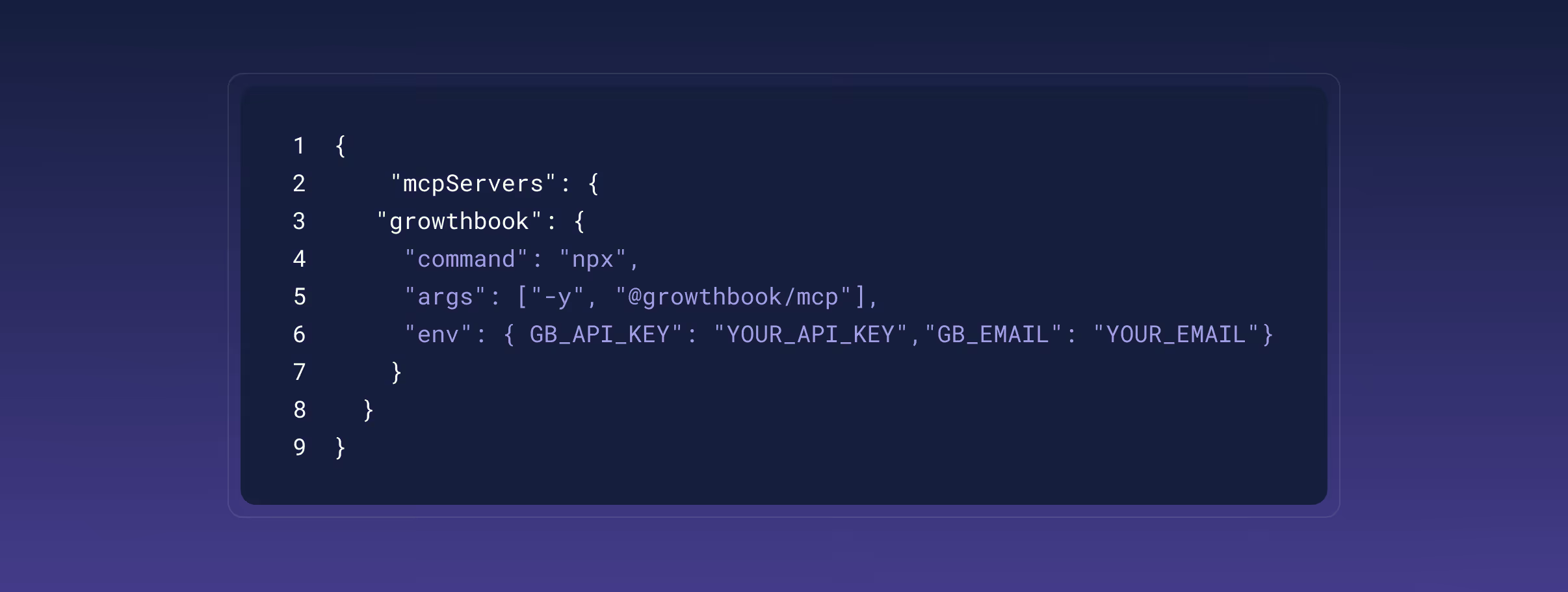
Add the MCP server config
Paste the JSON block into your AI tool’s MCP settings. Works with Cursor, Claude Code, VS Code, and any MCP-compatible tool.
Start prompting
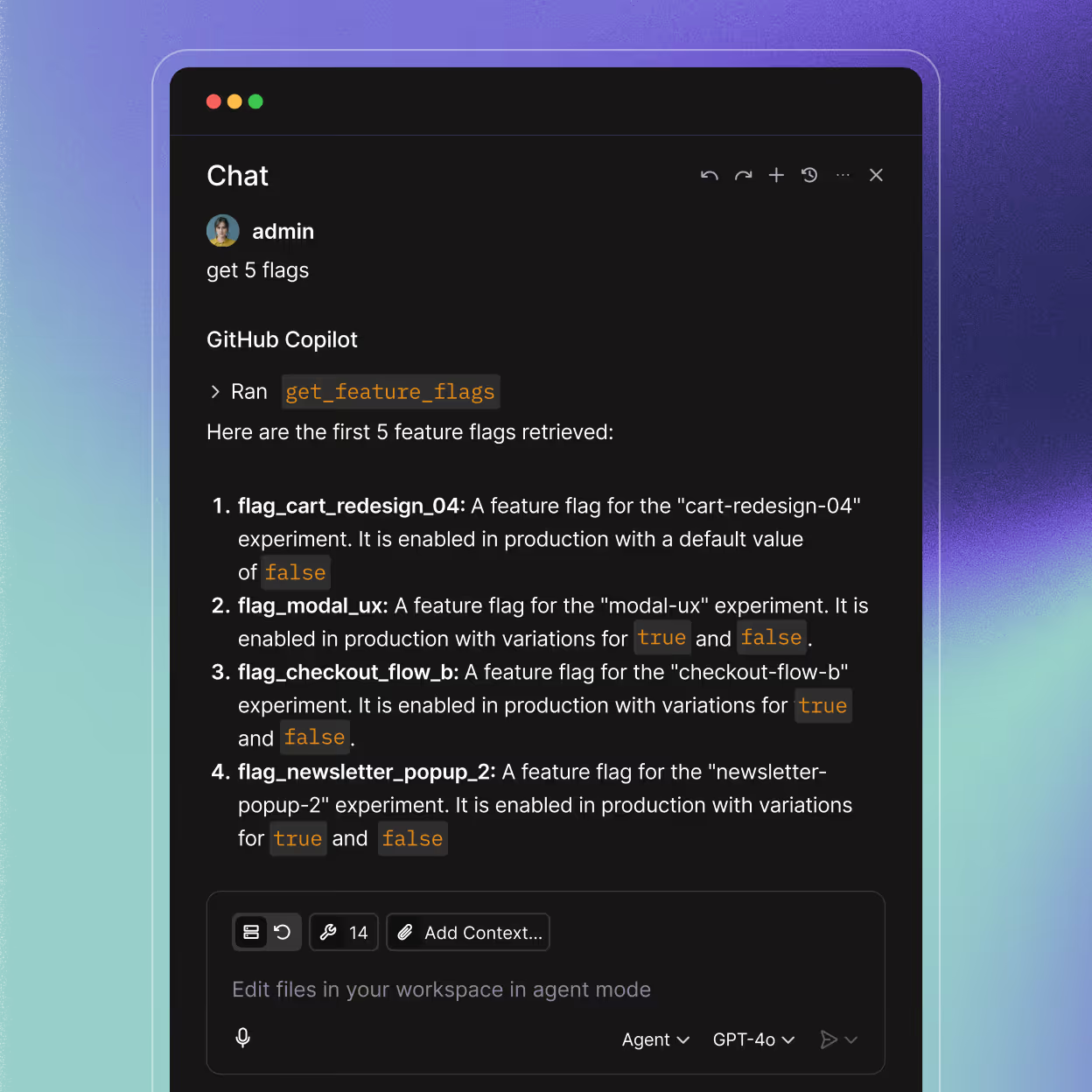
Ask your AI assistant to create flags, check experiments, analyze past experiments. No switching tabs.

Start learning with these prompts
Automatically add feature gates
Set up experiments from your editor
Clean up automatically
Ask Claude for updates
Start planning with a brainstorm
Go from coding velocity to shipping with confidence
Ship fast from your workflow
AI coding tools make it easy to write and deploy features quickly. Feature flags let you control who sees what and measure the impact. With the MCP server, you can automate feature flag setup and you’re one chat away from an experiment.
More context for prompts and agents
The MCP server brings GrowthBook context and capabilities to your AI tool. Bring your policies and templates from GrowthBook to your AI tool for context. Review your entire experimentation program before your next sprint planning session. Reduce technical debt with a stale-flag cleanup agent.

Build a culture of experimentation
Just because you can build it, doesn’t mean you should. Only 20% of product changes have a positive impact on core business metrics. For teams already living in Cursor or Claude Code, GrowthBook fits into your workflow rather than interrupting it.

One warehouse-native platform for modern product development
Experimentation
Feature Flags
Product Analytics
“People only see the wins, but there’s actually greater value in avoiding losses. We’ve stopped changes that could have cost millions.”
“GrowthBook has changed the way we think about experiments... It allowed us to uplevel our code, speed up decision-making, and focus on what we do best.”
“Experimentation showed what customers actually do rather than what we assume they’ll do.”
GrowthBook gives us a way to standardize experimentation while respecting the way Wikimedia projects actually work: open source, self-hosted, privacy-first, and deeply integrated with our existing data infrastructure.

GrowthBook is the only platform that lets us automate analysis at this level. It gives us the flexibility to measure accurately and the speed to help teams learn every day.
"A/B testing GenAI features has been an absolute game changer. Experimentation went from feeling like a speed bump to becoming a safety net."
FAQs
MCP (Model Context Protocol) is a standard that connects AI models with external software, databases, workflows, and tools. GrowthBook launched the first open-source production MCP server for experimentation and product development in early 2025. It brings feature flags and testing into AI development environments so engineering teams can measure what they ship without breaking flow.
Any AI tool that supports the Model Context Protocol works with the GrowthBook MCP server, including Claude Code, Cursor, VS Code, and Codex. For tools without MCP support, custom agents you build yourself, or any HTTP client, the REST API exposes the same functionality.
Yes, GrowthBook's MCP server is 100% open source. You can inspect the code, verify the implementation, and contribute improvements at github.com/growthbook/growthbook-mcp. GrowthBook itself is fully open source at github.com/growthbook/growthbook. The REST API runs on code you can read.
Yes. The MCP server connects to your GrowthBook instance (cloud or self-hosted) to create and manage feature flags and experiments. Setup takes minutes. See docs.growthbook.io/integrations/mcp for tool-specific instructions.
Yes. Teams use GrowthBook to run A/B tests comparing LLM providers, prompt variations, and model versions — measuring impact on real user metrics rather than benchmark scores. The MCP server lets you set up those experiments from your editor.
You can connect to the hosted MCP server or run the server yourself.
The hosted server runs on GrowthBook Cloud and calls the GrowthBook API on your behalf. Its access is limited to what your GrowthBook account can already see.
Running it yourself keeps that traffic in your own infrastructure. The server talks only to the GrowthBook instance you point it at. Run it as a local process in your editor with an API key, or deploy the official Docker image as your own HTTP endpoint.
In both cases your AI tool decides what goes into a tool call, so review that tool's privacy policy alongside this one.
Not on GrowthBook Cloud. Point your AI tool at https://mcp.growthbook.io/mcp and approve the OAuth prompt in your browser. There is no API key to create and nothing to install. If you self-host GrowthBook, you run the server yourself, either as a local stdio process in your editor or as your own HTTP endpoint using the official Docker image.
GrowthBook also exposes a REST API that delivers the same capabilities to any HTTP client, including custom agents, CI jobs, and internal tools. See our AI-native development page for the full picture of how GrowthBook supports humans and agents working together.
Only for self-hosted setups. The hosted server authenticates with OAuth, so it acts with your own GrowthBook permissions instead of a shared key in a config file. Self-hosted local setups still pass an API key or personal access token.
Ready to ship faster?
No credit card required. Start with feature flags, experimentation, and product analytics — free.

