
Salesforce Tutorial
 Jules Verne
⚡ Smart Summary
Salesforce is a cloud-based Customer Relationship Management (CRM) platform that helps businesses manage sales, service, marketing, and commerce in one place. Below, you will learn its architecture, products, features, and how to start using it.

Before we start learning Salesforce, let’s first understand the two concepts it is built on –
What is Cloud Computing?
Cloud computing is all about using a remote server to store, manage, and process data, instead of a local server or personal computer.
What is CRM?
CRM (Customer Relationship Management) is a kind of software that stores customer contact information like name, address, age, and phone number. It also keeps track of customer activity like website visits, numbers of outgoing and incoming phone calls, email, and more.
What is Salesforce?
Salesforce is a cloud-based Customer Relationship Management (CRM) software for managing customer relationships and integration with other systems. This SaaS tool helps to create custom solutions for marketing, sales, services, and ecommerce as per business requirements. Salesforce has now expanded from just CRM to offer multiple products.

Testsigma is an AI-powered, no-code test automation platform that I found ideal for testing Salesforce applications end-to-end. It lets you build tests in plain English, and its self-healing tests automatically adjust when your Salesforce metadata or UI changes, which kept my maintenance effort low.
Service Nature of Salesforce
Salesforce delivers its platform through three cloud service models:
- Salesforce as SaaS (Software as a Service): No installations, setup, or download required. Just log in and use the software across the cloud.
- Salesforce as PaaS (Platform as a Service): In this kind of software service, no separate platform is required. You can use the developer’s code to create and deploy applications.
- Salesforce as IaaS (Infrastructure as a Service): No hardware or software installations needed as your data and applications are stored securely on the Salesforce cloud.
History of Salesforce
- It was founded in March 1999 by ex-Oracle employee Marc Benioff, along with Parker Harris, Dave Moellenhoff, and Frank Dominguez
- In June 2004, the company’s IPO was listed on the New York Stock Exchange under the stock symbol CRM and raised US$110 million.
- In October 2014, Salesforce announced the development of its Customer Success Platform to merge all the Salesforce services like sales, service, marketing, analytics, etc.
- In 2017, Salesforce launched a Facebook Analytics tool.
- In 2018, Salesforce partnered with Apple for improving apps for businesses.
- In 2019, Salesforce acquired the analytics company Tableau for US$15.7 billion, and in 2021, it completed its US$27.7 billion acquisition of Slack.
- In 2023, Salesforce introduced Einstein GPT, bringing generative AI to CRM, and in 2024, it launched Agentforce for building autonomous AI agents.
- Today, Salesforce supports dozens of languages and serves more than 150,000 customers worldwide, from small businesses to Fortune 500 companies.
Why Salesforce? Key Benefits
Here are the prime reasons for using Salesforce CRM:
- It is a complete feature-rich solution for marketing, sales, service, partner management, and community management.
- Salesforce data is stored in the cloud so your team can use it from anywhere in the world with the help of an Internet connection.
- It caters to the needs of small as well as medium to large organizations.
- Salesforce works on a pay-as-you-go model, so there are no overhead costs.
- Increase customer loyalty, retention, and satisfaction
- Accelerates sales productivity
- Salesforce can easily integrate with 3rd party apps.
- Increase the growth of your business
- Continuous optimization of campaigns can be done based on the market response and closure interaction with channel partners.
Salesforce Architecture
To understand how one platform serves so many companies at once, let us look at how Salesforce is built. The below figure demonstrates detailed Salesforce Architecture:
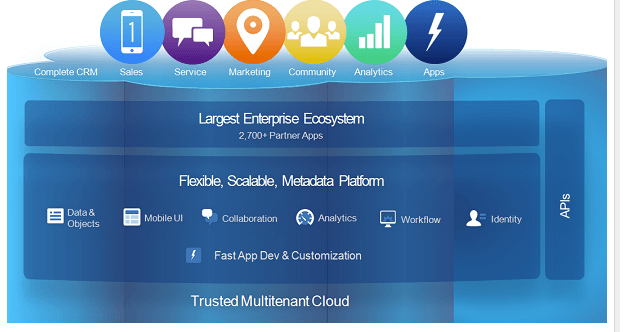
The architecture of Salesforce can be divided into various components described as follows:
Trusted Multitenant Cloud
In this component, multiple instances of one or more applications operate separately in a shared environment. The instances are known as tenants, which are separate from each other even though they physically remain on the same hardware. It is called trusted as it offers a high level of security.
Scalable Metadata Platform
This component helps you to make customizations. It also allows you to increase the amount of data or concurrent user instances.
Enterprise Ecosystem
The enterprise Ecosystem of Salesforce is quite big as many partners contribute by creating and maintaining apps in this platform. To ensure the quality of your Salesforce implementation, it’s essential to learn about Salesforce testing techniques and best practices.
APIs
Salesforce offers a powerful suite of APIs to develop mobile apps and integrations.
CRM and Related Functionality
Salesforce includes all features of CRM and also offers features for the creation of apps.

Salesforce CRM is built on a platform development language called APEX. Salesforce testing allows you to check that the configuration and code are functional. This CRM allowed me to improve customer loyalty, retention, and satisfaction, aiming to build lasting connections.
Features of Salesforce
These architectural strengths translate into a rich set of day-to-day features:
- Marketing and sales lead: Helps you to measure customer engagement by tracking email activities and convert them to customers.
- Contact management: With the help of this feature, you can pull your customer’s data like activity history, frequent contacts, customer communications, etc.
- Opportunities and quotes: Helps vendors to create opportunities and quotes.
- Build and run innovative apps: You can build, scale, and manage apps
- Analytics: It allows you to access the data, create dashboards, and perform analysis
- Email integration: It provides integrations devoted to customer service, support, and customer experience
- Communities for sales: Online community software that enables companies to connect customers, partners, and employees with each other
- Salesforce Engage: This feature focuses on making personalized contact with a customer for various campaigns designed by the marketing team
- Sales Collaboration: This feature helps you to address customer queries and feedback
- Sales Performance Management: It offers metric-based goal setting and helps you to get feedback & rewards for the sales team.
- Lead Management: This feature helps you to track the leads that are in progress
- Territory Management: This feature allows you to create multiple territory models. You can also preview them before rollout, and it helps you to optimize and balance territories
- Partnership management: This feature allows you to build communities with partners and help them to share objectives, goals, and activities
- Workflow and Approvals: The interface provides a simple drag-and-drop option
- Files Sync and Share: This feature provides the sales team the power to share various files and update them instantly
- Reports and Dashboards: The dashboards and reporting feature offers a real-time picture of the business at a glance
- Sales Forecasting: This feature gives you a real-time view of the forecast of a sales team
Salesforce Products
Salesforce groups its functionality into purpose-built clouds:

| Type of Cloud | Description |
|---|---|
| Sales Cloud | Sales Cloud brings all the customer information together in an integrated platform. It includes various features for marketing, sales, and lead generation which help you to achieve your business goals. |
| Marketing Cloud | Marketing Cloud helps you to monitor and engage with customers across the world through personalized email, mobile, social, and advertising campaigns. |
| Service Cloud | Service Cloud helps support teams resolve customer cases faster across channels such as phone, email, chat, and self-service portals. |
| Analytics Cloud | Analytics Cloud, now called CRM Analytics, helps companies to visualize data through AI-powered dashboards and insights. |
| Community Cloud | Community Cloud, since renamed Experience Cloud, lets a company directly connect with resellers, distributors, and partners through branded portals. |
| Commerce Cloud | The Commerce Cloud allows your organization to provide seamless customer service and shopping experience. |
| IoT Cloud | The IoT Cloud was used by companies to develop connected products; Salesforce has since retired this standalone offering. |
| Health Cloud | Health Cloud is helping the health industry to understand patients beyond their charts. |
Difference between Traditional CRM Vs. Salesforce CRM

| Traditional CRM | Salesforce CRM |
|---|---|
| Hosted on the company’s server | Hosted on the cloud |
| Takes months or even years to set up | Can be set up in a few days or weeks |
| Difficult to understand and use | Easy to use and understand |
| Unused data | Manages all data in one place |
| No personalized service | Real-time customer data and personalized service |
| High client attrition | High customer lifetime value |
How are companies using Salesforce?
Next, let us see how companies use Salesforce for various applications:
| Industry | Company | Usage |
|---|---|---|
| Communications | Comcast Spectacor | Salesforce CRM helps them to maintain detailed customer profiles and find their biggest fans to develop an effective marketing technique. |
| Finance | American Express | American Express uses the CRM tool to connect its employees across organizations, branches, and time zones. |
| High Tech | Sony | The famous electronics firm Sony uses the Salesforce Service Cloud to communicate with its customers. |
| Health Care | Health Leads | Health Leads is able to view and update patient data and coordinate with doctors. |
| Consumer Goods | Coca-Cola | Coca-Cola, the beverage maker, uses Salesforce to connect better with its staff and customers. |
How to access Salesforce?
Now, let’s learn how to access Salesforce:
Salesforce has a 30-day free trial, and we will register for the same.
Step 1) Go to link and
1. Add required information
2. Click on start free trial button

Step 2) Setup will take time

Step 3) You will see the welcome screen, with demo data

Step 4) Let’s create a new Account (Company). Click on Account > New

Step 5) In the popup
- Enter the required data
- Click save

Step 6) Account is created

The UI of Salesforce is very self-explanatory, and likewise, you can do other transactions.
What is Apex?
Apex is an object-oriented programming language. It allows developers to execute transaction control and flow statements on Salesforce servers with the help of an API. Apex also helps developers to add business logic into their programming code.
Here are the advantages of using the Apex language:
- Apex uses syntax and semantics that are easy to understand and offers fast and effective results
- It is designed to thread together multiple queries and DML statements into a single unit of work on the Salesforce server
- Apex uses direct references to schema objects like object and field names
Salesforce Lightning vs Salesforce Classic
Salesforce offers two user interfaces, and beginners will see both mentioned. Salesforce Classic is the original interface, while Lightning Experience, launched in 2015, is the modern interface built on a component-based framework. Salesforce no longer adds major new features to Classic; innovations such as Einstein AI and the drag-and-drop Lightning App Builder appear only in Lightning Experience.
| Aspect | Salesforce Classic | Lightning Experience |
|---|---|---|
| User interface | Compact, text-heavy pages | Modern, component-based design |
| Customization | Limited page layouts | Drag-and-drop Lightning App Builder |
| AI and analytics | Basic reports and dashboards | Einstein insights and dynamic dashboards |
| New features | Maintenance only | Receives every new release |
💡 Tip: All new Salesforce orgs start in Lightning Experience, and certification exams assume it. Classic users can switch interfaces from the profile menu.
AI in Salesforce: Einstein and Agentforce
Artificial intelligence is now built into every Salesforce cloud. Einstein, introduced in 2016, is the AI layer that analyzes your CRM data to support smarter decisions. Its key capabilities include:
- Lead and opportunity scoring: Ranks prospects by how likely they are to convert
- Predictive forecasting: Projects sales results from historical pipeline data
- Generative AI: Einstein GPT, introduced in 2023, drafts sales emails, service replies, and summaries grounded in customer records
In 2024, Salesforce launched Agentforce, a platform for building autonomous AI agents. Unlike scripted chatbots, Agentforce agents can reason over business data, answer customer questions, qualify leads, and complete routine tasks within boundaries an administrator defines. Learning Salesforce today therefore also means learning to configure AI features, not just manage records.
