jQuery Multiple Select Plugin For Bootstrap - Bootstrap Multiselect
| File Size: | 3.38 MB |
|---|---|
| Views Total: | 719662 |
| Last Update: | |
| Publish Date: | |
| Official Website: | Go to website |
| License: | MIT |
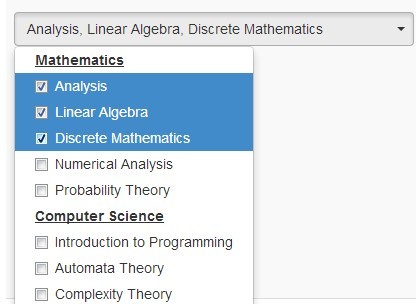
Bootstrap Multiselect is a jQuery plugin that turns a Bootstrap 5, Bootstrap 4, or Bootstrap 3 select box into a multiple select dropdown with checkbox options.
Use it when your form needs multi-choice selection but still needs to keep the native <select multiple> element in the markup.
The plugin adds a Bootstrap dropdown button, checkbox-style options, filtering, optgroup handling, select all controls, callbacks, and API methods for programmatic updates.
Licensed under the Apache License, Version 2.0 & BSD 3-Clause. The Bootstrap 3 Version is available here.
For a no-jQuery option, see this vanilla JavaScript multi-select dropdown.
Features:
- Converts standard single and multiple select elements into Bootstrap dropdown controls.
- Shows selected options as checkbox-style dropdown items.
- Select All option for bulk selection.
- Filters long option lists by text, value, or both.
- Handles clickable and collapsible optgroups.
- Accepts custom button, filter, option, divider, optgroup, and reset templates.
- Callbacks for selection changes, dropdown state, filtering, initialization, select all, and deselect all.
- API methods for refresh, rebuild, select, deselect, enable, disable, and data provider updates.
Use Cases:
- Category filters where users can pick several tags, regions, products, or statuses from one Bootstrap dropdown.
- Admin forms that need search, select all, and reset controls for long option lists.
- Grouped option lists where departments, countries, product families, or permission groups need collapsible optgroups.
- Dynamic forms where option data comes from JavaScript and must update after the page loads.
How to use it:
1. Include jQuery library & Bootstrap framework on your webpage.
<link rel="stylesheet" href="/path/to/cdn/bootstrap.min.css" />
<script src="/path/to/cdn/jquery.min.js"></script>
<script src="/path/to/cdn/bootstrap.bundle.min.js"></script>
2. Include the Bootstrap Multiselect plugin's stylesheet and script after jQuery.
<link rel="stylesheet" href="css/bootstrap-multiselect.css">
<script src="js/bootstrap-multiselect.js"></script>
3. Create a standard multiple select element.
<select id="demo" multiple="multiple">
  <option value="Javascript">Javascript</option>
  <option value="Python">Python</option>
  <option value="LISP">LISP</option>
  <option value="C++">C++</option>
  <option value="jQuery">jQuery</option>
  <option value="Ruby">Ruby</option>
</select>
4. Call .multiselect() on the target select element.
$(function(){
  $('#demo').multiselect();
});
Configuration options:
enableHTML(Boolean): Allows HTML content in option labels.buttonClass(String): Sets the CSS class for the multiselect button.inheritClass(Boolean): Inherits classes from the original select element.buttonWidth(String): Sets the button width.buttonContainer(String): Defines the container that holds the button and dropdown.dropRight(Boolean): Places the dropdown on the right side.dropUp(Boolean): Places the dropdown above the button.selectedClass(String): Sets the CSS class for selected options.maxHeight(Boolean/Number): Sets a maximum dropdown height and adds scrolling when exceeded.includeSelectAllOption(Boolean): Adds a Select all option.includeSelectAllIfMoreThan(Number): Shows Select all only when the option count passes this value.selectAllText(String): Sets the Select all label.selectAllValue(String): Sets the value for the generated Select all option.selectAllName(Boolean/String): Controls the name assigned to the Select all option.selectAllNumber(Boolean): Shows the selected option count when all options are selected.selectAllJustVisible(Boolean): Selects only visible filtered options when Select all is used.enableFiltering(Boolean): Adds a search field to the dropdown.enableCaseInsensitiveFiltering(Boolean): Makes filtering case insensitive.enableFullValueFiltering(Boolean): Filters against the full option value.enableClickableOptGroups(Boolean): Makes optgroup labels clickable.enableCollapsibleOptGroups(Boolean): Makes optgroups collapsible.collapseOptGroupsByDefault(Boolean): Collapses optgroups on initialization.filterPlaceholder(String): Sets the filter input placeholder.filterBehavior(String): Filters bytext,value, orboth.includeFilterClearBtn(Boolean): Adds a clear button to the filter input.preventInputChangeEvent(Boolean): Prevents input change events.nonSelectedText(String): Sets the button text when no option is selected.nSelectedText(String): Sets the text shown after the selected count.allSelectedText(String): Sets the text shown when all options are selected.numberDisplayed(Number): Sets how many selected labels appear before count text is used.disableIfEmpty(Boolean): Disables the multiselect when it has no options.disabledText(String): Sets the text shown for a disabled empty multiselect.delimiterText(String): Sets the delimiter for selected labels.includeResetOption(Boolean): Adds a Reset option.includeResetDivider(Boolean): Adds a divider before the Reset option.resetText(String): Sets the Reset option label.indentGroupOptions(Boolean): Indents options inside optgroups.widthSynchronizationMode(String): Controls width synchronization withnever,always,ifPopupIsSmaller, orifPopupIsWider.buttonTextAlignment(String): Sets button text alignment.templates(Object): Replaces the generated button, popup container, filter, clear button, option, divider, optgroup, and reset button templates.
$('#demo').multiselect({

  // allows HTML content
  enableHTML: false,

  // CSS class of the multiselect button
  buttonClass: 'custom-select',

  // inherits the class of the button from the original select
  inheritClass: false,

  // width of the multiselect button
  buttonWidth: 'auto',

  // container that holds both the button as well as the dropdown
  buttonContainer: '<div class="btn-group" />',

  // places the dropdown on the right side
  dropRight: false,

  // places the dropdown on the top
  dropUp: false,

  // CSS class of the selected option
  selectedClass: 'active',

  // maximum height of the dropdown menu
  // if maximum height is exceeded a scrollbar will be displayed
  maxHeight: false,

  // includes Select All Option
  includeSelectAllOption: false,

  // shows the Select All Option if options are more than ...
  includeSelectAllIfMoreThan: 0,

  // Lable of Select All
  selectAllText: ' Select all',

  // the select all option is added as additional option within the select
  // o distinguish this option from the original options the value used for the select all option can be configured using the selectAllValue option.
  selectAllValue: 'multiselect-all',

  // control the name given to the select all option
  selectAllName: false,

  // if true, the number of selected options will be shown in parantheses when all options are seleted.
  selectAllNumber: true,

  // setting both includeSelectAllOption and enableFiltering to true, the select all option does always select only the visible option
  // with setting selectAllJustVisible to false this behavior is changed such that always all options (irrespective of whether they are visible) are selected
  selectAllJustVisible: true,

  // enables filtering
  enableFiltering: false,

  // determines if is case sensitive when filtering
  enableCaseInsensitiveFiltering: false,

  // enables full value filtering
  enableFullValueFiltering: false,

  // if true, optgroup's will be clickable, allowing to easily select multiple options belonging to the same group
  enableClickableOptGroups: false,

  // enables collapsible OptGroups
  enableCollapsibleOptGroups: false,

  // collapses all OptGroups on init
  collapseOptGroupsByDefault: false,

  // placeholder of filter filed
  filterPlaceholder: 'Search',

  // possible options: 'text', 'value', 'both'
  filterBehavior: 'text',

  // includes clear button inside the filter filed
  includeFilterClearBtn: true,

  // prevents input change event
  preventInputChangeEvent: false,

  // message to display when no option is selected
  nonSelectedText: 'None selected',

  // message to display if more than numberDisplayed options are selected
  nSelectedText: 'selected',

  // message to display if all options are selected
  allSelectedText: 'All selected',

  // determines if too many options would be displayed
  numberDisplayed: 3,

  // disables the multiselect if empty
  disableIfEmpty: false,

  // message to display if the multiselect is disabled
  disabledText: '',

  // the separator for the list of selected items for mouse-over
  delimiterText: ', ',

  // includes Reset Option
  includeResetOption: false,

  // includes Rest Divider
  includeResetDivider: false,

  // lable of Reset  Option
  resetText: 'Reset',

  // indent group options
  indentGroupOptions: true,

  // possible options: 'never', 'always', 'ifPopupIsSmaller', 'ifPopupIsWider'
  widthSynchronizationMode: 'never',

  // text alignment
  buttonTextAlignment: 'center',

  // custom templates
  templates: {
    button: '<button type="button" class="multiselect dropdown-toggle" data-toggle="dropdown"><span class="multiselect-selected-text"></span></button>',
    popupContainer: '<div class="multiselect-container dropdown-menu"></div>',
    filter: '<div class="multiselect-filter"><div class="input-group input-group-sm p-1"><div class="input-group-prepend"><i class="input-group-text fas fa-search"></i></div><input class="form-control multiselect-search" type="text" /></div></div>',
    filterClearBtn: '<div class="input-group-append"><button class="multiselect-clear-filter input-group-text" type="button"><i class="fas fa-times"></i></button></div>',
    option: '<button class="multiselect-option dropdown-item"></button>',
    divider: '<div class="dropdown-divider"></div>',
    optionGroup: '<button class="multiselect-group dropdown-item"></button>',
    resetButton: '<div class="multiselect-reset text-center p-2"><button class="btn btn-sm btn-block btn-outline-secondary"></button></div>'
  }

});
Callback functions:
Use callbacks to change button labels, customize option text, react to selection changes, track dropdown state, or run logic after filtering.
buttonText: Returns the button text for the current selected options.buttonTitle: Returns the button title text.checkboxName: Sets the checkbox name value.optionLabel: Returns the option label.optionClass: Returns the option class.onChange: Runs when an option changes.onDropdownShow: Runs when the dropdown starts to show.onDropdownHide: Runs when the dropdown starts to hide.onDropdownShown: Runs after the dropdown is shown.onDropdownHidden: Runs after the dropdown is hidden.onSelectAll: Runs after selecting all options.onDeselectAll: Runs after deselecting all options.onInitialized: Runs after initialization.onFiltering: Runs during filtering.
/**
 * Default text function will either print 'None selected' in case no
 * option is selected or a list of the selected options up to a length
 * of 3 selected options.
 *
 * @param {jQuery} options
 * @param {jQuery} select
 * @returns {String}
 */
buttonText: function (options, select) {
    if (this.disabledText.length > 0
        && (select.prop('disabled') || (options.length == 0 && this.disableIfEmpty))) {

        return this.disabledText;
    }
    else if (options.length === 0) {
        return this.nonSelectedText;
    }
    else if (this.allSelectedText
        && options.length === $('option', $(select)).length
        && $('option', $(select)).length !== 1
        && this.multiple) {

        if (this.selectAllNumber) {
            return this.allSelectedText + ' (' + options.length + ')';
        }
        else {
            return this.allSelectedText;
        }
    }
    else if (this.numberDisplayed != 0 && options.length > this.numberDisplayed) {
        return options.length + ' ' + this.nSelectedText;
    }
    else {
        var selected = '';
        var delimiter = this.delimiterText;

        options.each(function () {
            var label = ($(this).attr('label') !== undefined) ? $(this).attr('label') : $(this).text();
            selected += label + delimiter;
        });

        return selected.substr(0, selected.length - this.delimiterText.length);
    }
},
/**
 * Updates the title of the button similar to the buttonText function.
 *
 * @param {jQuery} options
 * @param {jQuery} select
 * @returns {@exp;selected@call;substr}
 */
buttonTitle: function (options, select) {
    if (options.length === 0) {
        return this.nonSelectedText;
    }
    else {
        var selected = '';
        var delimiter = this.delimiterText;

        options.each(function () {
            var label = ($(this).attr('label') !== undefined) ? $(this).attr('label') : $(this).text();
            selected += label + delimiter;
        });
        return selected.substr(0, selected.length - this.delimiterText.length);
    }
},
checkboxName: function (option) {
    return false; // no checkbox name
},
/**
 * Create a label.
 *
 * @param {jQuery} element
 * @returns {String}
 */
optionLabel: function (element) {
    return $(element).attr('label') || $(element).text();
},
/**
 * Create a class.
 *
 * @param {jQuery} element
 * @returns {String}
 */
optionClass: function (element) {
    return $(element).attr('class') || '';
},
/**
 * Triggered on change of the multiselect.
 *
 * Not triggered when selecting/deselecting options manually.
 *
 * @param {jQuery} option
 * @param {Boolean} checked
 */
onChange: function (option, checked) {

},
/**
 * Triggered when the dropdown is shown.
 *
 * @param {jQuery} event
 */
onDropdownShow: function (event) {

},
/**
 * Triggered when the dropdown is hidden.
 *
 * @param {jQuery} event
 */
onDropdownHide: function (event) {

},
/**
 * Triggered after the dropdown is shown.
 *
 * @param {jQuery} event
 */
onDropdownShown: function (event) {

},
/**
 * Triggered after the dropdown is hidden.
 *
 * @param {jQuery} event
 */
onDropdownHidden: function (event) {

},
/**
 * Triggered on select all.
 */
onSelectAll: function () {

},
/**
 * Triggered on deselect all.
 */
onDeselectAll: function () {

},
/**
 * Triggered after initializing.
 *
 * @param {jQuery} $select
 * @param {jQuery} $container
 */
onInitialized: function ($select, $container) {

},
/**
 * Triggered on filtering.
 *
 * @param {jQuery} $filter
 */
onFiltering: function ($filter) {

},
API methods:
destroy: Removes the plugin instance.refresh: Refreshes checked checkboxes from the current selected options.rebuild: Rebuilds the plugin instance.select: Selects a value.deselect: Deselects a value.selectAll: Selects all options or all visible options.deselectAll: Deselects all options or all visible options.updateButtonText: Updates the button text and title.setOptions: Updates plugin options.disable: Disables the multiselect.enable: Enables the multiselect.dataprovider: Provides option data programmatically.setAllSelectedText: Sets the runtime text shown when all options are selected.
// destroy the instance
$('#demo').multiselect('destroy');

// refresh the checked checkboxes based on the currently selected options
$('#demo').multiselect('refresh');

// rebuild the instance
$('#demo').multiselect('rebuild');

// select an option
$('#demo').multiselect('select', value);

// deselect an option
$('#demo').multiselect('deselect', value);

// select all options
$('#demo').multiselect('selectAll', justVisible);

// deselect all options
$('#demo').multiselect('deselectAll', justVisible);

// update the text and title of the button
$('#demo').multiselect('updateButtonText');

// update options
$('#demo').multiselect('setOptions', options);

// enable/disable the multiselect
$('#demo').multiselect('disable');
$('#demo').multiselect('enable');

/* provide options programmatically
  var data = [
      {label: 'Option 1', title: 'Option 1', value: '1', selected: true},
      {label: 'Option 2', title: 'Option 2', value: '2'},
      {label: 'Option 3', title: 'Option 3', value: '3', selected: true}
  ];
*/
$('#demo').multiselect('dataprovider', data);

// programmatically provide a new text to display in the button when all options are selected, at runtime
$('#demo').multiselect('setAllSelectedText', value);
More examples
Create a searchable Bootstrap multiselect dropdown:
$('#demo').multiselect({
  enableFiltering: true,
  enableCaseInsensitiveFiltering: true,
  includeFilterClearBtn: true,
  filterPlaceholder: 'Search'
});
Add Select all behavior for visible filtered options:
$('#demo').multiselect({
  includeSelectAllOption: true,
  selectAllJustVisible: true,
  selectAllText: ' Select all'
});
Load options from JavaScript data:
var data = [
  {label: 'Option 1', title: 'Option 1', value: '1', selected: true},
  {label: 'Option 2', title: 'Option 2', value: '2'},
  {label: 'Option 3', title: 'Option 3', value: '3', selected: true}
];

$('#demo').multiselect('dataprovider', data);
Alternative plugins
- jQuery Multiple Select Box Plugin
- jQuery Multiple Select Element Replacement Plugin - selectlist
- jQuery Plugin For Selecting Multiple Elements - Multiple Select
- Browse more jQuery multiple select plugins
- Compare this plugin with a vanilla JavaScript multi-select dropdown
- Use this shadcn multi-select component for Next.js
More multiple select resources
FAQs:
Q: How do I create a Bootstrap multiselect dropdown with checkboxes?
A: Add a standard <select multiple> element, include jQuery, Bootstrap, bootstrap-multiselect.css, and bootstrap-multiselect.js, then call $('#demo').multiselect().
Q: How do I add search to the dropdown?
A: Set enableFiltering to true. Use enableCaseInsensitiveFiltering for case-insensitive search and filterBehavior to search by option text, value, or both.
Q: How do I select or deselect options from JavaScript?
A: Use the select, deselect, selectAll, and deselectAll API methods. Call updateButtonText or refresh when the displayed button state needs to match changed values.
Q: Can Bootstrap Multiselect load options dynamically?
A: Yes. Use the dataprovider method with an array of option objects. Use rebuild when the plugin needs to rebuild the dropdown from changed markup.
Changelog:
2026-06-03
- Updated doc
v2.0.0 (2025-10-07)
- Updated for Bootstrap 5
v1.1.1 (2021-08-07)
- Reset button option
- onSelectAll and onDeselectAll get changed options as argument
- Fixed Keyboard support
- Fixed Bower and NPM specs, specifically regarding Bootstrap version and meta information
v1.1.0 (2021-07-30)
- Redesign of filter and active items
- Added new option "widthSynchronizationMode"
- Added new option "buttonTextAlignment"
- Fixed bugs
2020-12-22
- Fix select width
v1.0.0 (2020-11-18)
- Updated for Bootstrap 4.
2020-11-01
- v0.9.16
2018-03-04
- v0.9.15
2018-01-03
- bugfix
2017-12-18
- bugfix
2016-08-18
- v0.9.13
2016-07-30
- Fixed: deselect/select doesn't work with search when value is typed in search
2016-07-29
- Adding data-placeholder collapses multiselect
2016-07-23
- Fixed More issues with enableCollapsibleOptGroups
2016-04-23
- Allows different checkbox name for the same dropdown
2016-04-21
- fixed select all + clickable + collapsible issues.
2016-04-20
- bugfix
2016-04-18
- Some fixes and more tests for clickable and collapisble option groups.
v0.9.13 (2015-10-15)
- bugfix
2015-05-27
- Added option to collapse groups (some kind of sub menu)
- onChange is triggered for each (de)selected option separately.
2015-04-12
- fixed bugs.
2015-03-18
- v0.9.12
2015-03-01
- update.
2015-02-17
- update.
2015-02-14
- Add onSelectAll option
2015-02-13
- Support filter with clickable opt groups.
2014-11-02
- fixed an issue.
2014-10-13
- fixed an issue.
2014-08-08
- fix for IE 8.
2014-08-03
- Improve filter performance.
- Add onDropdownShown function call back.
2014-07-15
- Update
2014-05-24
- Update
2014-04-02
- Updated enable, disable demo.
2014-04-01
- templates can be overriden using configuration options.
2014-03-31
- update.
2014-03-13
- Bootstrap 3.1.1 update.
- Fixed bugs.
2014-03-12
- Bootstrap 3.1.1 update.
- Fixed bugs.
2014-02-07
- fixes.
2014-01-09
- Fixed bug When all options started as selected='selected', select all checkbox does not checked
2013-12-10
- Fixed bug when no options binding is given
This awesome jQuery plugin is developed by davidstutz. For more Advanced Usages, please check the demo page or visit the official website.


