Creating a simple project with Maven
Now that we have set up Maven on our favorite operating system and verified that it works fine, it is time to create a simple Java project.
Maven makes it easy to bootstrap a new project by creating a bunch of files and folders following accepted conventions.
How to do it...
Let's start creating the first simple project using Maven, by performing the following steps:
- Open a command prompt and change the directory to the folder in which you want to create your first Maven project.
- Run the following command:
mvn archetype:generate -DgroupId=com.packt.cookbook -DartifactId=simple-project -DarchetypeArtifactId=maven-archetype-quickstart -DinteractiveMode=falseYou can change the
groupIdandartifactIdvalues in the preceding command as per your requirement. - You will see Maven downloading a bunch of files:
Downloading: https://repo.maven.apache.org/maven2/org/apache/maven/plugins/maven-clean-plugin/2.5/maven-clean-plugin-2.5.pom Downloaded: https://repo.maven.apache.org/maven2/org/apache/maven/plugins/maven-clean-plugin/2.5/maven-clean-plugin-2.5.pom (4 KB at 1.4 KB/sec) - Then it will start generating sources:
[INFO] >>> maven-archetype-plugin:2.2:generate (default-cli) > generate-sources @ standalone-pom >>> - When Maven has completed generating sources, it will create the project that we want:
[INFO] Using following parameters for creating project from Old (1.x) Archetype:
maven-archetype-quickstart:1.0
[INFO] ----------------------------------------------------------------------------
[INFO] Parameter: groupId, Value: com.packt.cookbook
[INFO] Parameter: packageName, Value: com.packt.cookbook
[INFO] Parameter: package, Value: com.packt.cookbook
[INFO] Parameter: artifactId, Value: simple-project
[INFO] Parameter: basedir, Value: C:\projects\apache-maven-cookbook
[INFO] Parameter: version, Value: 1.0-SNAPSHOT
[INFO] project created from Old (1.x) Archetype in dir: C:\projects\apache-maven-cookbook\simple-project
Tip
Downloading the example code
You can download the example code files from your account at http://www.packtpub.com for all the Packt Publishing books you have purchased. If you purchased this book elsewhere, you can visit http://www.packtpub.com/support and register to have the files e-mailed directly to you.
How it works...
Did you get an while error running the preceding command to create your simple project?
One possibility is that your Maven is behind an HTTP proxy server. If so, see the Running Maven behind an HTTP proxy server recipe in this chapter.
Let's look at the folder structure that is created:
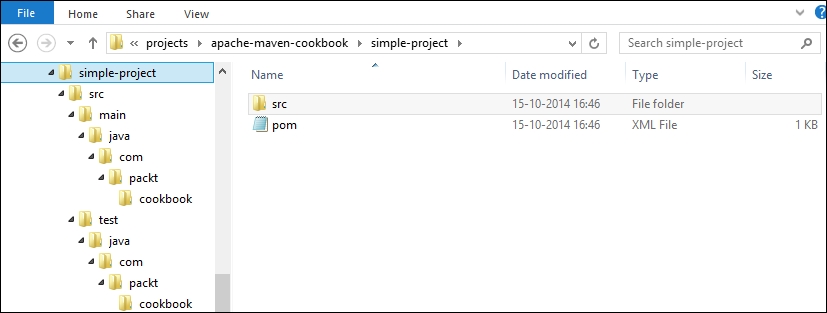
You will notice the following things:
- The Maven project configuration file
pom.xmlis created in the root of thesimple-projectfolder. We will explore this file in detail in subsequent sections. - A bunch of folders are created:
src\main\java: This is for Java source filessrc\test\java: This is for Java test source filessrc\main\resources: This is for resource files for the projectsrc\test\resources: This is for resource files for the test
- Within each of the preceding folders, a folder structure corresponding to the
groupId(org.packt.cookbook) is created.
The following are essentially Maven conventions at work:
- Maven expects all Java source files to reside
in src\main\java - Similarly, it expects all Java test files to reside in
src\test\java - It expects all project resources to reside in
src\main\resourcesand test resources to reside insrc\test\resources - It expects that source files will typically have the same package structure as the
groupIdparameter (though this is not mandatory) - Two sample classes, namely
App.javaandAppTest.java, are also created and it is not expected that they will be used beyond testing how Maven works
The mvn command that we used in the Creating a simple project with Maven recipe in this chapter, tries to invoke the generate goal of the archetype plugin with the specified command-line parameters.
The default Maven installation has minimal features. All features of Maven are available as Maven plugins. When given a plugin name, Maven knows where to download it from and then run it.
In this case, Maven downloads the archetype plugin. This plugin, in turn, can depend on another plugin. In this case, the latter plugin gets downloaded. This happens in a recursive fashion and, at the end of the process, all the relevant plugins required to run the specified command are downloaded.
These plugins are placed in your local repository, which is a location in your system. Once downloaded, these are never downloaded again unless deleted.
See also
- The Running Maven behind an HTTP proxy server recipe in this chapter