HOOTSUITE
     BASICS
    join.me: https://join.me/839-721-382
           AUDIO (888)251-2909
            CODE 630.310.9567

GATEHOUSE NEWS & INTERACTIVE DIVISION
The agenda

• What is HootSuite?

• Why use it?

• Getting set up

• How it works

• FAQ

• Resources, additional training
What is HootSuite?

• A social media dashboard

• Lets you manage multiple profiles/platforms

• Lets you time your posts

• Allows you to view upcoming posts
Why use HootSuite?

• Peak times for social media
   traffic don’t line up with
   traditional work hours.

• You want to post content
   when your readers are
   most likely to view it, and
   share it.

• Inner Circle 2013 includes
   Facebook and Twitter
   expectations seven days of
   the week.
Why use HootSuite

For Inner Circle 2013, all reporters must tweet
  from their own professional account

• News consumers are increasingly
turning to Twitter for headlines,
updates and interaction
• Reporters should tweet at least
twice each day and multiple times
during breaking news coverage

GOAL Increase reach, community interaction and
potentially find stories and sources via Twitter
Why use HootSuite

For Inner Circle 2013, newsrooms must post to
  Facebook every day of the week.
Larger newsrooms also will have increased
  posting expectations.
 • Readers are typically more active on
 Facebook during the weekends, and
 we need to reach our audience then.
 • Posting more than twice daily gives
 more opportunity to promote your
 brand and content.

GOAL Increase our website referral traffic
from Facebook for more pageviews.
Why use HootSuite

HootSuite allows you to schedule Facebook posts and
            tweets from a single account.

     FACEBOOK
     1-2 staff              6-19 staff
     2 posts per day        5 posts per day
     3-5 staff              20 or more
     4 posts per day        6 posts per day

     TWITTER
     2 tweets per day, seven days a week
     Expectation is the same for all reporters
Getting set up

 Sign up for a free account at hootsuite.com


• Use an email account
   that you’ll always have
   access to:
   (news@yourpaper.com)

• Use a generic password
   that everyone in the
   newsroom can have
Getting set up
To add Twitter:


 (1) In the top, left corner,
 click your user profile icon


 (2) Under My Social Networks,
 click Add a Social Network
Getting set up

         (3) Click Twitter


                             (4) Click Connect
                             with Twitter
Getting set up

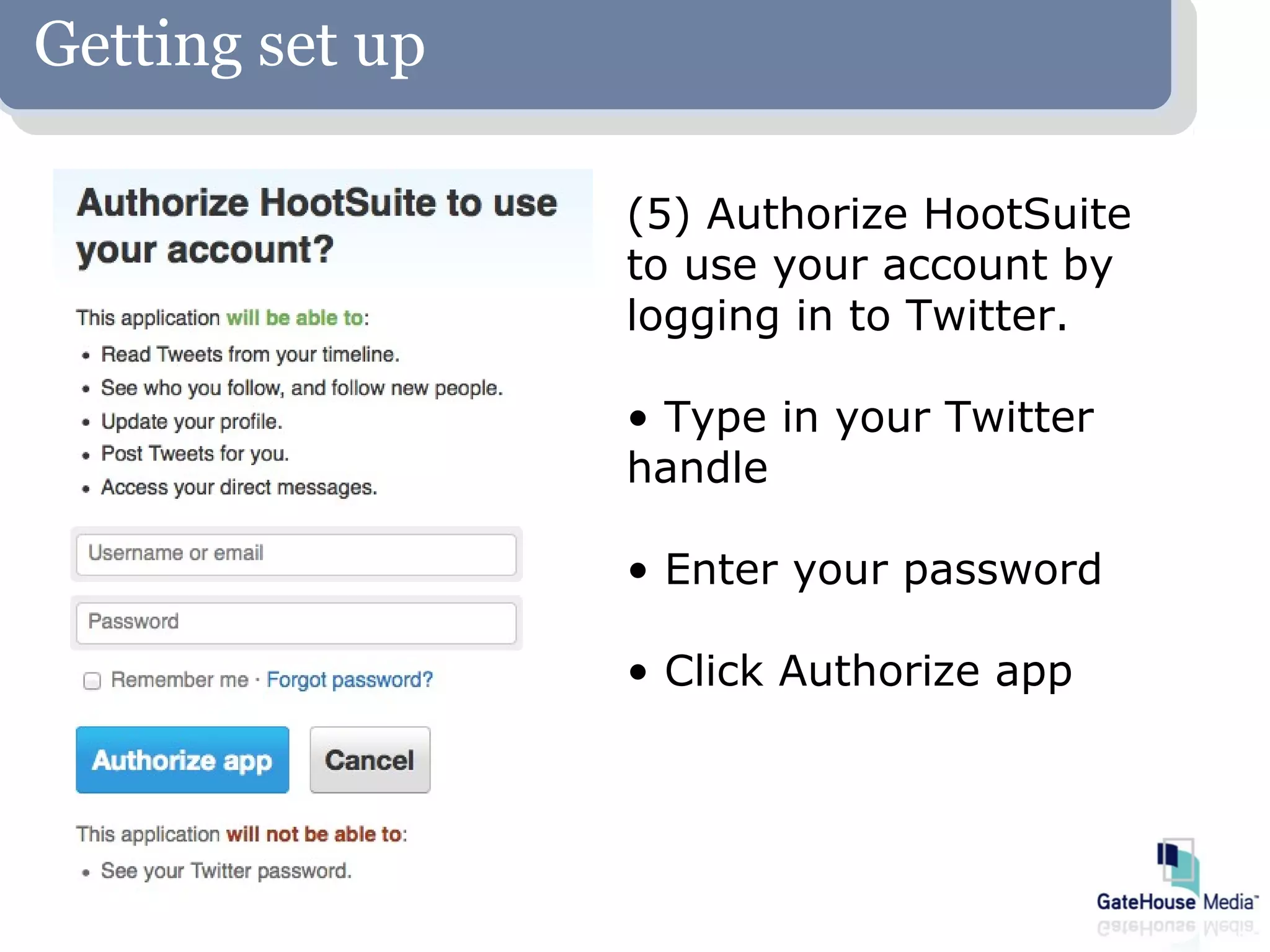
                 (5) Authorize HootSuite
                 to use your account by
                 logging in to Twitter.

                 • Type in your Twitter
                 handle

                 • Enter your password

                 • Click Authorize app
Getting set up
To add Facebook:


 (1) In the top, left corner,
 click your user profile icon


 (2) Under My Social Networks,
 click Add a Social Network
Getting set up


        (3) Click Facebook


                             (4) Click Connect
                             with Facebook
Getting set up
Add social networks like Facebook and Twitter

  (5) Type in Facebook
  credentials

  (6) Click Log In, located
  at the bottom-right of
  the login screen

  (7) Click the “plus” icon to add the profile. Click
  the check mark to remove the profile
Getting set up
Add social networks like Facebook and Twitter

  (8) Check the box, ensuring a new tab is are
  created for your Facebook page


  (9) Click Finished importing
How it works

 Compose your post just like you would in
 Facebook or Twitter


  Cut and paste the link to        Select the pages
  your story into the built-in     you want to
  URL shortener                    publish to

Click Send Now to post, or the calendar icon
to schedule your post
How it works
How to: Time-stamp a post


                            Click on the calendar icon

                            Type in your message

                            Use built-in link shortener

                            Select a date, time

                            Click “Schedule”
How it works
 How to: Monitor scheduled posts


Click on the
paper airplane
icon

View your
upcoming posts
How it works
 How to: Alter or delete a scheduled post

  Click on the post


                            Select the “X”


   You can also edit your post by
   selecting the “Edit” option.
FAQ

Can I delete Facebook content on Hootsuite?
No. If you want to delete a post, you must log in to
your Facebook page and delete it manually.

I’m using the built-in scheduler on Facebook.
Do I need to switch to HootSuite?
No. Using Facebook’s scheduler is fine. But
HootSuite allows you to add Twitter accounts, so
you can schedule tweets in advance.
FAQ

The free version of HootSuite only allows five
streams. I have six Twitter or Facebook
accounts. What now?
HootSuite Pro, which lets you add unlimited
streams, is $10 a month.
If Pro isn’t an option, organize your streams using
multiple accounts.

Can I remove streams I no longer want?
Yes. Under your profile, all your social networks will
be listed. To remove one, just hover over it, click
on the gear that appears and choose “Remove from
HootSuite.”
Resources
• More information can be found in the 2013 Inner Circle
   Handbook. Download at www.ghnewsroom.com
• Contact your content team manager:


           Mike Turley               Carlene Cox
              mturley@                   ccox@
      corp.gatehousemedia.com   corp.gatehousemedia.com


           Sarah Corbit             Brad Jennings
              scorbitt@                bjennings@
      corp.gatehousemedia.com   corp.gatehousemedia.com
Resources

Twitter for Reporters
A basic session for reporters who have little or no
   experience with Twitter. Training will cover how
   and when to tweet, how to gain followers and will
   explain basic Twitter terminology. Also included will
   be ideas for posts, ethical boundaries and how to
   time-stamp posts to appear on non-working days.

When: 2 p.m. Central, Thursday, Jan. 24
Resources

"Coming in Print"
Explains the strategy behind “Coming in Print” and
  offers suggestions on how to write engaging
  promotions.

When: 2 p.m. Central, Friday, Jan. 25
Resources

Seen-on-scene photo galleries
Covers how to maximize time spent taking and
  uploading seen-on-scene galleries and effectively
  translate those efforts into page views. Includes
  suggestions on where to shoot seen-on-scene
  galleries.

When: 2 p.m. Central, Tuesday, Jan. 29
HOOTSUITE
     BASICS
GATEHOUSE NEWS & INTERACTIVE DIVISION

HootSuite

  • 1.
    HOOTSUITE BASICS join.me: https://join.me/839-721-382 AUDIO (888)251-2909 CODE 630.310.9567 GATEHOUSE NEWS & INTERACTIVE DIVISION
  • 2.
    The agenda • Whatis HootSuite? • Why use it? • Getting set up • How it works • FAQ • Resources, additional training
  • 3.
    What is HootSuite? •A social media dashboard • Lets you manage multiple profiles/platforms • Lets you time your posts • Allows you to view upcoming posts
  • 4.
    Why use HootSuite? •Peak times for social media traffic don’t line up with traditional work hours. • You want to post content when your readers are most likely to view it, and share it. • Inner Circle 2013 includes Facebook and Twitter expectations seven days of the week.
  • 5.
    Why use HootSuite ForInner Circle 2013, all reporters must tweet from their own professional account • News consumers are increasingly turning to Twitter for headlines, updates and interaction • Reporters should tweet at least twice each day and multiple times during breaking news coverage GOAL Increase reach, community interaction and potentially find stories and sources via Twitter
  • 6.
    Why use HootSuite ForInner Circle 2013, newsrooms must post to Facebook every day of the week. Larger newsrooms also will have increased posting expectations. • Readers are typically more active on Facebook during the weekends, and we need to reach our audience then. • Posting more than twice daily gives more opportunity to promote your brand and content. GOAL Increase our website referral traffic from Facebook for more pageviews.
  • 7.
    Why use HootSuite HootSuiteallows you to schedule Facebook posts and tweets from a single account. FACEBOOK 1-2 staff 6-19 staff 2 posts per day 5 posts per day 3-5 staff 20 or more 4 posts per day 6 posts per day TWITTER 2 tweets per day, seven days a week Expectation is the same for all reporters
  • 8.
    Getting set up Sign up for a free account at hootsuite.com • Use an email account that you’ll always have access to: ([email protected]) • Use a generic password that everyone in the newsroom can have
  • 9.
    Getting set up Toadd Twitter: (1) In the top, left corner, click your user profile icon (2) Under My Social Networks, click Add a Social Network
  • 10.
    Getting set up (3) Click Twitter (4) Click Connect with Twitter
  • 11.
    Getting set up (5) Authorize HootSuite to use your account by logging in to Twitter. • Type in your Twitter handle • Enter your password • Click Authorize app
  • 12.
    Getting set up Toadd Facebook: (1) In the top, left corner, click your user profile icon (2) Under My Social Networks, click Add a Social Network
  • 13.
    Getting set up (3) Click Facebook (4) Click Connect with Facebook
  • 14.
    Getting set up Addsocial networks like Facebook and Twitter (5) Type in Facebook credentials (6) Click Log In, located at the bottom-right of the login screen (7) Click the “plus” icon to add the profile. Click the check mark to remove the profile
  • 15.
    Getting set up Addsocial networks like Facebook and Twitter (8) Check the box, ensuring a new tab is are created for your Facebook page (9) Click Finished importing
  • 16.
    How it works Compose your post just like you would in Facebook or Twitter Cut and paste the link to Select the pages your story into the built-in you want to URL shortener publish to Click Send Now to post, or the calendar icon to schedule your post
  • 17.
    How it works Howto: Time-stamp a post Click on the calendar icon Type in your message Use built-in link shortener Select a date, time Click “Schedule”
  • 18.
    How it works How to: Monitor scheduled posts Click on the paper airplane icon View your upcoming posts
  • 19.
    How it works How to: Alter or delete a scheduled post Click on the post Select the “X” You can also edit your post by selecting the “Edit” option.
  • 20.
    FAQ Can I deleteFacebook content on Hootsuite? No. If you want to delete a post, you must log in to your Facebook page and delete it manually. I’m using the built-in scheduler on Facebook. Do I need to switch to HootSuite? No. Using Facebook’s scheduler is fine. But HootSuite allows you to add Twitter accounts, so you can schedule tweets in advance.
  • 21.
    FAQ The free versionof HootSuite only allows five streams. I have six Twitter or Facebook accounts. What now? HootSuite Pro, which lets you add unlimited streams, is $10 a month. If Pro isn’t an option, organize your streams using multiple accounts. Can I remove streams I no longer want? Yes. Under your profile, all your social networks will be listed. To remove one, just hover over it, click on the gear that appears and choose “Remove from HootSuite.”
  • 22.
    Resources • More informationcan be found in the 2013 Inner Circle Handbook. Download at www.ghnewsroom.com • Contact your content team manager: Mike Turley Carlene Cox mturley@ ccox@ corp.gatehousemedia.com corp.gatehousemedia.com Sarah Corbit Brad Jennings scorbitt@ bjennings@ corp.gatehousemedia.com corp.gatehousemedia.com
  • 23.
    Resources Twitter for Reporters Abasic session for reporters who have little or no experience with Twitter. Training will cover how and when to tweet, how to gain followers and will explain basic Twitter terminology. Also included will be ideas for posts, ethical boundaries and how to time-stamp posts to appear on non-working days. When: 2 p.m. Central, Thursday, Jan. 24
  • 24.
    Resources "Coming in Print" Explainsthe strategy behind “Coming in Print” and offers suggestions on how to write engaging promotions. When: 2 p.m. Central, Friday, Jan. 25
  • 25.
    Resources Seen-on-scene photo galleries Covershow to maximize time spent taking and uploading seen-on-scene galleries and effectively translate those efforts into page views. Includes suggestions on where to shoot seen-on-scene galleries. When: 2 p.m. Central, Tuesday, Jan. 29
  • 26.
    HOOTSUITE BASICS GATEHOUSE NEWS & INTERACTIVE DIVISION