

While writing my WordPress Plugin article, “Top WordPress Plugins: 2012 versus 2013” for the Clark College WordPress Class, I was exposed to the highest rated and most popular WordPress Plugins.
Some of these sparked my interest, and I wanted to try a few of them out.
Some led me to find ones that were not mentioned in the lists that I ended up liking better, and some sounded better than what they turned out to be. In the article, I included “Isobel’s Picks“, but the one I am choosing to review today is: Shortcode Ultimate WordPress Plugin.
Go to your Plugin Panel and search for Shortcode Ultimate. Install and activate the Plugin.
How to use Shortcode Ultimate WordPress Plugin
Unlike a other WordPress Plugins, Shortcode Ultimate does not have a navigation menu link. It is built in and simply adds code to your template files for you to access with shortcodes.

I like to think of shortcodes like aliases: instead of remembering and typing out the long command or code, shortcodes are there to give the same code a nickname, so that when that nickname is put wherever you place it, your page knows who you are talking about, and respects that you don’t want to pronounce their real long and weird name that you don’t understand.
Since the Plugin does not appear in your menu, let’s start by clicking “Where to start?” on the Plugin description in Plugins > Installed Plugins.
Now, the great thing about this Plugin, is its cheatsheet feature:

There are a list of shortcodes that have been created and activated for you. Of course, you have to option to make your own, as seen in the menu, but for this review, I’d like to point out my favorite shortcode: The Accordion.

The accordion menu is my favorite type of menu style. However, it requires a lot of code, even if you are using pure CSS3. With this shortcode, all that work is whisked away into just a few lines, like a beautiful haiku!
Once that beautiful haiku has been copied and pasted wherever you choose to use it,
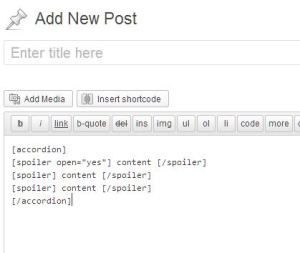
Take a look at the result and see that it works smashingly!

The accordion shortcode is simply my favorite one offered. Additional shortcodes included in this WordPress Plugin are:
| Tabs Spoiler Accordion Divider Spacer Highlight Label Quote Pullquote Dropcap |
Frame Row Column List Button Service Box Note Lightbox Tooltip |
Private Youtube Vimeo Screenr Audio Video Table Permalink Members (login) Guests |
RSS Feed Menu Sub Pages Siblings Document (Google Docs) Google Maps Slider Carousel Gallery Posts +Custom CSS |
All of these shortcodes have examples, descriptions and instructions.
So there you have it. Of course, this is a great shortcode creator Plugin as well, but not everyone will be as interested in that aspect. Enjoy!
 ClarkWP WordPress Magazine
What a cool WordPress Plugin. It is so amazing what fun things can be done with such a simple looking tool – revealing the power behind the Plugin magic. 😀 Thanks!
I want to use it to make a shortcode, then do a tutorial- but I have yet to have any ideas I want to execute.
Need help with suggestions?
Sure! If anybody could- you could definitely come up with something I can get excited enough about to take my time on!