- Java 100%
| Filename | Latest commit message | Latest commit date |
|---|---|---|
| AndroidCharts | ||
| AndroidChartsExample | ||
| gradle | ||
| pic | ||
| .gitignore | ||
| build.gradle | ||
| gradle.properties | ||
| gradlew | ||
| gradlew.bat | ||
| LICENSE | ||
| README.md | ||
| settings.gradle | ||

chartDirect
This is a fork of the AndroidCharts library. It was created due to necessity for the usageDirect project.
It contains:
- a bar chart with condensed variant
- a clock pie chart
- an ordinary pie chart (unmaintained)
- a line chart (unmaintained)
Features
The following may not apply to the unmaintained chart types.
- lightweight
- support for dark background
BarViewandCondensedBarViewbacked byRecyclerViewfor highest performance- display different colors in charts
- accent color as default color
Including in Your Project
Please use JitPack for downloading compiled AAR bundles. Sorry. See how.
Usage
Bar chart
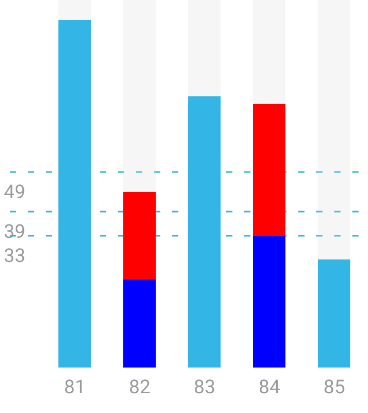
Include the BarView in your layout like this:
<im.dacer.androidcharts.bar.BarView
    android:layout_width="wrap_content"
    android:layout_height="300dp"
    android:id="@+id/bar_view" />
Set it up using Java:
BarView barView = findViewById(R.id.bar_view);

// Construct Value object for each bar
Value[] values = new Value[]{

    // Single-colored bar
    new Value(50, "50"),

    // Multi-colored bar
    new MultiValue(
        new int[]{20, 40}, new Integer[]{Color.RED, Color.BLUE}
    )
};
barView.setData(values, 100);

// Optionally add vertical lines for scale
barView.setHorizontalLines(new Line[]{new Line(25, "25%")});

// Optionally enable zero line
barView.setZeroLineEnabled(true);

// Optionally scroll along dashed scale lines
// (need to pass windowBackground color for performance reasons)
barView.setScrollHorizontalLines(true, windowBackground)
A condensed variant with no margin between bars is also available – simply use CondensedBarView instead of BarView.
The attribute @android:attr/windowBackground is used to draw scroll indicators at the ends of the graph ("fog of
war") – if this leads to unexpected result, you may disable it with BarView.setShowFogOfWar(false). You may also want
to do this for the condensed variant to prevent it from disappearing too suddenly and noticeably.
You may also show a cursor that highlights one selected bar using BarView.setShowCursor(true) and
BarView.setCursorPosition(int, float) with the position and offset, for instance like this:
viewPager.registerOnPageChangeCallback(new ViewPager2.OnPageChangeCallback() {
    @Override
    public void onPageScrolled(int position, float positionOffset, int positionOffsetPixels) {
        barView.setCursorPosition(position, positionOffset);
    }
});
Then, set a click listener like this:
barView.setOnBarClickListener(new BarView.OnBarClickListener() {
    @Override
    public void onClick(int position) {
        viewPager.setCurrentItem(position, true);
    }
});
Clock Pie Chart
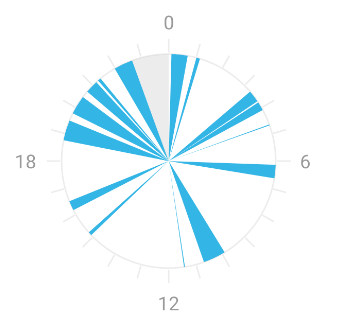
<im.dacer.androidcharts.clockpie.ClockPieView
    android:layout_width="match_parent"
    android:layout_height="match_parent"
    android:id="@+id/clock_pie_view" />
ClockPieView pieView = findViewById(R.id.clock_pie_view);
ClockPieSegment[] pieSegments = new ClockPieSegment[]{
    new ClockPieSegemnt(14, 30, 17, 45); // from 14:30 until 17:45
}
pieView.setData(pieSegments);
You may also set a segment that is displayed as a background segment.
Deprecated classes
For usage instructions on the deprecated classes, please refer to the AndroidCharts README.
Contributing
Any contributions, large or small, major features, bug fixes, and so forth, are welcome.
You are encouraged to utilize the issue tracker to discuss new ideas before working on them.
Comparison to original AndroidCharts library
| View | code quality improvement status | new features | other improvements | original example screenshot |
|---|---|---|---|---|
LineView |
unchanged | no new features | none |  |
BarView |
significantly improved | background lines for scale (including labels), support for bold / italic labels, zero line (optional), condensed variant (CondensedBarView), multiple colors in one bar (MultiValue), backed by RecyclerView, can show cursor |
fix missing margins, color set to accent color, support for dark background, show scroll indicators (fog of war) |  |
ClockPieView |
improved | gray out background partially (e.g. to display time as not passed yet), colored segments | support for drawing in views with larger width than height, support for drawing when view is set to match_parent, color set to accent color, remove animation as it was too slow, support for dark background |
 |
PieView |
unchanged | no new features | none |  |
License
This library is licensed under the MIT license.
The license text can be seen below.
The MIT License (MIT)
Copyright (c) 2020 Fynn Godau
Copyright (c) 2013 Ding Wenhao
Permission is hereby granted, free of charge, to any person obtaining a copy of this software and associated documentation files (the "Software"), to deal in the Software without restriction, including without limitation the rights to use, copy, modify, merge, publish, distribute, sublicense, and/or sell copies of the Software, and to permit persons to whom the Software is furnished to do so, subject to the following conditions:
The above copyright notice and this permission notice shall be included in all copies or substantial portions of the Software.
THE SOFTWARE IS PROVIDED "AS IS", WITHOUT WARRANTY OF ANY KIND, EXPRESS OR IMPLIED, INCLUDING BUT NOT LIMITED TO THE WARRANTIES OF MERCHANTABILITY, FITNESS FOR A PARTICULAR PURPOSE AND NONINFRINGEMENT. IN NO EVENT SHALL THE AUTHORS OR COPYRIGHT HOLDERS BE LIABLE FOR ANY CLAIM, DAMAGES OR OTHER LIABILITY, WHETHER IN AN ACTION OF CONTRACT, TORT OR OTHERWISE, ARISING FROM, OUT OF OR IN CONNECTION WITH THE SOFTWARE OR THE USE OR OTHER DEALINGS IN THE SOFTWARE.
If you are using aboutDirect, you may use this snippet to generate a Library class for this library:
new Library("chartDirect", License.MIT_LICENSE, "The MIT License (MIT)\n" +
    "\n" +
    "Copyright (c) 2020 Fynn Godau\n" +
    "\n" +
    "Copyright (c) 2013 Ding Wenhao", "Fynn Godau and AndroidChart contributors", true, "https://codeberg.org/fynngodau/chartDirect"
)