Link to this sectionDeployment#
Ultralytics Platform provides comprehensive model deployment options for putting your YOLO models into production. Test models with browser-based inference, deploy to dedicated endpoints across 42 global regions, and monitor performance in real-time.
Watch: Get Started with Ultralytics Platform - Deploy
Link to this sectionOverview#
The Deployment section helps you:
- Test models directly in the browser with the
Predicttab - Deploy to dedicated endpoints in 42 global regions
- Monitor request metrics, logs, and health checks
- Scale to zero when idle (deployments currently run a single active instance)

Link to this sectionDeployment Options#
Ultralytics Platform offers multiple deployment paths:
| Option | Description | Best For |
|---|---|---|
| Predict Tab | Browser-based inference with image, webcam, and examples | Development, validation |
| Shared Inference | Multi-tenant service across 3 regions | Light usage, testing |
| Dedicated Endpoints | Single-tenant services across 42 regions | Production, low latency |
Link to this sectionWorkflow#
graph LR
    A[✅ Test]:::start --> B[⚙️ Configure]:::proc
    B --> C[🌐 Deploy]:::proc
    C --> D[📊 Monitor]:::out

    classDef start fill:#4CAF50,color:#fff
    classDef proc fill:#2196F3,color:#fff
classDef out fill:#9C27B0,color:#fff| Stage | Description |
|---|---|
| Test | Validate model with the Predict tab |
| Configure | Select a region and review the editable, auto-generated deployment name |
| Deploy | Create a dedicated endpoint from the Deploy tab |
| Monitor | Track requests, latency, errors, and logs in Monitoring |
Link to this sectionArchitecture#
Link to this sectionShared Inference#
The shared inference service runs in 3 key regions, automatically routing requests based on your data region:
graph TB
    User[User Request]:::start --> API[Platform API]:::proc
    API --> Router{Region Router}:::decide
    Router -->|US users| US["US Predict Service<br/>Iowa"]:::out
    Router -->|EU users| EU["EU Predict Service<br/>Belgium"]:::out
    Router -->|AP users| AP["AP Predict Service<br/>Taiwan"]:::out

    classDef start fill:#4CAF50,color:#fff
    classDef proc fill:#2196F3,color:#fff
    classDef decide fill:#FF9800,color:#fff
classDef out fill:#9C27B0,color:#fff| Region | Label | Location | Best For |
|---|---|---|---|
| US | Americas | Iowa, USA | Americas users, fastest for Americas |
| EU | Europe, Middle East & Africa | Belgium, Europe | European users, GDPR compliance |
| AP | Asia Pacific | Taiwan, Asia-Pacific | Asia-Pacific users, lowest APAC latency |
Link to this sectionDedicated Endpoints#
Deploy to 42 regions worldwide on Ultralytics Cloud:
- Americas: 14 regions
- Europe: 13 regions
- Asia-Pacific: 12 regions
- Middle East & Africa: 3 regions
Each endpoint is a single-tenant service with:
- Default resources of
1 CPU,2 GiBmemory,minInstances=0,maxInstances=1 - Scale-to-zero when idle
- Unique endpoint URL
- Independent monitoring, logs, and health checks
Link to this sectionDeployments Page#
Access the global deployments page from the sidebar under Deploy. This page shows:
- World map with deployed region pins (interactive map)
- Overview cards: Total Requests (24h), Active Deployments, Error Rate (24h), P95 Latency (24h)
- Deployments list with three view modes: cards, compact, and table
- New Deployment button to create endpoints from any completed model
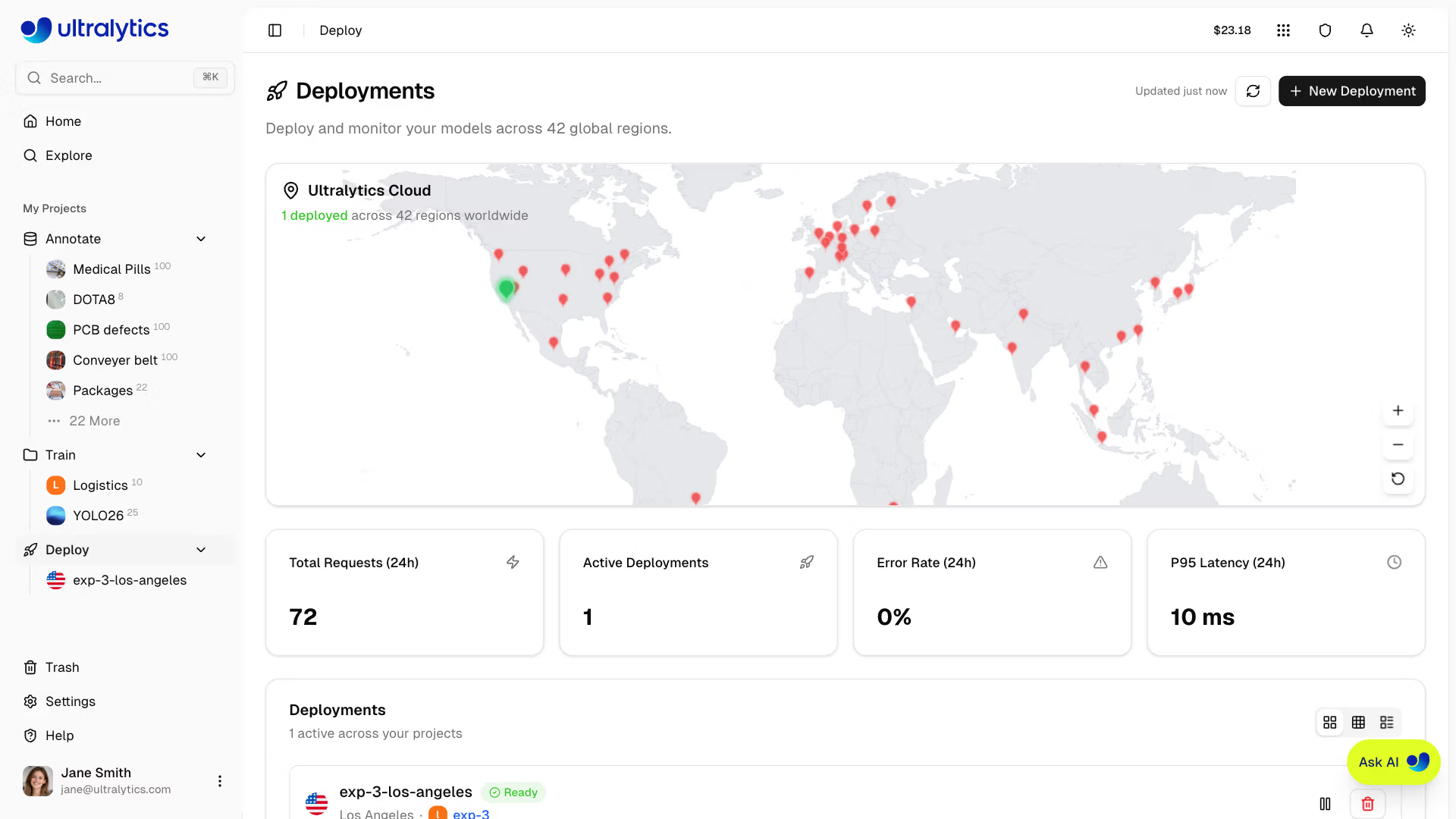
The page polls every 15 seconds normally. When deployments are in a transitional state (creating, deploying, or stopping), polling increases to every 3 seconds for faster feedback.
Link to this sectionKey Features#
Link to this sectionGlobal Coverage#
Deploy close to your users with 42 regions covering:
- North America, South America
- Europe, Middle East, Africa
- Asia Pacific, Oceania
Link to this sectionScaling Behavior#
Endpoints currently behave as follows:
- Scale to zero:
minInstancesdefaults to0 - Single active instance:
maxInstancesis currently capped at1on all plans
Link to this sectionRegional Deployment#
Use the measured region latency to place an endpoint near its callers. Actual inference latency depends on the model, input size, endpoint state, and network path.
Link to this sectionHealth Checks#
Each running deployment includes an automatic health check with:
- Live status indicator (healthy/unhealthy)
- Response latency display
- Auto-retry when unhealthy (polls every 20 seconds)
- Manual refresh button
Link to this sectionQuick Start#
Create a deployment:
- Train or upload a model to a project
- Go to the model's Deploy tab
- Select a region from the latency table
- Click Deploy and wait for the deployment status to become Ready
Model → Deploy tab → Select region → Click Deploy → Endpoint URL readyOnce deployed, use the endpoint URL with your API key to send inference requests from any application.
Link to this sectionQuick Links#
- Inference: Test models in browser
- Endpoints: Deploy dedicated endpoints
- Monitoring: Track deployment performance
Link to this sectionFAQ#
Link to this sectionWhat's the difference between shared and dedicated inference?#
| Feature | Shared | Dedicated |
|---|---|---|
| Service | Shared across Platform users | Dedicated to one deployment |
| Scale | Managed by Platform | Scale-to-zero, one instance |
| Regions | 3 data regions | Choose from 42 deployment regions |
| URL | Platform model API | Generated deployment endpoint URL |
| Testing | Model Predict tab | Deployment-card Predict tab or API |
Link to this sectionHow long does deployment take?#
The deployment remains in a creating or deploying state while its service starts. It becomes usable when the status changes to Ready; timing varies by model and region.
Link to this sectionCan I deploy multiple models?#
Yes, each model can have multiple endpoints in different regions. Deployment counts are limited by plan: Free 3, Pro 10, Enterprise unlimited.
Link to this sectionWhat happens when an endpoint is idle?#
With scale-to-zero enabled:
- Endpoint scales down after inactivity
- First request triggers cold start
- Subsequent requests are fast
First requests after an idle period trigger a cold start.