A modern Vue 3 frontend for the support roster platform, delivering public on-call visibility, authenticated workspace management, and operational tools through a polished single-page application.
Support Roster UI is the user-facing web interface for managing and viewing on-call schedules. It provides a public roster viewer, an admin workspace for planning and operations, contact information pages, product release notes, and protected tools—all built with Vue 3, Vite, and Tailwind CSS.
This repository is designed to work as a Git submodule within support-platform, where backend services, automated tests, development scripts, and curated screenshots are centrally coordinated.
- 🎯 Vue 3 Composition API with
<script setup>and reusable feature structure - ⚡ Lightning-fast development powered by Vite 7 with HMR
- 🎨 Modern styling using Tailwind CSS 4 with custom design tokens
- 🛣️ Smart routing via Vue Router 5 with role-based access guards
- 🔒 Access control enforcing workspace policies on protected pages
- 📦 Modular architecture with feature-based organization
- 🌐 Internationalization support via Vue I18n
- 🐳 Production-ready with Docker + Nginx deployment path
- 📚 Comprehensive specs maintained in
.specs/for all features
| Public Viewer | Workspace Overview |
|---|---|
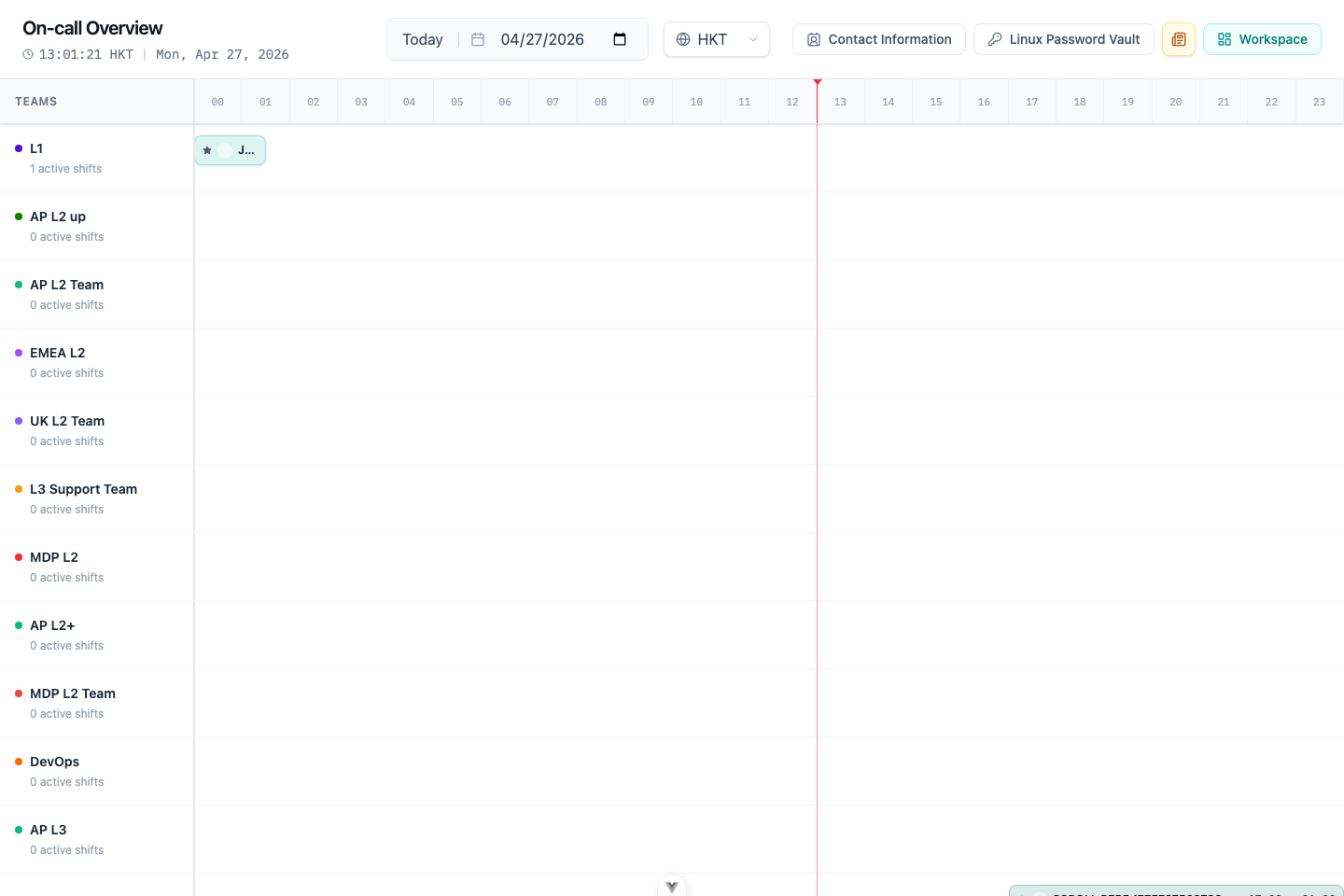 |
 |
| Monthly Roster Planner | Validation Center |
|---|---|
 |
 |
| Surface | Route | Access | Purpose |
|---|---|---|---|
| Public Viewer | /viewer |
Public | Read-only on-call timeline with date picker, timezone selector, and responsive layout |
| Login | /login |
Public | Staff ID authentication and account activation flow |
| Admin Workspace | /workspace/* |
Authenticated + Policy | Complete roster management: overview, monthly planning, staff, shifts, teams, validation, import/export, accounts |
| Contact Hub | /contact-information |
Public + Protected | Public viewing and admin management of contact details |
| Host Hub | /linux-passwords |
Protected | Operational password vault gated by workspace access policy |
| Product Updates | /product-updates |
Public | User-facing release notes tracking visible product changes |
Note: Navigating to
/workspaceredirects users to the appropriate workspace entry page based on their authenticated permissions and workspace policy.
| Category | Technology |
|---|---|
| Framework | Vue 3.5 (Composition API) |
| Build Tool | Vite 7 |
| Router | Vue Router 5 |
| State Management | Vue reactivity + Pinia stores |
| Styling | Tailwind CSS 4 |
| UI Components | Radix Vue (headless primitives) |
| Icons | Lucide Vue Next |
| Utilities | clsx, tailwind-merge, class-variance-authority |
| Date Handling | date-fns, date-fns-tz |
| i18n | Vue I18n |
| Runtime | Node.js ^20.19.0 || >=22.12.0 |
- Node.js
^20.19.0 || >=22.12.0 - npm (comes with Node.js)
- Backend API running at
http://127.0.0.1:8080/api(see Backend Dependency)
# Clone the repository (if standalone) or init submodules (if from parent workspace)
git submodule update --init --recursive

# Navigate to the UI directory
cd support-roster-ui

# Install dependencies
npm install# Start the Vite dev server (default port: 5173)
npm run devThe app will be available at http://localhost:5173 with hot module replacement enabled.
Default API Configuration:
VITE_API_BASE_URL=http://127.0.0.1:8080/apiYou can override this in .env.development.local (not tracked by Git).
# Build for production
npm run build

# Preview the production build locally
npm run preview
The build output will be in the dist/ directory.
| Command | Description |
|---|---|
npm run dev |
Start Vite development server with HMR |
npm run build |
Build production-ready static bundle to dist/ |
npm run preview |
Preview production build locally |
npm run format |
Format src/ with Prettier |
| Variable | Purpose | Default (Dev) | Example (Prod) |
|---|---|---|---|
VITE_API_BASE_URL |
Backend API base URL | http://127.0.0.1:8080/api |
https://supportui.servier/api |
VITE_XMATTERS_URL |
External Systems drawer link for xMatters | https://www.xmatters.com/ |
|
VITE_SERVICENOW_URL |
External Systems drawer link for ServiceNow | https://www.servicenow.com/ |
|
VITE_MESSAGE_DELIVERY_KB_URL |
Message Delivery Knowledge Base link | https://learn.microsoft.com/ |
Configuration Files:
.env.development– Development defaults.env.production– Production defaults.env.development.local/.env.production.local– Local overrides (not committed)
See Vite's environment variables documentation for more details.
┌─────────────────────────────────────────────────┐
│                   Browser                       │
│                                                 │
│  ┌───────────────────────────────────────────┐ │
│  │           Vue 3 SPA (Vite)                │ │
│  │                                           │ │
│  │  ┌─────────────────────────────────────┐ │ │
│  │  │  /viewer       # Public roster view │ │ │
│  │  │  /login        # Auth & activation  │ │ │
│  │  │  /workspace/*  # Admin workspace    │ │ │
│  │  │  /contact-information/* # Contact flows │ │ │
│  │  │  /linux-passwords       # Protected vault│ │ │
│  │  │  /product-updates       # Release notes  │ │ │
│  │  └─────────────────────────────────────┘ │ │
│  │                                           │ │
│  │  ┌─────────────────────────────────────┐ │ │
│  │  │      src/api/ (API Client Layer)    │ │ │
│  │  └─────────────────────────────────────┘ │ │
│  └───────────────────────────────────────────┘ │
│                       │                         │
│                       ▼                         │
│              HTTP Requests                      │
└─────────────────────────────────────────────────┘
                        │
                        ▼
        ┌───────────────────────────────┐
        │   support-roster-server       │
        │   (PostgreSQL backend)        │
        └───────────────────────────────┘
Key Concepts:
- Single-page application with client-side routing
- API layer (
src/api/) abstracts backend communication - Route guards enforce authentication and workspace policies
- Feature modules encapsulate domain logic (workspace, contact-info, etc.)
- Pinia stores manage cross-component state when reactivity isn't enough
support-roster-ui/
├── .specs/                          # 📚 Frontend specifications
│   ├── spec.md                      # Main spec navigation
│   ├── architecture.md              # Architecture decisions
│   ├── development.md               # Local dev workflow
│   ├── deployment.md                # Deployment guides
│   ├── ui-design.md                 # Design system & patterns
│   ├── product-updates.md           # Product update log rules
│   ├── modules/                     # Module-specific specs
│   └── workspace/                   # Workspace feature specs
│       └── index.md
├── build/                           # 🐳 Deployment configs
│   ├── build-frontend.sh
│   ├── push-to-ecr.example.sh
│   └── ecs-task-definition.example.json
├── public/                          # Static assets (served as-is)
├── src/
│   ├── api/                         # 🔌 Backend API wrappers
│   ├── assets/                      # 🎨 Global styles, images
│   ├── components/                  # 🧩 Shared UI components
│   ├── data/                        # Static data (teams, etc.)
│   ├── features/                    # 🎯 Feature modules
│   │   ├── contact-information/
│   │   ├── linux-passwords/
│   │   ├── product-updates/
│   │   └── workspace/               # Admin workspace feature
│   ├── i18n/                        # 🌐 Internationalization
│   │   └── locales/
│   ├── lib/                         # 🛠️ Utility functions
│   ├── pages/                       # 📄 Top-level route pages
│   ├── router/                      # 🛣️ Route config & guards
│   ├── stores/                      # 📦 Pinia state stores
│   ├── App.vue                      # Root component
│   └── main.js                      # App entry point
├── Dockerfile                       # Production container
├── nginx.container.conf             # Nginx config for SPA routing
├── package.json
├── vite.config.js
└── tailwind.config.js
The UI communicates with support-roster-server, which must expose:
| API Scope | Base Path | Purpose |
|---|---|---|
| Public Data | /api/** |
Viewer roster data, public contacts |
| Workspace Admin | /api/workspace/** |
CRUD for staff, shifts, teams, rosters, validation |
| Authentication | /api/auth/** |
Login, logout, account activation |
- Start PostgreSQL (required by backend)
- Start backend server (
support-roster-serveron port8080) - Start frontend dev server (
npm run devin this directory)
Convenience script (from parent workspace):
../scripts/dev/restart-all.shThis script handles restarting both backend and frontend services together.
For detailed backend setup, see the support-roster-server repository README.
-
Linux + Nginx (static hosting)
- Build with
npm run build - Serve
dist/with Nginx - Configure reverse proxy to backend API
- Build with
-
Docker + Nginx (containerized)
- Build Docker image:
docker build -t support-ui . - Run with environment variables for
VITE_API_BASE_URL - Suitable for AWS ECR/ECS Fargate or any container orchestrator
- Build Docker image:
Dockerfile– Multi-stage build for productionnginx.container.conf– Nginx config with SPA fallbackbuild/build-frontend.sh– Build scriptbuild/ecs-task-definition.example.json– AWS ECS task templatebuild/push-to-ecr.example.sh– ECR push script example
Production Environment Variables:
See .env.production for default production config. Override as needed in your deployment environment.
All frontend technical specifications live in the .specs/ directory:
| Document | Description |
|---|---|
.specs/spec.md |
🗂️ Main spec navigation hub |
.specs/architecture.md |
🏛️ Architecture decisions & patterns |
.specs/development.md |
💻 Local dev workflow, health checks, restarts |
.specs/deployment.md |
🚀 Deployment guides (Nginx, Docker, AWS) |
.specs/ui-design.md |
🎨 Design system, colors, typography, components |
.specs/product-updates.md |
📝 Product update log maintenance rules |
.specs/workspace/index.md |
🏢 Workspace feature navigation |
.specs/modules/ |
📦 Individual module specs |
When to update specs:
- Adding or changing routes, pages, components
- Modifying state management, API integration, or data models
- Changing visual rules, interaction patterns, or development workflow
- Adding or removing features
We welcome contributions! Please follow these guidelines:
Critical: Specs are not optional. They are part of the implementation.
- ✅ Always update
.specs/docs when changing routes, pages, components, state, APIs, or workflows - ✅ Update navigation files (
.specs/spec.mdor relevantindex.md) when adding new spec documents - ✅ Keep specs synced with code in the same commit/PR
- ❌ Don't create scattered spec files outside
.specs/
- ✅ Maintain
src/features/product-updates/data/productUpdates.jsfor user-visible changes - ✅ Update both
zh-CNandenentries (bilingual requirement) - ✅ Write for users, not developers (focus on value, not implementation)
⚠️ Skip for internal refactors (note "no user-visible changes" in PR description)
- Follow Vue 3 Composition API best practices
- Use
<script setup>for new components - Maintain consistent code style (use
npm run format) - Write meaningful commit messages
For detailed agent instructions, see AGENTS.md.
This project is licensed under the MIT License. See LICENSE for details.
Made with ❤️ using Vue 3, Vite, and Tailwind CSS