Have a new computer, Make sure to do this!


You have brought that new computer home. Now after you have unpacked it, and began setting it up for use. your ready to take it for a spin on the internet highway. But wait, hold on  there. So much of us never think about the security of our computer. Then when things go array, we want to blame the computer.


Embed from Getty Images


Recovery media, is called this for a reason, should the hard drive ever fail, you will still have a copy of the operating system.

Windows 8 offers you several ways, depending on the manufacture.

Each computer system is different, some allow you to make what are known as recovery discs. These  consist of transferring your operating system(OS) onto three DVDs.


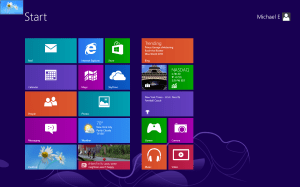
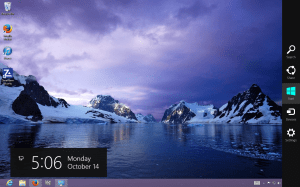
To set up transfer of the OS(Operating System)  bring up the charm bar.


charm bar


In the search field type “Control Panel” from here click on “recovery” to get started.


We are going to be using a 16GB Thumb Drive to create our recovery Media

See title

See title (Photo credit: Wikipedia)


After you click on Recovery there are three options before you. We are going to choose for this operation “Create a Recovery Drive”  After you make your choice, Click the bottom tab marked “Next” then insert the thumb drive and the partition will be transferred to the USB Drive.


This slideshow requires JavaScript.

The link below will give you  some other options to choose from also.


http://www.howtogeek.com/131907/how-to-create-and-use-a-recovery-drive-or-system-repair-disc-in-windows-8/?utm_source=newsletter&utm_medium=email&utm_campaign=291212

The next step is to protect your investment by protecting it with software. The Internet is just full of programs that want you to believe they can make your computer run faster. That is not the case. Only more memory or a faster Processor.

One of the first programs that you want to install is a good Anti-Virus,  if you are a Home User, there is free Anti-virus for you to use.

I have provided you some choices.

Some of these are AVG, ZoneAlarm, and Avast.


To get to the   AVG  Website click on the link below:


AVG AntiVirus Free


http://free.avg.com/us-en/homepage


To download Avast’s Free Anti-Virus click on the link below


This slideshow requires JavaScript.

http://www.avast.com/en-us/index


After downloading you will prompted to get a license from Avast. This only takes a few minutes.

ZoneAlarm comes with  Firewall and Anti-virus.

Click on the  link below for their website:

http://www.zonealarm.com/security/en-us/home.htm


This slideshow requires JavaScript.

The next thing we want to look at is FoxitReader. This is a PDF(portable document format) that you can use in place of Adobe Reader.  FoxitReader has been in the business for along time. The link below will get you to their website.

http://www.foxitsoftware.com/Secure_PDF_Reader/


This slideshow requires JavaScript.


Stay away from PC cleaner, Optimizer pro the  list  goes on and on.  There is so much garbage out there you have to be extra careful, so if you find something make sure you check what type of problems previous users have had with that program.

Looking for a Registry Cleaner then look no further then Ccleaner.


This slideshow requires JavaScript.

Below is a link to their website.


http://www.piriform.com/ccleaner


Next would be to find  a  Anti-Malware program.

The best in the business for getting rid of Malware is MalwareBytes.

https://www.malwarebytes.org/

This slideshow requires JavaScript.

To keep your computer from bots, there is a program put out by Safer-Networking.org  Spybot: Search and Destroy.


This slideshow requires JavaScript.

Below is a link to their Website


http://www.safer-networking.org/private/compare/


Let’s not forget to use Mozilla Firefox as our browser


http://www.Firefox.com


This slideshow requires JavaScript.

Using these items will keep your computer safe and secure.


Putting God First


God Bless


Putting God First

← Back

Thank you for your response. ✨


Facebook messenger is it the real deal

Video


This slideshow requires JavaScript.

Facebook is a social network application, that we use on our computers, smart phones and other devices to keep in touch. We can  post photo’s, check to see how our friends are doing and even play games, such as Farmsville2. There is a lot to do with Facebook. It keeps us in the loop with our families and friends.

Today, we start by looking at  Facebook messenger. The one we will be looking at is at http://www.facebookmessenger.biz

Whenever you download a program, make sure to use a limited account.

Below is a link on why choosing a limited or Administrator account is best

Limited user or Administrator

Sometimes, we are searching the web and we see something like Facebook Messenger and we don’t notice that it is not from Facebook, then the computer starts acting wacky and we can’t seem to figure out why. If you move your mouse across the screen, and it doesn’t actually stay in one place moves a little chances are you probably have Malware or a Virus.

  Malware Bytes is one of the programs that I use. This program is quite enough for getting rid of malware.   After downloading be sure that you click on the update tab. The link below will help on how to best run the program.

Free Malware Bytes

click on the link below to download  Malware Bytes :

http://download.cnet.com/Malwarebytes-Anti-Malware/3000-8022_4-10804572.html 

When you get to the website at http://www.FacebookMessenger.biz , at the bottom is a disclaimer that this site is not endorsed, operated or endorsed by Facebook Once downloaded, there are several things that come up, if you use the custom install you can get rid of most of these pesky issues by clicking decline, However, Malware Bytes will still find about 6-8 malware infections,

Upon testing the application, if you just install without using the custom installation, you are going to have around 542 Malware infections  on your computer.

Should you accidentally download this program, make sure to download Spybot: Search and Destroy, along with ZoneAlarm firewall. As of this writing   however ZoneAlarm does work on Windows 8, just not the upgrade to 8.1

below is a link for Spybot: Search and Destroy

http://download.cnet.com/Spybot-Search-Destroy/3000-8022_4-10122137.html

ZoneAlarm Firewall and Anti-virus.

http://www.zonealarm.com/security/en-us/zonealarm-free-antivirus-firewall.htm

To prevent Facebook Messenger from loading after you download the Zonealarm free firewall, Click on the firewall, this will take to Application Control, find Facebook Messenger, left click, you will have options, click Kill, a warning will pop-up, click OK, and do this for each Facebook entry, you also want to remove the program by going to Programs and Features, find Facebook Messenger and click Uninstall.

Which brings us to the conclusion that  downloading Messenger from the official Facebook Website is the only safe place.

Be Safe and God Bless

computing basic info


English: Blue screen of death, Windows XP, ati...

English: Blue screen of death, Windows XP, ati2dvas (Photo credit: Wikipedia)

This is a help for everybody wanting to learn about computers. The most reliable and safe website I have found is at http://www.cnet.com.  . Before you download anything from cnet.com or any other website you want to make sure that the program is compatible to your computer, Windows xp, Windows vista, windows 7,or Windows 8.  Otherwise you may get the   infamous blue screen of death. What this means is that you loaded an incompatible program. So, let start by looking for a good Firewall.  Zonealarm is one that I recommend it handles inbound and outbound.

Maybe you would like to stop paying for an anti-virus and using a free one.  Before, you start to download that new anti-virus, you will have to remove the old one.  To do this if you have Windows XP, you want to go to all programs, find your anti-virus, click on program and click  uninstall.

For Windows Vista, and Windows 7, go to the start button, control panel, Programs and Features, click on the Anti-virus, that you want to remove and click Uninstall.

For Windows 8, move your mouse to the bottom left corner, Right click, click on Programs and Features,find the  Anti-Virus and uninstall it.

Once you uninstall the program then restart the computer. Now you can head on over to cnet.com Just click the link below:

http://download.cnet.com/windows/

Zone-alarm has a good Anti-virus and Firewall that works together.  Avg free is also a good anti-virus. There are also other free antivirus programs  including Avira  On making your choice  make sure to read the reviews, this will tell you what problems were found while it was being tested.  Be aware and be safe.